Overview

1 Introduction to Wasm on the server

WebAssembly (Wasm) began as a way to run high-performance code in the browser and has grown into a portable, sandboxed compute layer for the server. Rather than a physical CPU, it is a hardware-agnostic instruction format executed by a runtime, allowing code written in many languages to run safely and consistently across machines. The introduction of the WebAssembly System Interface (WASI) enabled Wasm outside the web by standardizing how it interacts with operating systems. In today’s mix of IaaS, PaaS, serverless, containers, and edge computing, Wasm fits naturally—especially where container platforms are used—bringing small, portable artifacts that integrate with existing workflows.

The chapter underscores four pillars that make Wasm attractive on the server: performance, security, flexibility, and portability. Wasm delivers near-native speed for many workloads and significantly faster cold starts with smaller artifacts than traditional containers, boosting serverless responsiveness and workload density in Kubernetes. Its capability-based sandbox restricts default access to the host, reducing the blast radius of supply-chain issues. Unlike JVM bytecode, Wasm is truly language-agnostic and well-suited to systems languages such as Rust and C/C++, while ongoing proposals (such as support for host-managed garbage collection) improve the experience for garbage-collected languages. Hardware independence enables “build once, run anywhere,” spanning x86, ARM, and resource-constrained edge devices.

The chapter also outlines trade-offs and where Wasm fits best. It excels in serverless and edge scenarios, and is compelling for mobile/desktop code sharing, secure application plug-ins, and even microcontrollers. However, ecosystem maturity varies, debugging support is still evolving, and some language toolchains and libraries are not yet Wasm-ready. A major current limitation is multi-threading, which can hurt latency for thread-heavy, long-lived services; mitigations include scaling via many lightweight instances while the threading proposal matures. Overall, Wasm and WASI offer an open, vendor-neutral foundation that complements containers and unlocks secure, portable deployment models on the server.

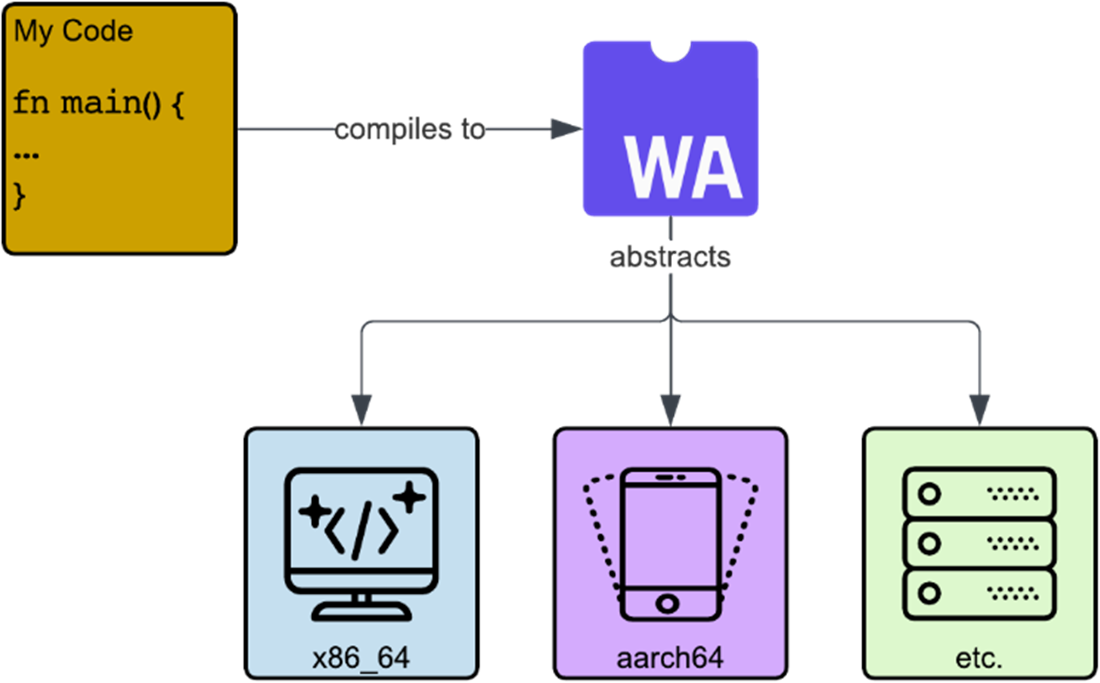
Wasm as an abstraction layer virtualizing over various kinds of hardware.
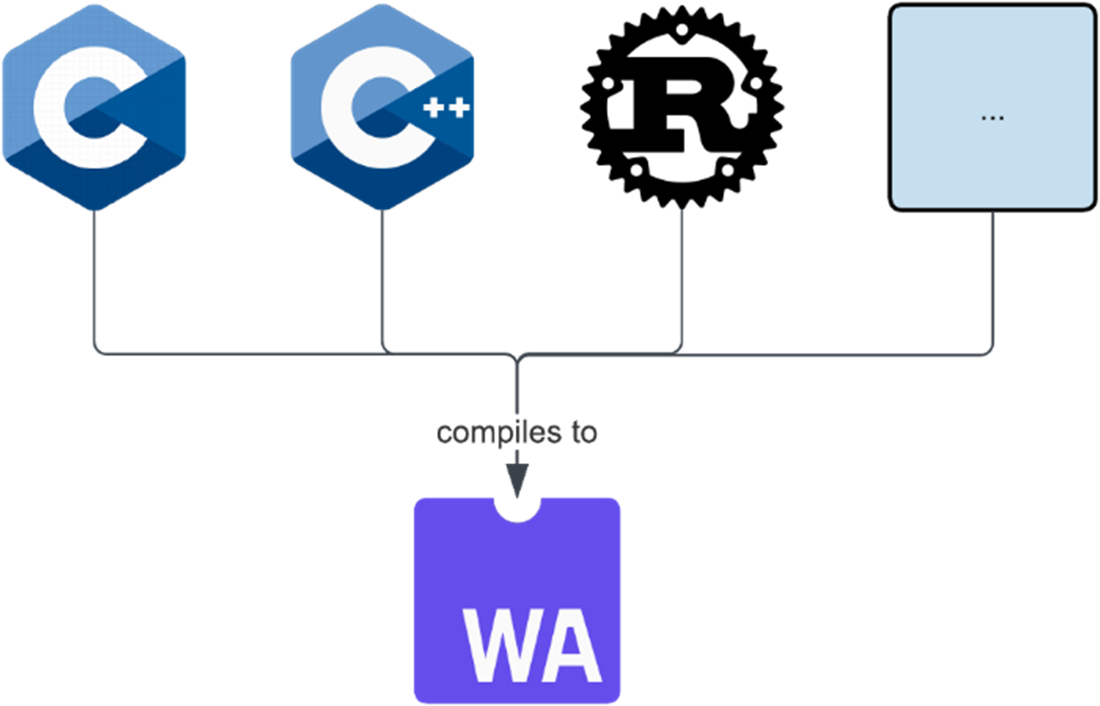
Compiling to Wasm from various languages.
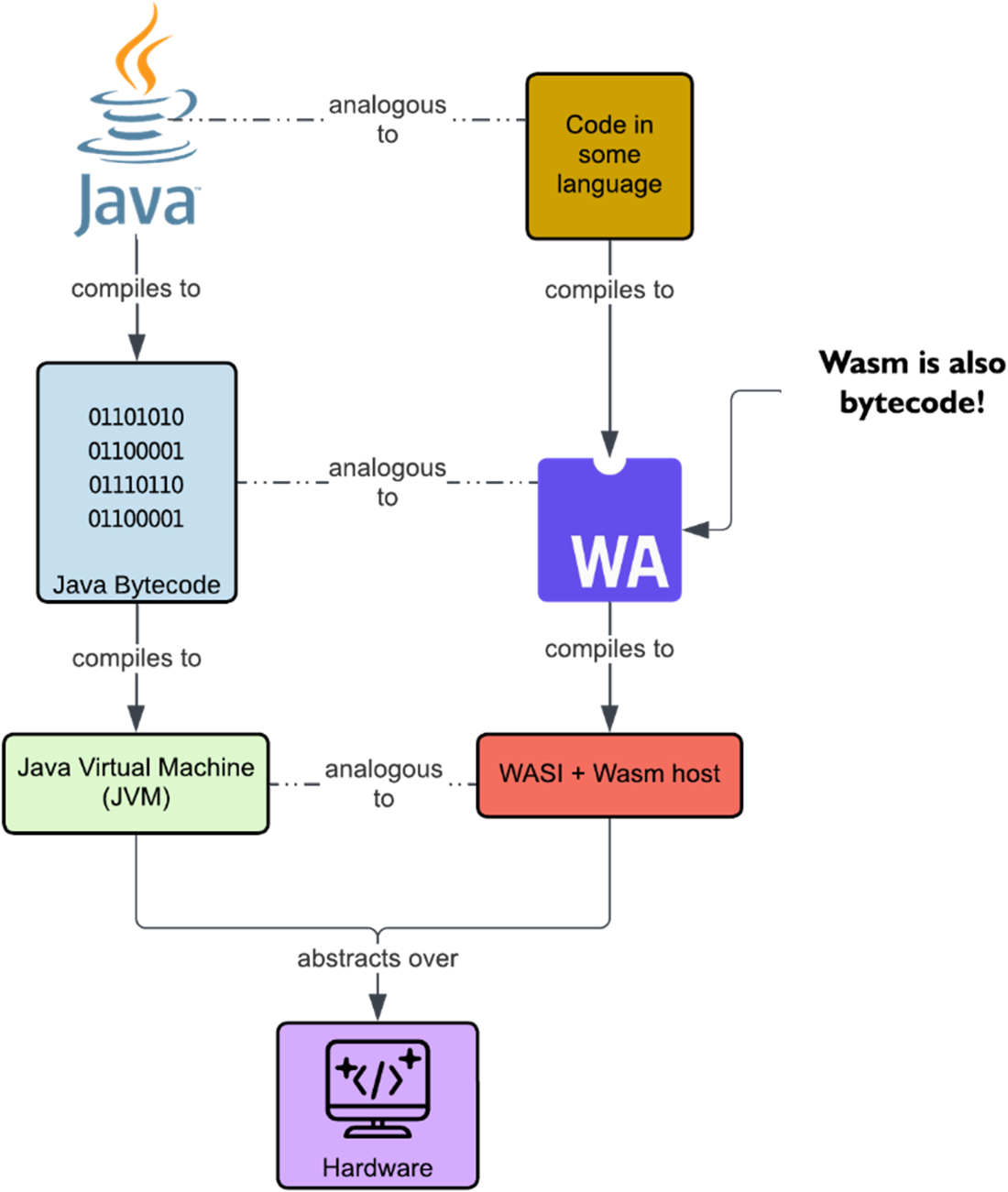
Java and Wasm's similarities
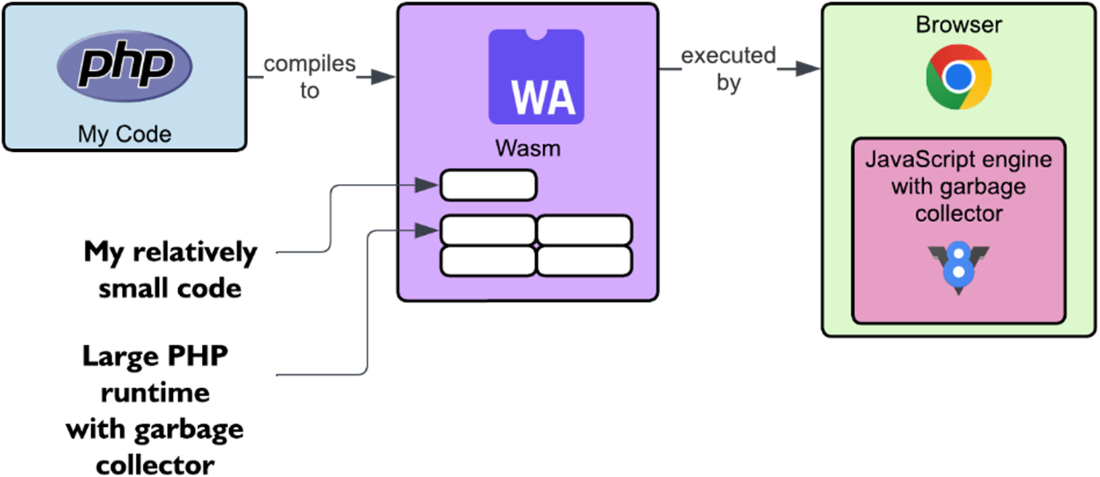
Running a PHP Wasm without garbage collection application in the browser.
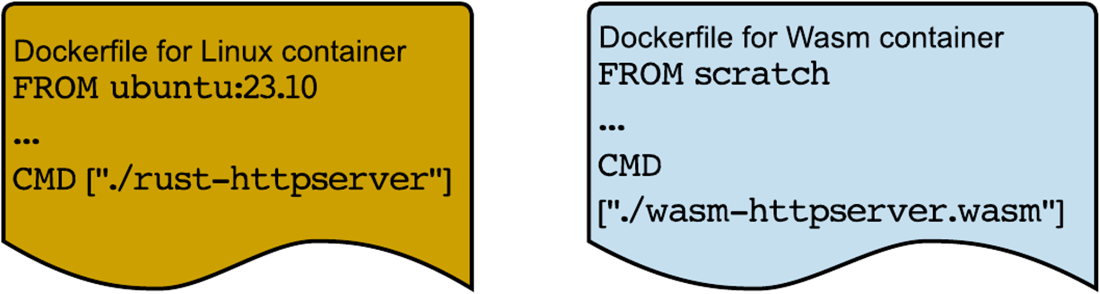
Dockerfiles for a Docker container and a Wasm container
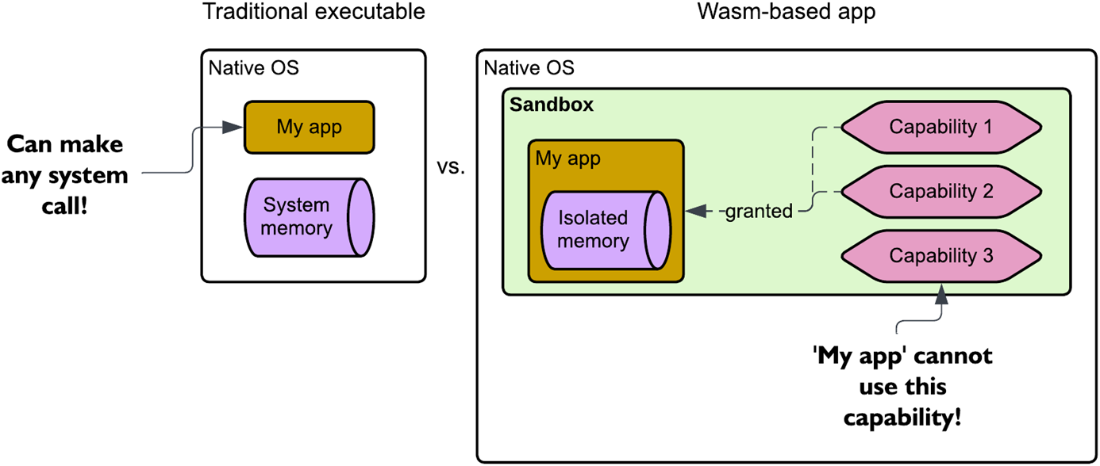
A native (traditional) application security model vs. Wasm's capability-based security model.
Summary

  • Wasm is akin to an ISA like x86_64, in the sense that your code can target it for compilation. But it is not a real platform, and instead, just virtualizes actual hardware.
  • Wasm apps can run outside of browser primarily through the Wasm System Interface (WASI) that allows communication with the OS.
  • Docker supports running two types of containers: the traditional Docker container, and the newly introduced Wasm container.
  • Wasm's language-agnosticism makes it so that over 40 languages can be compiled to it, but that is a double-edged sword as support for a particular language might not be as mature as it is for others.
  • While benchmarks show that standalone Wasm apps can be 10-50% faster than containerized apps, real-world applications can struggle due to Wasm's lack of support for multi-threading.
  • Wasm, when paired with serverless and its scale-to-zero requirement, leads to 80% faster execution times on average when compared to traditional serverless technologies.
  • A Wasm binary is completely independent of the platform or hardware where it is built and can theoretically run on any system due to its hardware-agnosticism property.
  • Wasm employs a capability-based security model that restricts the binary to only access the native OS through specific capabilities made available by the Wasm runtime.
  • Aside from serverless and edge computing, Wasm has found its footing in mobile and desktop applications, microcontrollers, smart contracts, and polyglot programming.
  • When targeting Wasm, it is commonplace to make sacrifices of particular packages that do not support Wasm.

FAQ

What is WebAssembly (Wasm) and how is it different from traditional CPU architectures?Wasm is a portable binary target similar to an instruction set architecture, but it isn’t tied to physical hardware. Instead, it acts as a hardware abstraction layer: you compile code (C, C++, Rust, etc.) to Wasm, and a runtime translates it to native code for the host machine. Its goal is to be a common denominator across different CPUs.
Why did Wasm move from the browser to the server?Wasm began (2017) to meet the web’s performance needs (e.g., 3D, audio/video, games) with safe, near‑native speed. Developers quickly realized the same attributes—speed, safety, portability—are valuable on servers, leading to WASI (2019) so Wasm could run outside the browser with OS capabilities.
What is WASI and why does it matter?WASI (WebAssembly System Interface) defines a standardized set of system APIs that runtimes implement, allowing Wasm modules to interact with files, clocks, networking, and more outside the browser. It’s the key that lets Wasm run on servers, edge devices, and anywhere a host runtime exists.
Where does Wasm fit among IaaS, PaaS, FaaS, and containers?Wasm shines in PaaS and FaaS, both of which rely on containers. Docker now supports “Wasm containers” that follow OCI image standards but run Wasm workloads. The result is lightweight, portable deployments that are especially attractive for serverless (e.g., scale-to-zero scenarios).
How does Wasm perform on the server compared to native apps and Docker containers?- Wasm vs native (x86_64): about 14% slower on average for single-threaded benchmarks (near‑native).
- Wasm vs container cold start: Wasm can be 10x faster for simple tasks; often 10–50% faster on warm starts for benchmarks.
- Real HTTP server test: a Docker container achieved ~17x lower worst-case latency than a comparable Wasm setup due to Wasm’s current single-threaded model. However, Wasm still had much faster cold starts and smaller artifacts.
Why are Wasm containers smaller and faster to cold-start?Wasm images typically contain just the application, not a full OS layer, and still use OCI formats. This cuts image sizes to KBs–low MBs (often 80% smaller than traditional containers), reducing pull times and improving cold starts (reported ~160% faster in one study).
How is Wasm language-agnostic, and how does it compare to the JVM?Wasm is a lightweight, language‑neutral binary format with broad tooling across many languages. Unlike the JVM (optimized for Java-like languages and a heavier VM), Wasm’s simple, stack‑based design targets portability and small runtime overhead. GC-dependent languages historically bundled their own runtimes, but the WasmGC proposal enables host‑managed garbage‑collected references to reduce duplication.
What are the current limitations and challenges of server-side Wasm?- Limited multi-threading (proposals in progress); many setups handle concurrency by instantiating multiple Wasm instances.
- Ecosystem maturity: some packages don’t compile to Wasm; tooling and debugging support are improving but not yet on par with mature stacks.
How does Wasm improve security?Wasm runs inside a memory‑safe sandbox with capability-based access. It cannot call the host OS directly; all I/O goes through explicitly granted interfaces in the runtime. This isolation contains the blast radius of supply‑chain issues and reduces attack surface compared to native binaries with full syscall access.
When should I use Wasm on the server—and when not?Use Wasm for serverless (faster cold starts, tiny artifacts), edge computing (hardware-agnostic and low memory), high-density Kubernetes workloads, plugins, microcontrollers, and cross‑platform app sharing. Avoid or be cautious for heavily multi-threaded, traditional PaaS-style apps until threading support matures—mitigate via horizontal scaling/orchestration.

pro $24.99 per month

  • access to all Manning books, MEAPs, liveVideos, liveProjects, and audiobooks!
  • choose one free eBook per month to keep
  • exclusive 50% discount on all purchases
  • renews monthly, pause or cancel renewal anytime

lite $19.99 per month

  • access to all Manning books, including MEAPs!

team

5, 10 or 20 seats+ for your team - learn more


choose your plan

team

monthly
annual
$49.99
$399.99
only $33.33 per month
  • five seats for your team
  • access to all Manning books, MEAPs, liveVideos, liveProjects, and audiobooks!
  • choose another free product every time you renew
  • choose twelve free products per year
  • exclusive 50% discount on all purchases
  • renews monthly, pause or cancel renewal anytime
  • renews annually, pause or cancel renewal anytime
  • Server-Side WebAssembly ebook for free

choose your plan

team

monthly
annual
$49.99
$399.99
only $33.33 per month
  • five seats for your team
  • access to all Manning books, MEAPs, liveVideos, liveProjects, and audiobooks!
  • choose another free product every time you renew
  • choose twelve free products per year
  • exclusive 50% discount on all purchases
  • renews monthly, pause or cancel renewal anytime
  • renews annually, pause or cancel renewal anytime
  • Server-Side WebAssembly ebook for free