DaemonSets are used to run exactly one pod per eligible node, ideal for node-scoped agents such as logging, metrics, networking, and storage components. They match pods with a label selector and constrain placement to nodes via node selectors; to include control-plane nodes, pods must tolerate their taints. The controller reconciles continuously, creating or deleting pods as nodes appear or vanish, and today relies on the scheduler by injecting per-pod nodeAffinity for the target node. Status fields report counts per node (ready, available, misscheduled, etc.). Scope can be narrowed dynamically with node labels (including standard kubernetes.io/os and kubernetes.io/arch), and DaemonSet pods are owned directly by the DaemonSet.
DaemonSets support RollingUpdate and OnDelete strategies. RollingUpdate defaults to maxSurge=0 and maxUnavailable=1 so only one node is updated at a time and never runs two instances on the same node; minReadySeconds gates progression. OnDelete gives manual, cautious control for cluster-critical agents. Many node agents require elevated privileges: either run as privileged (broadest power) or, preferably, grant only specific Linux capabilities; they often mount hostPath volumes to access host files and may join host namespaces such as hostNetwork (and optionally hostPID/hostIPC) when needed. To ensure system components get scheduled under pressure, assign an appropriate PriorityClass (for example, system-node-critical).
Workloads commonly need to talk to the agent on the same node. Three patterns enable this: map a container port to a fixed hostPort and let clients discover the node IP via the Downward API; run the agent on the host network and bind to a well-known port; or expose the agent behind a ClusterIP Service configured with internalTrafficPolicy=Local so traffic stays on-node. The Service-with-Local policy is usually the cleanest and most secure because it avoids host networking and external exposure; use hostPort or hostNetwork mainly when node-external access is required. Each approach ensures clients (e.g., the Kiada example app) consistently reach their co-located agent rather than an instance on another node.
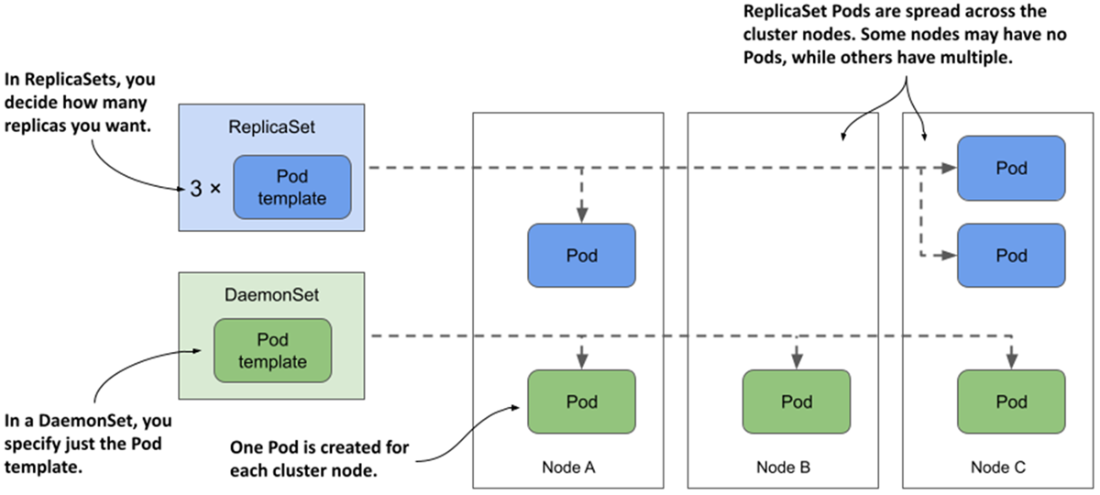
DaemonSets run a pod replica on each node, whereas ReplicaSets scatter them around the cluster.
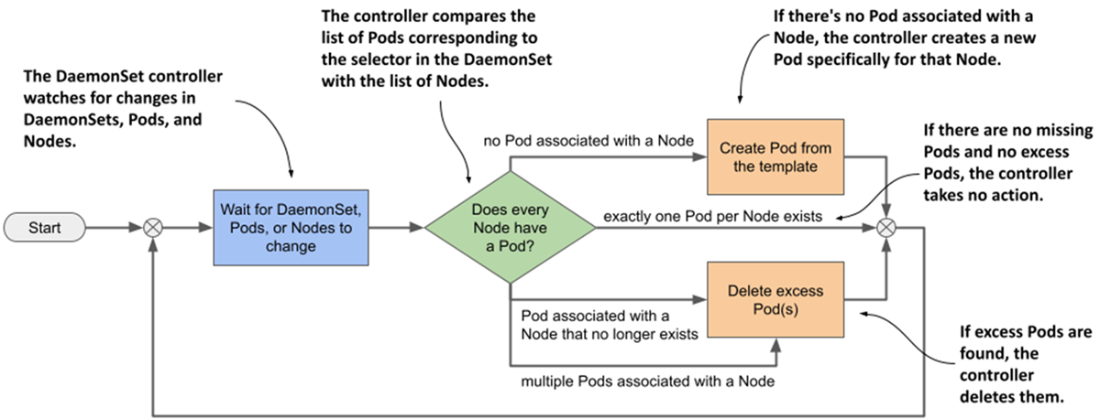
The DaemonSet controller’s reconciliation loop
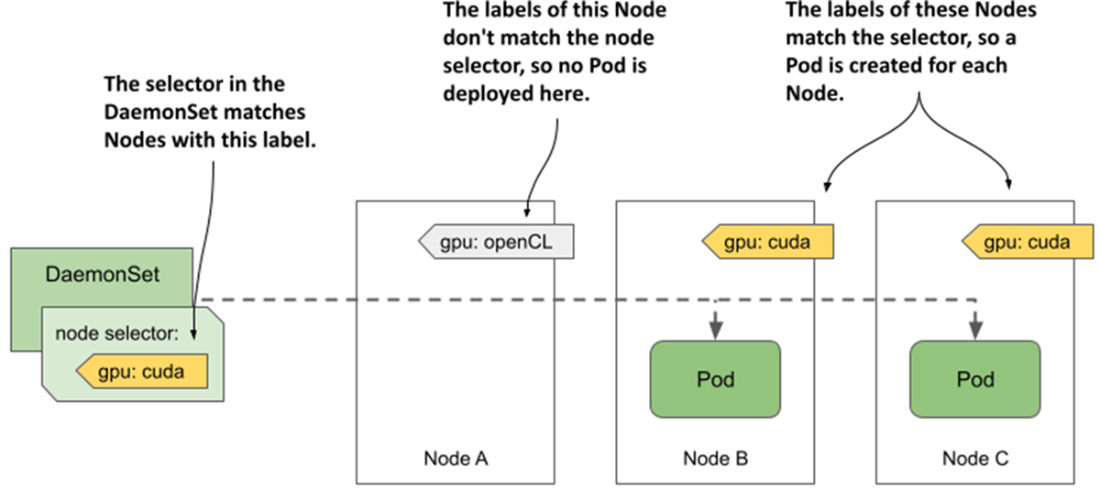
A node selector is used to deploy DaemonSet Pods on a subset of cluster nodes.
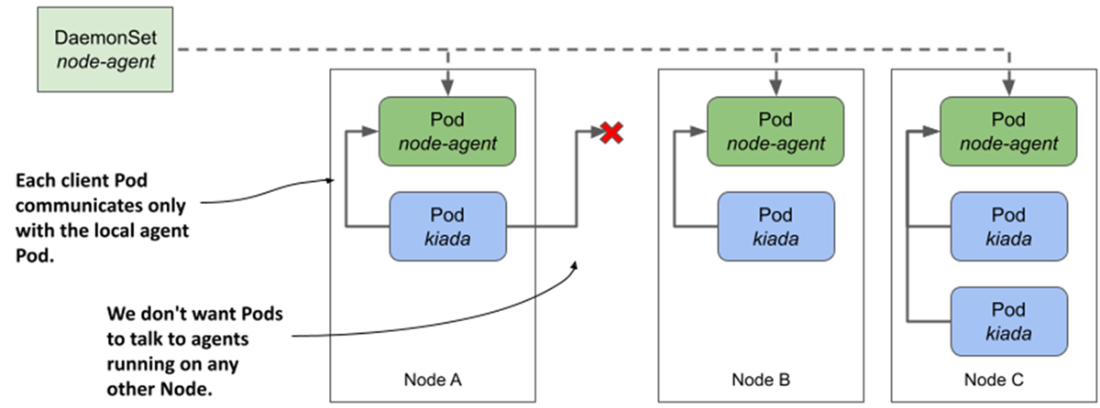
How do we get client pods to only talk to the locally-running daemon Pod?
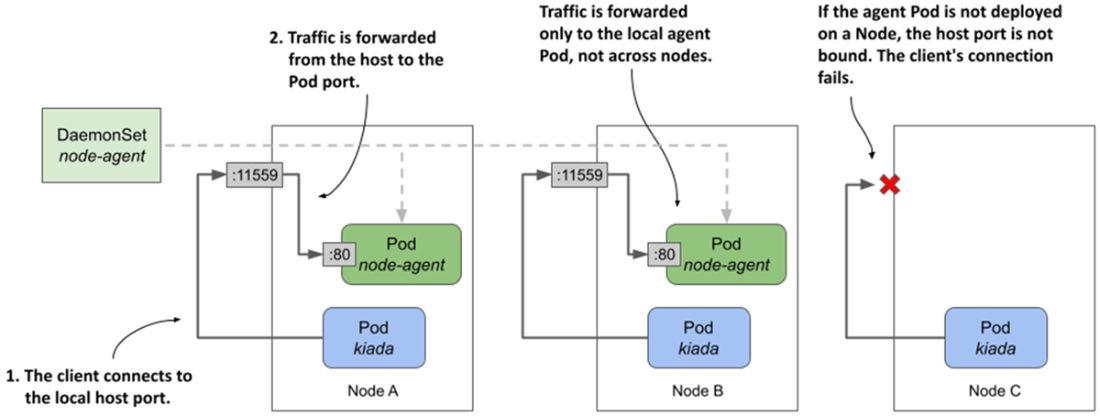
Exposing a daemon Pod via a host port
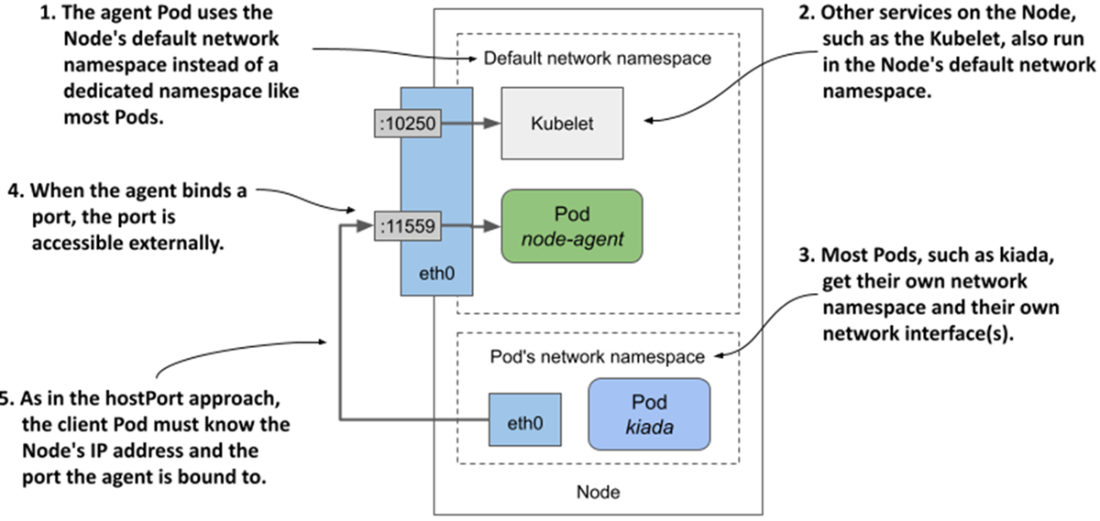
Exposing a daemon Pod by using the host node’s network namespace
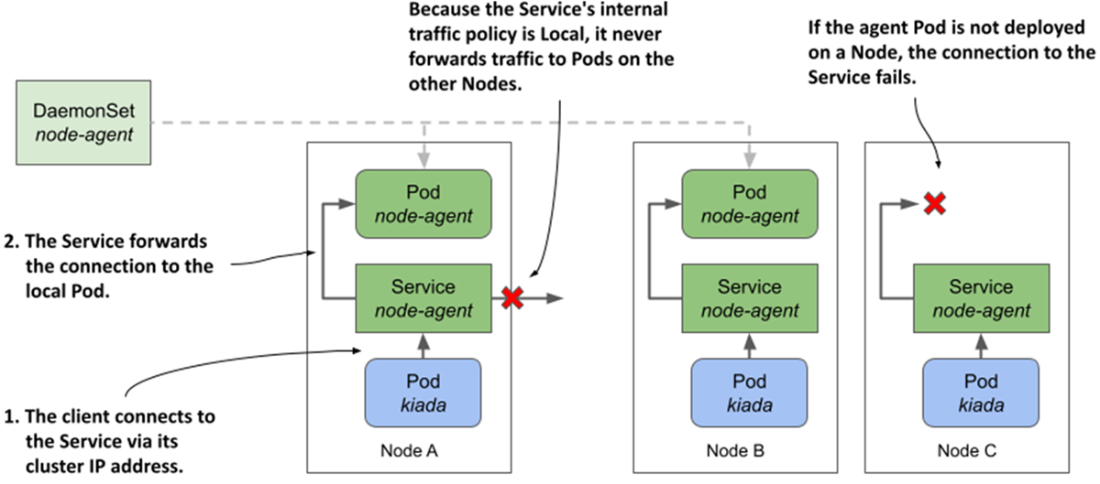
Exposing daemon Pods via a service with internal traffic policy set to Local
Summary
A DaemonSet object represents a set of daemon Pods distributed across the cluster nodes so that exactly one daemon Pod instance runs on each node.
A DaemonSet is used to deploy daemons and agents that provide system-level services such as log collection, process monitoring, node configuration, and other services required by each cluster node.
When you add a node selector to a DaemonSet, the daemon are deployed only on a subset of all cluster nodes.
A DaemonSet doesn't deploy pods to control plane nodes unless you configure the pod to tolerate the nodes’ taints.
The DaemonSet controller ensures that a new daemon Pod is created when a new node is added to the cluster and that it’s removed when a node is removed.
Daemon Pods are updated according to the update strategy specified in the DaemonSet. The RollingUpdate strategy updates pods automatically and in a rolling fashion, whereas the OnDelete strategy requires you to manually delete each pod for it to be updated.
If pods deployed through a DaemonSet require extended access to the node’s resources, such as the file system, network environment, or privileged system calls, you configure this in the Pod template in the DaemonSet.
Daemon Pods should generally have a higher priority than pods deployed via Deployments. This is achieved by setting a higher PriorityClass for the pod.
Client pods can communicate with local daemon Pods through a service with internalTrafficPolicy set to Local, or through the node's IP address if the daemon Pod is configured to use the node’s network environment (hostNetwork) or a host port is forwarded to the pod (hostPort).
FAQ
What is a DaemonSet, and when should I use it?A DaemonSet ensures exactly one replica of a pod runs on each eligible node. It’s ideal for per-node agents and system daemons such as log collectors, metrics scrapers, kube-proxy, and CNI plugins. Unlike Deployments/ReplicaSets, you don’t set a replicas count; the controller reconciles one pod per node by default and can be limited to a subset of nodes via a node selector.How does the DaemonSet controller place pods, and what’s the difference between a label selector and a node selector?The DaemonSet’s label selector determines which pods belong to it. In each reconciliation loop, the controller ensures each eligible node has exactly one matching pod, creating or deleting as needed (including when nodes join/leave). A node selector (in the pod template) filters which nodes are eligible. For scheduling, the controller injects nodeAffinity into each pod so the Scheduler places it on a specific node. Note: the DaemonSet’s pod label selector is immutable; to change it you must recreate the DaemonSet (you can use --cascade=orphan to preserve pods).Why aren’t my daemon pods running on control-plane nodes, and how can I enable that?Control-plane nodes are typically tainted to avoid running regular workloads. DaemonSet pods won’t schedule there unless they tolerate those taints. Add a toleration such as:
- tolerations:
- operator: Exists
to the pod template to tolerate all taints. This is how kube-proxy is commonly configured. Use with care—misbehaving workloads on control-plane nodes can impact cluster stability.How do I run daemon pods only on specific nodes?Use a node selector in the pod template (spec.template.spec.nodeSelector) and label your target nodes accordingly. The controller watches Node objects; when a node’s labels change, it creates or deletes the local daemon pod to match. You can leverage standard labels like kubernetes.io/arch and kubernetes.io/os, run separate DaemonSets per architecture, or use a single DaemonSet with multi-arch images. The node selector is mutable; you can update or remove it (for example with kubectl patch using a JSON patch).How do I interpret key DaemonSet status fields?Key fields report node-centric counts:
- desiredNumberScheduled: nodes that should run the daemon
- currentNumberScheduled: nodes currently running at least one matching pod
- updatedNumberScheduled: nodes whose pod matches the current template
- numberReady: nodes with a running, ready daemon pod
- numberAvailable: nodes with an available daemon pod
- numberMisscheduled: nodes running a daemon pod but shouldn’t
Counts are per node; during updates a node can temporarily run more than one daemon pod.What update strategies do DaemonSets support, and what are the defaults?Two strategies:
- RollingUpdate (default): Replaces pods node-by-node. Defaults are maxSurge=0 (avoid two instances on a node) and maxUnavailable=1 (update one node at a time). minReadySeconds applies between nodes. Setting maxUnavailable above the node count mimics “Recreate.” If a pod’s readiness probe fails during a rollout, the controller immediately replaces it, ignoring maxSurge/maxUnavailable.
- OnDelete: Semi-automatic. Pods aren’t updated until you manually delete them, letting you pace critical changes and verify node health between replacements.How are daemon pods pinned to specific nodes during scheduling?The controller adds requiredDuringScheduling nodeAffinity to each pod that matches the target node (by metadata.name), and the standard Scheduler places it there while considering resources and constraints. Older Kubernetes versions set spec.nodeName directly; today using nodeAffinity lets the Scheduler participate fully.How can daemon pods access host resources (filesystem, kernel, network) safely?Options include:
- Kernel access: Prefer fine-grained Linux capabilities (e.g., NET_ADMIN, NET_RAW) over privileged: true. Use the minimum set needed.
- Filesystem: Mount hostPath volumes to access specific files/dirs (e.g., xtables.lock, /lib/modules).
- Networking: hostNetwork: true lets the pod share the node’s network stack; you can also use hostIPC/hostPID for other namespaces if required. Apply least privilege to reduce risk.How do I ensure client pods talk only to the local daemon on the same node?Three approaches:
- hostPort: Map a node port to the daemon container port; clients use the node’s IP and that port.
- hostNetwork: Run the daemon on the node’s network and bind directly to a node port.
- Local Service (recommended): Expose daemon pods with a Service whose internalTrafficPolicy is Local. Clients use normal cluster DNS, and traffic stays on the same node. Note: connections on nodes without a local daemon pod will fail.How do I mark daemon pods as higher priority so they can preempt less important workloads?Assign a PriorityClass by setting priorityClassName in the pod spec. Built-in classes commonly include system-cluster-critical and system-node-critical (kube-proxy uses the latter). Higher-priority pods can preempt lower-priority ones when nodes are overbooked. You can also define custom PriorityClasses that fit your needs.
pro $24.99 per month
access to all Manning books, MEAPs, liveVideos, liveProjects, and audiobooks!

 Kubernetes in Action, Second Edition ebook for free
