Overview

4 Creating consumer applications

This chapter shifts focus from producers to the other half of the pipeline: consumer applications. It explains how consumers receive and process messages at scale, how consumer groups unlock parallelism, and how batching and timeouts shape the trade-off between throughput and latency. The text surfaces the core correctness themes—offset management, ordering, duplicates, and lag—and frames operational realities such as rebalances and health checks. It also broadens the integration toolkit by discussing when HTTP access via a REST proxy can be useful and how compression choices affect performance and storage, all with the goal of designing consumers that are reliable, efficient, and easy to operate.

The chapter details the consumer polling loop—subscribe, fetch in batches, deserialize, process, and commit offsets—and shows how subscriptions can span multiple topics or use explicit positioning by offset or time. It explains how partitions are assigned one-per-consumer-instance within a group, the roles of the group coordinator and leader, and how joins, leaves, and failures trigger rebalances (eager vs. cooperative) governed by heartbeats, session timeouts, and processing deadlines. It compares assignment strategies (Range, RoundRobin, Sticky, CooperativeSticky), introduces static membership to avoid unnecessary rebalances on restarts, and outlines the next-generation, server-side assignment protocol in KRaft that consolidates heartbeats and assignments for more consistent, low-disruption rebalances. Additional nuances include reading compacted topics and how batching controls (such as size and wait thresholds) influence both resource usage and latency.

Practical guidance is grounded in the Customer 360 ODS example: agree on serializers/deserializers, define a consumer group and client identifiers, run separate consumers for profiles and transactions, prefer manual commits to avoid loss, and start from the earliest offsets when needed—while ensuring idempotency. The chapter warns about concurrent updates to the same aggregate from different consumers and proposes optimistic locking (or funneling updates through a single streaming service) to prevent overwrites. It emphasizes that scalability is bounded by partition count, advises monitoring and acting on consumer lag, and describes sharded worker pools to increase parallelism while preserving per-key order and safe offset commits. Common pitfalls include poorly tuned batch sizes and timeouts, fragile deserialization, mis-initialized offsets, and the lack of distributed transactions when coordinating with external systems. Finally, it recommends producer-side batch compression for better efficiency and positions REST access (e.g., via a proxy or bridge) as a convenient but higher-overhead option when native clients aren’t feasible or low latency isn’t critical.

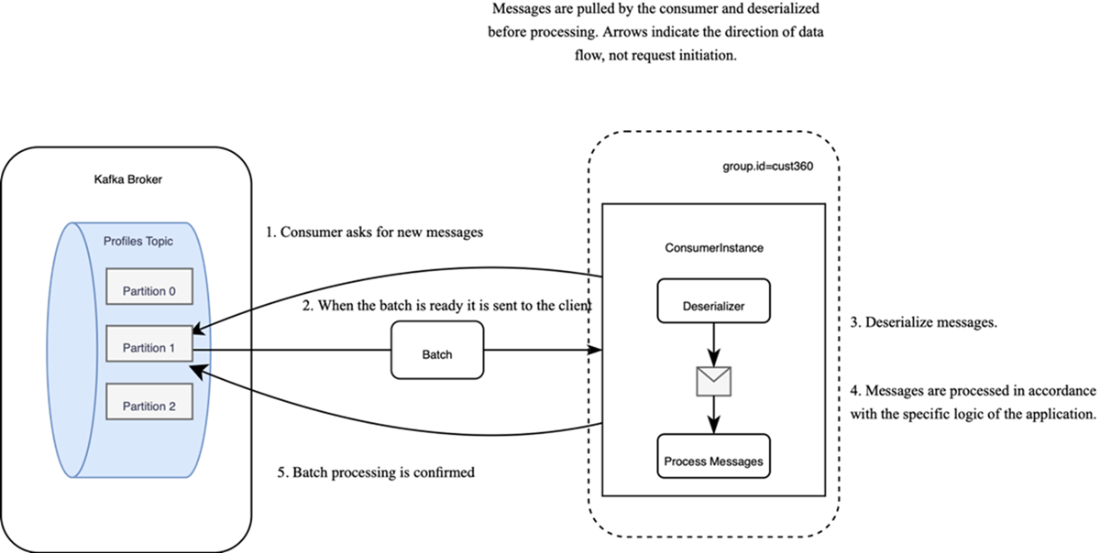
Consumer message reception involves periodically requesting new data, receiving messages when available, deserializing and processing the messages, and acknowledging their processing.
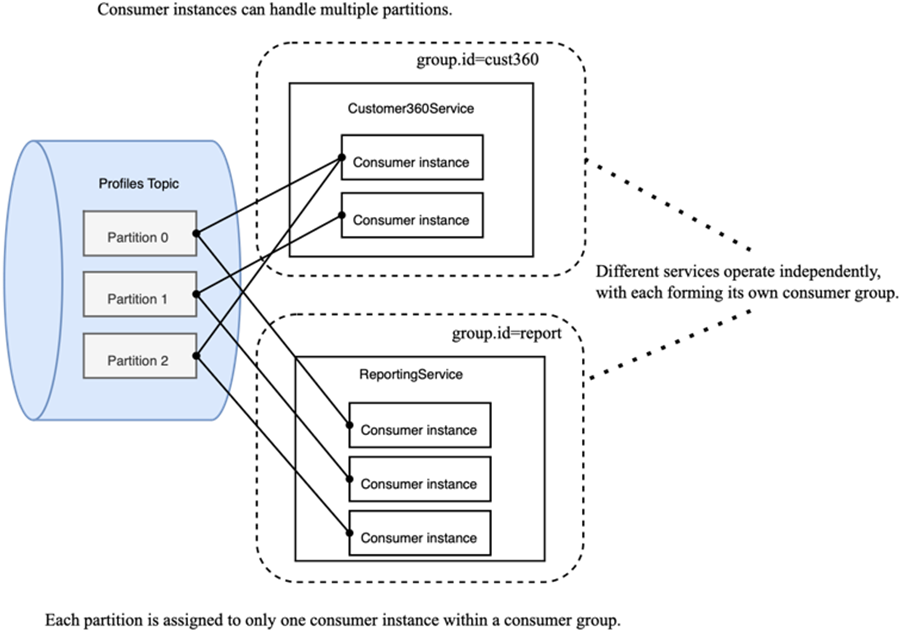
Each service consumes data from the topic independently.
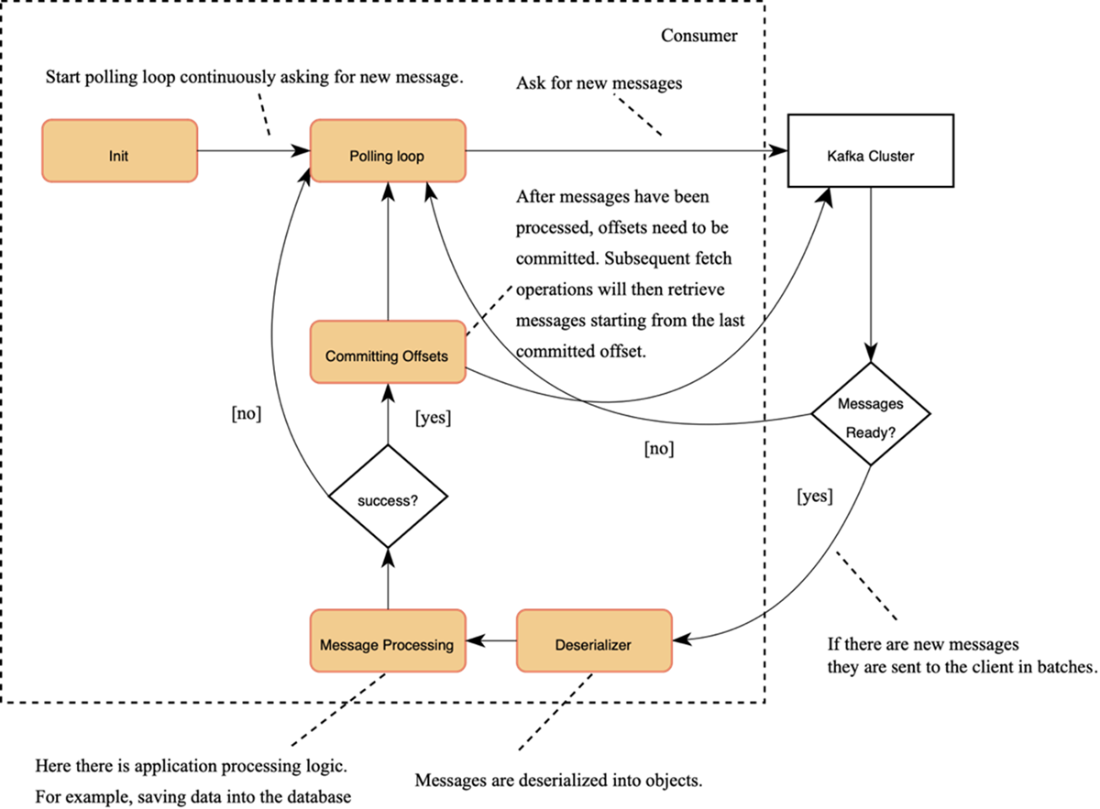
Workflow of the consumer application
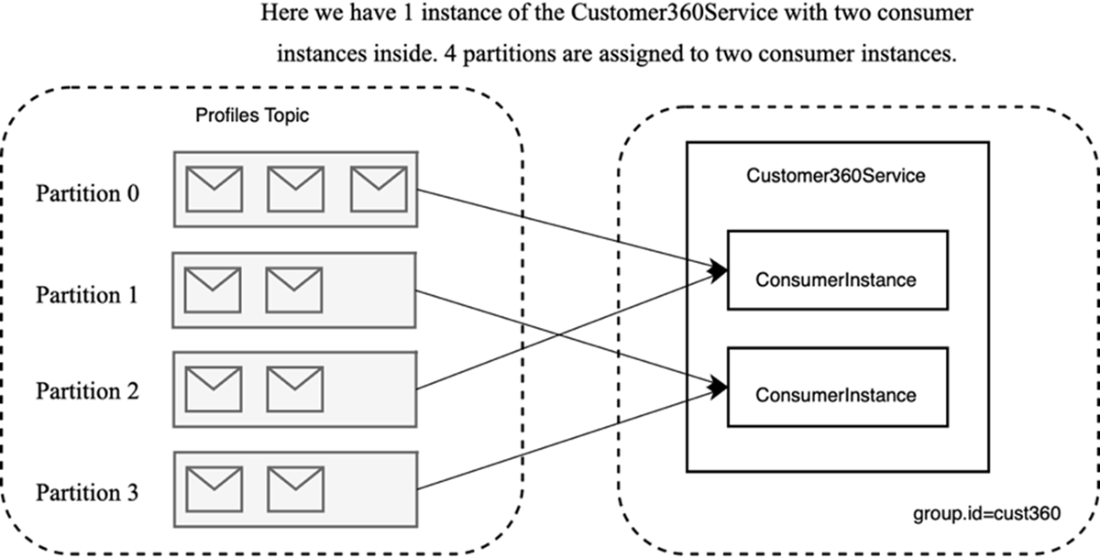
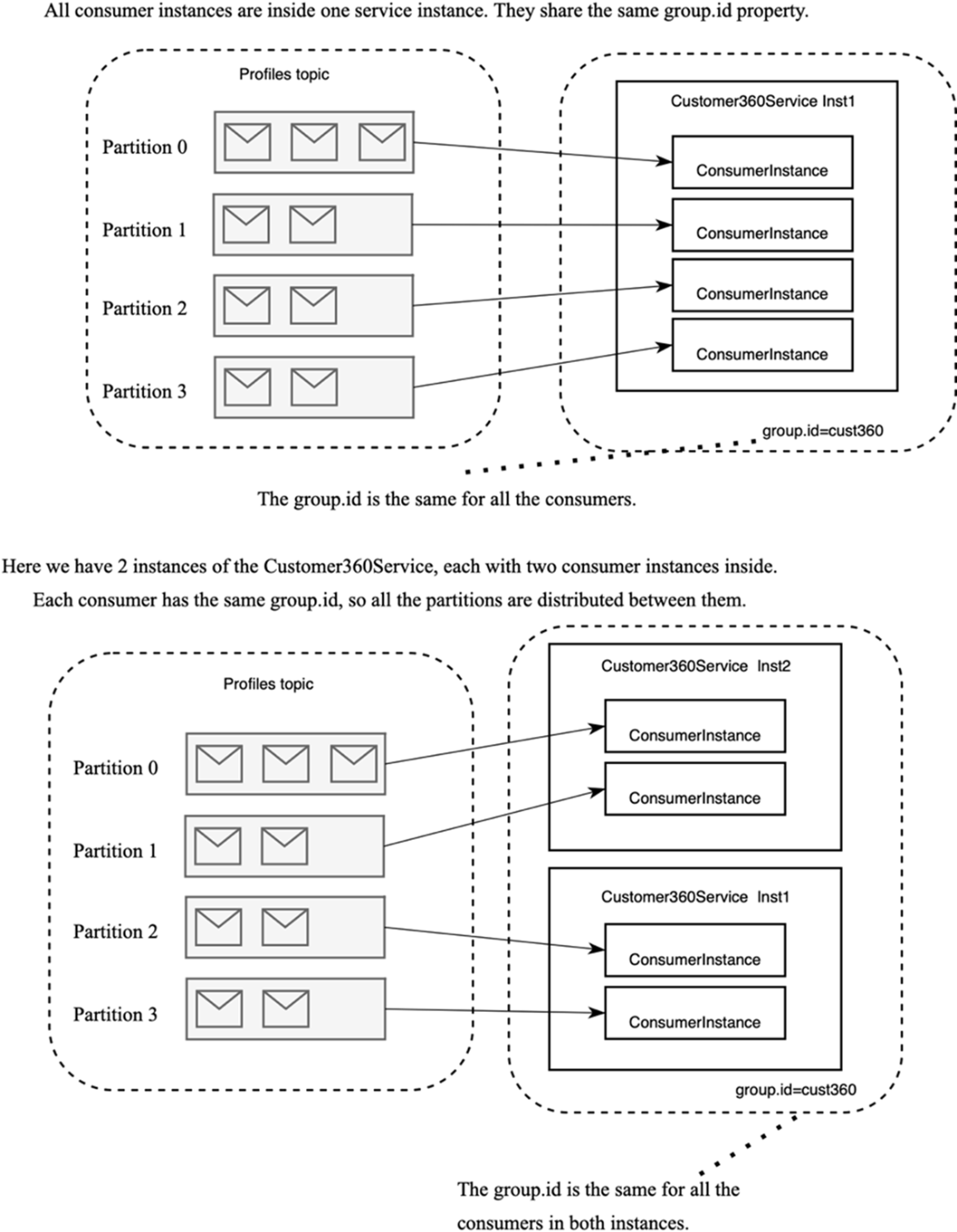
Assignment of the topic partitions to the consumer instances within a consumer group
Various consumer topologies
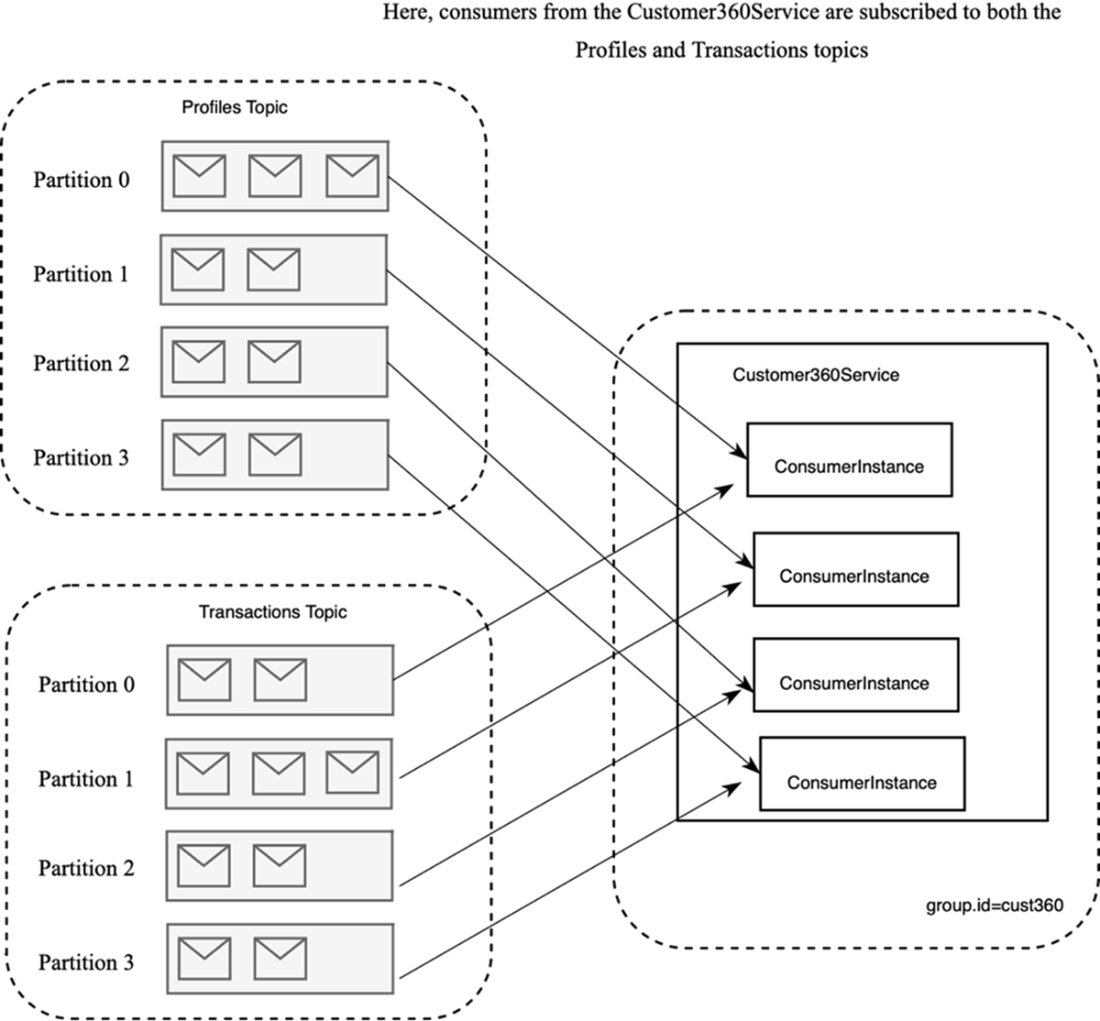
Subscribing to multiple topics
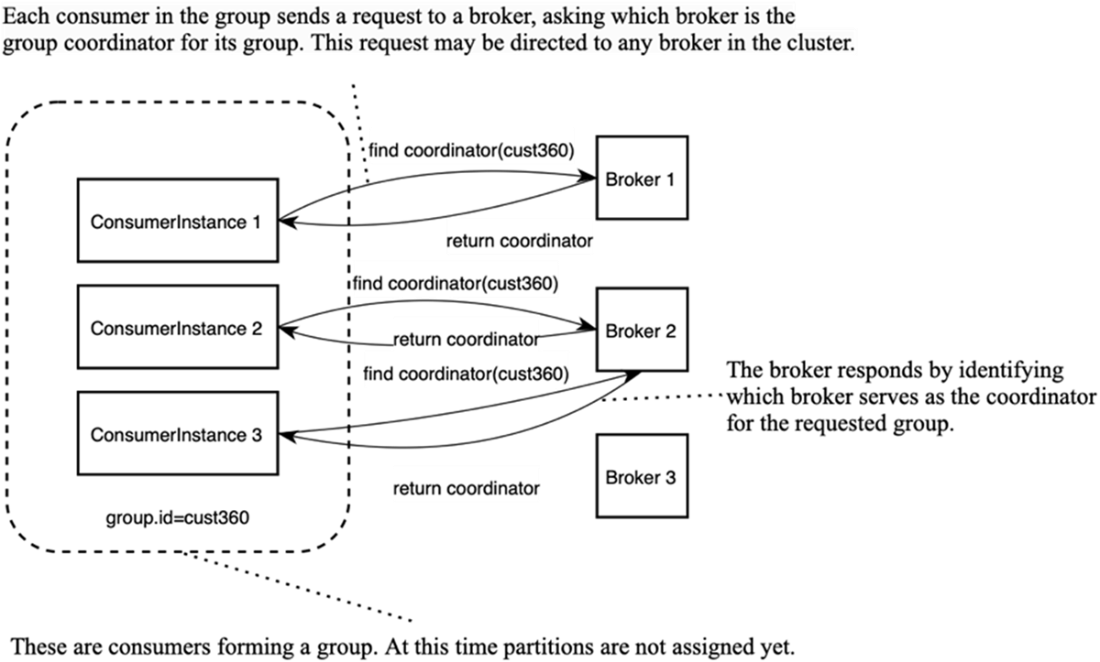
Finding the group coordinator
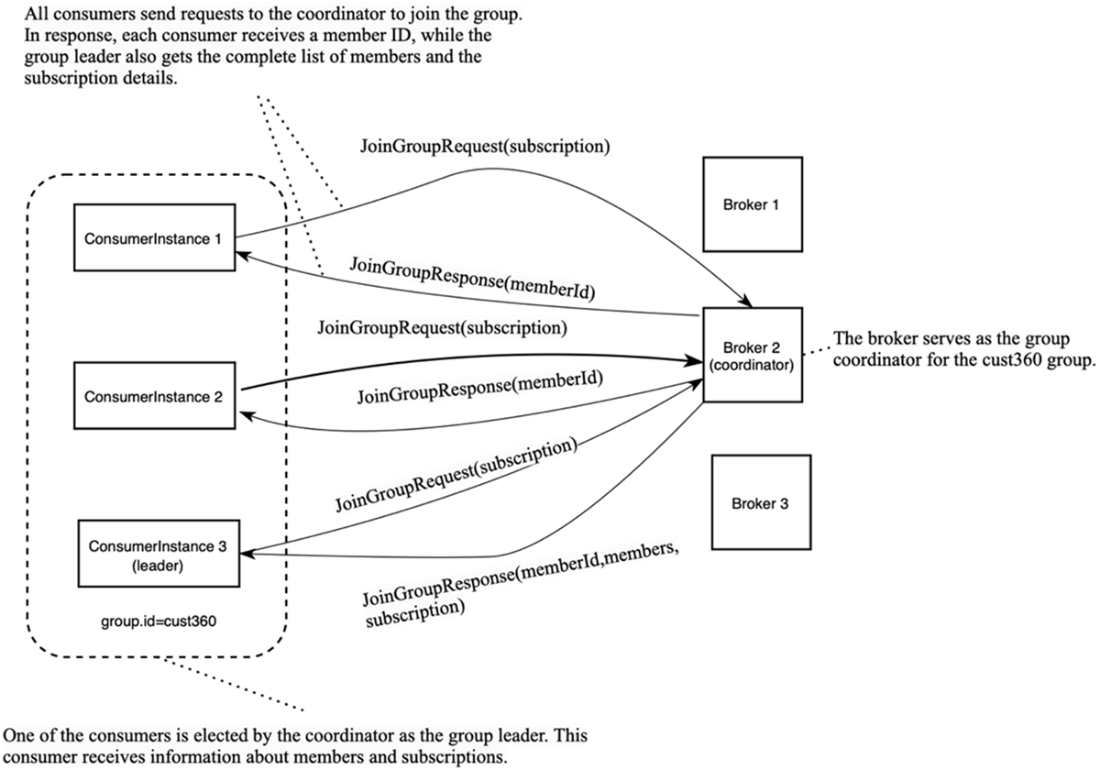
Joining the group
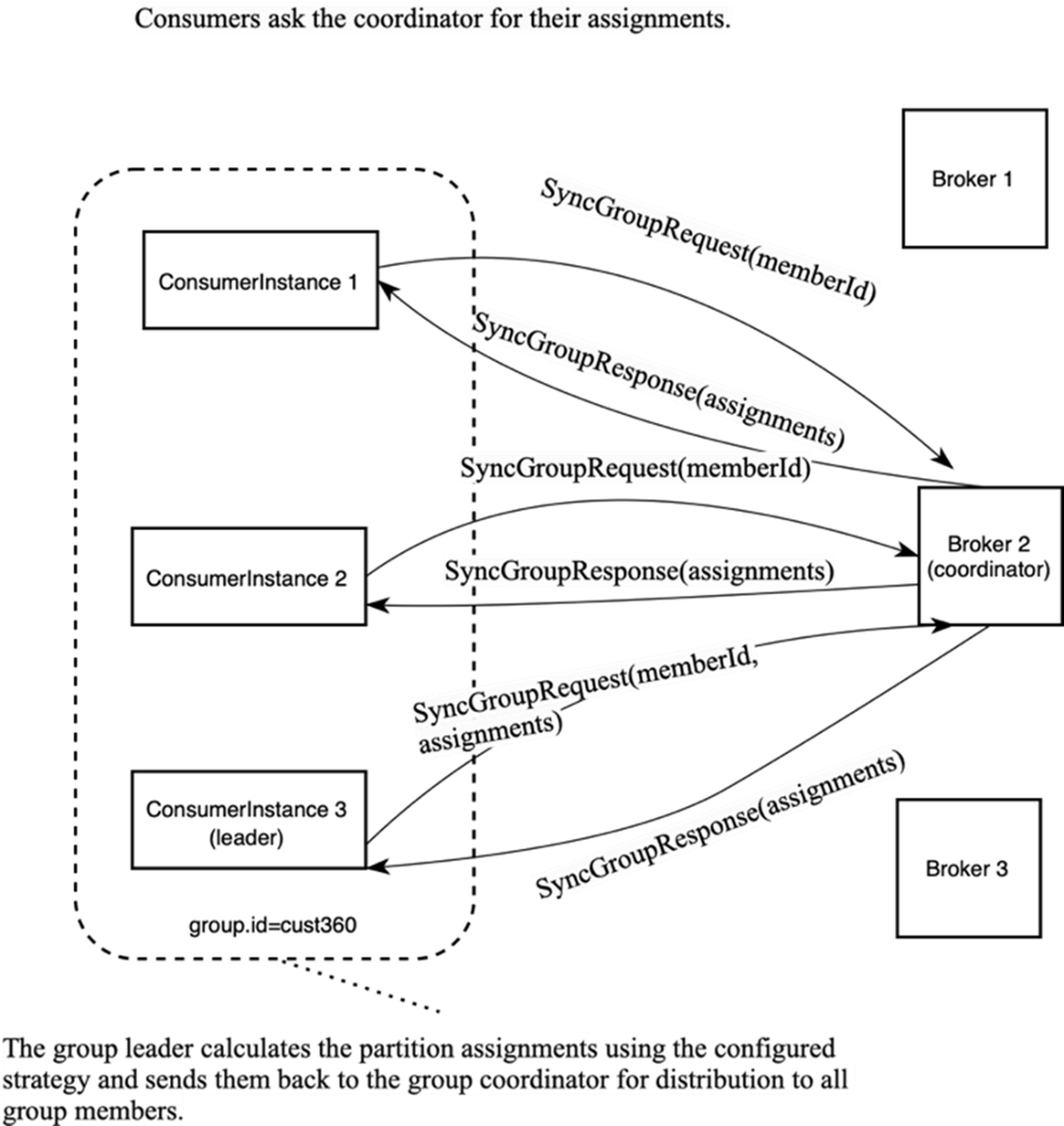
Distributing the assignments
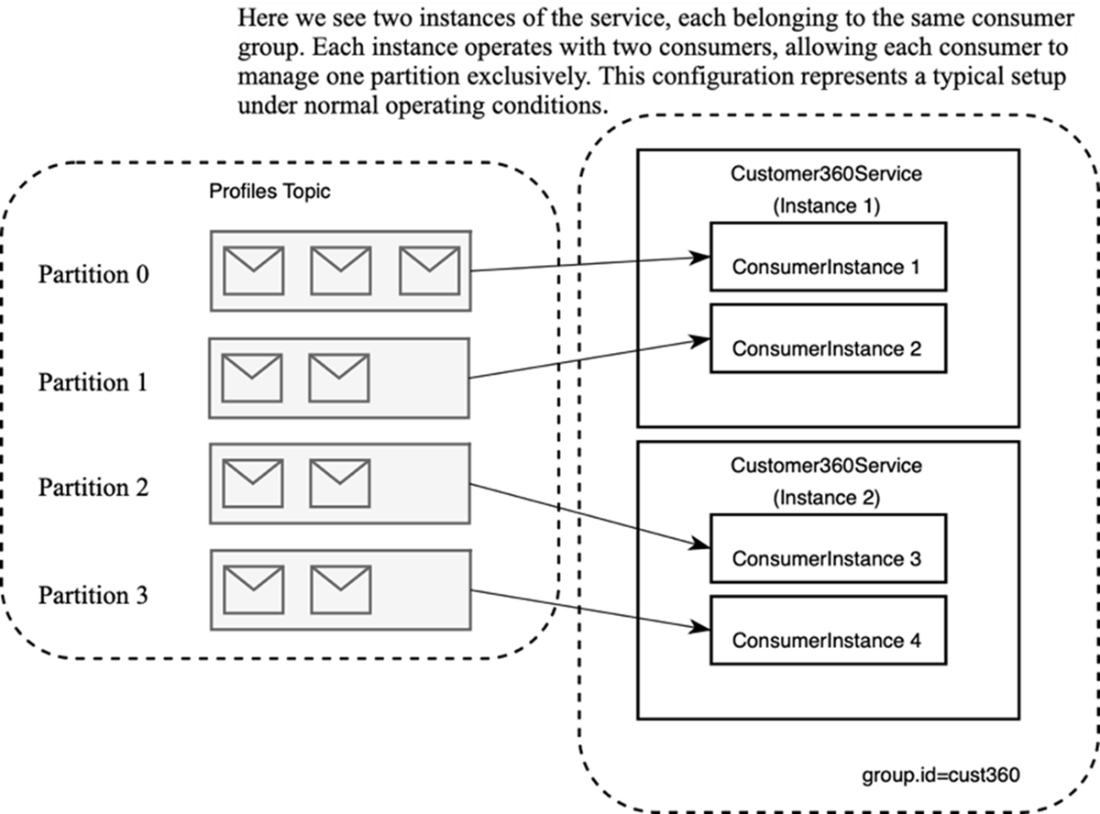
Assignment of the partitions under normal circumstances
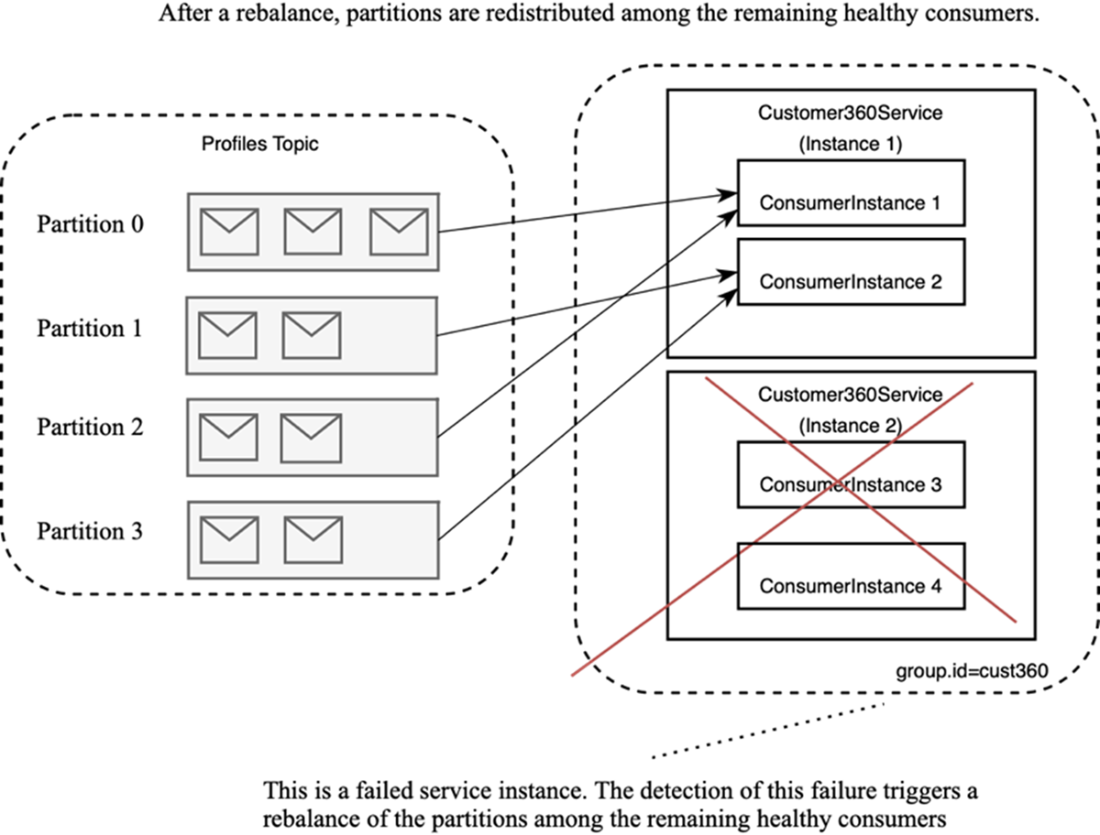
Redistribution of the partitions after a failure
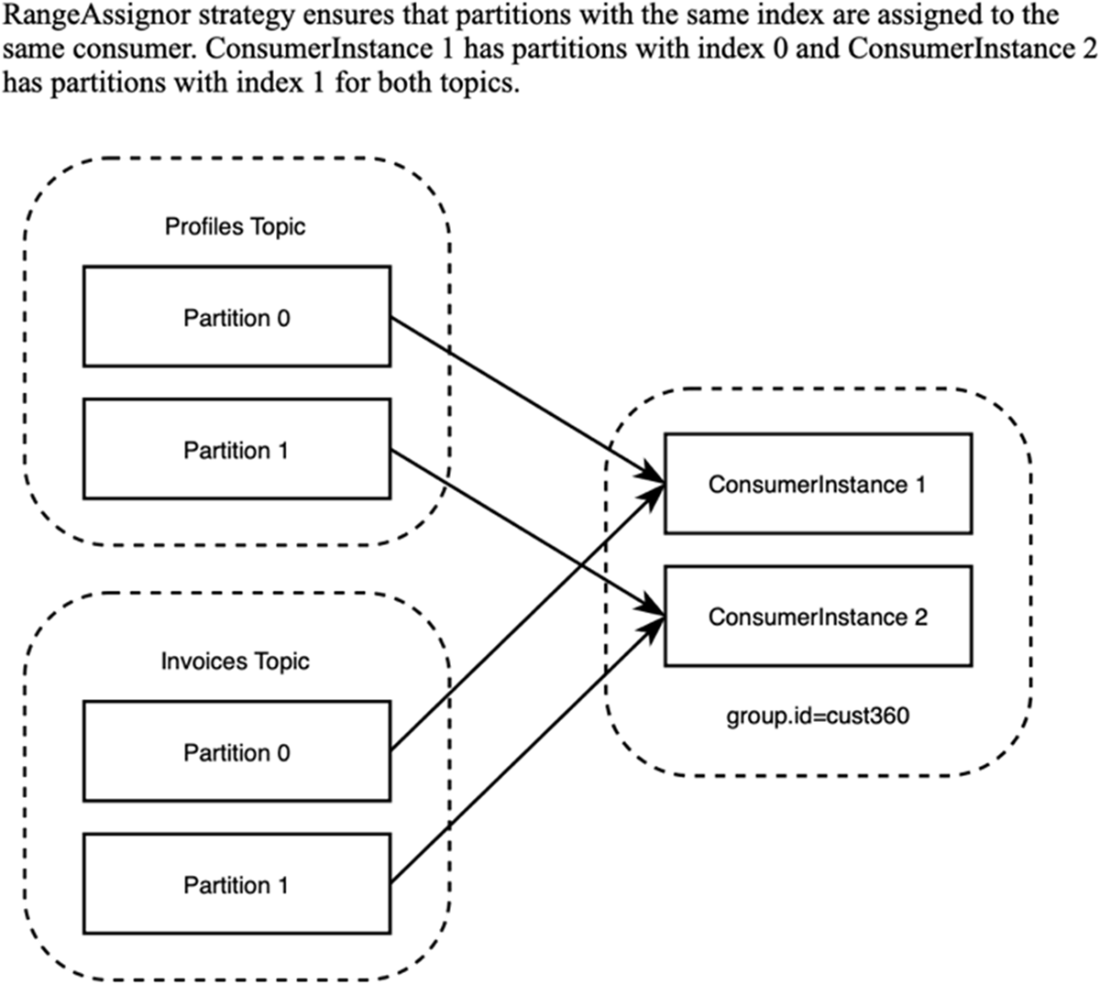
The RangeAssignor strategy
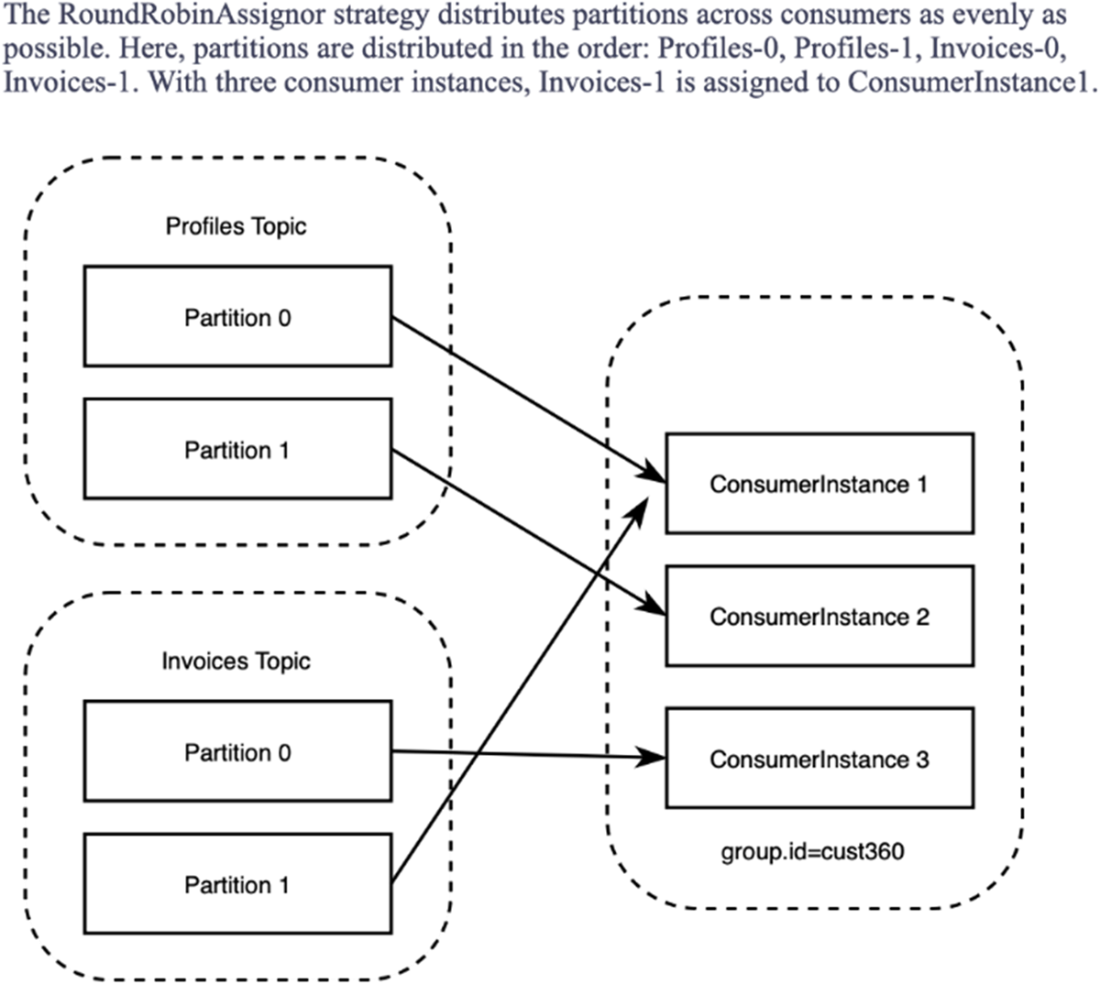
The RoundRobinAssignor strategy
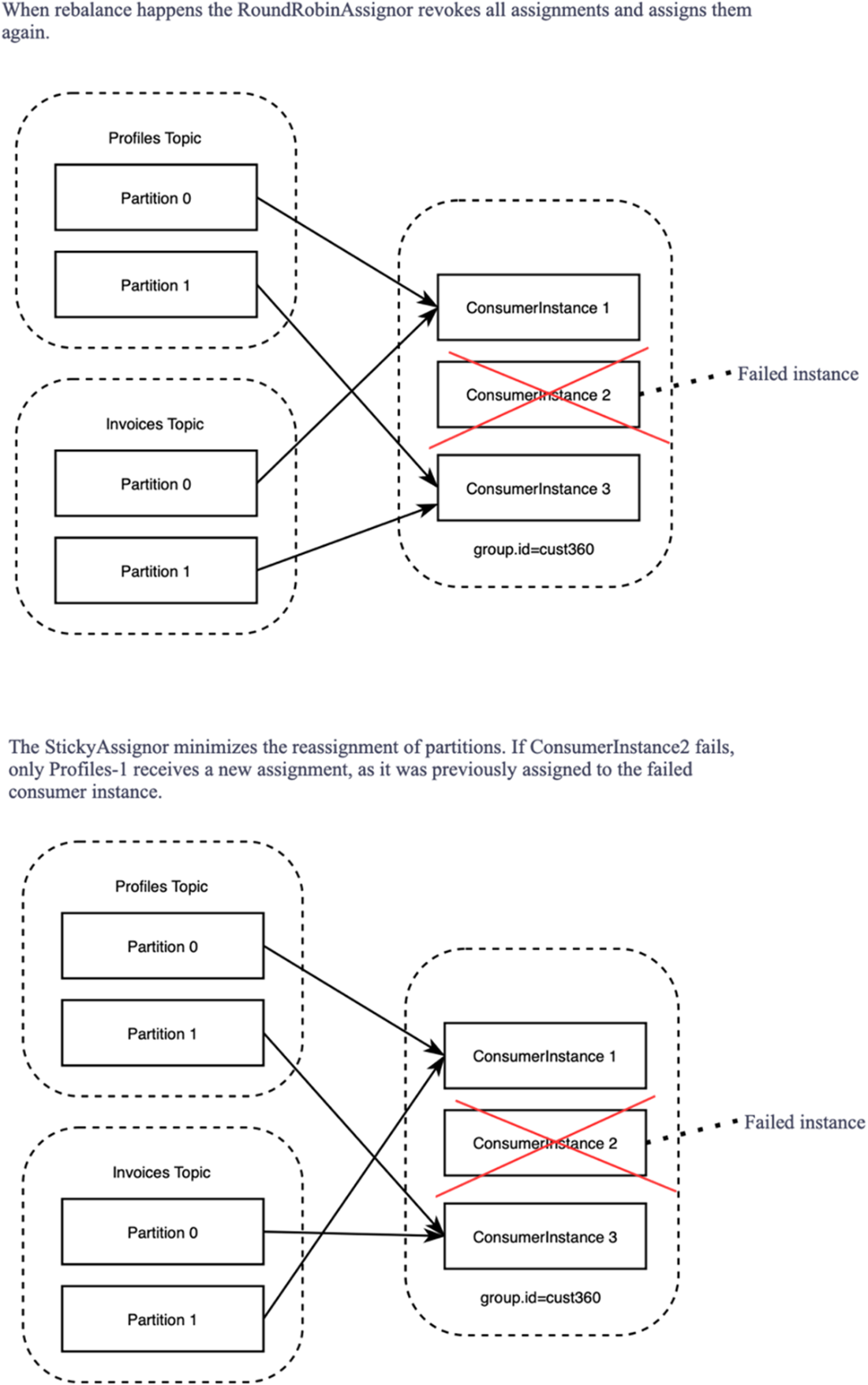
Different assignments after rebalancing with the RoundRobinAssignor and StickyAssignor strategies
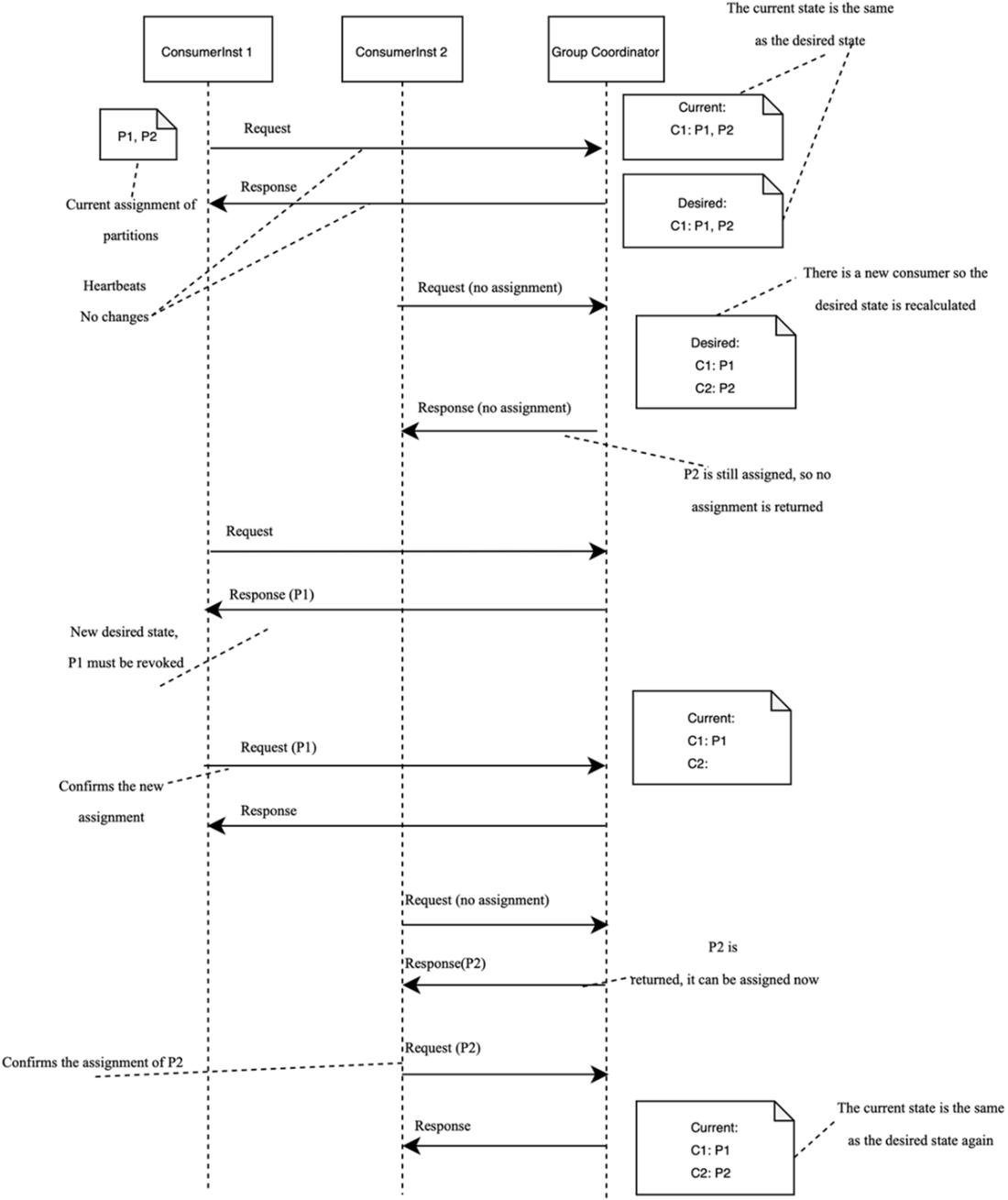
An example of the next-generation rebalance protocol. ConsumerInst 2 joins the group, and this triggers the rebalance.
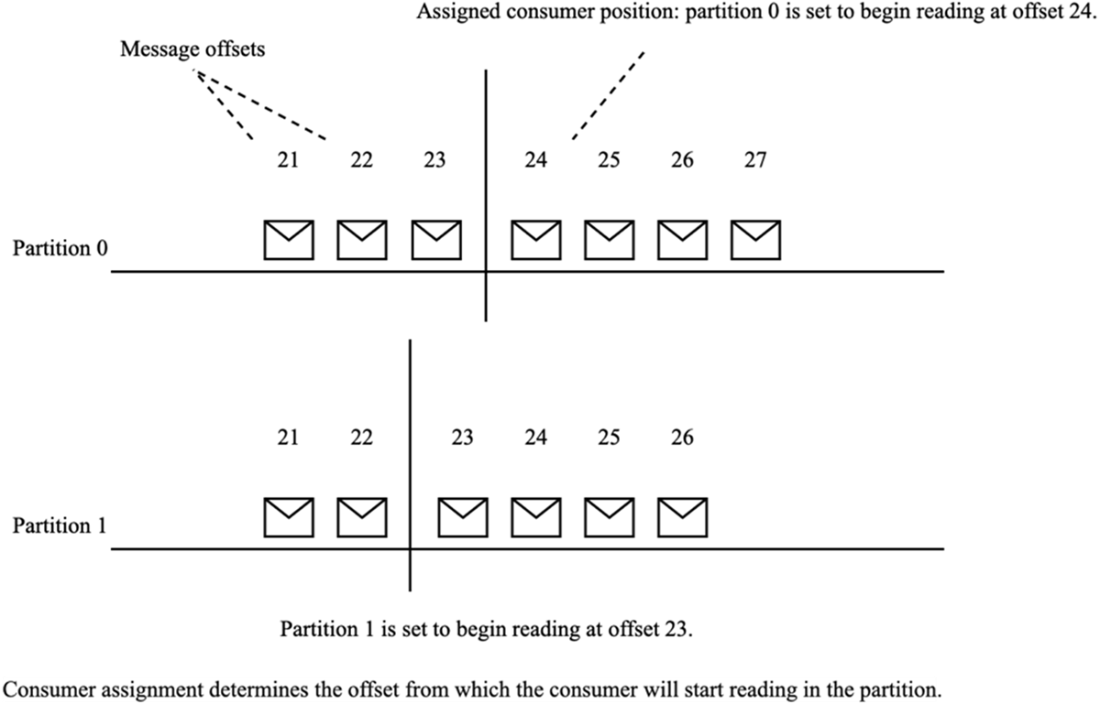
Specifying consumer assignment by offsets
Current setup for Customer360Service consumers
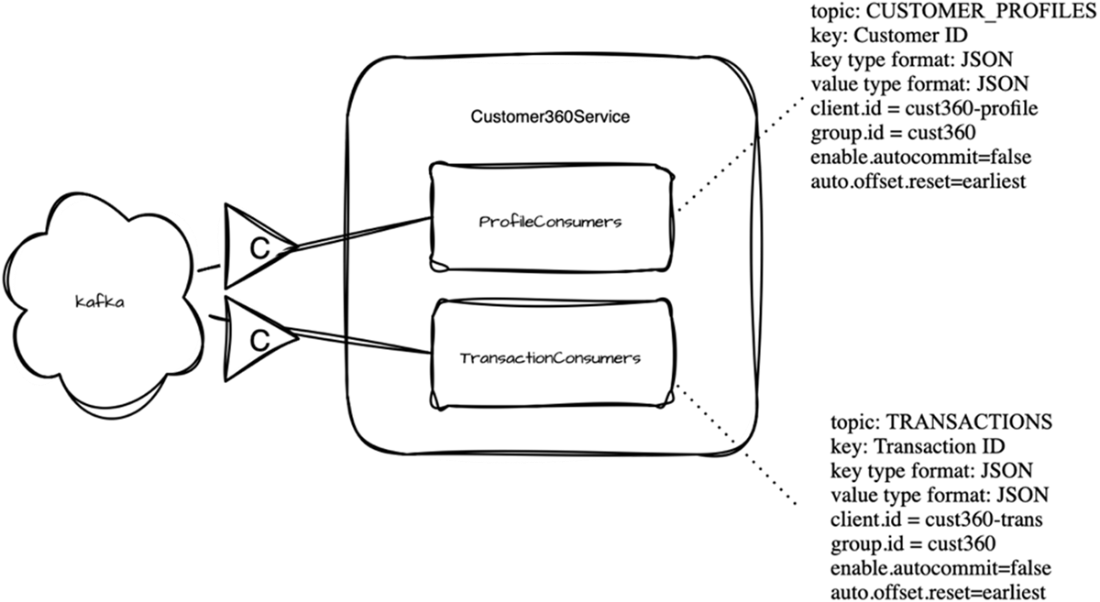
Overwriting data by different consumers
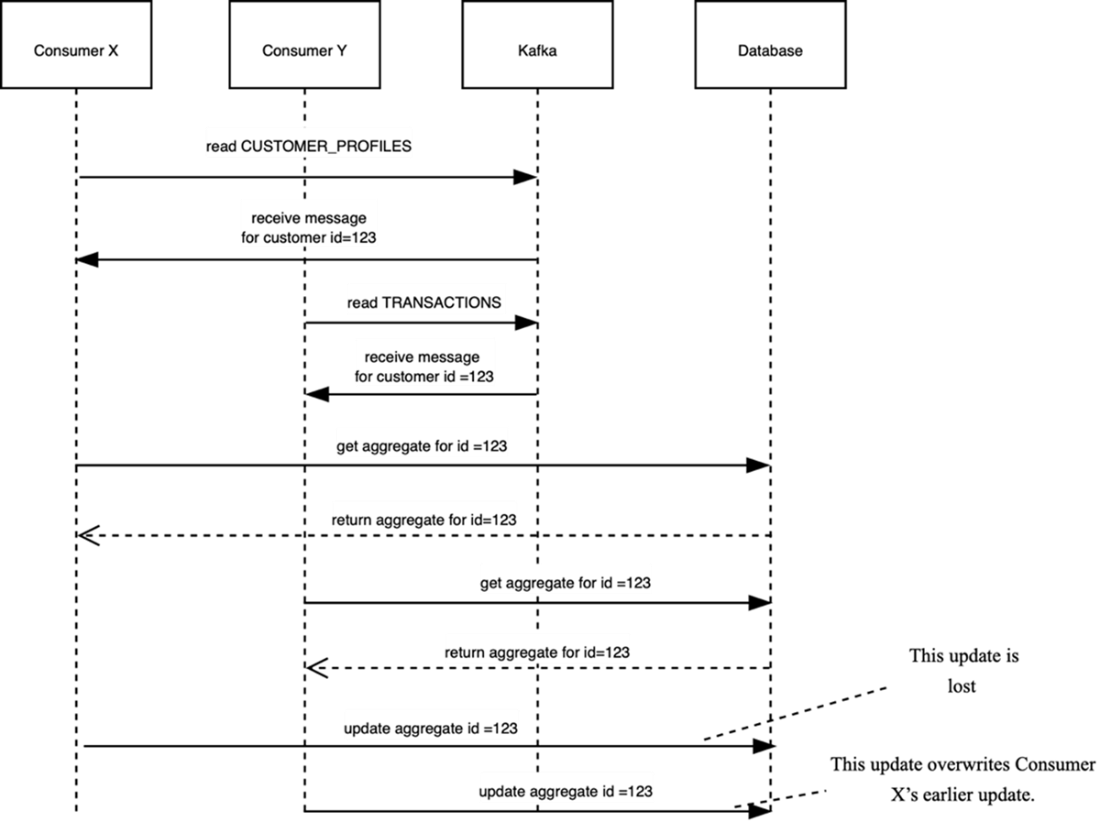
Using optimistic locking
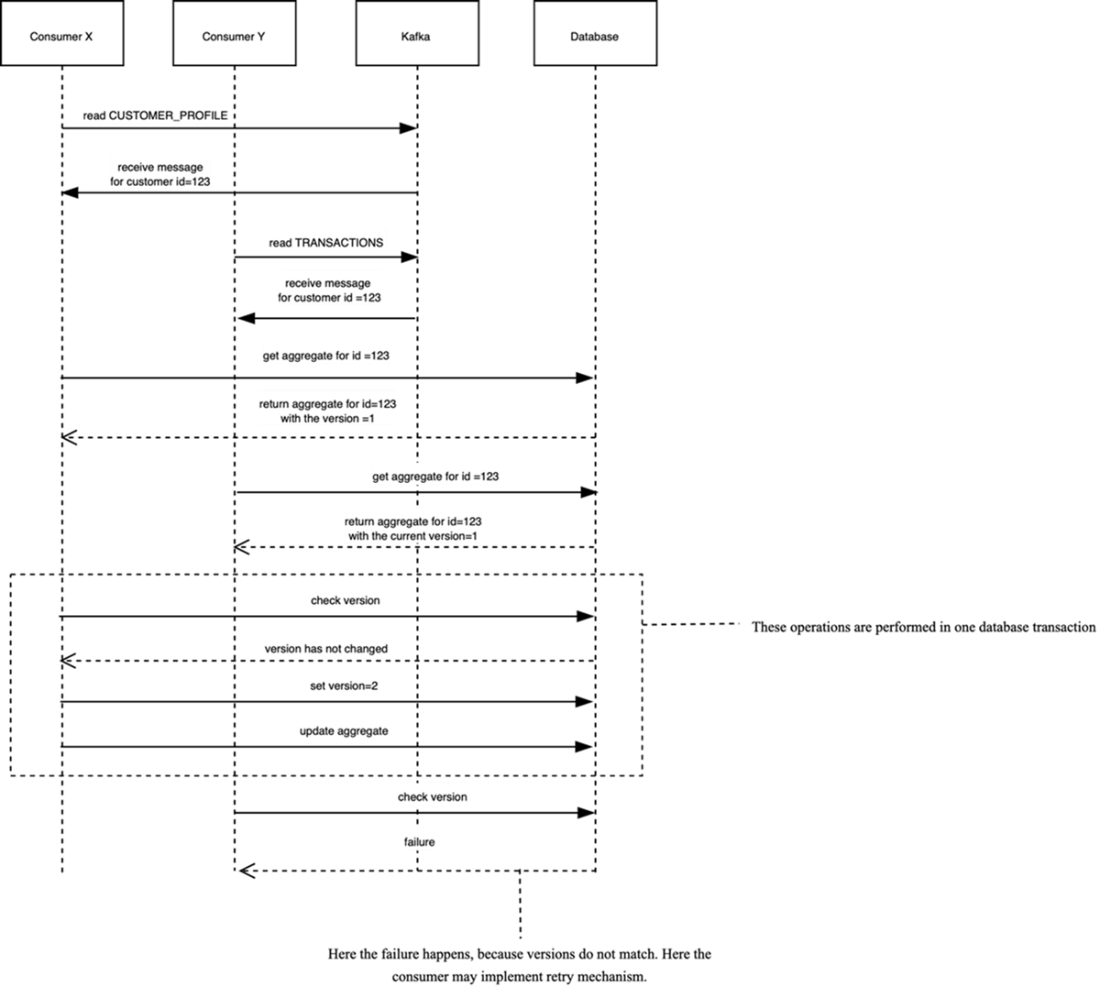
Calculating consumer lag
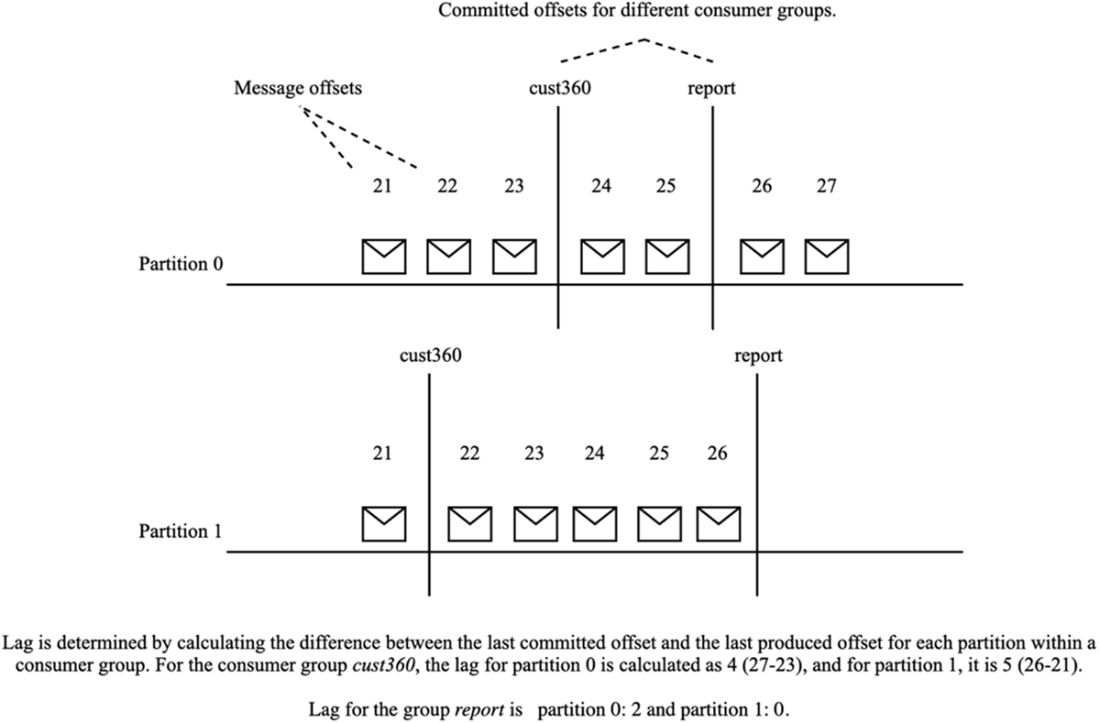
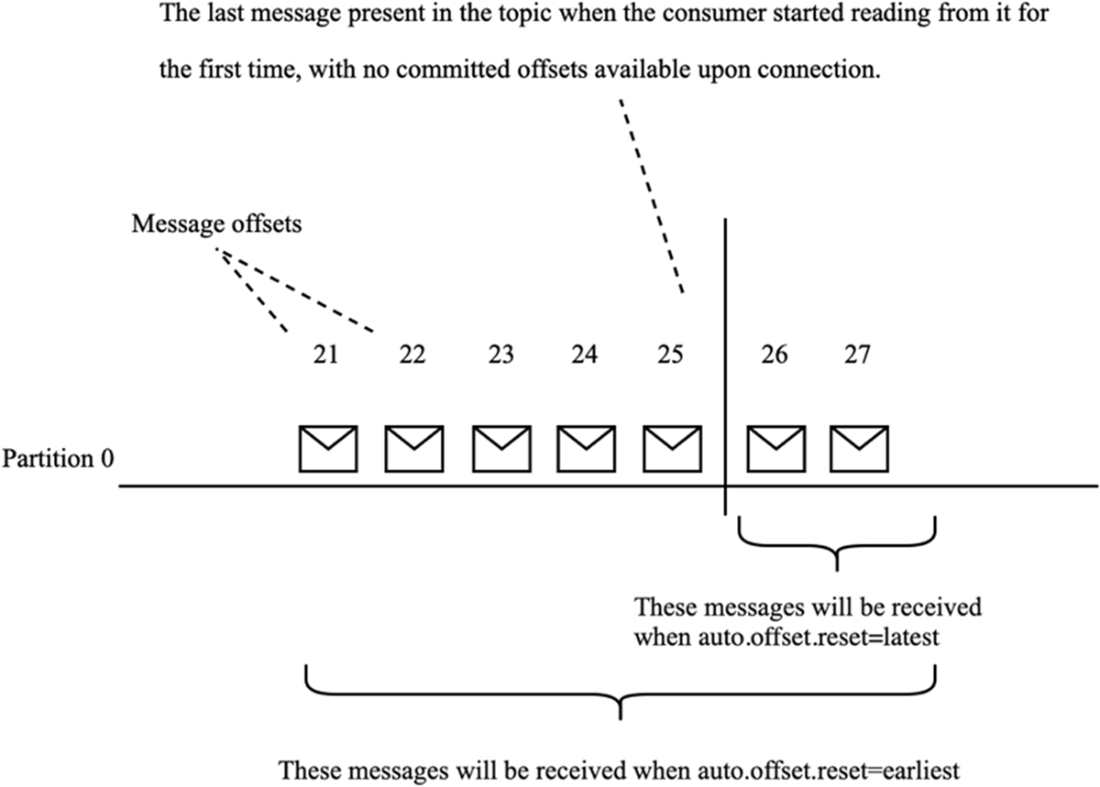
Different configurations of the auto.offset.reset property
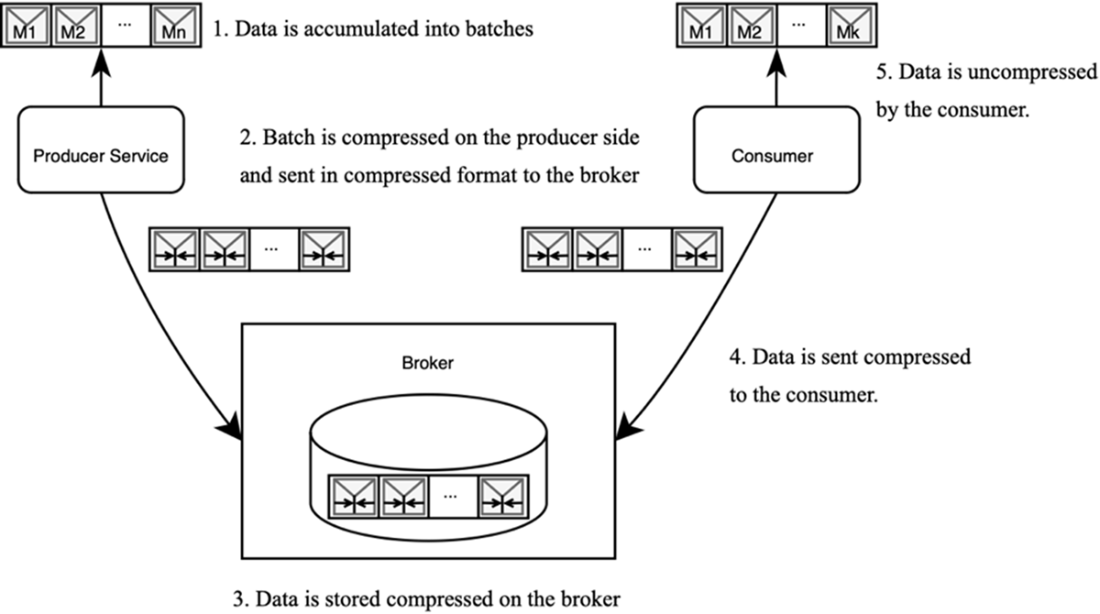
Compressing the data on producer side
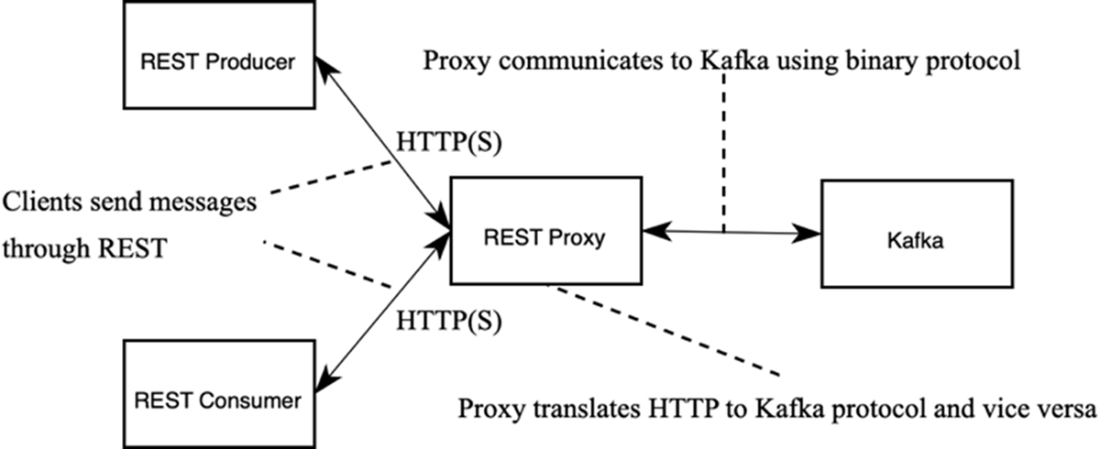
Communicating to Kafka through REST
Summary

  • Consumers continuously request data, deserialize incoming messages, process them according to application-specific logic, and then commit the message offsets back to Kafka.
  • To facilitate parallel processing, consumers operate within a consumer group, where partitions are equitably distributed among group members.
  • Consumers can either subscribe to topics to dynamically receive partition assignments or explicitly assign specific partitions for targeted data processing.
  • Each consumer group has a group coordinator, which is a broker, responsible for managing the members of the group and facilitating rebalances.
  • Within each consumer group, a group leader is designated to manage partition assignments and coordinate with the group coordinator.
  • Timeouts are set to efficiently detect and manage consumer inactivity or failures.
  • Messages can be compressed by either the producer or the broker to enhance network throughput and reduce storage space. By default, compression is handled by the producer, which specifies the compression type in its configuration.
  • When utilizing the Confluent Rest Proxy, clients can interact with Kafka via HTTP REST. The Rest Proxy serves as a mediator, converting requests and responses between the HTTP REST format and Kafka’s native protocol.

FAQ

How does a Kafka consumer receive messages? What is the basic workflow?A Kafka consumer connects to the cluster, subscribes to topics, and repeatedly polls for data. When enough data is available (or a timeout expires), the broker returns a batch. The consumer deserializes and processes records, then commits the next offset to mark where to resume. A commit records position, not processing success, and offsets are stored per consumer group in the internal topic __consumer_offsets.
What are consumer groups and how do they enable parallel processing?Consumers collaborating under the same group.id form a consumer group. Within a group, each partition is assigned to only one consumer instance at a time, enabling parallelism across partitions while preserving per-partition order. The number of partitions caps the group’s parallelism: more consumers than partitions leaves some idle; fewer means some consumers handle multiple partitions. A consumer can also subscribe to multiple topics.
How are partitions assigned to consumers, and what do the group coordinator and leader do?A broker acts as the group coordinator for a consumer group. Consumers discover the coordinator, send JoinGroup requests, and one consumer becomes the group leader. The leader computes assignments using the configured partition.assignment.strategy and returns them to the coordinator, which distributes assignments to all members. Consumers then fetch directly from partition leaders and send heartbeats to the coordinator to indicate liveness.
How should I manage offsets? What do enable.auto.commit and auto.offset.reset control?With enable.auto.commit=true (default), the client periodically commits offsets automatically, which is simple but can skip unprocessed records after a crash. Critical applications often disable it (enable.auto.commit=false) and commit only after successful processing. If a group has no committed offsets, auto.offset.reset decides where to start: latest (default) begins from new records; earliest replays from the beginning; or it can error if no offset exists.
How do I size consumer batches for throughput and latency?Batching trades latency for throughput. Key properties are: fetch.min.bytes (minimum aggregated data to return), fetch.max.wait.ms (how long to wait to meet min bytes), fetch.max.bytes (cap per response), max.poll.records (cap by record count), and max.partition.fetch.bytes (cap per partition). Align these settings to avoid contradictions, monitor memory usage, and tune for your workload.
When do rebalances occur, and what’s the difference between eager and cooperative rebalancing? How do timeouts affect this?Rebalances happen when consumers join/leave or when a member is slow or fails. Eager rebalances revoke and reassign all partitions (“stop-the-world”); cooperative rebalances move only what’s necessary, minimizing pauses. Health/timeouts control detection and processing windows: heartbeat.interval.ms (send frequency), session.timeout.ms (missed-heartbeat threshold before eviction), and max.poll.interval.ms (max time to process a batch before the client removes itself and triggers rebalance).
What is static group membership, and when should I set group.instance.id?Static membership assigns a stable identity to each consumer via group.instance.id. If a member restarts and rejoins within session.timeout.ms, the coordinator recognizes it and preserves its previous partition assignments, avoiding unnecessary rebalances and reducing downtime during routine restarts.
Which partition assignment strategy should I choose and why?RangeAssignor (default) assigns contiguous partition ranges per consumer and co-partitions topics so same-index partitions land on the same consumer—useful when correlating data across topics by key. RoundRobinAssignor spreads partitions evenly but can reshuffle more during rebalances. StickyAssignor evens load while preserving existing assignments to reduce churn. CooperativeStickyAssignor further minimizes disruption by rebalancing incrementally. Pick for data locality (Range) or even distribution and stability (Sticky/CooperativeSticky).
When should I access Kafka over HTTP with the Confluent REST Proxy, and what are the tradeoffs?Use the REST Proxy when your language lacks a native client, for quick prototypes, or for administrative/low-latency-insensitive tasks. It exposes produce/consume and admin APIs over HTTP(S) and integrates well with cloud gateways and identity. Tradeoffs: extra HTTP overhead, lower throughput/higher latency than the native protocol, and not all client features are available as efficiently.
How does Kafka handle data compression for consumers?Compression is typically enabled on producers via compression.type (gzip, snappy, lz4, zstd). Producers compress entire batches; brokers store them compressed; consumers automatically decompress—no special consumer config required. Broker-side recompression is possible but adds overhead; the default producer setting (“producer”) is recommended. Text formats (like JSON) usually compress better than compact binary formats; encrypting data negates compression benefits.

pro $24.99 per month

  • access to all Manning books, MEAPs, liveVideos, liveProjects, and audiobooks!
  • choose one free eBook per month to keep
  • exclusive 50% discount on all purchases
  • renews monthly, pause or cancel renewal anytime

lite $19.99 per month

  • access to all Manning books, including MEAPs!

team

5, 10 or 20 seats+ for your team - learn more


choose your plan

team

monthly
annual
$49.99
$499.99
only $41.67 per month
  • five seats for your team
  • access to all Manning books, MEAPs, liveVideos, liveProjects, and audiobooks!
  • choose another free product every time you renew
  • choose twelve free products per year
  • exclusive 50% discount on all purchases
  • renews monthly, pause or cancel renewal anytime
  • renews annually, pause or cancel renewal anytime
  • Kafka for Architects ebook for free
choose your plan

team

monthly
annual
$49.99
$499.99
only $41.67 per month
  • five seats for your team
  • access to all Manning books, MEAPs, liveVideos, liveProjects, and audiobooks!
  • choose another free product every time you renew
  • choose twelve free products per year
  • exclusive 50% discount on all purchases
  • renews monthly, pause or cancel renewal anytime
  • renews annually, pause or cancel renewal anytime
  • Kafka for Architects ebook for free
choose your plan

team

monthly
annual
$49.99
$499.99
only $41.67 per month
  • five seats for your team
  • access to all Manning books, MEAPs, liveVideos, liveProjects, and audiobooks!
  • choose another free product every time you renew
  • choose twelve free products per year
  • exclusive 50% discount on all purchases
  • renews monthly, pause or cancel renewal anytime
  • renews annually, pause or cancel renewal anytime
  • Kafka for Architects ebook for free
