JavaScript looks simple at first because you can write and run code immediately, but that ease hides a lot of complexity. The chapter opens by showing how the same short program can behave differently depending on the runtime, its version, and even whether the file is treated as CommonJS or ESM. This sets up the book’s core goal: to reveal what really happens under the hood when JavaScript runs, especially when code seems correct but produces surprising results.
The central example is a “friendly” asynchronous puzzle that prints a greeting using microtasks, nextTicks, timers, promises, and immediates. By running the same code in Node.js, Deno, Bun, Chrome, and Cloudflare Workers, the chapter demonstrates that identical source can produce different outputs because each runtime schedules work differently. These differences come from host-defined behavior, not just the language itself, and they show why understanding the event loop and task queues matters for both correctness and performance.
The chapter then separates JavaScript into three layers: the language specification, the engine, and the host runtime. Some behavior is standardized and should be consistent everywhere, some depends on the engine, and some is entirely controlled by the host environment. The message is that developers cannot rely on surface-level knowledge alone; to debug real problems and write robust code, they need to understand how runtimes actually execute, schedule, and coordinate JavaScript in practice.
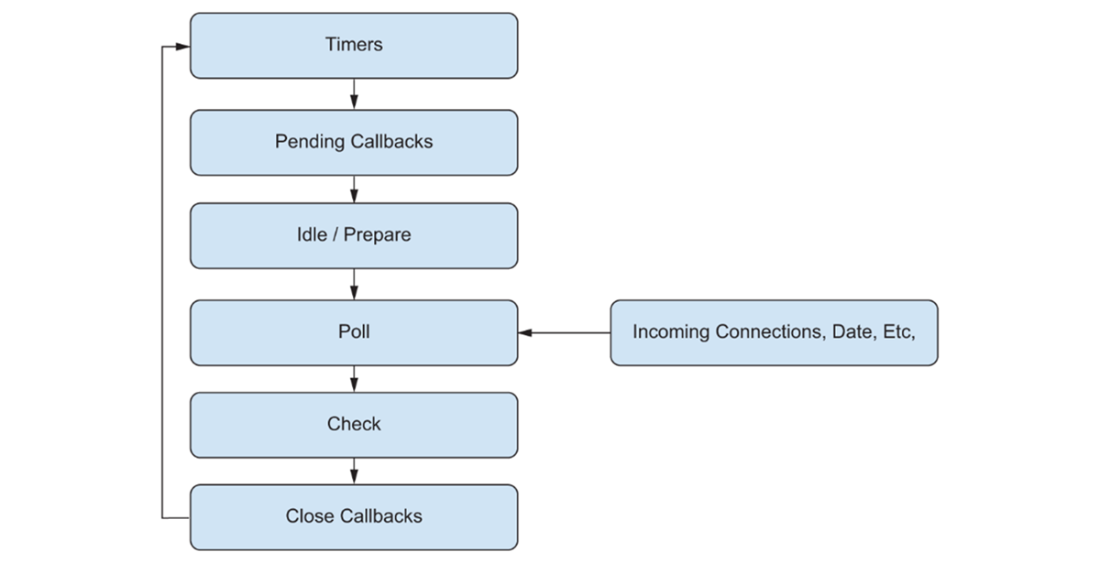
An illustration of the phases of the Node.js Event Loop from the project documentation (https://nodejs.org/en/learn/asynchronous-work/event-loop-timers-and-nexttick). At the start of each iteration Node.js will first execute timers, then move on to calling pending callbacks, preparing for I/O, polling the operating system for I/O, then performing various checks and cleanup operations before starting over again at the top with timers.
Summary
Identical JavaScript code can yield different results in Node.js, Deno, and Bun due to differences in runtime implementation choices
The event loop controls execution order, with each runtime implementing different scheduling priorities
Language specifications define what must be consistent; implementations and hosts define what can vary
Understanding the distinction between language, implementation, and host behaviors prevents unexpected bugs
FAQ
Why does the same JavaScript code print different results in different runtimes?Because JavaScript execution depends not only on the language itself, but also on the host runtime and its event-loop scheduling rules. Node.js, Deno, Bun, browsers, and Cloudflare Workers may handle timers, microtasks, nextTicks, and immediates differently, so identical code can produce different output.What is the main goal of this chapter?The chapter aims to help readers understand how JavaScript really works under the hood, especially how primitives, asynchronous operations, and runtime-specific behavior affect execution, timing, and observable results.Why can JavaScript seem simple at first but become confusing later?JavaScript is easy to start with because it has no visible compilation step, no required type declarations, and no manual memory management. But the hidden complexity of runtimes, queues, promises, and scheduling can lead to surprising behavior when code runs in real environments.What does the friendly “Hello” puzzle demonstrate?It demonstrates that asynchronous operations do not necessarily execute in the order they appear in the source code. The puzzle shows how different queues and runtime rules determine the final output.What are microtasks, nextTicks, and immediates?They are different kinds of scheduled asynchronous work. Microtasks are part of JavaScript behavior for promises and queueMicrotask, nextTicks are Node.js-specific, and immediates are also host/runtime-defined in Node.js. Each queue can be processed in a different order depending on the runtime.Why does Node.js print Hello in CommonJS but a different result in ESM?Node.js loads ECMAScript modules asynchronously, while CommonJS is handled synchronously in a different way. That difference changes when the code begins running and therefore changes the order in which queued tasks execute.Why did the same code fail in Deno without changes?Deno does not provide some Node.js APIs globally by default, including setImmediate(). Since the example relied on a Node-specific API, Deno threw an error until that function was imported explicitly.Why does Bun produce yet another different output?Bun uses a different runtime implementation and scheduling behavior, so the same asynchronous code can be ordered differently even when it runs successfully. This is an example of host/runtime-defined behavior affecting output.What is the difference between the JavaScript engine and the host runtime?The JavaScript engine parses, compiles, and executes JavaScript code itself. The host runtime embeds the engine and provides external capabilities such as timers, networking, file system access, and event-loop scheduling.What is the difference between language-defined, implementation-defined, and host-defined behavior?Language-defined behavior is specified by ECMAScript and should behave consistently everywhere, such as promises. Implementation-defined behavior depends on the JavaScript engine. Host-defined behavior depends on the runtime, such as Node.js-specific APIs like process.nextTick().
pro $24.99 per month
access to all Manning books, MEAPs, liveVideos, liveProjects, and audiobooks!

 JavaScript in Depth ebook for free
