1 The framework without a framework
Modern web development faces rapid tool churn and “framework fatigue,” which complicate both individual learning and team-wide decisions about long-term maintainability. Many developers want the simplicity of plain HTML, JavaScript, and CSS, but have lacked a scalable way to add structure without committing to a full framework. Web Components address this gap by offering a standards-based path to build reusable, encapsulated UI without framework lock-in, providing organization and longevity grounded in the platform itself.
At their core, Web Components mirror the strengths of native elements: they package markup, style, behavior, and an API. The Custom Elements API lets you define new elements, while the Shadow DOM provides encapsulation so external CSS and JS don’t inadvertently break internals. Early turbulence—most notably the failure of HTML Imports and uneven Shadow DOM support—pushed developers toward stopgap libraries like Polymer and X-Tags with polyfills such as Shady DOM. The modern, stable approach centers on ES2015 modules, template literals, and the template tag, with Custom Elements as the foundation and Shadow DOM now broadly available and optional. Lightweight utilities like lit-html and LitElement exemplify an opt-in, no-framework workflow that builds on web standards.
Because custom elements behave like any DOM element, you interact with them via properties, attributes, methods, and events, with reflection between properties and attributes considered a best practice. Components compose naturally—from small controls to entire applications—and communicate through native or custom events; when needed, simple patterns like an event bus or carefully chosen microframeworks can coordinate larger systems without heavy abstractions. Looking ahead, frameworks increasingly compile their components to standalone Web Components, improving interoperability across ecosystems, and even other languages can participate via WebAssembly. The upshot: choose the tools that fit your project, but Web Components now offer a practical, future-friendly way to build and share UI—framework-free or framework-assisted—on a foundation of stable web standards.
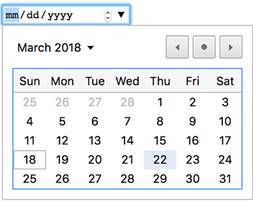
Expanded date picker UI
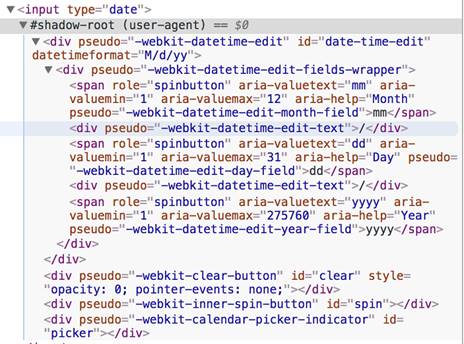
Enabling shadow root settings in the Chrome dev tools allows us to see the input tag’s hidden Shadow DOM.
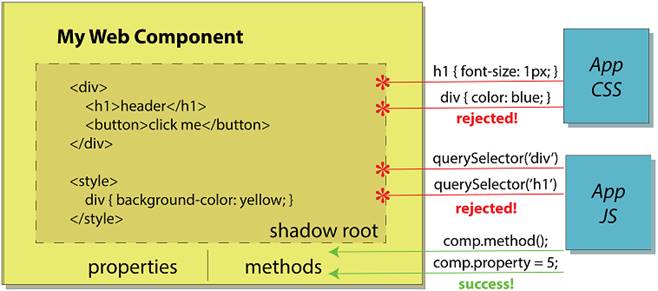
The Shadow DOM protects your component from unintended consequences when CSS or JS might affect styles and nodes inside that aren’t meant to be altered. Instead, your component would have a custom-defined API to interact with using methods and properties.
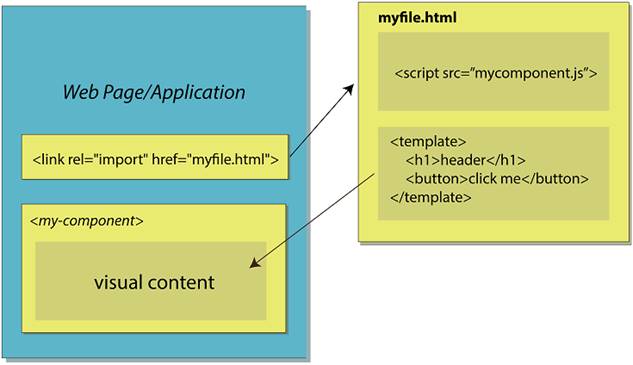
With HTML Imports, a file containing your component definition and your component’s markup could be imported right into your document.
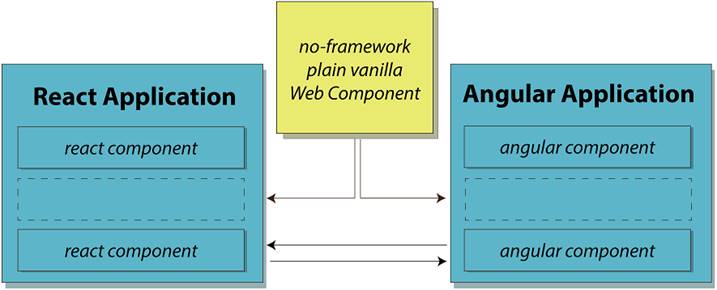
Web Components could bridge the gap in the future between popular frameworks. Not only can no-framework Web Components be used in these frameworks, but there are already experimental projects to compile a component in React, Angular, or Vue to independently run components that can be used anywhere.
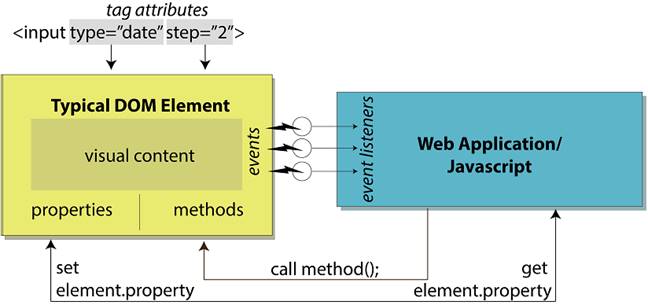
DOM elements have various properties, methods, events, and attributes that are used to tell the element how to act and communicate with the outside world.
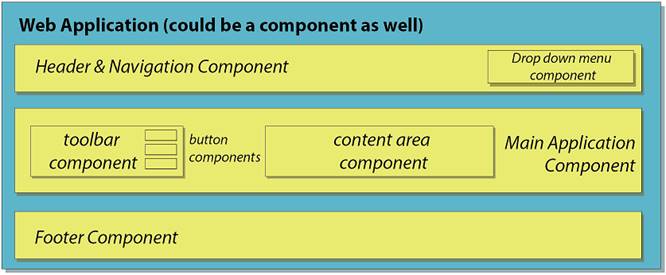
Example web application comprised of Web Components, which are themselves made up of more Web Components. The hierarchy can extend to something small, like a custom button, or be as large as the entire application wrapped as a Web Component.
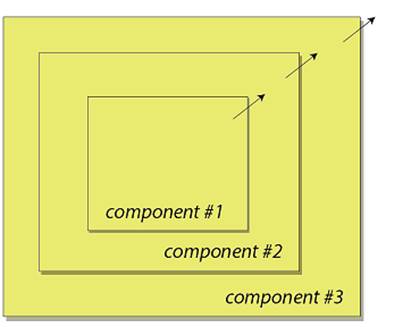
Events naturally bubble from the inside out of nested elements.
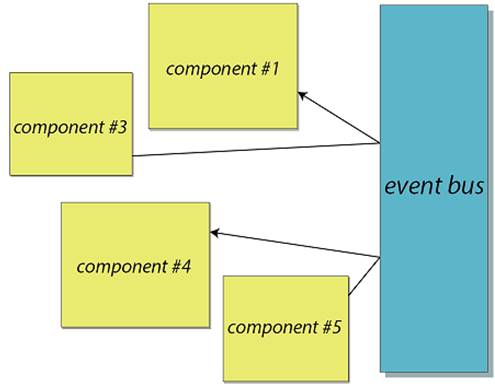
If normal event bubbling is not desirable, with a bit of code, you can create an event bus system to route events where you want.
Summary
In this chapter, you learned
- How Web Components have evolved in the past few years from a Google-owned working draft to a real web standard adopted by all the modern browsers
- The Shadow DOM as an optional yet important feature, while being on the verge of widespread browser adoption
- Web Components’ place in modern frameworks, as well as an agnostic part of any ecosystem
- The potential future of Web Components with an ever-expanding community of JS modules in the spirit of Polymer Project libraries like lit-html and lit-element, as well as non-Polymer Project ones like hyperHTML
- The individual Web Component versus an entire Web Component application

 Web Components in Action ebook for free
