Chapter 5. Interactive programs: input and output processing
In this chapter, interactive Idris programs are presented as descriptions of actions rather than direct side effects, which preserves the language’s purity while still allowing console input and output. The central idea is to distinguish between evaluating an expression and executing the actions it describes: an expression of type IO a can be computed safely, and then handed to the runtime system to perform the actual effects. This viewpoint is illustrated with simple console programs such as greeting the user, showing how the type of a function makes clear whether it returns a plain value or a description of an interactive process.
The chapter then develops the machinery for building real interactive programs by sequencing actions and using their results. The bind operator >>= connects one action to the next by passing the produced value forward, while do notation provides a clearer syntax for the same pattern. Using these tools, the text builds programs that prompt the user, read strings, compute derived values like lengths, and print results. It also explains the distinction between let for pure computations and <- for values obtained only by executing an action, and introduces pure for returning ordinary values inside an IO context.
From there, the discussion turns to validation, control flow, and dependent types. Interactive functions can branch on user input, return results like Maybe Nat to signal success or failure, and use pattern-matching bindings to simplify nested checks while remaining total. Loops are expressed recursively, with totality depending on whether termination can be guaranteed from the structure of the program and its inputs. The chapter concludes by showing how to read and validate dependent data from the console, first with vectors of known or unknown length and then with dependent pairs, so that runtime-checked information such as vector length can be carried into types and used safely to justify operations like zipping two user-provided vectors together.
Figure 5.1. Evaluating the expression putStrLn (show (47 * 2)) and then executing the resulting actions
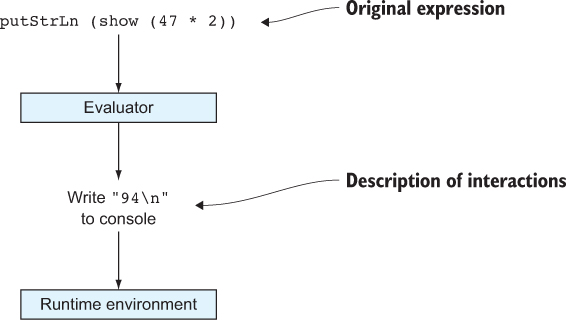
Figure 5.2. An interactive operation to read a String and then echo its contents using the >>= operator. The types of each subexpression are indicated.
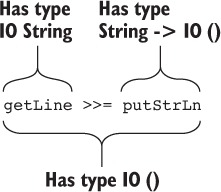
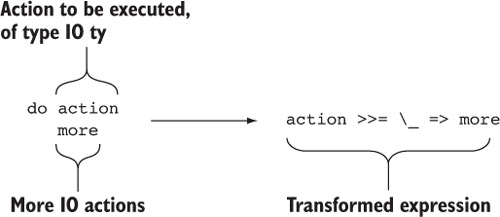
Figure 5.3. Transforming do notation to an expression using the >>= operator when sequencing actions. The value produced by the action, of type ty, is ignored, as indicated by the underscore.
Summary
- Idris provides a generic IO type for describing interactive actions.
- Idris distinguishes between evaluation of pure functions and execution of interactive actions. The :exec command at the REPL executes interactive actions.
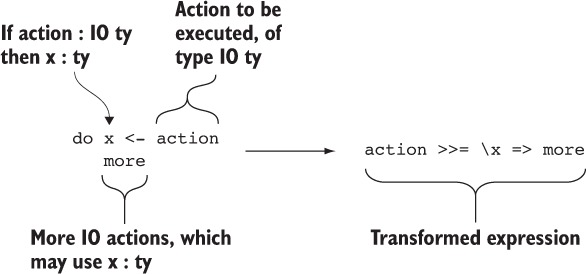
- You can sequence interactive actions using do notation, which translates to applications of the >>= operator.
- You can produce pure values from interactive definitions by using the pure function.
- Idris provides a concise notation for pattern-matching on the result of an interactive action.
- Dependent types express assumptions about inputs to functions, so you need to validate user inputs to check that they satisfy those assumptions.
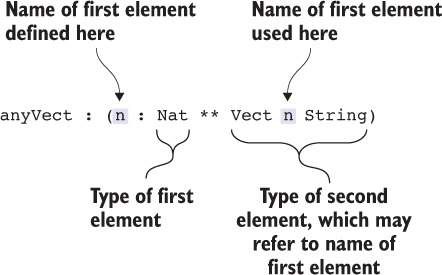
- Dependent pairs allow you to pair two values, where the type of the second value is computed from the first value.
- You can use dependent pairs to express that a type’s argument, such as the length of a vector, will not be known until the user enters some input.
FAQ
What is the main idea behind interactive programming in Idris?
Idris keeps its purity by separating evaluation from execution. Interactive programs are written as descriptions of actions usingIO, and the runtime system executes those actions later.What does the type IO a mean?
IO a describes an interactive program that performs I/O actions and eventually produces a value of type a.Why is String -> IO Int different from String -> Int?
String -> Int is a pure function that directly computes an integer. String -> IO Int returns a description of an interactive program that will produce an integer after execution.What is the difference between evaluation and execution?
Evaluation computes theIO description, while execution actually performs the described console or system actions through the Idris runtime.How do >>= and do notation help with IO programs?
They sequence interactive actions so the result of one action can be passed to the next. do notation is syntactic sugar that makes this sequencing easier to read and write.When should you use let and when should you use <- inside a do block?
Use let for pure expressions that are evaluated immediately, and use <- for actions whose results are only available after execution.Why is pure needed in interactive programs?
pure lifts a normal value into IO without adding any extra effects, letting you return a value from an interactive computation.How can you validate user input in an interactive Idris program?
You can read the input with anIO action, inspect it with pure functions, and branch on the result. For example, a string can be checked with all isDigit before converting it to a number.What are pattern-matching bindings in do notation used for?
They let you combine binding and pattern matching in one step, such as matching on Just x <- action. If the pattern fails, you can provide alternative behavior with a | clause.
 Type-Driven Development with Idris ebook for free
