Appendix D. Understanding Java threads
This appendix distills the essentials of how Java threads work so you can reason about and troubleshoot concurrent behavior in real applications. A thread is an independent sequence of instructions within a process; multiple threads run concurrently and may execute in parallel. While ordering within a single thread is deterministic, operations across different threads are not, which is why concurrency introduces subtle, nondeterministic outcomes. The text emphasizes understanding these basics to interpret tooling output and diagnose issues that arise when threads coordinate—or fail to do so—in modern Java apps.
A core concept is the thread life cycle and its state transitions. Threads move from new to runnable after start(), oscillating between ready and running as the JVM schedules them. They can be temporarily blocked by synchronization or coordination mechanisms, including monitored (contending for a synchronized block), waiting (via wait/notify), sleeping (Thread.sleep), parked (LockSupport.park), or join-based waits, before eventually reaching the dead/terminated state. Recognizing why and how threads enter each state—plus how transitions occur, including interruption and InterruptedException—provides crucial context when reading profiler timelines or thread dumps during investigations.
The appendix surveys synchronization patterns and pitfalls. It explains synchronized blocks and methods, the role of a monitor, and how using the same monitor links separate critical sections. It covers wait/notify/notifyAll (usable only within synchronized regions), the producer–consumer pattern, joining threads to sequence dependent work, and the tradeoffs of timed waiting (sleep, timed wait/join), cautioning against sleep as a substitution for precise signaling. It also notes higher-level concurrency utilities (Semaphore, CyclicBarrier, Lock, Latch), advising simplicity and careful use to avoid overengineering. Finally, it outlines common concurrency failures—race conditions, deadlocks, livelocks, and starvation—and underscores using profilers and thread dumps to pinpoint root causes efficiently.
Figure D.1 A multithreaded app visualized as a group of sequence timelines. Each arrow in the figure represents the timeline of a thread. An app starts with the main thread, which can launch other threads. Some threads run until the process ends, while others stop earlier. At a given time, an app can have one or more threads running in parallel.
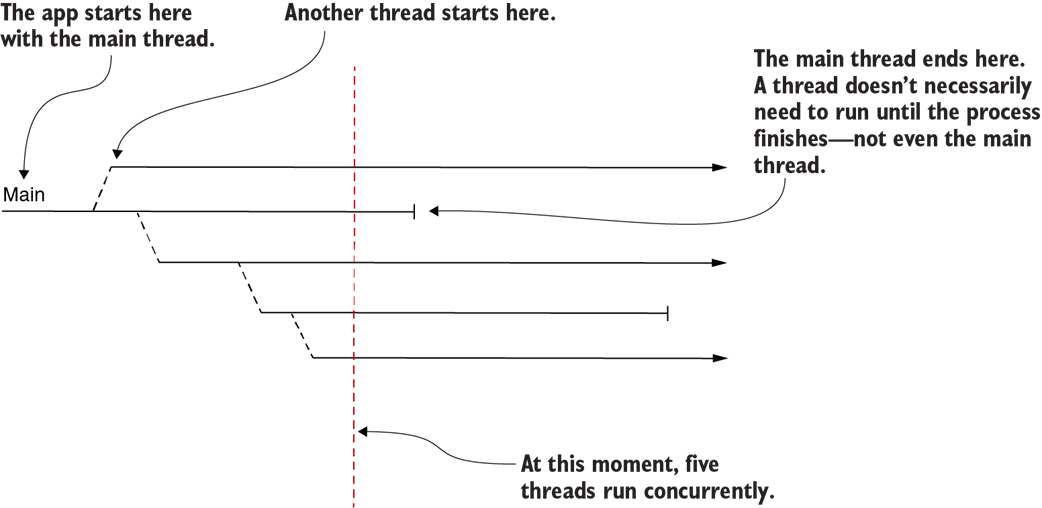
Figure D.2 With two instructions on one thread, we can always know the exact order of execution. But because two threads are independent, if instructions are on different threads, we can’t know the order in which they will execute. At most, we can say that one scenario is more likely than another.
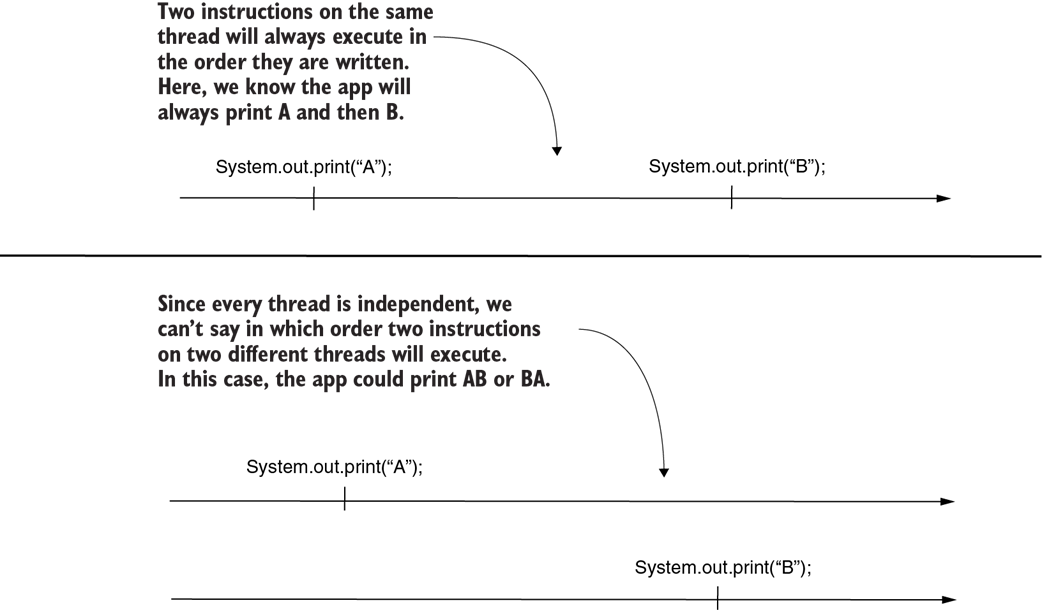
Figure D.3 VisualVM shows thread execution as sequence timelines. This visual representation makes the app’s execution easier to understand and helps you to investigate possible problems.
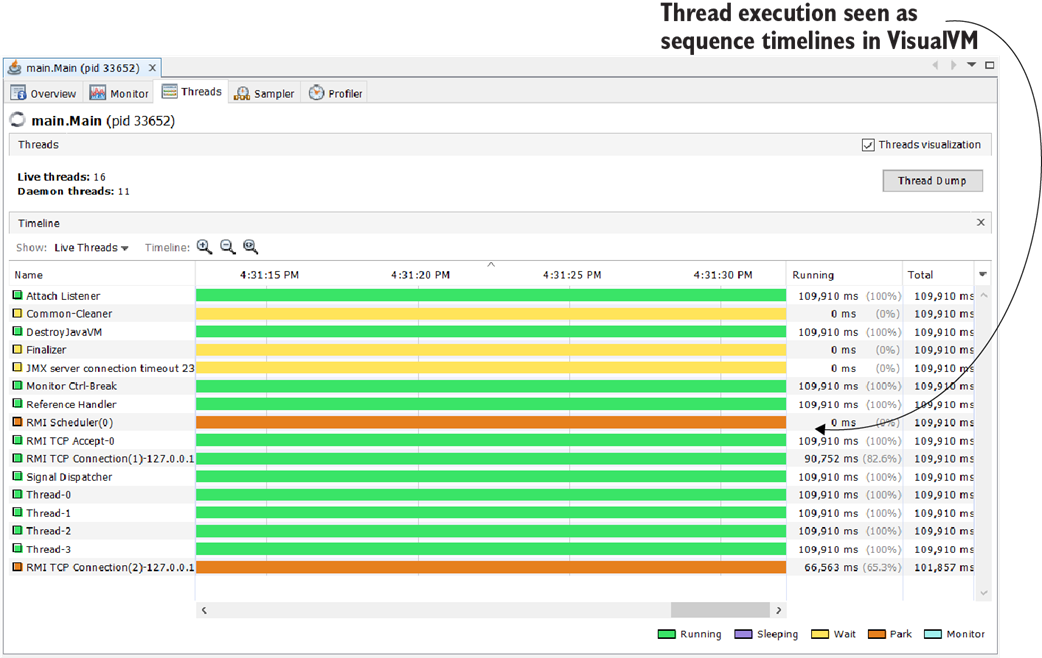
Figure D.4 A thread life cycle. During its life, a thread goes through multiple states. First, the thread is new, and the JVM cannot run the instructions it defines. After starting the thread, it becomes runnable and starts to be managed by the JVM. The thread can be temporarily blocked during its life, and at the end of its life it goes to a dead state, from which it can’t be restarted.

Figure D.5 An example of using synchronized blocks. Multiple synchronized blocks of the app can use the same object instance as a monitor. When this happens, all threads are correlated such that only one active thread executes in all. In this image, if one thread enters the synchronized block, defining instructions A and B, no other thread can enter in the same block or in the one defining instruction C.
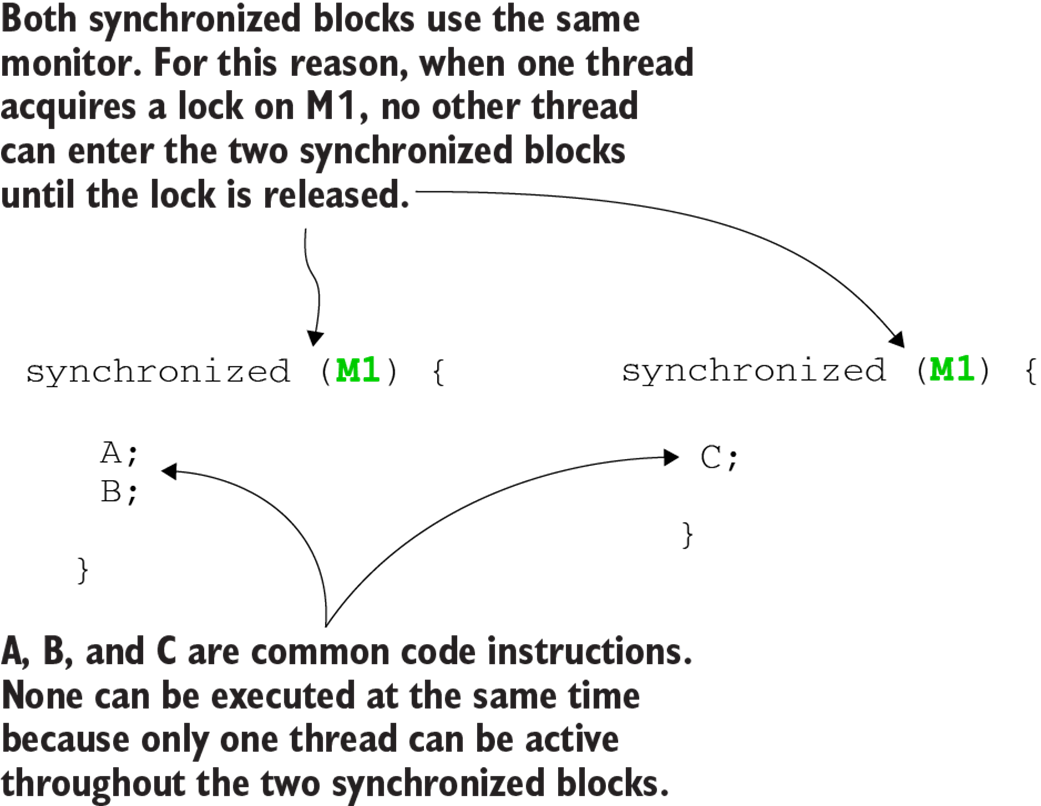
Figure D.6 When two synchronized blocks don’t use the same object instance as the monitor, they are not synchronized. In this case, the second and the third synchronized blocks use different monitors. That means instructions from these two synchronized blocks can execute simultaneously.
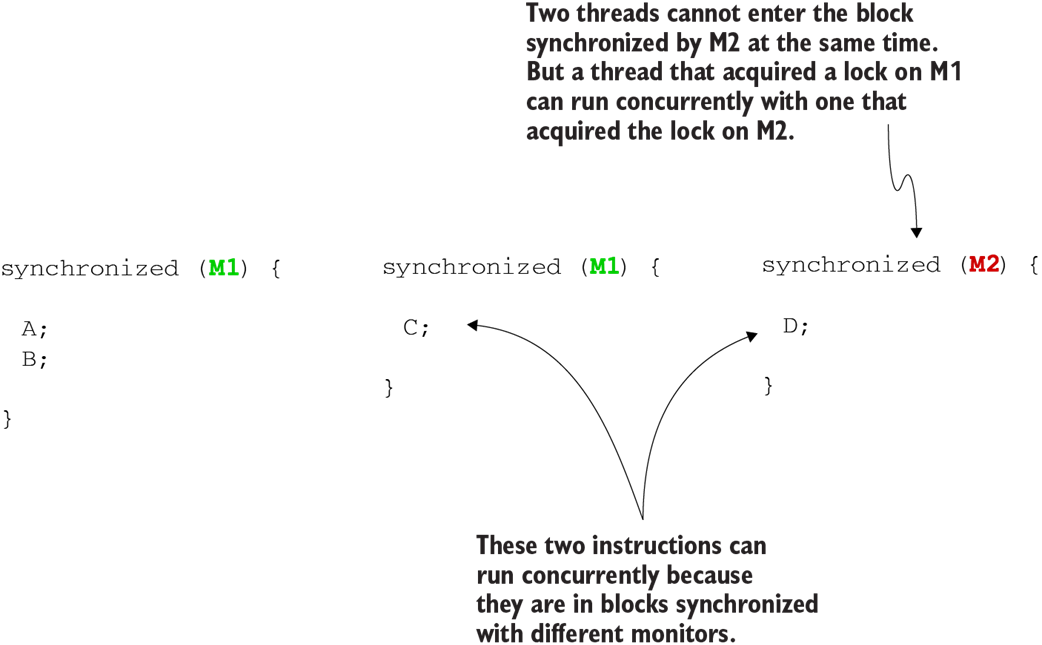
Figure D.7 VisualVM indicates the state of a thread. The Threads tab in the profiler provides a complete picture of what each thread does and, if a thread is blocked, what blocked that thread.
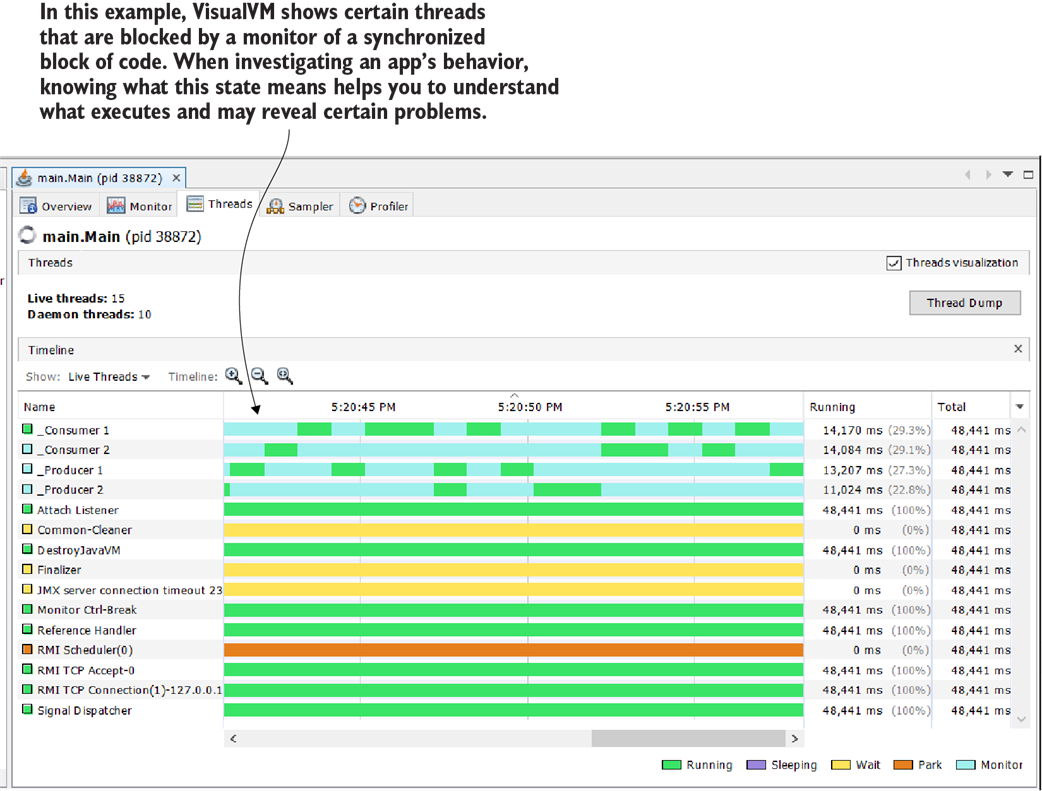
Figure D.8 In some cases, a thread should pause from executing and wait for something to happen. To make a thread wait, the monitor of a synchronized block can call its wait() behavior. When the thread becomes executable again, the monitor can call the notify() or notifyAll() methods.
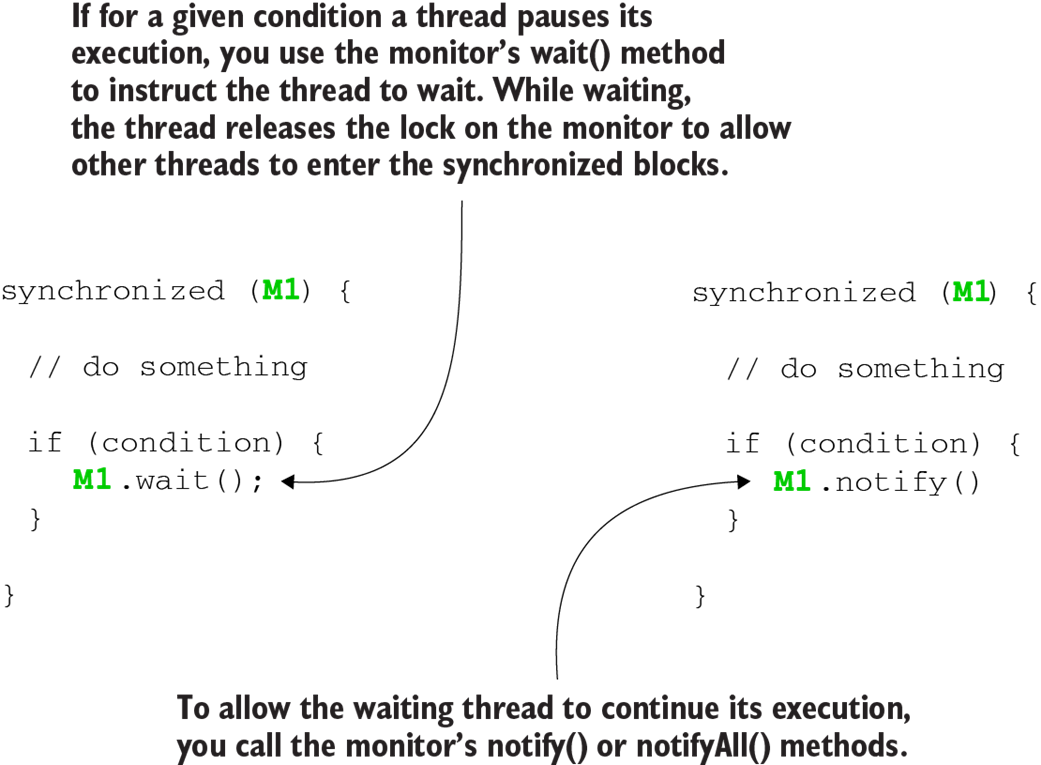
Figure D.9 A use case for wait() and notify(). When a thread brings no value by executing in the current conditions, we can make it wait until further notice. In this case, a consumer should not execute when it has no value to consume. We can make the consumers wait, and a producer can tell them to continue only after it adds a new value to the shared resource.
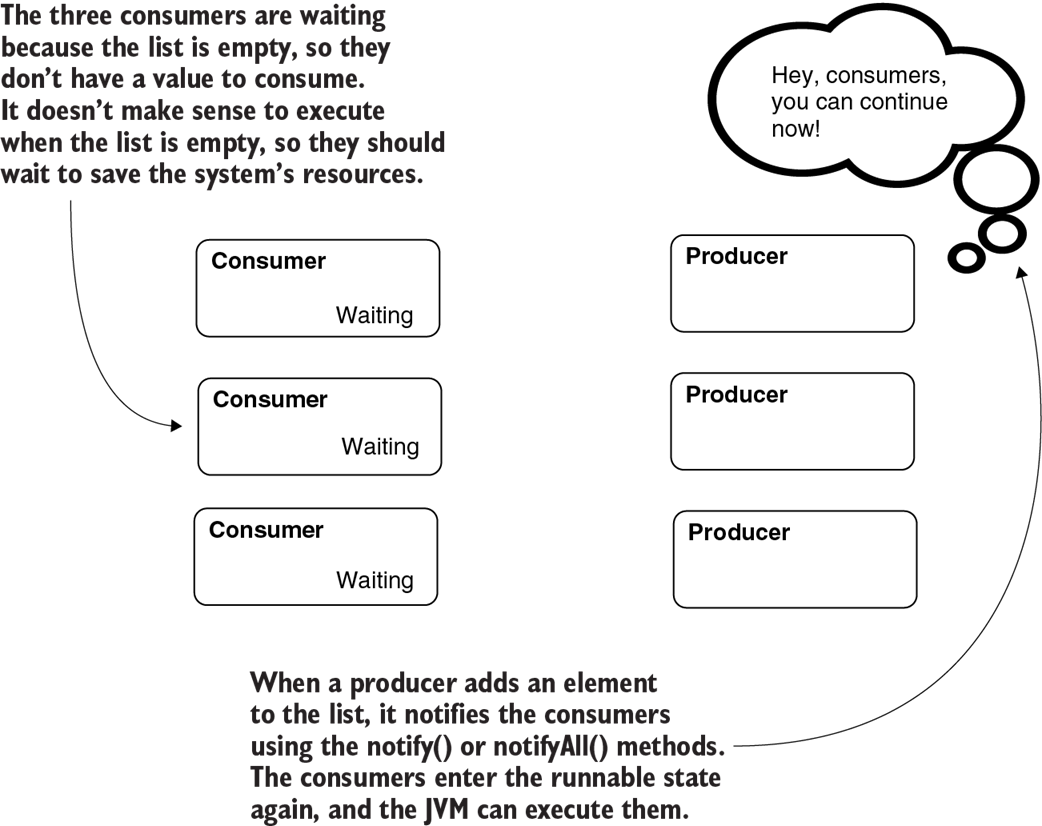
Figure D.10 In some cases, you can improve the app’s performance using multiple threads. But you need to make some threads wait for others since they depend on the execution result of those threads. You can make a thread wait for another using a join operation.
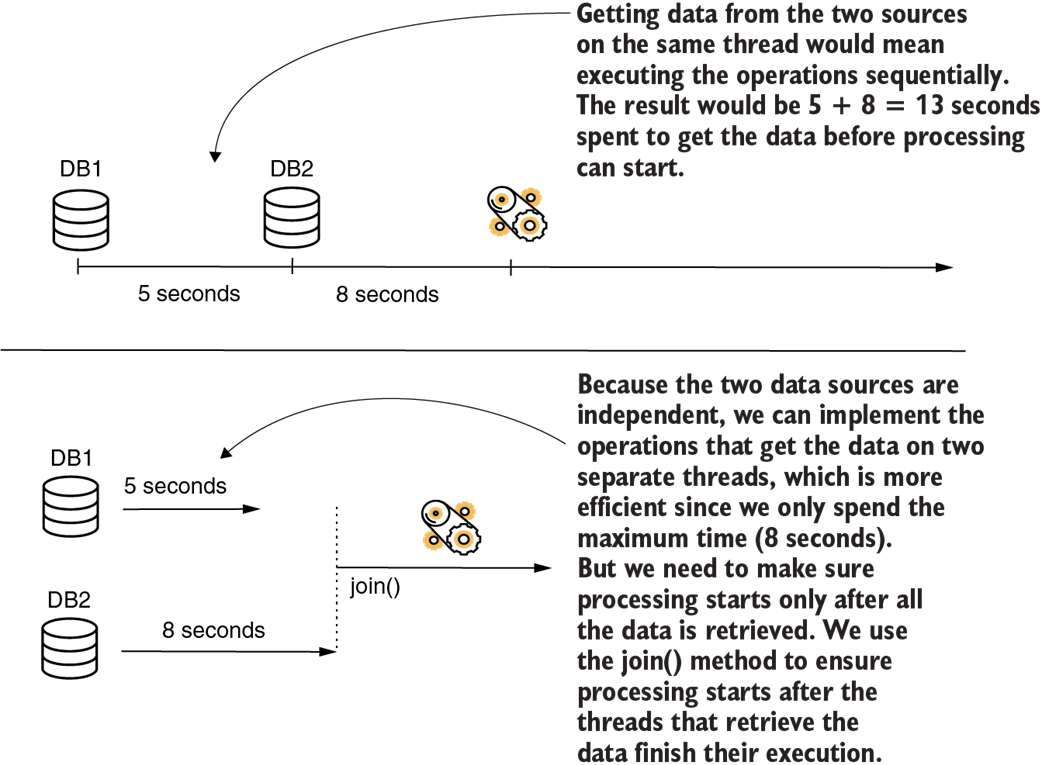
Figure D.11 A timed waiting approach instead of wait() and notify() is usually not the best strategy. Whenever your code can determine when the thread can continue its execution, use wait() and notify() instead of sleep().
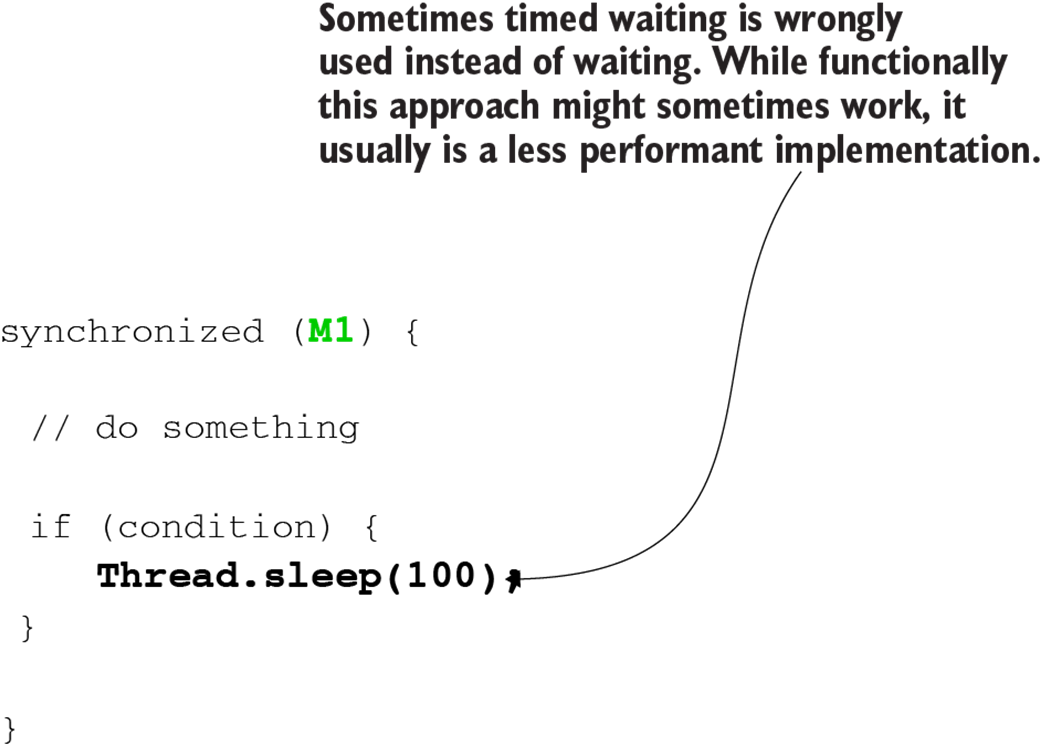
Figure D.12 A race condition. Multiple threads concurrently try to change a shared resource. In this example, threads T1 and T2 try to change the value of variable x simultaneously, which can result in different outputs.

Figure D.13 Example of a deadlock. In a case in which T1 waits for T2 to continue the execution and T2 waits for T1, the threads are in a deadlock. Neither can continue because they are waiting for the other.

Figure D.14 A deadlock. Thread T1 can’t enter the nested synchronized block because T2 has a lock on resource A. Thread T1 waits for T2 to release resource A so that it can continue its execution. But thread T2 is in a similar situation: it cannot continue its execution because T1 acquired a lock on resource B. Thread T2 waits for thread T1 to release resource B so that it can continue its execution. Since both threads wait for each other and neither can continue its execution, the threads are in a deadlock.
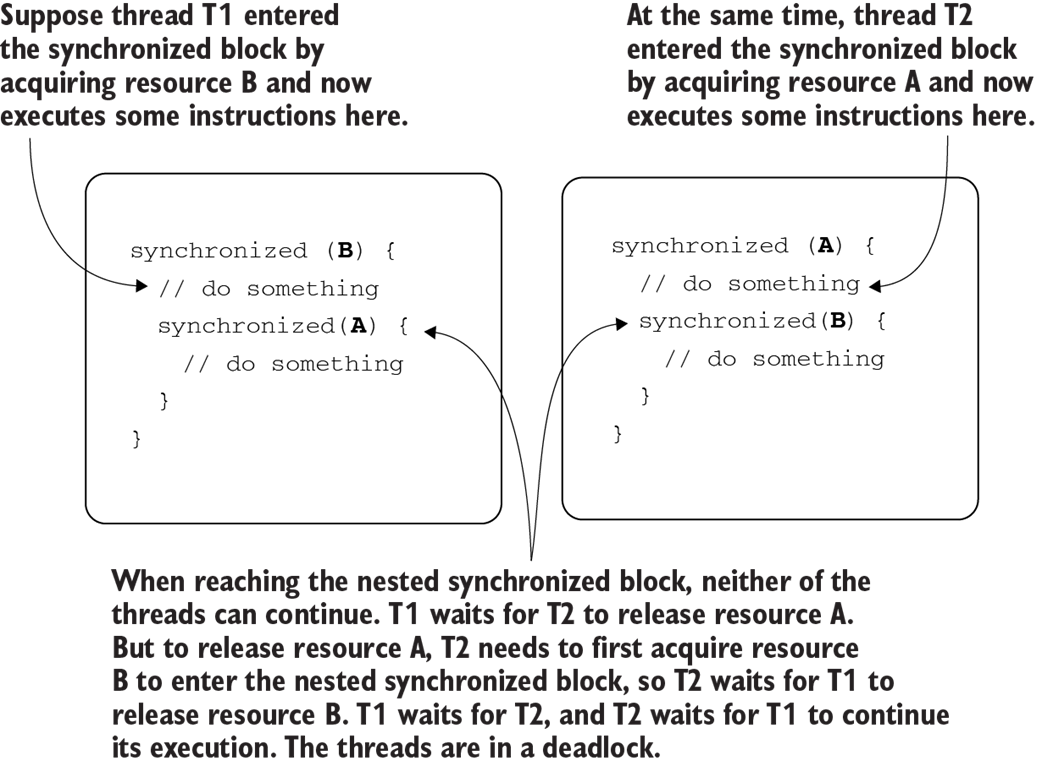
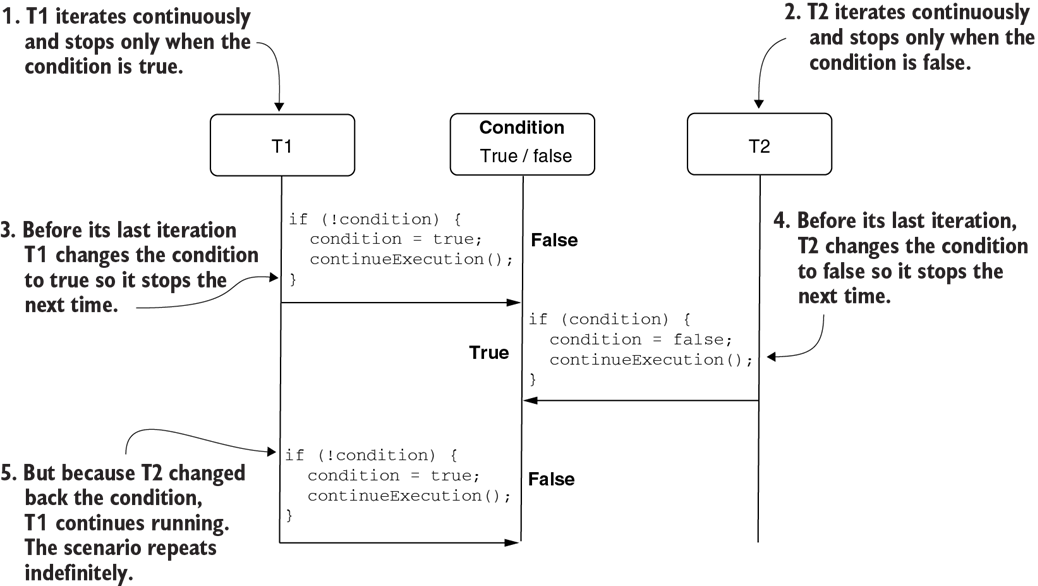
Figure D.15 An example of a livelock. Two threads rely on a condition to stop their execution. But when changing the value of the condition so that they can stop, each thread causes the other to continue running. The threads cannot stop, and thus unnecessarily spend the system’s resources.
D.5 Further reading
Threads are complex, and in this appendix we discussed the essential topics that will help you understand the techniques addressed throughout this book. But, for any Java developer, understanding how threads work in detail is a valuable skill. Here is a list of resources I recommend you read to learn about threads in depth:
- Oracle Certified Professional Java SE 11 Developer Complete Study Guide by Jeanne Boyarsky and Scott Selikoff (Sybex, 2020). Chapter 18 describes threads and concurrency, starting from zero and covering all the thread fundamentals OCP certification requires. I recommend you start with this book to learn threads.
- The second edition of The Well-Grounded Java Developer by Benjamin Evans, Jason Clark, and Martijn Verburg (Manning, 2022) teaches concurrency, from the fundamentals to performance tuning.
- Java Concurrency in Practice by Brian Goetz et al. (Addison-Wesley, 2006) is an older book, but it hasn’t lost its value. This book is a must-read for any Java developer wanting to improve their threads and concurrency knowledge.
FAQ
What is a thread in Java, and why use multiple threads?
A thread is an independent sequence of operations within a process. Using multiple threads lets an app run tasks concurrently (and potentially in parallel), improving responsiveness and throughput. An app starts on the main thread, which can launch others. The process ends only after all its threads finish.How does execution order differ within a single thread versus across threads?
Within one thread, instruction order is deterministic: earlier code runs before later code. Across threads, execution order is not guaranteed—interleavings may vary from run to run, so you can’t rely on one thread’s step happening before another’s unless you synchronize.What are the main states in a Java thread’s life cycle?
- New—Created but not started.
- Runnable—Eligible to run; JVM moves it between Ready (not executing) and Running (executing on a CPU).
- Blocked—Temporarily not runnable. Substates include Monitored (waiting for a synchronized monitor), Waiting (wait() called), Sleeping (Thread.sleep()), and Parked (park()).
- Dead—Terminated after finishing, failing with an Error/Exception, or being interrupted; cannot be restarted.
How do threads transition between states?
- new → runnable: call start().
- Within runnable: JVM switches between ready and running.
- Into blocked: sleep(), join(), wait(), or attempting to enter a synchronized block whose monitor is held.
- Back to runnable: timeouts expire, notify()/notifyAll()/unpark() happens, or a monitor becomes available.
- To dead: thread completes, fails, or is interrupted (interrupting a blocked thread results in an InterruptedException).
How does synchronized work, and what is a monitor?
Each synchronized block/method has a monitor (non-null object) that controls entry. A thread entering the block acquires the monitor; others must wait until it releases the lock on exit. For synchronized methods, the monitor is implicit: for instance methods, it’s this; for static methods, it’s the Class object.What happens if different synchronized blocks use the same vs. different monitors?
If two synchronized blocks share the same monitor object, they are mutually exclusive across both blocks—only one thread may execute in either at a time. If they use different monitors, they’re independent and can run simultaneously. Choose monitors carefully to avoid unintended coupling or insufficient protection.How do wait(), notify(), and notifyAll() work, and when should I use them?
They must be called inside a synchronized block on the monitor object. wait() blocks the current thread indefinitely and releases the monitor so others can enter; notify() wakes one waiting thread; notifyAll() wakes all waiting threads. Use them to pause work that can’t proceed yet (for example, producer–consumer). Misuse can cause deadlocks or threads waiting indefinitely.What does join() do, and when is it useful?
join() makes one thread wait until another finishes. It’s useful when a task depends on results produced by other threads (for example, parallel data retrieval followed by aggregation). Be cautious: if the joined thread hangs or never ends, the waiting thread won’t proceed. A timeout variant (join(timeout)) can limit waiting.When should I use sleep() versus wait()/notify() or timeouts?
sleep() pauses for a fixed time and doesn’t coordinate with other threads. Prefer wait()/notify() when your code can determine exactly when work can continue, and use wait(timeout) or join(timeout) for bounded waits. Relying on sleep() for coordination often leads to poor performance or flaky behavior.What are common multithreading issues I should watch for?
- Race conditions—Concurrent updates to a shared resource cause inconsistent results.
- Deadlocks—Threads wait on each other and make no progress.
- Livelocks—Threads keep running but never accomplish work due to constantly changing conditions.
- Starvation—A runnable thread never gets CPU or resources because others are always favored.

 Troubleshooting Java, Second Edition ebook for free
