24 Exploring data
This chapter introduces Python as a practical platform for exploring data, focusing on work in Jupyter with the pandas and matplotlib libraries. It highlights why Python is a strong choice for data tasks despite not being the fastest language: readability, a vast ecosystem (with optimized components like NumPy), and reduced developer effort. The text contrasts Python-based workflows with spreadsheets, noting spreadsheet limits (such as row caps and a rigid 2D model) and emphasizing Python’s flexibility to model complex, larger, or non-tabular problems using rich data structures and custom classes.
The core of the chapter centers on pandas and its DataFrame abstraction for tabular data. It shows how common steps—loading data from formats like CSV or JSON, standardizing missing values, selecting columns by name, and applying vectorized operations—become concise and consistent. Examples include converting problematic strings (like percentages) to numeric types, chaining transformations for efficient cleaning, and saving results back to common formats. Beyond cleaning, the chapter demonstrates how pandas simplifies joining related datasets, computing derived columns, filtering rows with expressive conditions, and performing descriptive summaries.
For deeper exploration, the chapter covers grouping and aggregation (such as sums and medians by month or territory) and illustrates straightforward plotting by leveraging matplotlib directly from DataFrames for quick bar and line charts in Jupyter. It closes with pragmatic guidance: pandas excels for many analytical workflows but comes with a learning curve and isn’t always the best fit—especially for very large, lightly processed datasets or data that doesn’t map well to tables. The overarching advice is to choose tools based on the problem, using pandas when it meaningfully streamlines exploration and sticking with plain Python or other solutions when it doesn’t.
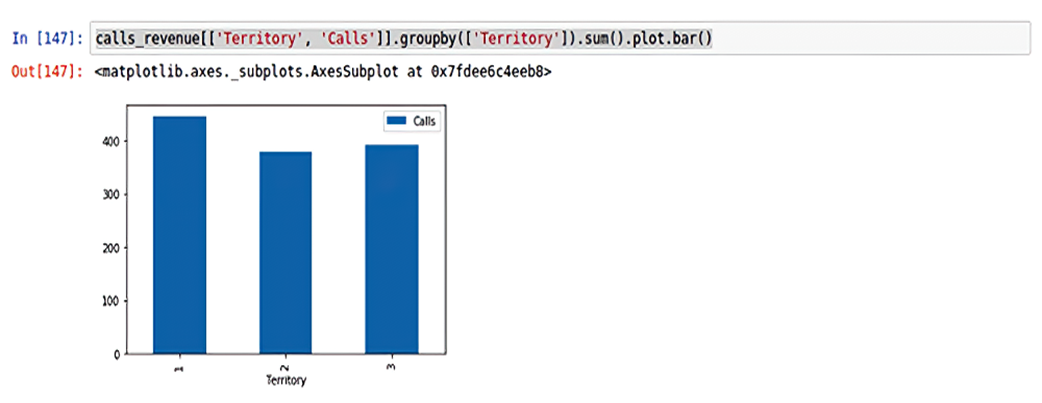
Bar plot of a pandas data frame in Jupyter notebook
Summary
- Python offers many benefits for data handling, including the ability to handle very large data sets and the flexibility to handle data in ways that match your needs.
- By allowing you to select, group and otherwise manipulate data elements, Python often gives you more powerful and flexible data operations than a spreadsheet.
- pandas is a tool that makes many common data-handling operations much easier.
- A dataframe is the structure pandas uses to manipulate data.
- pandas has methods for loading and saving data from files in several common data formats, including CSV and JSON.
- pandas operations on columns makes data cleaning easier, operating by column on all rows of the data.
- The pandas merge method allows you to combine dataframes on a shared field.
- pandas combined with mathplotlib also makes simple plottingeasy by allowing you to plot data with a single plot command.
- In spite of its many advantages, pandas may not always be the best choice, particularly for large data sets that aren’t suited to pandas or need near real time processing.
FAQ
What advantages does Python offer for exploring data compared to spreadsheets?
Python offers readability, a rich ecosystem (NumPy, pandas, matplotlib), and flexibility beyond a 2D grid. It handles larger datasets than typical spreadsheet row limits and lets you combine lists, dicts, sets, and custom classes to model complex data. Many numerical routines are optimized in C under the hood, so performance is often sufficient while saving developer time.What is pandas, and when is it a good (or poor) fit?
pandas is a library centered on the DataFrame, a 2D, table-like structure with powerful tools for loading, cleaning, transforming, aggregating, and visualizing tabular/relational data. It excels at repetitive, boilerplate data-wrangling tasks and integrates tightly with NumPy and matplotlib. It does have a learning curve and isn’t ideal for every situation (for example, very large non-tabular datasets, simple streaming pipelines, or cases where tabular structure isn’t natural).How do I install and set up pandas (and related tools) in Jupyter or Colab?
- Colab typically has pandas, NumPy, and matplotlib preinstalled.- In a terminal:
pip install pandas matplotlib- In a notebook cell:
!pip install pandas matplotlib- Common setup in Jupyter:
%matplotlib inline
import pandas as pd
import numpy as np
What is a DataFrame, and how do I create and select data?
- Create from a list of lists:df = pd.DataFrame([[1,2,3],[4,5,6],[7,8,9]], columns=["one","two","three"])- Select a single column:
df["two"]- Select multiple columns (returns a DataFrame):
df[["one","three"]]- Vectorized ops across columns/frames:
df.add(2), df["a"] + df["b"]How do I load and save data with pandas?
- Load:pd.read_csv("file.csv"), pd.read_json("file.json"); many other formats (spreadsheets, HTML, XML, SQL) often require extra libraries (for example, SQLAlchemy for databases).- Handle missing markers on load:
pd.read_csv("file.csv", na_values=["Missing","NA","?","-"])- Save:
df.to_csv("out.csv", index=False), df.to_json("out.json")How do I clean missing values and fix columns like percentages stored as strings?
- Standardize “no data” markers to NaN when reading:na_values=[...] in read_csv/read_json.- Convert "12.34%" strings to numeric fractions:
df["pct"] = (pd.to_numeric(df["pct"].str.strip("%")).div(100))How can I merge related datasets?
Usepd.merge with key columns, similar to SQL joins:merged = pd.merge(calls, revenue, on=["Territory","Month"])Supports inner (default), left, right, and many-to-many joins:
pd.merge(a, b, how="left", on=[...]).How do I filter rows and add computed columns?
- Boolean filtering (boolean indexing):df[df.Territory == 3]- Compound conditions:
df[(df.Amount/df.Calls) > 500]- Add a derived column:
df["Call_Amount"] = df.Amount / df.CallsHow do I aggregate and group data?
- Column summaries:df.Calls.sum(), .mean(), .median(), .min(), .max()- Group and aggregate:
df[["Month","Calls","Amount"]].groupby("Month").sum()df[["Territory","Calls","Amount"]].groupby("Territory").sum()How do I plot directly from a DataFrame in a notebook?
- Enable inline plots in Jupyter:%matplotlib inline- Plot examples:
df.groupby("Territory")["Calls"].sum().plot.bar()df.plot.line(), df.plot.pie()These are great for quick visuals; for advanced styling/layouts, use matplotlib directly or specialized viz libraries.

 The Quick Python Book, Fourth Edition ebook for free
