21 Processing data files
This chapter lays out a practical, end-to-end approach to processing data files with Python through the ETL (extract-transform-load) pattern. It begins by framing common challenges encountered during extraction—large files that require streaming line by line and inconsistent or unknown encodings—and shows why UTF-8 is the safest default in modern workflows. It explains how to handle decoding problems with error strategies (ignore, replace, backslashreplace, surrogateescape) and then moves from unstructured text to basic normalization techniques (deciding logical units like paragraphs or lines, lowercasing, stripping punctuation) to prepare text for reliable downstream analysis.
For structured text, the chapter contrasts rolling your own splits with using the csv module, emphasizing csv’s robustness with delimiters, quoting, and newlines, and demonstrating both list-based reading and DictReader for name-based access (with a performance caveat). It then covers reading spreadsheet files using openpyxl: loading workbooks, iterating rows, and extracting cell values, while cautioning about spreadsheet pitfalls such as row limits and auto-formatting (for example, interpreting strings as scientific notation). The guidance favors CSV or other delimited formats when possible for simpler, safer pipelines.
The “transform” and “load” portions focus on cleaning, sorting, and writing data. Cleaning includes converting types, replacing sentinel strings like “Missing,” parsing percentages, and standardizing dates; sorting strategies range from in-memory list sorting with keys to external tools for very large files. The chapter offers debugging and data-quality tips (watch whitespace, nulls, punctuation, and break complex operations into clear steps), then shows how to write out CSV with csv.writer or DictWriter, create Excel files with openpyxl, and optionally package outputs in archives. A concluding lab applies the techniques to real weather data: filtering for Cook County, normalizing missing values and percentages, and stopping at a marker line, reinforcing the practical workflow from messy input to clean, reusable output.
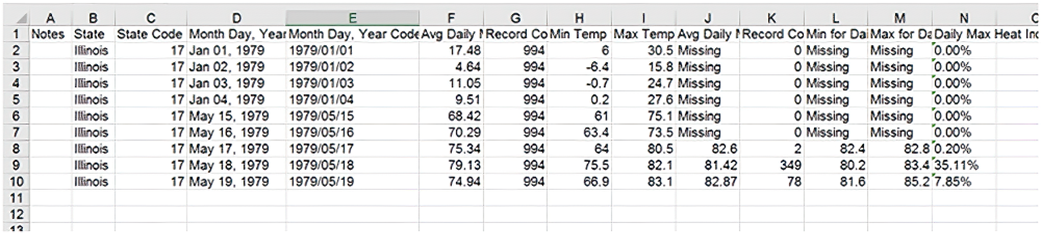
A view of the previous data now shown in spreadsheet format
Summary
- ETL (extract-transform-load) is the process of getting data from one format, making sure that it’s consistent, and then putting it in a format you can use. ETL is the basic step in most data processing.
- Encoding can be problematic with text files, but Python lets you deal with some encoding problems when you load files.
- The most common way to handle a wide range of characters in simple text files is to encode them in the Unicode UTF-8 encoding.
- Delimited and CSV files are common, and the best way to handle them is with the csv module.
- Spreadsheet files (in Excel format) can be more complex than CSV files but can be read and written with third party libraries.
- Currency symbols, punctuation, and null characters are among the most common data cleaning issues; be on the watch for them.
- Cleaning and presorting your data file can make other processing steps faster.
- Writing data in the formats discussed is similar to reading them.
FAQ
What is ETL, and how does it map to Python-based data-file processing?
ETL stands for Extract-Transform-Load. In this chapter: Extract means opening sources (text, CSV, Excel) and parsing records; Transform covers cleaning, normalizing, type conversion, reorganizing, and sorting; Load is writing cleaned data back out (CSV/Excel) or into databases. In Python you’ll typically use open() and iterators for text, the csv module for delimited files, openpyxl for Excel, and then write results with csv or openpyxl.How should I read very large text files that don’t fit in memory?
- Stream instead of reading everything: iterate line by line (for line in open(path, encoding="utf-8")).- Process in chunks if needed (batches).
- Avoid building giant lists unless necessary; prefer generators/pipelines.
- Use with for safe file closing.
Which text encoding should I assume, and how do I handle bad bytes?
Default to UTF-8: open(path, encoding="utf-8"). If bad bytes appear, choose errors handling to fit your needs: errors="strict" (raise), "ignore" (drop), "replace" (marker), "backslashreplace" (escape sequence), or "surrogateescape" (round-trip unknown bytes). Pick strictness based on data quality and downstream requirements.How can I break unstructured text into paragraphs and words and normalize it?
- Paragraphs: split on blank lines, e.g., text.split("\n\n").- Words: lowercase (s.lower()), remove punctuation (str.translate or regex), then split on whitespace.
- Normalize before counting/searching so variants like “This/this/this.” match consistently.
When should I use the csv module instead of str.split for delimited files?
Use csv for anything beyond the simplest cases. It correctly handles quoting, embedded delimiters, and newlines. Example: csv.reader(open(path, newline=""), delimiter="|") will split fields, strip newlines, and respect quotes. Hand-rolled split() breaks when fields contain the delimiter or quotes.How do I read CSV rows as dictionaries, and what are the trade-offs?
Use csv.DictReader(open(path, newline="")). Each row is a dict keyed by header names, which improves clarity and reduces indexing mistakes. Trade-off: some overhead—typically about 2x slower than list rows on large files—so choose based on scale and readability needs.What are common data-cleaning steps for text-based files?
- Trim whitespace, normalize case, remove/control punctuation.- Convert types: dates, ints, floats (strip % then divide by 100).
- Handle sentinel values (e.g., replace "Missing" with "" or None).
- Watch for null bytes and odd encodings.
- Clean as you read to keep logic localized and reproducible.
How can I sort data effectively, including large files?
For in-memory: read lines/records, then list.sort() or sorted(), optionally with a key (e.g., key=str.lower or key=lambda r: r[5:]). For very large files, consider external tools (e.g., UNIX sort) or multi-pass/merge strategies. Keep key functions simple for performance.What’s the recommended way to read and write Excel files?
Prefer CSV when possible (simpler, fewer surprises, scale-friendly). For .xlsx, use openpyxl: load_workbook(), choose a worksheet, iterate ws.iter_rows(), and use cell.value. When writing, create Workbook(), ws.append(rows), wb.save(). Be aware of Excel nuances (row limits, automatic scientific notation like 1E20).How do I write clean output files (CSV/Excel) for downstream use?
- CSV: use csv.writer(open(path, "w", newline="")). For dicts, use csv.DictWriter with fieldnames and writeheader(). The module will quote fields as needed.- Excel: with openpyxl, create a Workbook, append rows, and save. Add formatting only if required.
- If delivering multiple or large files, consider packaging in a zip archive.

 The Quick Python Book, Fourth Edition ebook for free
