As Python codebases grow, packages provide a scalable way to organize related modules into coherent, navigable structures. A package is a directory hierarchy on disk whose names map directly to dotted Python paths, letting you split functionality across files while keeping a clear namespace. Packages generalize modules: they can expose attributes, run initialization code the first time they’re imported, and act as the unit for grouping and distributing functionality, while remaining distinct from the separate topic of building distributable archives.
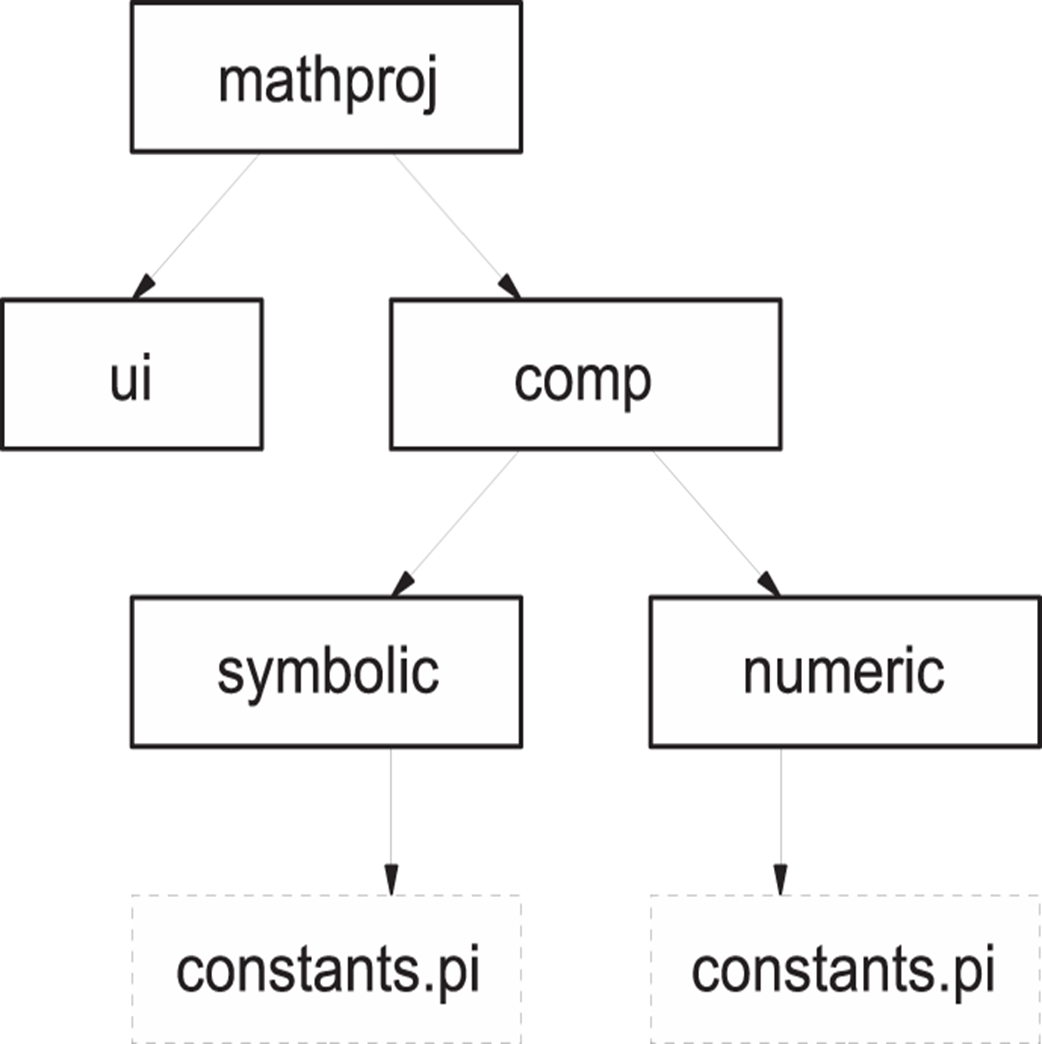
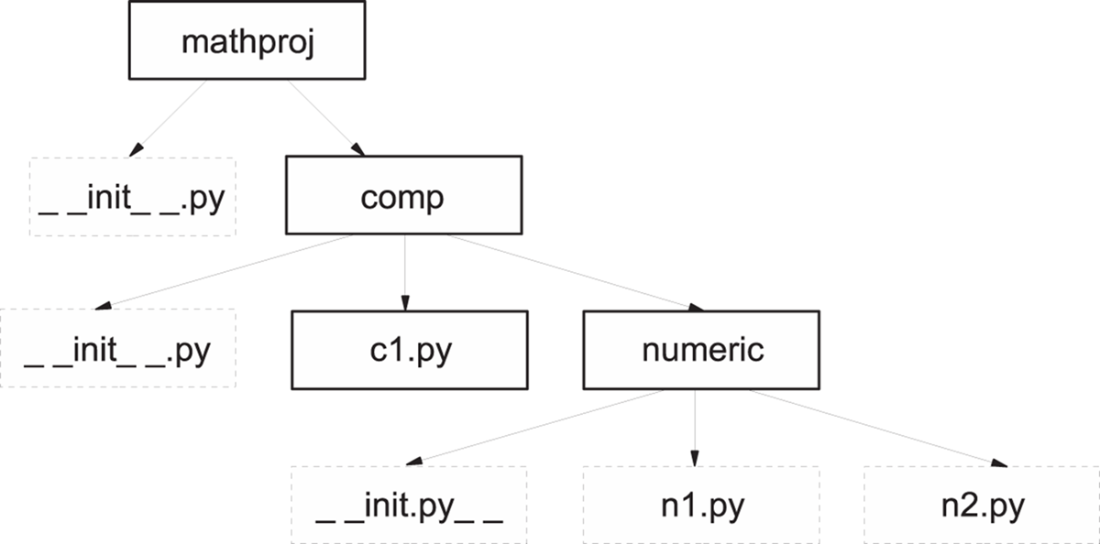
A concrete example, mathproj, shows a top-level package split into ui and comp, with comp further divided into symbolic and numeric subpackages—even allowing the same module name (such as constants.py) to define different objects that are disambiguated by their full package paths. The __init__.py files both mark directories as packages and execute initialization on first import (for example, setting attributes or printing load messages). Import behavior is explicit: importing a top-level package doesn’t automatically load subpackages or submodules, and files within a package must still import what they use. Absolute and relative imports both work (relative imports rely on the module’s __name__ and don’t work from a __main__ module). The __all__ attribute controls what names are imported by from package import *, but it doesn’t recurse into subpackages.
Good practice favors shallow hierarchies (“flat is better than nested”) and clear visibility rules: don’t rely on __all__ to hide names; instead, use leading underscores for nonpublic objects. The chapter’s lab reinforces these principles by refactoring a single-module text-processing solution into a package with separate modules for cleaning, processing, and optional exceptions, and an __init__.py that re-exports a convenient API. The discussion highlights practical concerns—like running examples in fresh sessions to avoid stale imports—and cautions that AI-assisted refactors may need careful prompting and minor manual fixes (such as missing imports), while the essential skill remains designing a maintainable, well-structured package layout.
A math package, split into ui and comp components, with symbolic and numberic elements in the components.
Example math package with __init__.py files added.
Summary
Packages let you create libraries of code that span multiple files and directories.
Using packages allows better organization of large collections of code than single modules would allow.
An __init__.py causes its folder to be recognized by Python as package and is executed when the package is imported.
Subpackages need to be explicitly imported, either in your code or in the package __init__py.
You should be wary of nesting directories in your packages more than one or two levels deep unless you have a very large and complex library.
The __all__ attribute can be used to hide elements from a wildcard import, but it’s better to explicitly make them private by beginning their names with a “_”.
FAQ
What is a Python package, and how is it different from a module?A module is a single file containing code; a package is a directory that groups related modules (and possibly subdirectories). The package name comes from the directory name, while a module’s name comes from its file name. Packages scale the module concept to organize very large projects.How does a package’s directory layout map to importable names?Import paths mirror directories. For example, with a top-level directory mathproj containing comp/numeric and comp/symbolic, you can access items as mathproj.comp.numeric.n1, mathproj.symbolic.constants.pi, or mathproj.numeric.constants.pi. This lets files with the same module name (like constants.py) coexist in different subpackages without conflict.What does an __init__.py file do in a package?It serves two purposes: (1) marks a directory as a package so it isn’t accidentally imported, and (2) runs automatically the first time that package is imported, allowing initialization code. Many packages can use an empty __init__.py, but you can also set attributes (for example, version) or define __all__ there.Does importing the top-level package automatically load all subpackages and submodules?No. Importing mathproj does not automatically import mathproj.comp or mathproj.comp.numeric.n1. You must explicitly import subpackages/submodules you need, which keeps imports predictable and avoids hidden work.How do imports within a package work (absolute vs. relative)?Modules inside a package must still import what they use. Absolute imports work everywhere, for example: from mathproj import version and from mathproj.comp.numeric.n2 import h. Relative imports are shorter and package-aware, for example: from .n2 import h, from .. import c1, or from ... import version.When can relative imports not be used?Relative imports depend on the module’s __name__. If a module is executed as the main program (its __name__ is "__main__"), relative imports like from .n2 import h will fail. Run such modules via the package (or use absolute imports) instead.What is the __all__ attribute, and how does it affect “from package import *”?__all__ is a list of names that defines what gets imported for from package import *. If __all__ is absent in a package’s __init__.py, that star import does nothing for that package. Star imports are not recursive; importing names from a subpackage still requires explicit imports.What happens when importing a deep submodule like mathproj.comp.numeric.n1?Python first imports parent packages (mathproj.comp, then mathproj.comp.numeric) before loading the submodule, executing each parent’s __init__.py along the way. Any side effects in those __init__.py files (for example, print statements) will run once when they are first imported.What are recommended practices for organizing packages?- Prefer a flat or shallow hierarchy; deep nesting is rarely necessary. As the Zen of Python says, “Flat is better than nested.”
- Don’t rely on __all__ to hide names; make non-public names start with an underscore instead.Is a “package” on PyPI the same as a code package discussed here?People also use “package” to mean a distributable artifact (for example, a wheel) that bundles modules/packages for upload to PyPI. Creating such distributions involves packaging tools and is outside this chapter’s scope. For guidance, see the Python Packaging User Guide: https://packaging.python.org/en/latest/
pro $24.99 per month
access to all Manning books, MEAPs, liveVideos, liveProjects, and audiobooks!

 The Quick Python Book, Fourth Edition ebook for free
