10 Modules and scoping rules
Python modules are simply files that group related code and data, making programs easier to organize, reuse, and maintain. Each module has its own namespace, which prevents name clashes and lets different modules define the same identifiers without conflict. The chapter introduces how modules underpin the standard library and typical projects, explains that modules can be Python source or compiled extensions, and emphasizes qualified access to keep names unambiguous. It also frames the broader topic of namespaces and scoping—local, global, and built-in—which determine how names are resolved at runtime.
Practically, the chapter walks through creating a first module, importing it, and accessing its attributes via qualification. It compares the three import forms—import modulename, from modulename import name, and from modulename import *—highlighting clarity, potential name collisions, and how __all__ and leading underscores control what gets imported. It covers development workflows such as reloading code with importlib.reload, bytecode generation, and using modules from scripts as well as interactively. You also learn how Python finds modules via sys.path, how PYTHONPATH and .pth files modify the search path, and where to place your own modules so they’re reliably importable.
The scoping section explains how Python binds names and searches them in local, then global, then built-in namespaces, with functions creating their own local scope independent of call sites. It illustrates common pitfalls like shadowing built-ins or previously bound names, and shows simple diagnostic tools—globals(), locals(), dir(), and del—to inspect and manage bindings. The chapter also demonstrates marking internal names as private with leading underscores, notes the breadth of the standard library and the availability of third-party packages, and concludes with a lab that packages earlier functions into a standalone module. Along the way it addresses practical notebook and tooling issues: uploading or generating module files, preserving literal newlines when writing code strings, remembering needed imports, and reloading a module after changes.
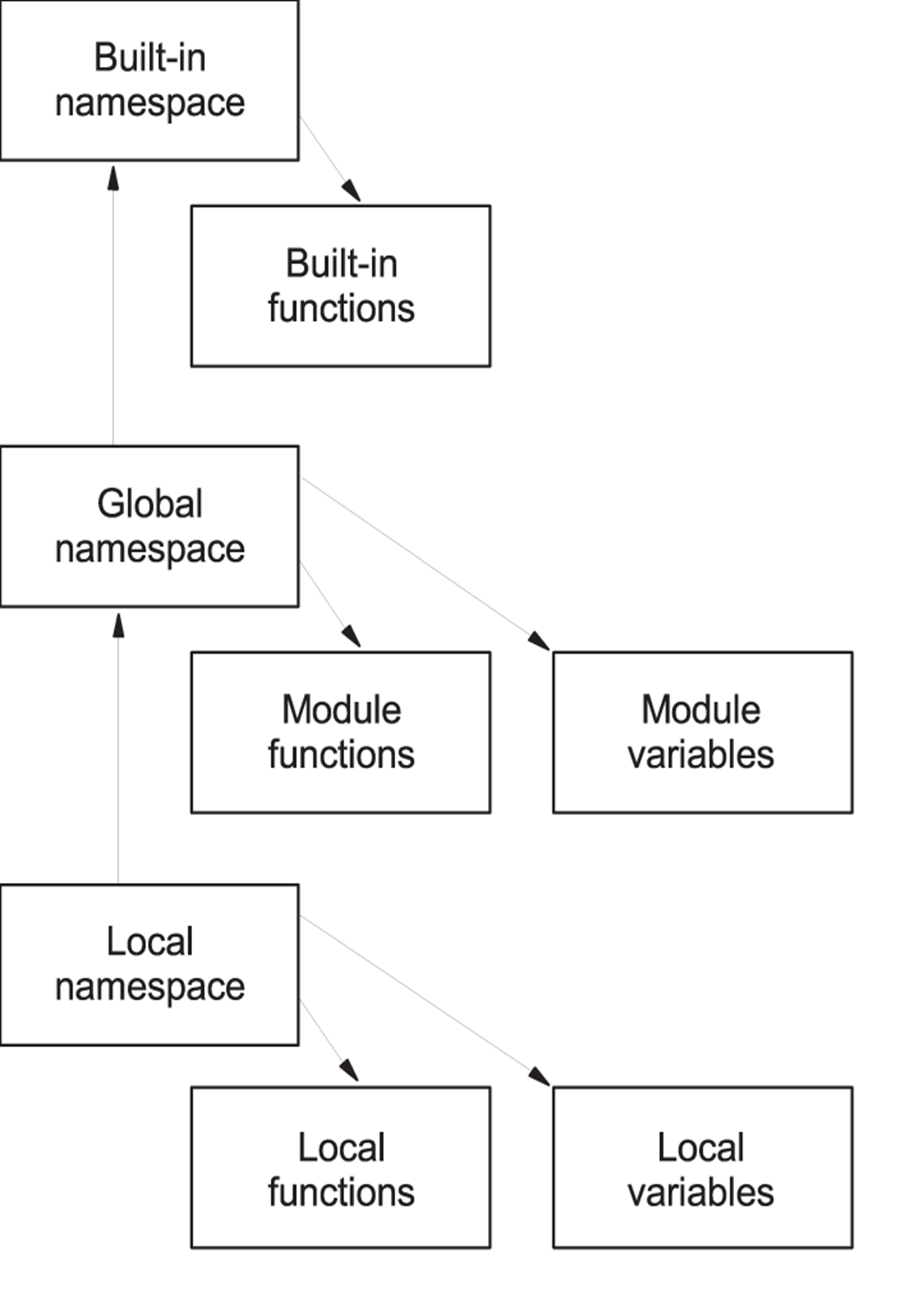
The order in which namespaces are checked to locate identifiers
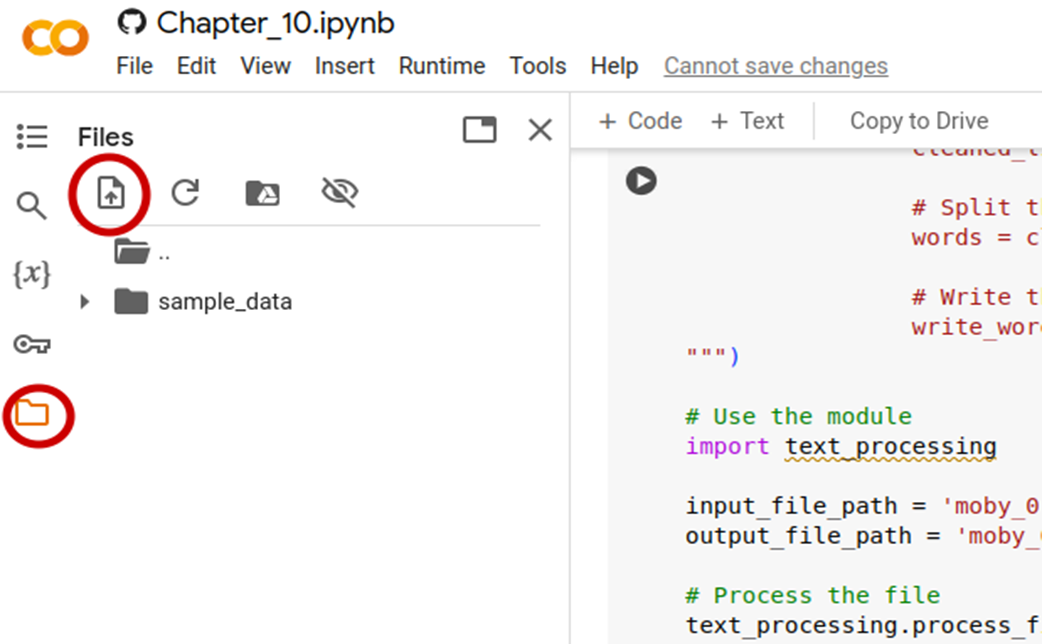
The file and upload icons in Colaboratory.
Summary
- Python modules allow you to put related code and objects into a file.
- Using modules also helps prevent conflicting variable names, because imported objects are normally named in association with their module.
- import can be used to import an entire module or to access specific elements in a module.
- Elements whose names begin with an underscore are not imported by from module import *.
- A namespace is the dictionary that connects objects and their names for a particular scope.
- Something in global scope is accessible everywhere in the module.
- Something in local scope is only accessible in the immediately enclosing namespace.
- Objects in the built-in namespace are always accessible
FAQ
What is a Python module and why should I use one?
A module is a file (commonly with a .py extension) that groups related code—functions, classes, constants—under a single name. Modules help you organize larger programs, enable code reuse, and prevent name clashes because each module has its own namespace (for example, you can have bothmymodule.reverse and othermodule.reverse in the same program).Why do I get NameError after import mymath when I type pi?
import mymath loads the module but does not place its names directly in your current namespace. You must qualify them, for example mymath.pi and mymath.area(2). To access names without qualification, import them explicitly with from mymath import pi (or similar).What are the differences among import modulename, from modulename import name, and from modulename import *?
- import modulename: Access with qualification (e.g., modulename.name); safest and most readable.
- from modulename import name1, name2: Brings specific names into your namespace; convenient for frequently used names.
- from modulename import *: Imports all public names; can cause name clashes and obscures where names come from. Often discouraged except in interactive use. If the module defines __all__, that list controls what gets imported.How can I reload a module after I’ve edited it?
Python loads each module once per session. To pick up changes without restarting, useimport importlib then importlib.reload(mymodule). Alternatively, restart your interpreter/notebook session.Where does Python look for modules and how do I inspect the search path?
Python searches directories insys.path (in order). Inspect it with import sys; sys.path. In scripts, the script’s directory is inserted first; in interactive sessions, the first entry is an empty string meaning “current directory.” If a module isn’t found, you’ll get ModuleNotFoundError/ImportError.What are good ways to make my own modules importable?
- Put them in the same directory as the script that imports them. - Add a directory to the search path via thePYTHONPATH environment variable (prepends to sys.path).
- Use a .pth file to append directories to the site search path.
Avoid placing custom code inside Python’s install directories unless there is a designated site-specific area. Be careful not to name your module the same as a standard library module.How do “private” names in modules work? What does a leading underscore do?
Names starting with an underscore (e.g.,_helper) are excluded from from module import *. They can still be accessed via qualification (e.g., module._helper) or imported explicitly (from module import _helper). A module can also define __all__ to control which names are exported by import *.What are namespaces and how does Python resolve names?
A namespace maps identifiers to objects. During execution, Python looks up names in this order: local, then global (module-level), then built-in. Functions create their own local namespace. You can inspect current bindings withlocals() and globals(), and list names with dir().What happens if I shadow a built-in or a module name, and how do I recover?
If you bind a name likelist to a variable, you hide the built-in function of the same name, causing errors like “object is not callable.” Avoid reusing names of built-ins and modules. To recover in an interactive session, del the conflicting name (e.g., del list) and re-import the module if needed.How do I create and use modules in Google Colab (or similar notebooks)?
Write the module code to a file in the current session (e.g.,open("mymodule.py","w").write("...")) or upload the file via the file browser. If your written code contains backslash escapes like '\n', consider using a raw triple-quoted string (prefix with r) to avoid unintended newlines. After editing, use importlib.reload(mymodule) or restart the runtime to pick up changes.
 The Quick Python Book, Fourth Edition ebook for free
