Chapter 7. Testing, deployment, and operations in the cloud
The chapter explains how cloud computing changes the way software is deployed, tested, and operated by replacing fixed, underused environments with on-demand resources. It contrasts traditional production, staging, testing, and development setups with the cloud model, showing how organizations used to overbuy hardware to mimic production and still often ended up with smaller, less representative test systems. In the cloud, those environments can be created, copied, and torn down as needed, reducing waste while making it easier to match production more closely.
A major theme is that the cloud improves operations through elasticity, automation, and faster recovery. It helps teams respond to traffic spikes, expand bandwidth and storage without large upfront investments, and recover from hardware failures by replacing instances quickly rather than waiting on manual repairs. The chapter emphasizes that these benefits depend on automation: software must be packaged, provisioned, and scaled with minimal manual intervention if teams want to take full advantage of cloud infrastructure.
The chapter also shows how cloud resources accelerate every major type of testing. Unit tests can run faster by using multiple cores and parallel build agents, functional tests can be sped up by distributing browser-based execution across browser farms, and load testing becomes far more practical because large pools of generators are cheap and easy to obtain on demand. Cross-browser visual testing and manual QA are also improved through specialized cloud services and crowd-sourcing platforms, allowing teams to scale both machines and people in parallel. Overall, the chapter argues that combining cloud infrastructure with automation and distributed testing practices can dramatically shorten feedback cycles and move teams closer to continuous deployment.
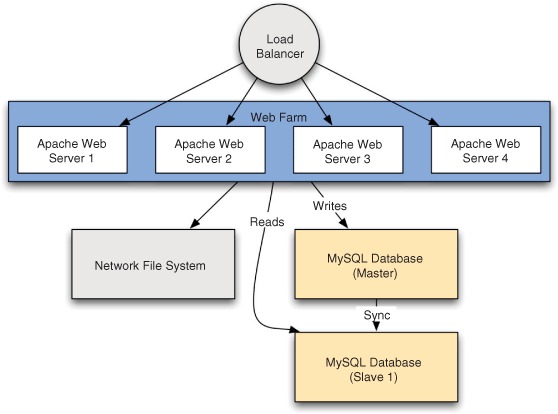
A typical production environment, which includes four web servers, a load-balancer, two database servers, and a networked file server, which hosts files shared to all four web servers
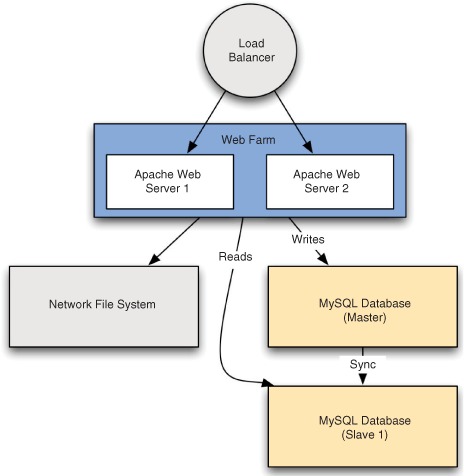
A staging environment to match the production environment in figure 7.1
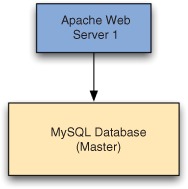
A simple testing environment with a single web server and single database
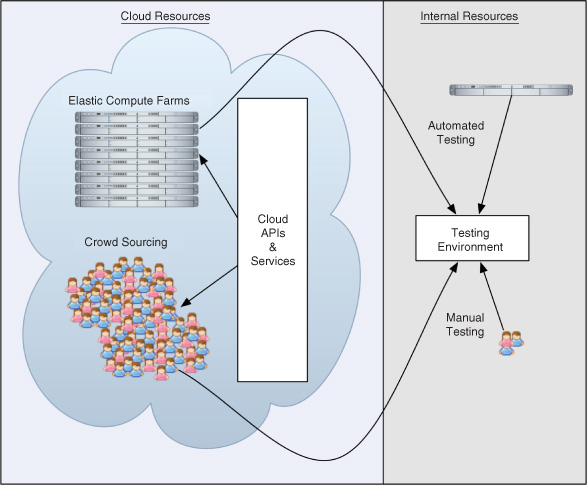
How cloud resources can augment internal resources (personnel and hardware) for testing. Instead of a small staff being responsible for all manual testing, a crowd-sourcing scenario is backed up by a potentially vast number of virtual servers in an elastic compute farm.
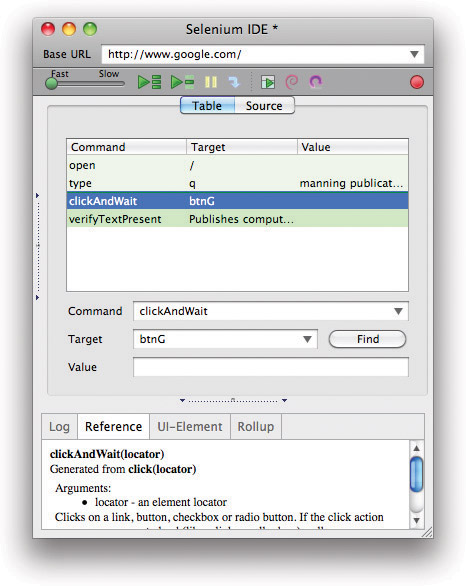
Selenium IDE after recording a Google search
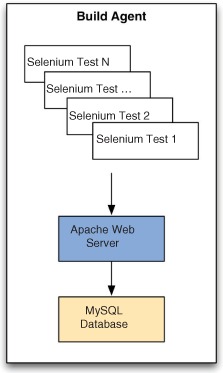
A typical Selenium test suite running on a CI build agent that includes an Apache web server and a MySQL database
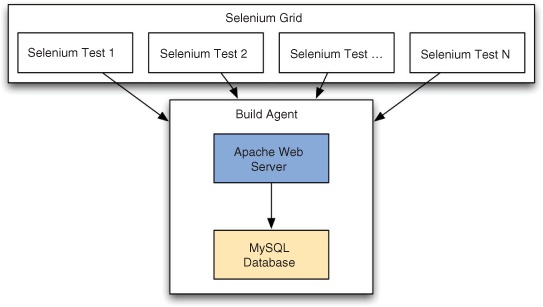
Selenium tests running in parallel against a single test environment on a CI build agent
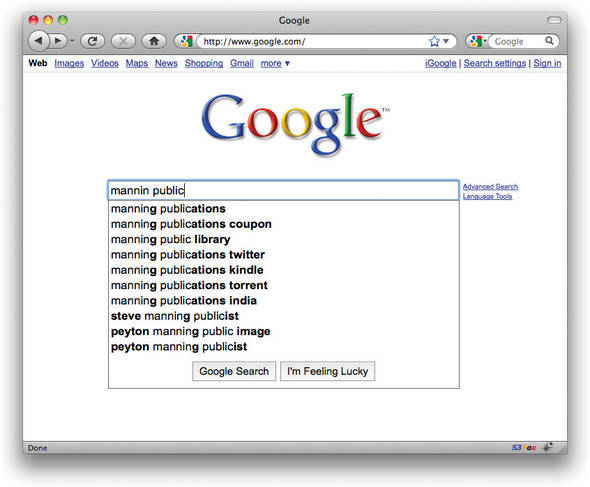
Demonstration of Google’s Ajax-based autocomplete functionality
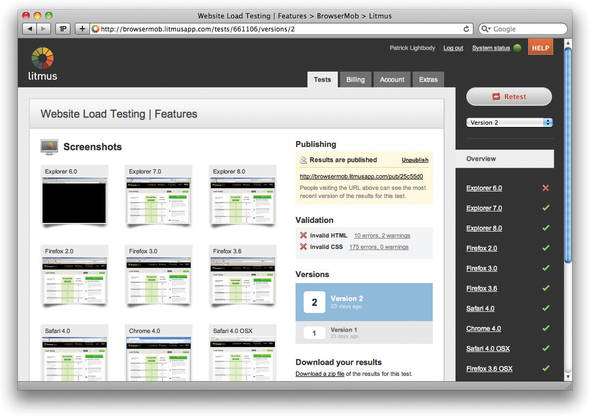
Litmus provides cross-browser testing services entirely hosted in the Amazon cloud.
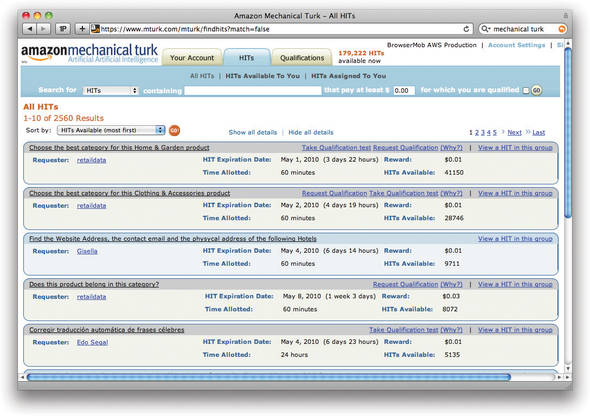
The view a “worker” sees when logging in to Amazon Mechanical Turk
FAQ
What are the main software deployment environments discussed in this chapter?The chapter describes four common environments: production, staging, testing, and development. Production is customer-facing, staging mirrors production for final checks, testing is a smaller environment for QA work, and development is where code is initially written and debugged.Why is testing considered a good fit for cloud computing?Testing is a “spiky” activity: it happens in bursts rather than continuously. Because cloud resources can be turned on only when needed, the cloud helps teams avoid paying for idle hardware and makes it easier to scale testing capacity quickly.How does the cloud improve traditional deployment models?The cloud reduces the need to buy separate physical machines for staging and testing, allows environments to be created and destroyed quickly, and makes it easier to match production-like setups without large upfront hardware costs.What cost advantage does the cloud offer for staging and testing environments?Instead of buying hardware that sits idle much of the time, teams can rent cloud infrastructure only for the hours they need it. In the chapter’s example, cloud-based staging and testing can cost far less than owning equivalent physical servers.How does the cloud help with production operations?The cloud helps production systems scale to sudden traffic spikes, provides elastic bandwidth and storage, and makes it easier to respond to hardware failures by replacing instances quickly rather than waiting for physical repairs.Why is automation important for cloud-ready operations?Cloud benefits are strongest when deployment and maintenance are automated. If teams still rely on manual steps to configure servers, install software, or add machines to load balancers, they cannot take full advantage of cloud elasticity and speed.How does cloud computing speed up unit testing and continuous integration?Unit tests can run in parallel across CPU cores, and CI systems can dynamically add build agents in the cloud when queues grow. This reduces wait times and helps teams get feedback much faster.How does the cloud improve functional testing with tools like Selenium?Functional tests can be distributed across a browser farm in the cloud, letting many browser sessions run in parallel. This can reduce a long test suite from hours to minutes and make continuous functional testing practical.What makes cloud-based load testing especially valuable?Load testing is highly bursty, often requiring many machines for short periods. The cloud makes it affordable to spin up large numbers of load generators on demand, enabling realistic performance tests without owning dedicated hardware.How can the cloud and crowd be used together in testing?Beyond machines, the chapter highlights using crowd-sourcing services such as Mechanical Turk and uTest to add human testers on demand. This helps with manual, usability, and visual testing, giving teams temporary access to more people without hiring permanent staff.
pro $24.99 per month
access to all Manning books, MEAPs, liveVideos, liveProjects, and audiobooks!

 The Cloud at Your Service ebook for free