Overview

Chapter 2. Understanding cloud computing classifications

This chapter explains cloud computing by breaking it down into the core technologies and service models that make it work. Using a vehicle analogy, it shows how data centers provide the engine, virtualization smooths out resource use, APIs act as controls, storage holds persistent data, databases support application state, and elasticity lets capacity expand or contract as needed. The big idea is that cloud computing is not just remote servers, but a coordinated system of infrastructure, software, and automation that enables efficient, on-demand computing at large scale.

A major focus is on why cloud providers can operate so efficiently. Massive data centers benefit from economies of scale in power, cooling, hardware purchasing, and location strategy, while modular designs make them even more flexible and cost-effective. Virtualization is presented as the key breakthrough that raised server utilization and made cloud economics viable. The chapter also explains how cloud APIs let users provision and manage resources remotely, how cloud storage supports files and application data, and why traditional relational databases often struggle to scale in cloud environments, leading to key-value and other NoSQL approaches.

The chapter then compares major cloud classifications and providers. Amazon EC2 is presented as the leading infrastructure service, Microsoft Azure as a hybrid of infrastructure and platform services, and Google App Engine as a highly automated platform for web applications. Ruby on Rails hosting and Salesforce Force.com are discussed as specialized platform options, while private clouds are treated as a smaller-scale, organization-owned alternative with important limitations. The chapter closes by stressing that choosing a cloud requires matching the provider and model to the application’s needs, especially considering scalability, control, lock-in, and the tradeoff between flexibility and simplicity.

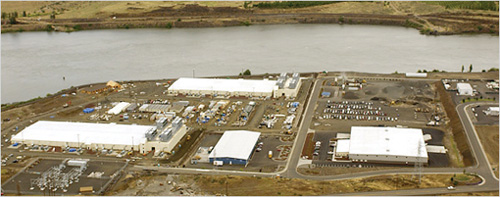
Photograph of Google’s top-secret Dalles, OR data center, built near the Dalles Dam for access to cheap power. Note the large cooling towers on the end of each football-sized building on the left. These towers cool through evaporation rather than using more power-hungry chillers. Source: Melanie Conner, New York Times.
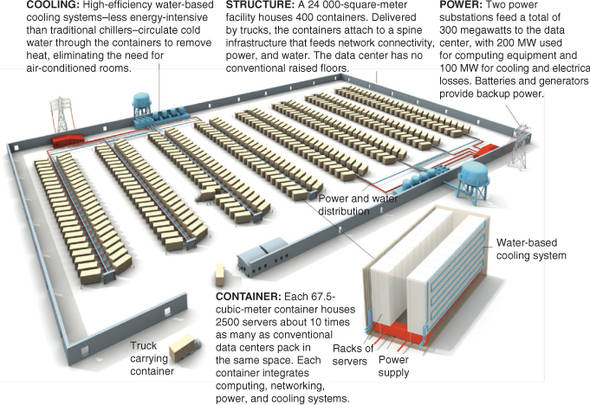
Expandable, modular cloud data center. Notice there is no roof. New containers with servers, power, cooling and network taps can be swapped in and out as needed. Source: IEEE Spectrum magazine.
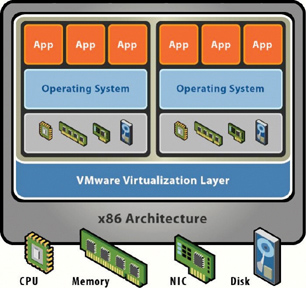
Virtual machine architecture using VMware as an example. The virtualization layer is what interfaces directly with all hardware components, including the CPU. That layer then presents each guest operating system with its own array of virtual hardware resources. The guest OS doesn’t operate differently than it would if installed on the bare hardware, but now several instances of guest OSs with all their applications can share a single physical device and have higher effective utilization. Source: VMWare.
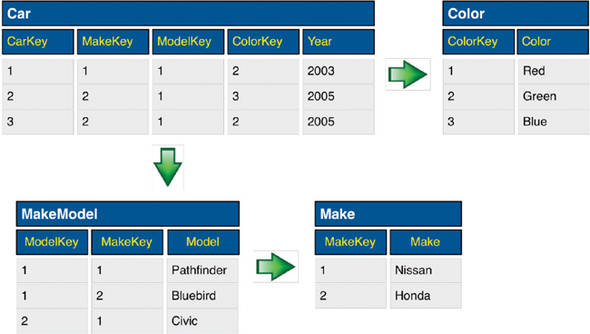
A simple example of how a relational database works. Four tables map out relationships among the data. Because a separate table lists the car manufacturers and colors, there is no need to separately list a red Nissan and a blue Nissan. But to fully understand what the car with CarKey 1 is, you must do a join of the Car, Color, MakeModel, and Make tables.
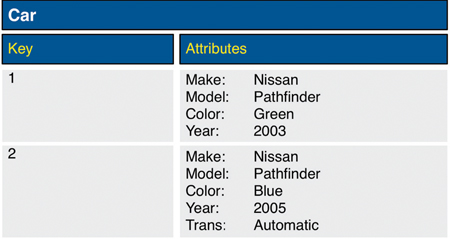
The same data as in figure 2.4, shown for a key-value type of database. Because all data for an item (row) is contained in that item, this type of database is trivial to scale because a data store can be split (by copying some of the items) or replicated (by copying all the items to an additional data store), and referential integrity is maintained.
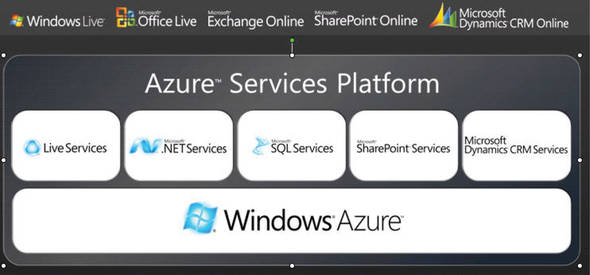
The Windows Azure architecture and framework. At the bottom level is the Windows Azure operating system. This runs in the virtualization environment created by Microsoft’s Hypervisor running on bare hardware. At the top layer are end-user applications, which Microsoft is recasting to be delivered as SaaS. Source: Microsoft.
FAQ

What are the six most critical technological underpinnings of cloud computing discussed in this chapter?The chapter identifies six core underpinnings: data centers, virtualization, access APIs, storage, databases, and elasticity. Together, these make cloud computing practical, scalable, and remotely manageable.
Why are large cloud data centers so important to cloud economics?Cloud data centers create economies of scale through massive hardware purchasing, cheaper power, efficient cooling, and geographic placement near users and low-cost energy. These factors lower the cost per compute operation compared with traditional corporate data centers.
How does virtualization enable cloud computing?Virtualization lets multiple virtual machines share a single physical server efficiently, greatly increasing server utilization. It is a key enabler of cloud economics because it allows resources to be allocated dynamically and on demand.
Why does a cloud need an API?An API gives users a remote way to provision, configure, control, and release cloud resources. Without an API, users could not manage cloud services over the network in the automated way cloud computing requires.
What role does cloud storage play in a cloud environment?Cloud storage provides persistent space for machine images, applications, backups, and data. It supports on-demand storage access over the network and is often billed based on usage and data transfer.
Why do traditional relational databases often struggle in cloud environments?Relational databases are difficult to scale because they depend on joins, shared tables, and referential integrity, which become hard to maintain when data is partitioned or replicated across many servers. This limits their ability to support highly elastic cloud workloads.
What is the advantage of NoSQL or key-value databases in the cloud?NoSQL and key-value databases scale horizontally more easily because data is stored in item-oriented form and does not rely heavily on joins. This makes them better suited for large-scale, distributed cloud applications.
What is elasticity in cloud computing?Elasticity is the ability of a cloud application to expand and contract capacity automatically as demand rises and falls. It helps applications handle traffic spikes without wasting resources during quieter periods.
How does Amazon EC2 differ from Google App Engine?Amazon EC2 is primarily Infrastructure as a Service, giving users more control but requiring them to manage scaling and configuration themselves. Google App Engine is Platform as a Service, with more automatic scaling and a more controlled application environment.
When should an organization consider a private cloud instead of a public cloud?A private cloud may be considered when an organization wants more control over its data or needs an internal hosted service behind a firewall. However, the chapter notes that private clouds are often smaller scale and may not match the efficiency or innovation of public cloud providers.

pro $24.99 per month

  • access to all Manning books, MEAPs, liveVideos, liveProjects, and audiobooks!
  • choose one free eBook per month to keep
  • exclusive 50% discount on all purchases
  • renews monthly, pause or cancel renewal anytime

lite $19.99 per month

  • access to all Manning books, including MEAPs!

team

5, 10 or 20 seats+ for your team - learn more


Close
choose your plan

team

monthly
annual
$49.99
$499.99
only $41.67 per month
  • five seats for your team
  • access to all Manning books, MEAPs, liveVideos, liveProjects, and audiobooks!
  • choose another free product every time you renew
  • choose twelve free products per year
  • exclusive 50% discount on all purchases
  • renews monthly, pause or cancel renewal anytime
  • renews annually, pause or cancel renewal anytime
  • The Cloud at Your Service The Cloud at Your Service ebook for free

Close
choose your plan

team

monthly
annual
$49.99
$499.99
only $41.67 per month
  • five seats for your team
  • access to all Manning books, MEAPs, liveVideos, liveProjects, and audiobooks!
  • choose another free product every time you renew
  • choose twelve free products per year
  • exclusive 50% discount on all purchases
  • renews monthly, pause or cancel renewal anytime
  • renews annually, pause or cancel renewal anytime
  • The Cloud at Your Service The Cloud at Your Service ebook for free