11 Alternative Interfaces
This chapter explores how to work with Terraform and OpenTofu beyond writing HCL by hand. It frames Terraform as both a CLI engine and a language, then shows ways to drive that engine from other languages, consume its machine‑readable outputs, react to streaming events, and even generate configurations programmatically. The discussion also weighs when and why teams might prefer alternatives—whether to shield developers from HCL, to automate code generation, or to build higher‑level tools—while noting licensing implications that can make OpenTofu attractive for embedding.
The core technique is “wrapping the CLI”: invoking terraform/tofu with JSON and JSONL flags, parsing the structured output, and surfacing it as native data types. A Python example implements a small client that runs commands, handles errors, and maps results into classes for validate, state, outputs, plans, and applies. Longer‑running operations (plan/apply) are streamed via generators, enabling real‑time event hooks and summarized logs (e.g., version, diagnostics, outputs, and change summaries). State is modeled by combining a pulled state snapshot with a JSON “show” for completeness, and thorough tests are built around a lightweight module. With these building blocks, teams can create bespoke tooling—such as policy or security scanners that analyze plans before deployment.
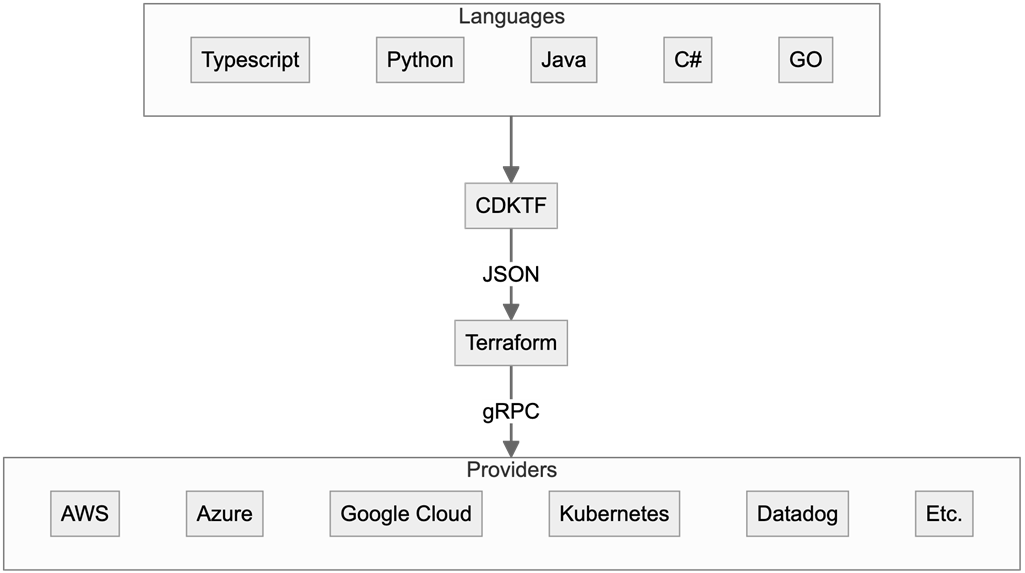
The chapter then shows two ways to author configurations without HCL. First, you can write Terraform in JSON (tf.json): mirror HCL blocks as top‑level keys, use string interpolation for expressions, express keywords like depends_on as strings, and include machine‑readable comments via a special “//” field. Second, CDK for Terraform (CDKTF) lets you define infrastructure in general‑purpose languages (e.g., Python, TypeScript) and synthesize to Terraform JSON/HCL, organizing projects into Apps, Stacks, and Resources, and deploying via a synth‑plan‑apply flow. While CDKTF can help productize IaC generation, the chapter cautions that native Terraform remains simpler for most teams and notes that CDKTF targets Terraform, not OpenTofu.
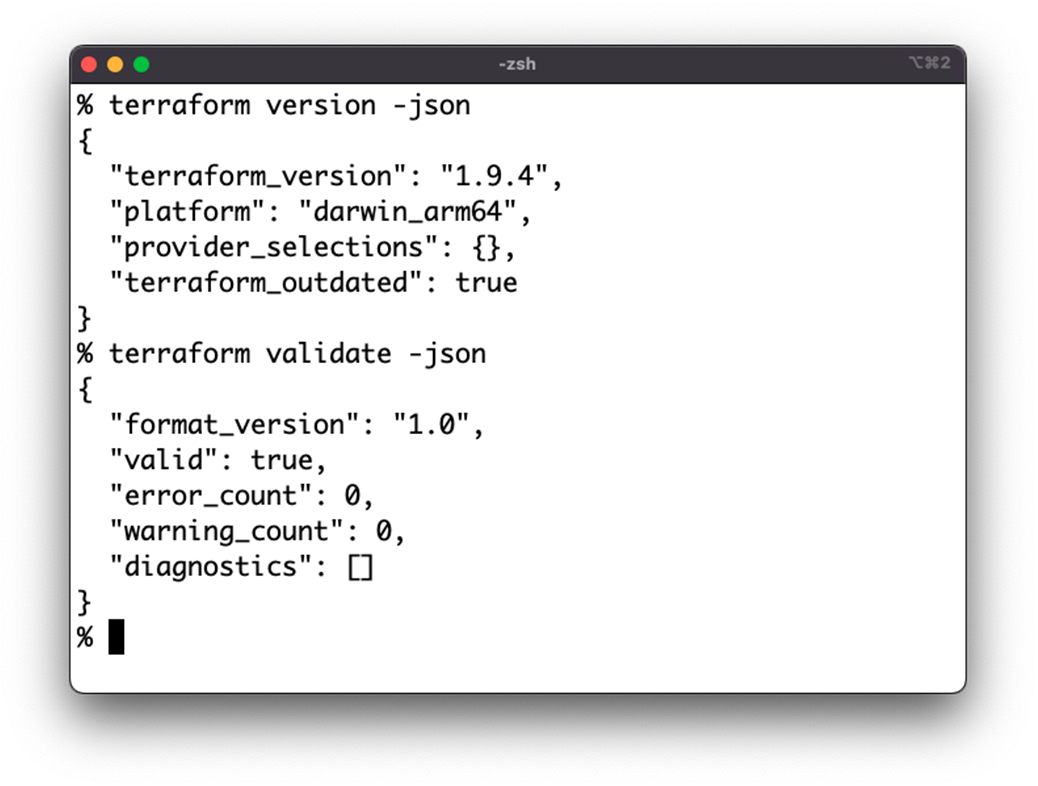
Terraform using JSON Output
CDKTF Abstraction Layers
CDKTF Development Cycle

Summary
- Terraform and OpenTofu are both built with the idea that they would be run programmatically, so they both utilize JSON as an optional output for most commands.
- Terraform and OpenTofu have two outputs meant to be read by machines: the Machine Readable UI for streaming events, and the JSON Output Format for quick responses.
- Both applications also are able to read JSON files instead of HCL to allow Terraform configurations to be generated programmatically.
- JSON is available in pretty much every programming language available.
- Humans should not write Terraform using JSON, instead relying on the more user friendly HCL.
- CDKTF is another option for generating Terraform code from inside another programming language, although it is only available for a subset of languages.
FAQ
What does it mean to “wrap” the Terraform/OpenTofu CLI and why would I do it?
Wrapping means driving the terraform/tofu binary from your own program, then parsing its JSON output into native data structures for your language. You: - Build commands and execute them (capture stdout, stderr, return code). - Pass -json to get machine-readable output. - Parse JSON/JSONL and expose it via classes/structs (e.g., Validate, State, Plan). Use cases: custom deployment tooling, CI/CD integrations, streaming logs to UIs, security/cost/compliance analysis, or any need to control Terraform programmatically.What’s the difference between the JSON Output Format and the Machine Readable UI?
- JSON Output Format: A single JSON object per command; used by commands like terraform show -json, terraform validate -json, terraform output -json, terraform version -json.- Machine Readable UI: Streaming JSON lines (JSONL), one JSON object per line; used by long-running/streaming commands like terraform plan -json and terraform apply -json. It enables real-time processing of events as they arrive.
How can I stream and react to plan/apply events in real time?
Run plan/apply with -json and read stdout line-by-line (JSONL). Each event has standard fields (@level, @message, @module, @timestamp, type) plus type-specific fields. Common types: - version: tool/UI versions - outputs: final outputs - change_summary: counts of add/change/remove/import, operation - diagnostic: warnings and errors Implement “event handlers” keyed by event type (and/or an “all” handler) to forward logs, update UIs, or trigger actions while the run is in progress.What core CLI commands can I wrap and what do their JSON structures look like?
- init: Support common flags (-backend=false, -backend-config file), plus passthrough extra args.- validate: Returns valid, error_count, warning_count, diagnostics[]. Do not treat non-zero exit as a fatal process error; parse the response instead.
- state: Combine terraform state pull (for lineage/serial) with terraform show -json to build a complete State model (including outputs, modules, resources).
- plan: Stream events (for logs/UX) and also run terraform show -json on the plan file to build a structured Plan model (resource changes, drift, outputs, prior_state).
- apply: Stream events; aggregate outputs, change summary, diagnostics into a high-level ApplyLog.
- output: terraform output -json mapped to Output objects.

 Terraform in Depth ebook for free
