2 Standards for implementing authentication
This chapter frames authentication and secret management as foundational pillars of application security alongside secure transport and hardened runtime environments. It urges teams to stop handling passwords and identity logic inside each app and instead rely on standards-driven Single Sign-On (SSO) and modern, phishing-resistant authenticators. For developers, the core toolbox is OAuth2, OpenID Connect, and WebAuthn, supported by robust libraries across languages, and underpinned by essentials like TLS, JOSE, X.509, and PKI. The overarching message is to centralize trust, reduce custom security code, and raise both security and usability by adopting proven protocols and services.
On user authentication, the guidance spans customers, employees, and partners. For customers, minimize friction while maintaining strong security by supporting social login via OpenID Connect/OAuth2, passwordless biometrics and security keys with WebAuthn, and a multifactor username/password fallback when needed—ideally all fronted by an SSO. For employees, consolidate access to internal apps, SaaS tools, and admin surfaces behind a corporate SSO tied to the directory; prefer OpenID Connect and use protocol bridges if only SAML/LDAP are available. For partners, compare issuing local accounts (simple but risky) versus federating to the partner’s SSO (preferred for clean provisioning and revocation). Because phishing remains a top threat, the chapter highlights WebAuthn and physical security keys that bind authentication to the legitimate site origin, thwarting credential theft.
On securing application credentials, the chapter warns against storing secrets in configuration files due to configuration drift, weak file-level protections, poor auditability, and difficult rotation. It recommends a centralized credential service or vault as the single source of truth to streamline updates and rotation, provide detailed audit logs, and leverage hardware-backed protections. Teams can choose a cloud provider’s key vault, platform-native secrets, or a self-hosted solution, but should avoid building their own. Since no universal API exists for secret stores, applications use provider-specific clients and must solve bootstrap trust—ideally with platform-based identity like SPIFFE. The best practices are clear: externalize authentication to a maintained SSO, adopt WebAuthn for phishing resistance, store all secrets in a credential service, and keep these foundations patched and up to date.
An authentication form, commonly referred to as a login form, serves as the primary interface through which users enter their credentials to authenticate and gain access to the system.

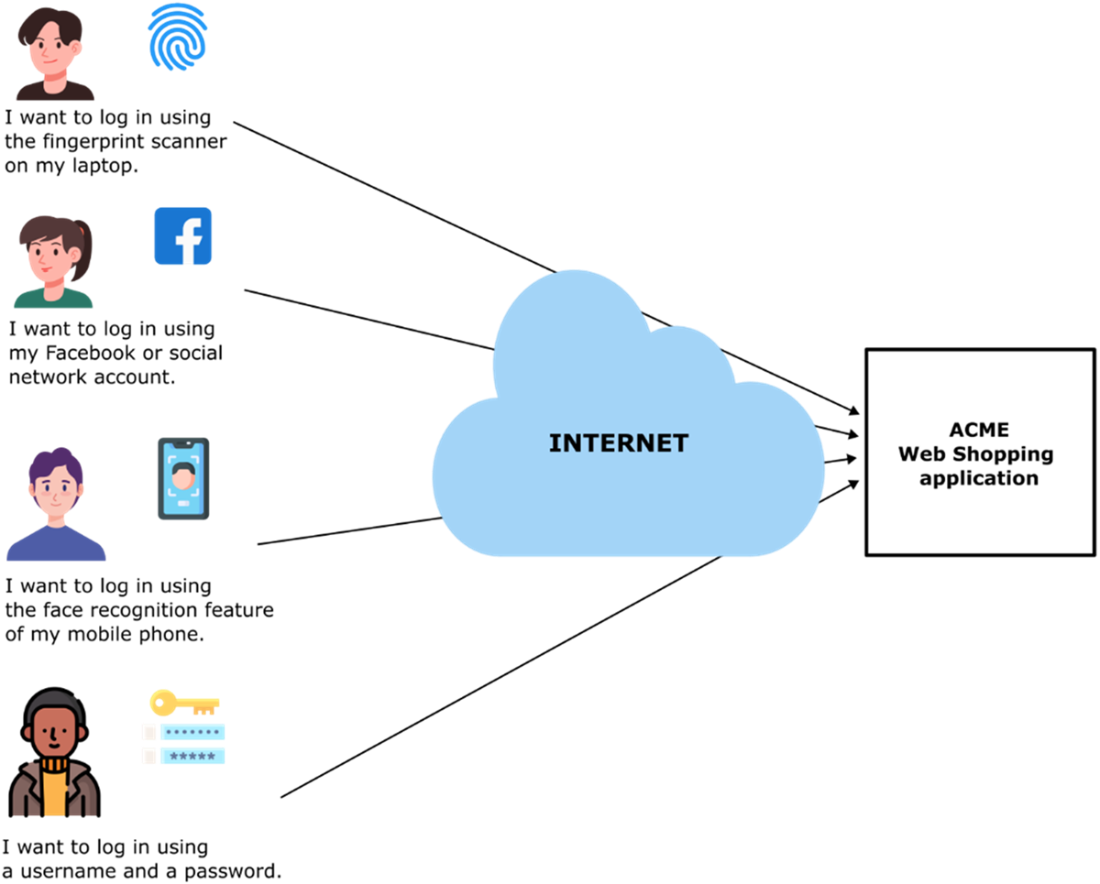
Customer authentication preferences. Some customers want to use biometric authentication features, such as fingerprint scanners and face recognition, on their devices and phones. Some customers want to be able to login using their existing accounts with large online service providers such as Google, and Facebook. Some users want to be able to login using a traditional username and password combination. Single Sign On services can accommodate all these types of authentication preferences and more.
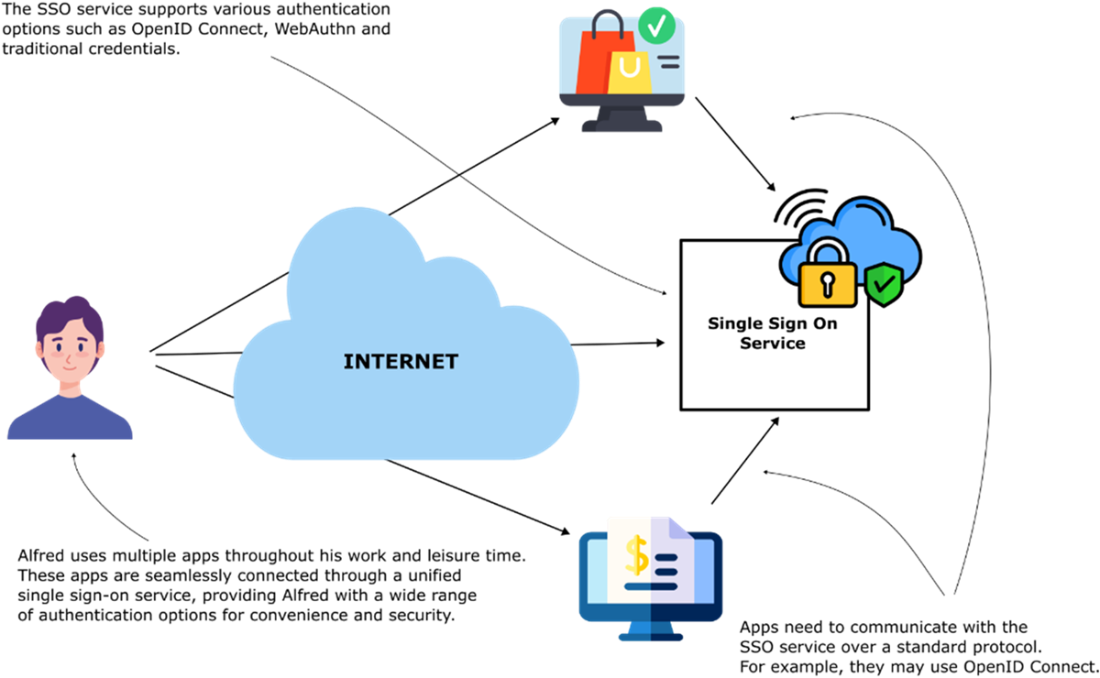
Single Sign On (SSO) Service handles user account creation and authentication. Multiple applications can use the same SSO service, simplifying security for application developers. The SSO service implements support authentication using OAuth2, OpenID Connect, WebAuthn, and multi-factor password-based authentication.
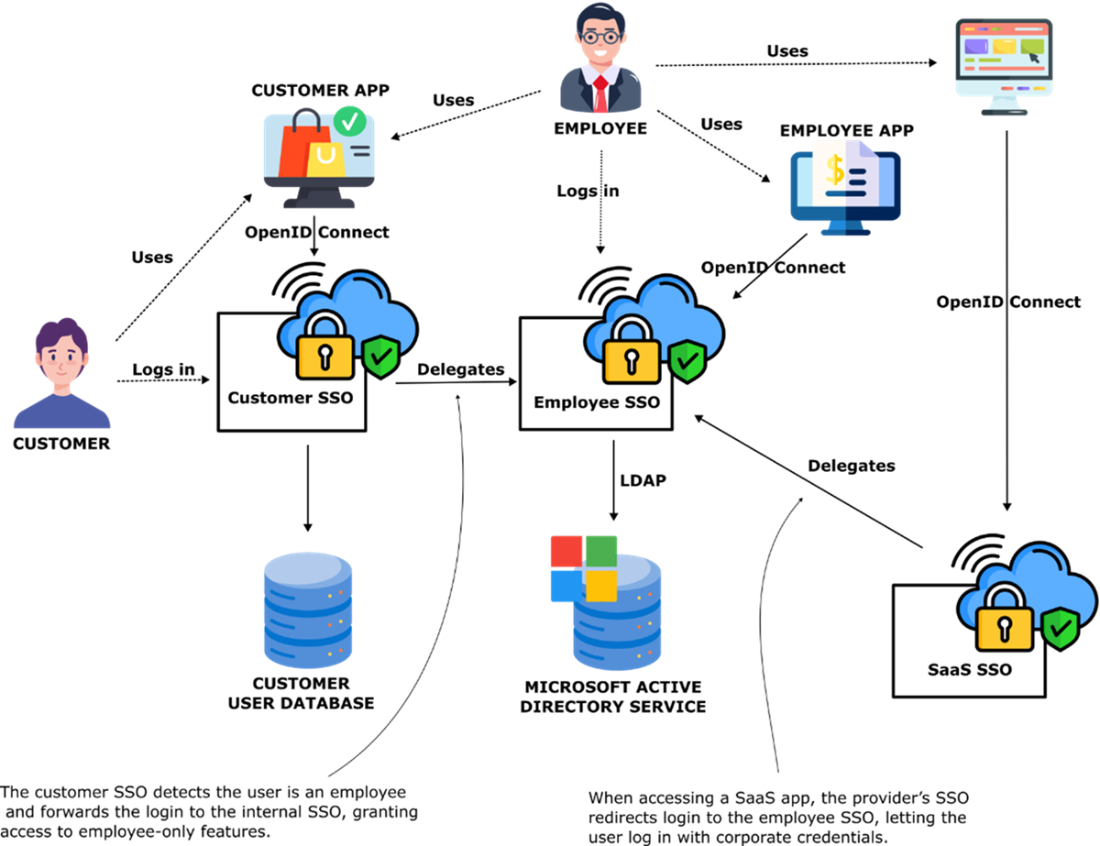
A corporate Sigle Sign On (SSO) service makes it possible for employees to access customer facing apps, internal employee only apps, and external SaaS apps using a single set of credentials
A user has to insert the Yubikey in their laptop, then press the button when on the login screen for a an application that support a physical security key. The Yubikey will check that the URL of the site the user is trying to log into matches the URL stored inside the Yubikey. If the URLs don’t match the login will fail. A Yubikey can protect against phishing attacks such as the one described in the text above.

Externalize application authentication into an SSO service that applications can access using OpenID Connect and WebAuthn. If you know OpenID Connect and WebAuthn, you can use all modern SSO services.

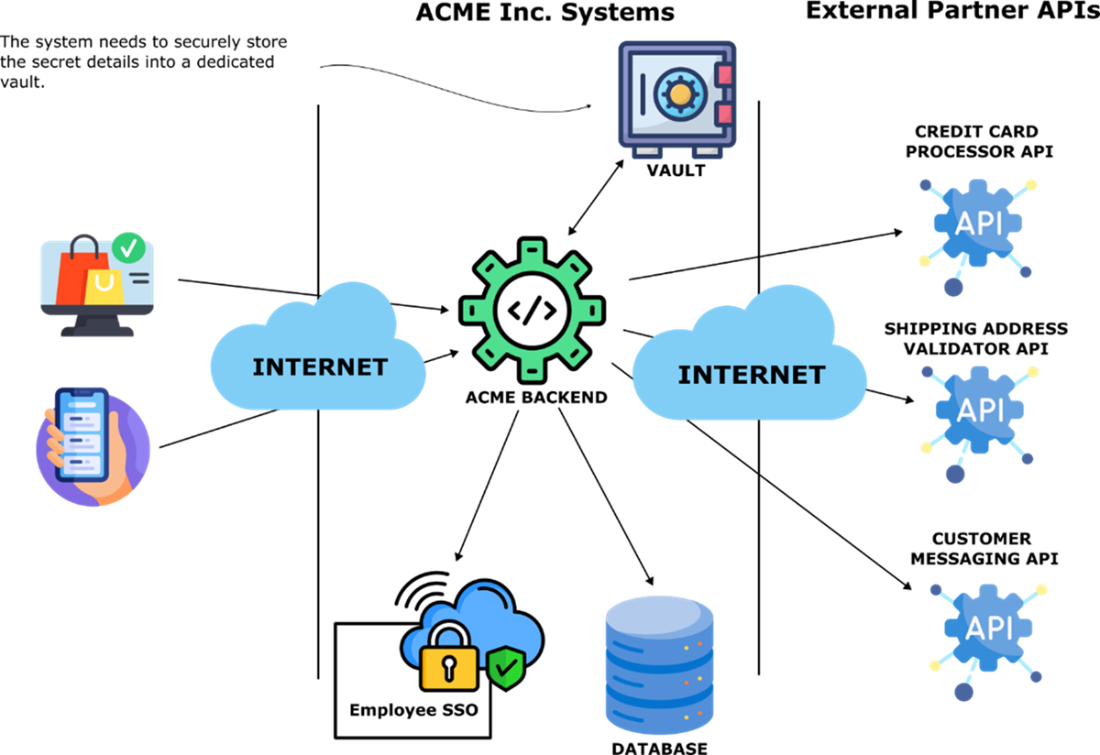
Applications depend on internal and external services that require passwords and API keys. The credentials to access services are extremely sensitive and must be protected. How can an application store and access sensitive credentials it needs to operate?
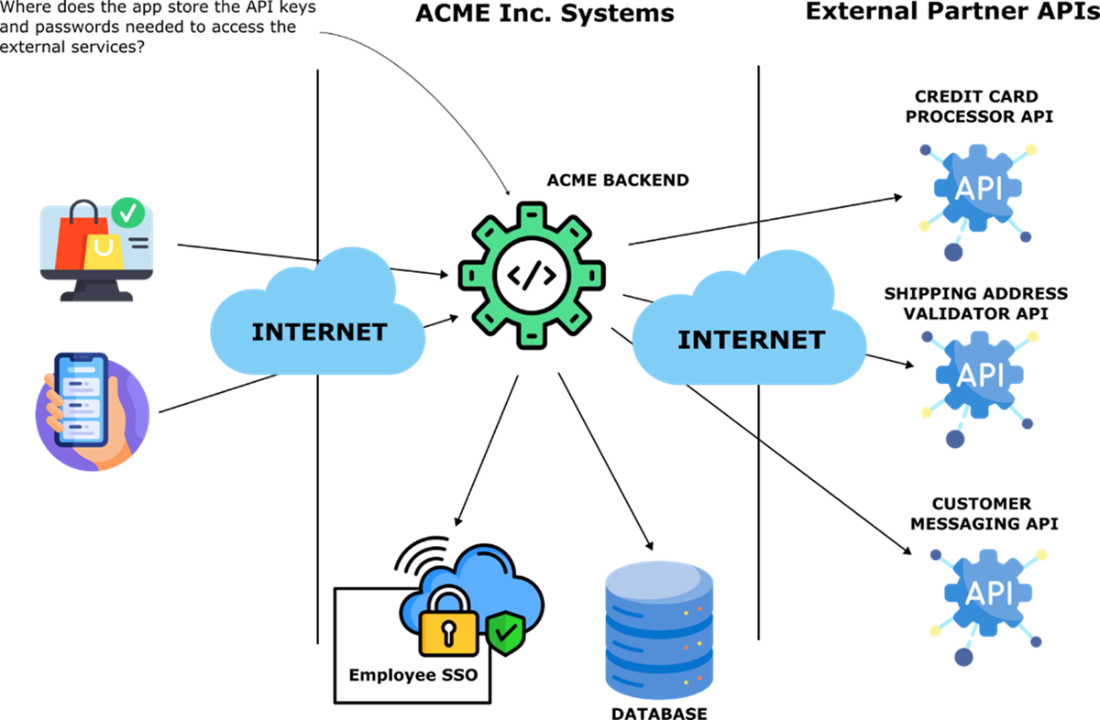
A credential vault is a centralized store of all sensitive configuration values, such as passwords, API keys, digital certificates, and other secrets the application needs to access at runtime.
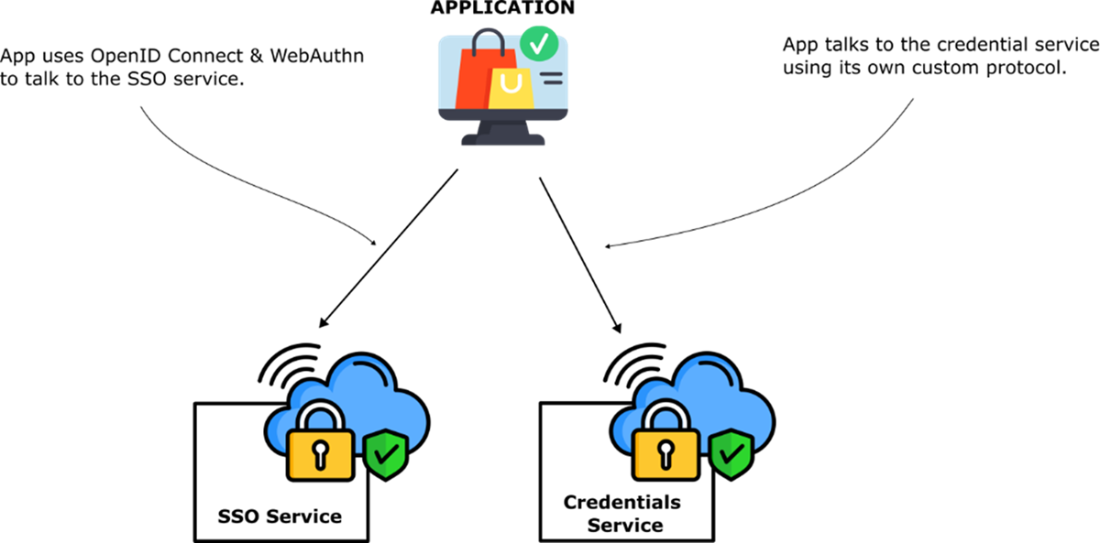
A credential management service and a single sign on service are two foundational components for cloud native application security. As a developer you can use the OpenID Connect and WebAuthn protocols to interact with all modern SSO services. However, for credential services there is no industry standard API so you will have to use a proprietary API provided by the credential service implementation.
Summary
- Passwords are weak, reused across services, and expensive to store securely, making them poor for both security and user experience.
- Externalizing authentication to SSO services improves security, reduces development effort, and provides better user experience across multiple applications.
- Modern applications should support OAuth2/OpenID Connect for social login, WebAuthn for biometric authentication, and multifactor password authentication as fallback.
- Corporate SSO services enable employees to access internal applications, external SaaS services, and customer-facing apps using unified Active Directory credentials.
- Organizations can either provide partner employees with internal accounts or delegate authentication to the partner's own SSO service for better security.
- Physical security keys using WebAuthn protocol protect against phishing attacks by validating website URLs before authentication.
- OAuth2, OpenID Connect, and WebAuthn are the essential authentication protocols developers need to master for modern applications.
- Applications should store sensitive credentials like API keys and passwords in centralized credential services rather than configuration files.
- Credential services provide single source of truth, easy updates, simplified rotation, comprehensive audit logs, and hardware security module support.
- No industry standard exists for credential service APIs, requiring use of provider-specific APIs and libraries.
- Information security engineers choose and configure SSO services, while developers implement OpenID Connect and WebAuthn integration in applications.

 Software Security for Developers ebook for free
