14 Passwordless login: Using Magic links and OTPs
Passwordless authentication removes the friction and fragility of memorized secrets by replacing passwords with sign-in actions tied to possession and intent. This chapter explains two widely deployed approaches—magic links and one-time passwords (OTPs)—showing how they improve usability while stressing that security depends on careful implementation and user awareness. It highlights common pitfalls such as account enumeration, phishing, token reuse, and weak delivery channels, and frames passwordless as part of a broader journey toward stronger, phishing-resistant methods like WebAuthn.
With magic links, a user submits an email address and receives a short‑lived, cryptographically signed token embedded in a link. The application must prevent email enumeration with generic responses; generate tokens with strong signing, explicit expiration, and a nonce; store and invalidate tokens on first use to stop replay; throttle requests; and monitor for anomalies. Delivery should be clearly branded, and the token should not appear as plaintext to avoid leakage via previews, forwarding, or logs. On click, the app verifies signature, expiry, and one‑time use, then establishes a session. Because email compromise and phishing remain real threats, domain checks, user education, and optional MFA can meaningfully raise the bar.
OTPs follow a similar pattern but require users to enter a short code that is randomly generated, time‑bound, and single‑use, then validated for correctness and expiry before issuing a session. Their benefits include being ephemeral, not requiring memory, and working across channels (SMS, email, or authenticator apps), making them a strong fit for MFA as “something you have.” Risks include SMS interception (e.g., SIM swap), phishing, and brute force—mitigated by using cryptographically secure generation, short lifetimes, rate limiting on requests and entry attempts, monitoring for suspicious activity, favoring app‑based TOTPs over SMS, and providing safe fallbacks. Compared with magic links, OTPs trade a little convenience for flexibility; both can deliver secure, user‑friendly logins when paired with strict expiry, one‑time semantics, throttling, auditing, and phishing defenses.
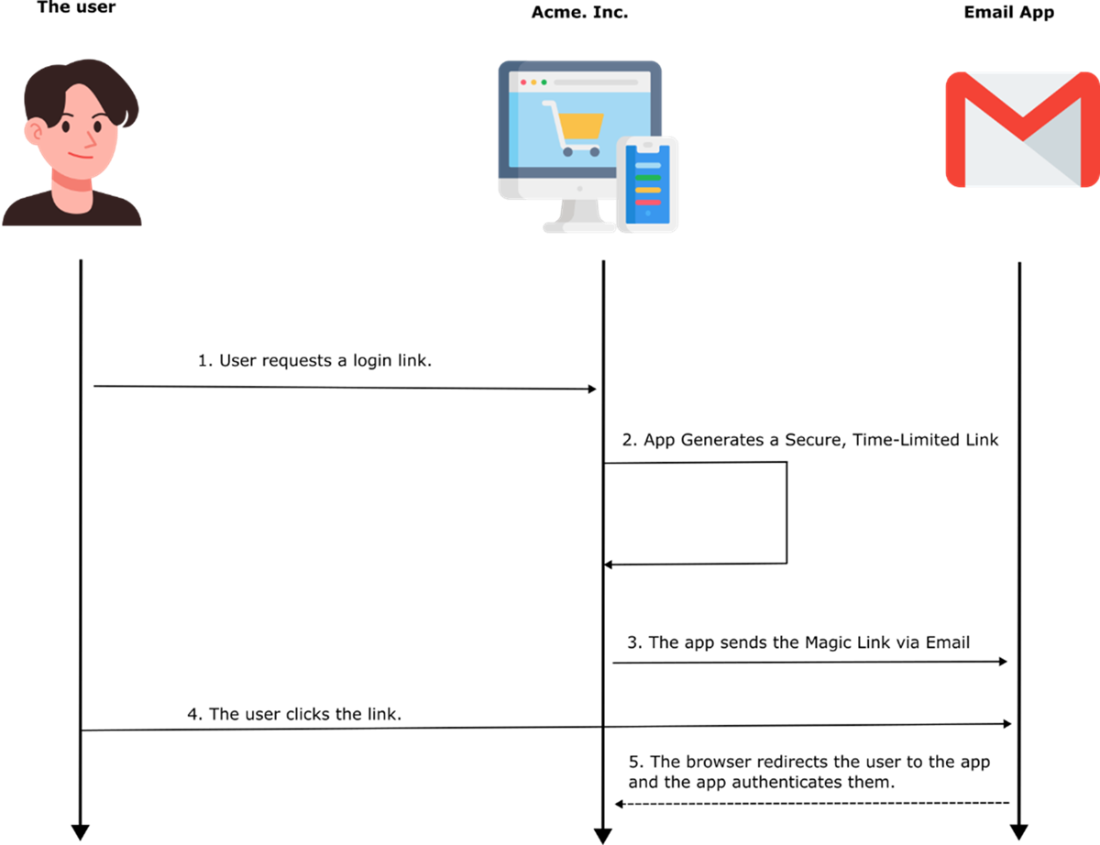
Authenticating through magic links. Upon the user’s request, the app generates a unique link and sends it to the user by email. The user clicks on the link to authenticate.
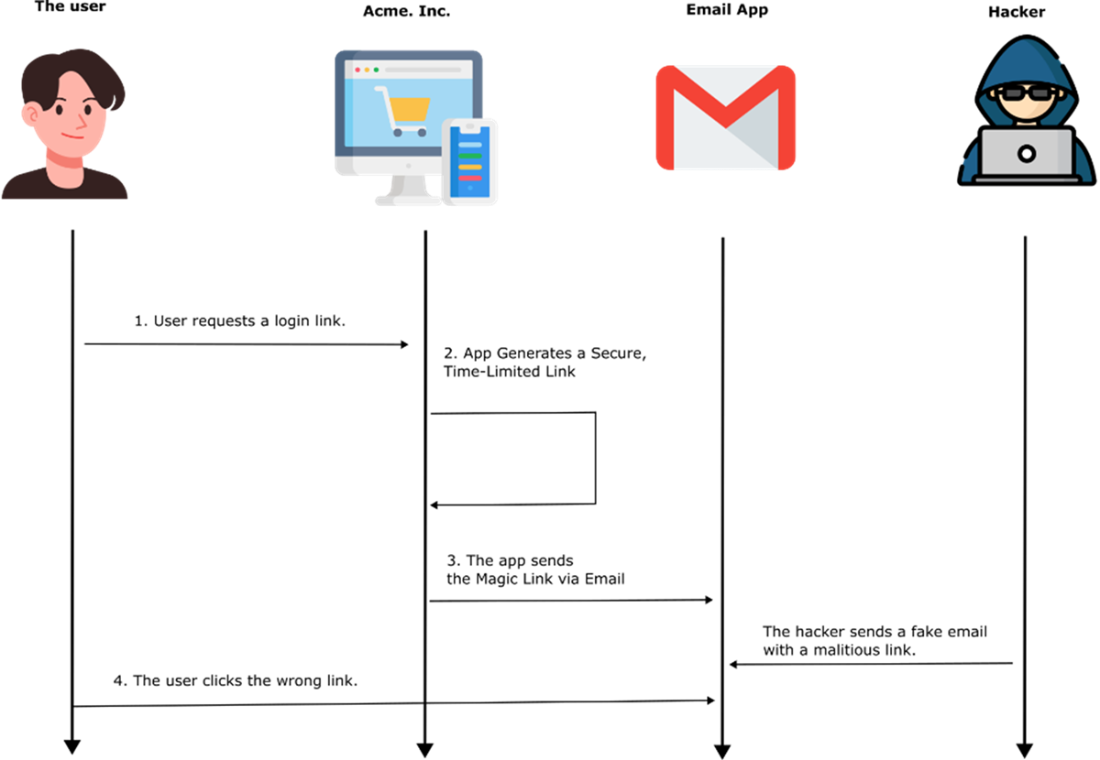
A malicious individual might send a fake but realistically looking email between steps 3 and 4 of the process. An inattentive user could be fooled into clicking the wrong link.
Security is only as strong as its weakest link. You can have the best defenses, but if you leave the key under the rug… well, good luck!

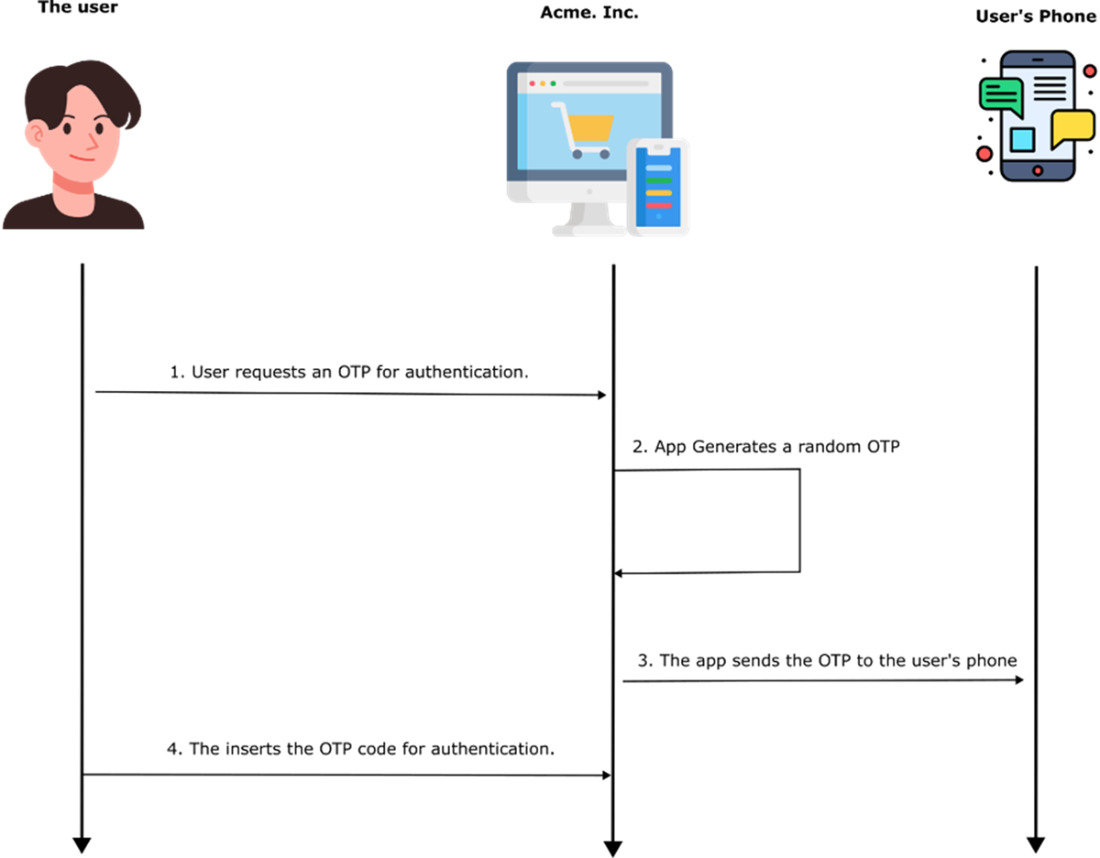
The OTP authentication process. The app generates a random OTP and sends it to the user. The user uses the received OTP to authenticate.
Summary
- Passwordless authentication improves security and convenience by eliminating weak or reused passwords. This chapter explored Magic Links, OTPs, Biometric Authentication, and Hardware Security Keys as alternatives. Each method has its advantages and risks.
- Magic links allow users to log in via a one-time link sent to their email. However, they are vulnerable to phishing and email compromise. Using short-lived, cryptographically signed tokens and preventing email enumeration helps mitigate risks.
- OTPs provide temporary numeric codes via SMS, email, or authenticator apps. They are susceptible to SIM-swapping, phishing, and brute-force attacks. Using app-based OTPs (Google Authenticator, Authy) and limiting OTP requests increases security.
- Passwordless authentication reduces phishing, credential leaks, and login friction, but no single method fits all use cases. Choosing the right approach depends on security needs, usability, and risk factors.
- Proper implementation is key—even the most secure authentication method can be exploited if configured poorly. Following best practices, encryption standards, and secure handling of authentication data ensures a stronger, safer login experience.

 Software Security for Developers ebook for free
