This chapter shows how to add practical authentication and authorization to a Rust web service built with Warp and SQLx. It begins by distinguishing the two ideas: authentication verifies who a client is, while authorization determines what that client is allowed to do. To support this flow, the application is extended with account concepts, database migrations, and new routes for registration and login.
The registration flow introduces an accounts table, a reusable account type, and logic for storing new accounts safely. Passwords are never stored in plain text; instead, the chapter adds salted hashing with Argon2 and random salt generation so stored credentials are much harder to compromise. It also covers how to handle duplicate registrations by propagating database errors upward and translating them into clearer HTTP responses.
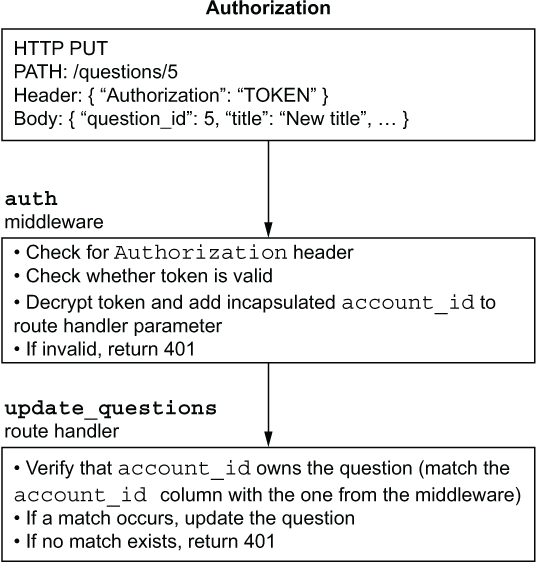
The second half focuses on logging users in and protecting routes. A successful login checks the stored hash, then issues a Paseto token containing the account ID and an expiration time. That token is then validated through Warp middleware that extracts the Authorization header and passes a session object into protected handlers. Finally, the chapter updates question and answer operations so only the original account can modify its own content, enforcing authorization by checking account ownership before allowing changes.
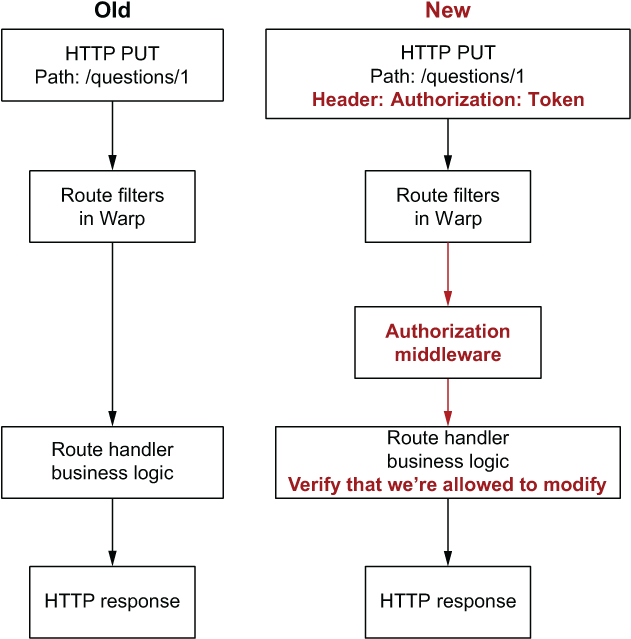
Changes to our current application to add authorization
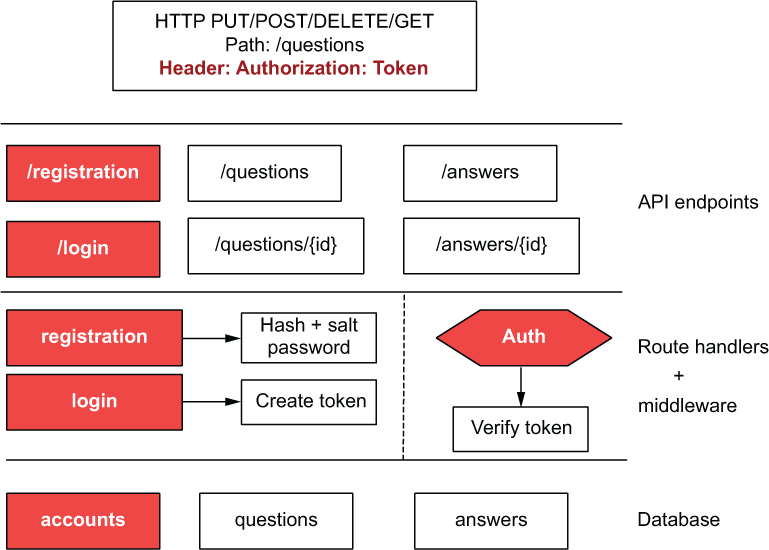
Adding new endpoints, route handlers, and middleware to our existing application
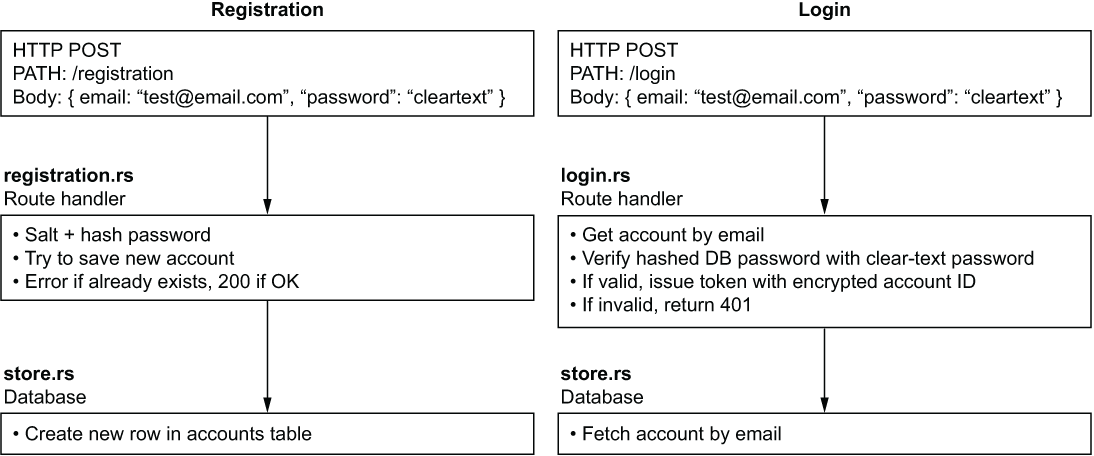
Authentication flow
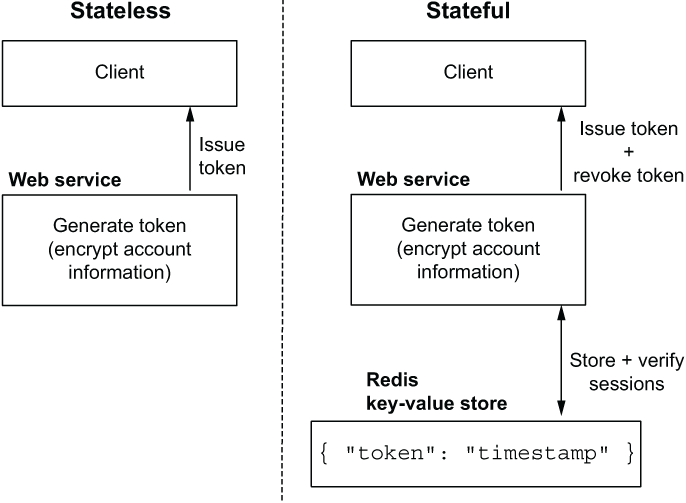
Stateless vs. stateful architecture
Authorization flow
Summary
- Each web service has to handle authentication and authorization, whether for itself to authenticate inside a microservice architecture, or for a client/server model when offering an API of some sort.
- Make sure to hash and salt passwords before storing them in the database, and use up-to-date recommendations on which hashing algorithm to use.
- A web application offers a few endpoints that can be accessed by users who aren’t authenticated.
- A registration endpoint offers a chance to send an email and password combination to the server.
- Based on the complexity of your application, you can store the email and password hash, or add user roles and other properties to an account.
- Make sure to add an ID to each entry in table so you can link resources with the respective account.
- The login endpoint is the entrance to your application. It sends back a token that is the key to authorizing future HTTP requests.
- Middleware is placed between the incoming HTTP call and the handing-off to the route handler. It checks for a valid token and extracts information out of this token.
- A token is a stateless way to do authentication. You can also choose to have a database table with all active tokens to be able to invalidate tokens in the future.
- The middleware will add a new parameter, the account ID, to the route handlers. It’s their job to check whether a client is allowed to modify the underlying resource.
- You can decide if you want to establish a secure connection (TLS, for example) via your application code or in your infrastructure setup.
FAQ
What is the difference between authentication and authorization?
Authentication verifies who a user is, while authorization determines what that user is allowed to do. In this chapter, authentication is used to identify a logged-in user, and authorization is used to check whether that user can modify a specific resource.What data should an account store in the first version of the application?
At minimum, the chapter starts with an email and password. Later, an ID is added to the account structure so questions and answers can be associated with a specific account.Why does the chapter use an Account type instead of a User type?
The termAccount is clearer and more flexible than User. It also avoids conflicts with PostgreSQL, which has a default user table and user is a reserved keyword.Why is a separate database migration needed for accounts?
A new migration is needed to create theaccounts table in PostgreSQL. The chapter uses SQLx migrations so the schema can be created automatically when the server starts.Why should passwords never be stored in plain text?
Plain-text passwords are unsafe because anyone with database access could read them directly. The chapter hashes and salts passwords before saving them, making them much harder to recover or reuse if the database is exposed.Why does the chapter use both hashing and salting for passwords?
Hashing transforms the password into a non-readable form, and salting adds random data so the same password does not always produce the same hash. Together, they make password cracking much harder.How does the registration endpoint work?
The registration route accepts an email and password, checks whether the email already exists, hashes the password, and stores the new account in the database. If the email is already registered, the app returns an error instead of inserting a duplicate row.How does login generate a token?
The login route looks up the account by email, verifies the submitted password against the stored hash, and then issues a token containing the account ID. That token is returned to the client so it can be used on later requests.How does the authorization middleware protect routes?
The middleware reads theAuthorization header, validates the token, and extracts a session object containing the account ID. Routes that modify data use this session to check whether the caller owns the resource before allowing the request.How does the chapter prevent one account from editing another account’s question?
The app stores anaccount_id alongside questions and answers. When a user tries to update a question, the server checks whether the question belongs to the same account ID from the token; if not, it returns 401 Unauthorized.
 Rust Web Development ebook for free
