Appendix B Installing Node.js on macOS and Windows
This appendix ensures you’re ready to build and evolve the sample Node.js web application by guiding you through installing Node.js on macOS and Windows. The focus is on using the latest long-term support (LTS) release because it’s the most stable, broadly supported option. The simplest paths recommended are either installing directly from the official Node.js installer or using a version manager, keeping the setup reliable and easy to maintain.
On macOS, two approaches are advised: download the official installer or use nvm to manage versions. Other installers exist but can introduce unnecessary complexity. The LTS release supports both Apple Silicon and Intel, so no CPU-specific steps are required. With nvm, you install the LTS release and then verify the installation by checking the Node.js version, giving you a clean, upgradable setup.
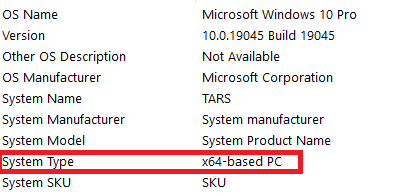
On Windows, the recommended route is to install the LTS release using the official installer. Before downloading, verify whether the system is 64-bit or 32-bit via the System Information tool, then choose the appropriate installer. The appendix notes an example current LTS (18.13.0), emphasizes that most code in the book is compatible across versions, and suggests nvm-windows if you need to manage multiple Node.js versions on Windows.
Figure B.1 Windows system information
FAQ
Which Node.js version should I install for this book?The latest Long-Term Support (LTS) version. Download it from https://nodejs.org. At the time of writing, the LTS is 18.13.0, but always check the site for the most current LTS.What are the recommended ways to install Node.js on macOS?Use one of two methods: directly from nodejs.org using the installer, or via Node Version Manager (nvm) from https://github.com/nvm-sh/nvm. Other tools exist but can make things harder long-term.Do I need to know whether my Mac uses Apple Silicon or Intel to install Node.js?No. The latest LTS version of Node.js supports both Apple Silicon (M1, M2, etc.) and Intel processors.How do I install Node.js on macOS using nvm?1) Install nvm: curl -o- https://raw.githubusercontent.com/nvm-sh/nvm/v0.39.5/install.sh | bash (from the official docs). 2) Open a new terminal. 3) Install Node.js LTS: nvm install --lts. 4) Verify: node --version.How can I verify that Node.js installed correctly?Open a new terminal and run node --version. You should see the installed Node.js version.How do I install Node.js on Windows (64-bit)?- Go to https://nodejs.org. - Download the LTS installer. - Run the installer and accept the default prompts. - After installation, you can verify with node --version in a terminal (Command Prompt or PowerShell).How do I install Node.js on Windows (32-bit)?- Go to https://nodejs.org. - Click the LTS download, then choose Other Downloads. - Under Windows Installer (.msi), select the 32-bit link. - Download and run the installer, accepting the defaults.How can I tell if my Windows is 64-bit or 32-bit before installing?- Open the Start menu. - Type System Information and press Enter. - Check System Type: x64-based PC = 64-bit; x86-based PC = 32-bit.Can I manage multiple Node.js versions on Windows?Yes. Use nvm-windows from https://github.com/coreybutler/nvm-windows. Note: The standard nvm supports macOS/Linux only; nvm-windows is a well-made alternative. Installation details are outside the scope of the book.Where can I find the most up-to-date installation guidance and official docs?For the author’s latest guide, visit https://cfe.sh/blog/. For official Node.js installation docs and downloads, visit https://nodejs.org/.
pro $24.99 per month
access to all Manning books, MEAPs, liveVideos, liveProjects, and audiobooks!

 Road to Kubernetes ebook for free
