8 Security bad practices
PostgreSQL offers strong security defaults and a vigilant security team, but real-world breaches often result from everyday operator mistakes. This chapter surveys the practices that most commonly undermine a secure deployment: relying on misleading password prompts, exposing instances to untrusted networks, overbroad access rules, and writing or configuring database code in ways that invite privilege escalation or data leaks.
On connectivity and authentication, the -W/--password switch is a footgun: it prompts even when the server doesn’t require a password, masking dangerous passwordless setups and training users to trust “successful” logins even with mistyped credentials. Avoid embedding cleartext passwords in commands or configs; let the server prompt when needed and use proper secret storage. Network-wise, setting listen_addresses to “*” expands the attack surface by accepting connections on every interface; bind only to required private addresses and layer firewall allowlists. In pg_hba.conf, trust is not authentication and should be avoided entirely; instead, use scram-sha-256, enforce SSL where appropriate, and craft narrow rules per database, role, and source host.
On authorization and code execution, don’t let superusers own application databases or connect as the application, as superuser privileges bypass most checks, weaken auditing, and enable accidental or intentional damage. SECURITY DEFINER turns functions into setuid-like entry points; restrict EXECUTE to intended roles, keep definitions simple, validate inputs, and set a safe search_path. Finally, control schema resolution to prevent object hijacking: revoke unnecessary CREATE on the public schema (especially on upgraded clusters), restrict who can create objects in shared schemas, prefer explicit schema qualification, and organize per-application schemas to block malicious overrides and unintended code execution.
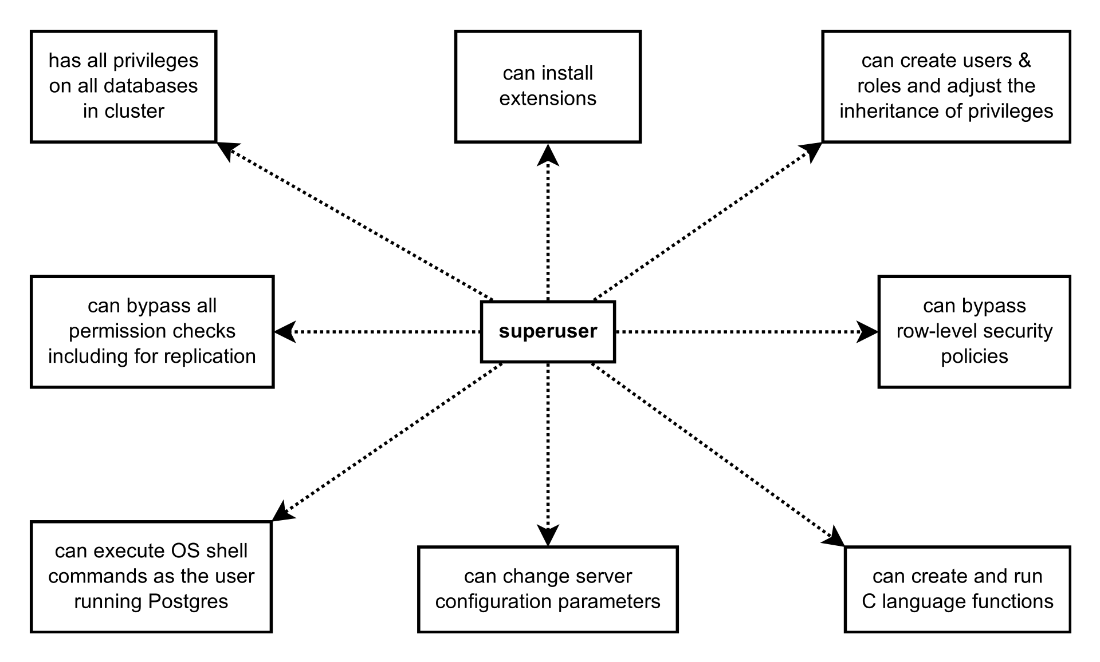
A superuser, analogous to the root user in UNIX, can bypass all privilege checks and do more things that no other user can. It is far more dangerous than simply having all privileges on all databases.
Summary
- Using
psql -Wor--passwordcan be confusing and lead to lapses in security. Rely on PostgreSQL’s automatic built-in password prompt mechanism instead. - Setting
listen_addresses = '*'can expose your database server to insecure networks, so you should only enable the trusted network interfaces that are necessary for database connectivity. - Using the
trustmethod inpg_hba.confin production environments is unacceptable. You should always enforce proper authentication to your server and restrict access as much as is practical. - Having your databases and their contents owned by a superuser can lead to security problems and accidental damage to your data. Instead, create roles that have only the relevant permissions to own and manage these databases, and grant permissions selectively to other roles.
- Declaring functions as
SECURITY DEFINERcan cause data leaks and enable privilege escalation. To reduce risk, use it sparingly and with a safesearch_path, and prefer the combination ofSECURITY INVOKERwith explicitGRANTs. - Not securing your
search_pathcan let others hijack queries and escalate their privileges. Apply tight control over object creation in schemas, and reference objects owned by trusted users only in queries.
FAQ
Is it safe to always pass -W/--password to psql?
No. That switch merely forces the client to prompt, even if the server doesn’t require a password. It can hide a misconfiguration (e.g., passwordless access), makes wrong passwords appear to “work,” and adds no benefit when the server does require a password (it will prompt anyway). Also, never put plaintext passwords in command lines or connection strings.What’s the right way to handle passwords for psql and other tools?
- Rely on the automatic prompt when the server requires a password.- Prefer secure mechanisms such as a protected .pgpass file or a secret manager.
- Avoid passing secrets via command line args or storing them in scripts/configs in cleartext.
Why is setting listen_addresses = '*' risky?
It makes PostgreSQL accept connections on all network interfaces. If the host has any public-facing interface, you may unintentionally expose the database to the internet, greatly expanding the attack surface.How should I safely restrict where PostgreSQL listens?
- Keep the default (localhost) unless remote access is truly needed.- Bind only to the specific private IPs that should accept connections, e.g.: listen_addresses = '10.10.10.56'.
- Layer firewall rules to allow only trusted subnets/hosts and log connection attempts.
What does “trust” in pg_hba.conf do, and why shouldn’t I use it?
trust disables authentication. Any PostgreSQL user from the allowed host/subnet can connect without a password. A single compromised machine on that network becomes a gateway to your database. Avoid trust completely in production (and even on shared development hosts).What should I use in pg_hba.conf instead of trust?
- Use password-based authentication with SCRAM, and prefer TLS: hostssl ... scram-sha-256.- Limit by database, user, and host (avoid broad “all/all/all”).
- Example: hostssl mydb myuser 10.10.10.29/32 scram-sha-256.
Why shouldn’t databases (or objects) be owned by a superuser?
Superusers bypass most checks (including many permission and RLS safeguards). Ownership by superuser encourages superuser connections and makes it easy to unintentionally run code with elevated privileges, enabling privilege escalation and complicating auditing. Create dedicated non-superuser roles to own databases/objects and grant only the needed privileges.When is SECURITY DEFINER appropriate, and how do I use it safely?
- Use only when a function must run with the owner’s rights.- Immediately REVOKE execute from PUBLIC and GRANT only to intended roles.
- Keep logic minimal, validate inputs, and review/test thoroughly.
- Set a safe search_path on the function (e.g., pg_catalog, your schema, pg_temp) to avoid hijacking.
What’s dangerous about an insecure search_path, and how do I mitigate?
If an untrusted schema appears earlier in search_path, identically named objects can be chosen first, leading to query/code hijacking. Mitigations:- Qualify object names for sensitive code.
- Remove untrusted schemas from search_path and restrict who can CREATE in shared schemas (e.g., REVOKE CREATE ON SCHEMA public FROM PUBLIC;).
- In SECURITY DEFINER functions, set a strict search_path (pg_catalog, trusted app schema, pg_temp).
What’s a quick checklist to avoid these security footguns?
- Don’t rely on -W/--password; never put passwords on the command line.- Bind to specific IPs; avoid listen_addresses = '*'; add firewall allowlists.
- Ban trust in pg_hba.conf; use scram-sha-256 over TLS and least-privilege HBA rules.
- Reserve superuser for admin tasks; use app-specific roles and RBAC.
- Use SECURITY DEFINER sparingly; REVOKE from PUBLIC; set safe search_path.
- Remove CREATE from public for non-admins; audit and monitor access; keep up with security updates.

 PostgreSQL Mistakes and How to Avoid Them ebook for free
