This appendix introduces the lightweight code framework used throughout the book to demonstrate OAuth concepts. The examples are built in JavaScript with Express.js on Node.js, but they are structured to keep language-specific details to a minimum so the focus stays on understanding OAuth itself. Rather than relying on full-featured OAuth libraries, the book walks through key behaviors by hand, using small helper libraries only for non-OAuth concerns. The example code is organized by chapter and exercise to help you concentrate on the exact piece of functionality being discussed.
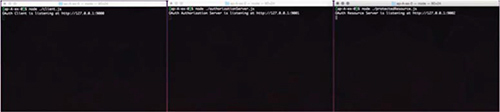
To work with the examples, you install Node.js and npm, then for each exercise run npm install in its directory to pull required dependencies. Every exercise comprises three separate applications—an OAuth client, an authorization server, and a protected resource—each started with the node command and run in its own terminal. They operate concurrently on different local ports so you can observe how the components interact as requests flow between them.
The framework serves static assets and uses HTML templates so pages can be rendered with dynamic data, while routing in Express.js maps HTTP methods and paths to handler functions that receive request and response objects. For simplicity, the examples keep temporary state in global variables, though a real application would use per-user sessions or platform equivalents. Completed solutions are provided for each exercise, and while the code adheres to standards and is ideal for learning, it is not intended for production use.
Figure A.1. Three terminal windows running each component in parallel
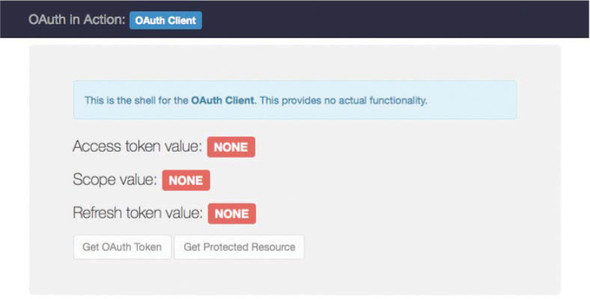
Figure A.2. The homepage for the client shell
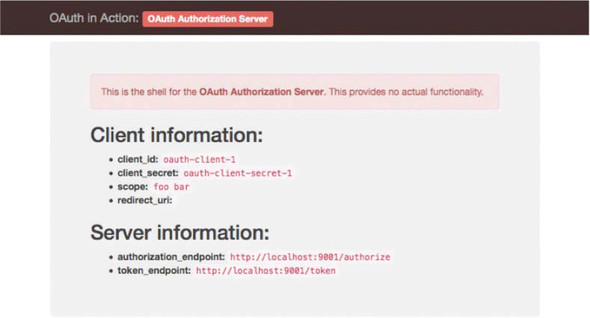
Figure A.3. The homepage for the authorization server shell
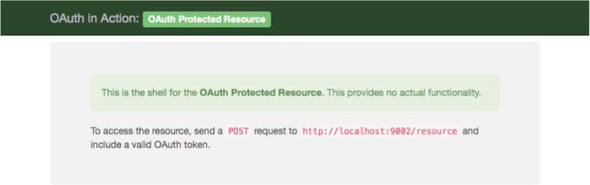
Figure A.4. The homepage for the protected resource shell
FAQ
What frameworks and language does the code use, and are the concepts portable?The examples are written in JavaScript using Express.js on Node.js. While the code runs on Node/Express, the OAuth concepts demonstrated are platform-agnostic and can be adapted to other languages and frameworks.Do I need to be an expert in JavaScript to follow along?No. The material minimizes JavaScript-specific quirks so you can focus on understanding OAuth. Non-OAuth functionality is handled by libraries to keep attention on the protocol.Where can I get the example code and completed solutions?The full code is on GitHub at https://github.com/oauthinaction/oauth-in-action-code/ and also available from the publisher at https://www.manning.com/books/oauth-2-in-action. Each exercise has its own directory, and a completed/ subfolder contains reference solutions.How do I install and verify Node.js and npm?Install Node.js and npm using your OS package manager or from https://nodejs.org/. For example on macOS with MacPorts: “sudo port install node” and “sudo port install npm”. Verify installation by running “node -v” and “npm -v” to see their version numbers.How do I install dependencies for an exercise? Do I repeat this every time?Change into the exercise directory (for example, ap-A-ex-0) and run “npm install”. This fetches packages into node_modules for that exercise. Run “npm install” separately for every exercise you work on.Which processes do I run, in what order, and how?Run each component in its own terminal and keep them running in parallel: “node client.js”, “node authorizationServer.js”, and “node protectedResource.js”. Start order doesn’t matter, but they must all be running for most examples.What URLs and ports does each component use?- Client (client.js): http://localhost:9000/ - Authorization Server (authorizationServer.js): http://localhost:9001/ - Protected Resource (protectedResource.js): http://localhost:9002/How are static files and templates organized and rendered?Static assets and HTML templates live in the files/ directory. Templates use Underscore.js via Consolidate.js. They’re configured with app.engine/app.set and rendered with “res.render('index', { access_token: token })”. You generally won’t need to edit them.How do I add HTTP routes in Express, and what are req/res?Add routes on the Express app for specific methods and paths, for example: “app.get('/foo', function(req, res) { ... })”. The req object has details of the incoming HTTP request (headers, URL, query, body), and res is used to send the HTTP response (status, headers, body).Why does the sample use global variables, and is this suitable for production?Globals are used to keep examples simple. In a real web app, state should be tied to user sessions (or appropriate storage), not global variables. The example code is standards-compliant but is not intended for production use.
pro $24.99 per month
access to all Manning books, MEAPs, liveVideos, liveProjects, and audiobooks!

 OAuth 2 in Action ebook for free
