9 Trigonometry for web developers
Trigonometry is presented as a practical frontend tool rather than abstract math, with sine, cosine, and tangent used to describe angles and positions on a circle. The chapter emphasizes the unit circle, the meaning of radians versus degrees, and how to convert between them so web developers can work comfortably across CSS and JavaScript. It also introduces inverse trig functions, especially atan2, as a reliable way to recover angles from coordinates and determine direction in all quadrants.
Building on those foundations, the chapter shows how trig can drive circular layouts and motion. Menu items can be arranged around a circle by calculating x and y coordinates from a center point, radius, and evenly spaced angles, either in JavaScript or with CSS calculations. The same formulas can animate elements around circular paths, create spinning loaders, and produce pendulum-like motion, with trig-controlled values like angle, radius, and speed shaping the look and timing of the effect.
The final part extends trig into wave-based design and direction-finding interactions. By varying amplitude, frequency, time, and phase shift, developers can place letters along a wave or animate text so it ripples dynamically. The chapter closes with directional calculations, where atan2 is used to compute the angle between two points so an arrow, pointer, or other element can rotate toward the cursor or a target, demonstrating how trig supports both decorative motion and responsive, orientation-aware UI behavior.
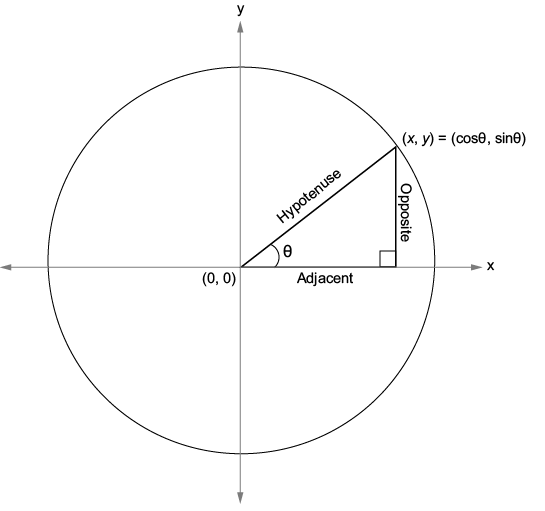
A right triangle and its sides relative to the angle theta (θ)
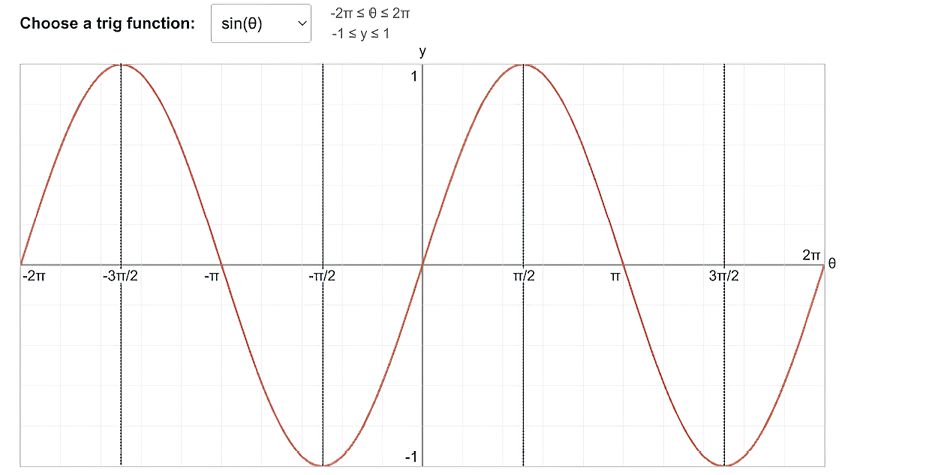
The graph of sin(θ) for −2π ≤ θ ≤ 2π
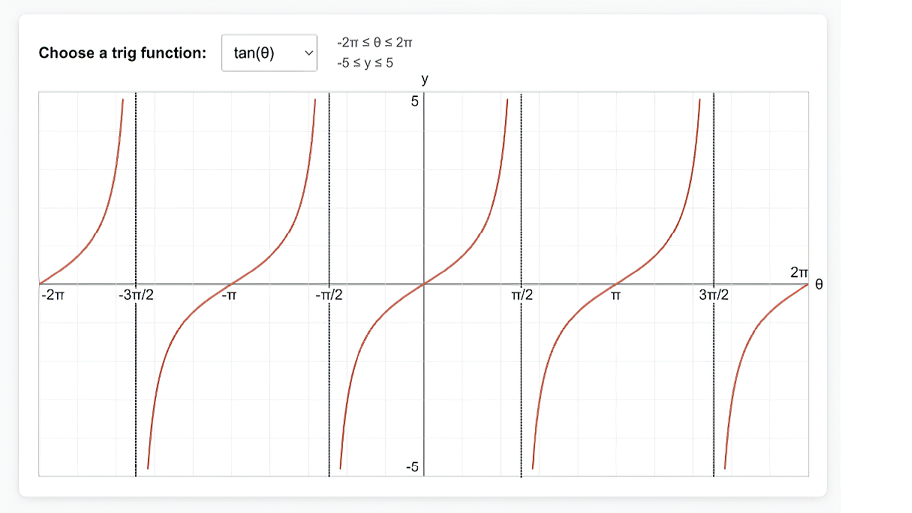
The graph of tan(θ) for −2π ≤ θ ≤ 2π
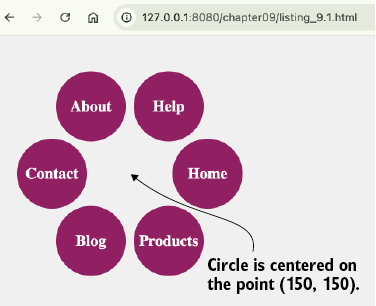
Arranging menu items in a circle using JavaScript
Arranging letters along a wave path using sin

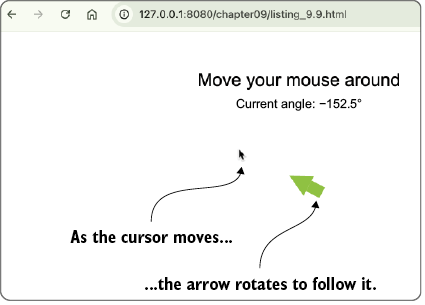
Using Math.atan2() to get the arrow to follow the cursor
Summary
- Trigonometry deals with the relationships that exist within a triangle, particularly a right-angled triangle, where one of the angles is 90 degrees.
- The sine is the opposite over the hypotenuse, so it’s a measure of the vertical component of the angle.
- The cosine is the adjacent over the hypotenuse, so it’s a measure of the horizontal component of the angle.
- The tangent is the opposite over the adjacent, so it’s a measure of the steepness of the angle.
- The values of cos(θ) and sin(θ) oscillate smoothly within the range [−1, 1], so that when you graph sin(θ) or cos(θ), the result is a regular, repeating wave pattern.
- To convert from degrees to radians, use
degrees * (Math.PI / 180). To convert from radians to degrees, useradians * (180 / Math.PI). - There are seven main trig functions—
sin(),cos(),tan(),asin(),acos(),atan(), andatan2()—available in both CSS and JavaScript. The JavaScript versions are methods of theMathobject (Math.sin(),Math.cos(), etc.). - You can use sin and cos to arrange page elements along a circle. For a circle with radius
rcentered at the point (centerX,centerY), for any angle, you calculate the x- and y-coordinates of that point on the circle usingx = centerX + r * cos(angle)andy = centerY + r * sin(angle). - The trig functions are useful for arranging page elements along a curved path. Multiply cos or sin to modify the amplitude of the curve, which is the maximum vertical offset from the horizontal axis. Multiply the angle to modify the frequency, which is a measure of how fast the wave cycles.
- When working with directional calculations, use
atan2to ensure the angle is correct in all quadrants.

 Math for Web Design ebook for free
