Overview

4 Designing reliable ML systems

This chapter presents a pragmatic path from ad‑hoc experimentation to reliable, production‑grade ML, emphasizing reproducibility, traceability, and consistent data/feature access. It assembles a “mini” ML platform around core responsibilities—experiment tracking, model versioning, feature management, deployment, and monitoring—so teams can collaborate safely, compare results rigorously, and promote models with confidence across environments. The narrative keeps a real‑world lens, showing how to stitch together focused tools into a coherent workflow that supports both batch and real‑time use cases while remaining flexible to project needs.

The workflow begins with exploratory analysis and iterative modeling, then formalizes it with MLflow for experiment tracking and model governance. Runs capture artifacts, datasets, parameters, and metrics; object storage backs dataset lineage; and autologging reduces boilerplate across libraries like scikit‑learn and XGBoost. With metrics centralized, the team can query past runs to select the best candidate and register it in the MLflow Model Registry, enabling versioned promotion (e.g., Staging to Production), reproducibility of training conditions, and clear answers to “what’s in production” and “how was it trained.”

To guarantee feature consistency across training and inference, the chapter introduces Feast as a feature store. Features are organized into entities and feature views, stored in an offline repository (e.g., files in MinIO) and materialized to an online store (e.g., Redis) for low‑latency lookups. Feast’s point‑in‑time joins, TTLs, and SDK/API access ensure reproducible training datasets and up‑to‑date online features, promoting reuse and collaboration. Rounding out the platform, the chapter situates batch inference with Kubeflow Pipelines, real‑time serving with BentoML, and drift monitoring with Evidently, laying a reliable foundation that can be automated and scaled in subsequent chapters.

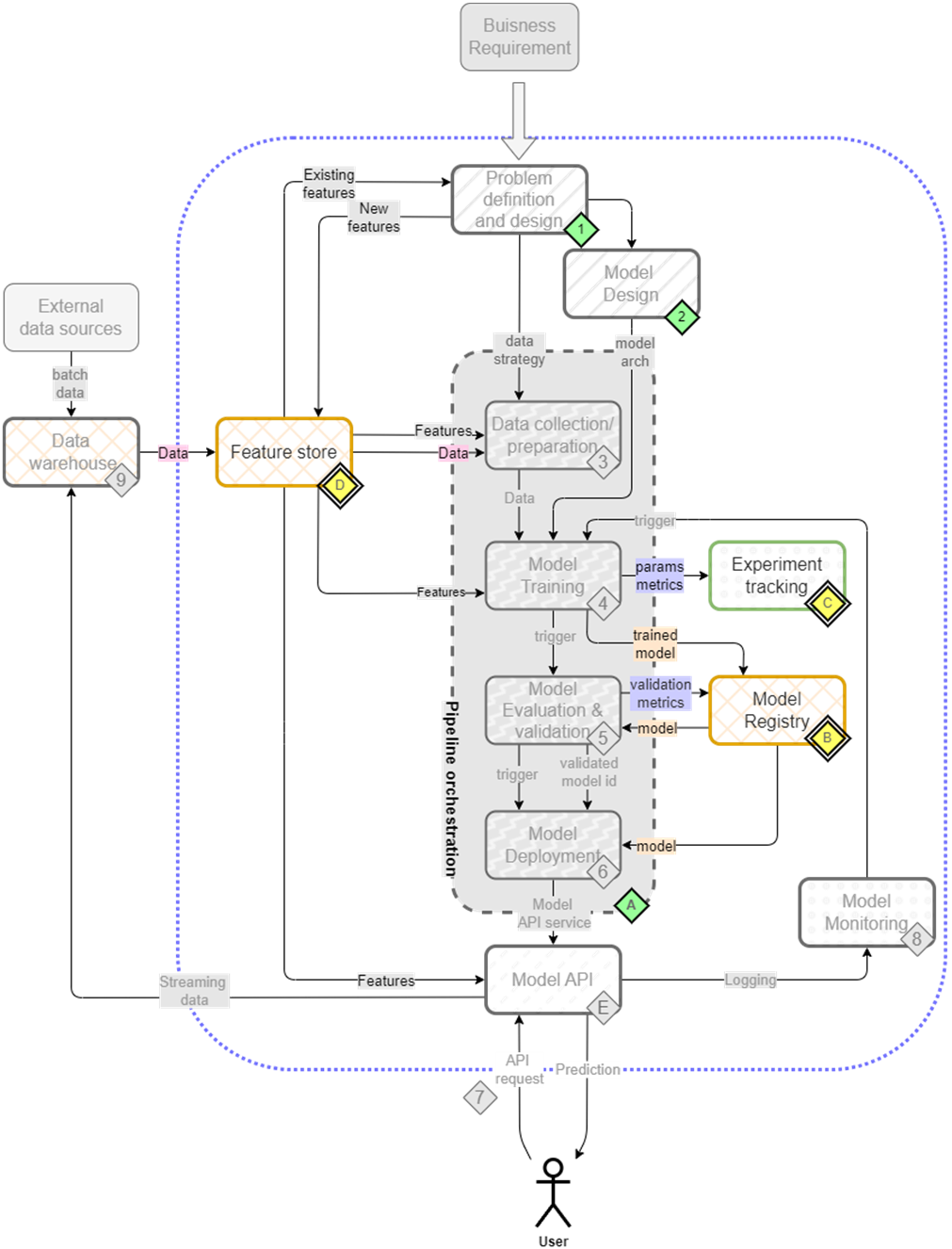
The mental map where we are now focusing on feature store(D), experiment tracking(C) and model registry(B).
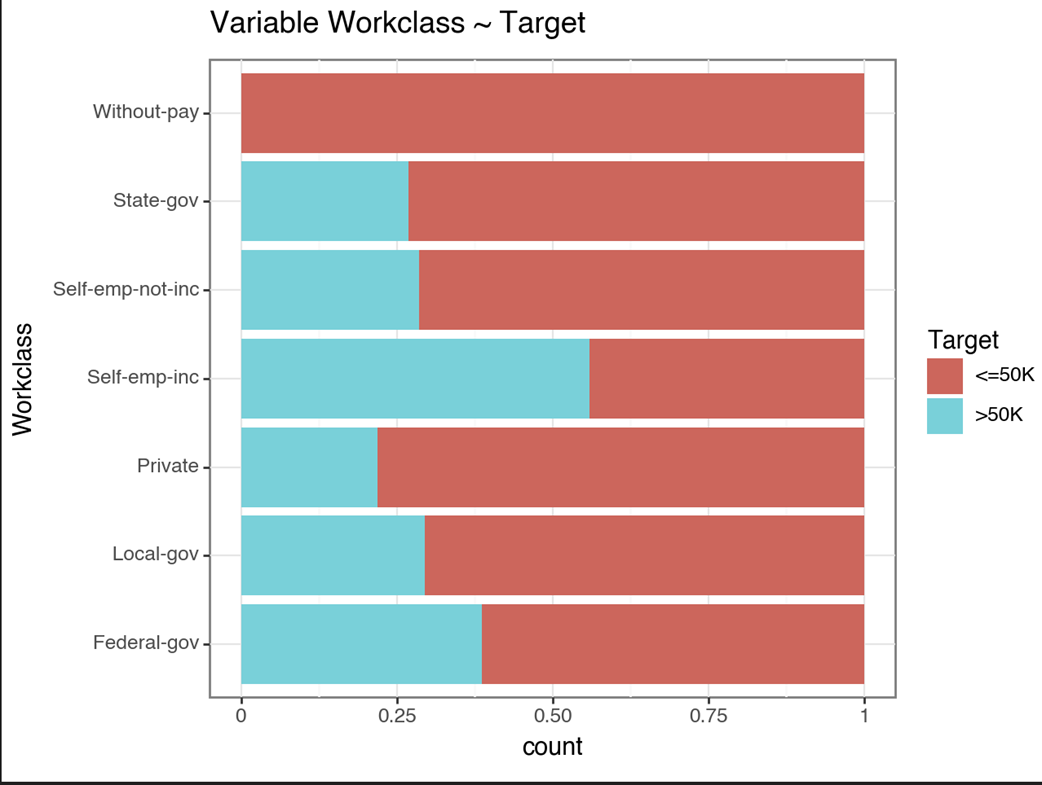
A plot comparing the workclass categories distribution with the target variable. For example self-employed people are more likely to be earning greater than 50k.
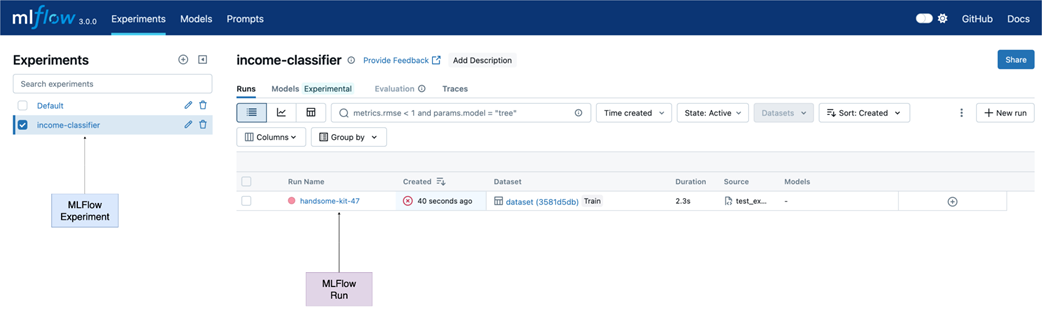
MLflow UI - On the left we have the list of experiments which shows our newly created income-classifier experiment. After starting a MLflow run and saving the plots we can see a new entry under Run Name.
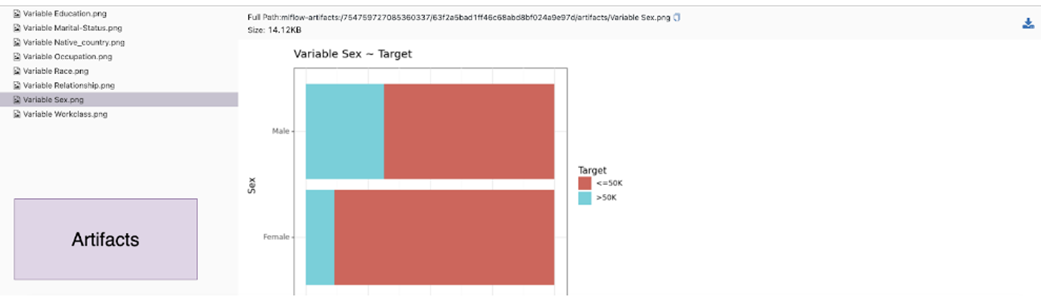
All the plots are present under artifacts. Run artifacts can include plots, files, and any object that can be saved on a disk.
The model metrics, and artifacts can all be seen under their respective tabs.
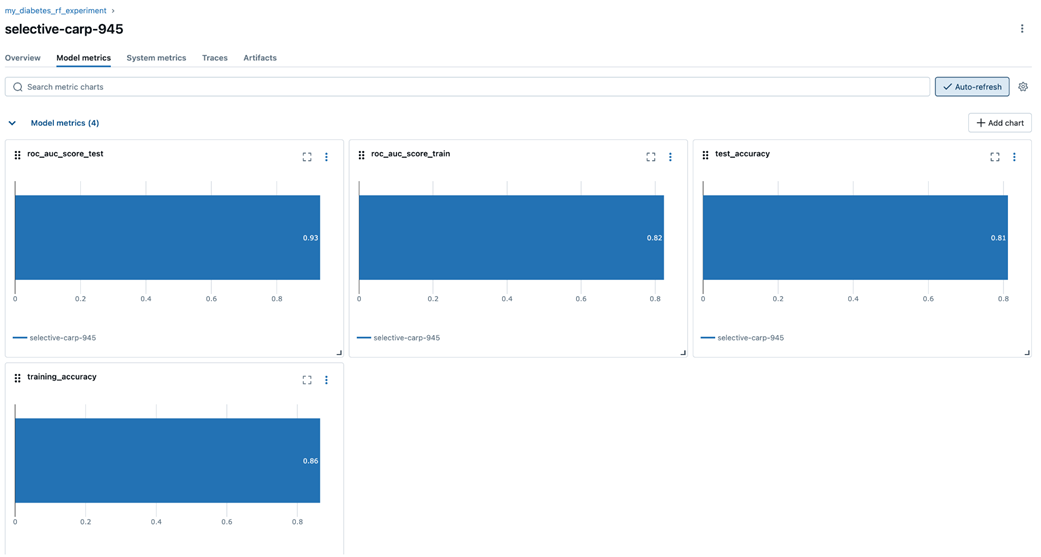
Auto-logging logs the model parameters and datasets without explicit logging. We even get feature importance plots automatically.
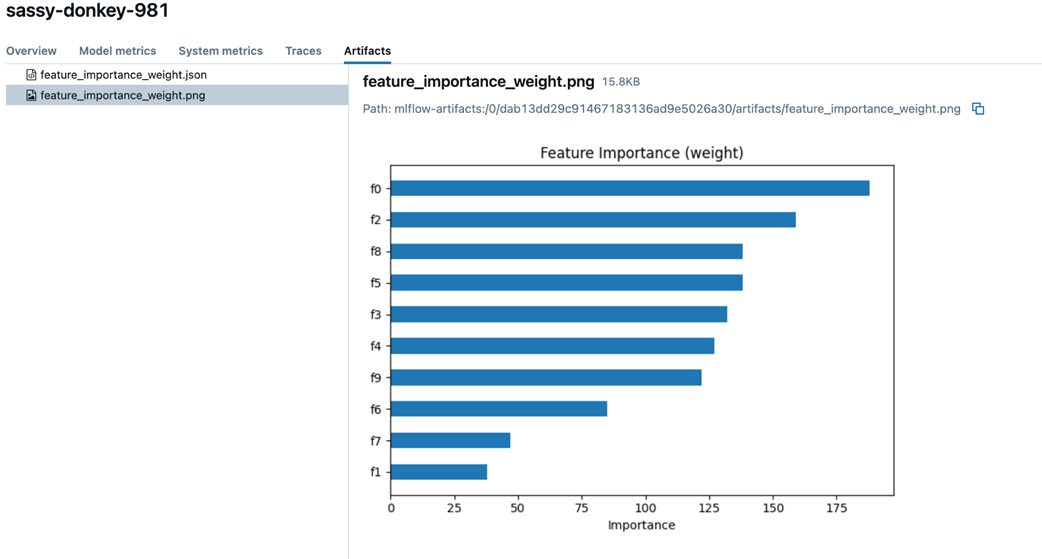
Using the MLflow UI to query runs that have a test AUC score < 0.8. Displaying the results in a chart view.
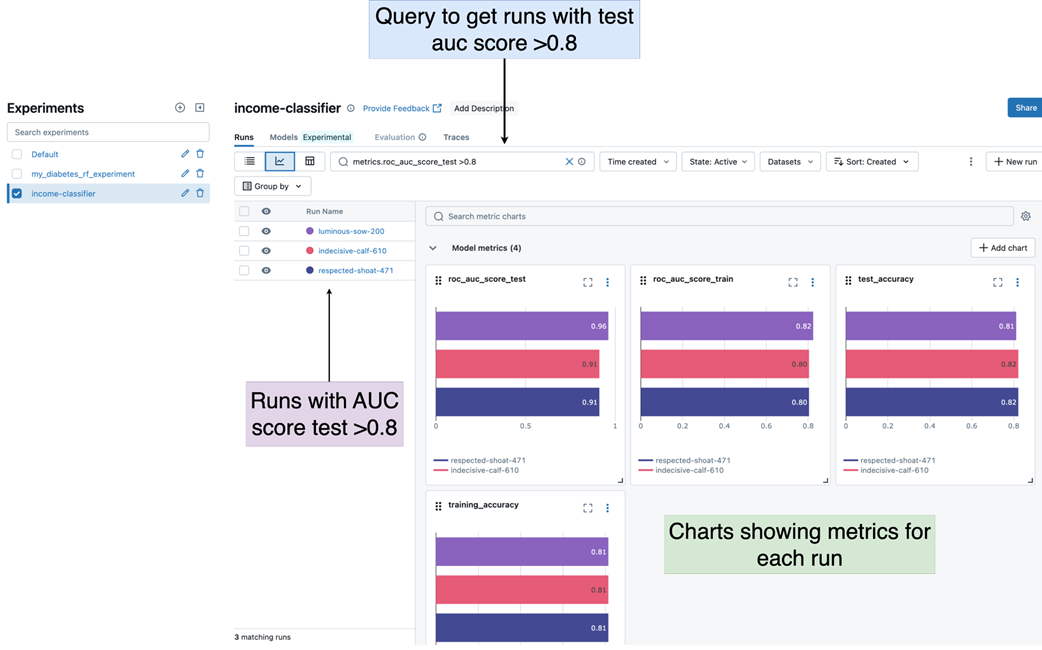
MLflow registered models can be seen under the models tab of the UI. Our Random Forest model can be seen here.
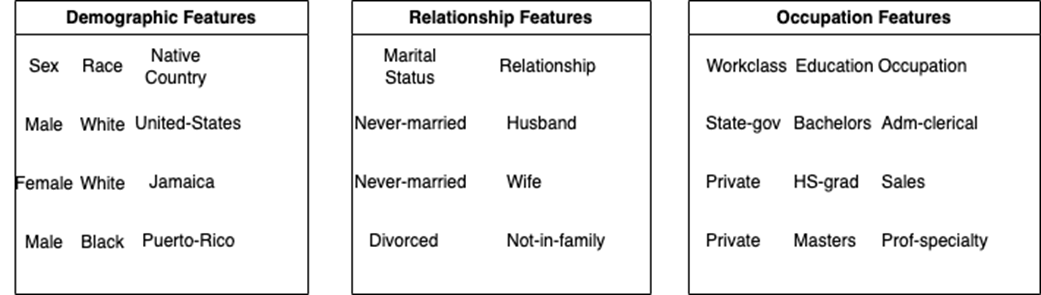
We split our single file into three files that represent three separate feature categories - demographic, relationship, and occupation.
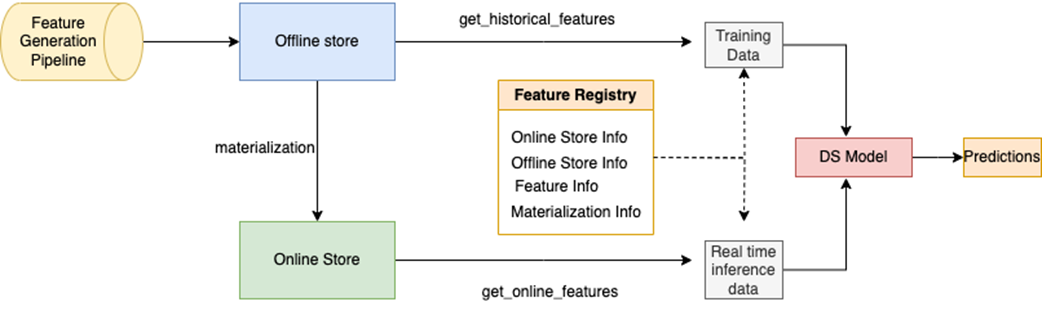
Feast feature store design involves a feature pipeline populating the offline store and periodically Feast materializes the offline features to the online store. Feature registry holds feature definitions along with online and offline store information. Feast SDK provides methods to retrieve features from online and offline stores which can be used for training and inference purposes.
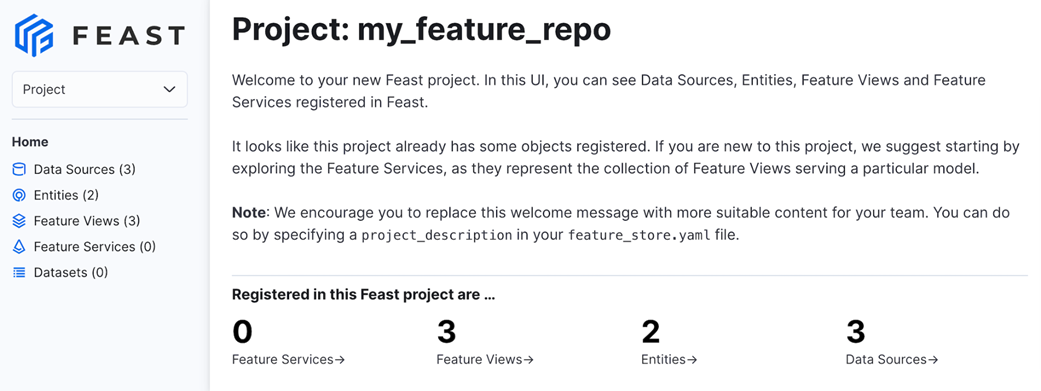
Feast UI gives us an easy way to visualize the details of feature views and entities for all our projects.
Summary

  • An experiment tracker such as MLflow can be used for tracking model performance and hyperparameters during model training and evaluation
  • MLflow Model Registry is a platform for managing, organizing, and versioning machine learning models, facilitating collaboration and deployment.
  • Feast the feature store streamlines the management and sharing of curated, ready-to-use features for machine learning, enhancing model development and deployment.
  • Feast enables point-in-time join to ensure the freshness of features at inference time
  • Feast supports both historical feature retrieval using offline stores and low-latency retrieval using online stores.

FAQ

Why do I need an experiment tracker, and what does MLflow track?Reliable ML requires reproducibility, fair model comparison, and performance tracking over time. MLflow captures parameters (including hyperparameters and data references), metrics, and artifacts (plots, models, files) in a centralized tracking server so teams can compare, reproduce, and collaborate on experiments.
How do I set up and use the MLflow tracking server locally?Install MLflow and start the UI with “mlflow ui” (default at http://localhost:5000). In your notebook/script, point MLflow to the server with set_tracking_uri, create or select an experiment with set_experiment, then wrap work in start_run blocks to log metrics, parameters, datasets, and artifacts.
What is an MLflow “run,” and how do I log artifacts like EDA plots?A run represents one execution of an experiment and has a unique run ID. Place your EDA or training code inside start_run; save plots to disk and use mlflow.log_artifacts to persist the directory so plots and files are attached to that run for future inspection.
How can I link datasets to runs for full reproducibility?Save datasets to an object store (e.g., MinIO, S3, GCS), then create MLflow dataset objects (mlflow.data.from_pandas) with a “source” URI. Log them via mlflow.log_input using contexts like “training,” “testing,” and “reference” so the run records exactly which data was used.
When should I use MLflow autologging versus manual logging?Autologging (e.g., mlflow.xgboost.autolog()) automatically records many parameters, metrics, models, and plots for supported libraries, reducing boilerplate. You may still need manual logs for custom metrics or to control dataset formats (autologging may log arrays instead of dataframes), so a hybrid approach is common.
How do I pick the best model and register it in the MLflow Model Registry?Use the UI’s search (e.g., filter by metrics.roc_auc_score_test and sort descending) or programmatically with MlflowClient.search_runs to find top runs. Register the chosen run’s model (runs:/<run_id>/<artifact_path>) with register_model, then manage lifecycle stages (e.g., Staging, Production) in the registry.
What problems does a feature store like Feast solve?Feast ensures consistent, reusable features across training and inference, provides point-in-time correct joins for historical retrieval, and centralizes feature definitions in a registry. It bridges offline storage (e.g., files/warehouse) and an online low-latency store (e.g., Redis) for real-time serving.
What are entities, FeatureViews, and TTL in Feast?An entity (e.g., user_id) identifies the subject for which features are computed. A FeatureView groups related features, declares schema and data source, and sets TTL to bound how far back Feast looks when assembling historical datasets, favoring the freshest valid features near the event time.
How do I configure Feast with MinIO (offline) and Redis (online)?Define FileSource paths as s3 URIs with an endpoint override pointing to MinIO. In feature_store.yaml, set the registry location, provider, offline_store type (file), and online_store type (redis) with its connection string. Run “feast apply” to register entities and FeatureViews and provision online infrastructure.
How do I retrieve features for training and for real-time inference?For training/batch, use get_historical_features with an entity dataframe (must include user_id and event_timestamp) and a list of features. Materialize the offline data to the online store for a time window, then use get_online_features for the latest features at inference; optionally expose HTTP endpoints with “feast serve” and browse definitions with “feast ui.”

pro $24.99 per month

  • access to all Manning books, MEAPs, liveVideos, liveProjects, and audiobooks!
  • choose one free eBook per month to keep
  • exclusive 50% discount on all purchases
  • renews monthly, pause or cancel renewal anytime

lite $19.99 per month

  • access to all Manning books, including MEAPs!

team

5, 10 or 20 seats+ for your team - learn more


choose your plan

team

monthly
annual
$49.99
$499.99
only $41.67 per month
  • five seats for your team
  • access to all Manning books, MEAPs, liveVideos, liveProjects, and audiobooks!
  • choose another free product every time you renew
  • choose twelve free products per year
  • exclusive 50% discount on all purchases
  • renews monthly, pause or cancel renewal anytime
  • renews annually, pause or cancel renewal anytime
  • Machine Learning Platform Engineering ebook for free

choose your plan

team

monthly
annual
$49.99
$499.99
only $41.67 per month
  • five seats for your team
  • access to all Manning books, MEAPs, liveVideos, liveProjects, and audiobooks!
  • choose another free product every time you renew
  • choose twelve free products per year
  • exclusive 50% discount on all purchases
  • renews monthly, pause or cancel renewal anytime
  • renews annually, pause or cancel renewal anytime
  • Machine Learning Platform Engineering ebook for free
choose your plan

team

monthly
annual
$49.99
$499.99
only $41.67 per month
  • five seats for your team
  • access to all Manning books, MEAPs, liveVideos, liveProjects, and audiobooks!
  • choose another free product every time you renew
  • choose twelve free products per year
  • exclusive 50% discount on all purchases
  • renews monthly, pause or cancel renewal anytime
  • renews annually, pause or cancel renewal anytime
  • Machine Learning Platform Engineering ebook for free