8 Querying multiple tables
This chapter explains what makes relational databases “relational” and why splitting data across multiple, related tables is powerful. It contrasts a single, spreadsheet-like table full of repeated values with a well-designed schema that organizes data into logical groups. By introducing primary keys and foreign keys, it shows how replacing repeated strings with compact identifiers reduces redundancy, improves consistency, and makes updates reliable. Using an order tracking example, it motivates separating customers, titles, orders, and order items, and describes common relationship types, especially one-to-many, such as customer-to-orders and order-to-items.
With the relational design in place, the chapter demonstrates how to retrieve related data using joins in the FROM clause. It introduces JOIN and ON to connect tables via matching key columns, explains these predicates alongside WHERE filters, and emphasizes two-part names (table.column) to disambiguate shared column names. It scales joins from two tables to several (orderheader, customer, orderitem, title) and notes that join order in the query is often about readability as long as relationships are correctly expressed. To improve clarity, it advocates concise table aliases (for example, oh, oi, c, t) and offers simple rules for picking sensible, short alias names.
Finally, the chapter presents the older, comma-and-WHERE join style as something you may encounter but should generally avoid. While syntactically valid, pushing all join conditions into WHERE harms readability, complicates troubleshooting, and restricts you to a single join type, whereas explicit JOINs are clearer and more flexible. The chapter closes by encouraging practice with multi-table queries, mindful use of predicates, and consistent aliasing, since joins will be central to most real-world SQL.
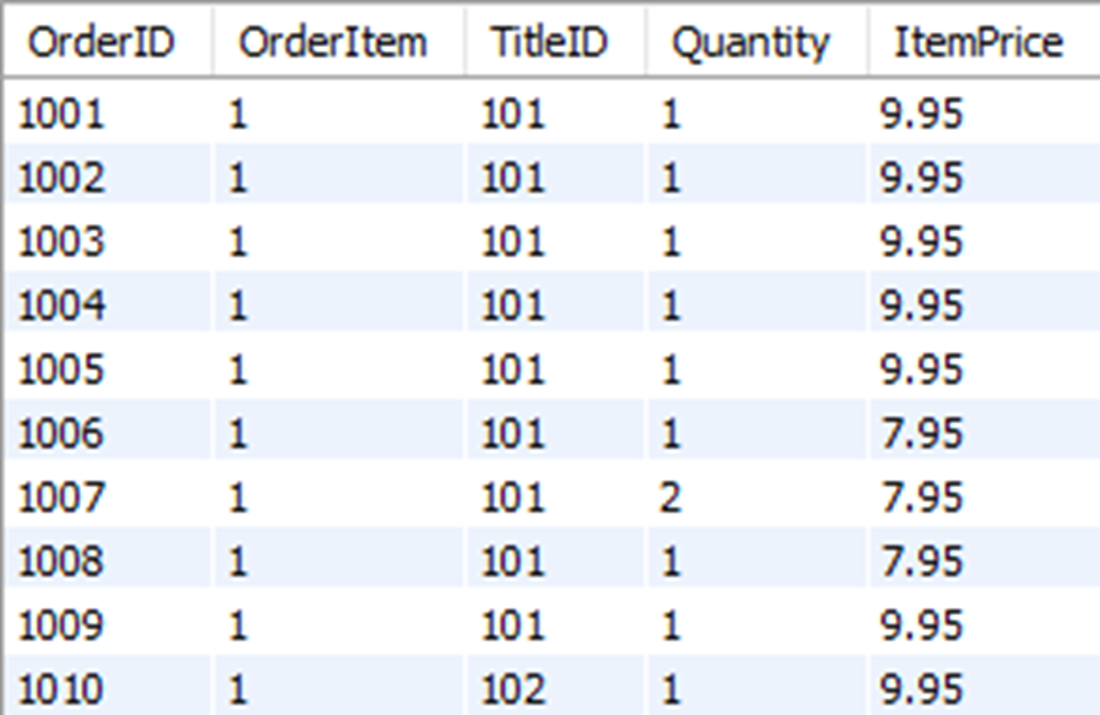
The first ten rows in the orderitem table, which includes the column “TitleID”
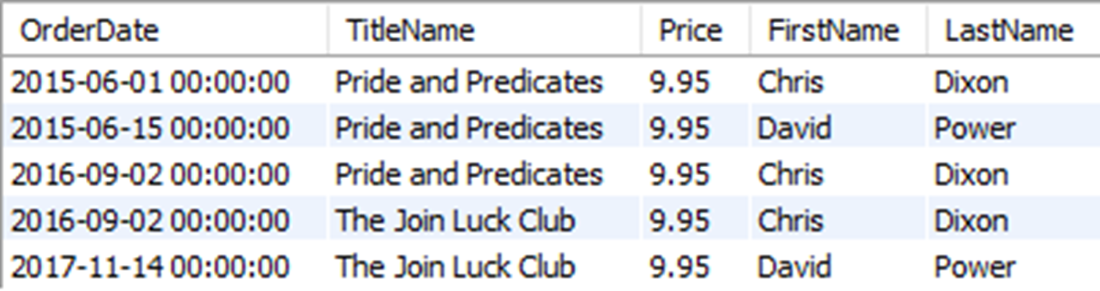
shows our hypothetical table used to track orders that contains order date, title name, price, and customer name.
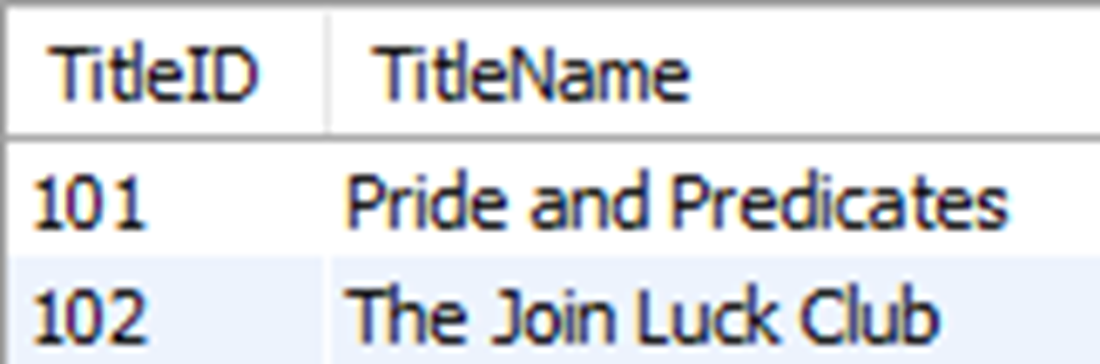
The results for TitleID and TitleName for the titles “Pride and Predicates” and “The Join Luck Club.
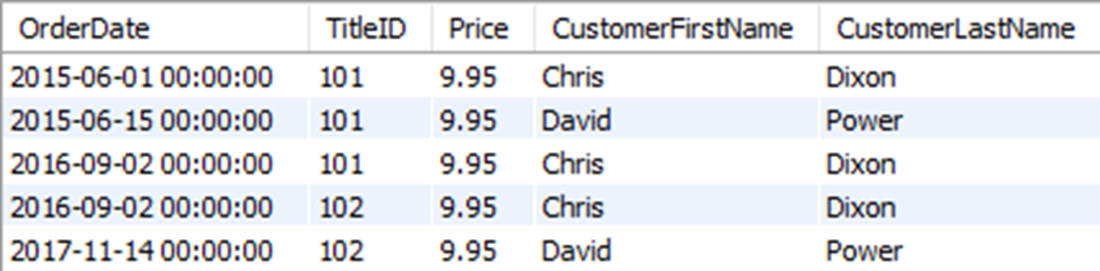
shows what it would look like if we replaced TitleName with TitleID in our hypothetical order table.
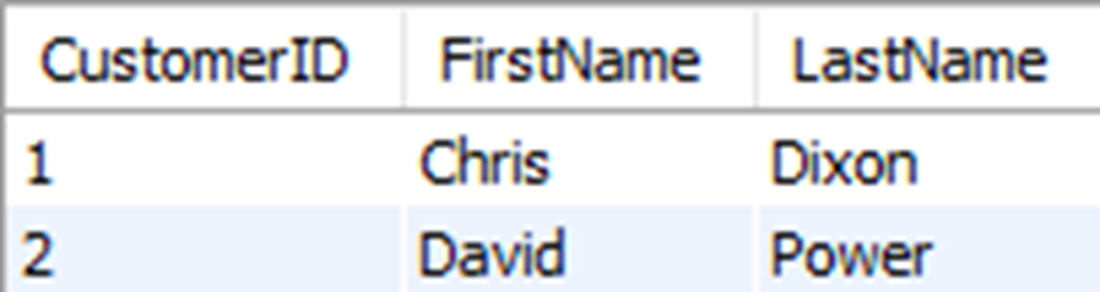
The results from the CustomerID, FirstName, and LastName for customers with the name “Chris Dixon” or “David Power”
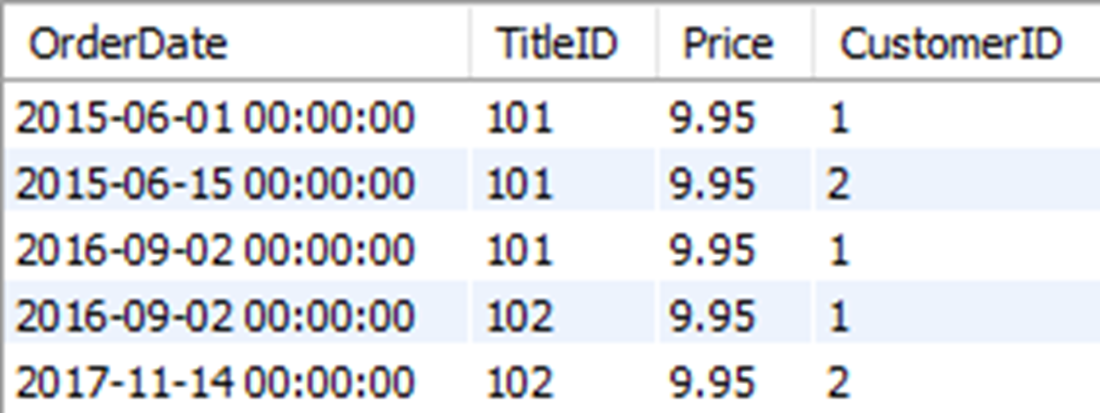
shows our hypothetical order table with a CustomerID column to reference names in the customer table.
The results of joining the orderheader and customer tables to show CustomerID and customer name values for the first order

Customer information from the customer table, and the price of the item ordered in the first order from the orderitem table

Customer information from the customer table, the price of the item ordered in the first order from the orderitem table, and the title name from the title table

Lab answers
- The results will be the same. Since our query is matching all OrderID values from the orderheader to the orderitem table, the OrderID column from either table can be used in the filtering condition to return the same results.
- Chris Dixon placed 3 orders. You could use a query like this to get the results:
- Eight customers placed an order in 2015:
- You could write a query like this using JOINs and aliases:
- The query executes successfully with the same result set, but as noted in this chapter, we generally try to avoid combining filtering predicates with join predicates for the sake of readability.
FAQ
What makes a database management system “relational”?
It stores data in separate, logical tables that relate to each other. Those relationships let you retrieve related data from multiple tables with a single query by joining them on shared values.Why split data across multiple tables instead of one big table?
To reduce redundancy, save storage, prevent inconsistencies, and make updates easier. For example, storing a book’s TitleName once in a title table and referencing it by TitleID elsewhere avoids repeated long strings and typos.What are primary keys and foreign keys?
A primary key uniquely identifies each row in a table (for example, title.TitleID). A foreign key is a column in another table that stores those key values to represent the relationship (for example, orderitem.TitleID referencing title.TitleID).What is a one-to-many relationship?
One row in a “parent” table relates to many rows in a “child” table. Examples: customer → orderheader (one customer, many orders) and orderheader → orderitem (one order, many items).Why replace names with numeric IDs?
Numeric IDs take less space, speed queries, and centralize the authoritative value. If a name changes or was entered incorrectly, you update it once in its table and all references remain consistent via the ID.How do I join two tables in SQL?
Use JOIN ... ON in the FROM clause to state the tables and the matching columns. Example:FROM orderheader JOIN customer ON orderheader.CustomerID = customer.CustomerID. The ON part is a predicate that evaluates matching rows.
 Learn SQL in a Month of Lunches ebook for free
