Overview

1 Before you begin

Data professionals manage a wide range of responsibilities across many technologies and often across dozens to thousands of SQL Server instances. While most tasks can be done through GUIs, that approach is slow and inconsistent at scale. A vivid example is a DBA who spent 90 minutes each morning checking Agent jobs on more than 100 instances; after a missed monthly run caused disruption during his vacation, he automated the process with PowerShell, turning a tedious routine into a quick review of a consolidated, color‑coded report. This sets the stage for the chapter’s core message: automation is the key to reliability, speed, and consistency.

The chapter advocates automating tasks as early as possible because scripts enforce repeatability, reduce human error, and can run unattended on reliable schedules. PowerShell is highlighted as the right tool for cross‑technology automation, excelling at monotonous, multi‑system operations and serving as executable documentation when scripts are written clearly with comments. With its cross‑platform reach and broad ecosystem, PowerShell skills carry over to data center and cloud scenarios alike, helping practitioners become the automators rather than the automated.

dbatools is introduced as a community‑driven, open‑source PowerShell toolkit that simplifies common and complex SQL Server tasks—backups, restores, migrations, Availability Groups, configuration, diagnostics—and integrates hard‑won community practices, making reliable automation accessible without deep PowerShell expertise. The book is aimed at data professionals who want to accomplish real administrative work at scale using a small set of well‑designed commands. It proposes a paced, practice‑oriented learning plan—one chapter per day with hands‑on labs—progressing from estate discovery to advanced migrations, while encouraging ongoing exploration and engagement with the broader community.

Figure 1.1. Job Activity Monitor
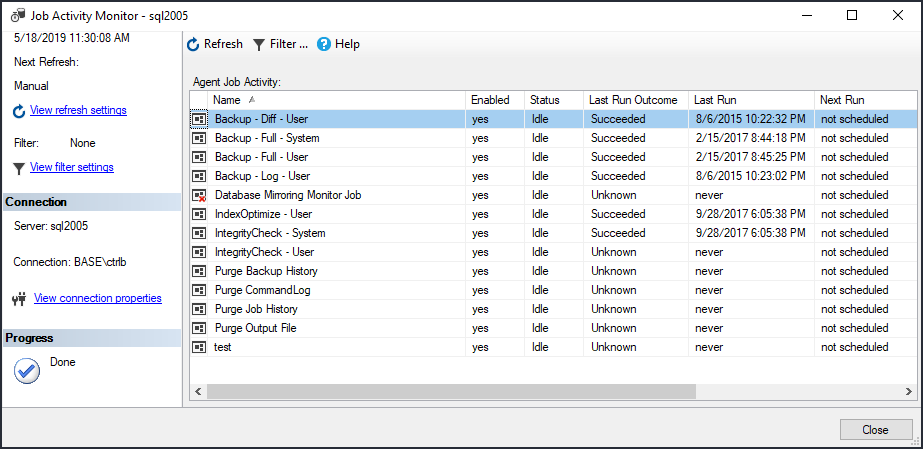
Agent
Figure 1.2. Color coded Excel output from PowerShell
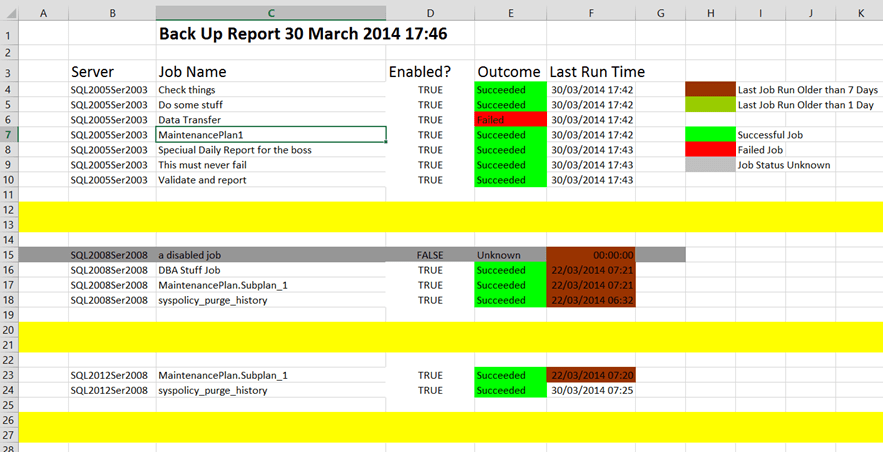
Excel
Figure 1.3. Sample dbatools command, Start-DbaMigration
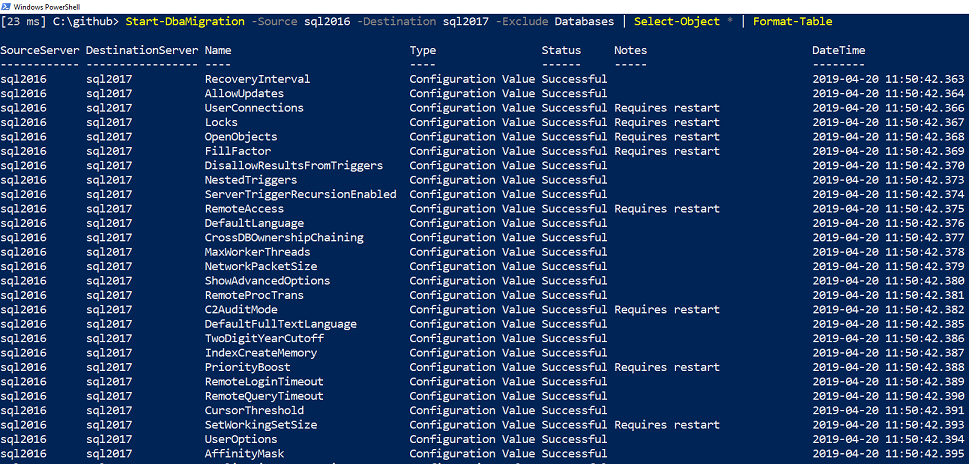
Excel
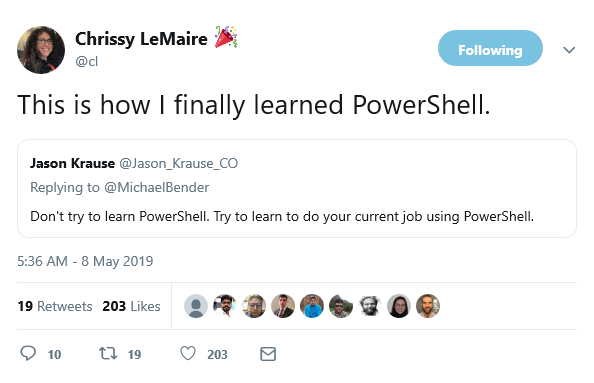
Figure 1.4. Learning PowerShell
Twitter

Being immediately effective with dbatools

The great thing about dbatools is that most of the development work has been done for you. A bunch of community members collectively invested thousands of hours to build a standardized toolset that help us manage our daily tasks. This also means you can manage these same tasks by just executing a few commands.

Like the authors of PowerShell in a Month of Lunches, Don Jones and Jeff Hicks, our primary goal in this book is for you to be "immediately effective". This means that a section may be initially light on the details so that you can jump right in and accomplish some tasks. If necessary, we will provide additional depth, theory and nuances later in the chapter, in online articles or highlight it in a livestream.

FAQ

Why can’t data professionals afford to ignore PowerShell?Because DBAs manage many tasks across multiple technologies and often many SQL instances, GUI-only work wastes time and invites inconsistency. PowerShell enables reliable, repeatable automation that saves time and reduces human error.
What was the first “win” with PowerShell described in the chapter?A DBA automated daily checks of SQL Agent Jobs across about 100 instances. What once took at least 90 minutes became a quick review of a color‑coded Excel report generated by a script, helping prevent oversights like missed monthly runs.
Why automate instead of relying on GUIs and manual steps?Automation delivers speed, repeatability, and accuracy. Scripts run consistently, can be scheduled, don’t get bored or distracted, and serve as clear, maintainable documentation compared to step-by-step screenshots.
Where does PowerShell run and what else can it automate?PowerShell is available on Windows, Linux, macOS, Raspberry Pi, and in the cloud. The skills transfer to automating Azure, SQL Managed Instances, and even services like Spotify and Slack.
What is dbatools and who created it?dbatools is an open‑source, cross‑platform PowerShell toolkit for SQL Server DBAs. It was created by Chrissy LeMaire and now includes contributions from over 215 community members.
What kinds of DBA tasks can dbatools help automate?Common tasks such as backups and restores, migrations, configuring instances, and setting up Availability Groups. It also simplifies things like max memory calculations and converting traces to Extended Events, and integrates with popular community tools (Ola Hallengren’s Maintenance Solution, Glenn Berry’s diagnostic queries, sp_whoisactive, First Responder Kit, sqlwatch).
How does dbatools relate to Microsoft’s SqlServer module?Microsoft’s SQL Tools Team maintains the SqlServer module, and Microsoft has been supportive of dbatools. Premier Field Engineers use it, and the SQL Tools Team allows inclusion of components that power SQL Server Management Studio.
Who is this book for and what background is expected?It targets end‑users/DBAs rather than developers. The focus is on accomplishing administrative tasks with PowerShell, assuming you already know basic SQL Server administration concepts.
How should I use the book and pace my learning?Read one chapter per day (about 40 minutes) and spend the remaining time practicing. Chapters 1–3 provide orientation; Chapters 4–24 are the core content and build on each other—complete them in order.
Where can I get help, answers, and connect with the community?Use the forum at https://dbatools.io/molforum and find lab answers at https://dbatools.io/answers. Join the SQL Community Slack #dbatools channel via https://dbatools.io/slack, and catch live coding at https://dbatools.io/live. Follow on Twitter: @cl, @sqldbawithbeard, @jpomfret, @ClaudioESSilva, and @psdbatools.

pro $24.99 per month

  • access to all Manning books, MEAPs, liveVideos, liveProjects, and audiobooks!
  • choose one free eBook per month to keep
  • exclusive 50% discount on all purchases
  • renews monthly, pause or cancel renewal anytime

lite $19.99 per month

  • access to all Manning books, including MEAPs!

team

5, 10 or 20 seats+ for your team - learn more


choose your plan

team

monthly
annual
$49.99
$399.99
only $33.33 per month
  • five seats for your team
  • access to all Manning books, MEAPs, liveVideos, liveProjects, and audiobooks!
  • choose another free product every time you renew
  • choose twelve free products per year
  • exclusive 50% discount on all purchases
  • renews monthly, pause or cancel renewal anytime
  • renews annually, pause or cancel renewal anytime
  • Learn dbatools in a Month of Lunches ebook for free

choose your plan

team

monthly
annual
$49.99
$399.99
only $33.33 per month
  • five seats for your team
  • access to all Manning books, MEAPs, liveVideos, liveProjects, and audiobooks!
  • choose another free product every time you renew
  • choose twelve free products per year
  • exclusive 50% discount on all purchases
  • renews monthly, pause or cancel renewal anytime
  • renews annually, pause or cancel renewal anytime
  • Learn dbatools in a Month of Lunches ebook for free
choose your plan

team

monthly
annual
$49.99
$399.99
only $33.33 per month
  • five seats for your team
  • access to all Manning books, MEAPs, liveVideos, liveProjects, and audiobooks!
  • choose another free product every time you renew
  • choose twelve free products per year
  • exclusive 50% discount on all purchases
  • renews monthly, pause or cancel renewal anytime
  • renews annually, pause or cancel renewal anytime
  • Learn dbatools in a Month of Lunches ebook for free