1 First steps with Java logging
Modern Java logging turns invisible program behavior into observable, actionable information. The chapter traces logging’s evolution from ad‑hoc console prints to a core discipline that supports monitoring, understanding behavior, debugging, performance tuning, and auditing. It explains logs as structured records—capturing when an event happened, which component produced it, and what occurred—written to a storage system that humans and machines can analyze. In short, logging is the black box of your application, enabling real‑time insight and post‑incident investigation across production systems.
Because many people rely on logs—developers, operators, and auditors—the chapter emphasizes choosing meaningful content over noise. It advises anticipating future questions and using a simple checklist (the “6+2” questions: who, what happened, where, what input, when, what result vs. expected, how, and how long) to ensure context and clarity. It also underscores responsibility: never log sensitive data such as passwords or personal identifiers, and balance thoroughness with relevance so logs remain useful rather than overwhelming.
Practically, the chapter contrasts manual prints with purpose‑built logging frameworks that add timestamps, manage output destinations, support levels, and encourage efficient, readable messages (e.g., placeholders) without cluttering business logic. It outlines a high‑level architecture where every component can emit events through a central framework, producing consistent, parsable output for tools and teams. Finally, it surveys popular Java options—Log4j 2.x, Java Util Logging, and Logback—noting that the book focuses on Log4j while principles largely transfer among frameworks, helping you choose based on features, trust, and operational needs.
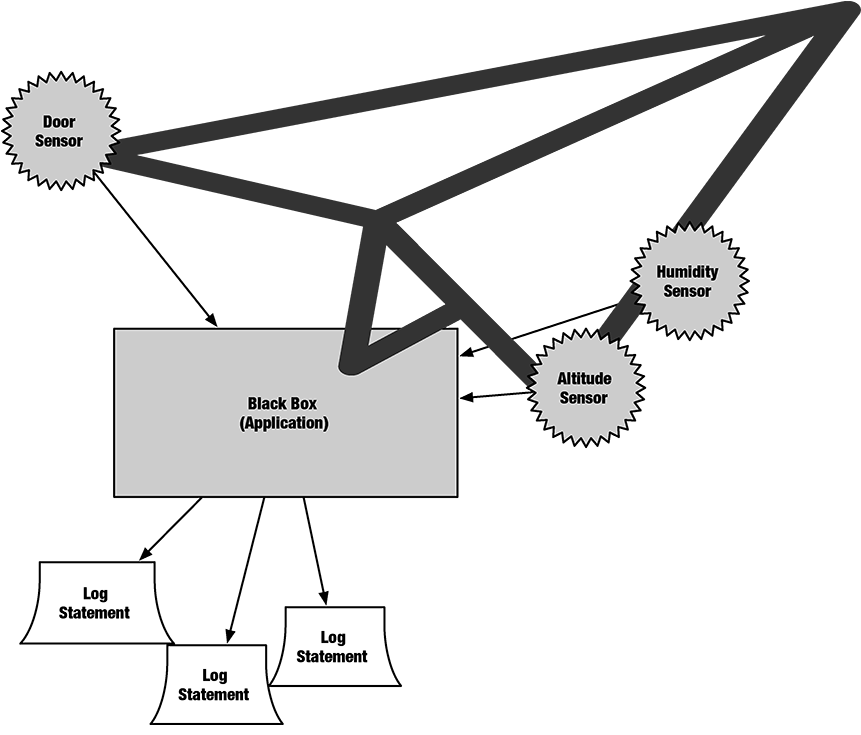
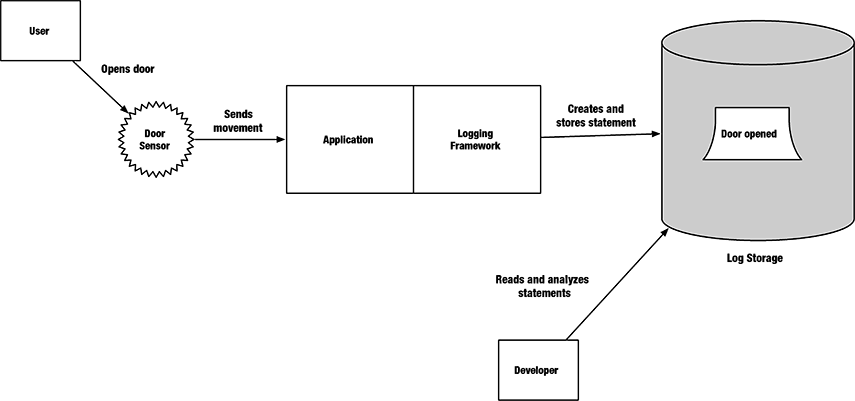
Sensors feed data into an application (black box), which generates log statements.
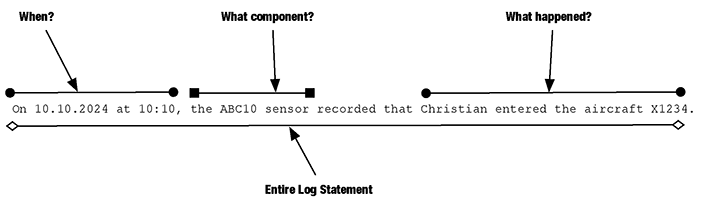
The structure of a log statement—when, what component, and what happened.
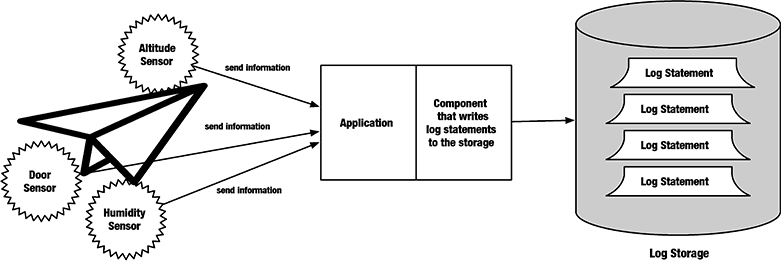
Log statements are stored in a storage, often a log file.
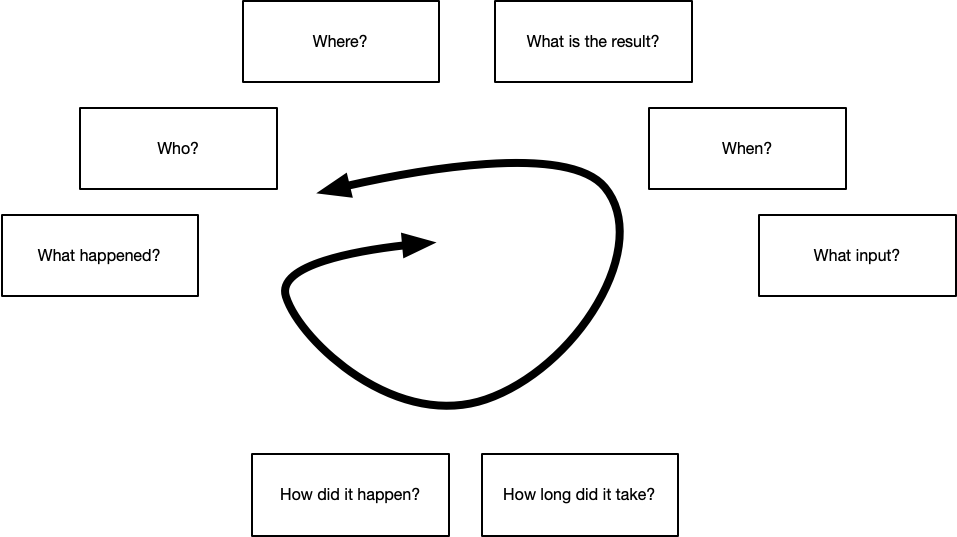
The circle of questions: Start with one and circle until you ask them all. It will help you find the proper context.
When a user generates an "open door" event, the system records it in the log file. Developers can read it for debugging purposes.
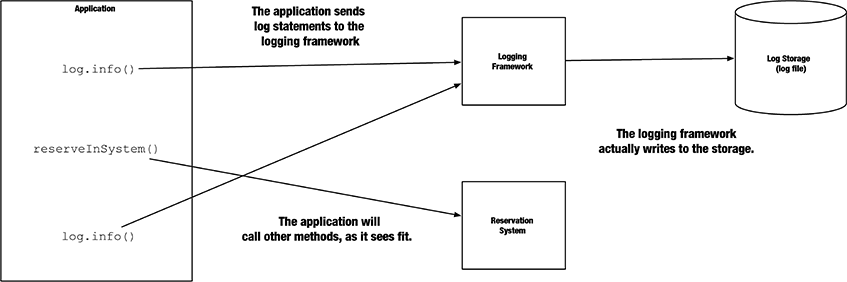
The flight app is responsible for booking flights. It will also use sub-components or microservices as the reservation system to perform its actions. Also, it wants to write logs directly.
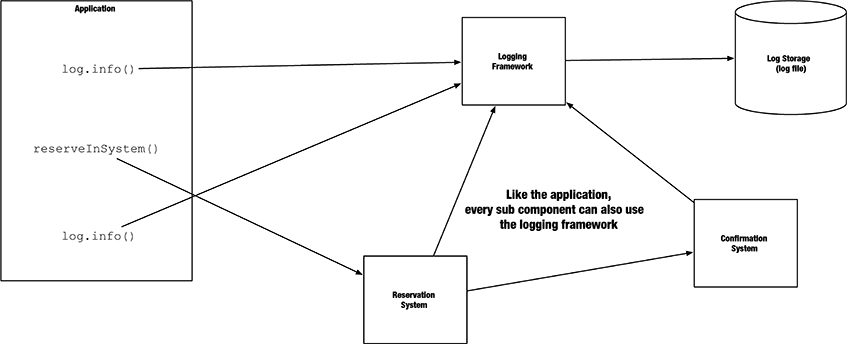
Like the flight app, the reservation system wants to write logs. The logging framework will provide the same service to this component.
Summary
- Logging records a history of events during an application’s execution.
- Logging is essential for capturing meaningful context through log statements.
- Log statements are messages recorded in log files or storage.
- Log files are essential for debugging, monitoring, and auditing.
- Logging frameworks offer methods like
log.info()for writing log statements. - Popular logging frameworks include Log4j 2, Java Util Logging, and Logback.
FAQ
What is logging and why do we need it?
Logging makes hidden system behavior visible. We use it to monitor health, understand application behavior, debug problems, tune performance, and satisfy audits and compliance.What are the essential parts of a log statement?
Each log typically answers three things: when the event happened (timestamp), which component recorded it, and what occurred (the message).Where are logs stored?
Logs are appended to a log storage—commonly plain log files, but sometimes specialized databases or external services.Who reads log files and what do they look for?
Developers look for technical details and errors, operators watch timing and reliability (for example, connection times), and auditors verify who did what and when (for example, money transfers or invoice send dates).What data should never be logged?
Never log sensitive data such as personal identifiers (emails, usernames, SSNs) or passwords (in any form). Doing so risks privacy breaches, regulatory penalties, and loss of trust.What are the “6+2” questions for writing meaningful logs?
Six Ws and two Hs: Who, What happened, Where, What input, When, What was the result vs. expected, How did it happen, and How long did it take. Use them to add the right context without noise.Why not just use System.out.println for logging?
It prints only to the console, requires manual timestamps and formatting, and doesn’t manage destinations or levels. It becomes hard to maintain as the app grows.What is a logging framework and how does log.info help?
A logging framework provides methods likeinfo, debug, and error to write structured logs to configurable destinations with timestamps and formatting. Example: log.info("Customer {} entered flight {}", customerId, flightId);Why prefer placeholders over string concatenation in logs?
Placeholders (for example,{}) avoid unnecessary object creation, improve readability, and let the framework handle formatting efficiently.
 Java Logging ebook for free
