Overview

5 Transactions

This chapter replaces the old “email to Lisa” payment flow with formal, verifiable transactions to eliminate the need to trust a single operator. Transactions are data structures that specify what coins are spent and how new coins are created, and they are stored verbatim so anyone can audit them. The system moves from an account-based model to a value-based UTXO model, which solves balance-check inefficiency, supports spending from multiple prior payments at once, and prevents Lisa from altering others’ payments because signatures commit to the entire transaction. From the user’s perspective wallets behave the same, but under the hood the lifecycle is create, confirm, and verify, with universal transparency enabling independent validation.

Transactions consist of inputs that reference unspent transaction outputs (UTXOs) by txid and index, and outputs that lock values to spending conditions. Wallets assemble enough inputs, add change outputs because outputs are spent in full, and sign each input; signatures exclude other signatures but commit to all other transaction data, and public keys are revealed on spend, making address reuse a security and privacy risk. Lisa confirms by checking existence and uniqueness of the spent outputs and by validating signatures, efficiently enforced via a maintained UTXO set that any verifier can rebuild. Script, a simple stack-based language, defines spending rules as a pubkey script (in the output) satisfied by a signature script (in the input); if each input’s combined program ends in “OK,” the transaction is valid and appended, allowing any full node to reproduce Lisa’s checks.

Beyond pay-to-public-key-hash, Script enables programmable money: multi-signature policies such as 2-of-3, pay-to-hash, and especially pay-to-script-hash (p2sh), which lets senders pay a short script hash while recipients provide the full redeeming script when spending (commonly recognized by addresses starting with 3). Transactions also carry version, locktime, and per-input sequence numbers, and the ledger’s money supply grows through special coinbase transactions that create new coins; all spending traces through a transaction graph back to such coinbases. While automation can handle Lisa’s duties, the only remaining trust is that she neither censors valid transactions nor reverts confirmed ones—issues addressed later—whereas everything else is now publicly verifiable thanks to transactions and signatures.

  . Bitcoin transactions
visual toc transactions.png
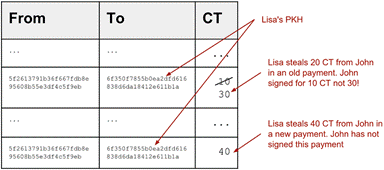
  Bad stuff Lisa could do. She wouldn’t, but she could.
lisa could steal.png
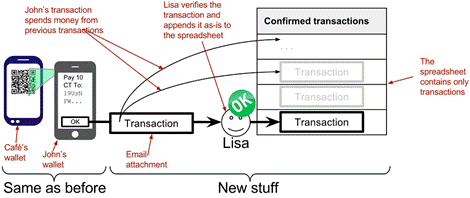
  The payment process is the same for users, but very different for Lisa and the spreadsheet.
wallet payment process transactions.png
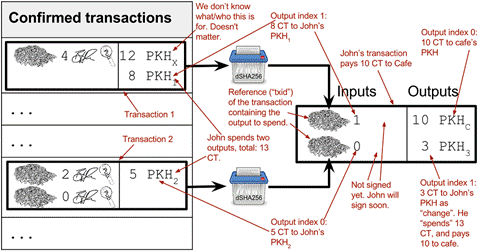
  John’s wallet prepares to pay 10 CT for a cookie. He uses both his keys with funds to cover the cost. He pays himself the change of 3 CT to a fresh address. The transaction is not yet signed.
transaction.png
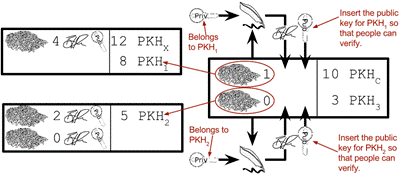
  John’s wallet signs the transaction. Each input gets its own signature. The public key is also needed in the inputs because anyone should be able to verify the signature.
sign transaction.png
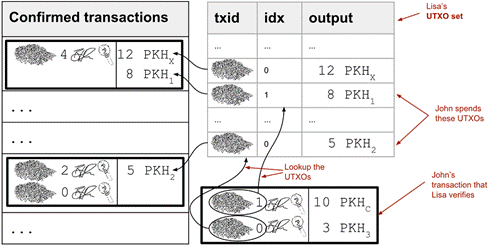
  Lisa verifies that John doesn’t double spend by using her UTXO set.
utxo set.png
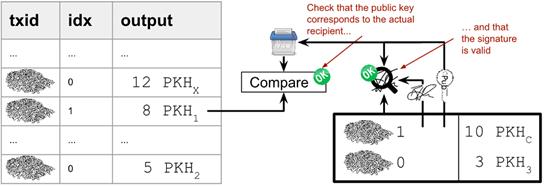
  Lisa verifies the first signature of John’s transaction.
verify signatures.png
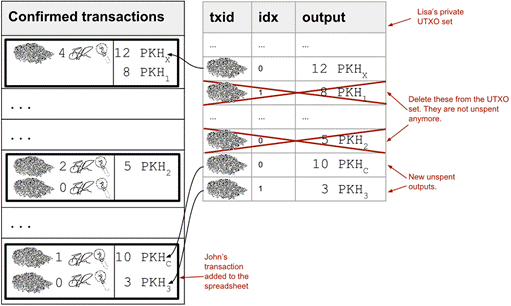
  Lisa adds the transaction to the spreadsheet and removes the spent outputs from the UTXO set.
utxo set update.png
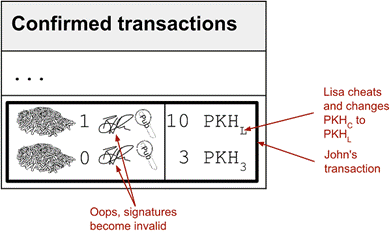
  Lisa cannot steal someone else’s money anymore. The signatures will become invalid and disclose her immoral act.
lisa steals from transaction.png
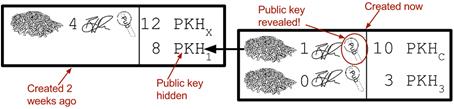
  The input reveals the public key. We made extra effort to avoid just that in chapter 3.
input reveals pubkey.png
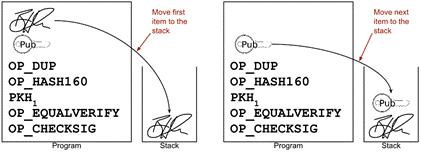
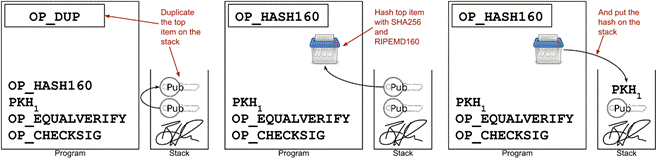
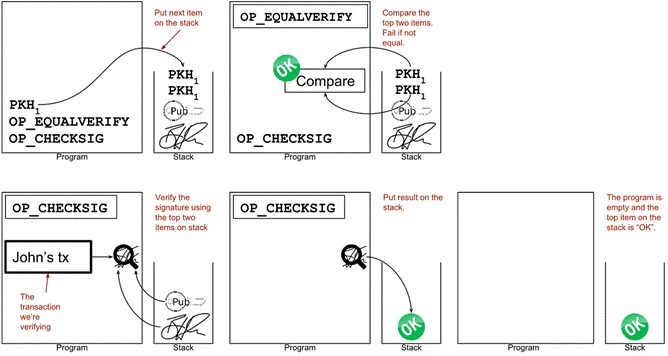
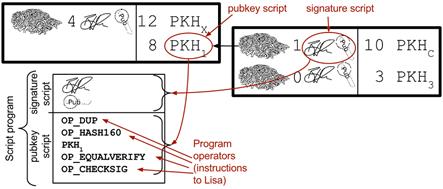
  The signature script is the first part of a program. The pubkey script in the spent output is the second part. If the complete program results in "OK", then the payment is authorized to spend the output.
script.png
execute script 1.png
execute script 2.png
execute script 3.png
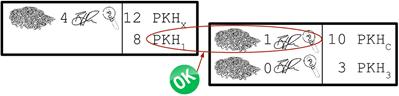
  The first input is verified.
script ok.png
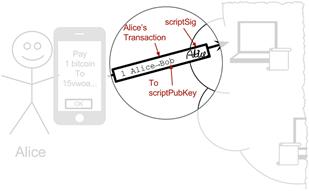
This chapter covers transactions. Right now we are exploring different ways to authenticate transactions.
periscope transactions.png
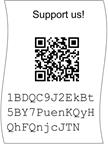
flyer p2pkh address.png
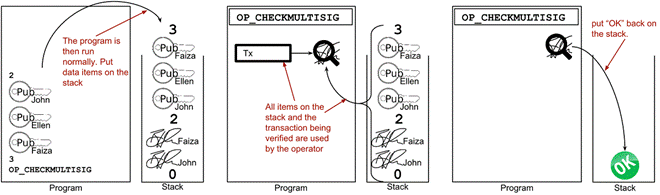
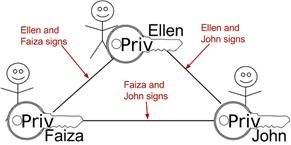
Multisignature setup between Faiza, Ellen and John. Two of the three keys are needed to spend money.
multisig transaction.png
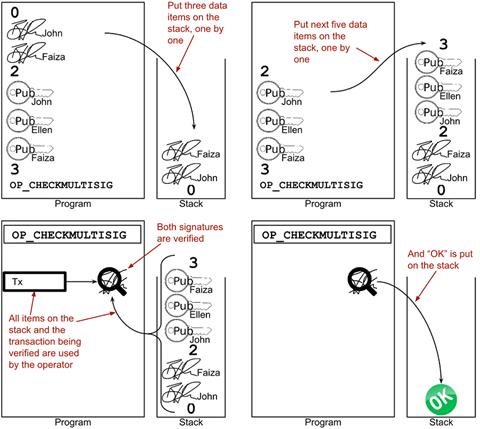
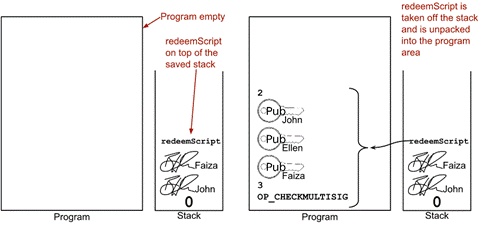
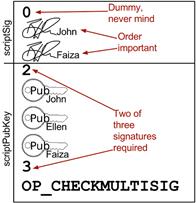
  A program that enforces 2 signatures out of 3 possible keys. The secret sauce is OP_CHECKMULTISIG.
multisig program.png
execute multisig.png
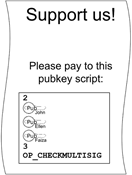
flyer scriptpubkey.png
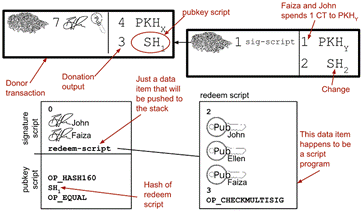
  Overview of pay-to-script-hash. The pubkey script is very simple. The signature script is special, because it contains a data item that contains program.
p2sh overview.png
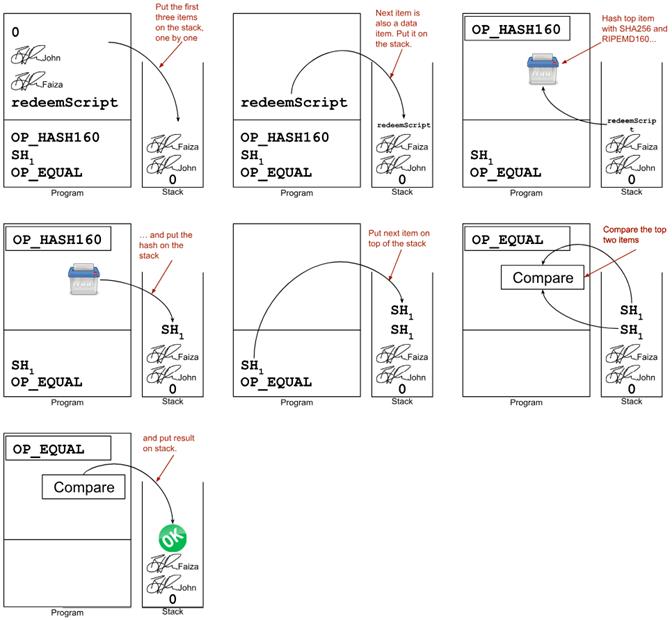
execute p2sh new client 1.png
execute p2sh new client 2.png
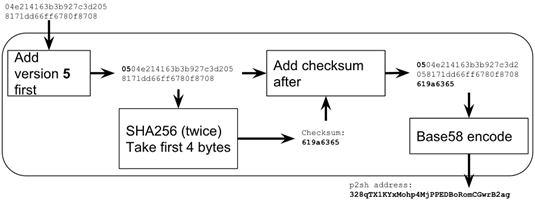
  Create a p2sh address. The difference from normal addresses is the version which is 5 for p2sh addresses instead of 0.
p2sh address encoding.png
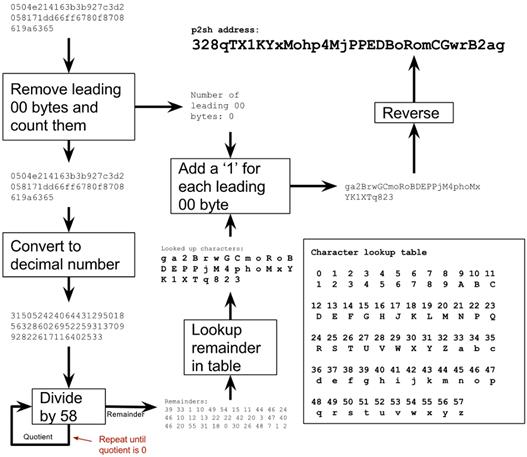
  Encode a versioned and checksummed script hash with base58. The result will always start with the character 3.
base58 encode p2sh.png
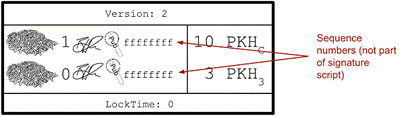
sequence number lock time.png
lisa is rewarded.png
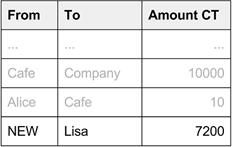
  Lisa rewards herself every day with a coinbase transaction.
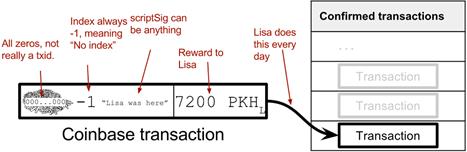
coinbase transaction.png
  The transaction graph. All transactions descend from one or more coinbase transactions.
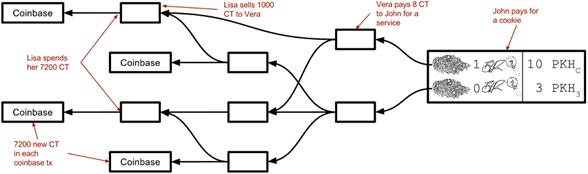
transaction graph.png
  The payment process. A wallet creates a transaction that Lisa verifies and appends to the spreadsheet.
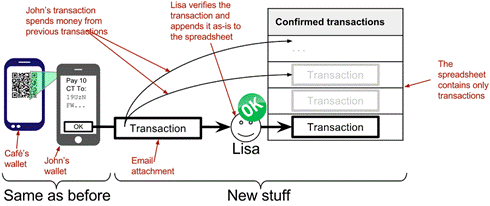
wallet payment process transactions.png
  A transaction spending output 1 of another transactions. The program consists of a signature script followed by a pubkey script.
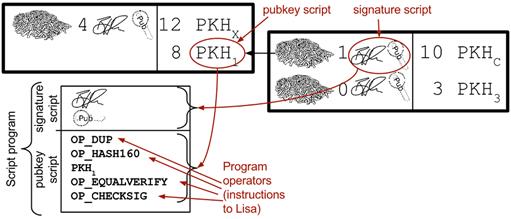
script.png

 Recap

In this chapter you learned that

  • Transactions have inputs and outputs, which lets you spend multiple "coins" and pay to multiple recipients in a single transaction.
  • The outputs of the transactions are "programmable". The sender wallet decides what program to put in the output. This dictates what’s needed to spend the money.
  • Anyone can verify the whole spreadsheet, because all signatures are public. This greatly reduces trust in Lisa.
  • Scripts can be used to enable multisignature capabilities, for example 3-of-7 capabilities. Great for companies and charities.
  • A new address type, p2sh address beginning with 3, is used to simplify the payment process for a lot of fancy payment types, for example multisig.
  • All transactions descend from one or more coinbase transactions. Coinbase transactions are the only way in which money is created.
  • Money creation is verified by any coworker, to make sure Lisa creates exactly as much as agreed. 7,200 CT per day.
  • Lisa can still censor and revert transactions. We still have to trust her with that.

FAQ

What problems with the old “Email to Lisa” system do transactions solve?Transactions remove the need to trust Lisa with balances and record edits. They let wallets combine multiple “coins” (UTXOs) in one payment, make all signatures public so anyone can verify, and replace Lisa’s balance calculations with precise checks that specific unspent outputs exist and aren’t already spent.
What is a transaction and how does it differ from the old row in the spreadsheet?A transaction is a self-contained piece of data with inputs and outputs that is stored verbatim in the spreadsheet. Inputs reference specific unspent outputs from earlier transactions, and outputs define where value goes (via locking scripts). Unlike the old rows, transactions include the signatures and rules needed so anyone can verify their validity.
What are inputs and outputs, and why is “change” often needed?Inputs point to earlier unspent transaction outputs (UTXOs) by txid and output index and include signatures to authorize spending. Outputs specify amounts and spending conditions (for example, pay-to-public-key-hash). Because an output must be spent in full, wallets usually add a change output back to the sender to return the leftover amount. The fee (if any) is inputs minus outputs.
How does the create → confirm → verify flow work?- Create: The wallet builds a transaction selecting UTXOs, sets outputs (recipient + change), and signs each input with the correct private key(s). - Confirm: Lisa checks that referenced outputs exist and are unspent, that inputs ≥ outputs, and that all signatures are valid, then appends the transaction as-is to the spreadsheet and updates her UTXO set. - Verify: Anyone can rebuild a private UTXO set and perform the same checks to ensure Lisa followed the rules.
What is the UTXO set and why is it important?The UTXO set is a local database of all unspent outputs. It lets verifiers quickly confirm that inputs spend real, unspent coins and prevents double spends. It’s derived solely from the transactions in the spreadsheet and can be rebuilt by replaying them in order.
Why do inputs include the public key, and why should addresses not be reused?To verify a signature, verifiers need the actual public key that corresponds to the hash recorded in the spent output; hashes are one-way, so the public key must be revealed in the spending input. Revealing a public key reduces the protection from “hash + key-derivation” down to “key-derivation only” for any other outputs to the same address. Reusing addresses therefore weakens security and harms privacy—use fresh addresses.
What is Script, and how do signature script and pubkey script work together?Script is a simple, stack-based language. The spending input provides a signature script (e.g., signature + public key), and the spent output provides a pubkey script (the rules). When executed top-to-bottom, if the combined program leaves “true/OK” on the stack, the input is authorized. Typical p2pkh uses OP_DUP OP_HASH160 … OP_EQUALVERIFY OP_CHECKSIG and signs a “cleaned” version of the transaction (without any signatures in inputs).
How do multisignature payments work, and why use pay-to-script-hash (p2sh)?Multisig locks funds with a rule like “2-of-3 signatures required,” enforced by Script (OP_CHECKMULTISIG). P2SH wraps that rule by paying to the hash of the redeemScript instead of the full script, so senders don’t need to understand or carry the large script, and the recipient bears the size/fee cost when spending. Old software stays forward-compatible, while upgraded software validates the redeemScript and signatures.
How can I recognize a p2sh address and what is a redeemScript?P2SH addresses use Base58Check with version 05 and typically start with “3”. The redeemScript is the actual Script (e.g., 2-of-3 multisig) whose hash appears in the output. When spending, the spender reveals the redeemScript and supplies the required data (e.g., multiple signatures) so verifiers can run it.
What trust remains in Lisa after introducing transactions?Transactions prevent her from altering amounts or recipients unnoticed because signatures would break and anyone can verify. However, two powers remain: censorship (not adding valid transactions she receives) and reversion (deleting already added transactions). These actions are detectable over time when others try to spend affected outputs, but resolving “word against word” requires additional mechanisms introduced in the next chapter.

pro $24.99 per month

  • access to all Manning books, MEAPs, liveVideos, liveProjects, and audiobooks!
  • choose one free eBook per month to keep
  • exclusive 50% discount on all purchases
  • renews monthly, pause or cancel renewal anytime

lite $19.99 per month

  • access to all Manning books, including MEAPs!

team

5, 10 or 20 seats+ for your team - learn more


choose your plan

team

monthly
annual
$49.99
$499.99
only $41.67 per month
  • five seats for your team
  • access to all Manning books, MEAPs, liveVideos, liveProjects, and audiobooks!
  • choose another free product every time you renew
  • choose twelve free products per year
  • exclusive 50% discount on all purchases
  • renews monthly, pause or cancel renewal anytime
  • renews annually, pause or cancel renewal anytime
  • Grokking Bitcoin ebook for free
choose your plan

team

monthly
annual
$49.99
$499.99
only $41.67 per month
  • five seats for your team
  • access to all Manning books, MEAPs, liveVideos, liveProjects, and audiobooks!
  • choose another free product every time you renew
  • choose twelve free products per year
  • exclusive 50% discount on all purchases
  • renews monthly, pause or cancel renewal anytime
  • renews annually, pause or cancel renewal anytime
  • Grokking Bitcoin ebook for free
choose your plan

team

monthly
annual
$49.99
$499.99
only $41.67 per month
  • five seats for your team
  • access to all Manning books, MEAPs, liveVideos, liveProjects, and audiobooks!
  • choose another free product every time you renew
  • choose twelve free products per year
  • exclusive 50% discount on all purchases
  • renews monthly, pause or cancel renewal anytime
  • renews annually, pause or cancel renewal anytime
  • Grokking Bitcoin ebook for free