3 Creating a Node.js module
This lesson introduces the essentials of starting a Node.js application by building a simple module and incorporating npm into the workflow. It explains how modularizing code keeps projects organized, how Node’s CommonJS system enables sharing functionality across files, and how npm streamlines adding third-party capabilities. By the end, you see how these pieces fit together to bootstrap an app and extend it with community packages.
On the module side, the chapter shows how each JavaScript file can act as a module whose properties are exposed via the exports object (shorthand for module.exports). A small example exports an array of encouraging messages from one file and consumes it in another with require('./messages'), then iterates and logs each message. It also clarifies how require loads and caches modules so the same instance is reused across the application, and connects these mechanics to CommonJS conventions for loading and exporting.
On the package side, you learn core npm commands and flags, initialize a project with npm init to create a package.json, and install dependencies that are recorded there. The chapter distinguishes local versus global installs and production versus development dependencies, explains the roles of node_modules and package-lock.json, and demonstrates bringing in a location utility package and using it in code (for example, looking up a city by ZIP code). Together, these steps establish a repeatable process for organizing modules, managing dependencies, and wiring third-party features into a Node.js app.
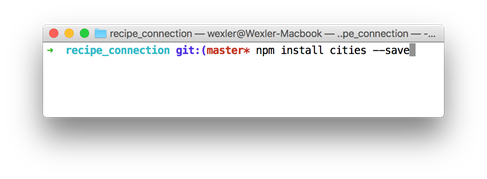
Installing a package in terminal
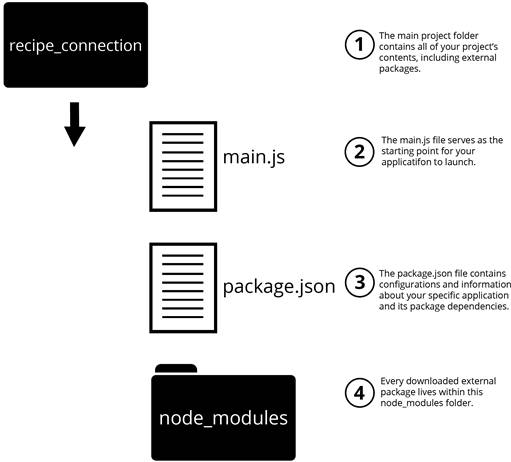
Node.js application structure with node_modules
FAQ
What is a Node.js module and why should I use it?
A module is a JavaScript file (or a folder of related files) that encapsulates a specific concept or feature. Splitting your app into modules keeps code organized, promotes reuse, and lets files access each other’s functionality only when needed.How do I export values from a module?
Attach values to the exports object. For example:exports.messages = ['You are great!']. The exports object is shorthand for module.exports, which is the actual object a module returns when required.How do I import a local module with require()?
Userequire('./path-to-module'). The .js extension is optional. For example: const messageModule = require('./messages'); Then access exported properties like messageModule.messages.What is CommonJS and how does it relate to modules in Node.js?
CommonJS defines the module format Node.js uses:require() for loading modules and exports/module.exports for exposing functionality. This is why you write const lib = require('lib') and exports.foo = ....Does require() cache modules?
Yes. When a module is required, Node.js loads it once, caches it, and returns the same instance to subsequentrequire() calls. This improves performance and preserves state when appropriate.Which npm commands should I know to get started?
-npm init: create a package.json and initialize a project
- npm install <package>: add a package
- npm publish: publish your own package
- npm start: run your app (if configured in package.json)
- npm stop: stop the app
- npm docs <package>: open a package’s docsWhat do --save, --save-dev, --save-prod, and --global mean?
---save (or default behavior): adds to dependencies for production use
- --save-dev: adds to devDependencies for development-only tools
- --save-prod: explicitly marks a production dependency
- --global or -g: installs the package globally as a CLI tool
You can use --production when deploying to install only production dependencies.How do I initialize a Node.js application and what is package.json?
Runnpm init in your project folder. It creates package.json, which stores project metadata (name, version, description, main entry file), scripts, author, license, and dependency listings used by npm.Where do installed packages live, and what is package-lock.json?
Installed code goes into thenode_modules folder. npm also creates package-lock.json to lock exact dependency versions and track install state. Don’t edit the lock file; commit it, but typically do not commit node_modules. Others can run npm install to restore dependencies.How can I add ZIP code lookup to my app using a package?
1) Initialize your project:npm init
2) Install the package: npm install cities --save
3) Use it in code:
const cities = require('cities');
var myCity = cities.zip_lookup(10016);
console.log(myCity); // { zipcode, state_abbr, latitude, longitude, city, state }

 Get Programming with Node.js ebook for free
