This chapter introduces Dask DataFrames as a scalable way to work with structured data—rows and columns—by coordinating many smaller Pandas DataFrames through Dask’s task graphs. It explains why DataFrames are a natural fit for common manipulation tasks compared to ad hoc Python structures, and emphasizes fundamental concepts such as axes (row-wise operations along axis 0 by default) and the index, which identifies rows and plays a central role in how Dask distributes work. The index underpins partitioning, enabling Dask to map pieces of a dataset across workers while preserving the semantics of familiar Pandas-like operations.
Dask builds on Pandas by splitting large datasets into partitions that can be processed in parallel across machines, trading a small amount of scheduling overhead for significant speedups at scale. The chapter covers practical partition management: defaults like a 64 MB blocksize when reading CSVs, specifying a target number of partitions, and inspecting layout via divisions and npartitions. It shows how to diagnose imbalance (for example, after filtering) with map_partitions and how to fix it via repartition, noting that changes are lazy until computed. A key performance theme is the “shuffle”—the network-heavy redistribution required by sorts, groupbys, joins, and reindexing—along with strategies to mitigate it: store data pre-sorted when possible, use sorted columns as indices to make lookups and joins efficient, and persist intermediate results to avoid re-shuffling.
The chapter closes with limitations and best practices. Dask DataFrames do not expose the full Pandas API and are immutable, so structure-altering operations (like insert/pop), certain windowed functions (expanding/ewm), and complex reshapes (stack/unstack, melt) are restricted because they induce expensive shuffles. Relational-style operations (join/merge, groupby, rolling) are supported but can become bottlenecks unless aligned on an indexed, sorted key. Indexing itself can be costly if data must be globally sorted, and reset_index behaves per partition, yielding non-unique, restarted sequences. The guidance is to use Dask for ingestion, filtering, and parallelizable transforms, then move reduced results to Pandas for operations better suited to a single-machine workflow, all while following Pandas best practices to get the most from Dask.
The Data Science with Python and Dask workflow
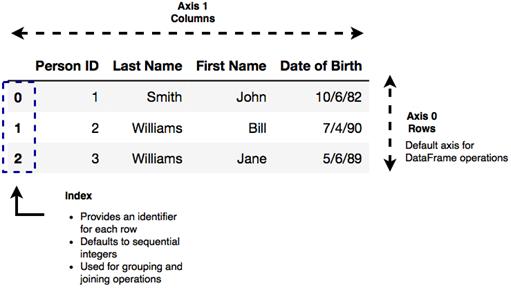
An example of structured data
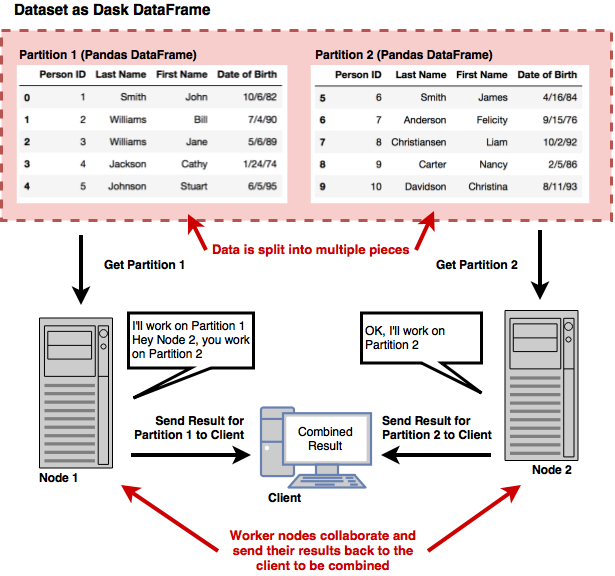
A Dask representation of the structured data example from Figure 3.1
Dask allows a single Pandas DataFrame to be worked on in parallel by multiple hosts
Processing data in parallel across several machines
A GroupBy operation that requires a shuffle
The result of calling reset_index on a Dask DataFrame
Summary
In this chapter you learned
Dask DataFrames consist of rows (axis 0), columns (axis 1), and an index.
DataFrame methods tend to operate row-wise by default.
Inspecting how a DataFrame is partitioned can be done by accessing the divisions attribute of a DataFrame
Filtering a DataFrame can cause an imbalance in the size of each partition. For best performance, partitions should be roughly equal in size. It’s a good practice to repartition a DataFrame using the repartition method after filtering a large amount of data.
For best performance, DataFrames should be indexed by a logical column, partitioned by their index, and the index should be pre-sorted.
FAQ
What is structured data and when should I use Dask DataFrames?Structured data is organized into rows and columns (like spreadsheets or database tables). Use Dask DataFrames when you need to manipulate large, tabular datasets that don’t fit comfortably in memory or when you want to parallelize work across cores or a cluster. For small, in-memory datasets, plain Pandas is usually faster and simpler.How do Dask DataFrames relate to Pandas and Dask’s Delayed/DAG model?Dask DataFrames are composed of many smaller Pandas DataFrames (partitions) and operations on them build a task graph (DAG). Dask schedules these tasks across workers to execute in parallel, giving you a Pandas-like API with scalable, distributed execution.What are axes and the index in a DataFrame, and why do they matter in Dask?Axis 0 refers to rows (the default for most operations) and Axis 1 refers to columns. The index identifies each row; Dask does not enforce uniqueness, but the index is crucial because Dask uses it to define partition boundaries and to efficiently distribute and locate data across workers.What is a partition in Dask DataFrames?A partition is a relatively small Pandas DataFrame that forms one chunk of a Dask DataFrame. Dask processes partitions in parallel. When reading data (e.g., with read_csv), Dask uses a default blocksize of about 64 MB to create partitions, or you can specify a target number of partitions via the npartitions argument.How can I inspect how my Dask DataFrame is partitioned?Use .npartitions to see the number of partitions and .divisions to see index-based partition boundaries. You can also apply map_partitions(len).compute() to count rows per partition. In divisions, all but the last partition are left-closed/right-open intervals; the last partition includes its upper bound.When should I repartition, and how?Repartition when partitions become imbalanced (e.g., after heavy filtering) or when you want a different partition count. Call df.repartition(npartitions=k). Reducing partitions concatenates; increasing partitions splits. Repartitioning is lazy—no data moves until you trigger execution (e.g., with compute, head, or persist). Existing divisions are retained unless you explicitly update them.What is a “shuffle” and which operations trigger it?A shuffle redistributes rows across partitions/workers (broadcasting/rearranging data) so related rows end up together. It’s required for operations like set_index, sorting, many joins/merges (especially on non-index keys), and groupby aggregations. Shuffles are expensive because they move data over the network.How can I minimize shuffle costs?- Store data pre-sorted in the source system when possible.
- Use a sorted column as the index to make joins and lookups partition-aware.
- Design joins to align on the index.
- If you must shuffle, persist the result to avoid repeating the shuffle in downstream steps.What limitations do Dask DataFrames have compared to Pandas?Dask does not expose the full Pandas API. DataFrames are immutable (no in-place structural changes like insert/pop). Some window methods (e.g., expanding/ewm) and complex reshapes (stack/unstack, melt) are unsupported or very costly due to shuffling. Relational operations (join/merge, groupby, rolling) can be bottlenecks. As with Pandas, row-wise apply/iterrows are slow—prefer vectorized operations. A common pattern is to use Dask for heavy lifting and reduction, then switch to Pandas for complex, smaller-scale operations.How does reset_index behave in Dask vs Pandas?In Dask, reset_index is applied per partition (like a map_partitions), so each partition’s index restarts at 0. You do not get a unique, global sequential index across the whole DataFrame. Avoid relying on reset_index for keys you plan to join, group, or sort on.
pro $24.99 per month
access to all Manning books, MEAPs, liveVideos, liveProjects, and audiobooks!





 Data Science with Python and Dask ebook for free
