6 Defining dependencies between tasks
This chapter deepens the reader’s understanding of how Airflow expresses and enforces relationships between tasks so pipelines run in the right order and make efficient use of parallelism. It starts from simple linear chains and expands to fan-out/fan-in patterns, explaining how explicit dependencies let the scheduler start tasks only when prerequisites have succeeded, propagate failures downstream, and exploit parallel execution where branches are independent. The discussion emphasizes that clear dependency modeling is more robust than time-based orchestration and that retries and error propagation are core to reliable execution.
The chapter then introduces dynamic control flow: branching and conditional execution. It contrasts “branching inside a task” (embedding if/else logic in operators) with “branching in the DAG” using a dedicated branching task that selects downstream paths explicitly, making behavior visible in the UI and enabling specialized operators. A key theme is trigger rules—the conditions that determine when a task can run. Using the default all_success with branching can inadvertently skip downstream work; rules such as none_failed or adding an explicit join task resolve that. Beyond branching, the chapter shows how to make tasks conditional (e.g., deploy only on the latest run) via a guard task that skips downstream tasks, or with built-ins like LatestOnlyOperator or ShortCircuitOperator. It rounds out trigger rules with practical guidance on propagation and alternative rules for cleanup, early-failure signaling, and eager continuation.
For passing small pieces of state across tasks, the chapter covers XComs: how to push and pull values explicitly or implicitly, how templating can consume them, and why to use them sparingly. It cautions about hidden dependencies, serialization and size limits, and suggests custom XCom backends and cleanup strategies when needed. Finally, it presents the Taskflow API, which simplifies Python task definition and chaining with decorators, turning returned values into downstream inputs while making data dependencies explicit in the DAG. The API improves readability but still relies on XCom under the hood and covers a subset of operators, so mixing Taskflow with the regular operator API may be necessary and should be done thoughtfully.
Our rocket-picture-fetching DAG from chapter 2 (originally shown in figure 2.3) consists of three tasks: downloading metadata, fetching the images, and sending a notification.
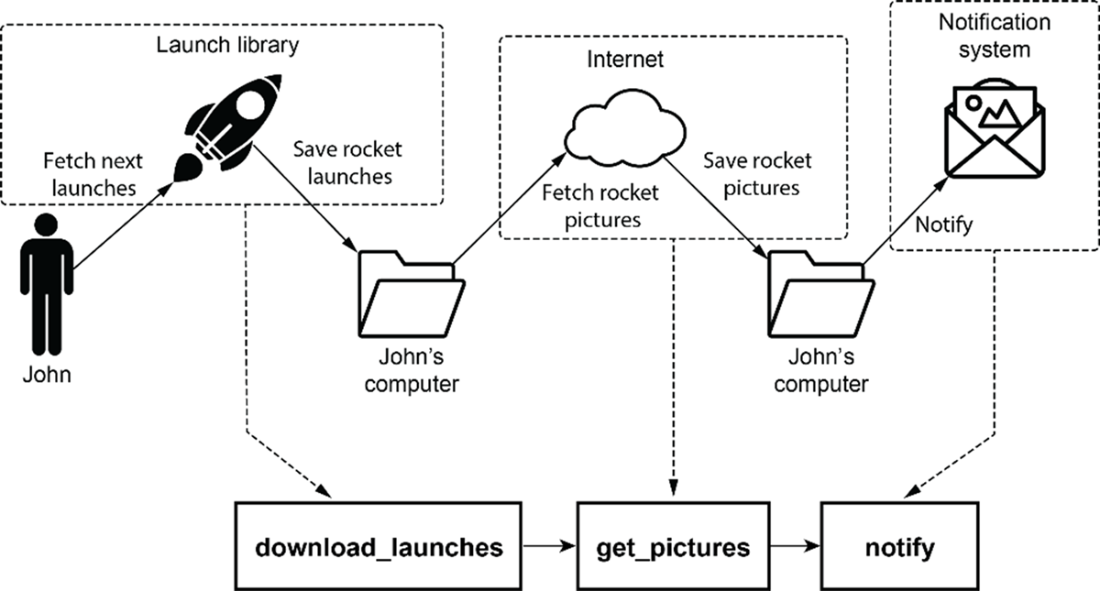
Overview of the DAG from the umbrella use case in chapter 1

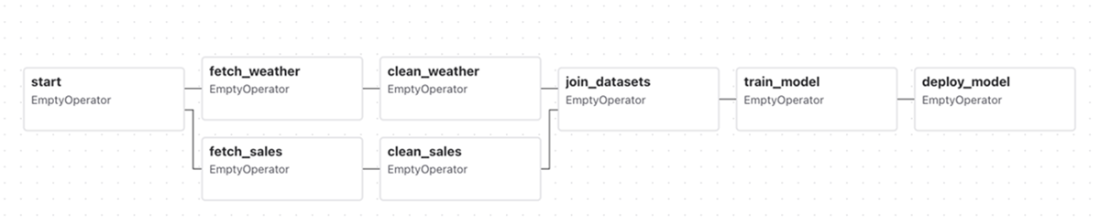
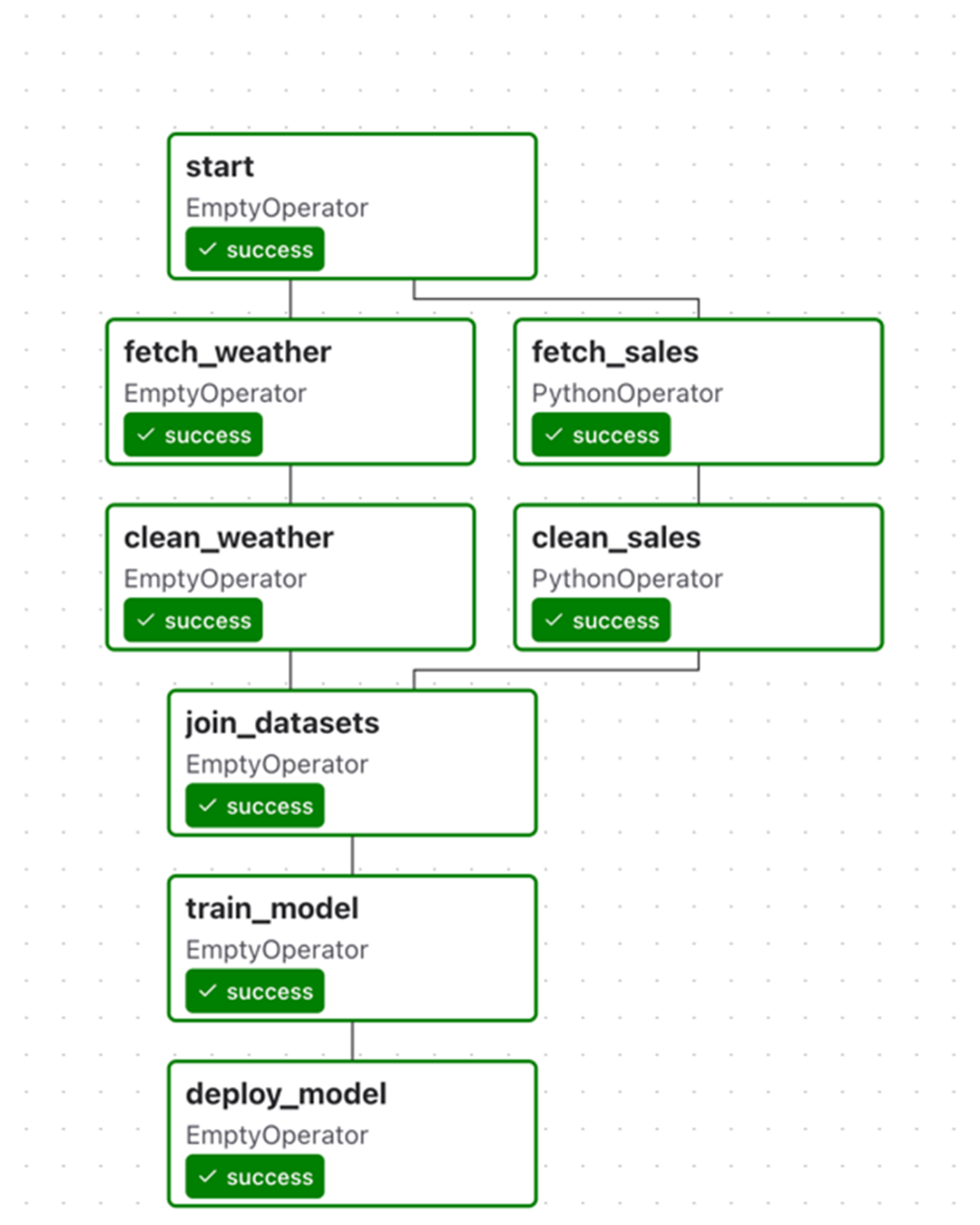
The umbrella DAG, as rendered by Airflow’s graph view. This DAG performs several tasks, including fetching and cleaning sales data, combining them into a data set, and using the data set to train a machine learning model. Note that the handling of sales/weather data happens in separate branches of the DAG, as these tasks are not directly dependent on each other.
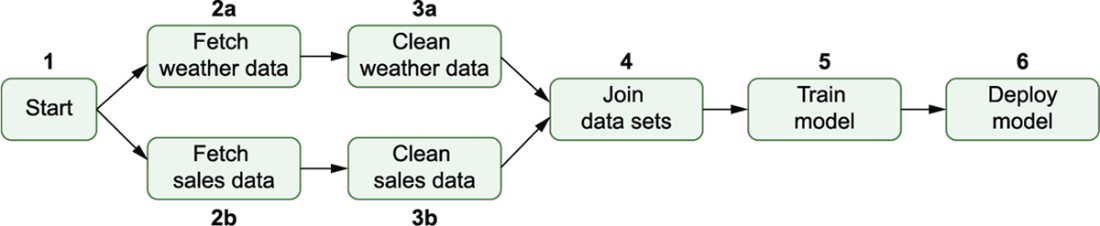
The execution order of tasks in the umbrella DAG, with numbers indicating the order in which tasks are run. Airflow starts by executing the start task, after which it can run the sales/weather fetch and clean tasks in parallel (as indicated by the a/b suffix). Note that this means that the weather/sales paths run independently, meaning that 3b may, for example, start executing before 2a. After completing both clean tasks, the rest of the DAG proceeds linearly with the execution of the join, train, and deployment tasks.
A possible example of different sets of tasks between the two ERP systems. If there are a lot of commonalities between different cases, you may be able to get away with a single set of tasks and some internal branching. However, if there are many differences between the two flows (such as shown here for the two ERP systems), you may be better off taking a different approach.

Example run for a DAG that branches between two ERP systems within the fetch_sales and clean_sales tasks. Because this branching happens within these two tasks, it is not possible to see which ERP system was used in this DAG run from this view. This means we would need to inspect our code (or possibly our logs) to identify which ERP system was used.
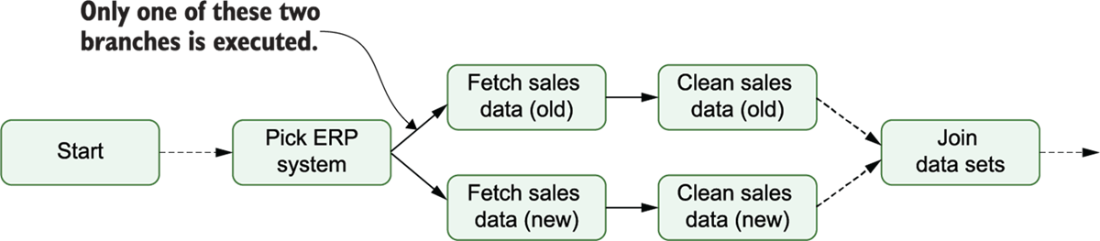
Supporting two ERP systems using branching within the DAG, implementing different sets of tasks for both systems. Airflow can choose between these two branches using a specific branching task (here, “Pick ERP system”), which tells Airflow which set of downstream tasks to execute.
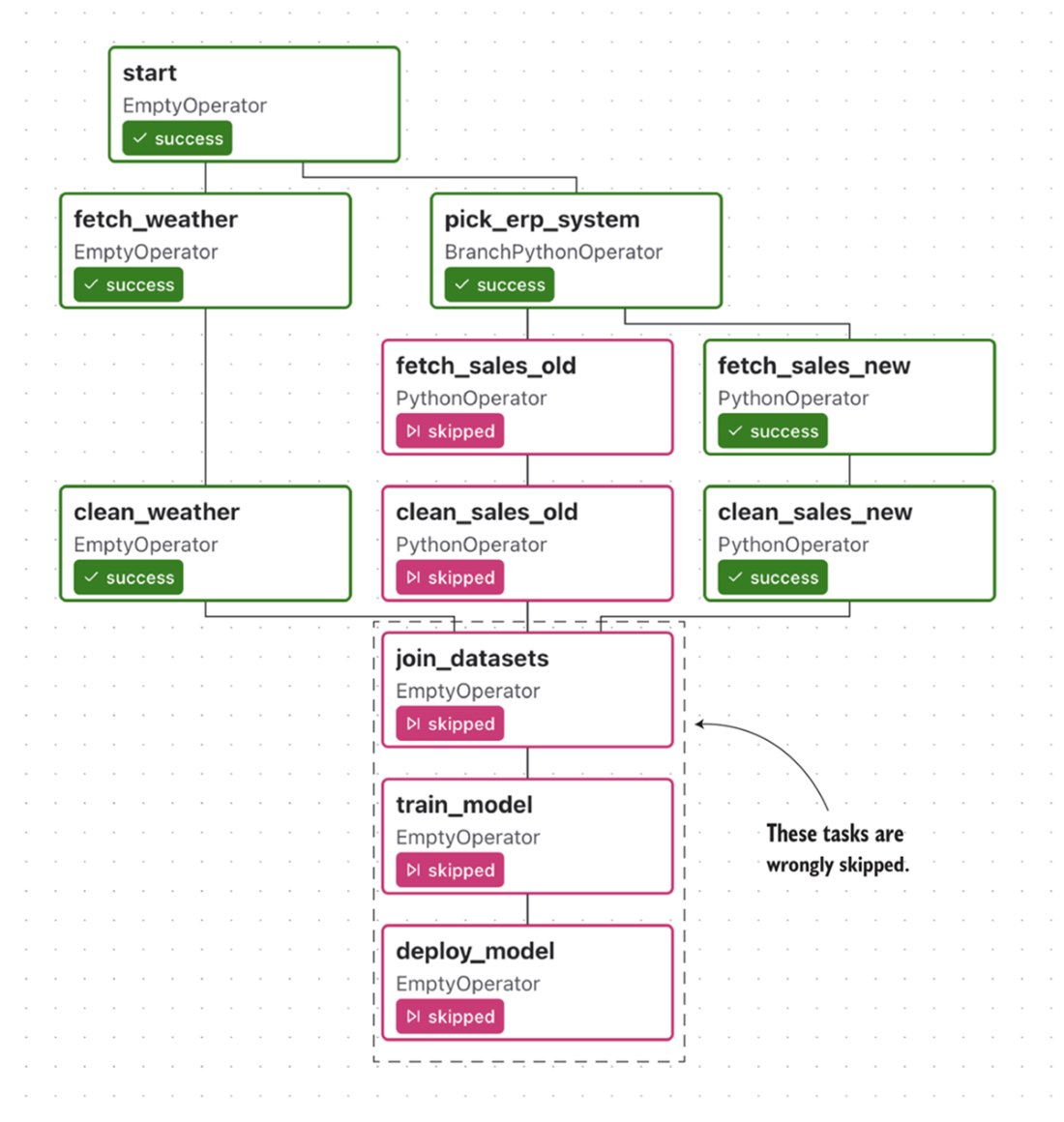
Combining branching with the wrong trigger rules will result in downstream tasks being skipped. In this example, the fetch_sales_old task is skipped. This results in all tasks downstream of the fetch_sales_old task also being skipped, which is not what we want.
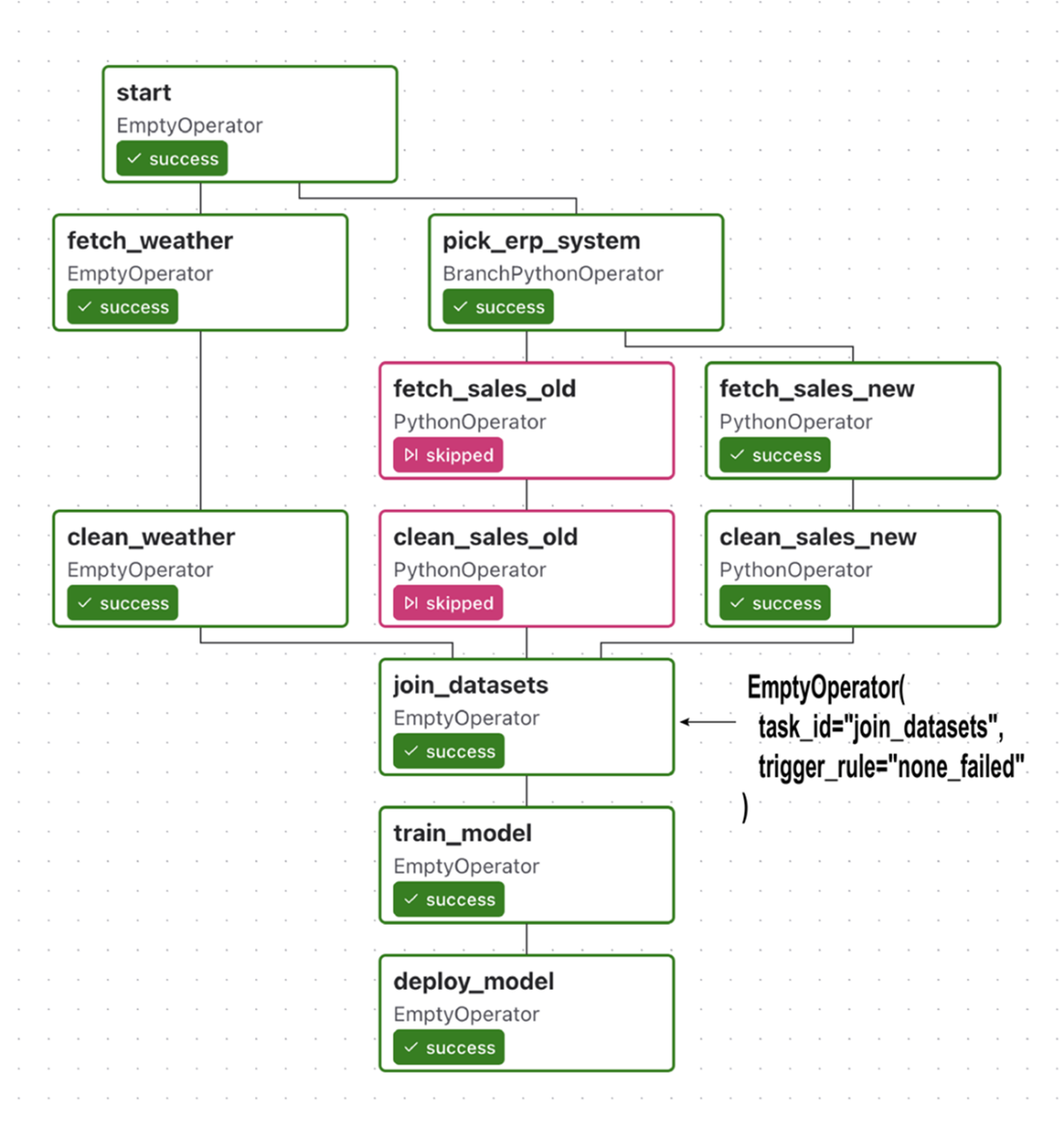
Branching in the umbrella DAG using trigger rule none_failed for the join_datasets task, which allows it (and its downstream dependencies) to still execute after the branch
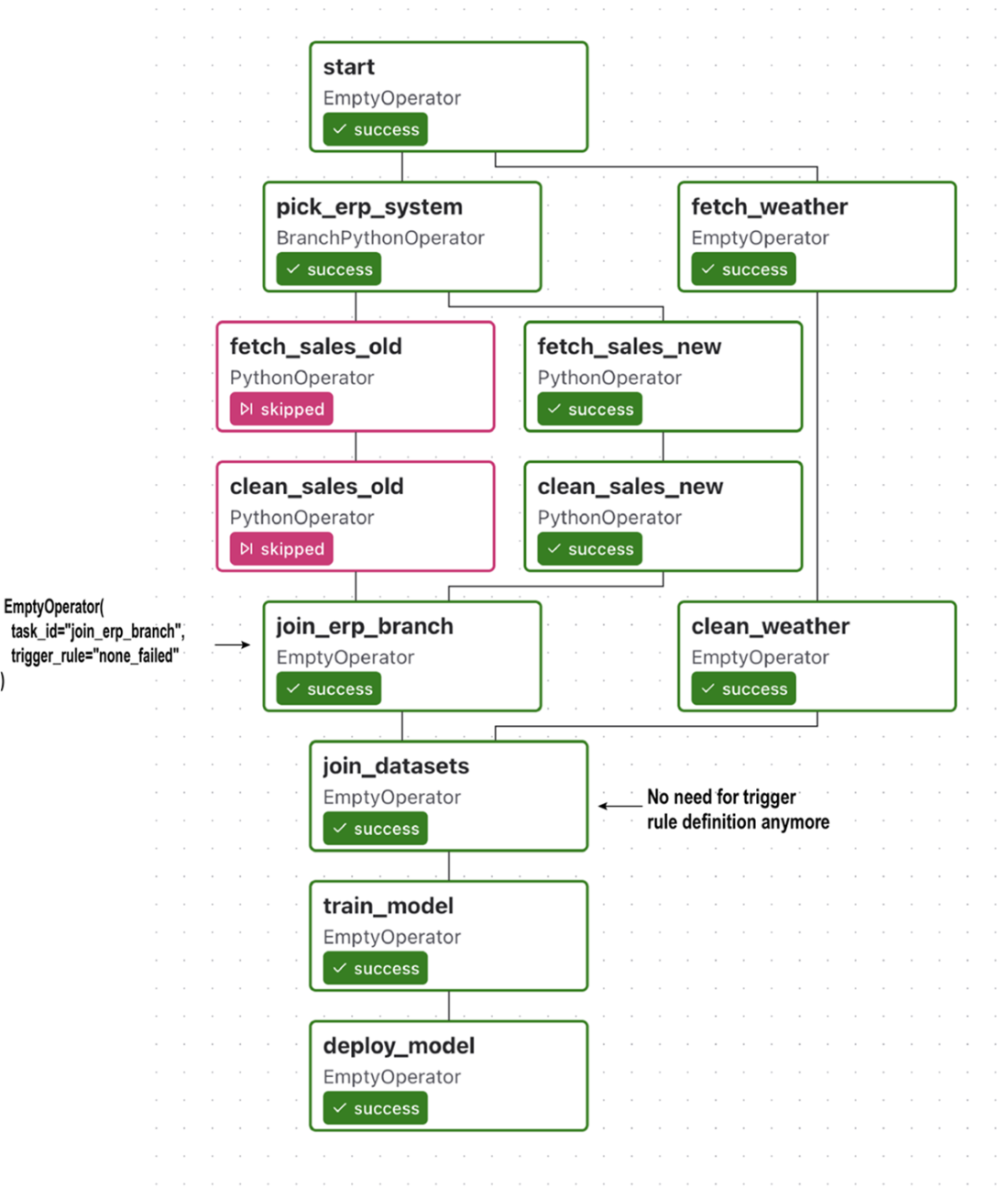
To make the branching structure more clear, you can add an extra join task after the branch, which ties the lineages of the branch together before continuing with the rest of the DAG. This extra task has the added advantage that you don’t have to change any trigger rules for other tasks in the DAG, as you can set the required trigger rule on the join task. (Note that this means you no longer need to set the trigger rule for the join_datasets task.)
Example run for umbrella DAG with a condition inside the deploy_model task, which ensures that the deployment is only performed for the latest run. Because the condition is checked internally within the deploy_model task, we cannot discern from this view whether the model was actually deployed.
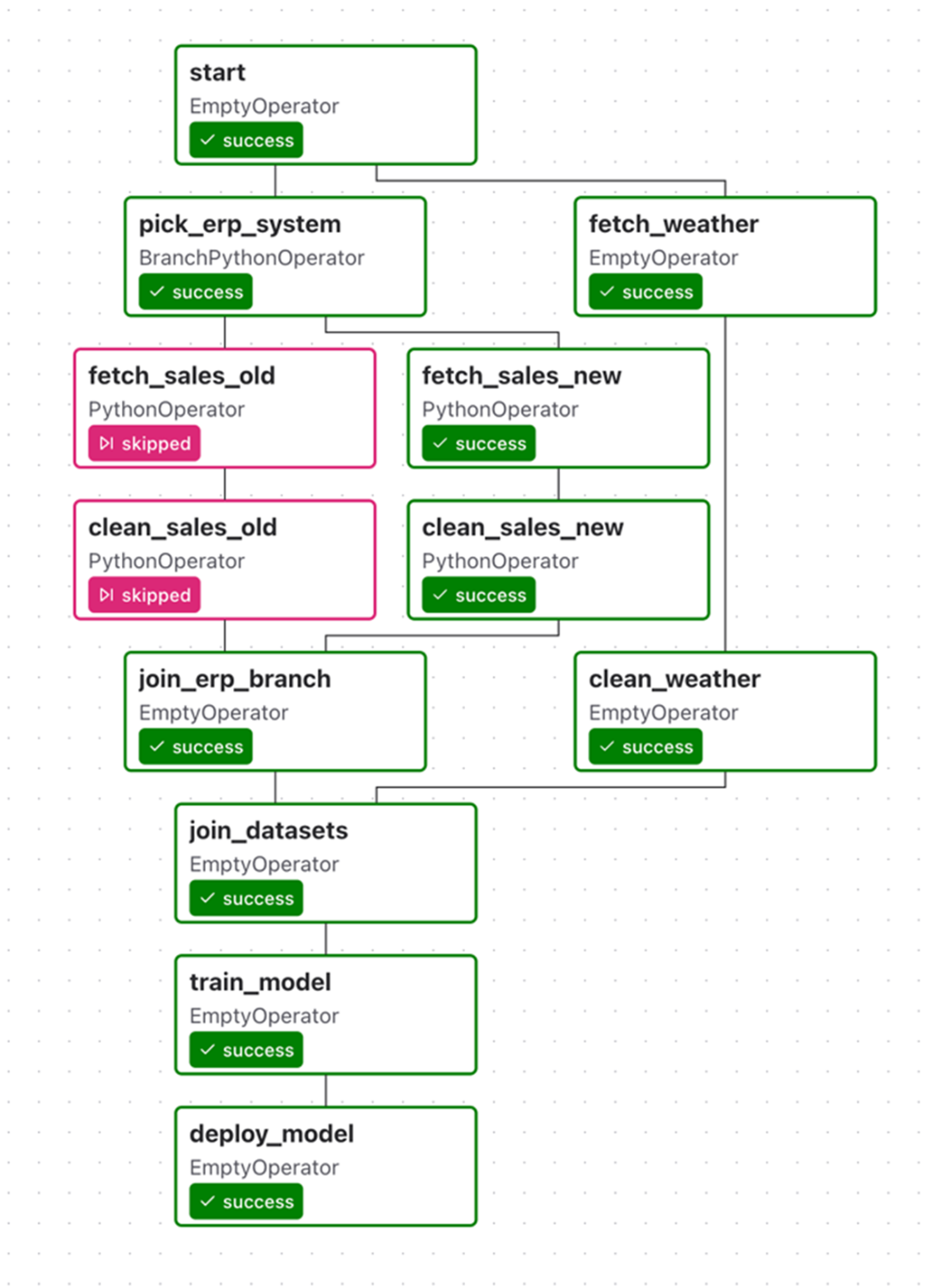
An alternative implementation of the umbrella DAG with conditional deployment, in which the condition is included as a task in the DAG, making the condition much more explicit than in our previous implementation.
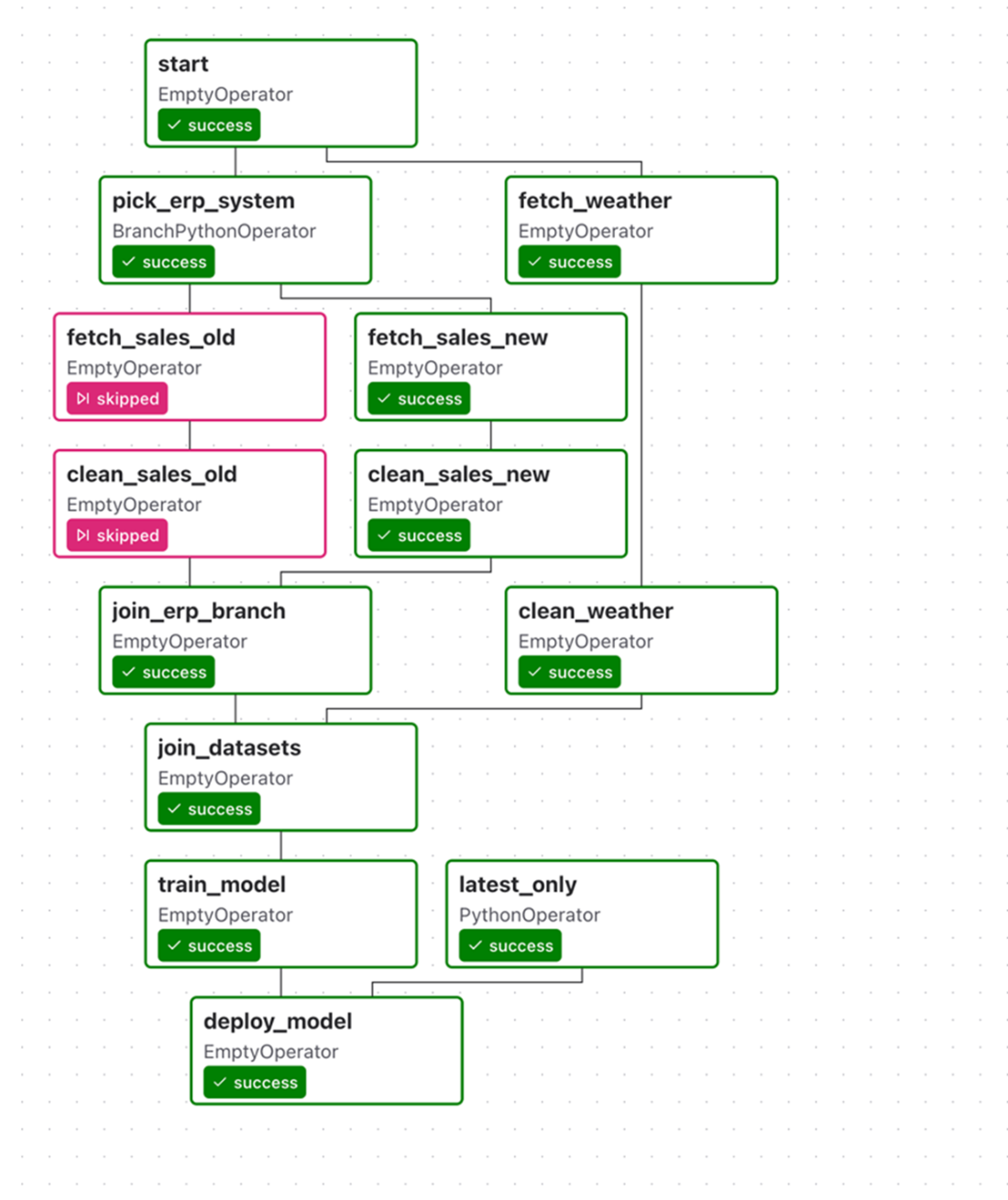
Result of our latest_only condition for three runs of our umbrella DAG. This tree view shows that our deployment task was only run for the most recent execution window, as the deploy_model task was skipped on previous executions. This shows that our condition indeed functions as expected.
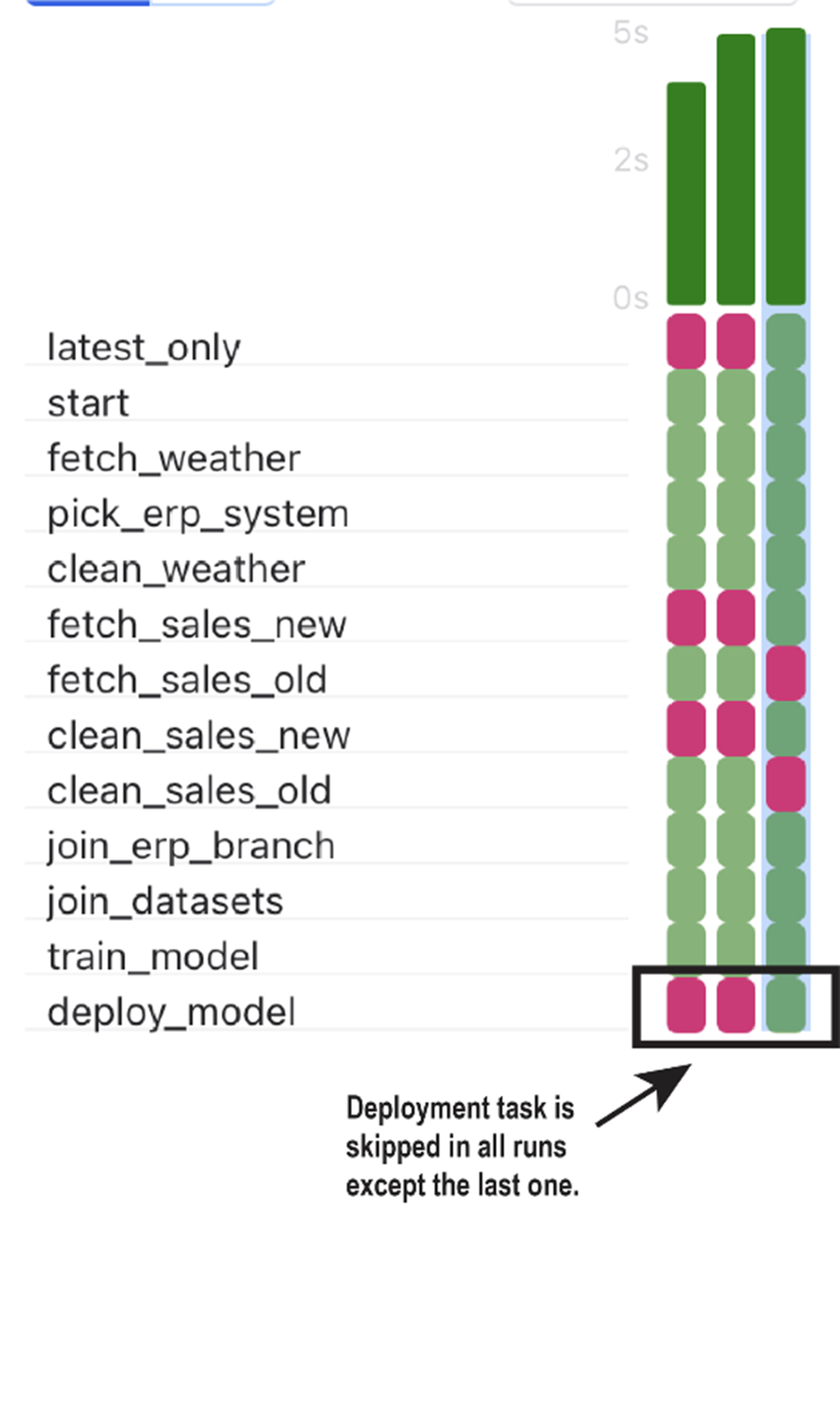
Tracing the execution of the basic umbrella DAG (figure 6.4) using the default trigger rule all_success. (A) Airflow initially starts executing the DAG by running the only task that has no preceding tasks that have not been completed successfully: the start task. (B) Once the start task has been successfully completed, other tasks become ready for execution and are picked up by Airflow.
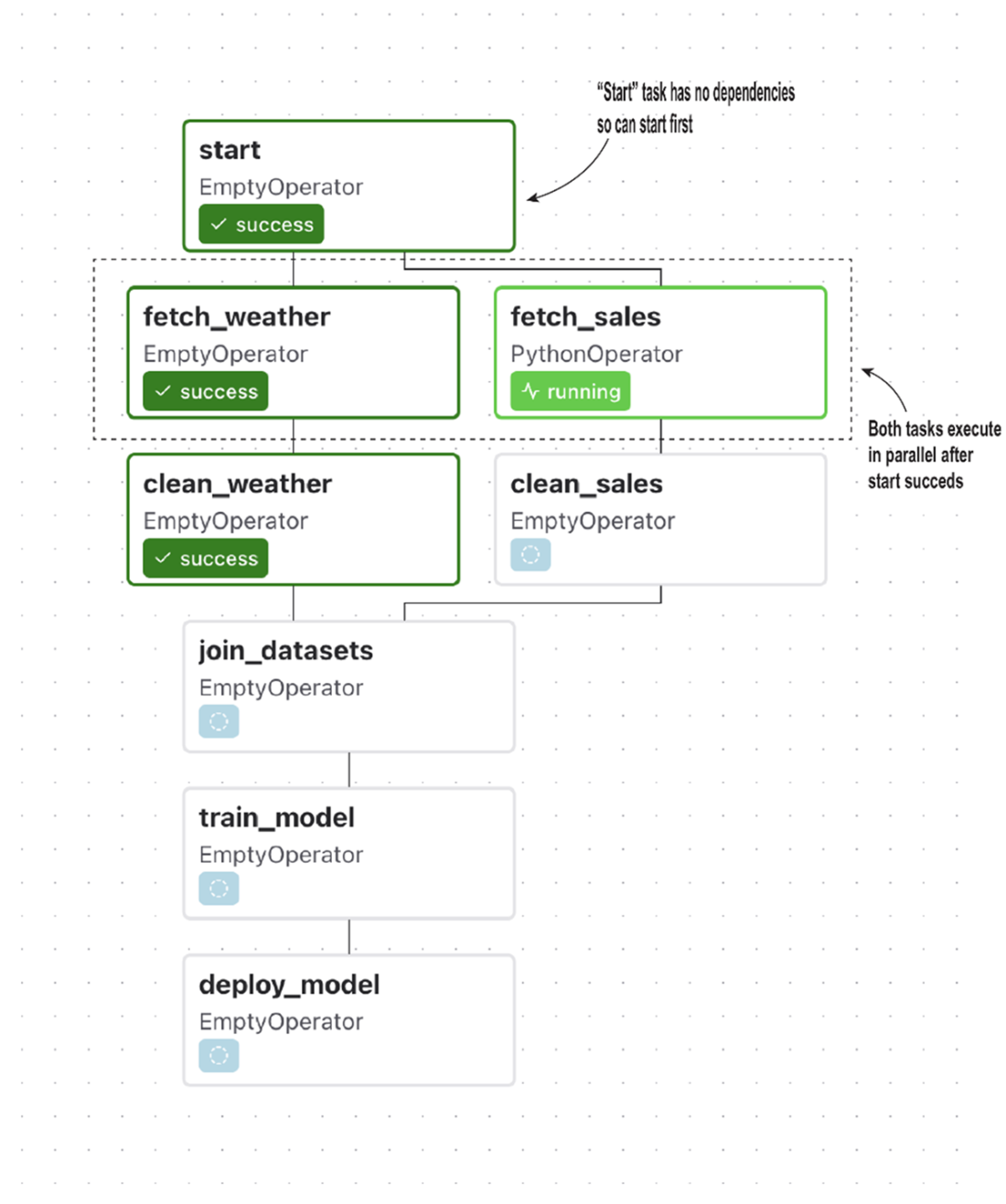
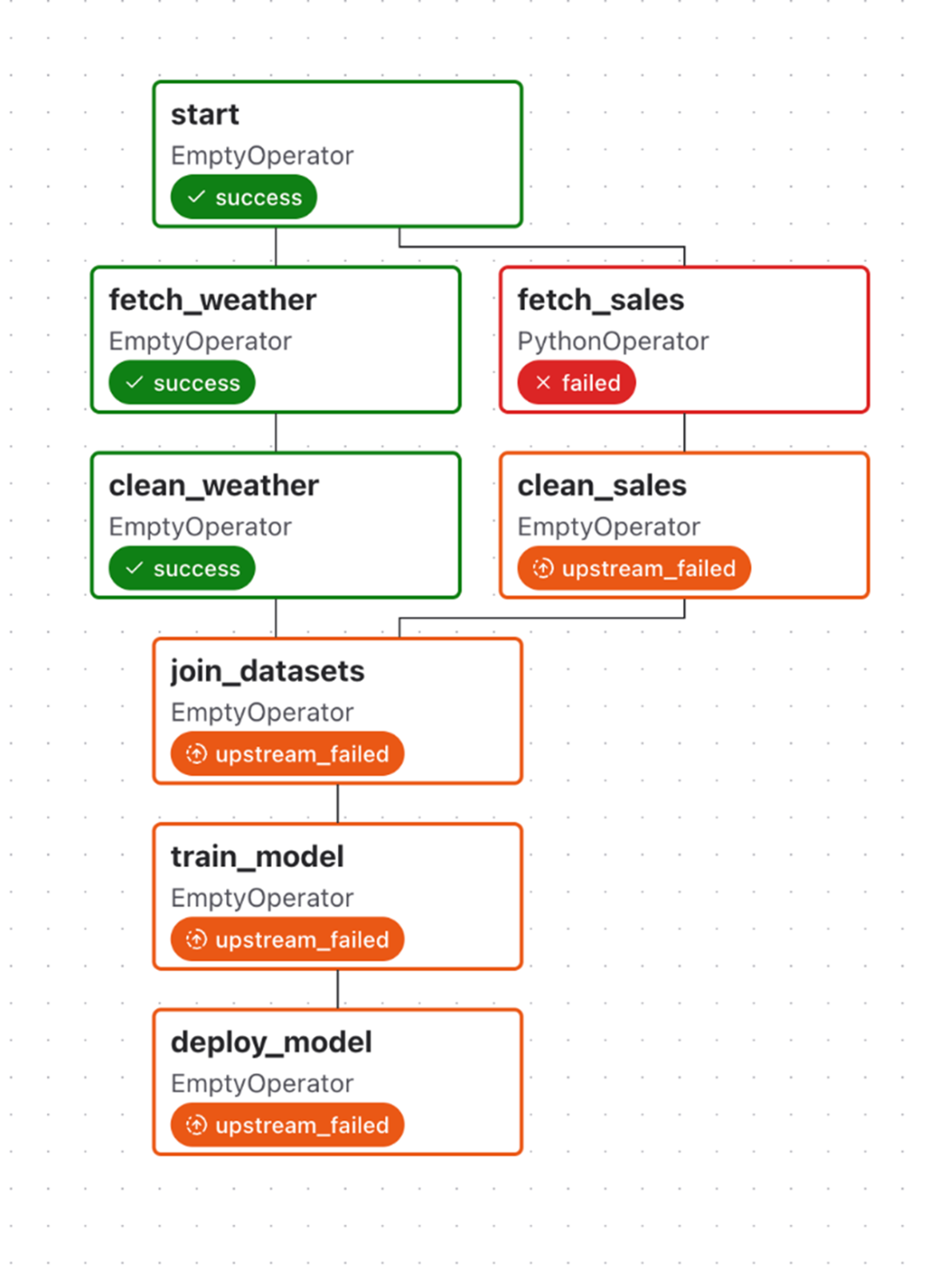
An upstream failure stops downstream tasks from being executed with the default trigger rule all_success, which requires all upstream tasks to be successful. Note that Airflow does continue executing tasks that do not have any dependency on the failed task (fetch_weather and clean_weather).
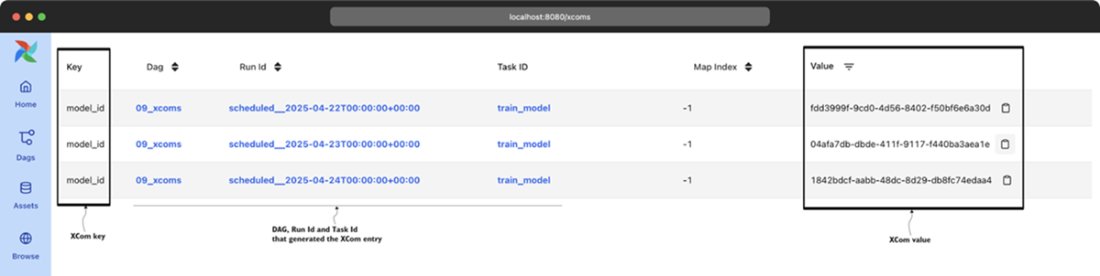
Overview of registered XCom values (under Browse > XComs in the web interface)
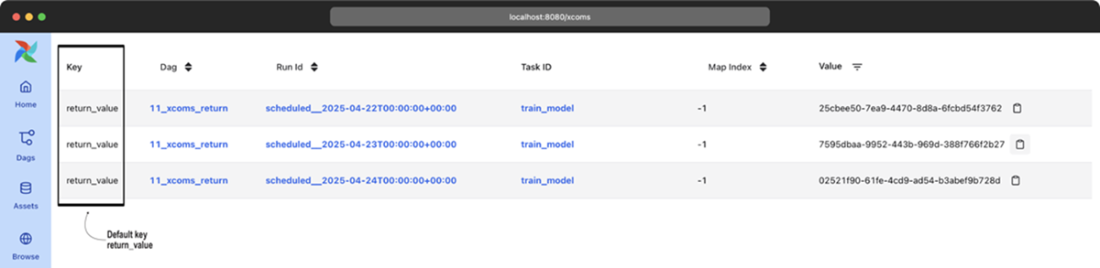
Implicit XComs from the PythonOperator are registered under the return_value key.
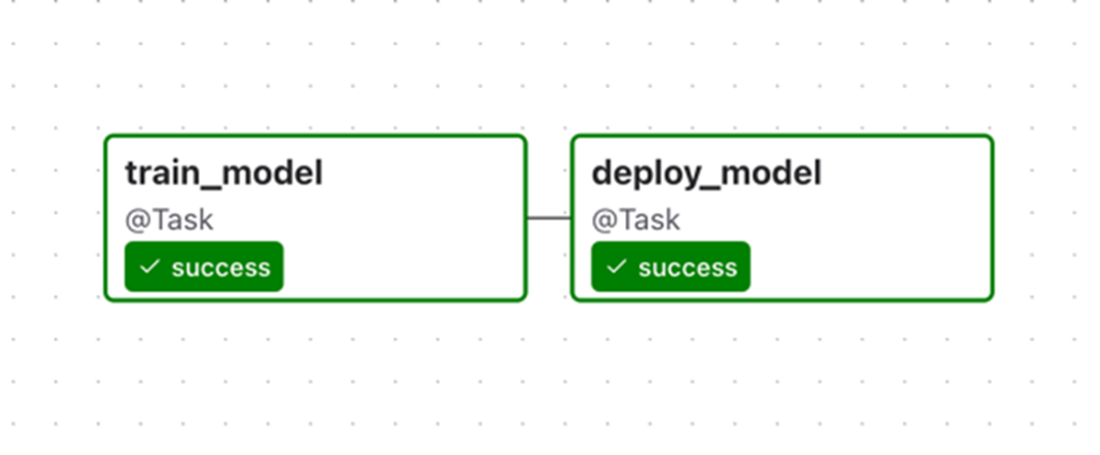
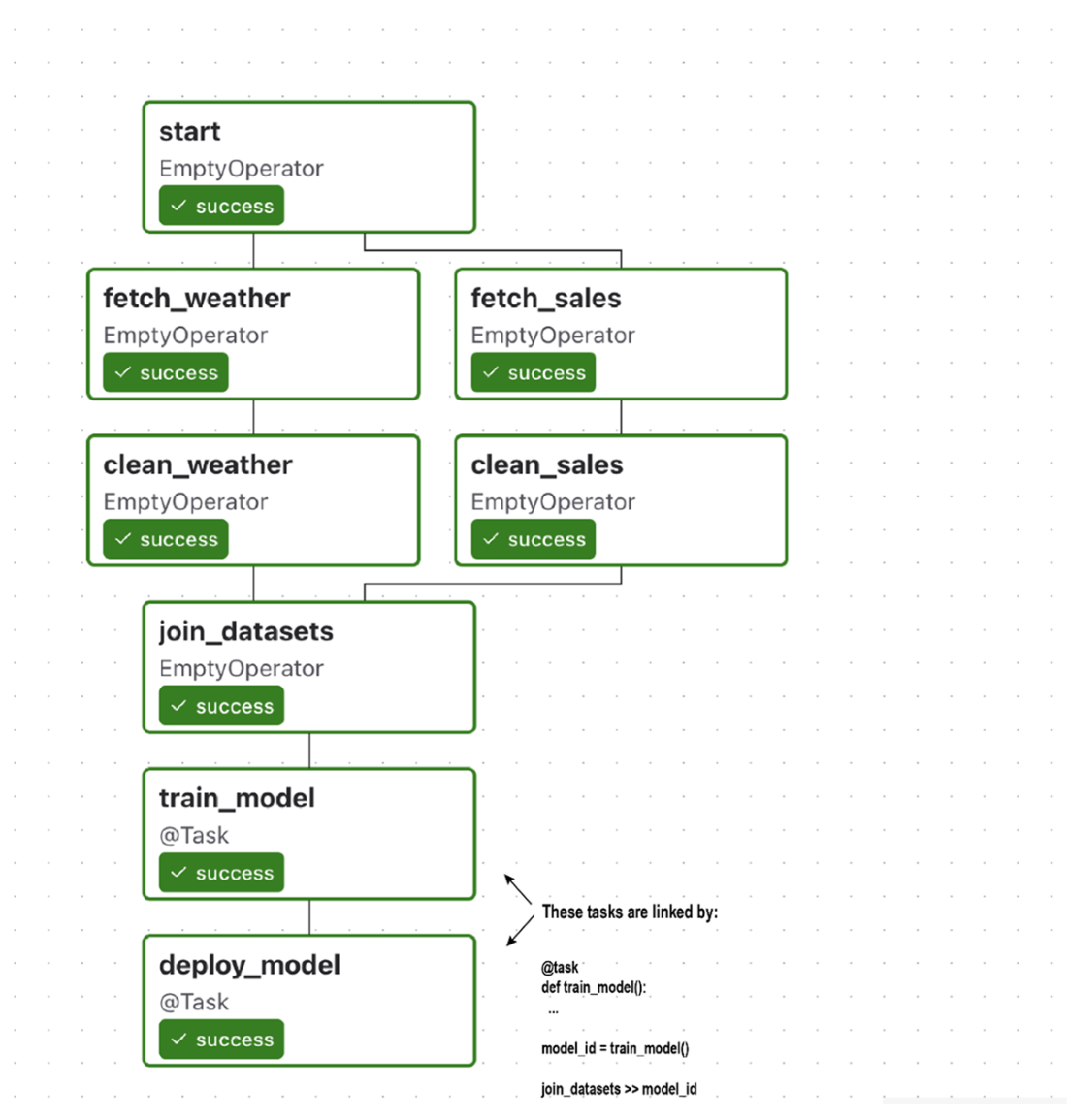
Subset of our previous DAG containing the train/deploy tasks, in which tasks and their dependencies are defined using the Taskflow API
Combining the Taskflow-style train/deploy tasks back into the original DAG, which also contains other (non-PythonOperator-based) operators
Summary
- Airflow's basic task dependencies define linear and fan-in/fan-out structures in DAGs, maintaining task order and ensuring tasks execute only after their upstream dependencies have been completed.
- Downstream tasks are skipped if dependent tasks fail, delaying execution until issues are resolved, and preventing downstream task execution in case of upstream failure.
- Branching enables the definition of parallel workflows and multiple execution paths based on user-defined conditions.
- The BranchPythonOperator enables the implementation of branches in DAGs, allowing the use of Python code to conditionally select the dag_id of the next task to be executed.
- Conditional tasks enable skipping tasks if a specific execution condition is not met, offering flexibility in task execution.
- Explicitly encoding branches/conditions in your DAG structure provides substantial benefits in terms of the interpretability of how your DAG was executed.
- The execution of Airflow tasks is governed by trigger rules, which dictate the consequences if an upstream task is skipped or fails. For example, by changing the default all_success rule to none_failed, it is possible to continue with the DAG workflow even if a task upstream was skipped.
- XComs facilitate the sharing of small data chunks among tasks, particularly useful when the output of one task is relevant on the execution of downstream tasks.
- XComs are not suitable for sharing large data among tasks. For example, they are ideal for sharing filenames, paths, or small API responses. For larger datasets, it's recommended to use external resources such as external databases or blob storage.
- The Taskflow API simplifies DAGs by converting Python functions into Airflow tasks using decorators, streamlining task creation.
FAQ
How do I define basic dependencies (linear, fan-out, fan-in) between Airflow tasks?
Linear: chain tasks in order with the bitshift operator.t1 >> t2 >> t3Fan-out (one-to-many): one upstream to multiple downstream tasks.
start >> [fetch_weather, fetch_sales]Fan-in (many-to-one): multiple upstream tasks converge to one downstream task.
[clean_weather, clean_sales] >> join_datasetsThese structures let Airflow schedule tasks as soon as their upstream dependencies complete successfully.
Which tasks run in parallel, and how does Airflow decide execution order?
Airflow continuously checks tasks and schedules any whose upstream dependencies have met their trigger rules. Independent branches (e.g., weather vs. sales) can run in parallel if your executor has capacity. After fan-out, sibling tasks run concurrently; after fan-in, the downstream task waits until all required upstream tasks satisfy its trigger rule.Branching inside a task vs. branching in the DAG: what’s the difference?
- In-task branching: put if/else logic inside a PythonOperator. Pros: simple for minor differences. Cons: logic is hidden in code/logs; you can’t leverage specialized operators; the UI can’t show which path ran. - DAG-level branching: use BranchPythonOperator that returns the task_id(s) to run. Pros: explicit in the graph; works with specialized operators; easier to reason about and monitor.def choose(**context):
return "fetch_sales_new" # or a list of task_ids
pick = BranchPythonOperator(task_id="pick_erp_system", python_callable=choose)
pick >> [fetch_sales_old, fetch_sales_new]Why are downstream tasks skipped after a BranchPythonOperator, and how do I fix it?
By default, tasks use trigger_rule="all_success". When branching, unchosen tasks are marked skipped, so a downstream join that expects all parents to succeed will be skipped too. Fix by using a trigger rule that tolerates skips, e.g. none_failed (or none_failed_min_one_success).join_datasets = PythonOperator(
task_id="join_datasets",
...,
trigger_rule="none_failed",
)Should I add a dedicated “join” task after branching?
Often yes. Insert an EmptyOperator that merges the branch lineages and apply the permissive trigger rule on that join, keeping the rest of the DAG unchanged and clearer.from airflow.providers.standard.operators.empty import EmptyOperator join_branch = EmptyOperator(task_id="join_erp_branch", trigger_rule="none_failed") [clean_sales_old, clean_sales_new] >> join_branch join_branch >> join_datasets
What are trigger rules, and which ones are most useful?
Trigger rules control when a task is ready to run based on upstream states. - all_success (default): run when all parents succeeded. - none_failed: run when no parent failed (success or skipped allowed). - all_done: run when all parents finished (success/failed/skipped). - one_success / one_failed: run as soon as at least one parent succeeds/fails. - none_skipped: run when no parent was skipped. - all_failed: run when all parents failed. Use none_failed to join branches, all_done for cleanup, and eager rules (one_success/one_failed) to react early.How do I run a task only for the most recent DAG run (e.g., deploy only once)?
Use LatestOnlyOperator to allow downstream tasks only on the latest run; older runs will mark downstream as skipped.from airflow.providers.standard.operators.latest_only import LatestOnlyOperator latest_only = LatestOnlyOperator(task_id="latest_only") train_model >> latest_only >> deploy_modelAlternatively, insert a Python task that evaluates the condition and raises AirflowSkipException to skip downstream tasks when not the latest run.
How do XComs work, and what are common pitfalls?
- Push: context["task_instance"].xcom_push(key, value) or return a value from PythonOperator/@task. - Pull: context["task_instance"].xcom_pull(task_ids="train_model", key="model_id") or via Jinja templates. Pitfalls: - Hidden dependencies (scheduler doesn’t enforce order); always add explicit task dependencies. - Keep payloads small and serializable; XComs are stored in the metastore (limits and performance concerns). - Avoid using XComs to pass expiring credentials or large datasets.Can I store larger or custom XCom payloads? How do I clean them up?
Yes. Implement a custom XCom backend by subclassing BaseXCom and defining serialize_value/deserialize_value, or use provider backends (e.g., object storage). Configure via the xcom_backend setting. For the default metastore, use airflow db clean to purge old XComs; with custom backends, implement your own retention/cleanup.What is the Taskflow API, and when should I use it?
The Taskflow API lets you define Python tasks with @task and wire dependencies by passing function outputs to inputs. Returned values are passed via XCom automatically.from airflow.sdk import task
@task
def train_model():
return "model_id"
@task
def deploy_model(model_id):
print(model_id)
mid = train_model()
deploy_model(mid)
Use it to reduce boilerplate and make data flow explicit. You can mix with classic operators, but be mindful of differing dependency syntax and XCom serialization limits. Not all operators have Taskflow decorators; use the regular API where needed.
 Data Pipelines with Apache Airflow, Second Edition ebook for free
