7 The CEO strikes back: Supercharging our dashboard
This chapter focuses on turning a launched Streamlit metrics dashboard into a more polished, practical, and executive-friendly product by responding to user feedback. The dashboard for Note n’ Nib already helps leaders explore sales metrics, but real-world use exposes gaps: charts become hard to read over long time spans, filters allow irrelevant combinations, metrics lack historical context, advanced users need deeper exploration, and dashboard states are difficult to share. The chapter frames these issues as a natural part of software iteration: launch is only the beginning, and quality improves through targeted refinements.
The first set of improvements makes the dashboard more flexible and informative. The time series chart is enhanced with selectable time grains—day, week, month, and year—so users can view short periods in detail or long periods more clearly. Filters are made interdependent by applying earlier selections before generating later filter options, preventing nonsensical choices such as selecting a product segment outside the chosen category. The dashboard also gains date range comparisons, including month-over-month, quarter-over-quarter, year-over-year, and previous-period comparisons. These comparison ranges are used to calculate percentage deltas in the metric bar, giving users context about whether current performance is better or worse than a prior period.
The chapter then adds more advanced capabilities for power users and collaboration. A drilldown view is implemented with a modal dialog, allowing users to inspect aggregated metrics across any combination of dimensions in a pivot-table-like format, complete with comparison tabs, total rows, formatted values, and styling. Deeplinks are added using query parameters and session state so users can share a URL that recreates the same dashboard selections, including dates, filters, chart settings, and other widget values. Finally, the app is made more production-ready by replacing the static CSV data source with Google BigQuery, using service account credentials stored as Streamlit secrets and updating the data loading layer while leaving the rest of the modular dashboard largely unchanged.
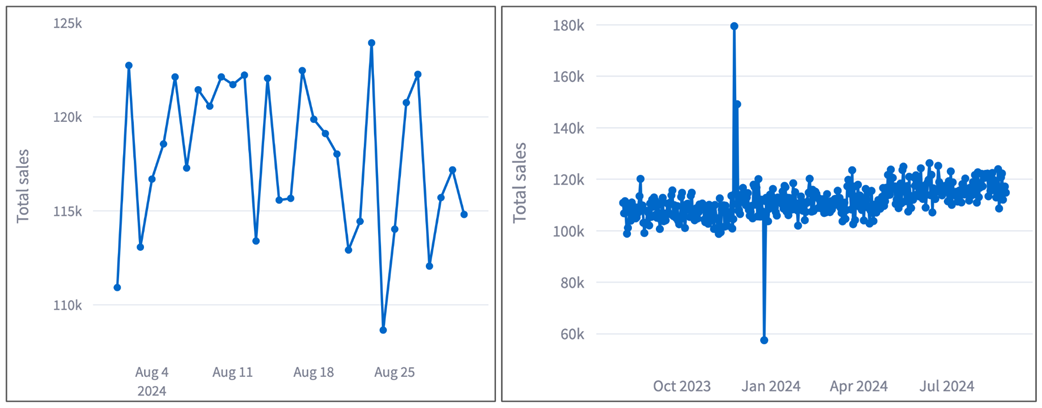
The day granularity in the existing time chart works for small time frames like a month (left), but not for longer time frames (right).
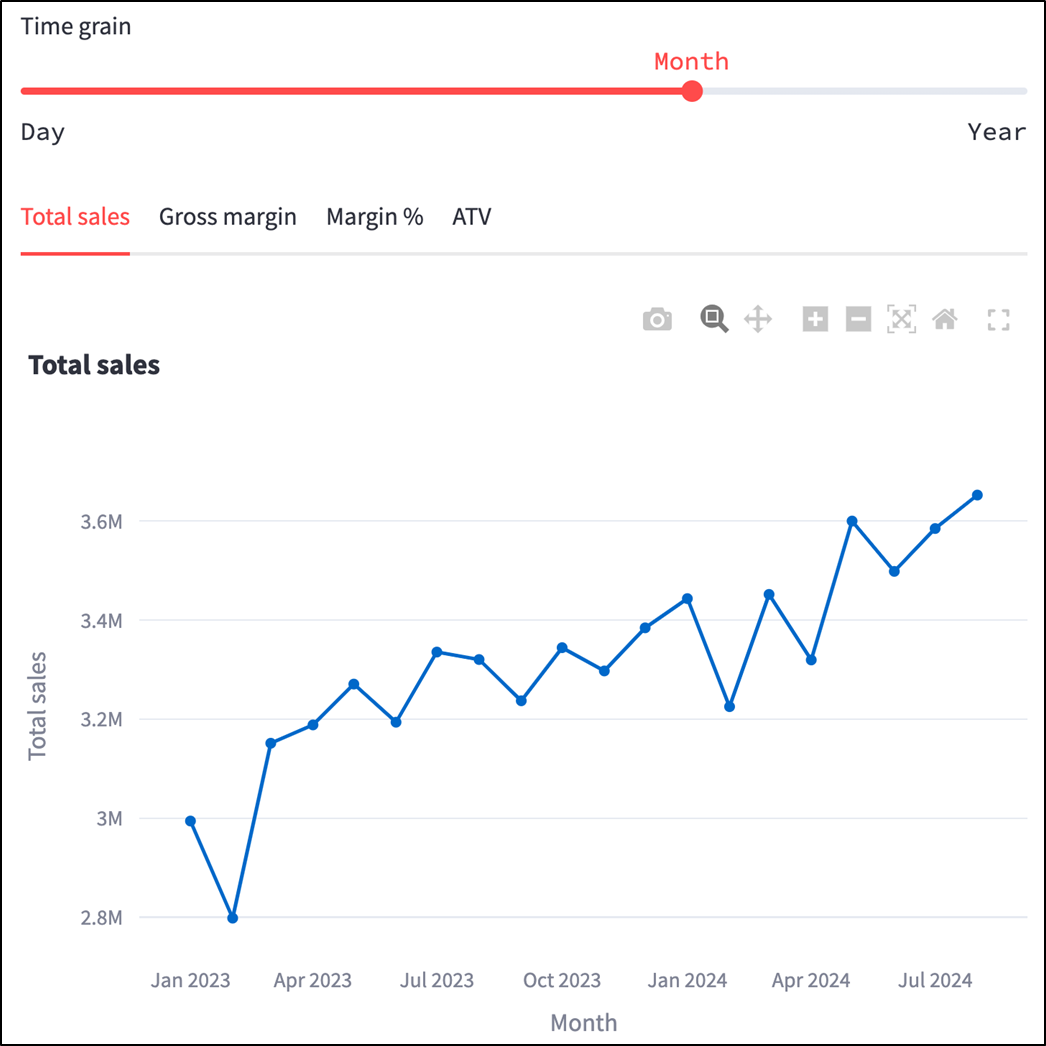
The line chart now has a time grain selector (see chapter_07/in_progress_01 in the GitHub repo for the full code at this point).
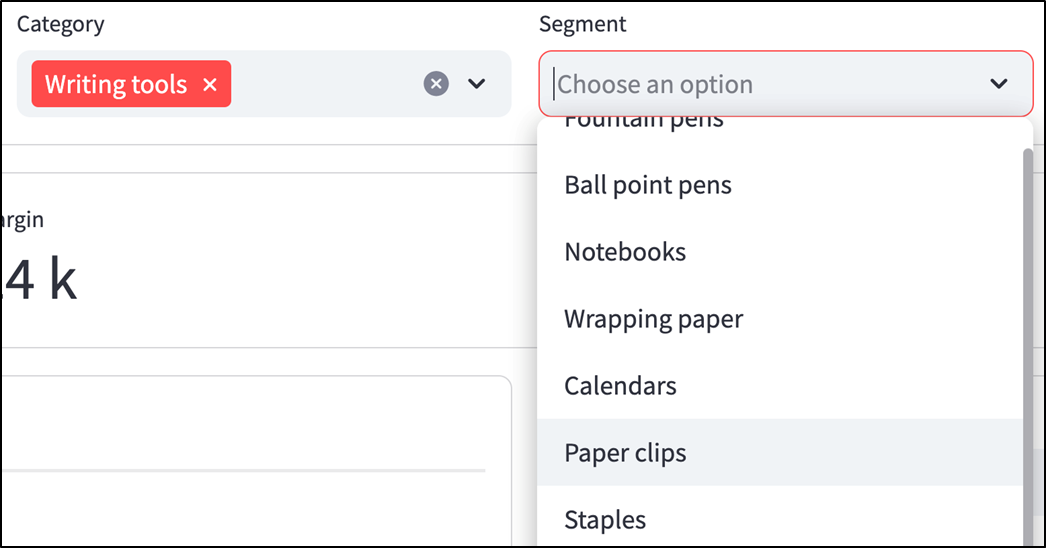
The filter bar options can have mismatching combinations.
Old filtering approach: Get unique values for all filters first, then filter based on selections.
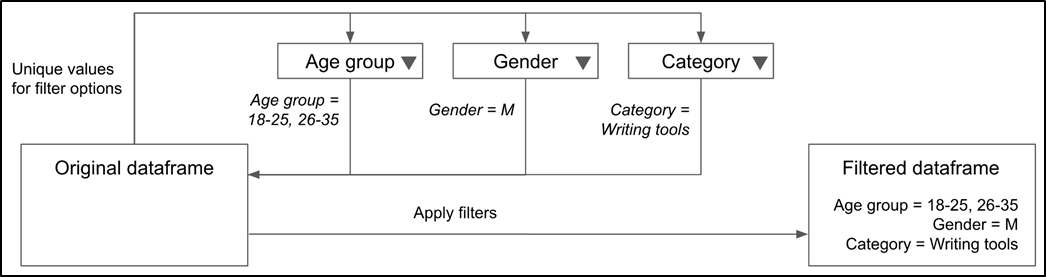
New filtering approach: Get unique values for each filter, apply filter based on selection, then repeat for other filters.
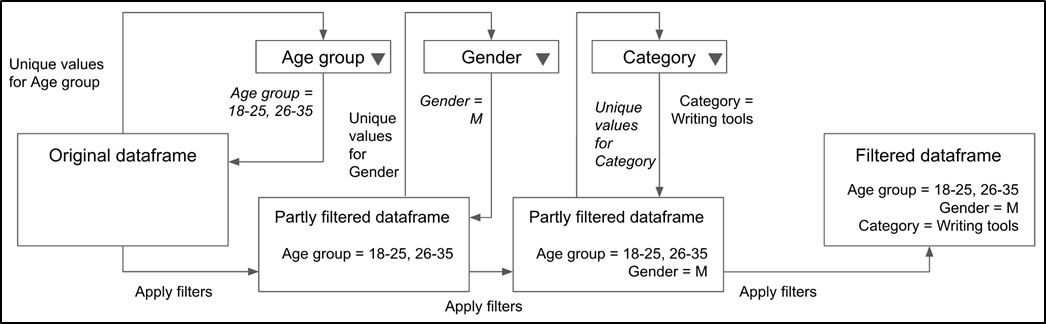
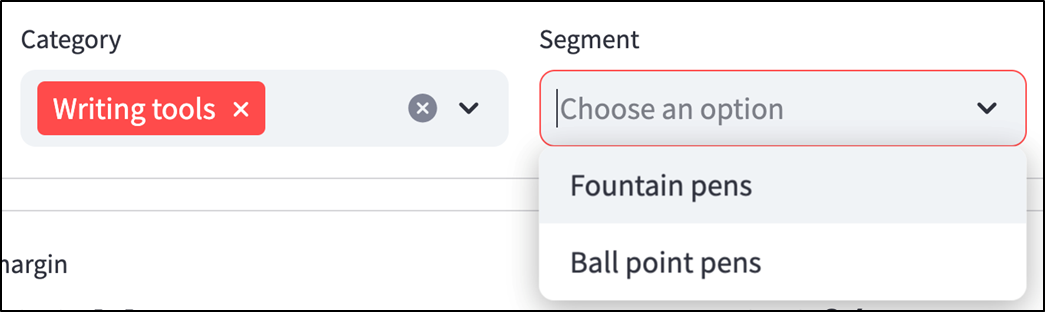
The filter bar only shows valid option combinations (see chapter_07/in_progress_02 in the GitHub repo for the full code).
Sales for RoyalQuill were $1.32M, but there's no indication of whether that's good or what the sales were in a previous comparable period.

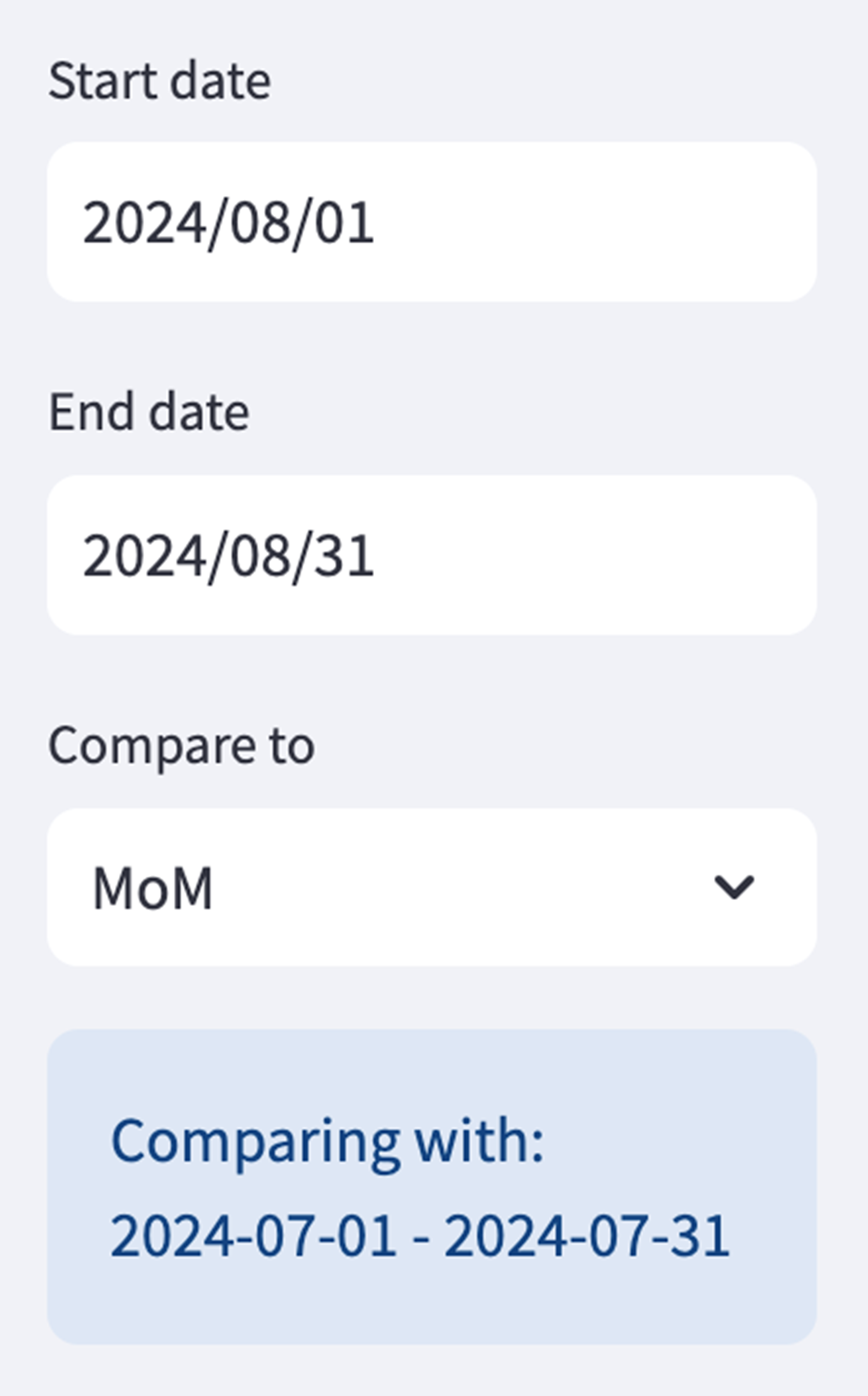
Sidebar showing a start/end date selector for the main date range as well as a "Compare to" input (see chapter_07/in_progress_03 in the GitHub repo for the full code).
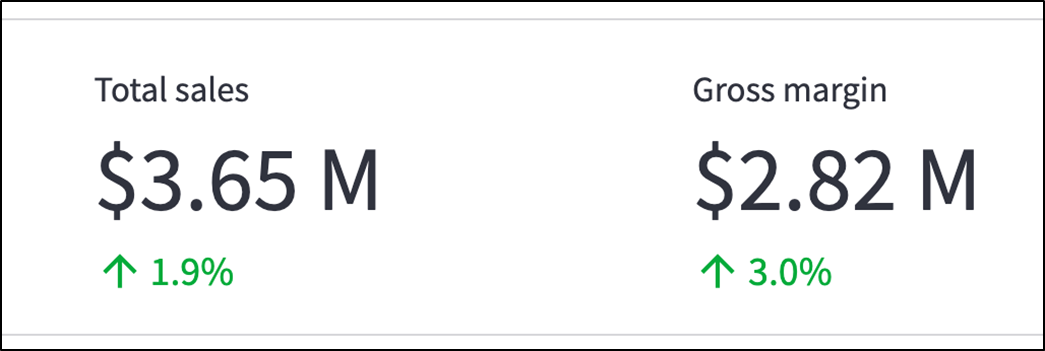
Metric bar showing how each metric has changed from the comparison date range (see chapter_07/in_progress_04 in the GitHub repo for the full code).
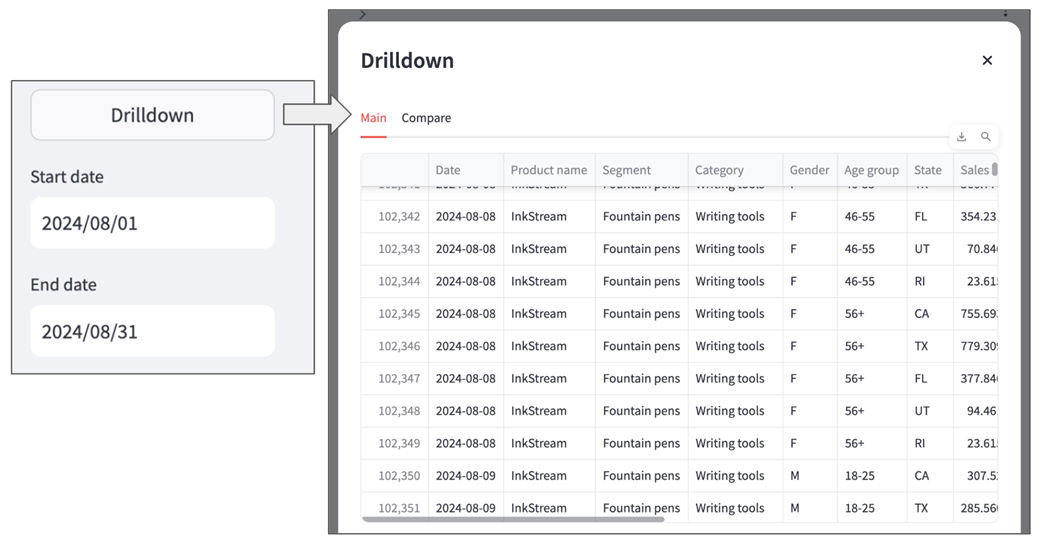
A basic raw dataframe view rendered in a dialog using st.dialog (see chapter_07/in_progress_05 in the GitHub repo for the full code).
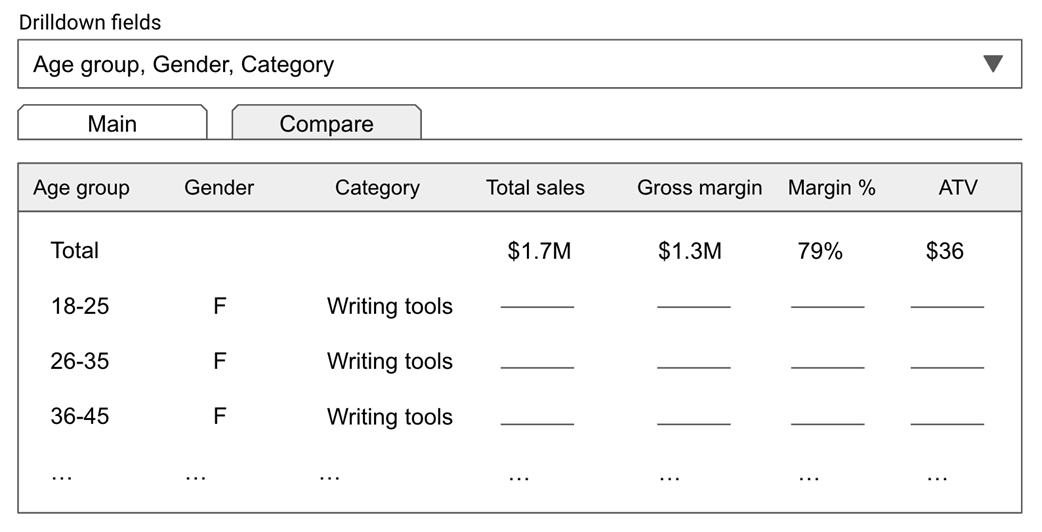
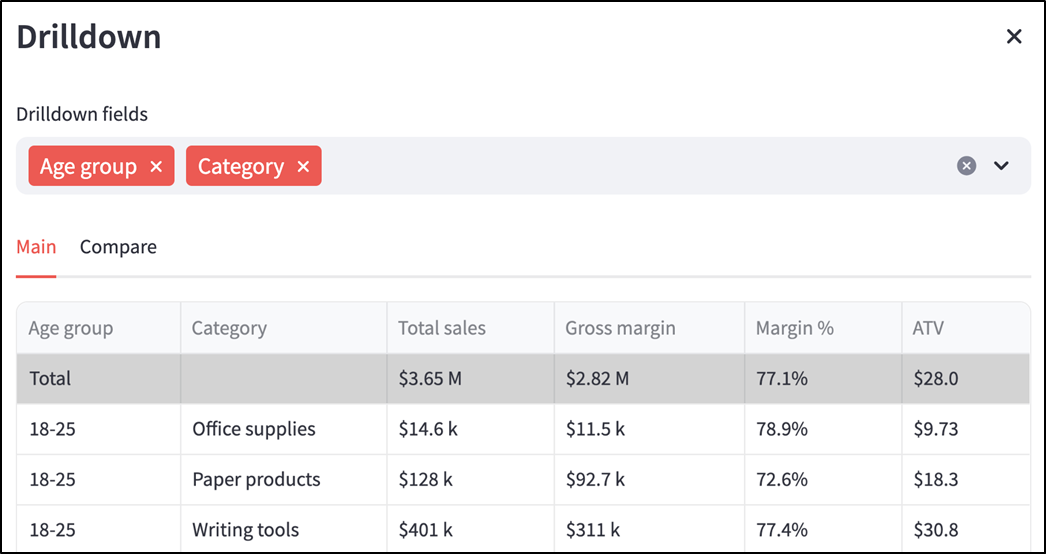
A mock UI for the drilldown view.
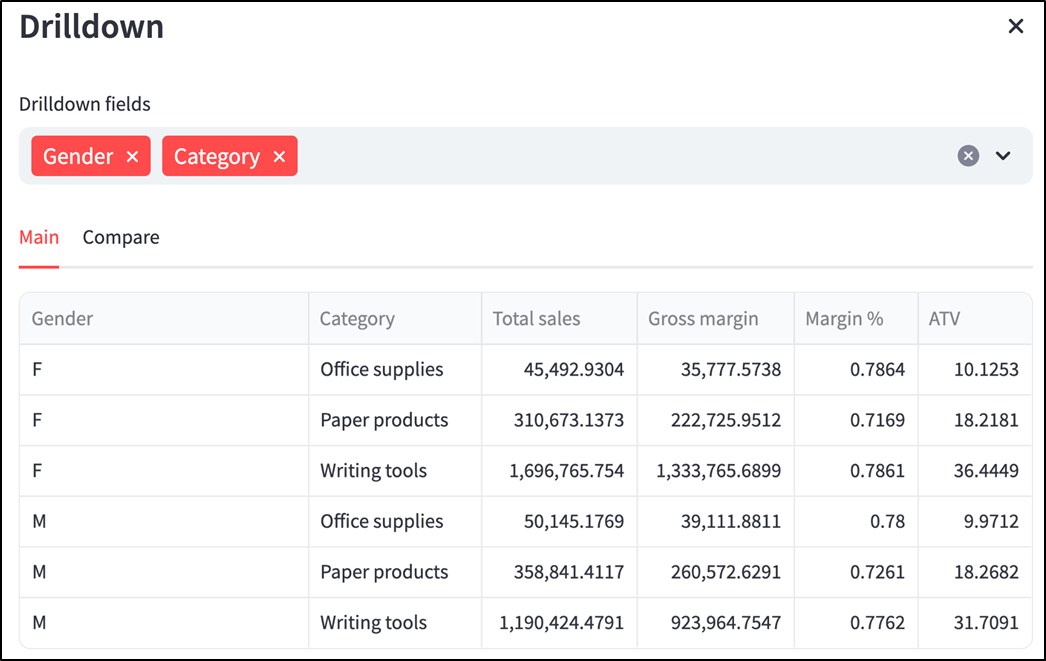
Drilldown view with a dimension selector and aggregated for selected dimensions (see chapter_07/in_progress_06 in the GitHub repo for the full code).
Drilldown dataframe view with a total row (see chapter_07/in_progress_07 in the GitHub repo for the full code).
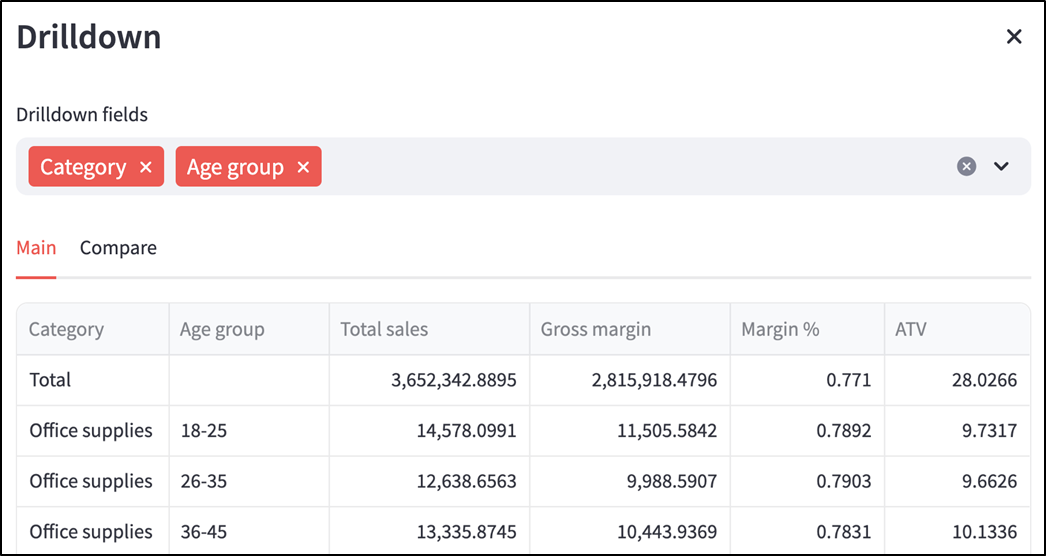
Completed drilldown view with shaded total row and formatted values (see chapter_07/in_progress_08 in the GitHub repo for the full code).
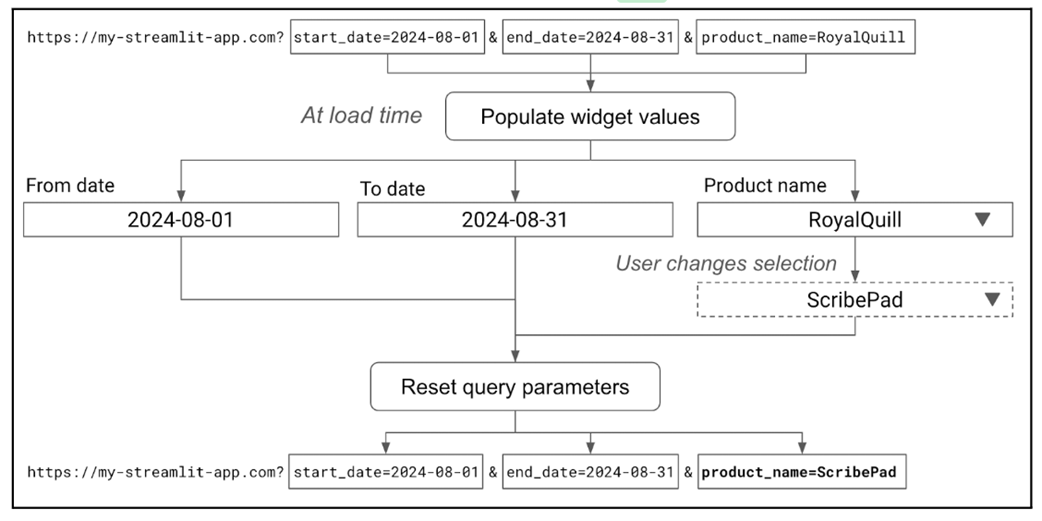
Approach for implementing deeplinking.
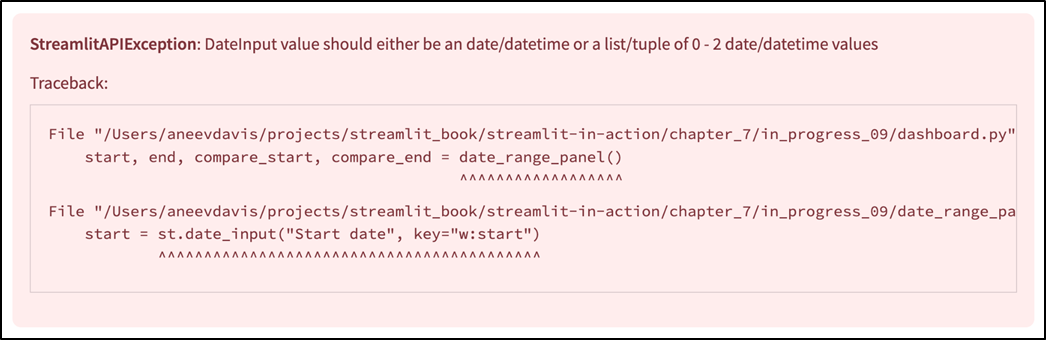
We get an error when we inadvertently pass a string to an st.date_input (see chapter_07/in_progress_09 in the GitHub repo for the full code).
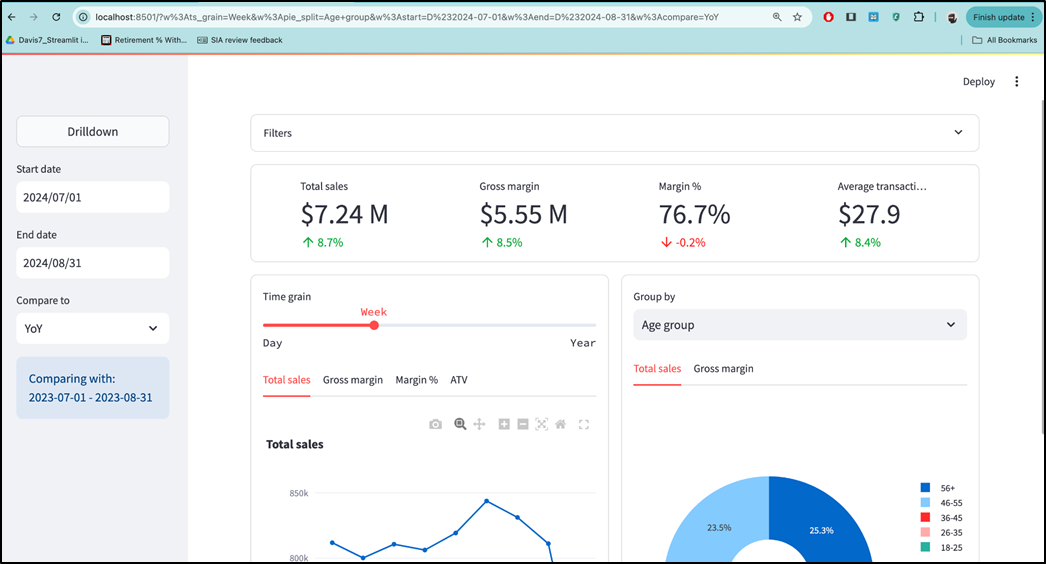
The widgets in the dashboard are populated based on the URL values (see chapter_07/in_progress_10 in the GitHub repo for the full code).
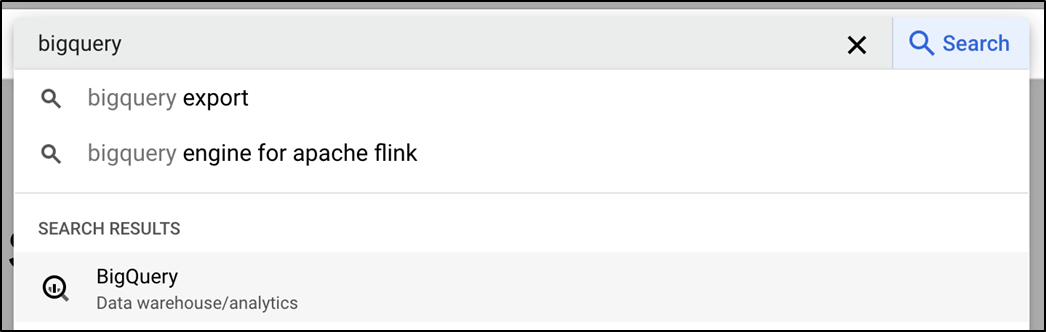
The most reliable way to find something on GCP is to use the search bar.
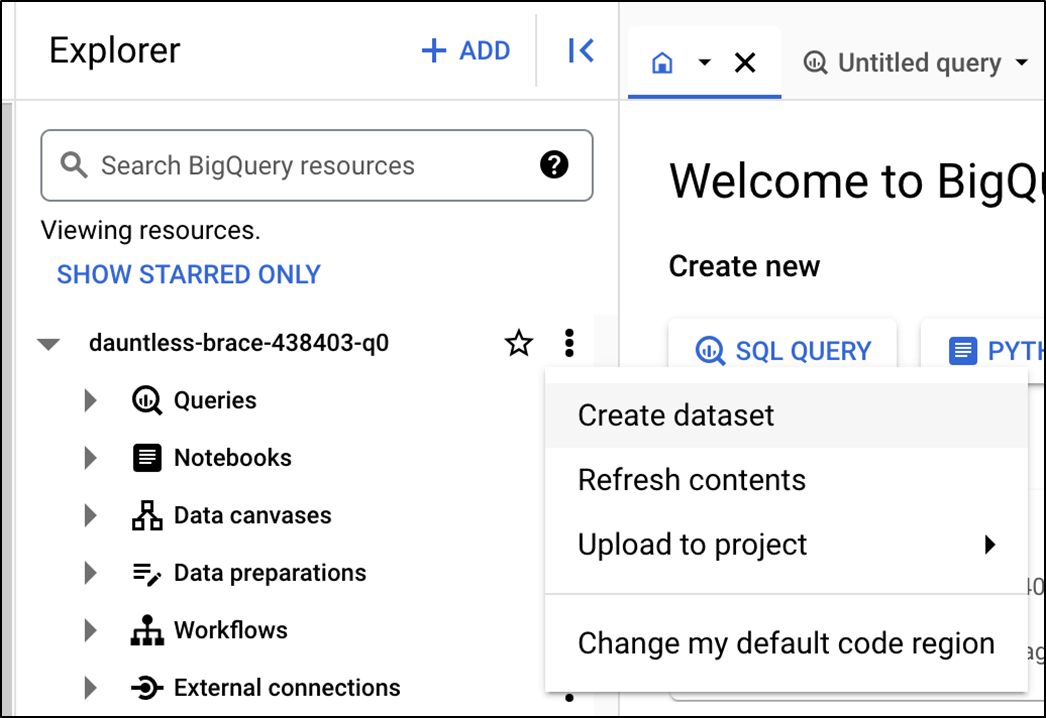
The Explorer pane in BigQuery.
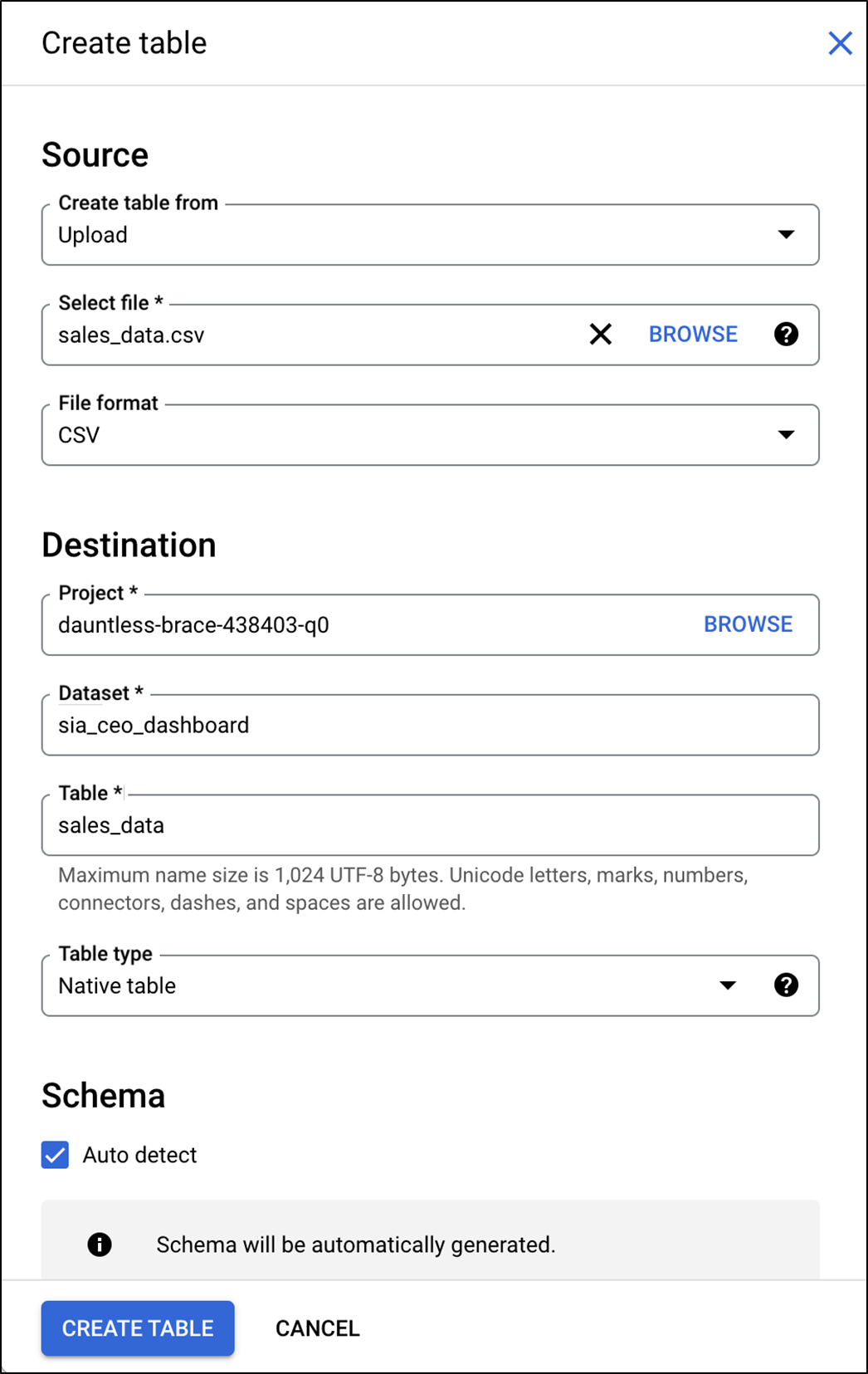
The table creation screen in BigQuery.
Summary
- Launching an app is only the first step to making it successful. You also have to land it, ensuring that it meets your users' needs. For this, it is critical to hear from users directly.
- st.select_slider is a cross between st.selectbox and st.slider, used when you want to impose a logical order between options.
- st.metric can show the delta associated with a metric, i.e. how a value has changed over time.
- st.dialog is a decorator that lets you create a modal dialog, an overlay that blocks interaction with the rest of the app.
- You can use st.container to create placeholders in your app, only rendering the content you want to show when it's available.
- Pandas dataframes have a style property that can be used to set conditional rules that modify how they are displayed on the screen.
- st.query_params is a dictionary-like object that lets you read and update URL query parameters—this can be used to enable deeplinks in an app.
- A data warehouse is a specialized system designed to store and retrieve large amounts of data.
- Google BigQuery, part of GCP, is an example of a data warehouse. To enable an app to connect to it, you need to create a service account with a key, and record the credentials in st.secrets.
FAQ
Why did the dashboard need a time grain selector?
The original time series chart plotted one point per day, which worked for short ranges but became unreadable over long periods. The chapter improves this by addingDay, Week, Month, and Year grains, then lets users choose the grain with st.select_slider.How are weekly, monthly, and yearly time grains added to the data?
They are added inprep_data() by converting the Day column into Pandas periods and then back into timestamps. For example, df['Month'] = df['Day'].dt.to_period('M').dt.to_timestamp() converts each date to the first day of its month.What is st.select_slider used for in this chapter?
st.select_slider is used to let users choose an ordered text option: Day, Week, Month, or Year. It is useful when options are strings but have a natural order, such as time grains from smallest to largest.How are interdependent filters implemented?
Instead of computing all filter dropdown values from the original dataframe, the app applies the filters selected so far before computing the next filter’s options. This means if a user selectsWriting tools as the category, the later filters only show segments and products that actually belong to that category.Why does the order of filters matter after making them interdependent?
The app computes each filter’s available values using the filters selected before it. Therefore, ifCategory appears before Segment, selecting a category can narrow the segment options. If Category appears after Segment, it cannot affect the segment dropdown because those options have already been computed.How does the dashboard compare metrics across date ranges?
The sidebar adds aCompare to selector with options such as MoM, QoQ, YoY, and Previous period. The app calculates a comparison date range, filters the data for both the main and comparison ranges, and then shows percentage deltas in the metric bar using st.metric.How is the percentage delta in the metric bar calculated?
The app calculates the metric for the main date range and the same metric for the comparison range. The delta is computed as(value - compare_value) / compare_value, then formatted as a percentage. If the comparison value is zero or unavailable, the delta is returned as None so Streamlit displays no delta.What is the purpose of the drilldown view?
The drilldown view gives power users a flexible way to inspect detailed data beyond the main charts. It appears in a modal dialog and lets users choose dimensions such asAge group, Gender, Category, Segment, Product name, and State, then displays aggregated metrics for each selected combination.How does st.dialog work in the drilldown feature?
st.dialog is used as a decorator, not as a normal container. A function decorated with @st.dialog("Drilldown", width="large") renders its contents inside a modal popup. In this chapter, the dialog contains tabs for the main and comparison data and a flexible drilldown table.How are deeplinks implemented in the Streamlit dashboard?
The app usesst.query_params to store widget selections in the URL and st.session_state to populate widget defaults from those URL values. Widget keys that should appear in the URL are prefixed with w:. The app also encodes lists and dates with prefixes like L# and D# so they can be restored with the correct types when someone opens a shared link.
 Build Python Web Apps with Streamlit ebook for free
