6 A dashboard fit for a CEO
This chapter walks through building an executive-style Streamlit dashboard for a fictional stationery retailer, Note n’ Nib, whose new CEO needs an up-to-date way to monitor business performance. The goal is to turn raw sales data into a clear, interactive dashboard that highlights key metrics, supports filtering across important business dimensions, and presents trends and breakdowns visually so decision-makers can quickly understand what is happening.
The chapter begins by defining the dashboard’s requirements, data model, and user experience. It uses a CSV file containing sales, gross margin, transactions, dates, products, categories, demographics, and states, then loads it with Pandas. It explains practical data-app concerns such as reliable file paths, displaying dataframes in Streamlit, and improving performance with cached data loading. The dashboard is then structured with modular Python files, a wide layout, a collapsible filter panel, multiselect widgets, a sidebar date range selector, and Pandas filtering logic based on selected dimensions and dates.
The second half focuses on calculating and presenting business metrics and visualizations. It defines total sales, gross margin, margin percentage, and average transaction value, then uses a configurable metric system with formatting helpers to display them in a prominent metric bar. The chapter also introduces Plotly for interactive charts: a tabbed time series chart showing how each metric changes over time, and a pie chart showing how sales or gross margin break down by dimensions such as age group, gender, state, category, segment, or product. By the end, the dashboard combines filters, date selection, KPI cards, and charts into a complete Streamlit app ready for further refinement.
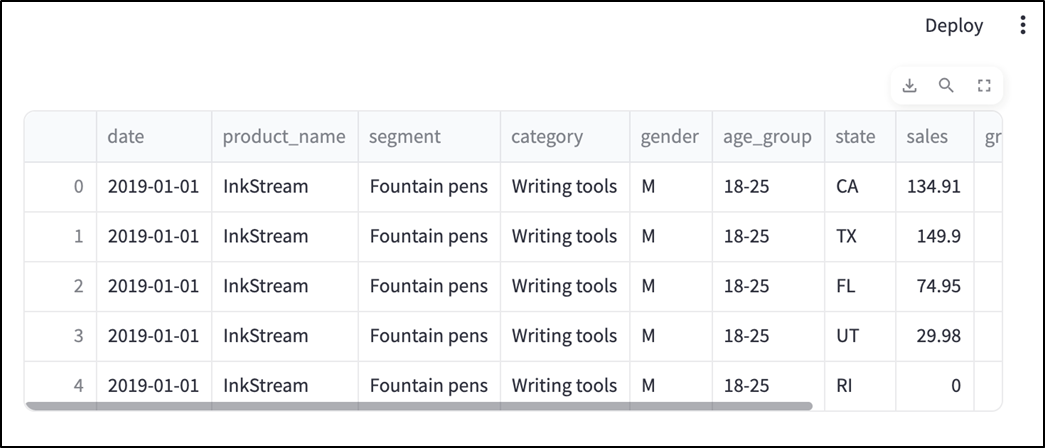
The first two rows of the CSV data we'll work with.

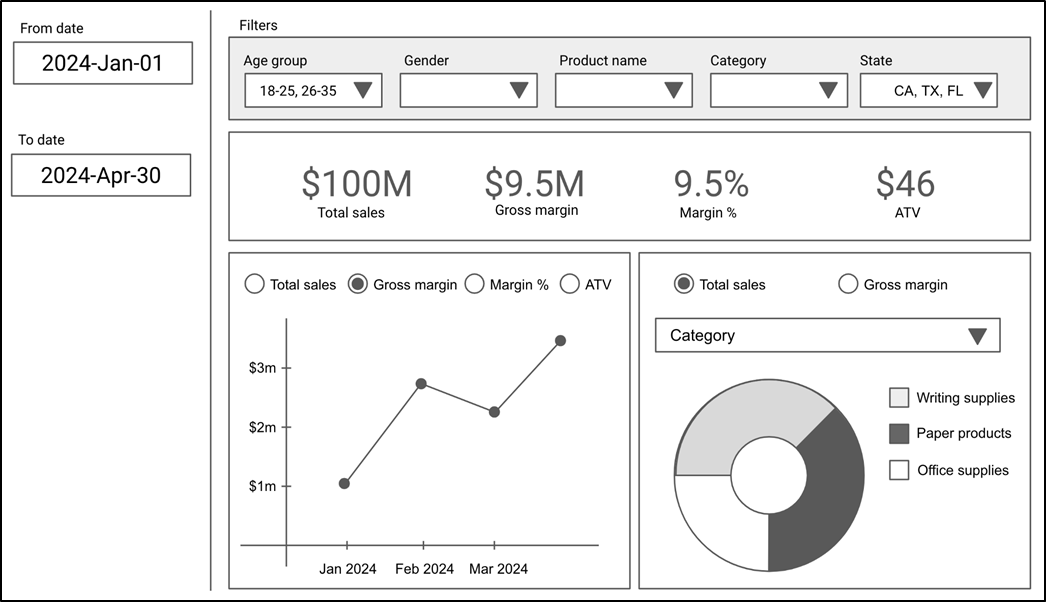
A UI mock for the dashboard.
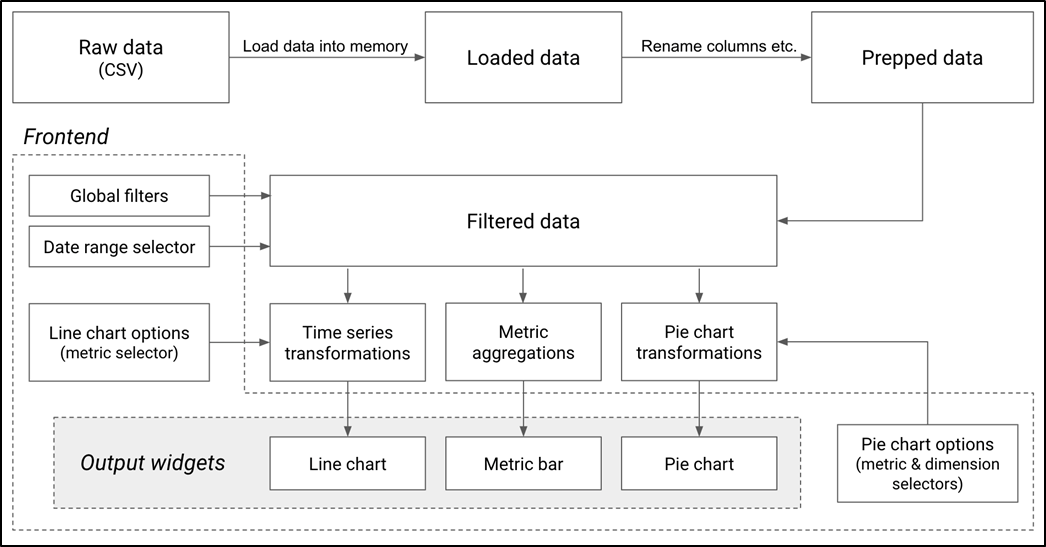
Flow of logic and data in the dashboard.
Streamlit can display Pandas dataframes natively.
By default, st.cache_data shows a spinner with a function name when running the function.

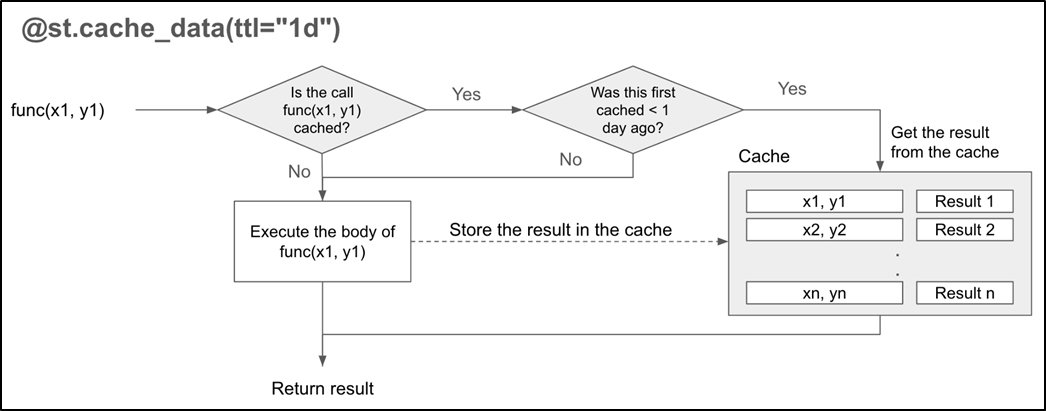
How st.cache_data works
Setting the show_spinner parameter in st.cache_data displays a user-friendly message when the data is loading.

The filter panel from our UI mock.

By default, our Streamlit app's layout is centered, which can be problematic if there's a lot to display horizontally.
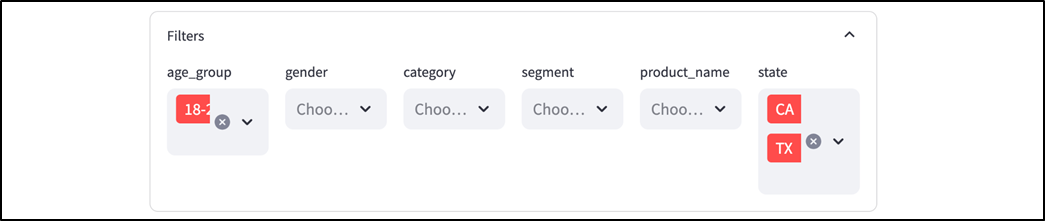
Filter panel with user-friendly field names and a wide layout.

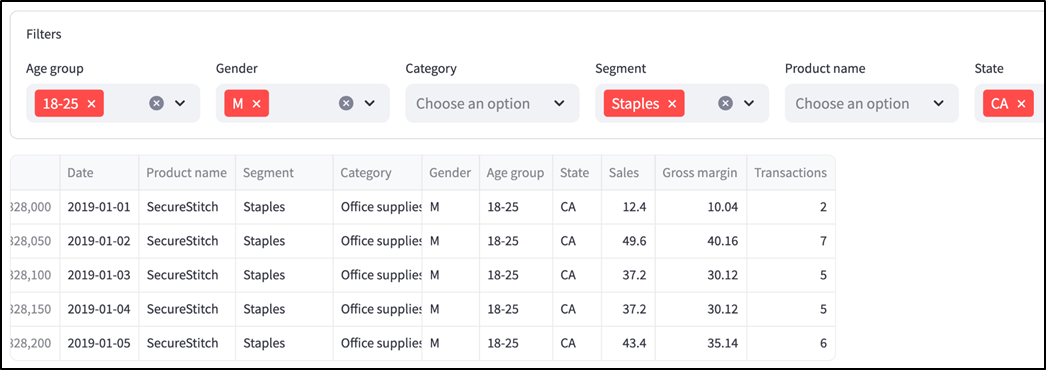
The selections in the filter panel correctly filter the displayed rows (see chapter_06/in_progress_05 in the GitHub repo for a snapshot of the full code).
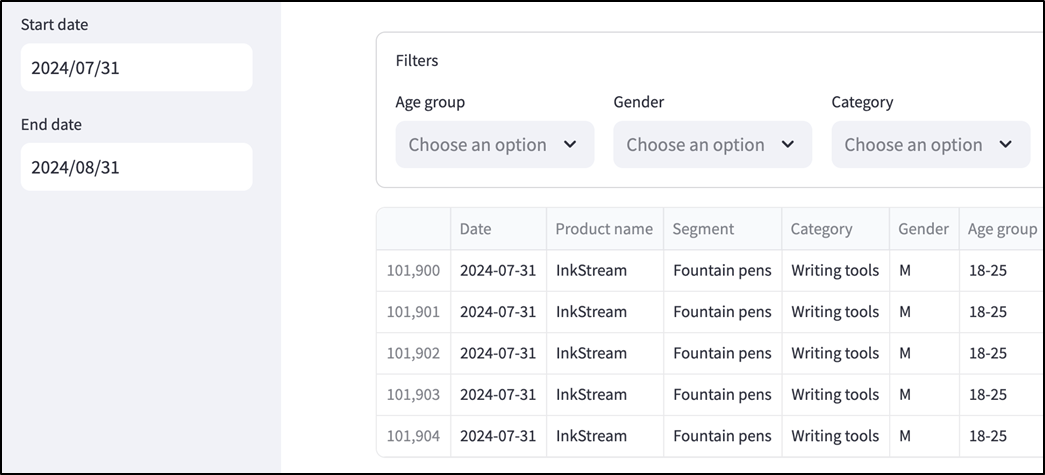
Date range inputs displayed in a sidebar (see chapter_06/in_progress_06 in the GitHub repo for a full code snapshot).
Metrics bar showing key metrics in aggregate for a selected date range (see chapter_06/in_progress_07 in the GitHub repo for the full code).

The time series chart from our UI mock.
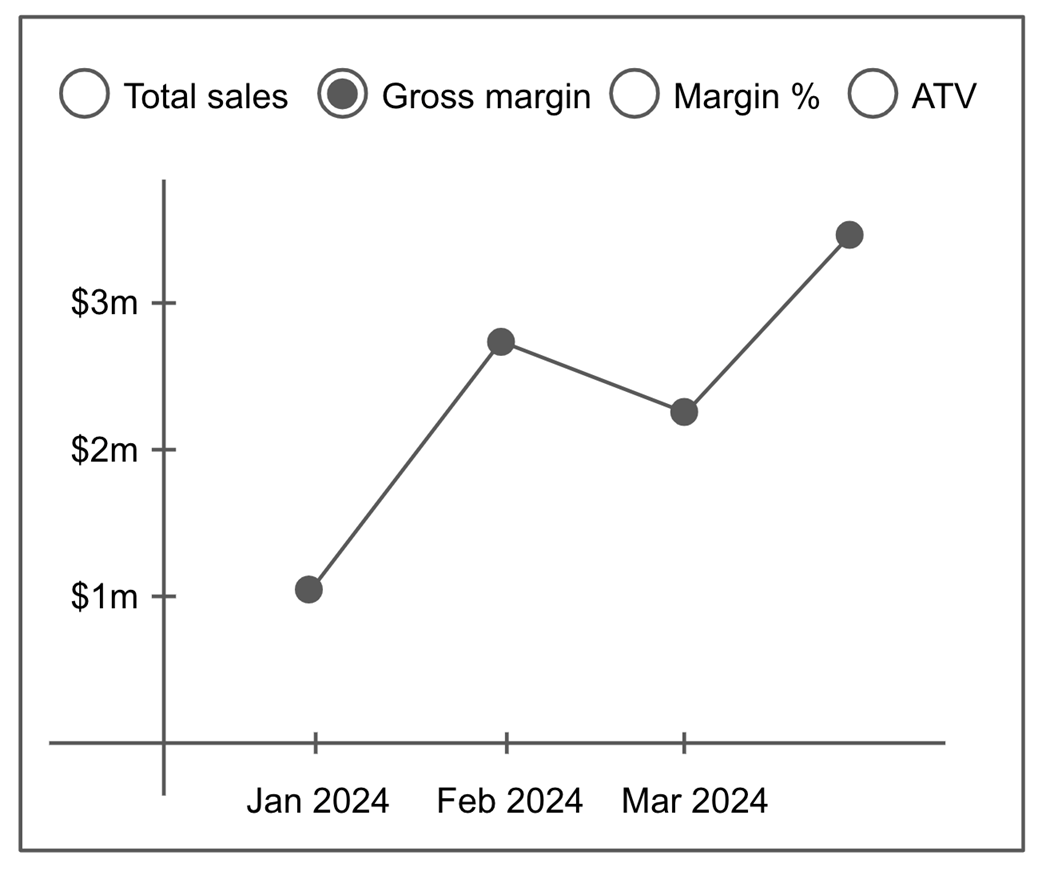
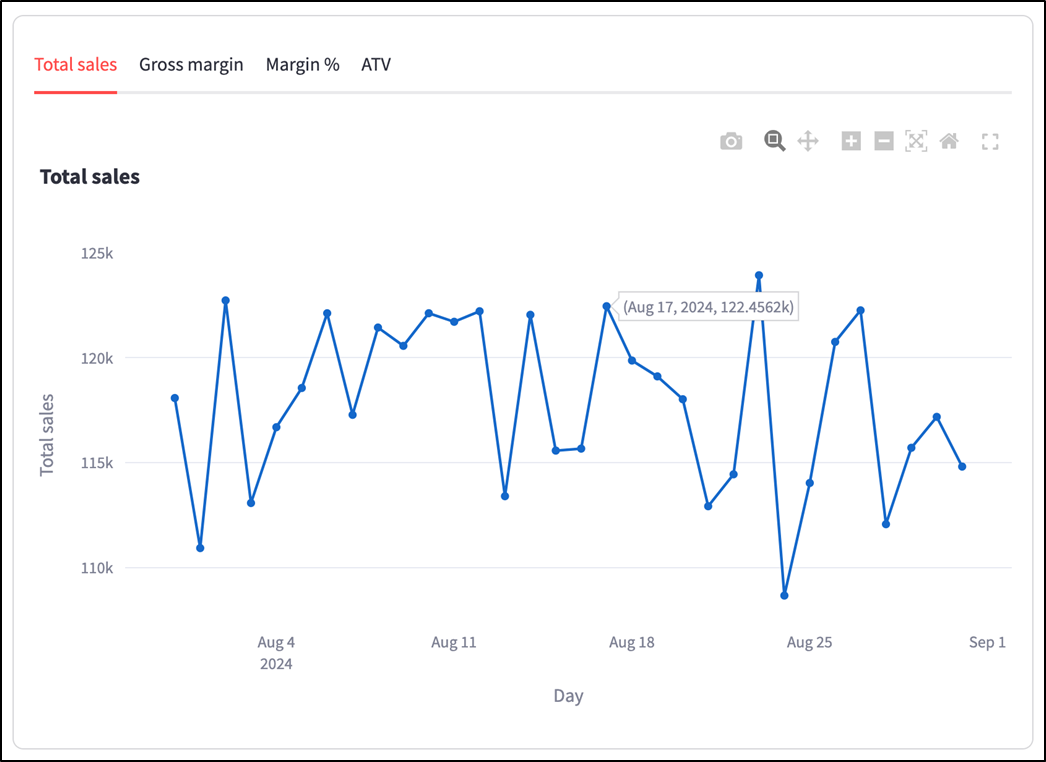
Time series chart created using Plotly (chapter_06/in_progress_08 in the GitHub repo has the full code).
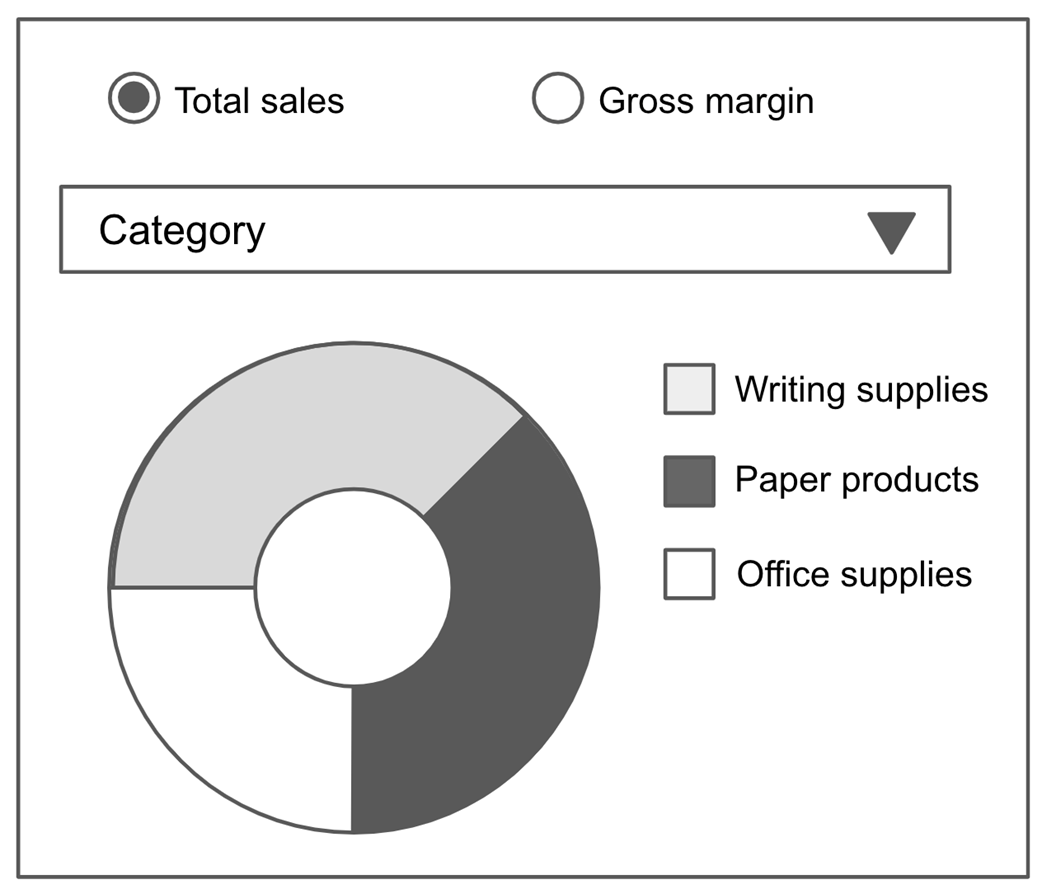
The pie chart from our UI mock.
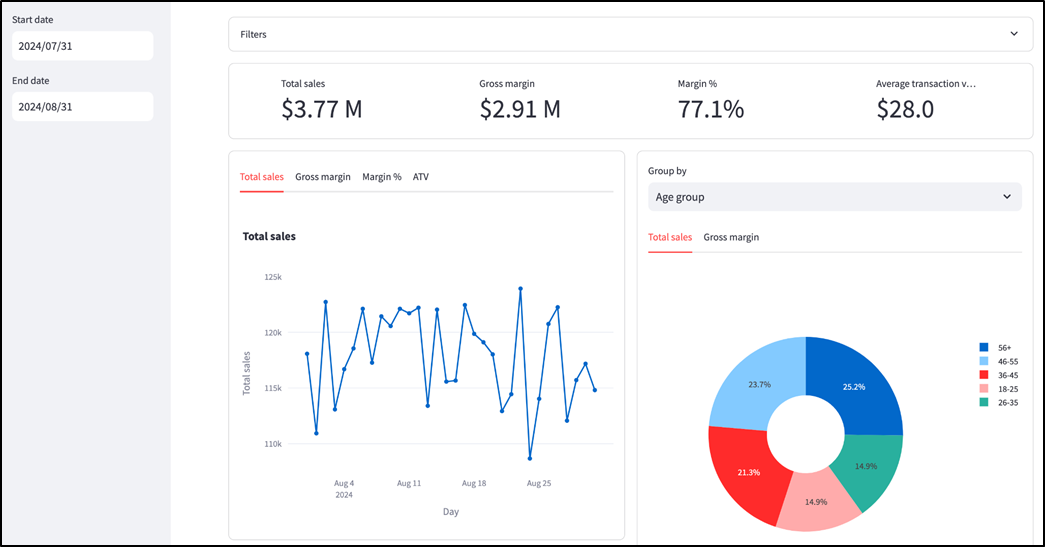
Our completed app, with the newly added pie chart at the bottom right (chapter_06/in_progress_09 in the GitHub repo has the full code).
Summary
- A metrics dashboard is an essential decision-making tool for executives.
- Pandas is a popular Python library for manipulating tabular data in dataframes. Streamlit can display Pandas dataframes natively.
- Use Pandas' read_csv function to load data from a comma-separated values (CSV) file
- The st.cache_data decorator can be used to cache the results of functions, improving performance. Its ttl parameter sets the time period for which a cached result is valid.
- The dataframe square bracket notation is quite versatile in Pandas; you can use them to select columns, filter rows, and more.
- st.container can be used to hold other Streamlit widgets, displaying them out of order or with a border around them.
- st.multiselect creates a dropdown menu where you can select multiple options.
- st.set_page_config can set app configurations in Streamlit, including switching from a centered layout to a maximized one.
- st.date_input can be used to display date selectors in your app.
- The humanize library is useful for formatting numbers in a user-friendly way.
- A time series is a sequence of data points, each with a date and a value.
- The groupby method on Pandas dataframes can aggregate data across dimensions.
- Plotly Graph Objects (abbreviated to go) is a Python library used to create visualizations that can be displayed directly by Streamlit.
- go.Scatter can be used to create scatterplots and line charts, while go.Pie can make pie charts.
FAQ
What is the goal of the CEO dashboard built in chapter 6?
The goal is to build an interactive Streamlit metrics dashboard that lets executives view different cuts of Note n' Nib sales data and track key business metrics for decision-making. The dashboard supports filtering, date range selection, summary metrics, time series trends, and breakdown charts.
Which key metrics does the dashboard track?
The dashboard tracks four main KPIs: total sales, gross margin, margin percentage, and average transaction value.
- Total sales: sum of the Sales column
- Gross margin: sum of the Gross margin column
- Margin %: gross margin divided by total sales
- Average transaction value: total sales divided by total transactions
What data source is used for the dashboard in this chapter?
The dashboard uses a CSV file named sales_data.csv, located in the chapter_06 folder of the book's GitHub repository. The file contains Note n' Nib sales data from January 2019 to August 2024, including product, category, segment, customer demographics, state, sales, gross margin, and transactions.
Why does the chapter use Pandas?
Pandas is used to load, inspect, clean, filter, group, and aggregate tabular data. The CSV is loaded into a Pandas dataframe with pd.read_csv(), and Pandas operations such as column selection, .unique(), .isin(), groupby(), apply(), and boolean indexing are used throughout the dashboard.
Why is st.cache_data used when loading the sales data?
The CSV file is large, so reading it every time Streamlit reruns the script would slow down the app. st.cache_data stores the result of a function call, such as loading or preparing the dataframe, so subsequent reruns can reuse the cached result instead of re-reading the file.
The chapter also uses options such as ttl="1d" to refresh the cache daily and show_spinner="Reading sales data..." to show a user-friendly loading message.
How are the dashboard filters created?
The filter panel is built with st.multiselect widgets inside an st.expander. Each dropdown corresponds to a dimension such as Age group, Gender, Category, Segment, Product name, or State. The list of options is generated dynamically from the dataframe using each column's unique values instead of being hardcoded.
How does the app apply filter selections to the dataframe?
The filter panel returns a dictionary where each key is a dimension name and each value is the list of selected options. The app then loops through this dictionary and filters the dataframe with Pandas boolean indexing:
df = df[df[col].isin(values)]
If the user selects no values for a dimension, the app treats that as no filter for that field.
How is the date range selector implemented?
The date range selector is placed in the Streamlit sidebar and uses two st.date_input widgets: one for the start date and one for the end date. The chapter hardcodes the latest date as 2024-08-31 because the dataset is static, then sets the default start date to 30 days before that.
The app converts dates with pd.to_datetime() and filters rows where the Day column falls between the selected start and end dates.
How are the metric definitions made flexible?
The chapter defines a Metric dataclass with three fields: title, func, and type. A separate metric_config.py file maps metric names to Metric objects. Each metric's func knows how to calculate that metric from a dataframe, while type controls formatting such as dollars or percentages.
What visualizations are created with Plotly?
The dashboard creates two main Plotly visualizations:
- Time series line charts, showing how each metric changes over time. These use go.Scatter with mode="lines+markers".
- Pie charts, showing how Total sales or Gross margin breaks down by a selected dimension such as Age group, Gender, State, Category, Segment, or Product name. These use go.Pie.
The charts are displayed in Streamlit with st.plotly_chart(..., use_container_width=True).

 Build Python Web Apps with Streamlit ebook for free
