Overview

12 Packaging and deploying Streamlit apps

This chapter explains how to move beyond beginner-friendly Streamlit Community Cloud deployments and prepare a Streamlit app for a more production-like environment. It highlights Community Cloud’s limitations, such as lack of custom domains, idle app shutdowns, resource constraints, and limited server customization, then compares alternatives ranging from managed platforms to raw cloud infrastructure. The chosen path is Docker plus AWS Elastic Beanstalk because it teaches widely useful deployment skills while balancing flexibility and manageability.

The chapter then walks through packaging a Streamlit app with Docker so it can run consistently across machines and cloud environments. It explains Dockerfiles, images, containers, port forwarding, volume mounts, and how to avoid embedding sensitive files like Streamlit secrets inside a Docker image by using a .dockerignore file. It also introduces Docker Compose as a cleaner way to define build instructions, port mappings, and mounted volumes, making local containerized development easier to repeat.

The final part focuses on deploying the Dockerized app to AWS Elastic Beanstalk, including creating an AWS account, configuring IAM permissions, preparing secrets for deployment, initializing the app with the EB CLI, creating an environment, and redeploying updates with a simple command. It also explains how Elastic Beanstalk uses services such as EC2, S3, load balancers, security groups, autoscaling, and monitoring behind the scenes. To make the app feel production-ready, the chapter finishes by showing how to attach a custom domain, request and validate an HTTPS certificate, and configure the load balancer so users can access the Streamlit app securely through a professional web address.

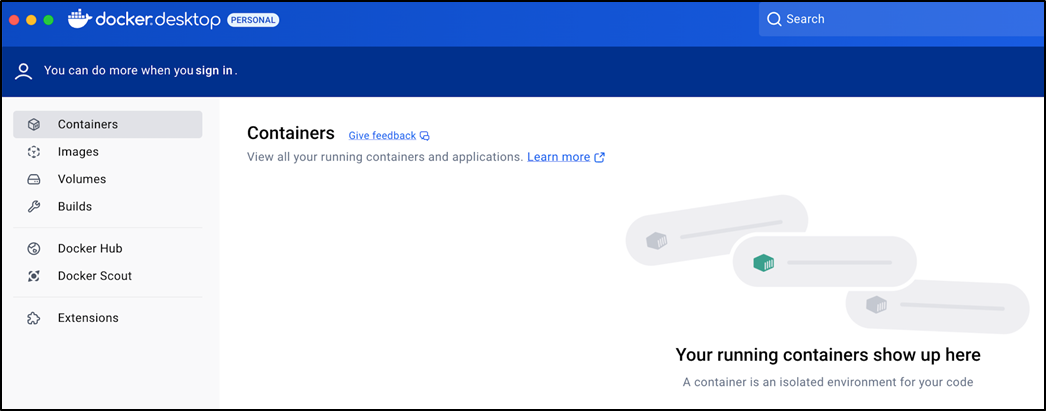
The Docker Desktop interface.
Docker runs your Streamlit app in a container.
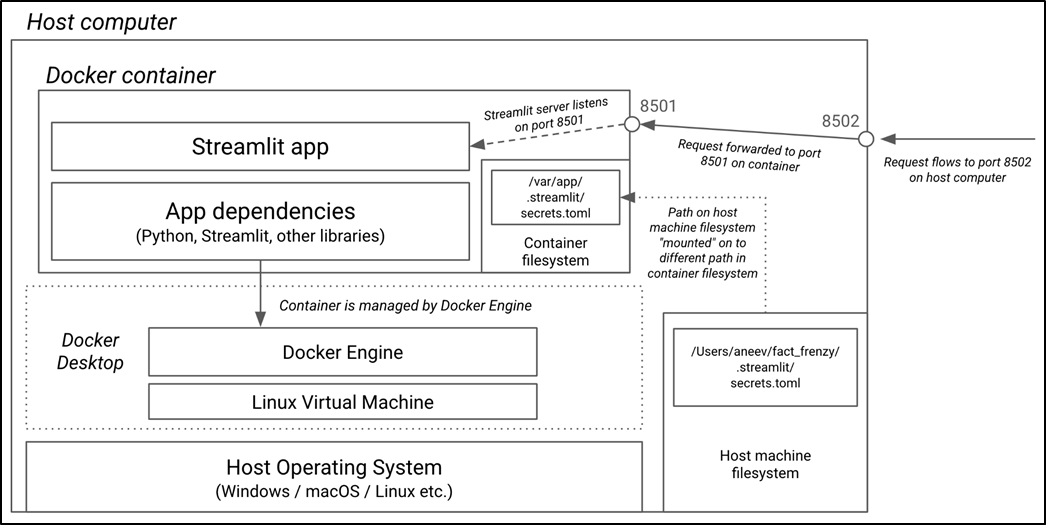
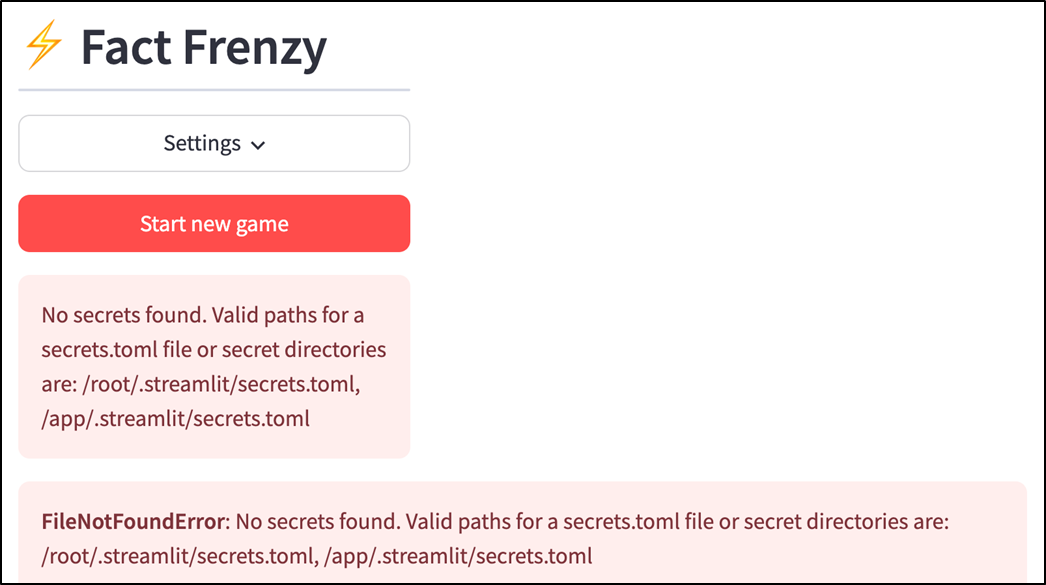
Since we added secrets.toml to .dockerignore, we need another way to make it available to our app at runtime (see chapter_12/in_progress_01 in the GitHub repo for the full code).
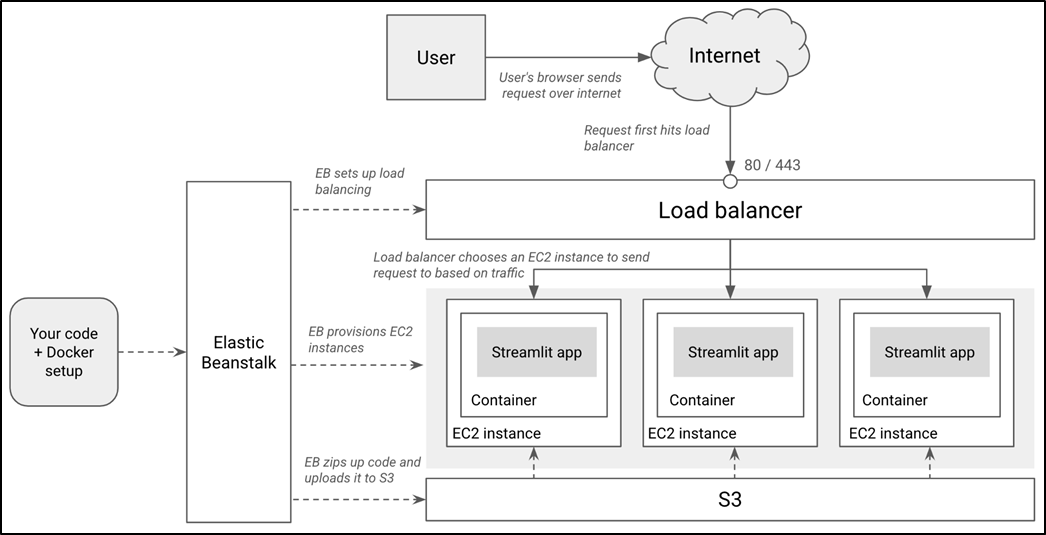
The end state of our deployed Streamlit app on AWS.
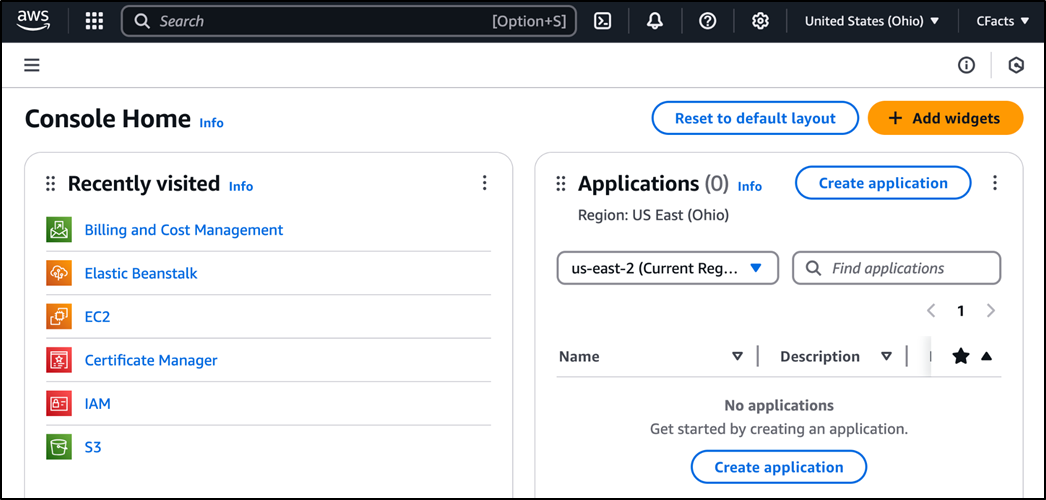
The AWS Management Console.
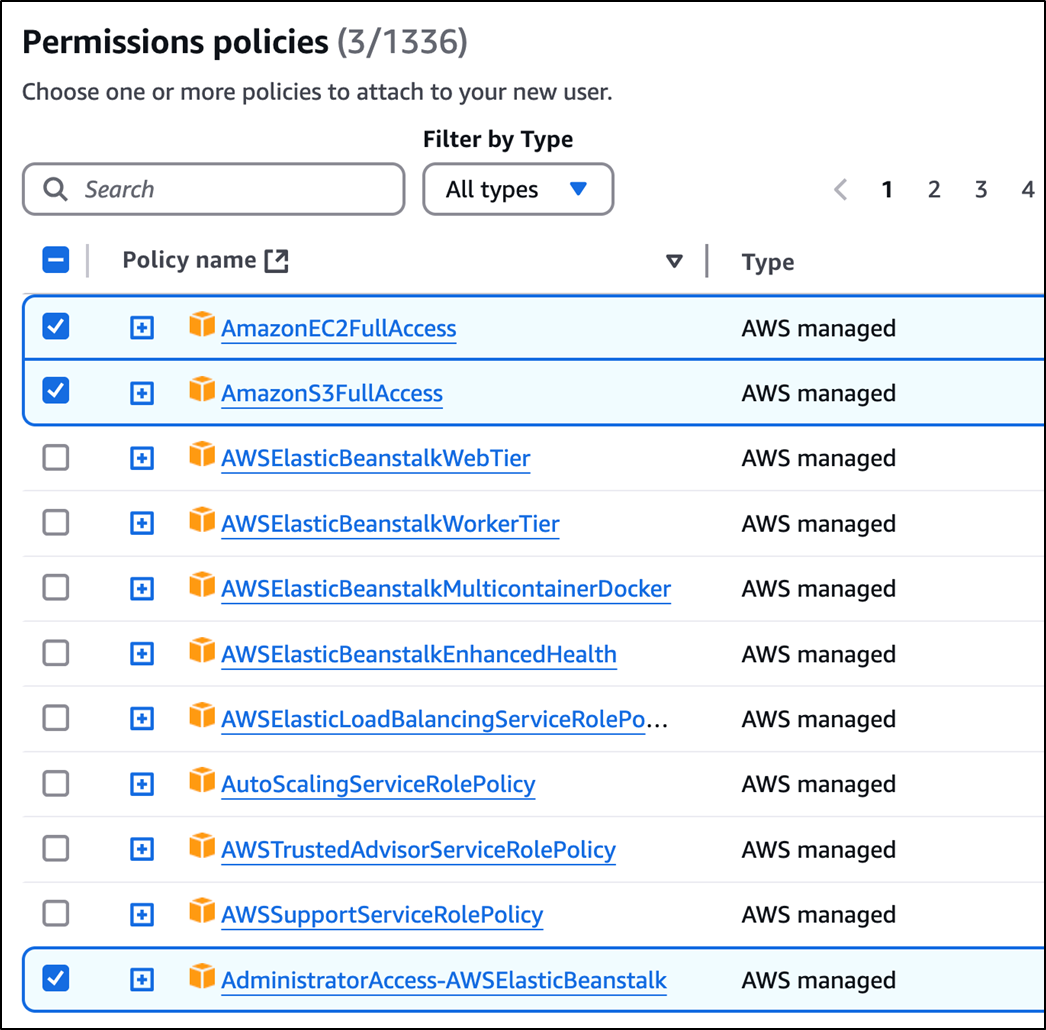
Adding the appropriate permissions for your IAM user
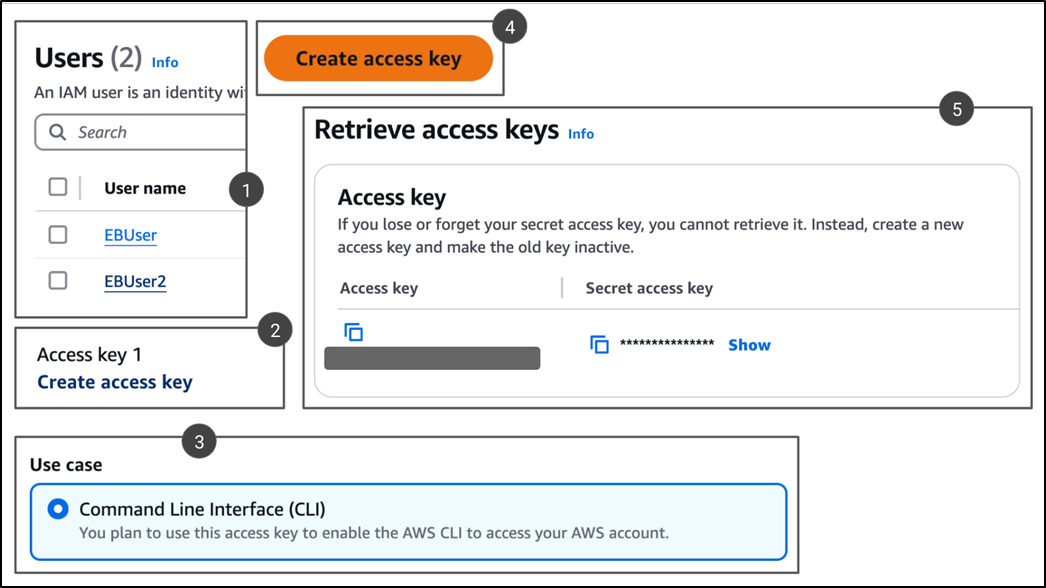
Generating an access key and secret pair for your IAM user.
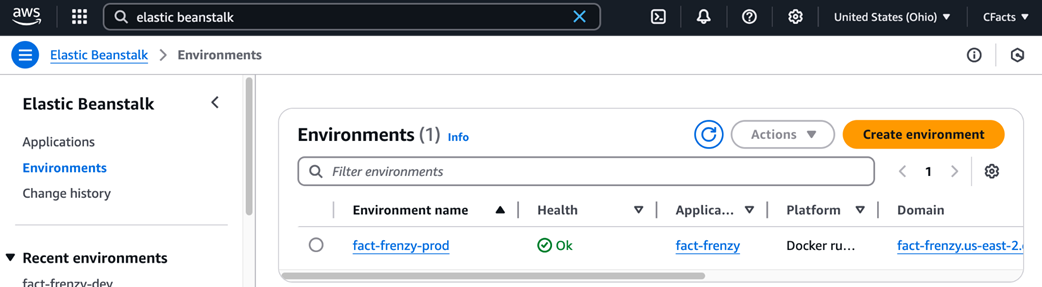
Our application and environment within the Elastic Beanstalk UI on the AWS console.
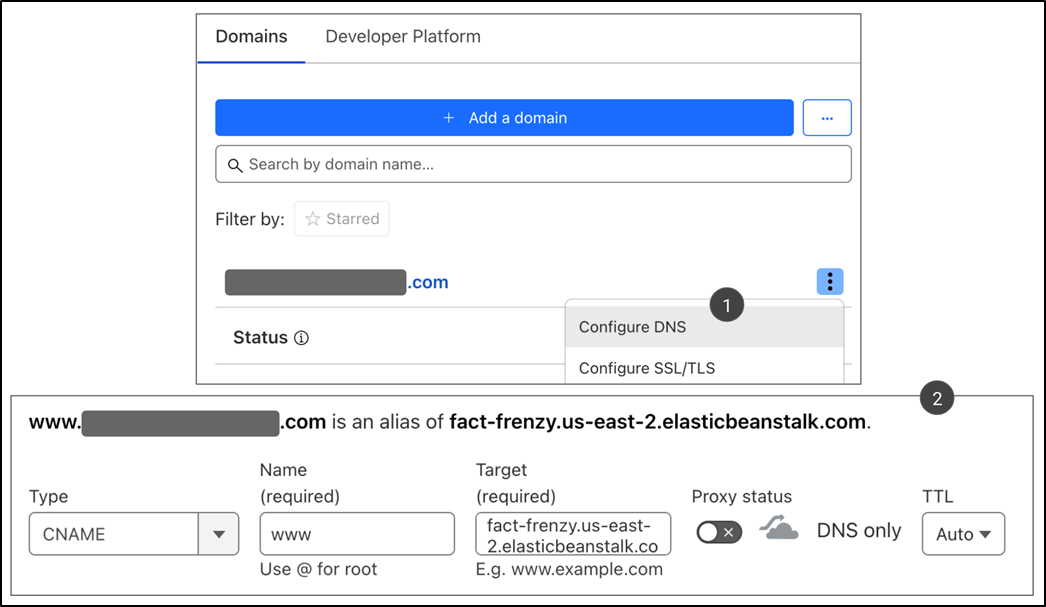
Adding a CNAME record to point your custom domain to your app.
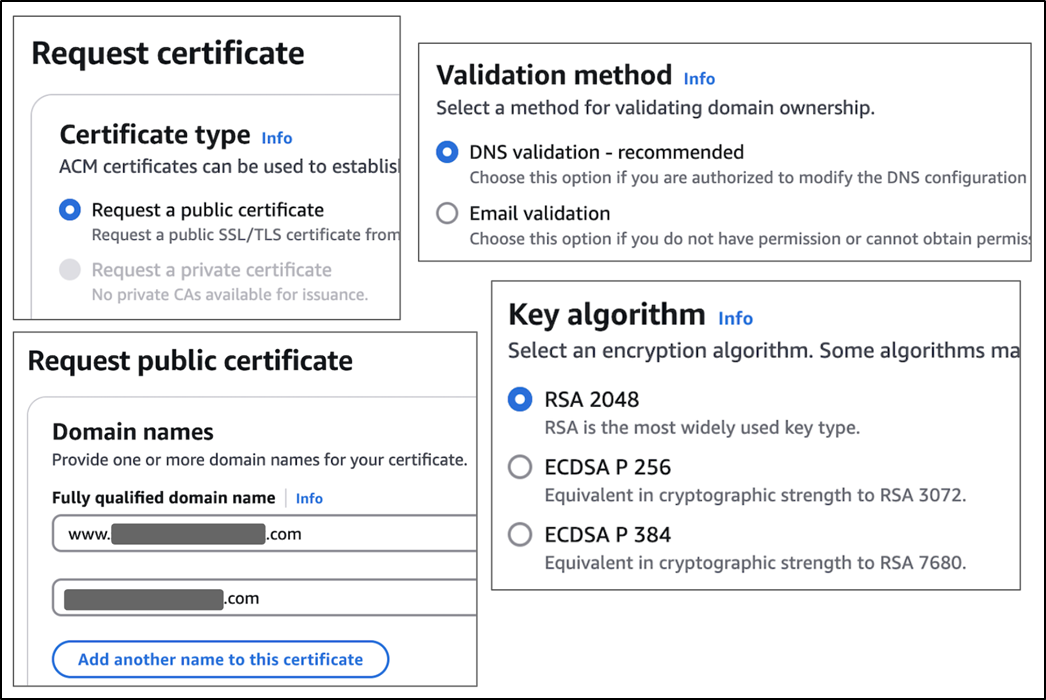
Options to choose while requesting a certificate in ACM.
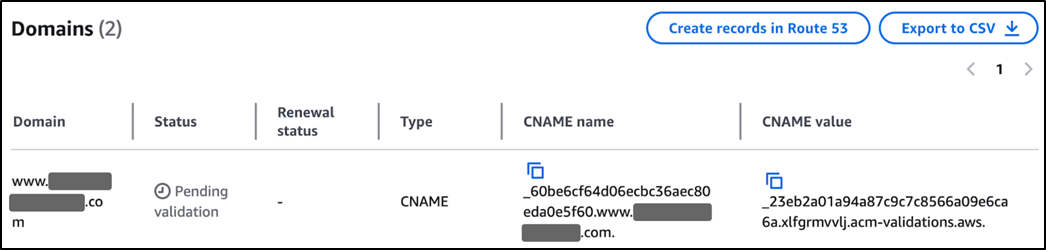
ACM shows CNAME records to add to your domain's DNS to prove ownership.
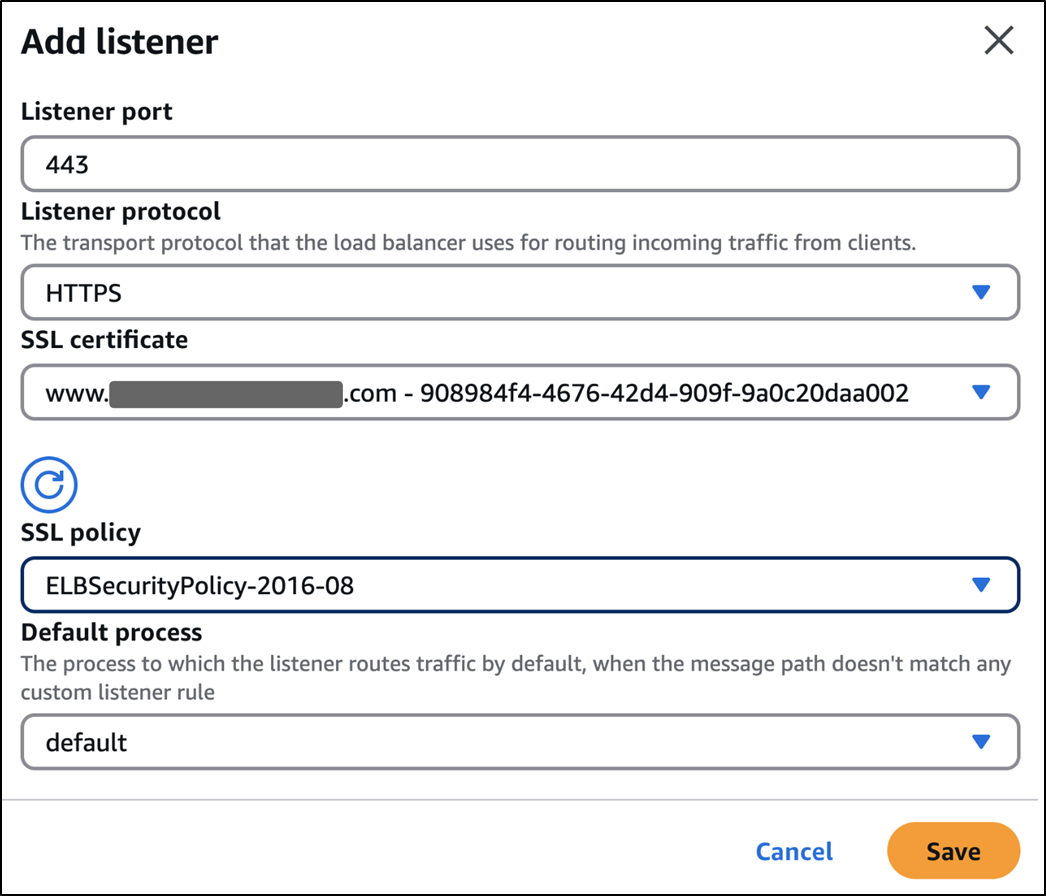
Adding an HTTPS listener and a certificate to your load balancer.
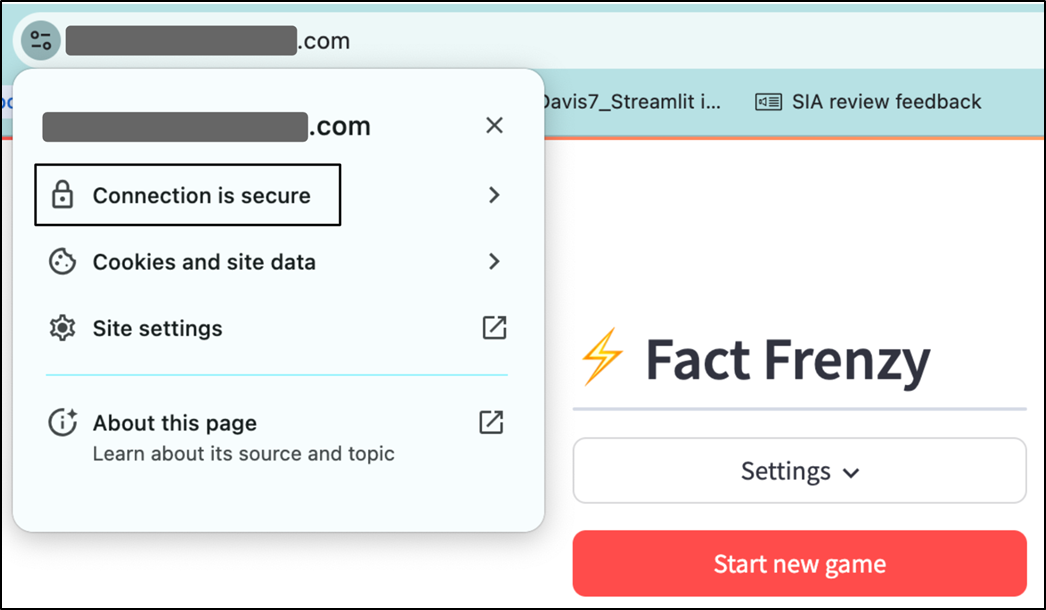
Your browser now confirms that HTTPS is enabled and the connection is secure.
Summary

  • Streamlit Community Cloud, though free, comes with several limitations, such as resource limits, lack of support for a custom domain, and idle app shutdowns.
  • There is a wide range of alternatives to choose from: low-complexity platforms like Render, medium-complexity options like Elastic Beanstalk, and even high-complexity ones like hand-configuring raw AWS services like EC2.
  • Docker is a tool that makes it possible to package your app so it runs anywhere.
  • To use Docker, you write a Dockerfile, build a Docker image from it, and spin up Docker containers from the image.
  • A Dockerfile has instructions to build an image layer by layer.
  • Streamlit offers configuration options that can be set using environment variables, a special config.toml file, or as flags in the streamlit run command.
  • The docker build command builds an image, while docker run spins up a container.
  • Docker Compose is a configuration manager for Docker, where you define the runtime instructions in a docker-compose.yml file.
  • AWS is the world's leading cloud provider, offering services like EC2 for virtual machines and S3 for storage.
  • Elastic Beanstalk is a layer on top of raw AWS services like EC2 and S3 that automatically configures these services for you, making it easy to deploy an app.
  • You can use Identity and Access Management within AWS to set up various permissions for services like EC2 and Elastic Beanstalk to do various things.
  • While preparing your Streamlit app for Elastic Beanstalk, you should specify the content of secrets.toml in a file within the .ebextensions folder rather than placing it along with your code.
  • You can use the EB CLI to interact with Elastic Beanstalk in a terminal.
  • The eb init commands sets up an EB application; eb create creates an environment under it.
  • Use the eb deploy command to redeploy your app when you make changes.
  • To add HTTPS to your EB app (without browser warnings), you need to get a custom domain from a domain registrar.
  • AWS Certificate Manager will issue an SSL certificate for your domain once you verify ownership.
  • To complete the process of enabling HTTPS, add a listener to your load balancer on port 443 and attach the issued certificate.

FAQ

Why might Streamlit Community Cloud not be enough for a production Streamlit app?Streamlit Community Cloud is excellent for learning, prototypes, demos, and lightweight apps, but it has limitations for more professional deployments. These include no custom domain support, resource limits, idle apps being shut down after a period of inactivity, and limited control over the server environment. If your app needs higher availability, more memory or CPU, custom software, a branded URL, or more control over deployment, you may need another hosting option.
What deployment approach does the chapter use for Streamlit apps?The chapter packages a Streamlit app with Docker, deploys it to AWS Elastic Beanstalk, and then adds a custom domain and HTTPS. This approach is not the easiest option compared with platforms like Render or Heroku, but it teaches real-world skills involving Docker, AWS, EC2, S3, load balancers, IAM, DNS, and certificates.
Why use Docker to package a Streamlit app?Docker creates a consistent environment that travels with your app. Instead of depending on whatever Python version, operating system, or packages happen to be installed on a machine, Docker lets you define the environment in a Dockerfile. The resulting Docker image can then be run as a container on your laptop, another developer’s machine, or in the cloud.
What does the Dockerfile for a Streamlit app do?The Dockerfile starts from a base image such as python:3.12-slim, sets a working directory, copies in requirements.txt, installs dependencies, copies the app code, exposes Streamlit’s default port 8501, sets Streamlit environment variables, and finally runs the app with a command such as streamlit run main.py.
Why should secrets.toml not be copied into a Docker image?Docker images are shareable artifacts, and anything copied into them can potentially be extracted later. If secrets.toml is included in the image, API keys or credentials may be exposed. The chapter recommends excluding the .streamlit/ folder with a .dockerignore file and providing secrets at runtime through a mounted volume locally or through Elastic Beanstalk configuration in production.
How do you run a Dockerized Streamlit app locally?After building the image with a command such as docker build -t fact-frenzy ., you can run it with port forwarding, for example docker run -p 8502:8501 fact-frenzy. This maps port 8502 on your host machine to port 8501 inside the container, so the app is accessed at http://localhost:8502.
What problem does Docker Compose solve in this chapter?Docker Compose avoids having to remember long docker run commands with port mappings and volume mounts. A docker-compose.yml file records the service configuration, including the build location, ports, and mounted volumes. Then docker-compose up can build and start the app with the correct settings.
What is AWS Elastic Beanstalk and why is it used?AWS Elastic Beanstalk is a platform-as-a-service tool that deploys and manages web apps on AWS without requiring you to manually configure every underlying service. It can provision EC2 instances, use S3 during deployment, configure networking, create load balancers, monitor health, and support scaling. It is used because it gives more control than fully managed platforms while avoiding the complexity of wiring raw AWS services together manually.
What AWS permissions and setup are needed before deploying with Elastic Beanstalk?The chapter creates an AWS account, then sets up an IAM user for command-line access instead of using root credentials. That IAM user receives policies such as AdministratorAccess-AWSElasticBeanstalk, AmazonEC2FullAccess, and AmazonS3FullAccess. It also creates an EC2 instance profile role named aws-elasticbeanstalk-ec2-role with the AWSElasticBeanstalkWebTier policy so EC2 instances can interact with required AWS services.
How do you add a custom domain and HTTPS to an Elastic Beanstalk Streamlit app?First, register or use an existing domain and add a DNS CNAME record pointing a host such as www to your Elastic Beanstalk URL. Then request a public certificate in AWS Certificate Manager using DNS validation. After AWS issues the certificate, attach it to the Elastic Beanstalk application load balancer by adding an HTTPS listener on port 443 and selecting the certificate. Once applied, the app can be visited securely using https://.

pro $24.99 per month

  • access to all Manning books, MEAPs, liveVideos, liveProjects, and audiobooks!
  • choose one free eBook per month to keep
  • exclusive 50% discount on all purchases
  • renews monthly, pause or cancel renewal anytime

lite $19.99 per month

  • access to all Manning books, including MEAPs!

team

5, 10 or 20 seats+ for your team - learn more


choose your plan

team

monthly
annual
$49.99
$499.99
only $41.67 per month
  • five seats for your team
  • access to all Manning books, MEAPs, liveVideos, liveProjects, and audiobooks!
  • choose another free product every time you renew
  • choose twelve free products per year
  • exclusive 50% discount on all purchases
  • renews monthly, pause or cancel renewal anytime
  • renews annually, pause or cancel renewal anytime
  • Build Python Web Apps with Streamlit ebook for free

choose your plan

team

monthly
annual
$49.99
$499.99
only $41.67 per month
  • five seats for your team
  • access to all Manning books, MEAPs, liveVideos, liveProjects, and audiobooks!
  • choose another free product every time you renew
  • choose twelve free products per year
  • exclusive 50% discount on all purchases
  • renews monthly, pause or cancel renewal anytime
  • renews annually, pause or cancel renewal anytime
  • Build Python Web Apps with Streamlit ebook for free
choose your plan

team

monthly
annual
$49.99
$499.99
only $41.67 per month
  • five seats for your team
  • access to all Manning books, MEAPs, liveVideos, liveProjects, and audiobooks!
  • choose another free product every time you renew
  • choose twelve free products per year
  • exclusive 50% discount on all purchases
  • renews monthly, pause or cancel renewal anytime
  • renews annually, pause or cancel renewal anytime
  • Build Python Web Apps with Streamlit ebook for free