11 Testing Streamlit apps
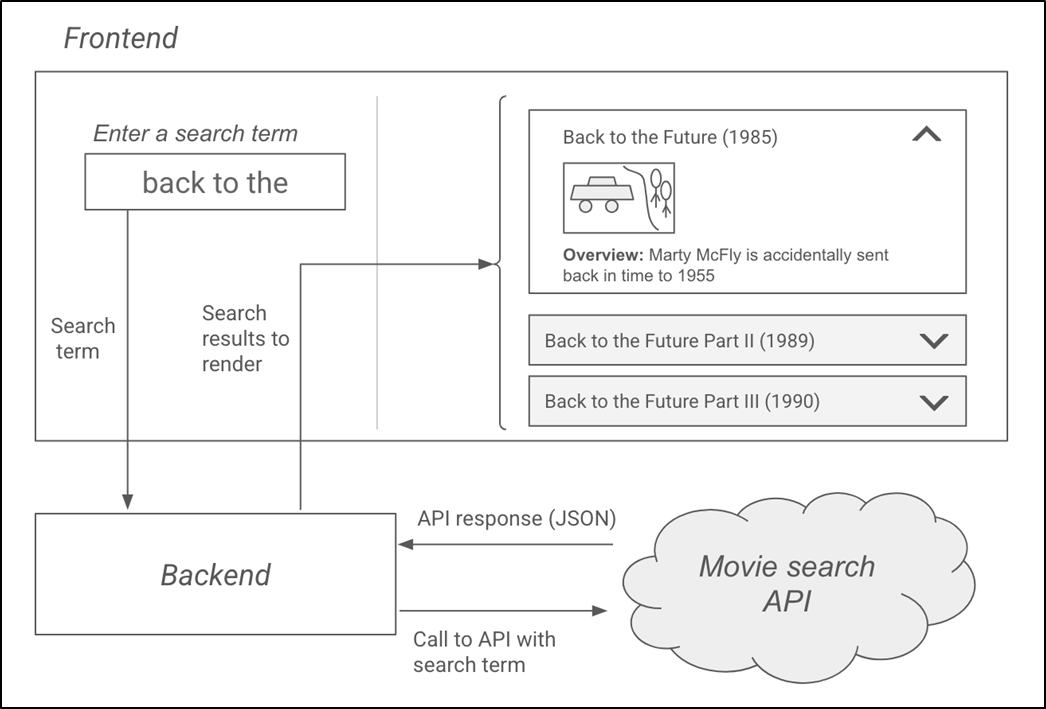
This chapter explains why testing is essential for building reliable Streamlit applications, especially once an app grows beyond a small personal project. It uses a simple movie-search app as the running example: a Streamlit frontend accepts a user’s search query, a backend calls a movie database API, the response is transformed into a convenient format, and the frontend displays movie details such as titles, release years, posters, overviews, and ratings. The chapter frames testing as a way to catch bugs before users do, protect existing features from accidental breakage, and make professional apps more dependable.
The chapter introduces a layered testing strategy using pytest. It distinguishes manual testing from automated testing, then focuses on unit, integration, and end-to-end tests. Backend unit tests isolate the backend from external dependencies by mocking API calls and fake responses, allowing tests to verify request behavior, response parsing, empty result handling, and poster URL generation without relying on the real network. Frontend unit tests use Streamlit’s AppTest to run the app in a simulated environment, inspect UI elements, manipulate session state, enter text, click buttons, and verify rendered output. These tests also demonstrate how a subtle bug—using the wrong key for a movie rating—can be caught even when the app does not crash.
The chapter then expands from isolated tests to broader validation. Integration tests check that the frontend and backend work together while still mocking the external API, and separately verify that the backend can communicate with the real API. An end-to-end test removes mocks entirely and simulates a real user search through the whole app, confirming that results appear and are rendered correctly. Finally, the chapter emphasizes that tests should evolve alongside the application: when code changes, failing tests may indicate either broken functionality or outdated test expectations, and new features should bring new tests. It also encourages running tests frequently, selectively when needed, and automatically through development workflows so the test suite remains an active guard against regressions.
The design for the MovieScout app.
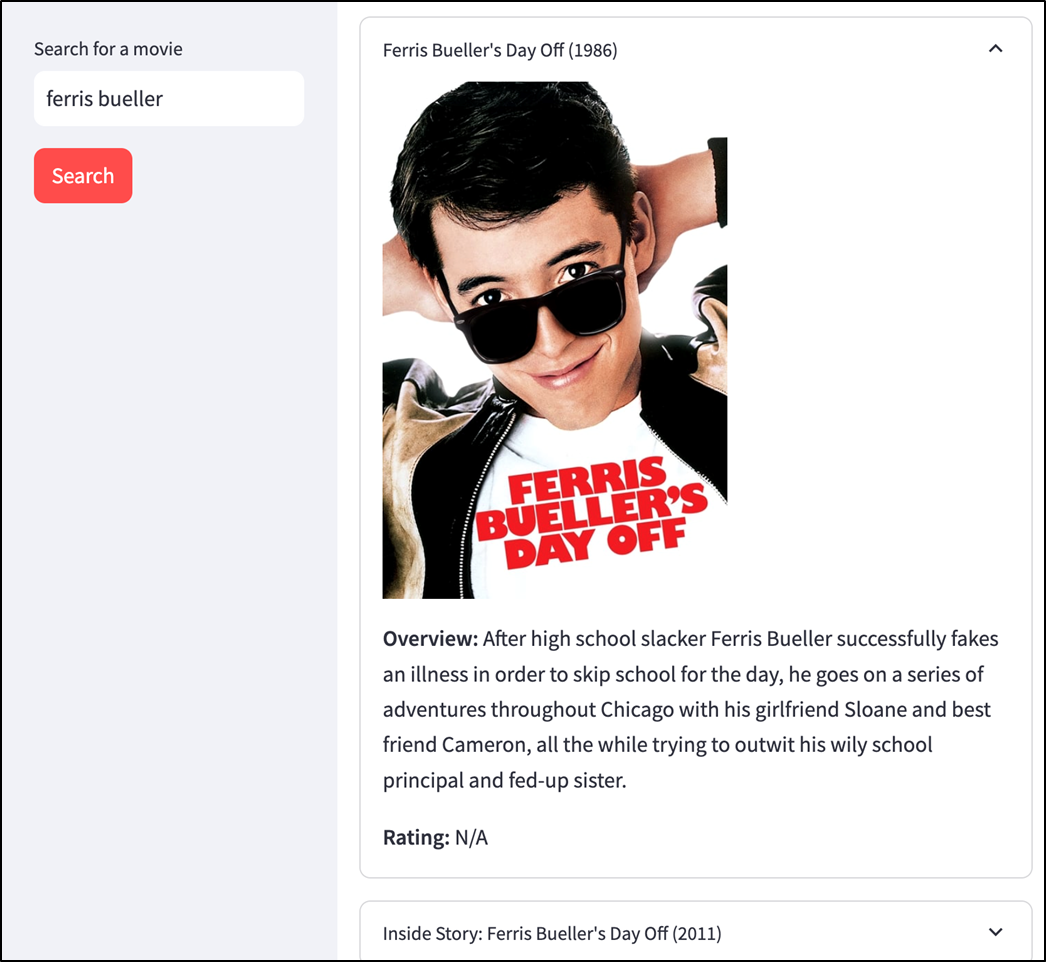
Screenshot of the working MovieScout app (see chapter_11/in_progress_01 in the GitHub repo for the full code).
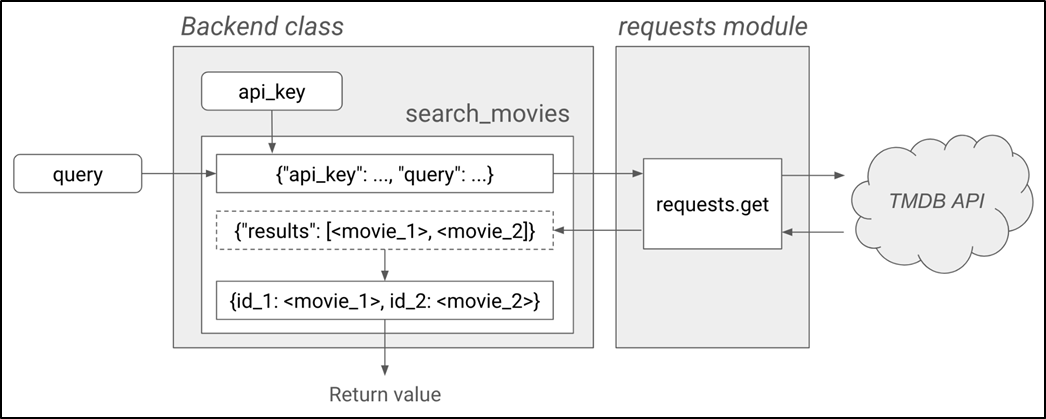
The requests module and the TMDB API are external dependencies of Backend.
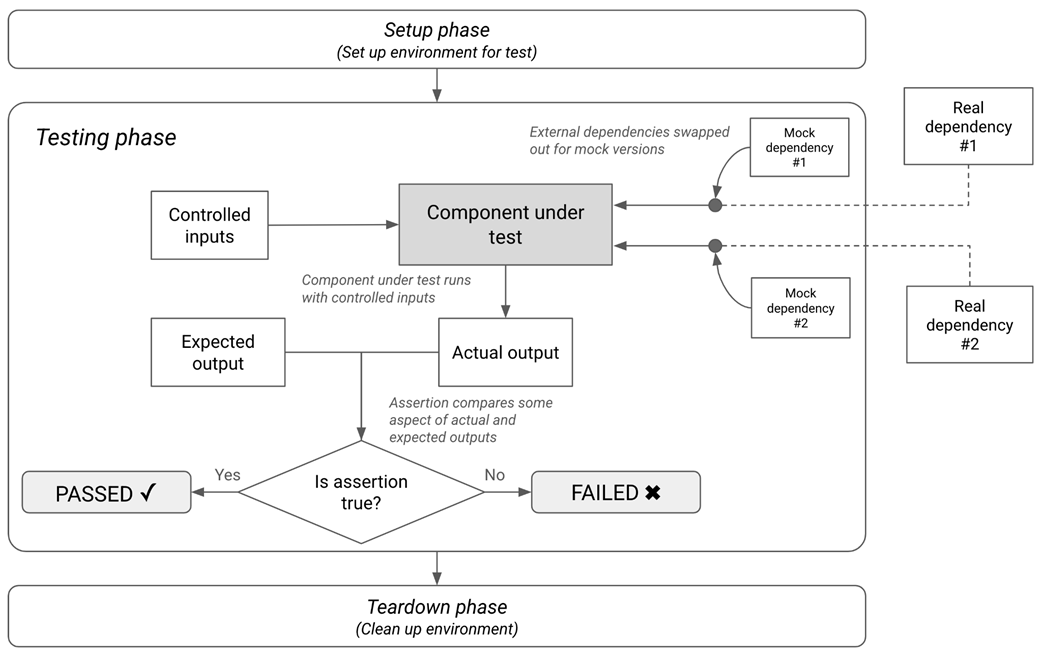
How a unit test works.
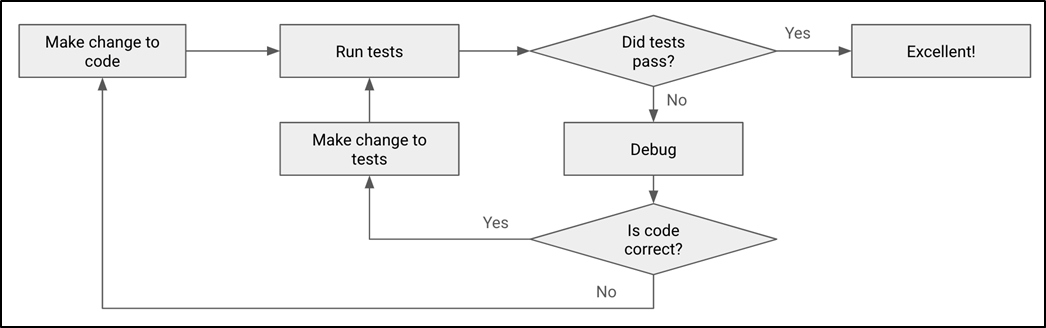
Flowchart showing how your app code and test code evolve.
Summary
- Testing your code can help you catch bugs before they reach your users and harden your application against failures.
- st.image can be used to render images in a Streamlit app.
- Automated testing consists of writing test code to check if your app code works correctly.
- Automated tests include unit tests, integration tests, and end-to-end tests.
- pytest is a popular framework for testing Python scripts and apps.
- Unit testing requires isolating the component under test from any dependency external to it, controlling its behavior by mocking it—i.e., swapping it out for a fake version.
- A test function runs the component under test—with mocked dependencies—and compares the actual results with the expected ones.
- You should write as many tests as needed for each component you want to check.
- A fixture is a reusable component that provides specific features to tests; pytest offers a @pytest.fixture decorator to mark a function as a fixture.
- The @patch decorator from unittest.mock can be used to mock a real dependency, replacing it with a fake.
- An assertion is a condition that is evaluated during a test; for a test to pass, all assertions must be true.
- You can run tests in pytest using the pytest command, adding the -v flag for verbose output.
- Streamlit's AppTest class simulates a running Streamlit app built from your code and has methods to mimic user interaction and inspect the rendered output.
- AppTest.from_file(...) creates a runnable instance of your Streamlit app, which can be started by calling its run() method.
- You can use dot notation on the AppTest instance to access lists of Streamlit elements of a particular type—for instance, at.button returns a list of buttons.
- You can simulate a user interaction on an element with methods such as set_value(...) and click(), chaining a call to run() to manually trigger an app re-run.
- Integration tests check how components behave when they are used together.
- An end-to-end test verifies the entire flow of an app under real-world conditions, with no mocking.
- As your app evolves, you should update your tests to match.
- You can automate test runs with a Git pre-commit hook; you can even set up CI tools like GitHub Actions to run tests automatically when code is pushed.

 Build Python Web Apps with Streamlit ebook for free
