9 Deployment and security
Deploying AI-powered web apps compounds familiar web risks with LLM-specific threats such as prompt injection, model manipulation, and runaway API usage. The chapter frames security as a multilayered pipeline: start with careful threat modeling, put server-side validation at the source of truth, and let every request traverse progressively stricter checks before it reaches core logic. It calls out stack-specific pitfalls—Next.js API routes and SSR surfaces, configuration leaks through abstractions like the Vercel AI SDK, and the fast-moving ecosystem around LangChain.js—urging up-to-date dependencies, conservative defaults, and strict control of public endpoints.
Concrete defenses include robust input validation (e.g., Zod) guided by a clear threat model, plus a composable middleware layer that handles CORS, authentication, security headers, anomaly detection, and rate limiting. The book demonstrates Redis-backed rate limits and per-user quotas to prevent abuse and control costs, alongside practical auth/authorization with Clerk.js to gate sensitive routes and enforce fair-use policies. It emphasizes secrets hygiene—never exposing private keys to the client, preferring server-only environment variables, and using server-executed code paths—while warning against storing or relying on user-supplied API keys. Because data protection is paramount, it recommends encrypting sensitive data, least-privilege access, retention policies, thorough audit logging, and PII redaction/anonymization before data reaches an LLM to meet GDPR/CCPA expectations.
On deployment, the chapter surveys hosted, containerized, and self-hosted paths, recommending Vercel for a streamlined baseline with HTTPS, CI/CD, environment variable management, and solid observability, while noting Docker/Kubernetes and self-hosting for advanced control. A production checklist—scaled by traffic tiers—covers cost management, privacy and compliance, security hardening (including WAF and upstream rate limits), latency optimization, scaling and reliability, monitoring and alerting, and safe rollout strategies. Pre-deployment steps (populate env vars, verify Node/runtime, ensure local builds) and CLI-driven releases are complemented by post-deployment practices: enable analytics and logs, add external alerting if needed, apply firewall rules, and continuously test and monitor. The overarching message is to bake security, privacy, and observability into the pipeline from day one, then iterate safely as features and usage grow.
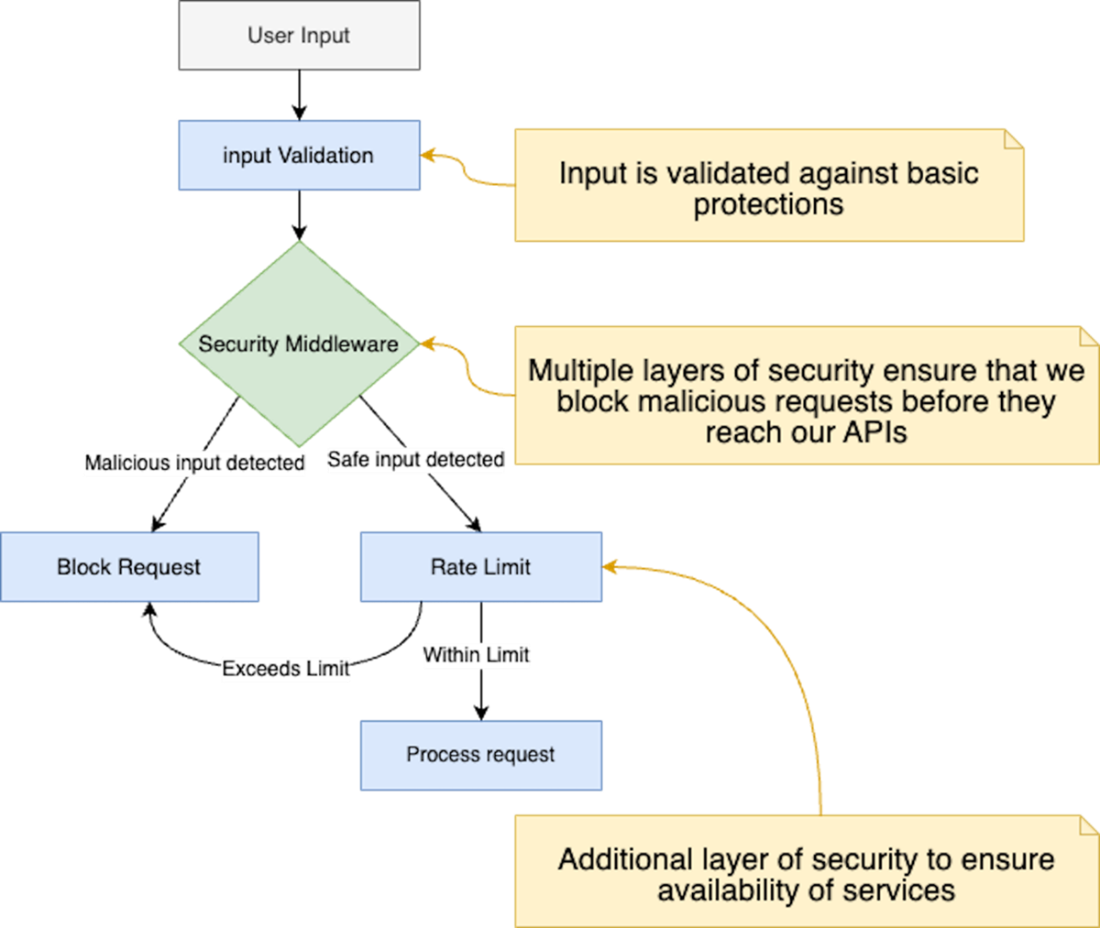
A flow diagram illustrating the multilayered security checks from user input validation through request processing, showcasing multiple defensive layers including input validation, security middleware, and rate limiting mechanisms.
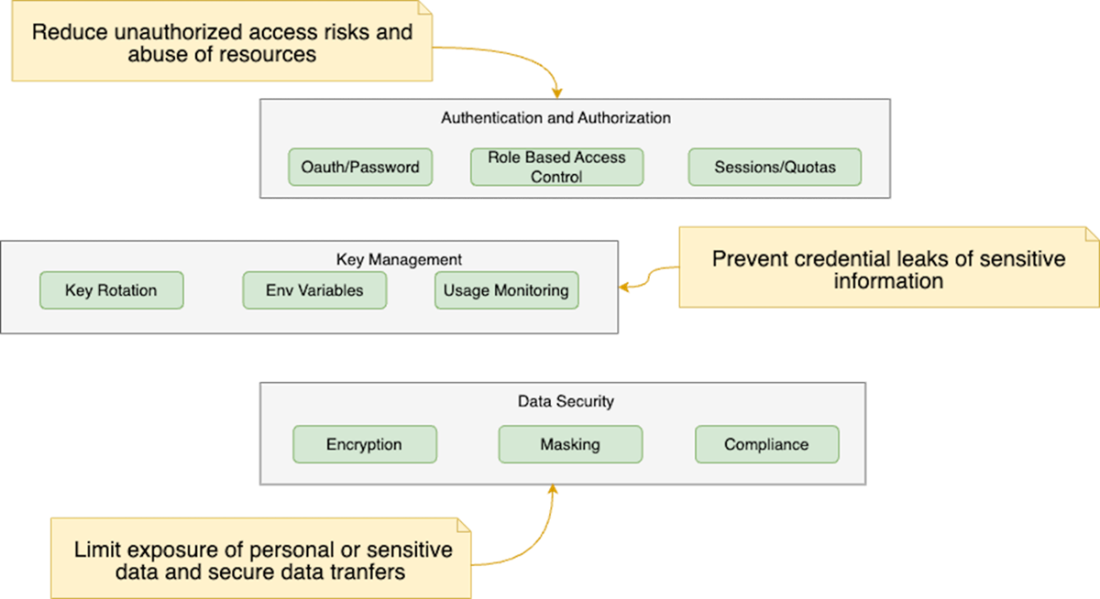
A layered approach covering secure development practices, authentication and authorization, API key management, data protection and compliance to ensure robust security and threat prevention
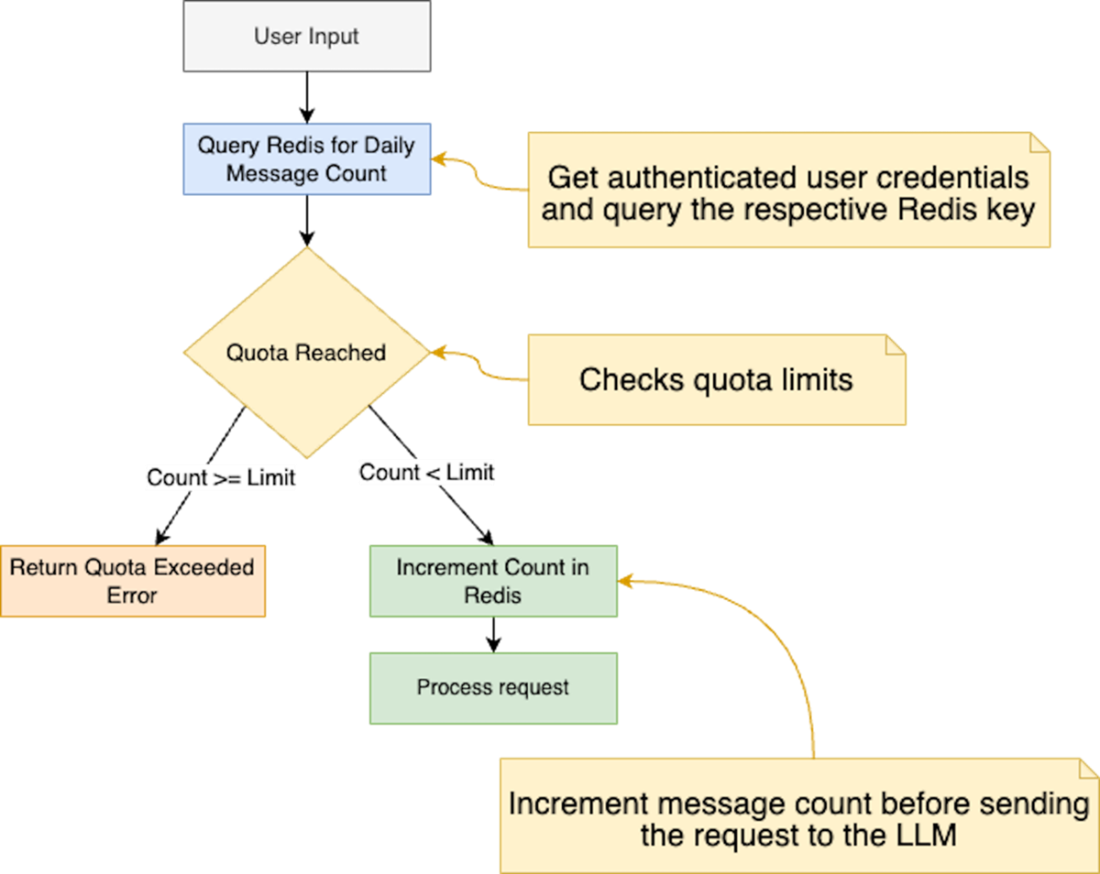
Message quota implementation flow. A flowchart depicting the server quota enforcement process, where user requests are authenticated via Clerk, checked against Redis-stored daily limits, and either processed or rejected based on quota status.
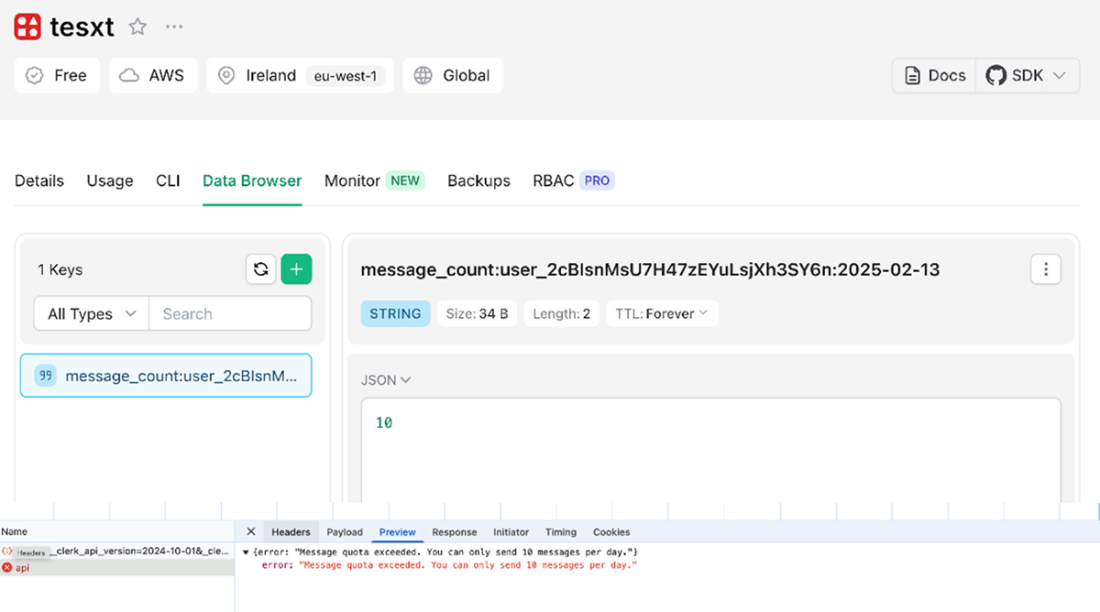
Overview of the message quota implementation. The top part displays the Upstash Data Browser, showing the Redis key and value tracking the number of messages sent by a user on a given day. The bottom part shows the API response, indicating a 429 Too Many Requests status code when the user exceeds their daily message limit of 10 messages.
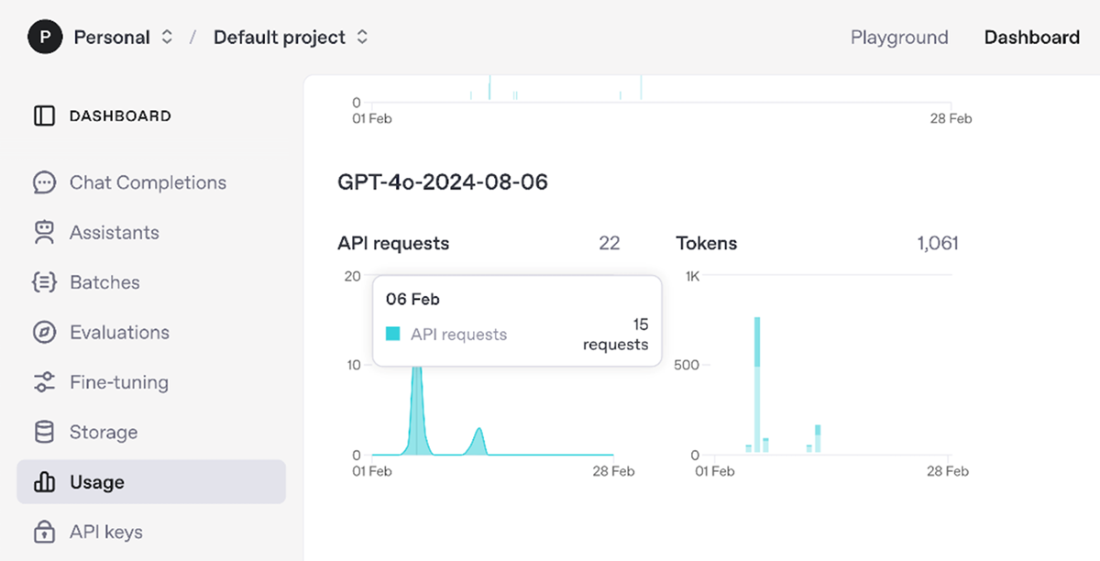
OpenAI API usage dashboard displaying metrics for a GPT-4 model instance, showing API requests and total token usage. The dashboard interface includes a navigation sidebar with options for monitoring various aspects of the API deployment.
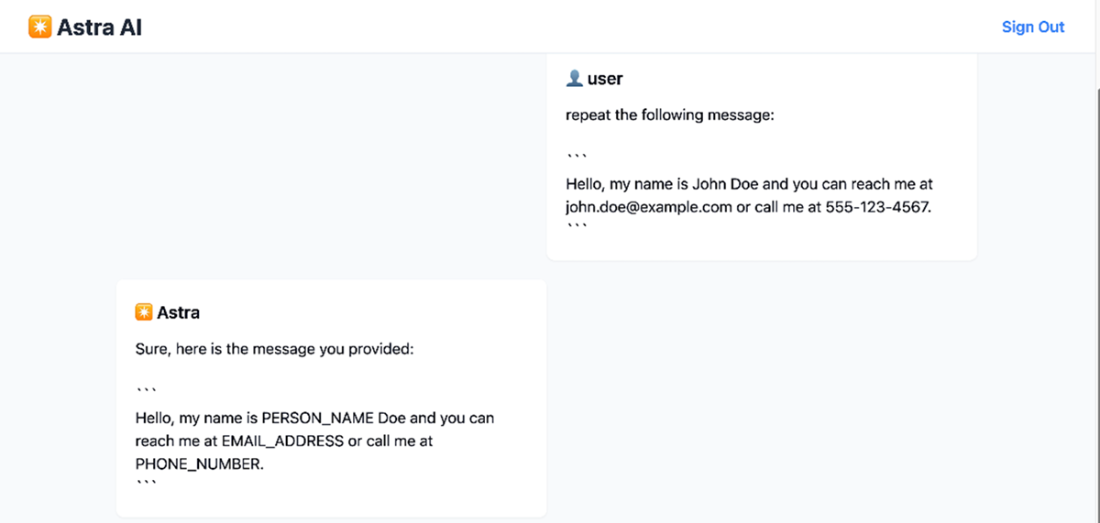
Simple data anonymization feature in action. The user provides a message containing personal information (name, email address, and phone number), and the system responds by replacing the sensitive data with generic placeholders: PERSON_NAME, EMAIL_ADDRESS, and PHONE_NUMBER.
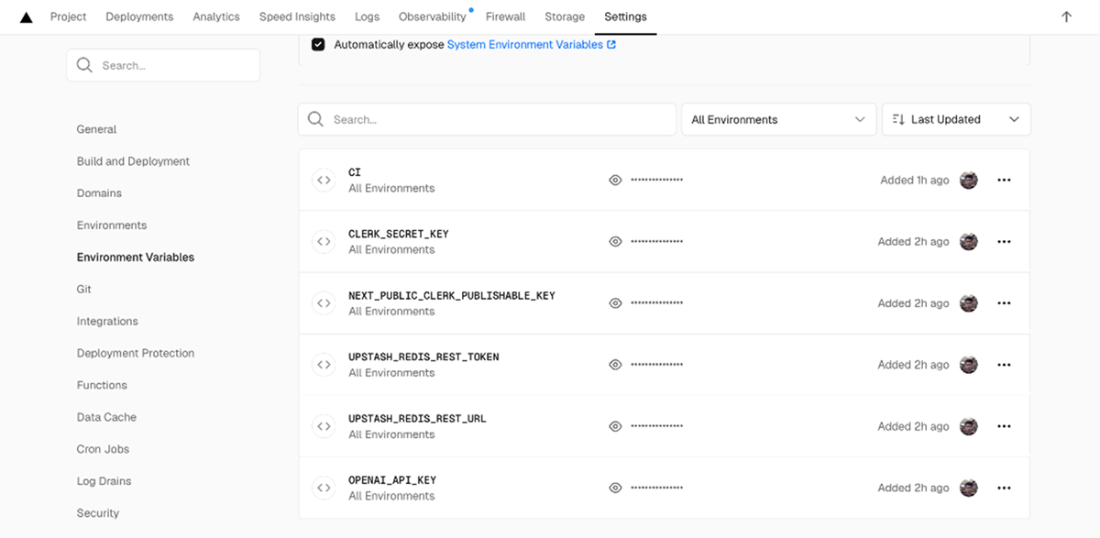
Configuration interface for project environment variables in the Vercel Dashboard, displaying several masked API keys and authentication tokens.
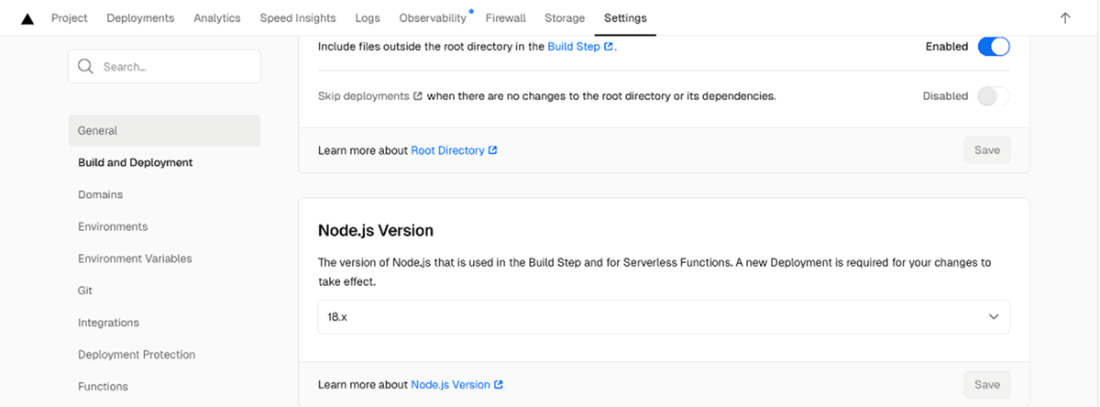
Vercel Dashboard build configuration settings screen showing where we set the Node.js version to 18.x for both the build step and serverless functions.
Terminal output showing successful Vercel CLI deployment of a chat application. The deployment shows both the project dashboard URL and the preview domain, along with instructions for promoting to production using the "vercel --prod" command.

Terminal output showing a failed Vercel deployment attempt with error messages. The output includes links to the deployment dashboard and preview URLs, along with instructions for viewing detailed error logs either through the web interface or via the "vercel logs" CLI command.

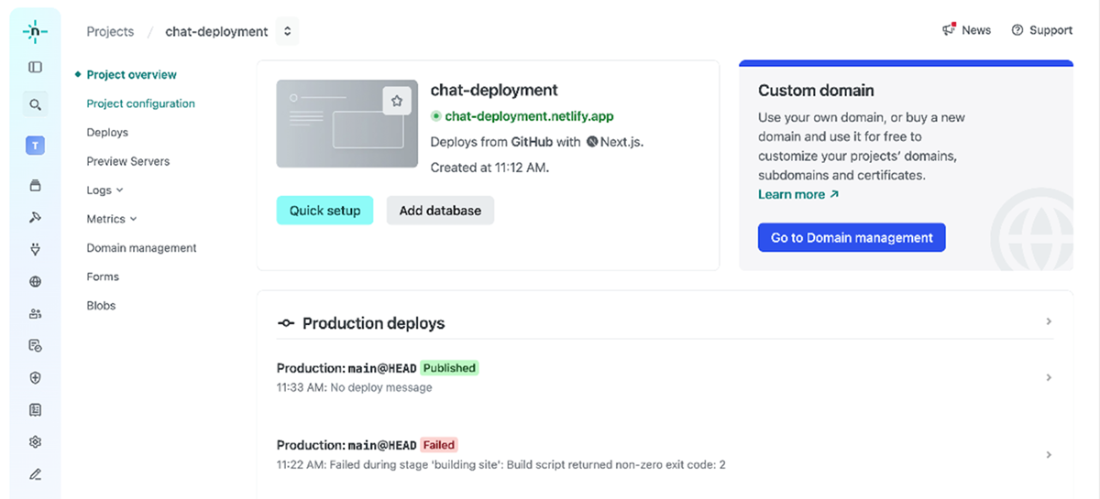
The Netlify UI dashboard for a successful deployment, showing the chat-deployment.netlify.app project overview, with a "Production deploys" section.
Summary
- AI-powered applications face unique security threats like prompt injection, model manipulation, and API abuse, requiring specialized security measures beyond traditional software practices.
- Securing AI applications involves a multi-layered approach, starting with input validation to prevent malicious data from reaching the AI models.
- Establishing a threat model is crucial for identifying potential vulnerabilities in your application, including public endpoints, user input points, and the sensitivity of the data being processed.
- Server validation is essential to ensure data integrity and security, as it cannot be bypassed by malicious users, unlike client validation which primarily enhances user experience.
- A security middleware layer acts as a central decision point, analyzing incoming requests for potential threats using various techniques, rate limiting, signature matching, token validation, and machine learning models.
- Effective security middleware should be positioned at the beginning of the request processing pipeline to intercept and analyze all incoming requests before they reach the application's core logic.
- Rate limiting is a crucial security control for protecting APIs from abuse by setting a maximum threshold on the number of requests allowed within a specific timeframe.
- User-provided API keys can be stored on the server (encrypted in a database) or on the client, but server storage is recommended for better security and control.
- Prioritizing data protection and compliance with regulations like GDPR is critical when building AI applications that store user data.
- Anonymizing or pseudonymizing chat histories helps protect user privacy and comply with data protection regulations, especially when using the data for model training.
- Deploying AI web applications requires careful consideration of cost management, data privacy, and latency.
- Deployment involves not only the application itself but also the configuration of databases and external services (e.g., authentication, rate limiting) for production use.
- Dedicated providers like Vercel offer streamlined deployment workflows specifically designed for Next.js applications, including CDN integration, monitoring, and firewalls.
- For more advanced deployment needs, Docker and Kubernetes are powerful tools for containerization and orchestration.
FAQ
What security threats are unique to AI web apps, and how does this chapter suggest mitigating them?
- Common AI-specific risks: prompt injection, model manipulation, and API abuse (credit drain, DoS via LLM calls).
- Mitigations follow a multilayered model: input validation (e.g., Zod schemas), security middleware (CORS, auth checks, headers), rate limiting (Upstash/edge WAF), and strict authentication/authorization with quotas.
- Continuously update dependencies (e.g., LangChain.js) and validate external data sources to avoid harmful inputs.
How should I approach input validation in Next.js to reduce prompt injection and abuse?
- Establish a threat model: map public endpoints, user input points, and data sensitivity.
- Always do server-side validation (client-side is only UX). Treat all client input as untrusted.
- Use a schema validator (e.g., Zod) to enforce constraints like length (e.g., prompt max 1000 chars) and shape before processing.
- Mirror limits in the UI (e.g., textarea maxLength) for immediate feedback.
Where should security middleware run in Next.js, and what checks should it perform?
- Place middleware at the very start of the request pipeline; on Vercel, run it at the edge for lower latency.
- Typical checks: CORS, authentication/authorization (e.g., Clerk protect), rate limiting, security headers, known attack signature checks, header/user-agent/IP anomalies.
- Use a composable pattern to sequence controls and short-circuit on violations.
How do I implement rate limiting for AI endpoints with Upstash Redis?
- Use @upstash/ratelimit with a sliding window (e.g., 5 requests per 10s) and identify clients by IP (or user ID for authenticated calls).
- On limit breach, return 429 Too Many Requests and stop further processing.
- Prefer edge-level or managed rate limiting (Cloudflare, AWS WAF, Vercel Firewall) to block abusive traffic before it reaches your app.
How can I enforce a daily message quota per user to control LLM costs?
- Authenticate users (e.g., Clerk) and derive a per-user key such as message_count:{userId}:{YYYY-MM-DD}.
- Use Redis INCR and set EXPIRE 24h on first write; if count exceeds the quota (e.g., 10), return 429 and block processing.
- Place rate limiting before quota checks to reduce Redis churn; consider cooldowns to deter rapid bursts.
What are best practices for API key and secret management in Next.js?
- Never expose secrets to the client. Only variables prefixed with NEXT_PUBLIC_ are safe for the browser.
- Inject secrets at deploy time (e.g., Vercel Environment Variables). Avoid committing defaults in code.
- Run sensitive code server-side (e.g., use server directive) and proxy API calls through server routes.
- Application-level keys: keep private and monitor usage. User-provided keys: store server-side, encrypted, and proxy access; avoid client-side storage.
- Audit and rotate keys regularly.
How do I anonymize or redact PII before sending user messages to an LLM?
- Add an anonymization step in your API handler or middleware to redact PII before logging or forwarding prompts.
- For demos: use a simple library like redact-pii; for production: prefer robust tools (Microsoft Presidio or Google Cloud DLP), especially for multi-language support and better accuracy.
- Verify logs to ensure only redacted text reaches the LLM; if the UI shows PII, inspect client rendering logic.
What authentication and authorization setup is recommended to prevent abuse and control costs?
- Require sign-in (e.g., Clerk.js with Next.js middleware) and protect sensitive routes (e.g., /chat).
- Use OAuth/social login or passwordless for convenience; add MFA for higher security or regulated apps.
- Combine auth with per-user quotas and rate limiting to cap API usage and cost exposure.
What deployment options work well for AI web apps, and when should I choose each?
- Vercel: best default for Next.js; provides HTTPS, edge middleware, CI/CD, logs, analytics, env var management.
- Docker/Kubernetes: pick for complex, high-scale, or custom infra needs (control over autoscaling, rollouts, geo-distribution).
- Self-hosting: maximum control with higher operational overhead.
- Alternatives: Netlify (static + serverless), Hugging Face Spaces (AI/model-centric hosting).
What belongs on my production checklist, and how do I monitor after launch?
- Checklist highlights: cost controls (LLM pricing + quotas), privacy/compliance (GDPR/CCPA; encrypt in transit/at rest; anonymize), security (WAF, rate limits, key rotation), performance (caching, latency), CI/CD, observability.
- Monitoring: use Vercel Analytics and Logs; integrate Sentry/Datadog/New Relic for richer tracing and alerts; add firewall rules in Vercel Firewall.
- Troubleshooting Vercel: verify Node version, env vars, local npm run build, clear cache (vercel --force), inspect build logs, and consult Vercel discussions.

 Build AI-Enhanced Web Apps ebook for free
