Overview

3 Connecting AI models with the Vercel AI SDK

This chapter explains how to evolve a basic AI app into a robust, scalable web experience by adopting the Vercel AI SDK. It begins with the core challenges developers face—vendor lock-in from direct provider APIs, the engineering complexity of real-time streaming, and growing pains around state management—and positions the SDK as a unifying solution. The guidance emphasizes sound integration principles: separation of concerns between intents and actions, abstraction layers to decouple external dependencies, incremental adoption to reduce risk, and continuous testing and documentation to preserve reliability as features expand.

Practically, the chapter shows how to replace direct model calls with SDK utilities that abstract providers and streamline UX. It introduces generateText for non-streaming scenarios and then upgrades to streamText for real-time responses via async iterables, while the useChat and useCompletion React hooks handle buffering, partial updates, and error states for a smooth UI. The Astra AI app is incrementally migrated: first swapping the route handler to use SDK functions, then enabling streaming on the backend and adopting useChat on the frontend so messages arrive and render progressively, improving perceived performance and conversational flow.

Beyond streaming, the chapter demonstrates portable, multi-provider support through a Language Model Specification that applies an Abstract Factory approach. A centralized selector (e.g., getSupportedModel) validates provider/model availability and keys, enabling easy switching between OpenAI, Google, and others from a simple UI control that passes choices through the hook body. Finally, it extends the chat to multimodal interactions by allowing users to upload images alongside text; the backend reformats the last user message into text and image parts for vision-capable models, while the UI handles file selection and optional preview. With notes on limits and quality considerations for images, the result is a more natural, flexible conversational interface that’s provider-agnostic, stream-enabled, and ready for richer media.

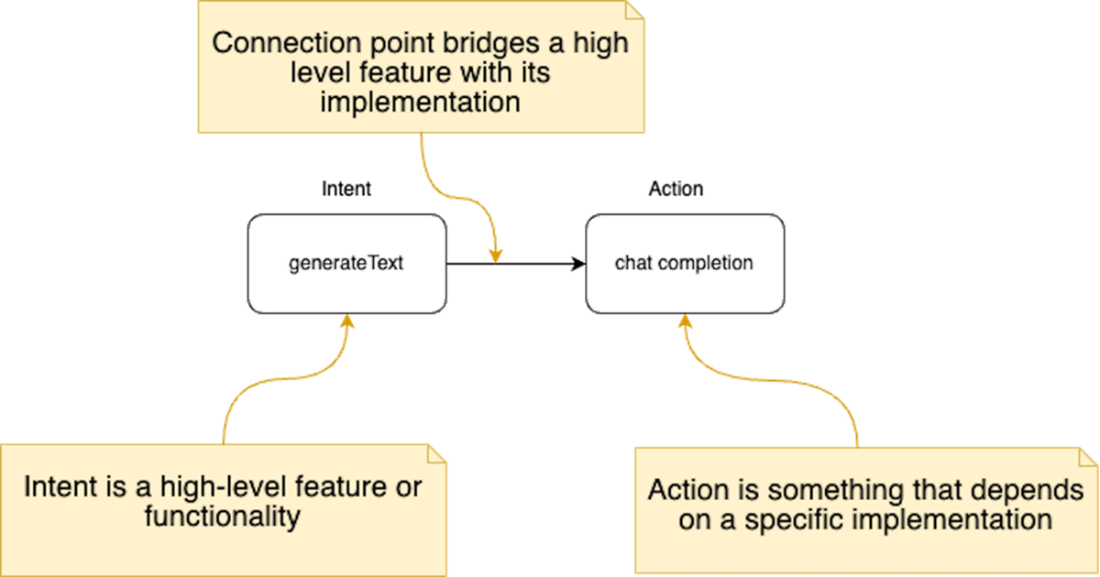
Separation of concerns between intents and actions. The intent (left) represents the high-level feature or functionality, such as "generateText". The action (right) represents the specific implementation or concrete steps to fulfill the intent, such as making a "chatCompletion" request. The arrow signifies the connection point that bridges the intent with its corresponding action, facilitating communication and interaction between the two components.
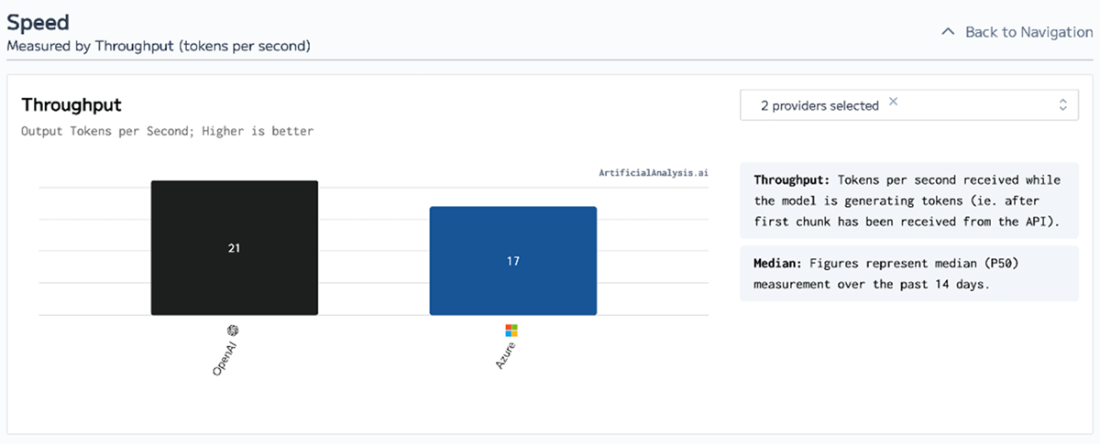
Speed comparison of gpt-4 models served from OpenAI vs Azure. The output token throughput are merely within a couple of dozen tokens per second maximum. Source https://artificialanalysis.ai.
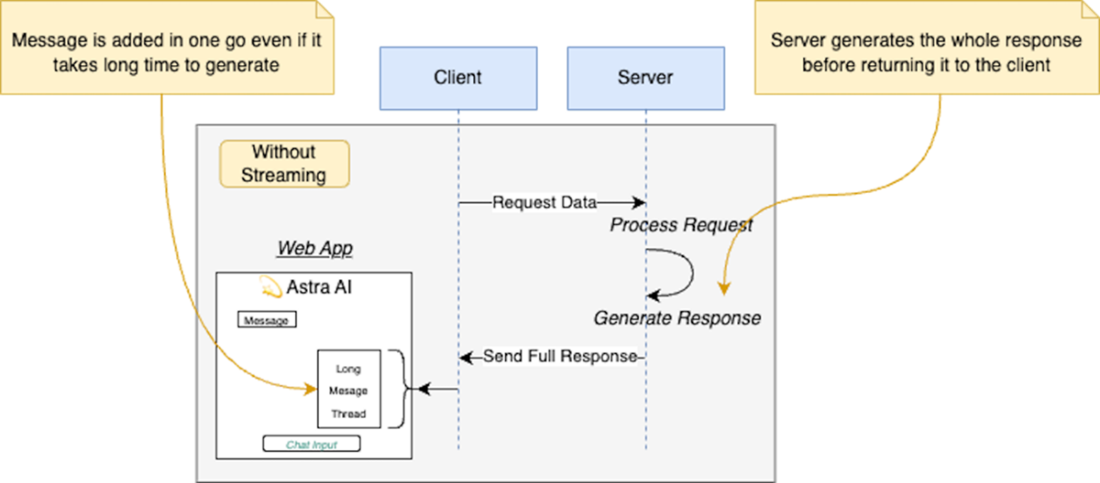
Without streaming the client sends a request and waits for the server to generate and send the full response before displaying it.
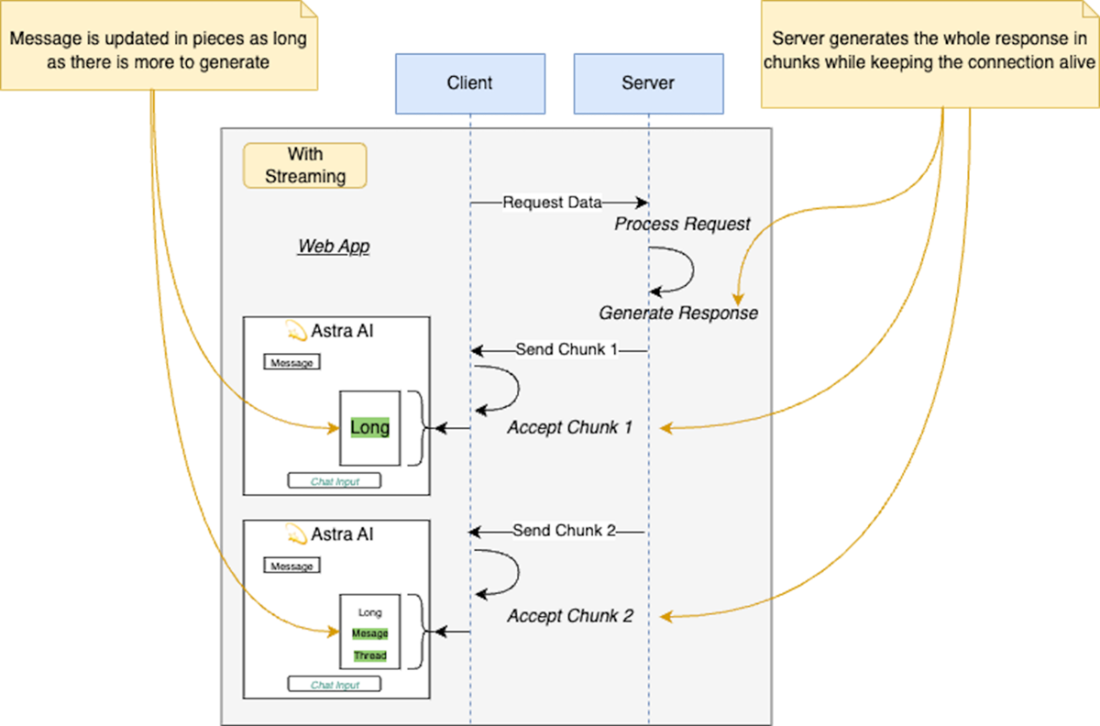
With streaming the client sends a request and the server sends the response in small chunks that are being streamed back to the client for processing.
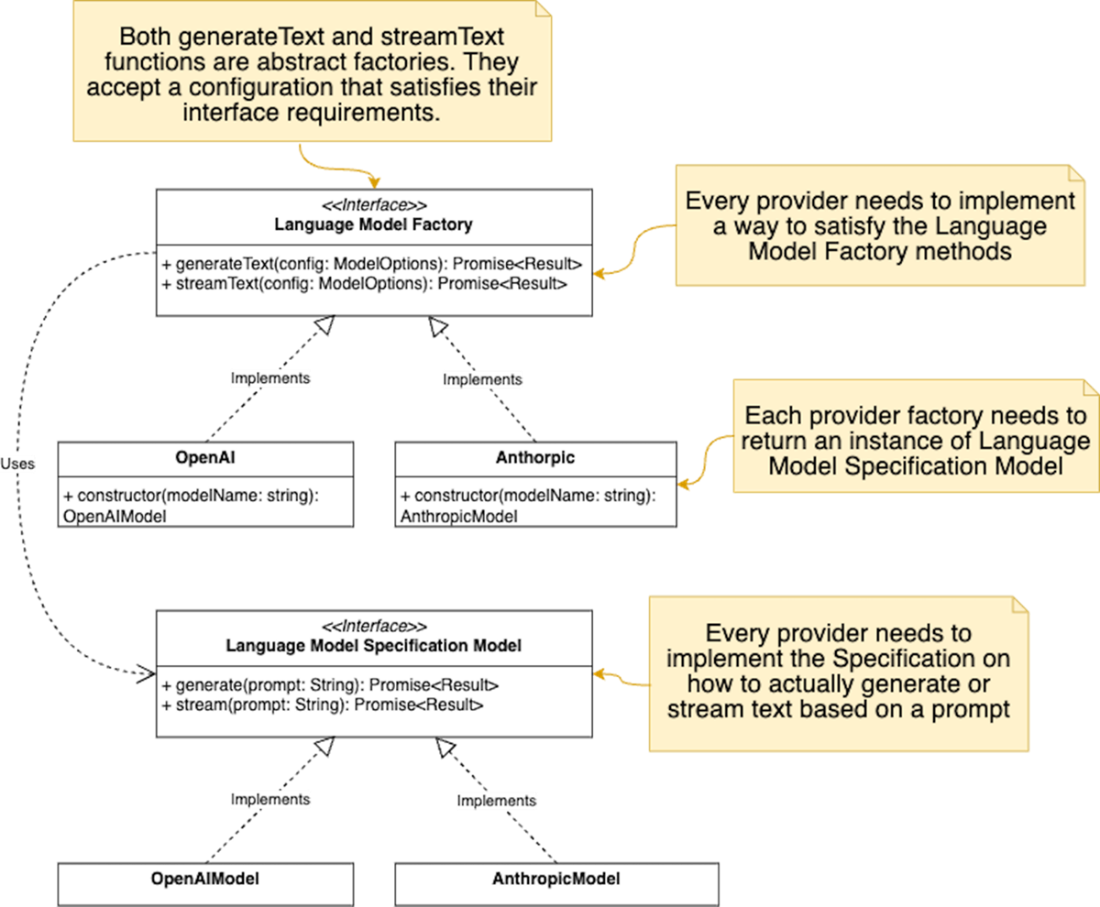
Implementation of the Abstract Factory pattern in the Vercel AI SDK for generating text using different language model providers
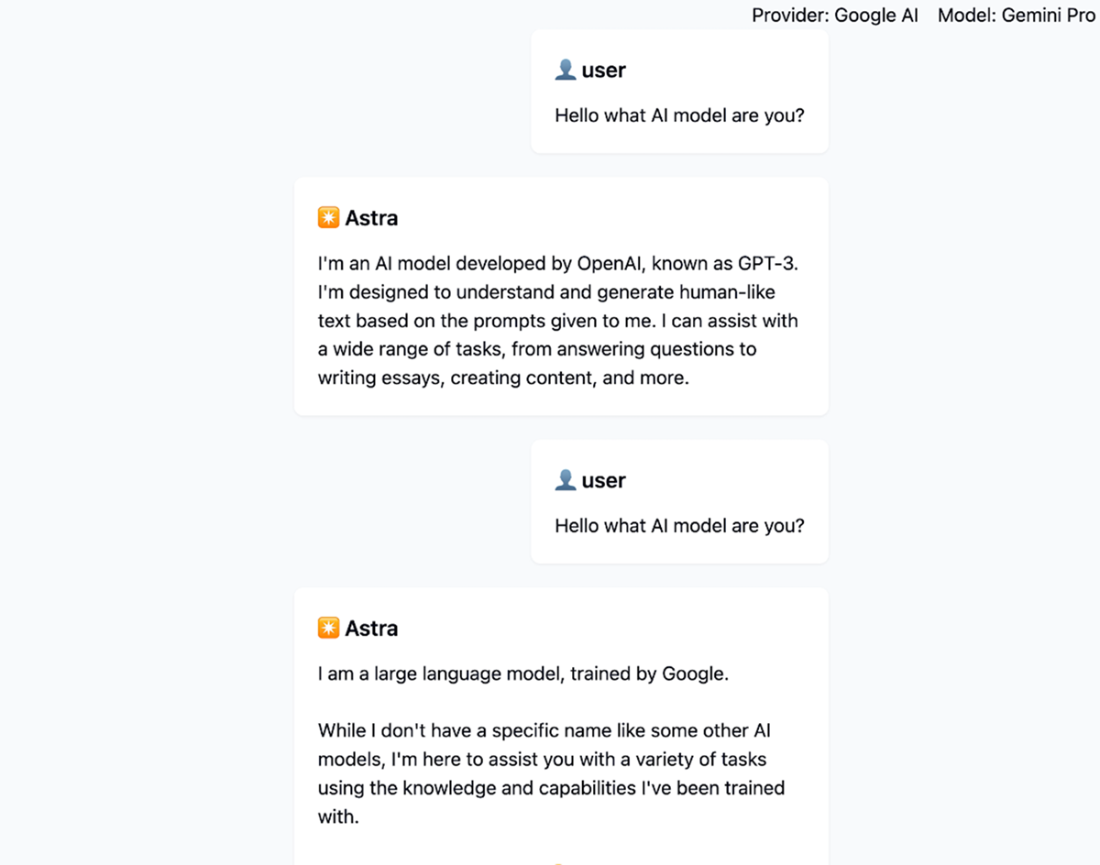
Screenshot of the current application showcasing the usage of multiple providers in the same chat session.
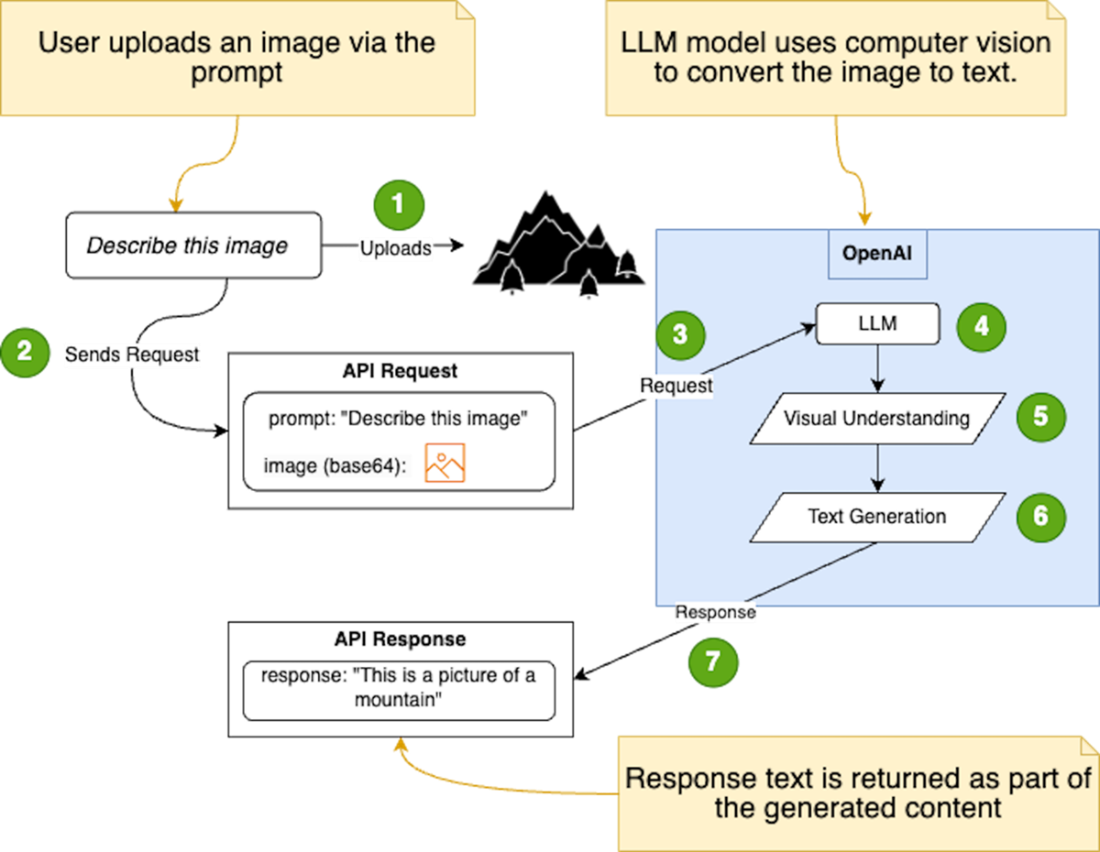
The image illustrates the process of sending an image alongside a text prompt to the OpenAI API, and how the language model utilizes computer vision techniques to understand the image and generate a relevant text response.
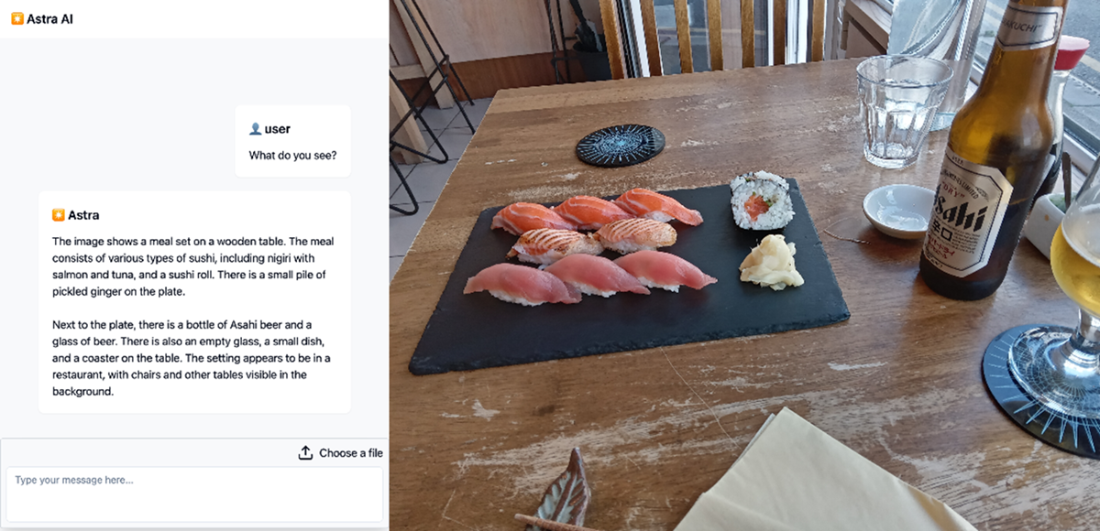
Uploading an image and getting an accurate description from the AI model. This functionality shows how the LLM can generate text descriptions from other media like images.
Summary

  • The Vercel AI SDK simplifies AI integration into web applications.
  • It also offers features such as provider abstraction, streaming responses, state management, and support for React server components
  • The SDK allows developers to break down complex AI tasks into smaller, more manageable components
  • Guidelines for integrating the SDK include separation of concerns, abstraction layers, incremental integration, testing and validation, and documentation.
  • The SDK provides functions like generateText and streamText for text generation.
  • React hooks like useChat and useCompletion are available for creating conversational UI and text completion capabilities.
  • Implementing streaming responses with the SDK has challenges like asynchronous processing, connection management, data buffering, and error handling.
  • The SDK abstracts away many of these low-level details to simplify handling streaming responses in web applications.
  • The SDK leverages the Language Model Specification to simplify working with different AI providers and models.
  • The integration of the SDK enhances functionality and user experience by enabling streaming chat, multiple AI provider support, and integration of OpenAI’s vision capabilities.

FAQ

What problems does the Vercel AI SDK help solve in AI web apps?The SDK tackles three main challenges: vendor lock-in (by abstracting providers), real-time streaming (with a consistent streaming API), and growing state complexity (via utilities and hooks that separate AI and UI concerns). It lets you switch models/providers with minimal code changes, stream partial outputs to the UI, and keep client/server in sync.
What is “provider abstraction” and why is it useful?Provider abstraction gives you a unified interface to multiple AI providers (e.g., OpenAI, Anthropic, Google). Instead of hard-coding a single vendor’s API, you pass a provider-specific model to SDK utilities, so switching providers becomes a configuration change, not an architectural rewrite.
When should I use generateText vs. streamText?Use generateText when you need a full, non-streaming result (e.g., summaries, one-off completions). Use streamText when you want the response streamed in chunks for better UX, such as chat UIs where displaying partial results improves perceived speed and engagement.
How does streaming work in practice with the SDK?The server generates output incrementally and sends chunks to the client over an open connection; the client renders them as they arrive. The SDK abstracts async iteration, buffering, connection handling, and errors, so you focus on rendering updates rather than low-level streaming details.
Which React hooks does the SDK provide for conversational UIs?The SDK offers useChat and useCompletion. useChat manages a multi-message conversation and streams assistant replies into your UI, while useCompletion handles single-prompt completions; both reduce boilerplate for input state, submission, and incremental updates.
How do I incrementally integrate the Vercel AI SDK into an existing app?Start small: install the core package (ai) and the provider package you need (e.g., @ai-sdk/google or @ai-sdk/openai), then replace a single route’s direct API call with generateText. Verify behavior, add streamText for streaming, and finally update the UI to use useChat or useCompletion—testing after each step.
What is the Language Model Specification and how does it enable multi-provider support?It’s a common interface that providers implement so the SDK’s utilities (generateText/streamText) can work uniformly across models. Conceptually similar to the Abstract Factory pattern, it decouples your app from vendor-specific clients and lets you swap or add providers without changing core logic.
How can users choose between providers and models at runtime?Create a helper (e.g., getSupportedModel) that validates provider/model pairs, checks for the proper API key, and returns the configured model instance. On the client, pass the selected provider and model in the useChat “body” option; the backend uses them to pick the model dynamically.
How do I add image (vision) prompts with Gemini or GPT-4o using the SDK?Extend the last user message to include both text and an image “part” (e.g., { type: "text", ... } and { type: "image", image: imageUrl }) and send it to streamText. On the frontend, add a file uploader, preview if desired, and include the image (often base64 or URL) in the request body alongside the text prompt.
What caveats should I consider when sending multimedia with prompts?Check provider limits (e.g., max image size), prefer clear, well-lit images, and avoid bundling many images in a single prompt. Not all models support vision—consult provider capability tables and handle fallback behavior gracefully.

pro $24.99 per month

  • access to all Manning books, MEAPs, liveVideos, liveProjects, and audiobooks!
  • choose one free eBook per month to keep
  • exclusive 50% discount on all purchases
  • renews monthly, pause or cancel renewal anytime

lite $19.99 per month

  • access to all Manning books, including MEAPs!

team

5, 10 or 20 seats+ for your team - learn more


choose your plan

team

monthly
annual
$49.99
$499.99
only $41.67 per month
  • five seats for your team
  • access to all Manning books, MEAPs, liveVideos, liveProjects, and audiobooks!
  • choose another free product every time you renew
  • choose twelve free products per year
  • exclusive 50% discount on all purchases
  • renews monthly, pause or cancel renewal anytime
  • renews annually, pause or cancel renewal anytime
  • Build AI-Enhanced Web Apps ebook for free

choose your plan

team

monthly
annual
$49.99
$499.99
only $41.67 per month
  • five seats for your team
  • access to all Manning books, MEAPs, liveVideos, liveProjects, and audiobooks!
  • choose another free product every time you renew
  • choose twelve free products per year
  • exclusive 50% discount on all purchases
  • renews monthly, pause or cancel renewal anytime
  • renews annually, pause or cancel renewal anytime
  • Build AI-Enhanced Web Apps ebook for free
choose your plan

team

monthly
annual
$49.99
$499.99
only $41.67 per month
  • five seats for your team
  • access to all Manning books, MEAPs, liveVideos, liveProjects, and audiobooks!
  • choose another free product every time you renew
  • choose twelve free products per year
  • exclusive 50% discount on all purchases
  • renews monthly, pause or cancel renewal anytime
  • renews annually, pause or cancel renewal anytime
  • Build AI-Enhanced Web Apps ebook for free