12 Integrating web apps with the Model Context Protocol
This chapter introduces the Model Context Protocol (MCP) as an open standard for safely connecting AI assistants to external tools, data, and resources through a consistent client–server interface. By standardizing how tools, prompts, and resources are discovered and invoked, MCP decouples assistant reasoning from tool execution, improves interoperability across frameworks, and enables reuse of integrations. The result is cleaner security boundaries, easier scaling to multiple services, and a foundation for plug-and-play capabilities in modern, LLM-powered web applications.
Practically, the chapter walks through an end-to-end integration using Next.js and the Vercel AI SDK, where a local MCP server is spawned via stdio transport to expose callable tools to the model. The example defines a simple tool that fetches jokes, demonstrates streaming responses through an API route to a React chat UI, and shows how the model selects tools at runtime while remaining isolated from direct API calls. It also details MCP server building blocks—tools, prompts, and resources—along with development workflows using an inspector to explore and debug integrations, and highlights the benefits of modularity, dynamic tool use, and stronger security.
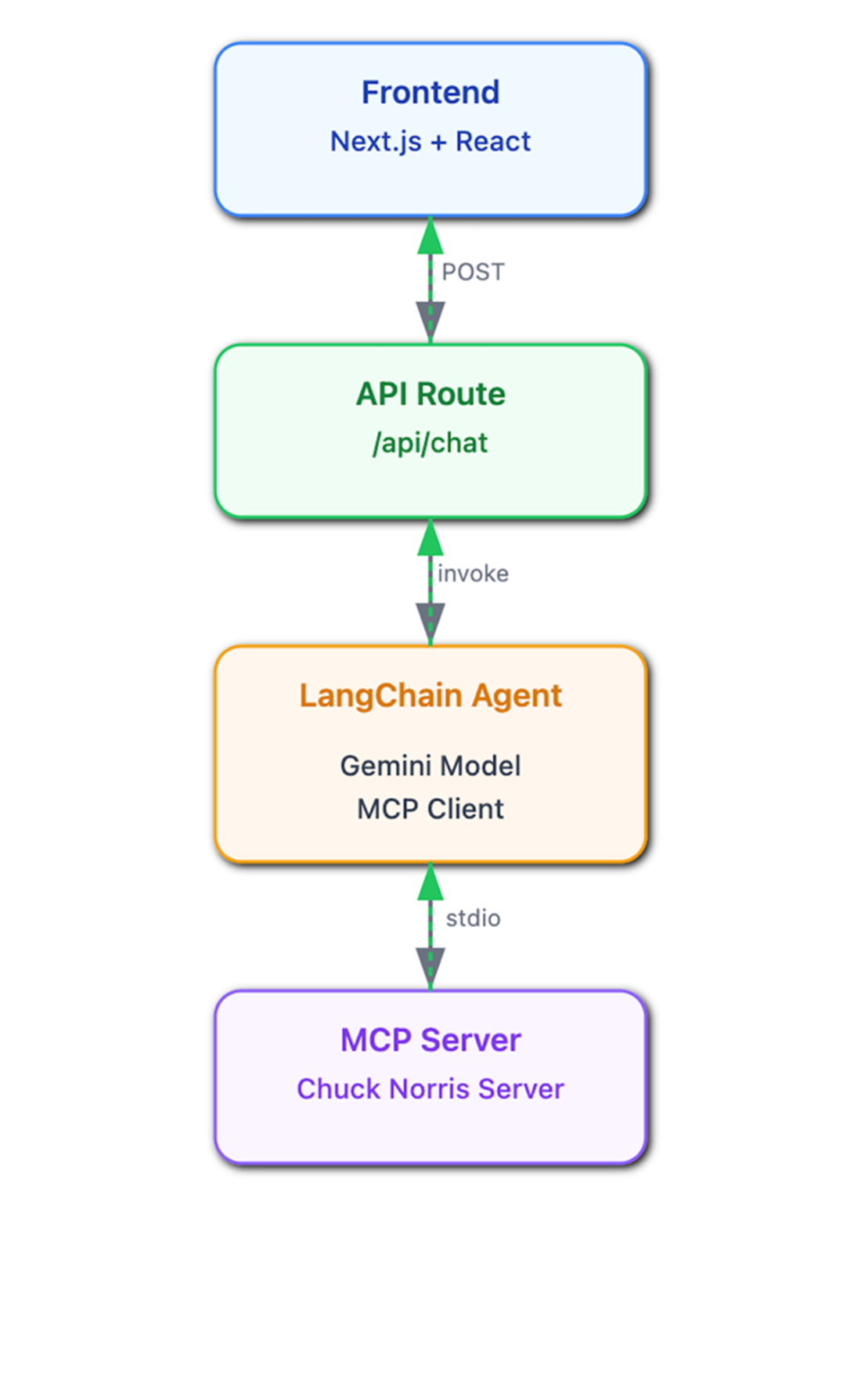
Beyond the SDK-based approach, the chapter integrates the same MCP server with LangChain.js, using adapters to turn MCP tools into agent-ready capabilities that the model can orchestrate within reasoning loops. It then looks ahead to ecosystem developments such as MCP gateways for unified multi-tool access, MCP-as-a-service for businesses to expose capabilities directly to assistants, and emerging directories and registries that simplify discovery and trust. Readers are encouraged to explore available servers, experiment with multi-server patterns, and adopt MCP as a scalable backbone for AI-enhanced web apps.
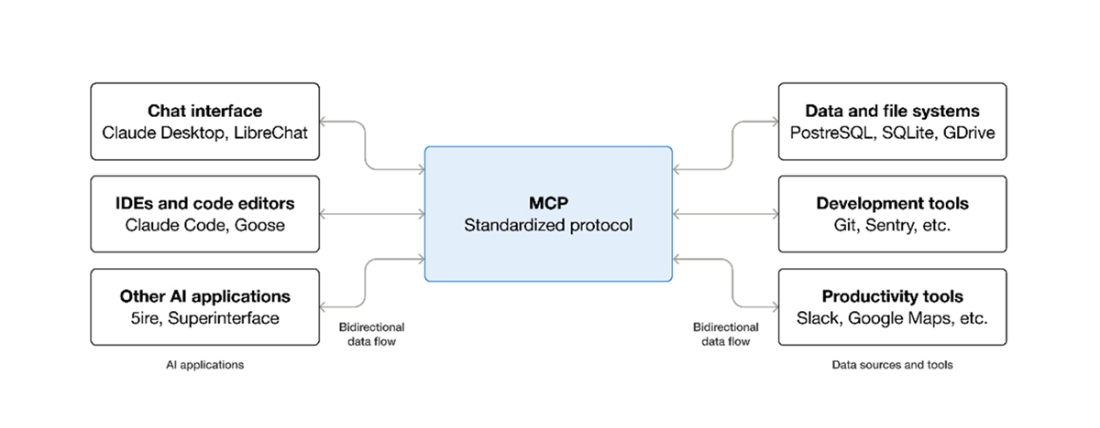
The Model Context Protocol (MCP) defines a standardized client–server interface that enables communication between web applications powered by LLMs (such as chat interfaces and code editors) and various external data sources and services (like databases, development tools, and productivity software). (src: https://modelcontextprotocol.io/)
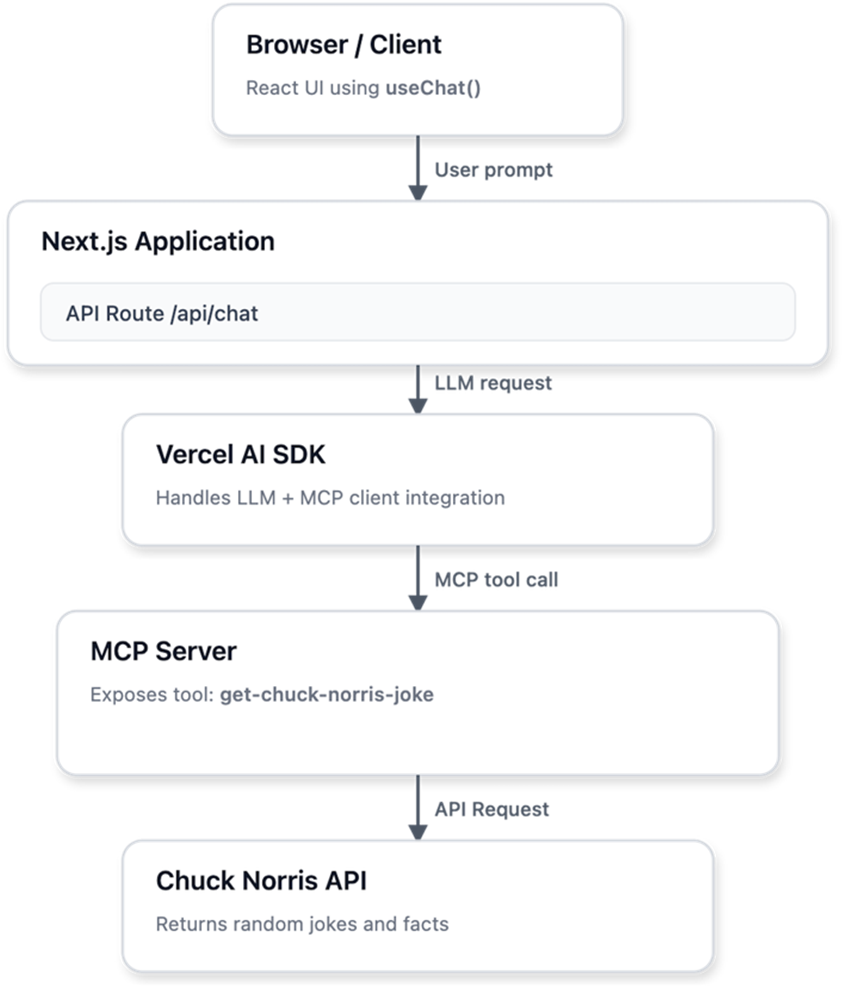
High-level architecture showing how a Next.js chat application integrates with MCP. The Vercel AI SDK communicates with an MCP client, which connects to one or more MCP servers exposing tools. Responses flow back through the client to the API route and are displayed in the chat interface.
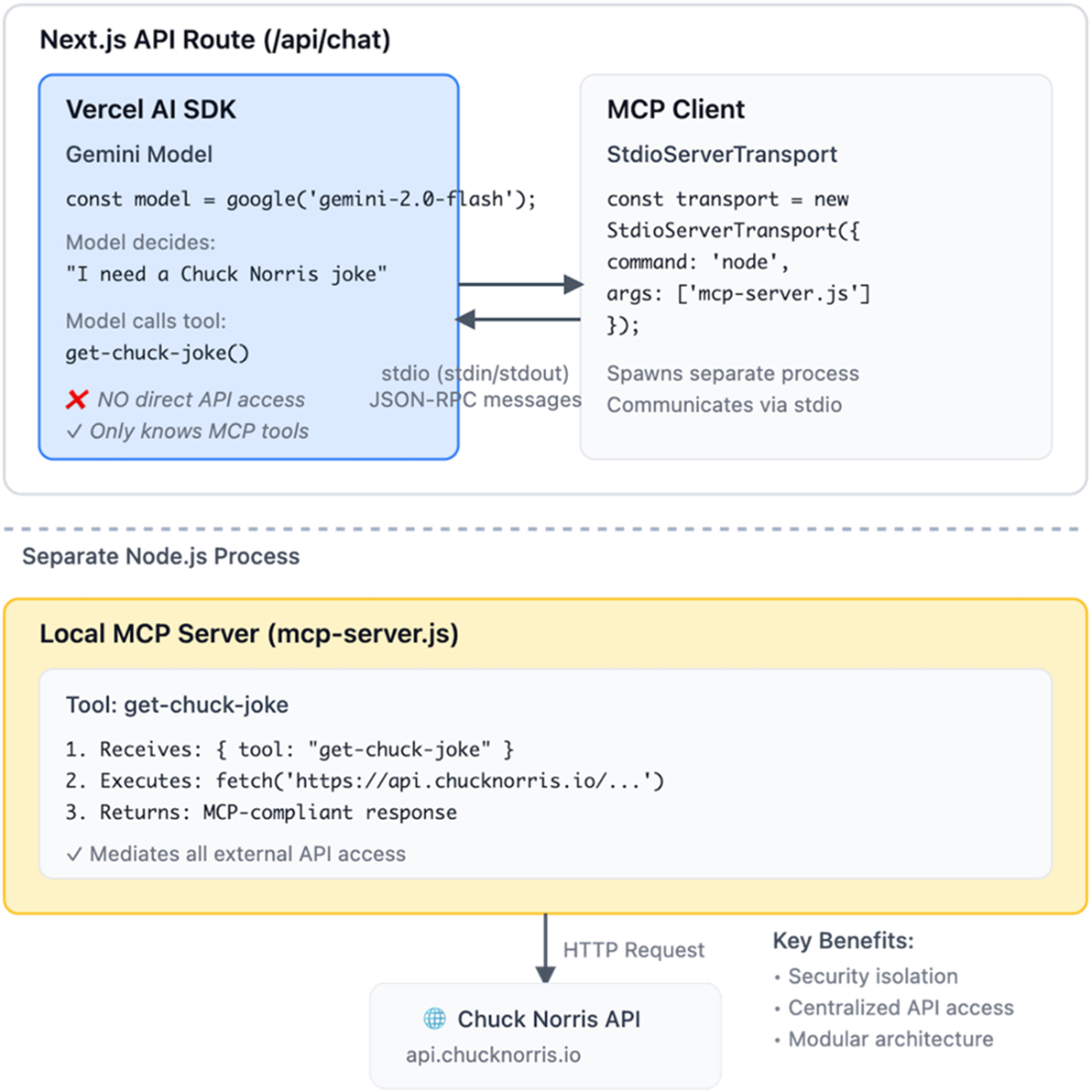
This diagram shows how the Vercel AI SDK communicates with a local MCP server through stdio transport. The MCP client spawns the server as a separate Node.js process, and they exchange JSON-RPC messages via stdin/stdout. When the model calls a tool like get-chuck-joke(), the request flows through stdio to the MCP server, which executes the actual HTTP request and returns the response
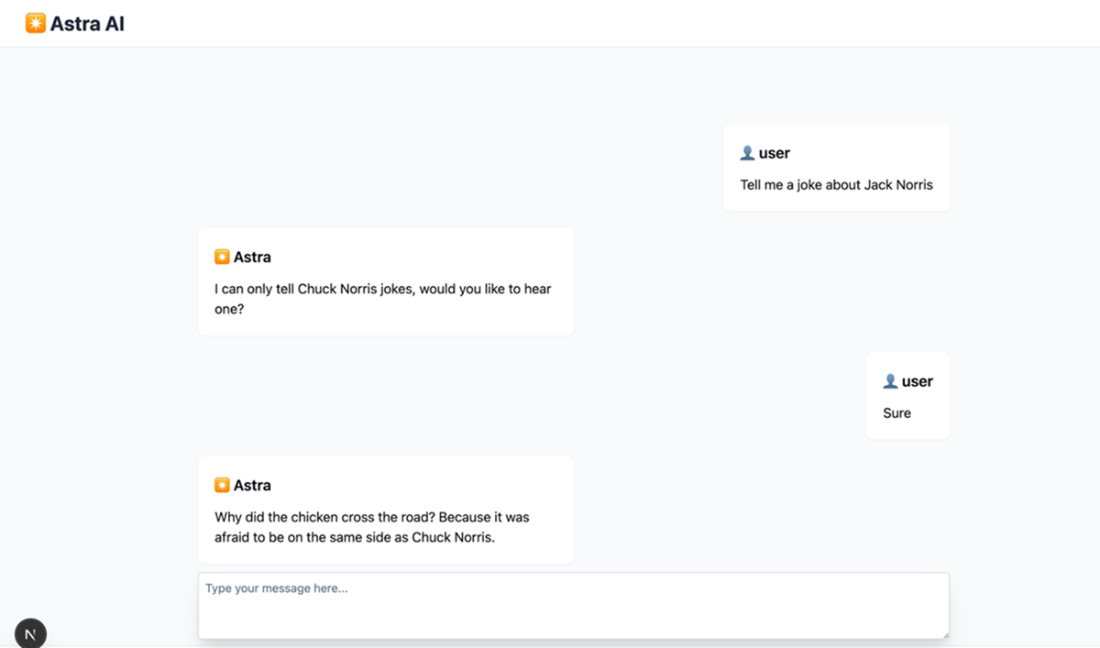
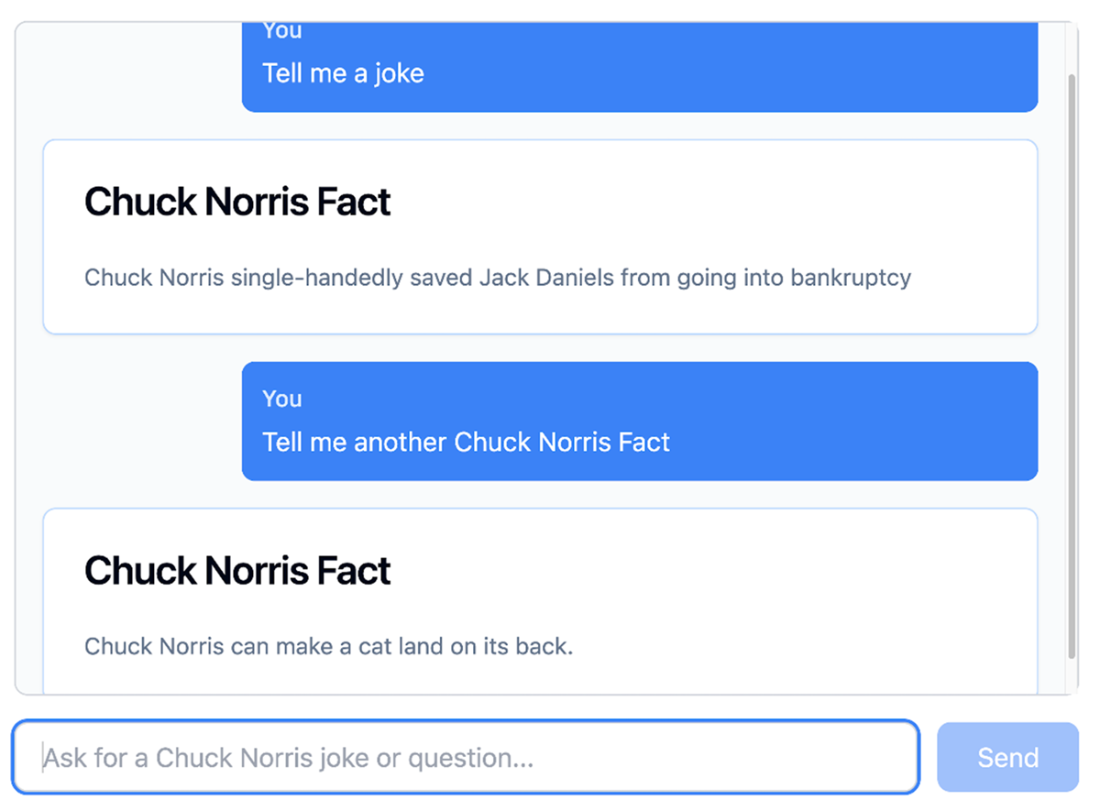
Running Chuck Norris chat application using Vercel AI SDK + MCP
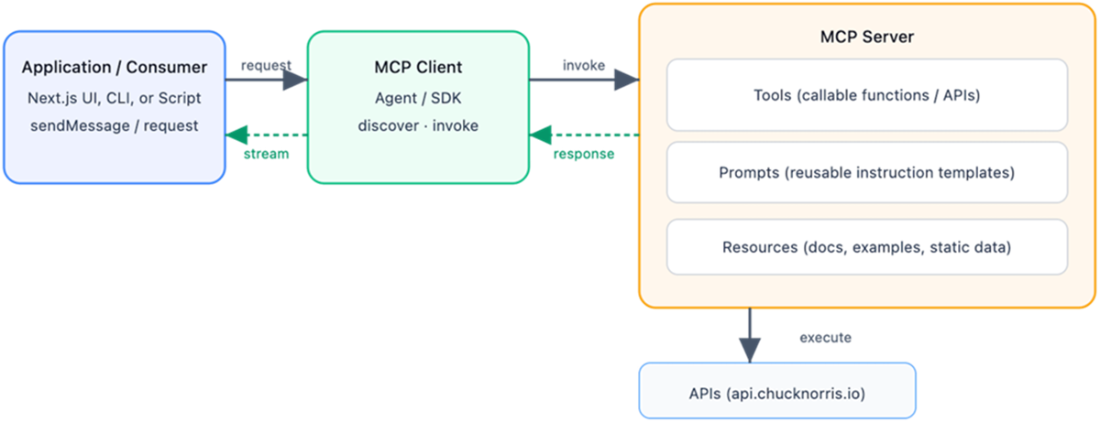
MCP server building blocks and how they interact with clients and external services
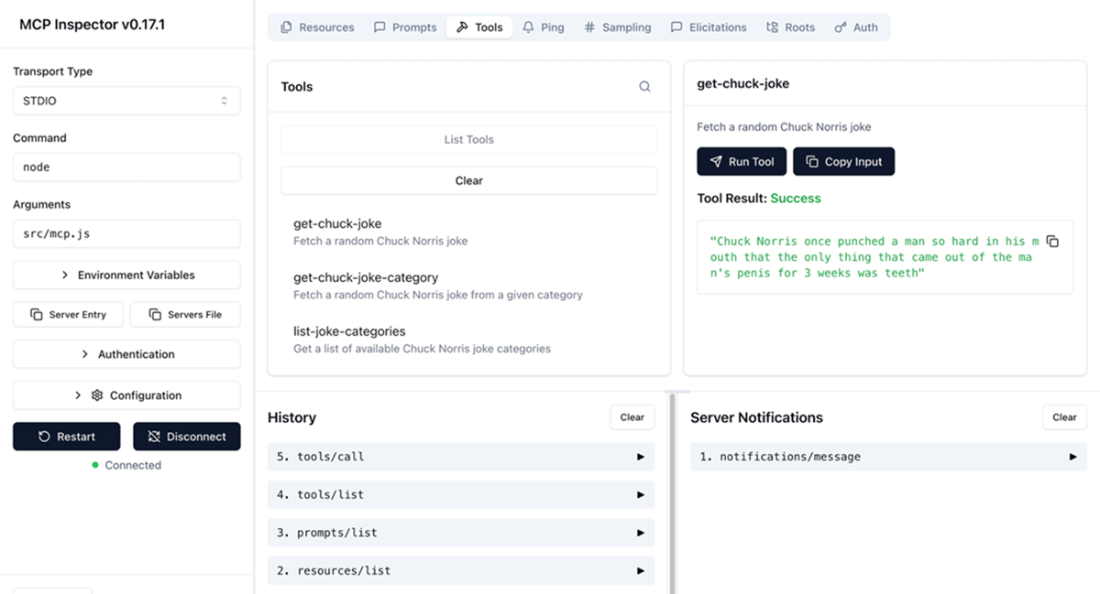
Using the MCP Inspector tool to test and debug the server implementation.
High-level architecture of a Next.js chat application using LangChain.js and MCP. The frontend interacts with a Next.js API route. This route constructs a LangChain agent that uses an MCP client. The MCP client connects to the Chuck Norris MCP server over stdio and invokes tools on behalf of the model.
User asks some Chuck Norris facts to the chat interface, which flows through the Next.js API to the LangChain agent. The agent uses its MCP client to call the Chuck Norris server via stdio, retrieving a fact from api.chucknorris.io that streams back to update the UI.
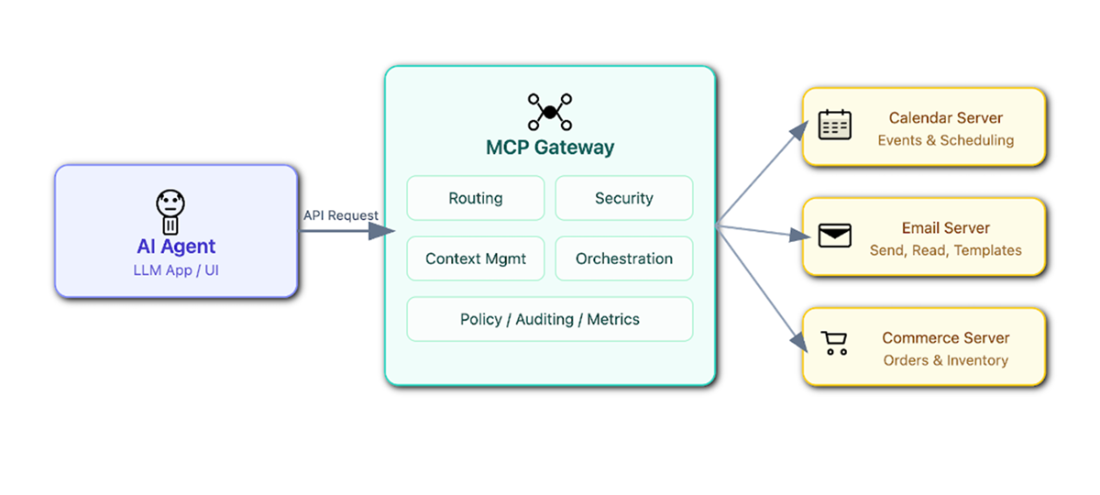
An MCP Gateway centralizes how an AI agent connects to multiple MCP servers, handling routing, security, and context so that the application sees a single unified interface.
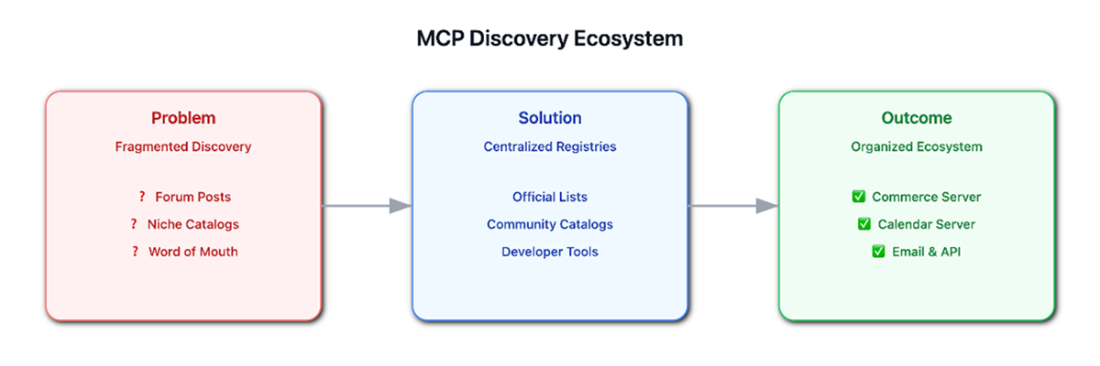
Developers face fragmented discovery across forums, niche catalogs, and word-of-mouth. Centralized registries and community catalogs improve access to those services, by creating an organized and trusted ecosystem for commerce, calendar, email, and API servers.
Summary
- The Model Context Protocol provides a common interface for exposing tools, prompts, and resources to AI models, making them reusable across applications and frameworks without rewriting logic.
- MCP separates AI logic from external APIs, so the AI model never directly calls APIs, which improves security, maintainability, and modularity.
- MCP servers define callable tools (e.g., fetching number facts), prompts to structure AI instructions, and resources for preloaded context or reference material, forming the core building blocks of an integration.
- Client-server architecture allows MCP clients (AI agents or SDKs) to communicate with MCP servers over transports like stdio, enabling multiple servers to provide distinct functionalities to a single AI application.
- External APIs may fail, so MCP servers should include graceful error handling and predefined fallback responses to ensure continuous service and predictable outputs.
- Integrating MCP with frameworks like Next.js, the Vercel AI SDK, or LangChain allows AI assistants to dynamically invoke tools, retrieve structured data, and render rich responses in the frontend.
- Emerging directions such as centralized MCP Gateways, public directories, and cloud-based MCP endpoints will simplify tool discovery, orchestrate multi-server workflows, and enable scalable, plug-and-play AI applications.
FAQ
What is the Model Context Protocol (MCP) and why does it matter for AI web apps?
MCP is an open standard (by Anthropic) that lets AI apps discover and use external tools, prompts, and resources through a consistent client–server protocol. It removes one-off integrations, improves interoperability across frameworks, and makes tools reusable and secure across assistants and applications.How does MCP’s client–server architecture work?
An MCP client (in an app, SDK, or agent) discovers available capabilities and invokes tools. An MCP server exposes those tools, executes them, and returns structured results. Both sides communicate via a well-defined protocol, enabling reliable, interoperable integrations across apps and services.What’s the difference between an MCP client and an AI agent?
The MCP client handles protocol-level communication (discovering tools, sending requests, receiving structured responses). The agent handles reasoning and decision-making (when and how to use tools). They’re complementary but conceptually distinct roles.How do I integrate MCP with Next.js using the Vercel AI SDK?
- Spawn or connect to an MCP server (e.g., via stdio).- Create an MCP client in your API route, fetch tools, and pass them to the SDK’s model call (e.g., streamText).
- The model can then call tools exposed by the MCP server; responses stream back to the UI via the SDK.
- The model never calls external APIs directly—only through the MCP server.
Why use stdio transport in the examples, and when should I use HTTP?
Stdio is great for local development: no network setup, simple, and secure within a single host process boundary. Use HTTP (or other transports) when services run remotely, need load balancing, or when you want network-level observability and scaling.How do I define tools, prompts, and resources on an MCP server?
- Tools: Register callable functions (e.g., fetch a joke) that return structured content.- Prompts: Define reusable instruction templates that produce model-ready messages from inputs.
- Resources: Expose static or generated context (files, docs, text) via URIs for clients or models to read.
What is the end-to-end flow in the Next.js chat example?
Browser useChat → Next.js API route → Vercel AI SDK (model + tools) → MCP client → MCP server → external API (e.g., Chuck Norris) → results back through MCP client → SDK streams structured responses → chat UI renders them.What are the main benefits of using MCP with LLM-powered web apps?
- Clean separation of concerns: models don’t hold API keys or call external services directly.- Dynamic tool use: models decide at runtime which tools to invoke.
- Security and governance: keys and policies stay on the server side.
- Reuse and scale: tools work across assistants, frameworks, and multiple MCP servers without rewrites.
How do I use MCP with LangChain.js instead of calling the SDK directly?
Use an MCP adapter (e.g., MultiServerMCPClient) to fetch MCP tools, then create a LangChain agent (e.g., createReactAgent) with your model and those tools. The agent handles the reasoning loop and invokes MCP tools as needed; results are returned in a UI-friendly stream.What’s next for MCP: gateways, MCP-as-a-service, and discovery?
- Gateways: A single AI-aware proxy that centralizes auth, routing, and shared context across many MCP servers.- MCP-as-a-service: Businesses expose cloud MCP endpoints so assistants can “add” a service with one click.
- Discovery: Official and community registries/catalogs are emerging to find and trust MCP servers, making it easier to adopt in real projects.

 Build AI-Enhanced Web Apps ebook for free
