11 Build an AI RAG Agent: Project walkthrough
This chapter walks through building a full-stack Retrieval-Augmented Generation web app that manages multiple knowledge bases and enables conversational querying over user-uploaded content. Users authenticate, create knowledge bases, upload PDFs or DOCX files, and chat with an AI assistant whose answers are grounded in retrieved document chunks. The solution combines Next.js for the UI, Clerk.js for authentication, Langchain.js for parsing and retrieval, the Vercel AI SDK for streaming, and Upstash Redis/Vector for persistence and semantic search, illustrating how these pieces come together to deliver a robust, multi-tenant RAG experience.
The implementation centers on clear user flows and modular architecture: a dashboard to create and manage knowledge bases, a DocumentUploader for drag-and-drop file handling, and a chat page that embeds queries, retrieves relevant chunks from Upstash Vector, and generates context-aware responses. Core API routes handle CRUD for knowledge bases, document uploads and processing, and chat interactions, while Langchain’s UpstashVectorStore integrates the vector index (configured for 768-dimension embeddings) with retrievers. Additional capabilities include deleting knowledge bases and individual documents; editing knowledge bases and chat history are intentionally left as extensions. The frontend uses React with Tailwind and shadcn components, and the project is wired via environment variables for Gemini, Upstash, and Clerk credentials.
Key challenges and considerations include multi-tenant data isolation (shared vector store with strict namespacing and metadata filters versus per-tenant isolation), secure document handling for resource-heavy parsing and embedding, and careful API design to minimize information exposure. Recommended hardening steps span rate limiting, upload quotas, malware scanning, background workers for heavy tasks, and encryption at rest, alongside adopting OpenAPI and an API gateway for centralized auth, throttling, and logging. The chapter frames the app as an MVP monolith suitable for learning while noting a potential path to microservices in production, and closes by emphasizing enduring web fundamentals amid rapidly evolving AI tooling, with trends like personalization, voice, and advanced chatbots shaping the future.
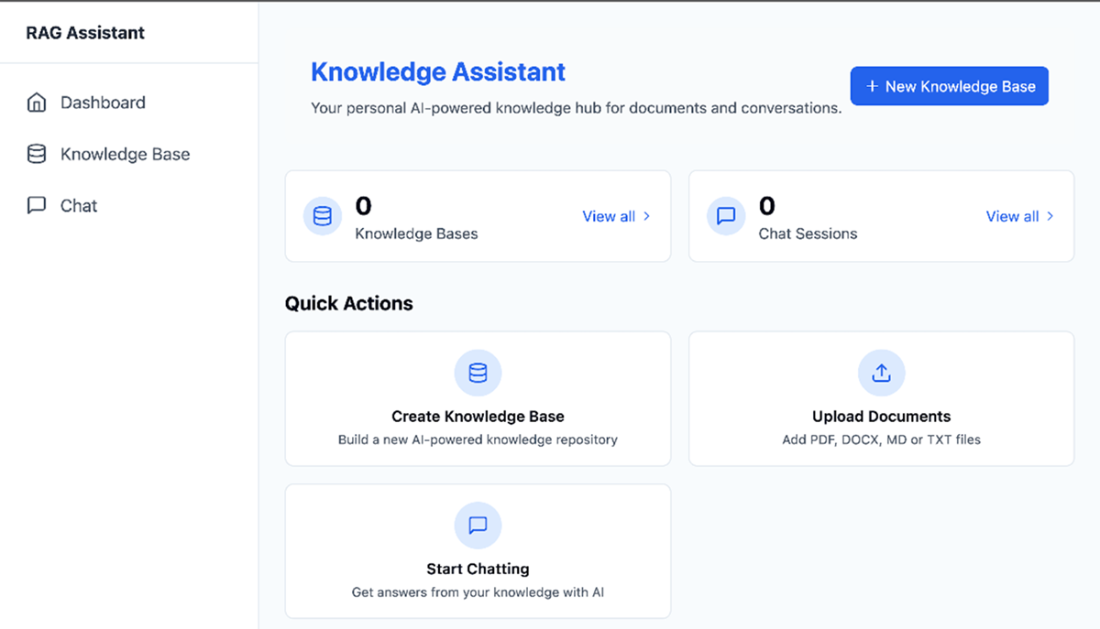
The main dashboard page contains a button to create a new knowledge base and useful quick action buttons.
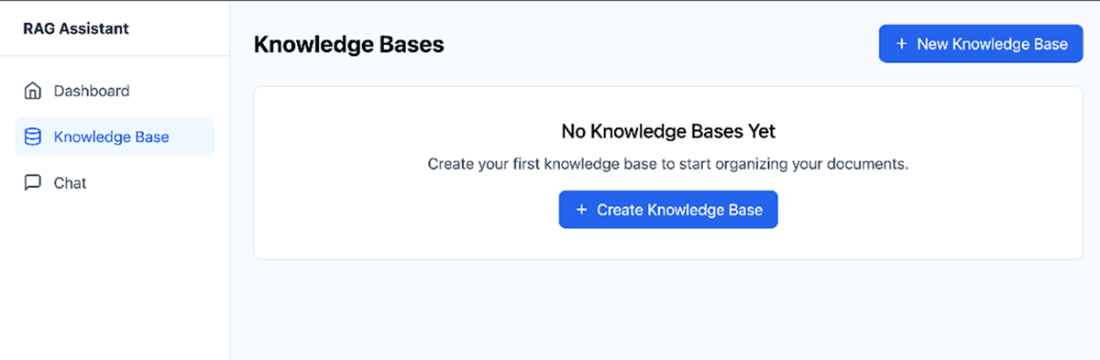
When the user clicks to review existing knowledge bases when none was created, the application will inform the user that they need to create one first.
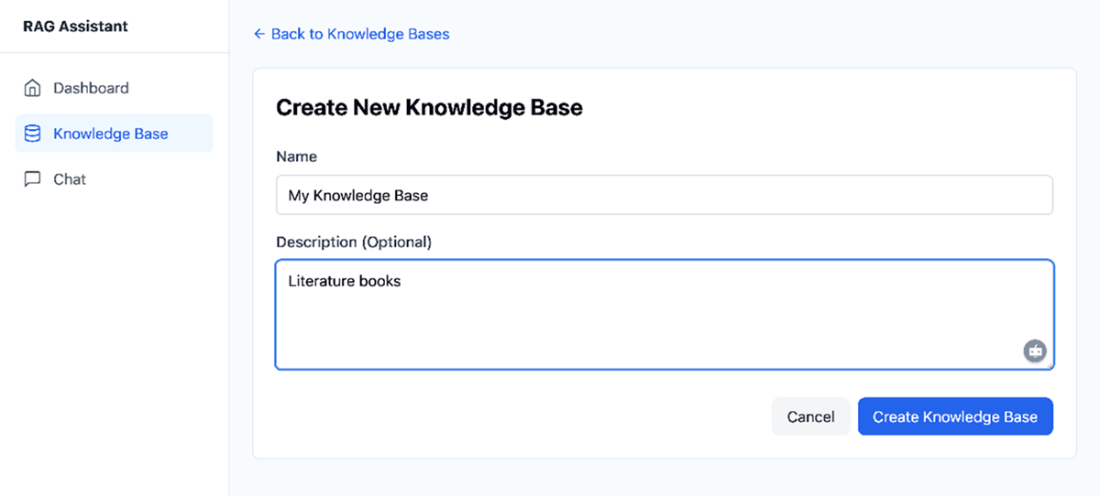
Users need to fill up a name and optionally a description to create a new knowledge base.
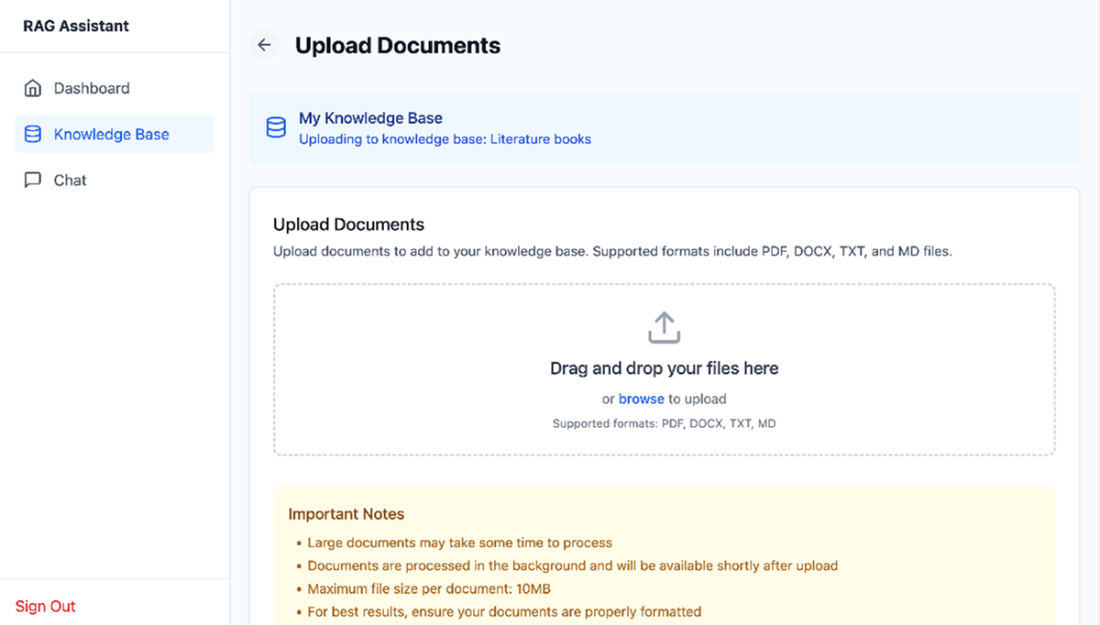
The Upload Documents page allows users to submit documents that can be used for chat like interactions.
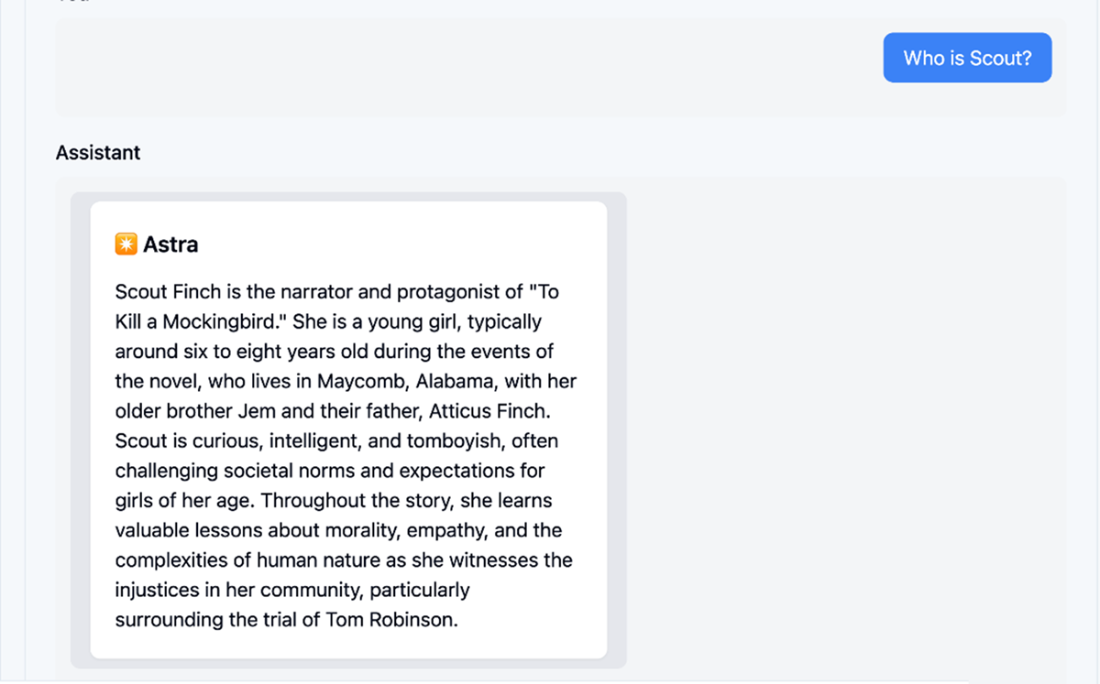
Once the knowledge base contains a few documents, users can start chatting with them in a conversational way.
Summary
- A Retrieval-Augmented Generation (RAG) web application enables users to create, organize, and interact with multiple knowledge bases, each containing uploaded documents such as PDFs and DOCX files.
- The chat interfaces allow users to ask questions and receive answers grounded in the content of their knowledge bases, leveraging Langchain.js retrievers and the Vercel AI SDK for conversational AI.
- Key architectural decisions include considering shared versus dedicated vector stores for user data, implementing secure document handling, and planning for future scalability and modularization.
- The project highlights the importance of designing for security, maintainability, and extensibility. To improve on this basic functionality, consider adding API rate limiting, malware scanning, background processing, and adhering to formal API specifications.
FAQ
What does the chapter’s RAG application do at a high level?
The app is a full‑stack Retrieval‑Augmented Generation (RAG) web application that lets authenticated users create knowledge bases, upload PDFs/DOCX documents, and chat with an AI assistant that answers using the selected knowledge base. It combines document management, vector search, and conversational AI for multi-knowledge-base scenarios.How do I create and manage knowledge bases?
From the Dashboard, click “New Knowledge base” and provide:- Name (required)
- Description (optional)
Which document types are supported and how do uploads work?
The app supports PDF and DOCX. Using the DocumentUploader (drag‑and‑drop or file picker), selected files are validated and uploaded. On the server, documents are parsed, chunked, converted to embeddings, and stored in Upstash Vector for similarity search.How does chatting with a knowledge base work end‑to‑end?
When you ask a question, the app embeds the query, retrieves the most relevant chunks from Upstash Vector (via Langchain retrievers), and uses the Vercel AI SDK to generate a context‑aware response, streaming it back to the UI.What technologies power the app and why were they chosen?
- Next.js for the full‑stack React framework and routing
- Vercel AI SDK for streaming, conversational state, and Next.js integration
- Langchain.js for prompt management, parsing, and vectorization (via UpstashVectorStore)
- Upstash Redis for simple external data storage
- Upstash Vector as the vector database (using a 768‑dimension index to match the Google AI embedding model)
- Clerk.js for secure authentication and user management
How do I run the example project and which environment variables are required?
In the repo’s root, run: npm run dev -w ch11/rag. Configure a .env with:- GEMINI_API_KEY
- UPSTASH_REDIS_REST_URL and UPSTASH_REDIS_REST_TOKEN
- UPSTASH_VECTOR_REST_URL and UPSTASH_VECTOR_REST_TOKEN
- NEXT_PUBLIC_CLERK_PUBLISHABLE_KEY and CLERK_SECRET_KEY
What are the main API routes and what do they handle?
- /api/knowledgebase: Create, list, get, and delete knowledge bases
- /api/knowledgebase/[knowledgebaseId]/document/[id]: Upload, fetch, and delete documents
- /api/upload: Receives files, associates them with a knowledge base, and triggers parsing/embedding
- /api/chat/[knowledgebaseId]: Retrieves relevant chunks and streams AI responses
How is authentication and authorization enforced?
All access is gated by Clerk.js. Only authenticated users can view dashboards, upload documents, or chat. Backend routes validate identity, and vector operations are scoped by knowledge base and user metadata to prevent cross‑tenant leakage.How is multi‑tenant data isolation handled in the vector store?
The app uses a shared Upstash Vector database with strict namespacing and metadata filters by user and knowledge base. For stricter compliance needs, provision dedicated per‑tenant vector stores to physically isolate data, at the cost of more operations and expense.What security and scalability measures are recommended beyond the MVP?
- API rate limiting and upload quotas
- Malware scanning for uploaded files
- Background workers/serverless for parsing and embedding
- Encrypted storage (or discard source docs if not needed)
- OpenAPI specs and an API Gateway for centralized auth, throttling, and logging

 Build AI-Enhanced Web Apps ebook for free
