Appendix A. Introduction to PyTorch
This appendix is a practical primer that equips readers to put deep learning into practice with PyTorch as the core tool for building large language models from scratch. It introduces PyTorch’s goals and strengths—combining usability with flexibility—and focuses on the essential features needed throughout the book rather than exhaustive coverage. Readers are guided through environment setup and installation choices, including CPU/GPU variants and version compatibility, with the aim of establishing a reliable, reproducible workspace before moving on to model implementation and training.
The chapter centers on PyTorch’s three pillars: tensors, automatic differentiation, and deep learning utilities. It explains tensors as the fundamental data container (covering ranks, dtypes, shapes, reshaping, transposition, and matrix multiplication) and shows how PyTorch mirrors NumPy while adding GPU support. It then introduces computation graphs and autograd to compute gradients automatically via backward passes, enabling backpropagation without manual calculus. Building on this, the text demonstrates how to define neural networks by subclassing torch.nn.Module, structuring layers (often with Sequential), running forward passes to produce logits, selecting suitable losses and optimizers, and executing the canonical training loop (zero_grad → backward → step) with proper train/eval modes, no_grad for inference, and model persistence via state_dict save/load.
Efficient data handling is addressed through custom Dataset classes and DataLoader configuration, including batching, shuffling, drop_last, and num_workers trade-offs to avoid CPU bottlenecks. The chapter concludes with performance optimization: moving tensors and models across devices, running on a single GPU with minimal code changes, and scaling to multiple GPUs using DistributedDataParallel with DistributedSampler and synchronized gradients. Along the way, it stresses practical considerations—accuracy evaluation, logits-to-probabilities conversion when needed, and careful resource management—so readers are prepared to train, evaluate, save, and scale PyTorch models effectively.
Figure A.1 PyTorch's three main components include a tensor library as a fundamental building block for computing, automatic differentiation for model optimization, and deep learning utility functions, making it easier to implement and train deep neural network models.
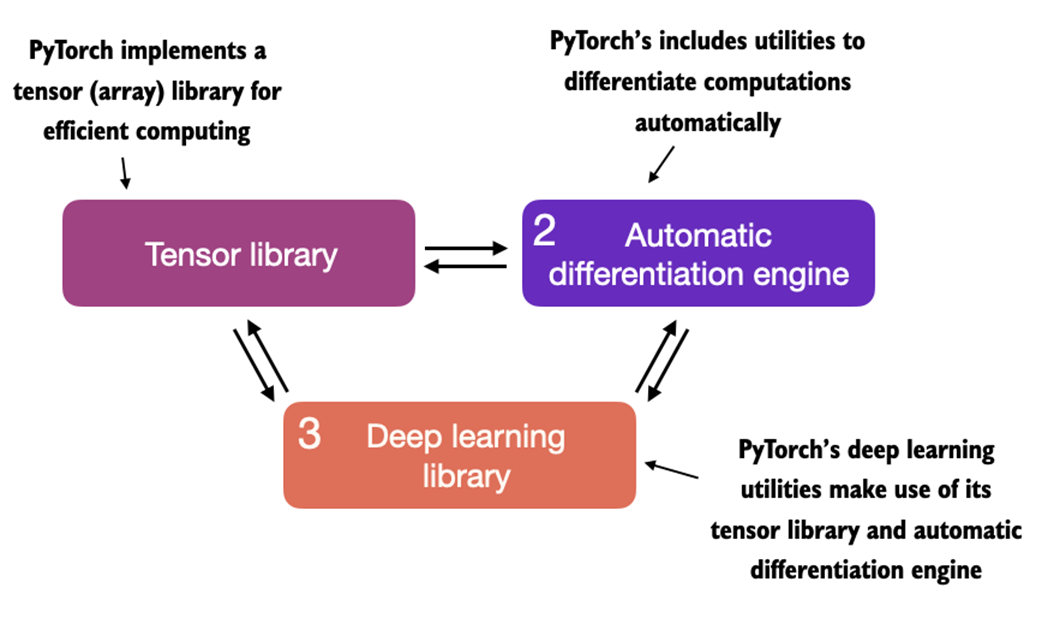
Figure A.2 Deep learning is a subcategory of machine learning that is focused on the implementation of deep neural networks. In turn, machine learning is a subcategory of AI that is concerned with algorithms that learn from data. AI is the broader concept of machines being able to perform tasks that typically require human intelligence.
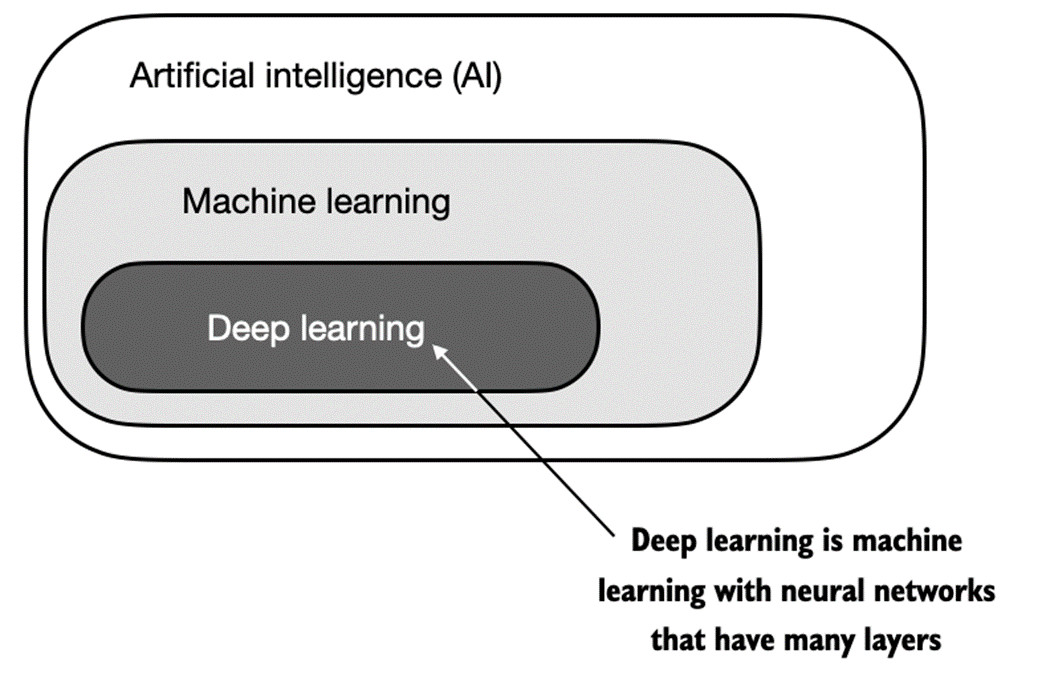
Figure A.3 The supervised learning workflow for predictive modeling consists of a training stage where a model is trained on labeled examples in a training dataset. The trained model can then be used to predict the labels of new observations.
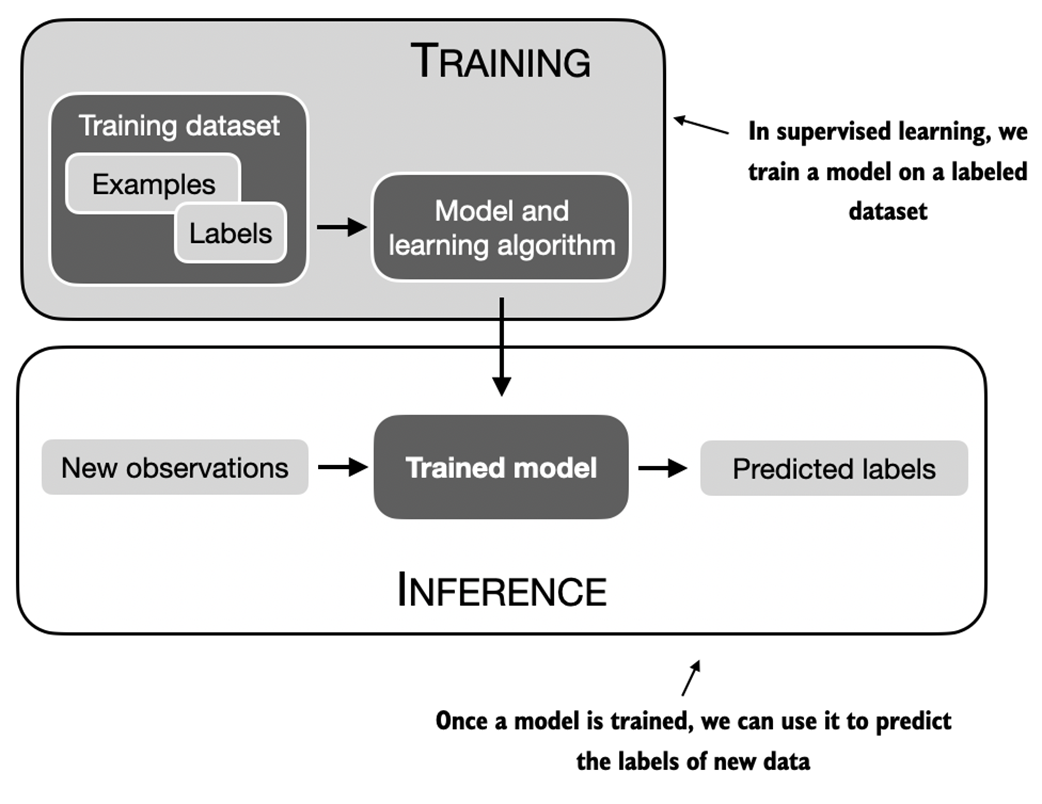
Figure A.4 Access the PyTorch installation recommendation on https://pytorch.org to customize and select the installation command for your system.
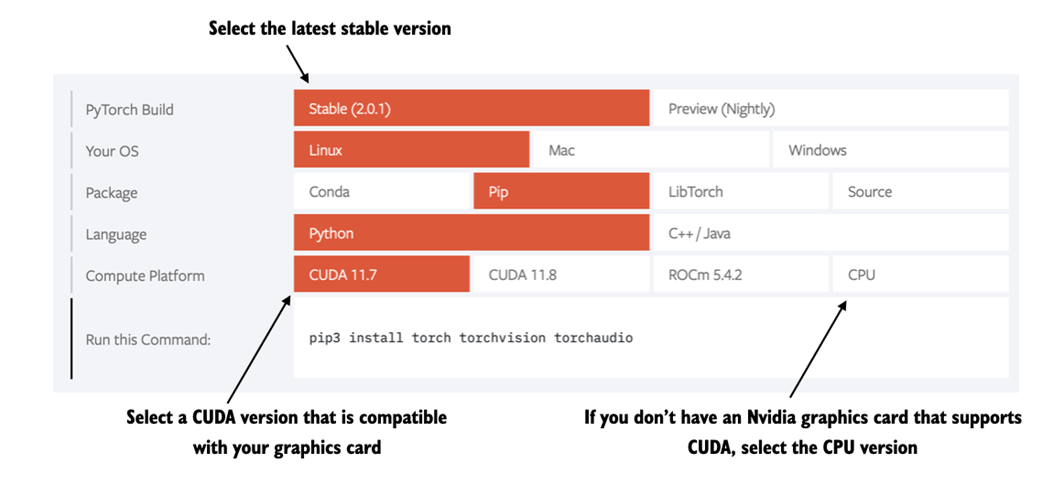
Figure A.5 Select a GPU device for Google Colab under the Runtime/Change runtime type menu.
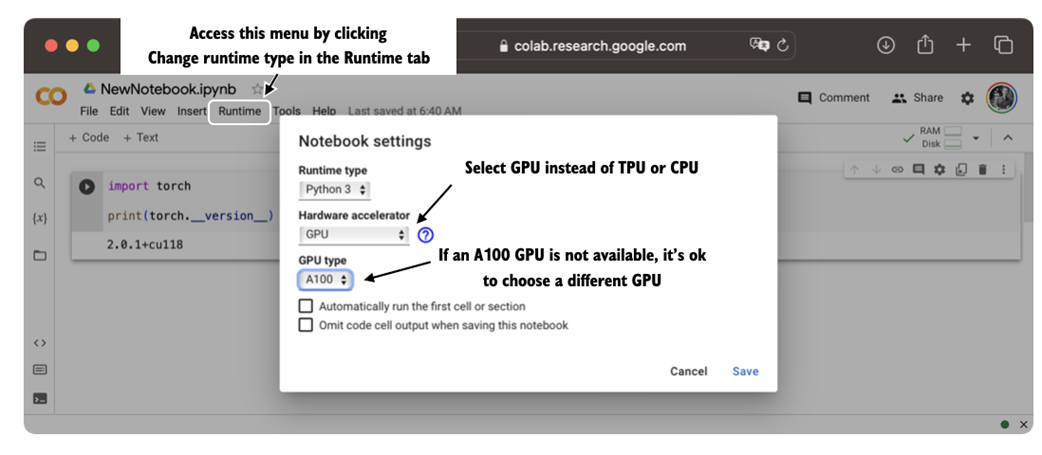
Figure A.6 An illustration of tensors with different ranks. Here 0D corresponds to rank 0, 1D to rank 1, and 2D to rank 2. Note that a 3D vector, which consists of 3 elements, is still a rank 1 tensor.
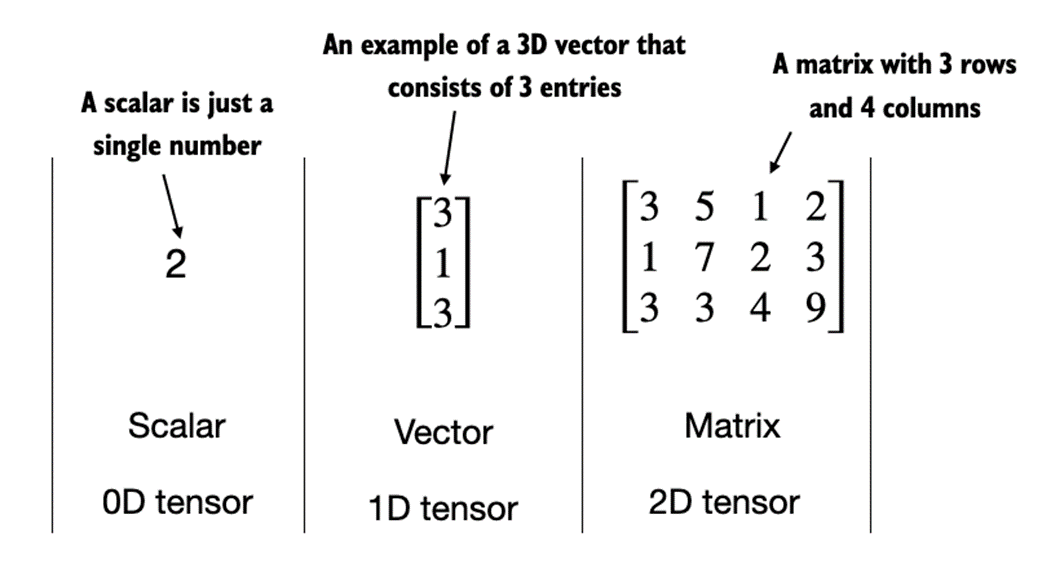
Figure A.7 A logistic regression forward pass as a computation graph. The input feature x1 is multiplied by a model weight w1 and passed through an activation function σ after adding the bias. The loss is computed by comparing the model output a with a given label y.
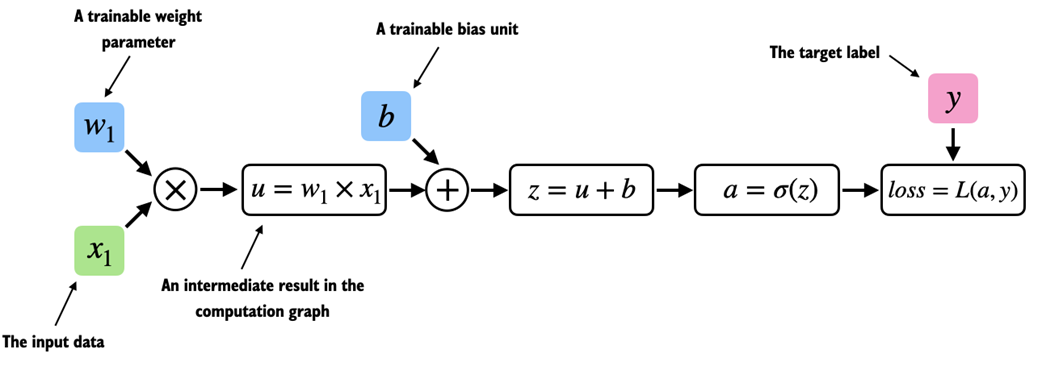
Figure A.8 The most common way of computing the loss gradients in a computation graph involves applying the chain rule from right to left, which is also called reverse-model automatic differentiation or backpropagation. It means we start from the output layer (or the loss itself) and work backward through the network to the input layer. This is done to compute the gradient of the loss with respect to each parameter (weights and biases) in the network, which informs how we update these parameters during training.
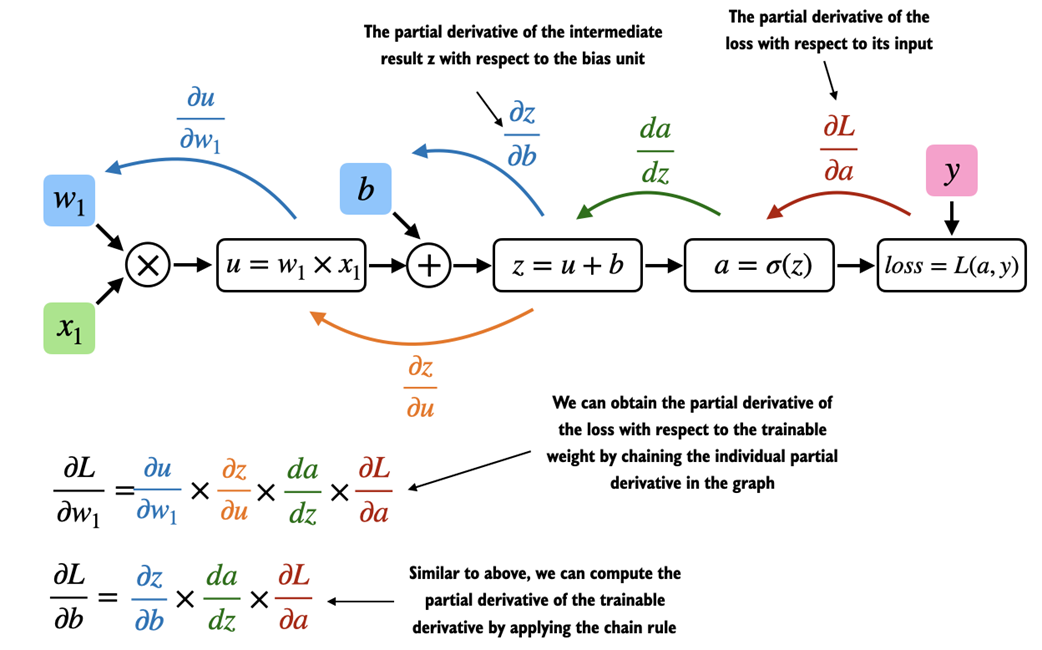
Figure A.9 An illustration of a multilayer perceptron with 2 hidden layers. Each node represents a unit in the respective layer. Each layer has only a very small number of nodes for illustration purposes.
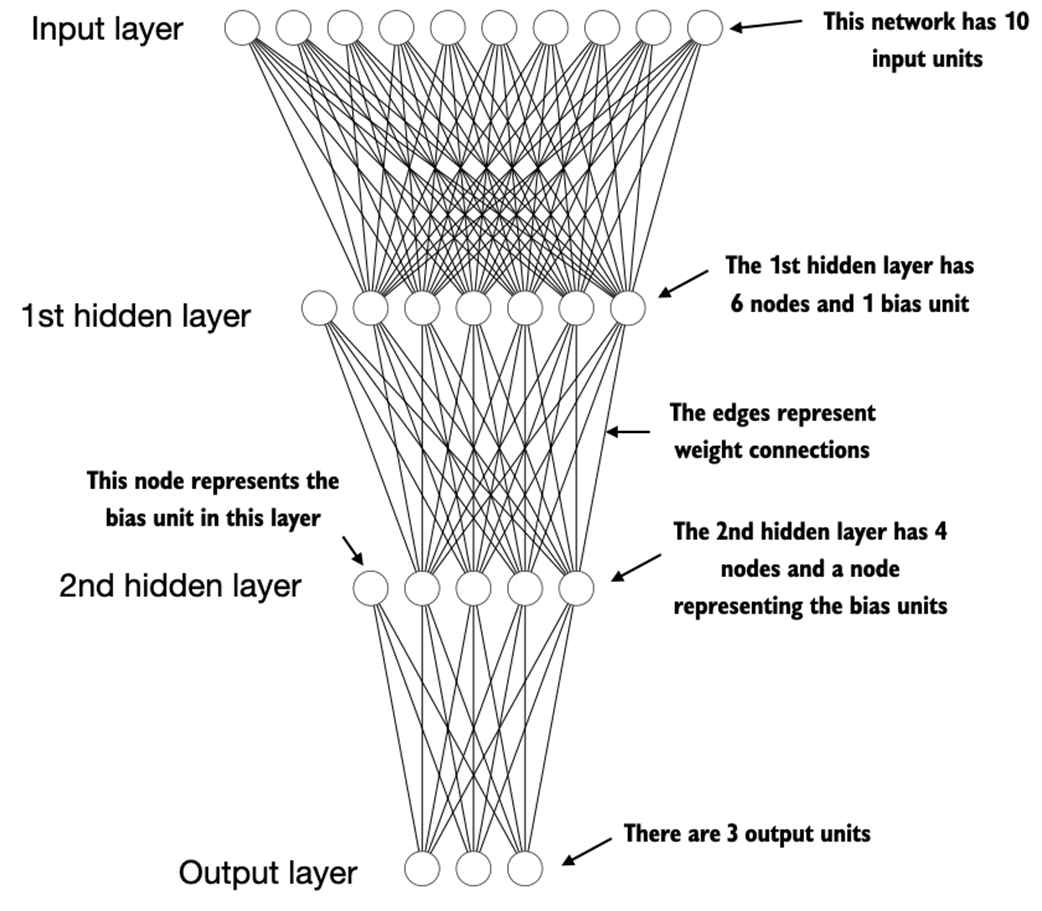
Figure A.10 PyTorch implements a Dataset and a DataLoader class. The Dataset class is used to instantiate objects that define how each data record is loaded. The DataLoader handles how the data is shuffled and assembled into batches.
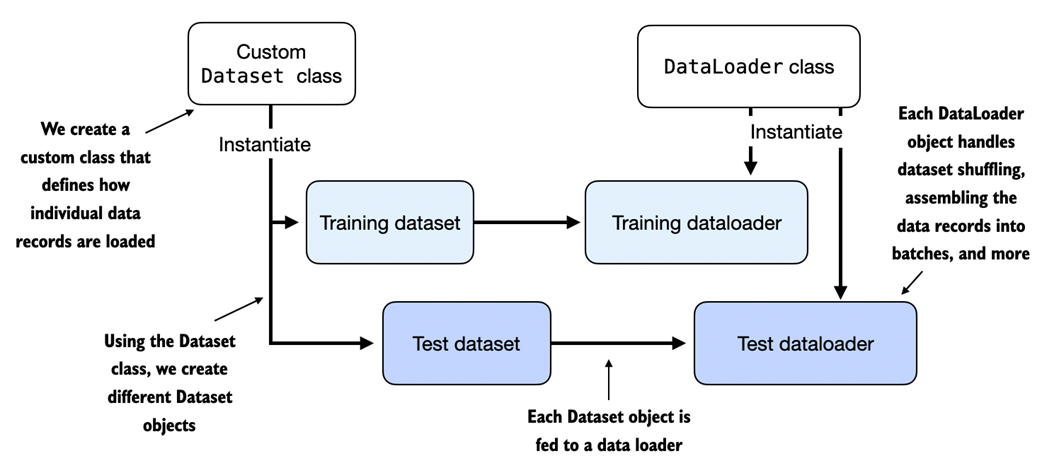
Figure A.11 Loading data without multiple workers (setting num_workers=0) will create a data loading bottleneck where the model sits idle until the next batch is loaded as illustrated in the left subpanel. If multiple workers are enabled, the data loader can already queue up the next batch in the background as shown in the right subpanel.
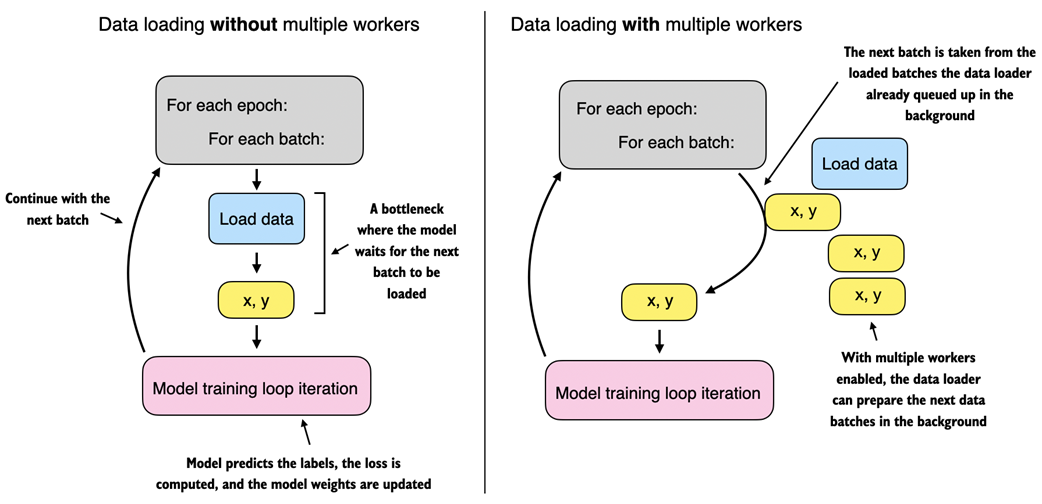
Figure A.12 The model and data transfer in DDP involves two key steps. First, we create a copy of the model on each of the GPUs. Then we divide the input data into unique minibatches that we pass on to each model copy.
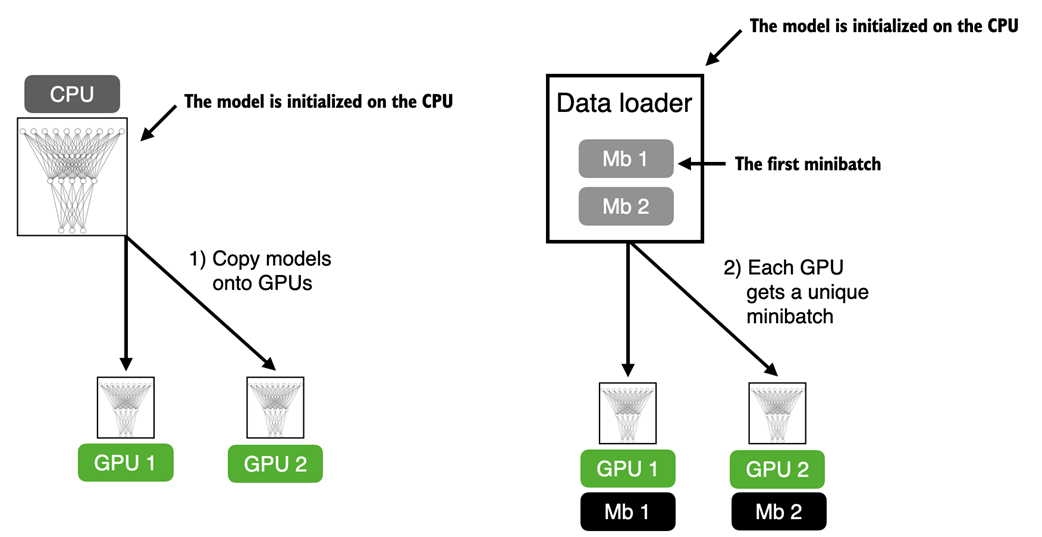
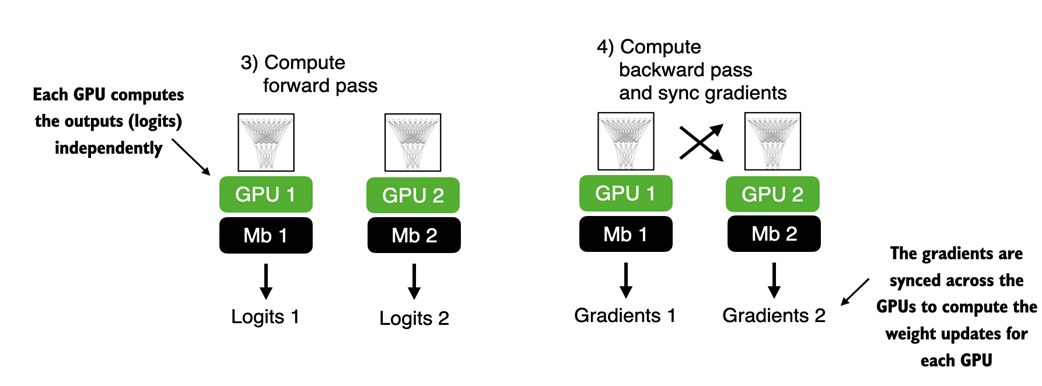
Figure A.13 The forward and backward pass in DDP are executed independently on each GPU with its corresponding data subset. Once the forward and backward passes are completed, gradients from each model replica (on each GPU) are synchronized across all GPUs. This ensures that every model replica has the same updated weights.
FAQ
What is PyTorch, and why is it popular for deep learning?
PyTorch is an open-source, Python-based deep learning library. It is popular because it combines a user-friendly interface with strong performance and flexibility: you can write code that feels like NumPy, customize low-level components when needed, and seamlessly accelerate workloads on GPUs. It has been the leading framework in research for years and is widely adopted in industry.What are the three core components of PyTorch?
- Tensor library: NumPy-like arrays with optional GPU acceleration.- Automatic differentiation (autograd): Builds computation graphs and computes gradients for backpropagation.
- Deep learning utilities: Modules, layers, loss functions, optimizers, pretrained models, and more.
How do I install PyTorch (CPU or GPU) and verify the version?
- Basic install:pip install torch- Pin to the book’s version for full compatibility:
pip install torch==2.0.1- For CUDA-enabled installs (NVIDIA GPUs), use the command recommended on https://pytorch.org for your OS/CUDA setup.
- Check the installed version in Python:
import torch
print(torch.__version__)How can I tell whether my system can use a GPU (CUDA, ROCm, or Apple Silicon)?
- NVIDIA CUDA:import torch
print(torch.cuda.is_available()) # True means CUDA GPU usable- Apple Silicon (M1/M2/M3+):
import torch
print(torch.backends.mps.is_available()) # True means MPS usableWhat are tensors, ranks (orders), and dtypes in PyTorch?
- Tensors generalize scalars (rank 0), vectors (rank 1), and matrices (rank 2) to higher dimensions.- Create tensors:
import torch
t0 = torch.tensor(1)              # 0D
t1 = torch.tensor([1, 2, 3])      # 1D
t2 = torch.tensor([[1, 2], [3, 4]]) # 2Dtorch.int64, floats default to torch.float32 (efficient for DL and GPUs). Change dtype with .to: t = torch.tensor([1, 2, 3]) # int64
t = t.to(torch.float32) # float32What are the most common tensor operations I should know first?
- Shape:tensor.shape- Reshape:
tensor.reshape(new_h, new_w) or tensor.view(new_h, new_w)- Transpose (2D):
tensor.T- Matrix multiply:
tensor.matmul(other) or tensor @ otherExample:
x = torch.tensor([[1, 2, 3], [4, 5, 6]])
print(x.shape)      # torch.Size([2, 3])
print(x.T)          # transpose
print(x @ x.T)      # 2x3 @ 3x2 -> 2x2
How does autograd work, and how do I compute gradients?
PyTorch builds a computation graph as you do tensor ops. If a tensor hasrequires_grad=True, PyTorch tracks ops on it. After computing a scalar loss, call loss.backward() to populate .grad on leaf parameters. Example: import torch, torch.nn.functional as F
x = torch.tensor([1.1])
w = torch.tensor([2.2], requires_grad=True)
b = torch.tensor([0.0], requires_grad=True)
y = torch.tensor([1.0])
a = torch.sigmoid(x * w + b)
loss = F.binary_cross_entropy(a, y)
loss.backward()
print(w.grad, b.grad) # gradientsHow do I build a simple neural network in PyTorch, and what are logits vs probabilities?
- Subclasstorch.nn.Module, define layers in __init__, wire them in forward. Example (MLP): class NeuralNetwork(torch.nn.Module):
def __init__(self, num_inputs, num_outputs):
super().__init__()
self.layers = torch.nn.Sequential(
torch.nn.Linear(num_inputs, 30), torch.nn.ReLU(),
torch.nn.Linear(30, 20), torch.nn.ReLU(),
torch.nn.Linear(20, num_outputs)
)
def forward(self, x):
return self.layers(x) # logitscross_entropy) expect logits and apply softmax internally for stability.- For probabilities at inference:
with torch.no_grad():
probs = torch.softmax(model(x), dim=1)model.train() during training and model.eval() for evaluation/inference; wrap inference in torch.no_grad().How do Dataset and DataLoader work, and what do batch size, shuffle, drop_last, and num_workers do?
- Create a customDataset with __len__ and __getitem__ to return one (features, label) pair.- Wrap it in a
DataLoader to handle batching and shuffling: from torch.utils.data import DataLoader
loader = DataLoader(dataset=train_ds,
batch_size=32,
shuffle=True,
drop_last=True, # avoid tiny last batch
num_workers=4) # parallel data loadingnum_workers>0 can greatly speed up training by loading data in parallel; for tiny datasets or some notebook environments, 0 may be simpler.- Labels for classification should start at 0 and be less than the number of output classes.
What does a typical PyTorch training loop look like, and why call zero_grad/backward/step?
Core steps per batch:1)
model.train()2) Forward pass:
logits = model(features)3) Loss: e.g.,
loss = F.cross_entropy(logits, labels) (pass logits, not softmax)4) Zero grads:
optimizer.zero_grad() (prevents gradient accumulation)5) Backprop:
loss.backward()6) Update:
optimizer.step()For evaluation:
model.eval() and wrap inference in torch.no_grad(). To save and load a trained model: # save
torch.save(model.state_dict(), "model.pth")
# load
model = NeuralNetwork(in_dim, out_dim)
model.load_state_dict(torch.load("model.pth"))How do I accelerate training on GPUs (single and multi-GPU)?
- Single GPU: pick a device and move model and data to it (three key changes).device = torch.device("cuda" if torch.cuda.is_available() else "cpu")
model = model.to(device)
for features, labels in train_loader:
features, labels = features.to(device), labels.to(device)- Apple Silicon: use
mps instead of cuda if available: torch.device("mps" if torch.backends.mps.is_available() else "cpu").- Multi-GPU: use
DistributedDataParallel (DDP). Each GPU gets a model replica and unique data shard (via DistributedSampler); gradients are synchronized across GPUs. Run DDP in a Python script (not inside notebooks) and initialize process groups; expect near-linear speedups with more GPUs (minus communication overhead).
 Build a Large Language Model (From Scratch) ebook for free
