9 Implementing policies with Cedar
In this chapter, the focus shifts from learning Cedar’s language features to putting them into practice in a realistic authorization system. ACME Corp’s identity team uses Cedar to support a Customer Collaboration platform with mixed access needs: owners and managers control documents, legal teams share contracts, account managers collaborate with customers, and zero-trust requirements limit access to managed devices and safe usage windows. The central goal is to replace scattered application checks with a single, testable policy layer that can evolve without constantly redeploying the app.
The chapter emphasizes that successful Cedar authoring starts with a well-designed schema. ACME defines the core entities, actions, and request context up front, which gives the policy set type safety, consistent vocabulary, and compiler validation. Once that foundation is in place, the team writes core rules for common access patterns such as team-based viewing, owner access, and manager access, while also using Cedar’s model of relationships and entity data to keep policies concise and data-driven. The chapter also shows how Cedar supports discretionary, membership, and relationship permissions, and how these can be combined with attribute-based conditions to express more complex business rules.
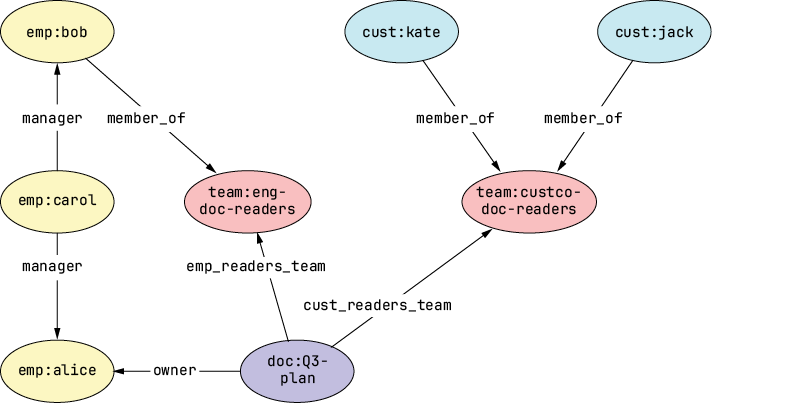
Beyond basic policy writing, the chapter explains how Cedar is operated in a real system. It covers the entity store and how relationship graphs supply the facts Cedar evaluates, including transitive relationships like management chains. It also shows how global constraints can be layered on top of normal permissions with explicit deny rules, how templates reduce repetitive policy authoring, and how overrides handle special exceptions without changing the base rules. Finally, the chapter ties everything together by mapping real requests into Cedar evaluations through a policy enforcement component and by describing deployment options such as a local agent, Amazon Verified Permissions, and Cedarling, all of which preserve the same authorization logic while fitting different operational environments.
A portion of the relationship graph that makes up the entity store for ACME’s Customer Collaboration Platform
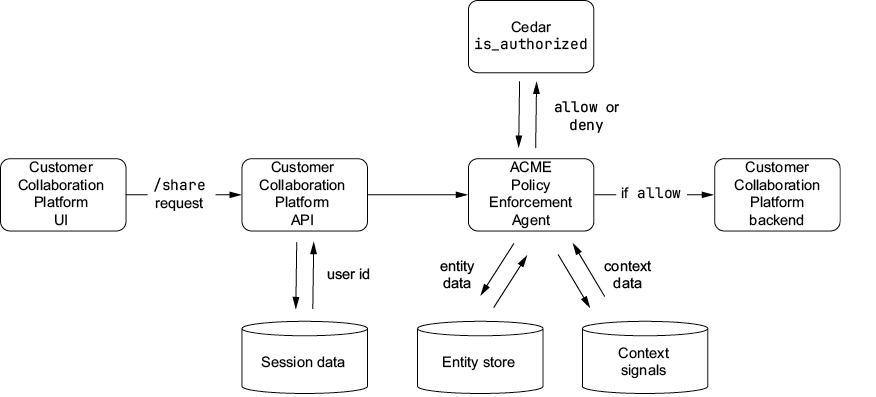
The Policy Enforcement Point (PEP) in ACME’s Customer Collaboration platform translates a real-world /share request into a Cedar evaluation by combining session data (principal), entity data (resource relationships), and context signals (environment attributes). Cedar’s is_authorized API provides an allow or deny decision, which the PEP enforces before forwarding the request to the backend.
Summary
- A Cedar schema provides the foundation for safe, consistent policies by defining entity types, attributes, actions, and context.
- Schema design choices, such as naming conventions and typed relationships, directly shape policy clarity and maintainability.
- ACME’s core policies set the baseline: owners can act on their own documents, reader teams can view them, and managers can supervise.
- The entity store, modeled as a relationship graph, provides the dynamic data that drives Cedar’s static policy logic.
- Cedar supports discretionary, membership, and relationship permissions, providing flexibility for combining RBAC, ABAC, and ReBAC patterns.
- Delegatable rights are managed explicitly, distinguishing between “using a resource” and “granting access to a resource.”
- Global constraints enforce zero-trust principles by applying organization-wide ABAC rules, such as device trust checks.
- Policy templates and overrides minimize duplication, maintain consistency, and allow for local exceptions when necessary.
- The Policy Enforcement Point (PEP) translates real requests into Cedar evaluations, making sure that each access decision is enforced consistently.
- Testing and static analysis safeguard your policy set, catching logic errors, regressions, and contradictions before they reach production.
- Cedar’s blend of clarity, flexibility, and rigor makes it a practical language for unifying authorization across complex systems.
FAQ
Why should a Cedar schema be designed before writing policies?
A schema defines the allowed entity types, actions, attributes, and context fields, so policies can be validated at compile time. Designing it first provides type safety, consistent vocabulary, and better tooling support, which helps prevent errors and policy drift.
What core entities and actions does ACME model in its Cedar schema?
ACME models Employees, Customers, Documents, and Teams as core entities. The main actions are doc:view, doc:edit, and doc:share.
How does the schema prevent incorrect authorization rules?
The schema restricts which principals, resources, and attributes policies may reference. For example, it ensures a Document owner must be an Employee and prevents a policy from accidentally allowing a Customer to edit a document.
Why does ACME use separate policies for employees and customers when authorizing document viewing?
Cedar does not support unions in policy scope, so combining Employees and Customers into one scoped policy is awkward. Splitting them into separate policies keeps the logic clearer, easier to test, and easier for Cedar to evaluate.
What does “owner can do all” mean in ACME’s policy set?
It means a document owner is permitted to view, edit, and share their own document. The policy scopes the principal to Employees and limits the allowed actions to those three document operations.
How does Cedar represent team-based access for document readers?
Cedar uses the entity store to model team membership as relationships. A policy can check whether a principal is in the document’s readers team rather than listing individual users inside the policy.
What is the difference between discretionary permissions and membership permissions?
Discretionary permissions let a resource owner choose who gets access, often by adding principals to a readers team. Membership permissions grant access to everyone in a defined group, such as all members of ACME’s legal team.
How do global constraints work in Cedar at ACME?
Global constraints are enforced with forbid policies that override matching permits. For example, ACME can block all employee document actions when context.device.managed == false, regardless of other allows.
What are Cedar templates used for?
Templates are used to create many similar policies that differ only by principal and/or resource. ACME uses them for repeated direct grants, such as giving one person access to one specific document, without writing a brand-new policy each time.
How does ACME map a real request to a Cedar authorization decision?
A Policy Enforcement Point gathers the principal, action, resource, and context from the request, then sends them to Cedar’s evaluation API. Cedar returns allow or deny, and the PEP enforces that decision before the backend continues.

 Authorization in Action ebook for free
