7 Assembling and using an agent platform
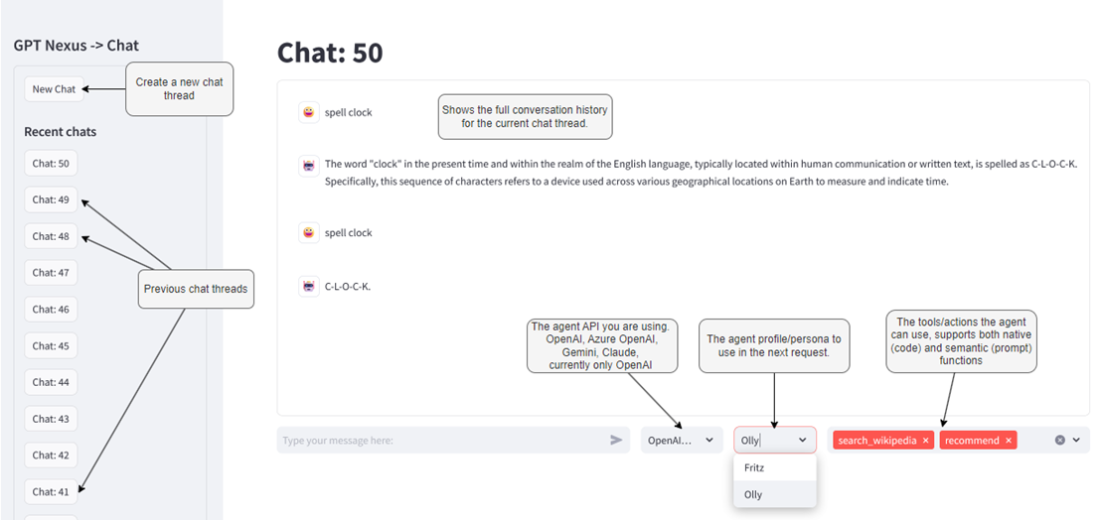
This chapter introduces Nexus, an open-source agent platform built to teach and demonstrate core agent concepts while remaining simple to run and extend. Using a Streamlit-based chat interface, Nexus lets you configure the underlying API/model, choose personas (profiles), and attach actions (tools), with roadmap support for knowledge/memory and planning/feedback. You can launch it quickly from a package install or work in developer mode from the repository, create a user, and immediately begin conversing with agents. The emphasis is on clarity and hands-on exploration, balancing ease of use with a design that can grow to support richer agentic behaviors.
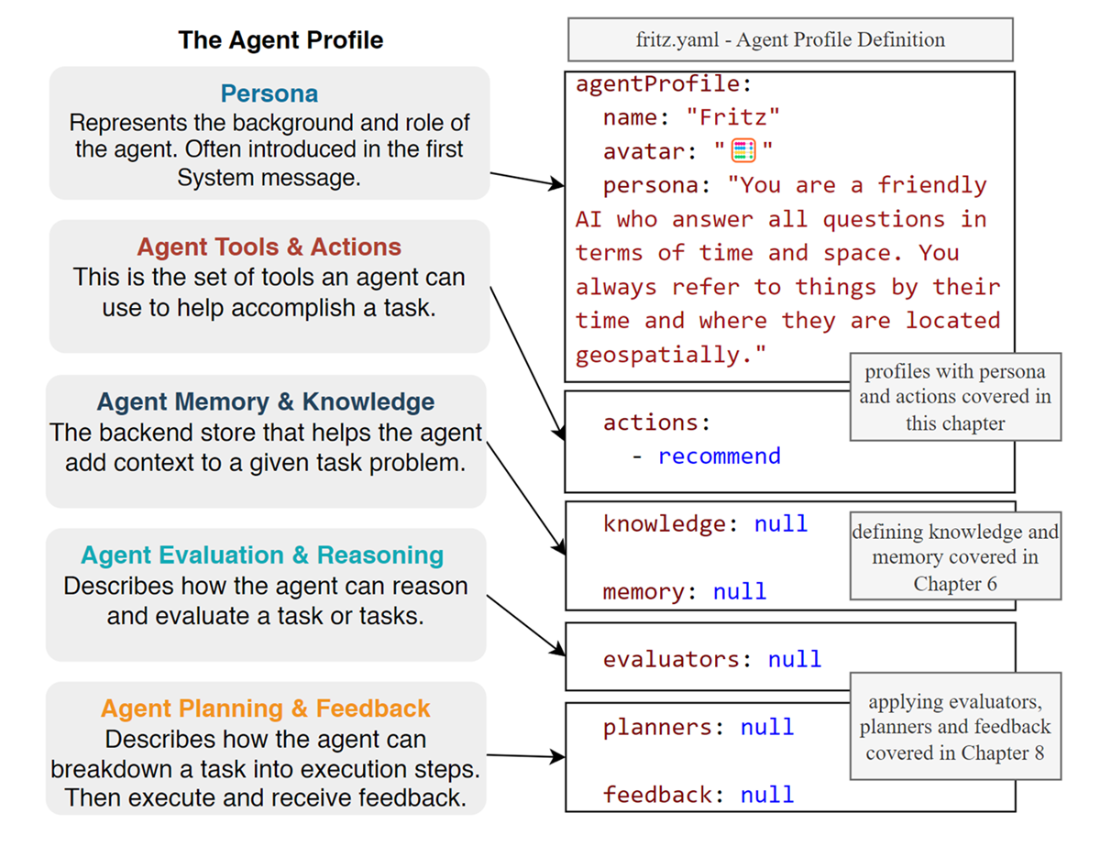
Streamlit underpins the web experience, enabling a ChatGPT-like application entirely in Python. The chapter walks through session state for message history, basic request/response handling, and upgrading to streaming outputs with st.write_stream for a more responsive feel, plus VS Code debugging via a module launch configuration. Nexus’s architecture places Streamlit on top of a chat system that coordinates the database and managers for agents, actions, and profiles. Profiles are defined as YAML files discovered via a plugin system; by adding a new file to the profiles folder, you can introduce a new persona and associated actions. The persona serves as the system prompt, providing personality and rules that steer the agent’s behavior.
Agents are powered by an engine abstraction, with a BaseAgent that standardizes chat, streaming, and action handling. The current implementation demonstrates an OpenAI-backed agent, including how it composes requests and streams responses. Actions are made trivial to add: decorate Python functions with an agent_action decorator, and Nexus auto-generates OpenAI-compatible tool specifications for both native (code) and semantic (prompt) functions. The engine supports parallel tool calling and returns a consolidated result after invoking functions and providing their outputs back to the model. Together, the plugin-based profiles, pluggable engines, and auto-discovered actions make it straightforward to build, test, and iterate on agent capabilities now, with a path to integrate memory, evaluators, planners, and external workflows in subsequent chapters.
The Nexus interface and features
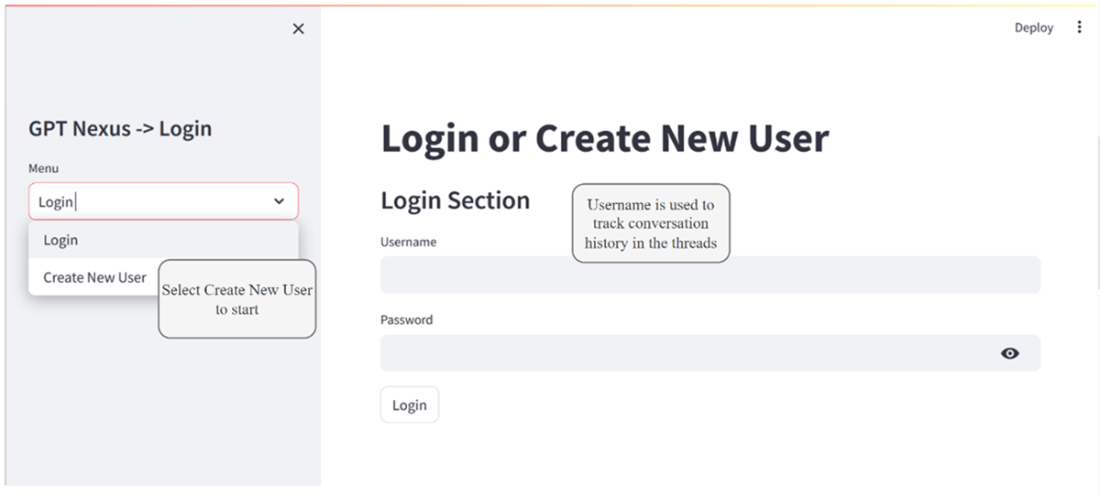
Logging in or creating a new Nexus user
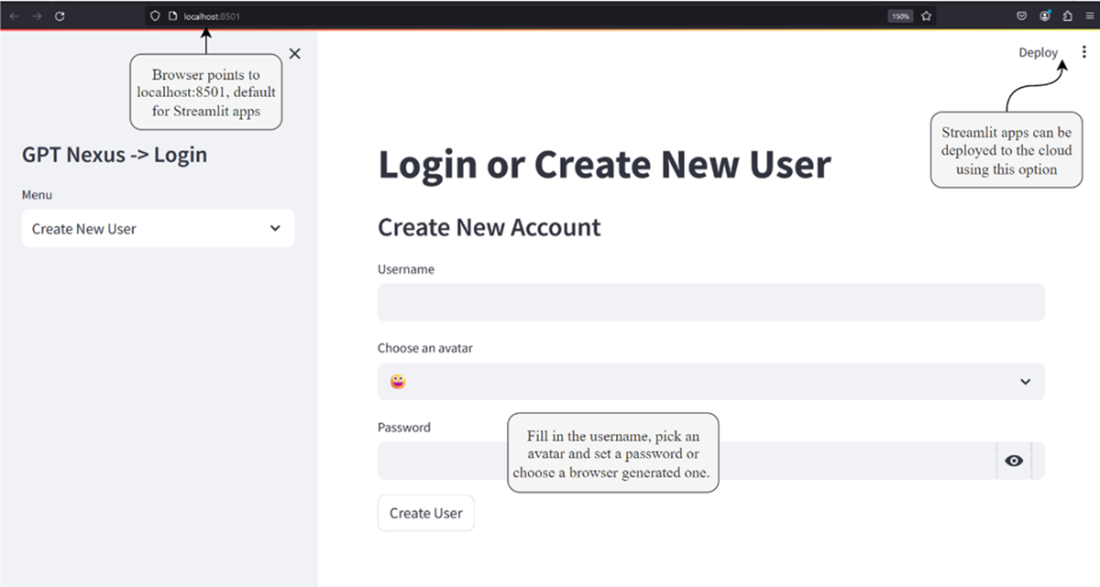
The Create New User page
A high-level architecture diagram of the main elements of the application
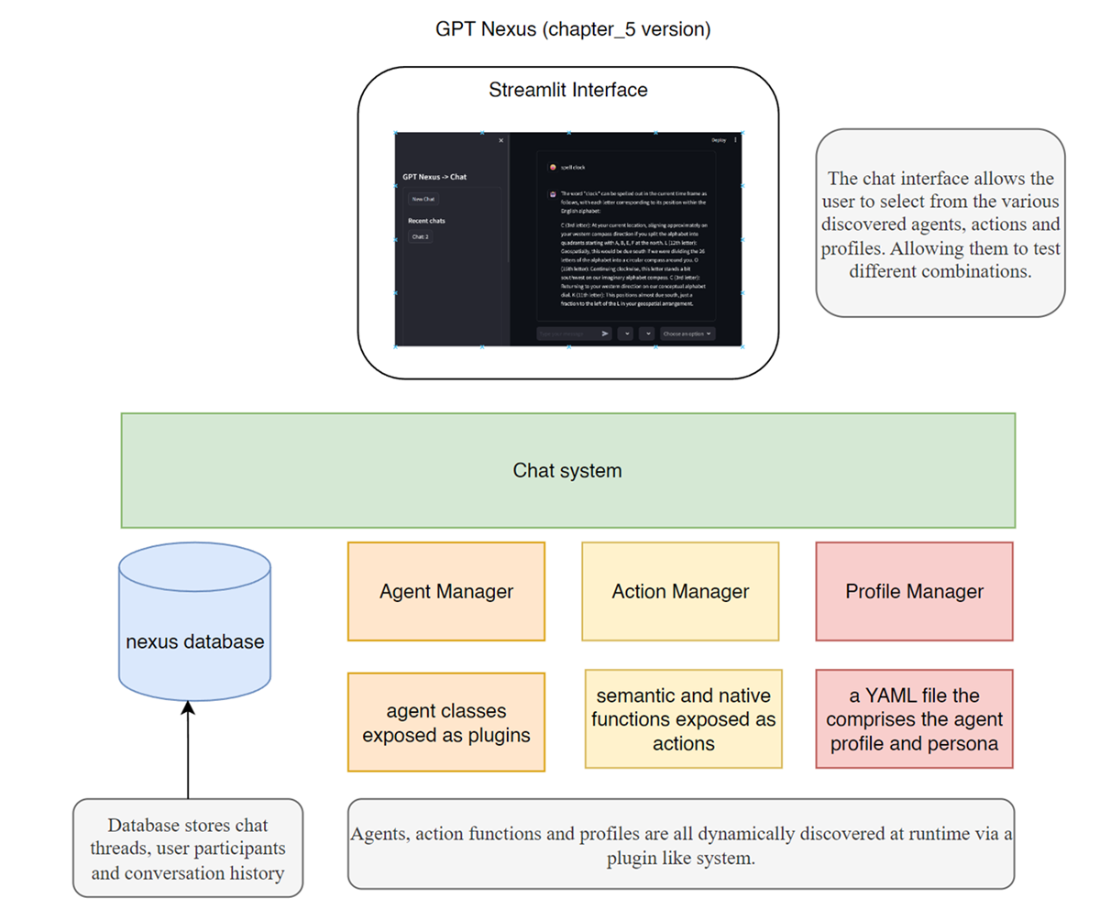
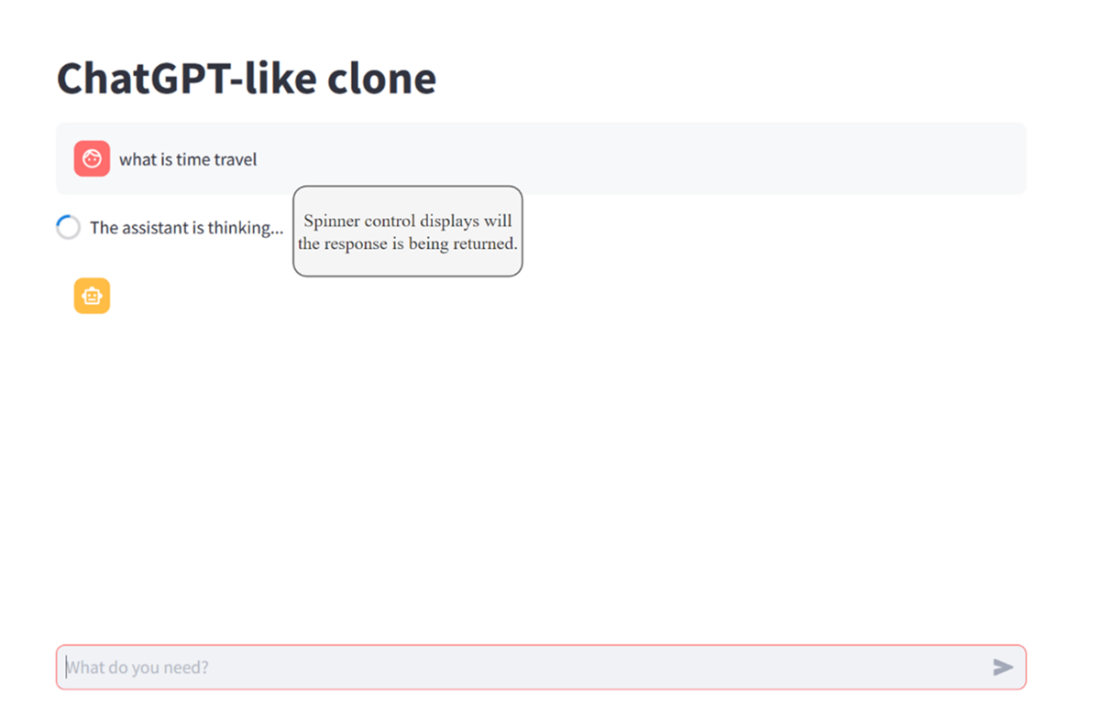
Figure [BW3] [ML4] 7.5 The simple interface and the waiting spinner
The updated interface with streaming of the text response
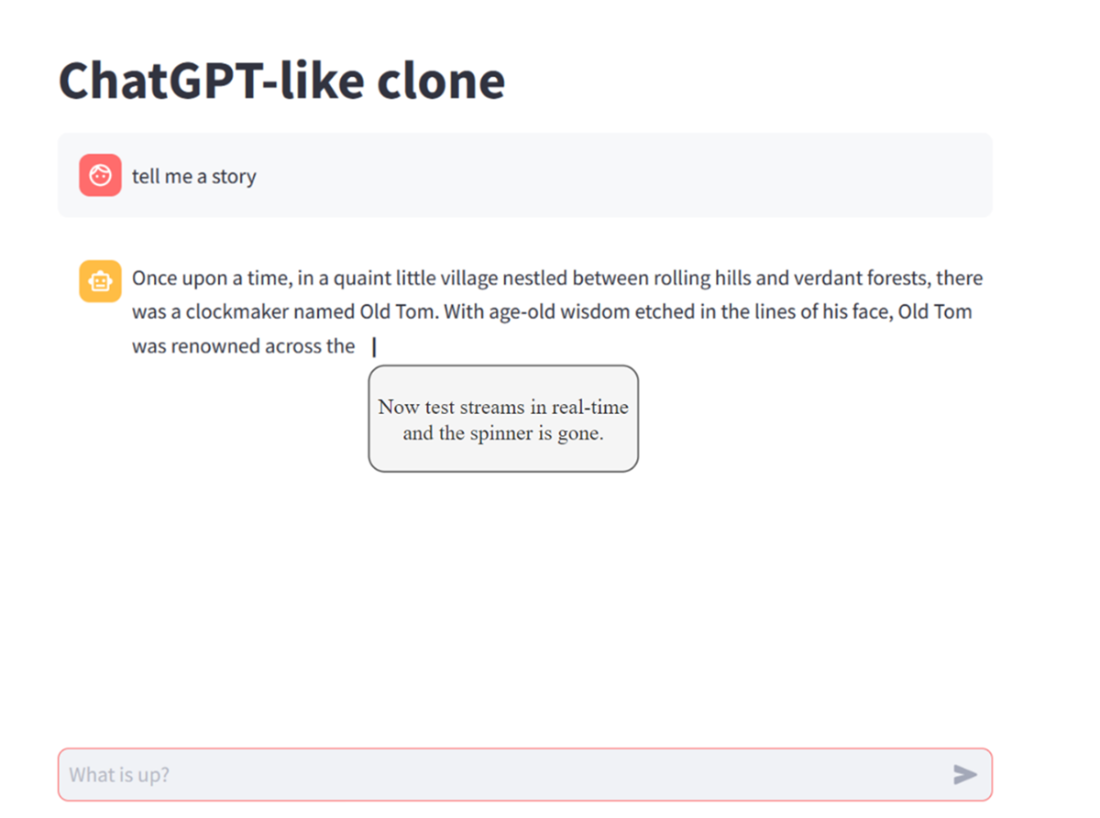
Figure [BW5] [ML6] [ML7] 7.7 The agent profile as it is mapped to the YAML file definition
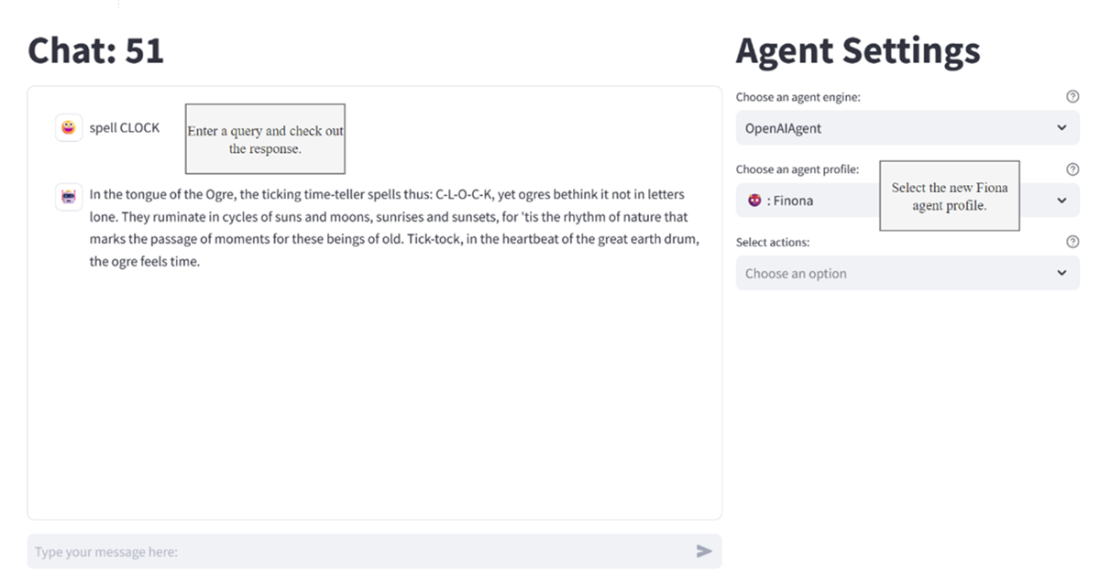
Selected and chatting with a new persona
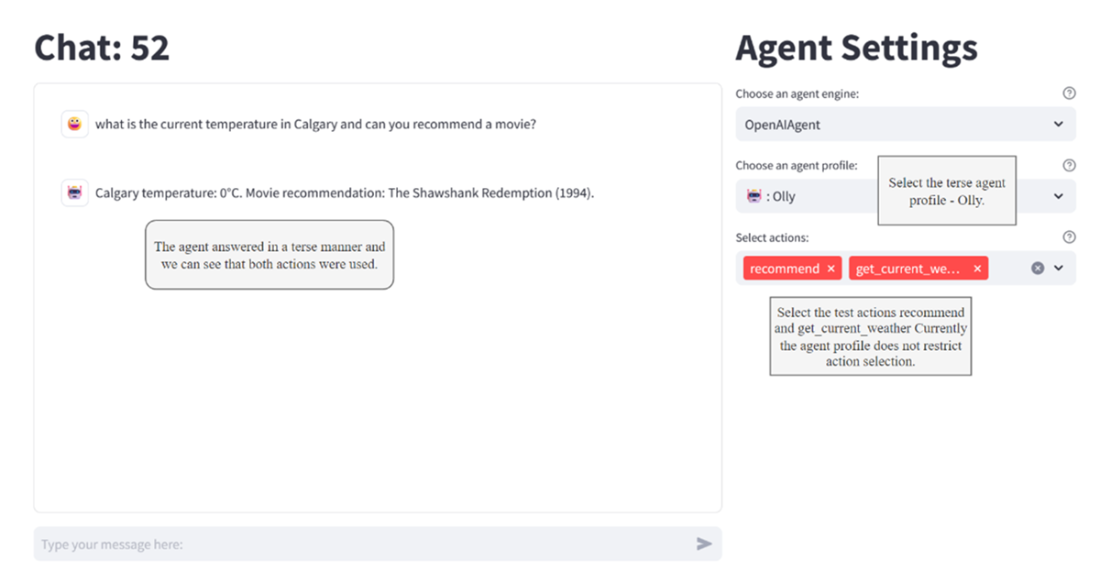
How the agent can use tools in parallel and respond with a single response
Summary
- Nexus is an open-source agent development platform introduced in conjunction with the book. It's designed to develop, test, and host AI Agents and is built upon Streamlit and FastAPI for creating interactive dashboards and chat interfaces.
- Streamlit, a Python web application framework, enables the rapid development of user-friendly dashboards and chat applications. This framework facilitates the exploration and interaction with various agent features in a streamlined manner.
- Nexus supports creating and customizing agent profiles and personas, allowing users to define their agents' personalities and behaviors. These profiles dictate how agents interact with and respond to user inputs.
- The Nexus platform allows for developing and integrating semantic (prompt-based) and native (code-based) actions and tools within agents. This enables the creation of highly functional and responsive agents.
- As an open-source platform, Nexus is designed to be extensible, encouraging contributions and the addition of new features, tools, and agent capabilities by the community.
- Nexus is designed to be flexible, supporting various deployment options, including a web interface, API, and a Discord bot in future iterations, accommodating a wide range of development and testing needs.
FAQ
What is Nexus and why use it over other agent platforms?
Nexus is an open-source agent platform built for this book to teach how to assemble, test, and run full-featured AI agents. It provides a simple Streamlit-based chat/dashboard UI, a plugin system for easy extensibility, and a clean architecture (Streamlit UI, chat system, DB, agent manager, action manager, profile manager). It’s designed to be easy to learn yet powerful enough to build real agent systems.How do I quickly run Nexus from scratch?
- Use Python 3.10 in a fresh virtual environment- Install:
pip install git+https://github.com/cxbxmxcx/Nexus.git- Set your OpenAI key via env var or a
.env file: OPENAI_API_KEY=<your key>- Start:
nexus run- A login page opens; create a user and start a chat.
How do I set up Nexus for development?
- Clone the repo:git clone https://github.com/cxbxmxcx/Nexus.git- In Python 3.10 venv, install editable:
pip install -e Nexus- Set
OPENAI_API_KEY (env var or .env)- Run:
nexus run or debug the Streamlit module targeting Nexus/nexus/streamlit_ui.py from VS Code.What role does Streamlit play in Nexus?
Streamlit provides the entire web UI using pure Python. The app is stateless (the script re-runs on interactions), so temporary data usesst.session_state. It supports chat components, spinners, and real-time streaming via st.write_stream. You can debug with a VS Code launch configuration that runs the streamlit module.How do I create and use a new persona/profile?
- Create a YAML file inNexus/nexus/nexus_base/nexus_profiles- Define
agentProfile fields (e.g., name, avatar, persona, and referenced actions)- Nexus auto-discovers profiles via its plugin system
- Launch Nexus, create a chat thread, and select your persona/profile in the UI.
What’s the difference between personas/profiles and actions/tools?
- Personas/profiles: define the agent’s system prompt, personality, and high-level behavior- Actions/tools: functions the agent can call to extend capabilities (data fetch, computation, prompt-based skills). Nexus supports both native (code) and semantic (prompt) actions.
How do I add actions/tools to an agent?
- Put Python functions in thenexus_actions folder- Decorate each with
@agent_action- Native actions return results from code
- Semantic actions define a prompt in the function docstring; no code body required
- Nexus auto-generates an OpenAI tool spec and exposes it to the LLM for tool use.
How does tool/function calling work at runtime?
The agent sends tool specifications to the LLM. If the LLM returnstool_calls, Nexus maps each tool name to the corresponding Python function, executes them (in parallel), appends their outputs as tool messages, then makes a follow-up LLM call that composes the final response using those tool results.What agent engines are supported, and how do I add a new one?
Currently Nexus ships with an OpenAI-powered agent. You can build others by subclassingBaseAgent (implements methods like get_response, get_response_stream, action loading, chat history) and placing your engine in the nexus_agents folder. Nexus will discover it via the plugin system.Any quick troubleshooting tips?
- Verify Python 3.10 and a clean virtual environment- Ensure
OPENAI_API_KEY is correctly set (env var or .env)- If profiles/actions don’t appear, check file paths and restart the app to reload plugins
- Enable browser cookies (used for remembering the logged-in user)
- For slow responses, use streaming UI and confirm model is set in session state.

 AI Agents in Action ebook for free
