8 Deploying agents and agentic systems
This chapter moves from toy examples to deployable agentic systems, focusing on how agents are consumed and where they should run. It contrasts three practical patterns—embedding agents directly in applications for low-latency experiences, hosting them as microservices behind APIs, and exposing them as tools via MCP or agent-to-agent calls—and demonstrates them with a browser-based real-time voice agent that delegates heavier work to a backend image-generation service. The examples show how to keep user experiences responsive, apply separation of concerns, and choose a pattern that fits interaction style, runtime needs, and operational control.
The deployment journey then centers on containerization and orchestration: packaging agents with Docker, running and managing them with Docker Desktop, and composing multiple services with Docker Compose to form a cohesive multi-agent stack. For quick demos, the chapter also shows how to tunnel local services externally. Architecture choices are framed by latency and workload: edge/browser runtimes for conversational and voice use, synchronous APIs for request/response tools, and event-driven workers for long or bursty jobs. Communication “wires” map to these needs—WebRTC/WebSocket for realtime, HTTP+SSE for streamed tool output, and message buses for background tasks—organized in a practical front-door topology that routes to specialized workers. State and memory are simplified with short-term chat stores, long-term knowledge via retrieval, and idempotent, cacheable tools to reduce latency and cost, complemented by intent-based model routing and trimmed context.
To productionize, the chapter emphasizes release engineering and operability: version prompts, tools, and models; gate and canary releases; and instrument everything with traces, metrics, and structured logs. Reliability improves with explicit time budgets, fallbacks, circuit breakers, and graceful degradation to maintain stable UX. Security, safety, and governance are addressed with a concrete threat model across client, gateway, runtime, tools, model provider, and storage; least-privilege identity, ephemeral client secrets, and externalized secret/config management; sandboxed tools with egress controls and resource limits; and defenses against prompt injection and data exfiltration using instruction hierarchies, schema-first allowlisted tools, and I/O sanitation. Content safety, policy enforcement, and human-in-the-loop approvals close the loop. With these patterns, you can select the right deployment strategy, containerize and orchestrate agents, and operate them securely and cost-effectively at scale.
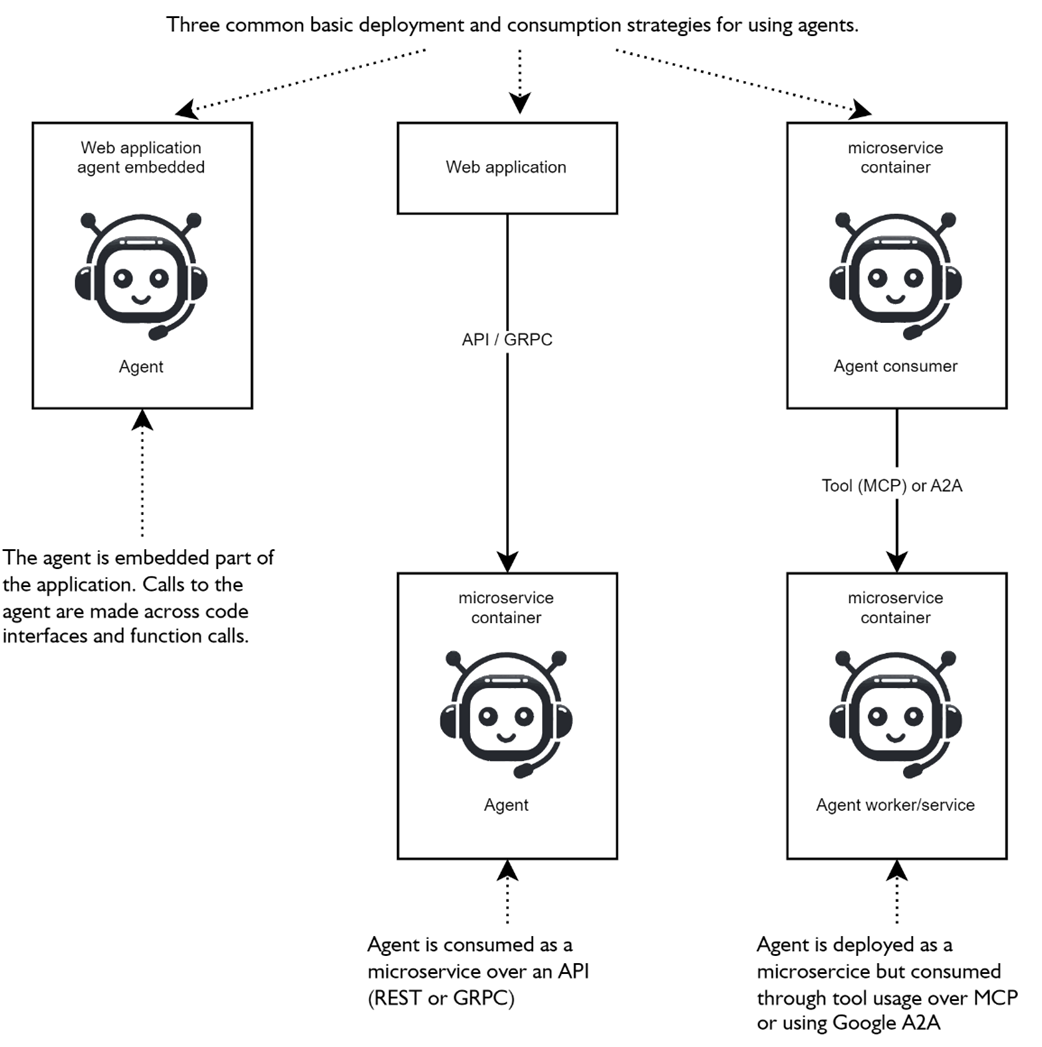
shows three simple patterns for deploying and consuming agents. From embedded agents, a microservice API is accessible or used as a tool through other agents.
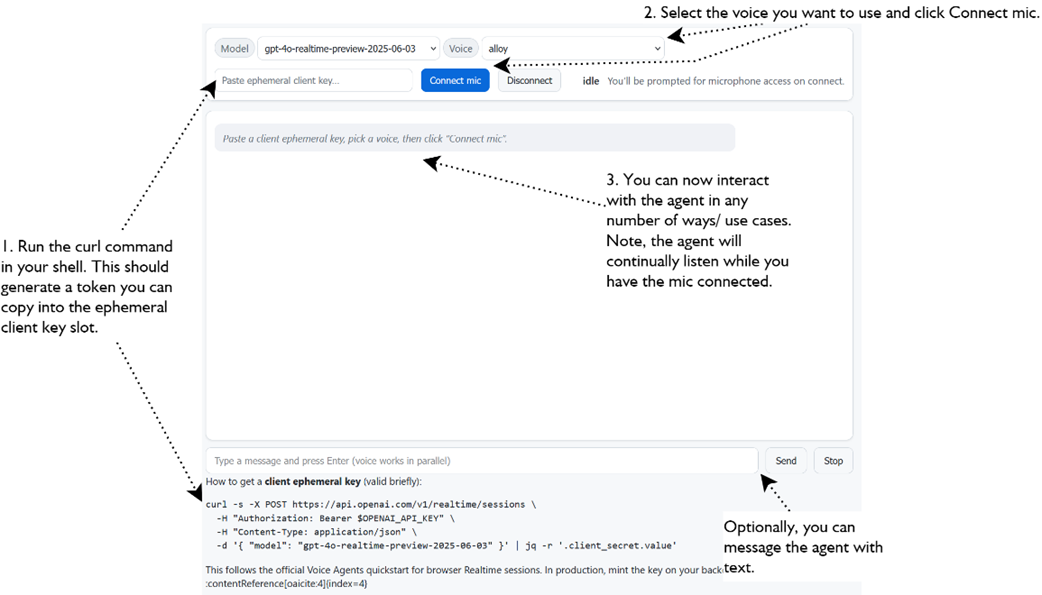
Connecting to a real-time model using a RealTime Agent object in a web browser. Allows for vocal interaction with the agent hosted in the browser.
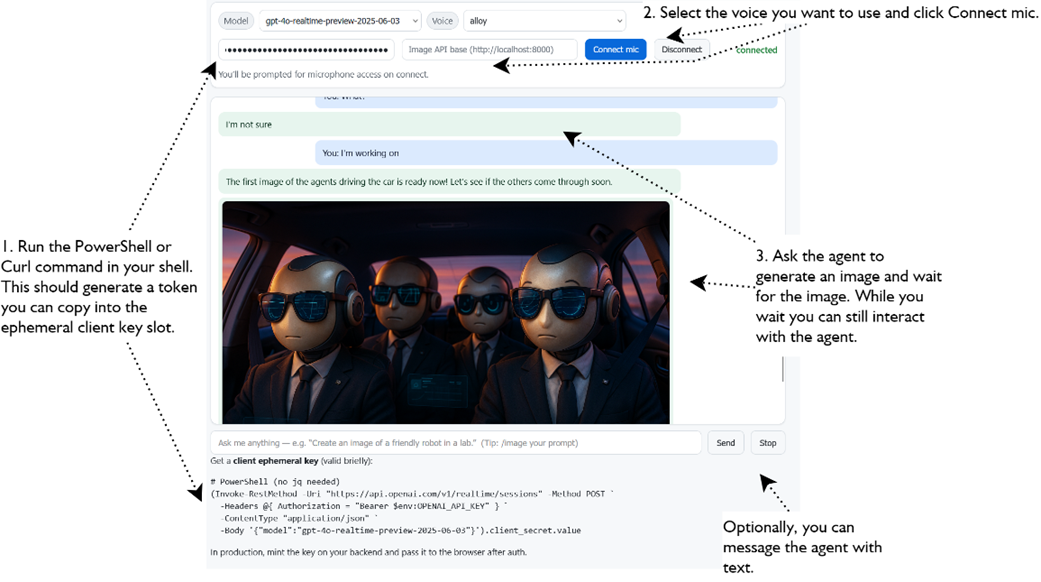
connecting the real-time voice agent to the API image generation agent as a tool and then generating images.
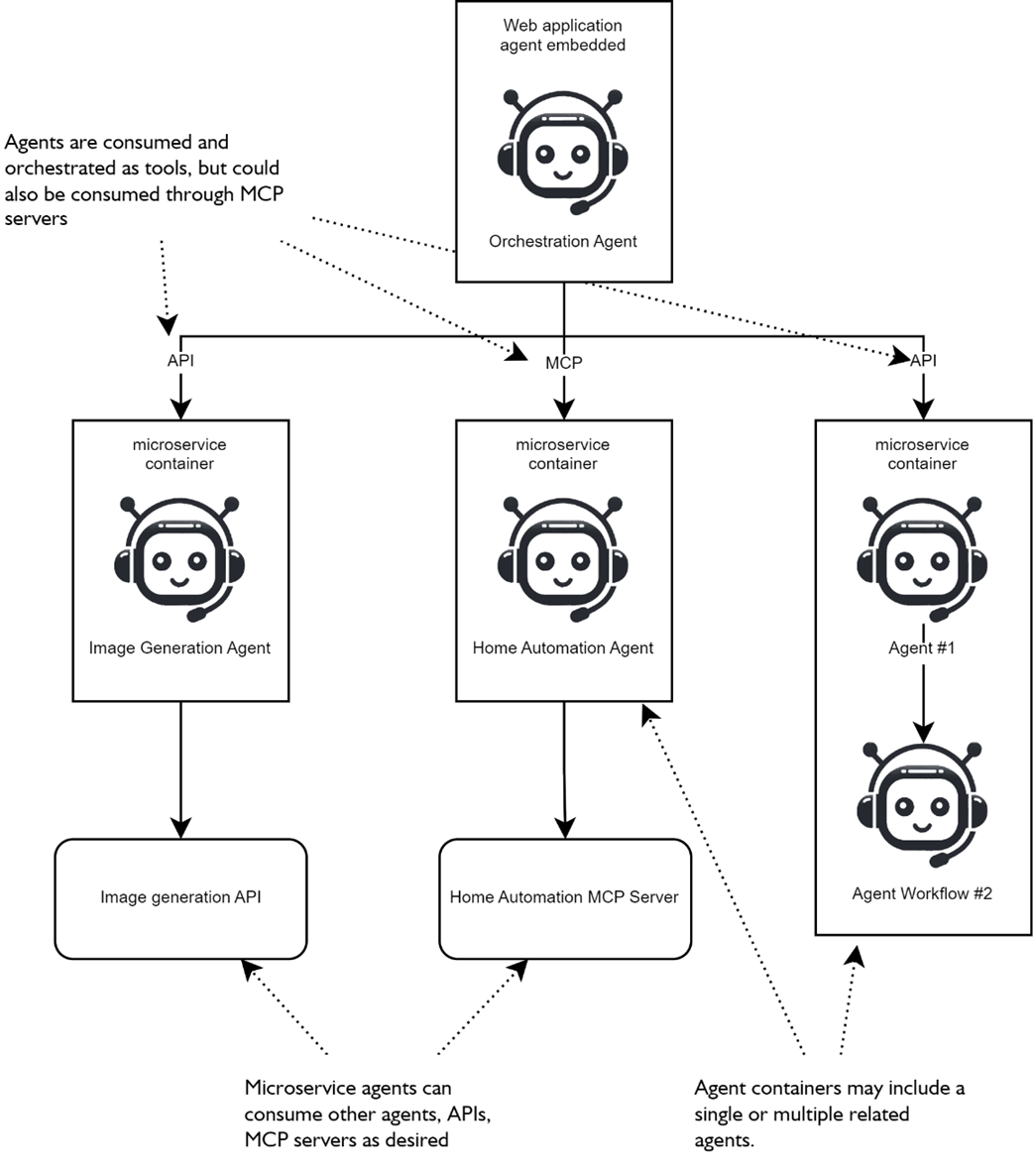
There are several ways afrontend agent may consume containerized microservice agents as tools through an API or as MCP servers.
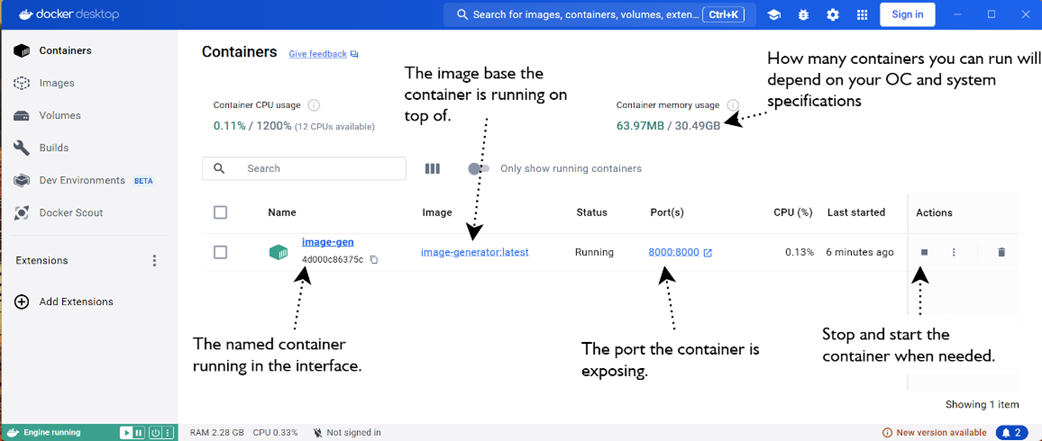
Docker Desktop interface for managing containers, allowing a user to start/stop containers, delete containers, and images.
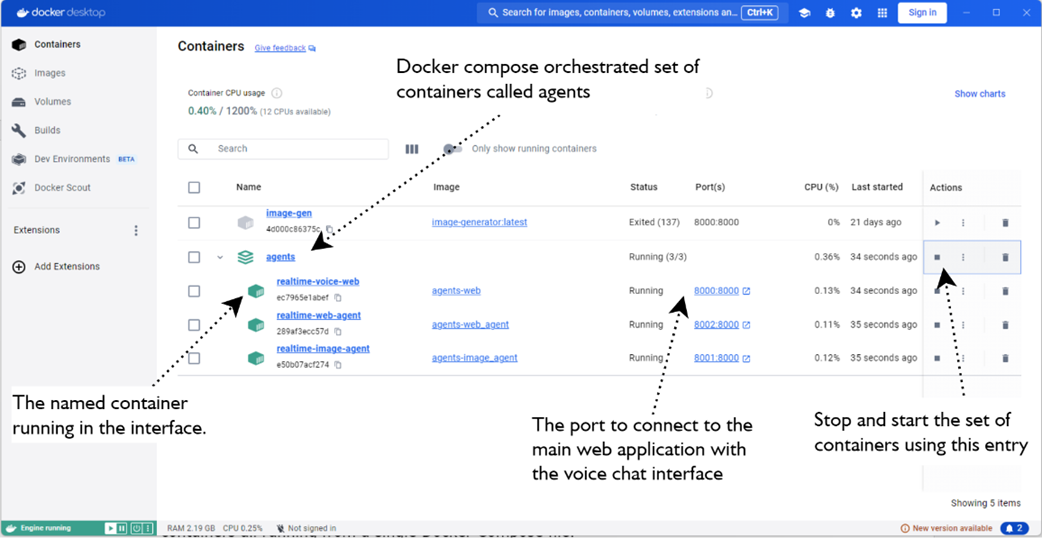
shows a set of containers orchestrated through a Docker Compose file.
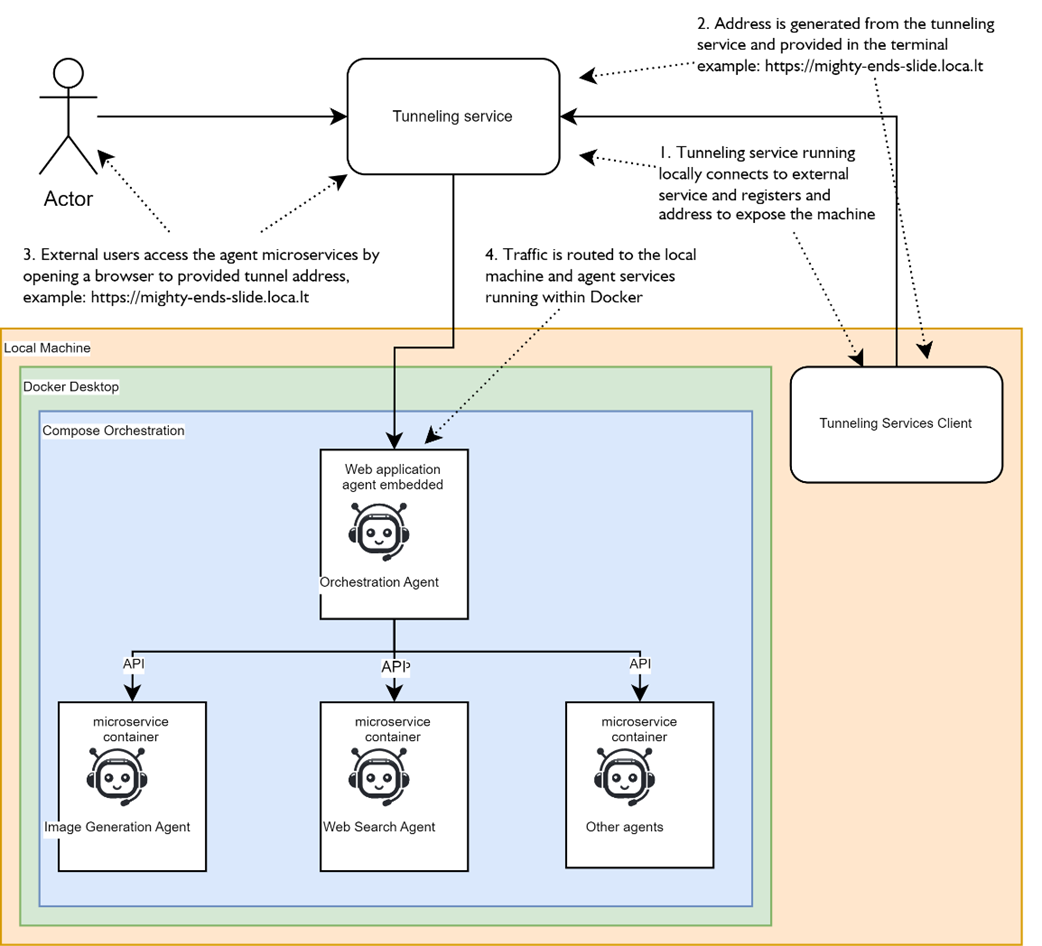
illustrates how external tunneling options can expose locally running agent services to external users. The Actor represents an external network user accessing an agent service. First the user browses to the tunneling service address and then routed to the a developers local machine.
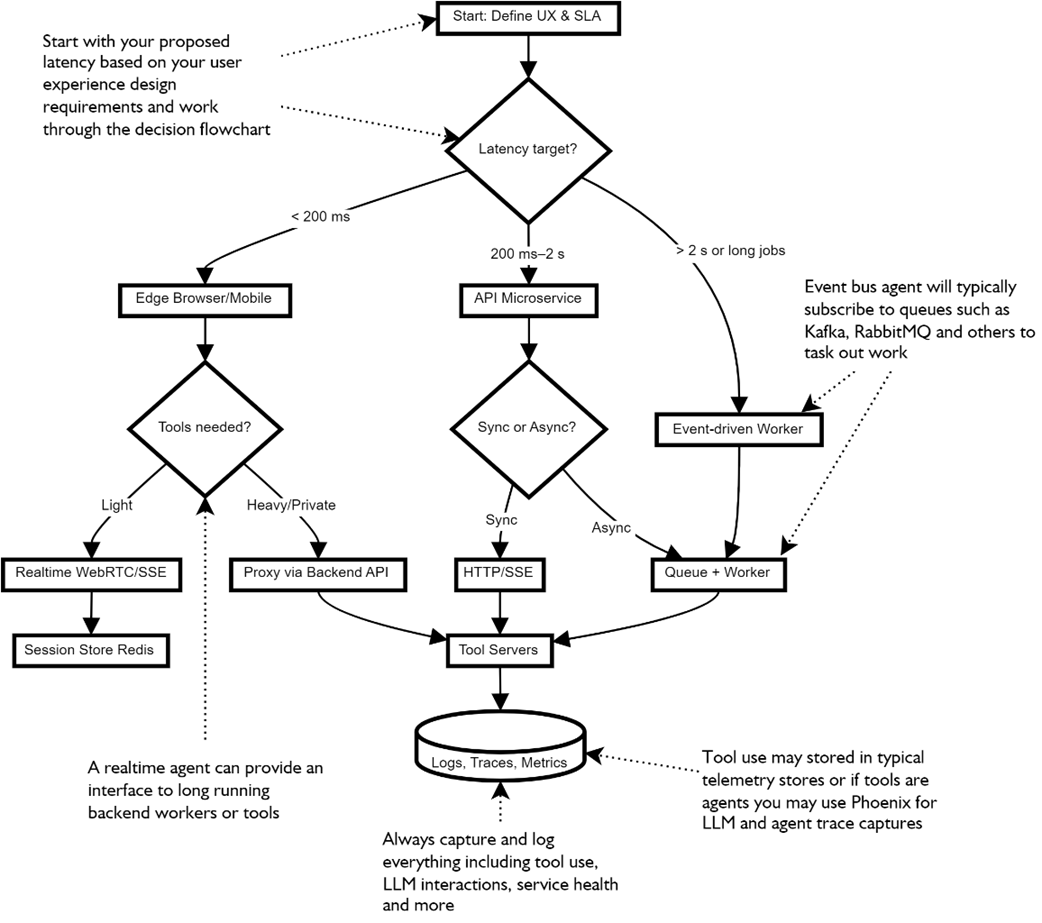
a helpful decision flowchart for deciding agent deployments.
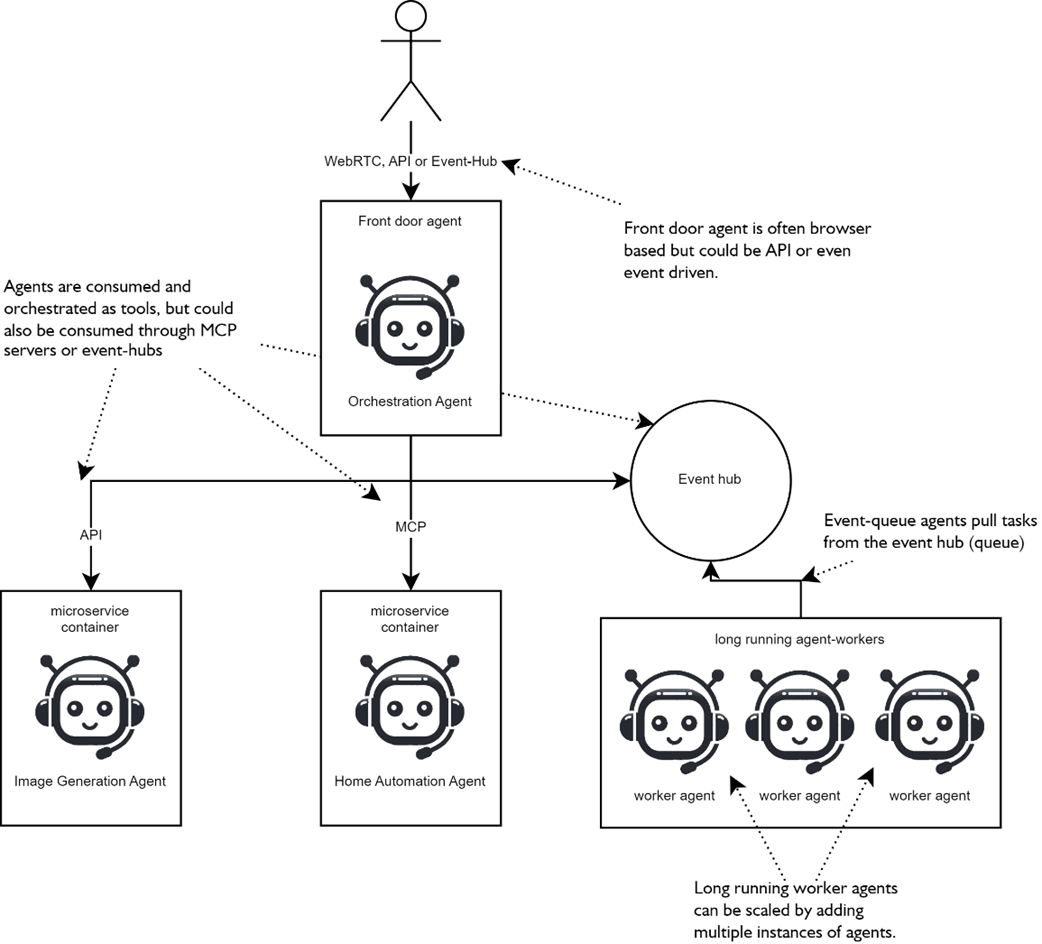
The practical front-door agent deployment pattern used for user-facing agents and applications
Summary
- Agent consumption drives deployment: embed for ultra‑low latency UX, wrap as a synchronous API for request/response tasks, or run as event‑driven workers for long jobs and retries.
- Realtime agents in the browser (WebRTC/WebSocket) deliver barge‑in speech, token streaming, and the most responsive experiences—keep tools simple or proxy them server‑side.
- Microservices + containers cleanly separate concerns; agents make ideal microservices because they’re self‑contained and easy to scale, swap, and version.
- Dockerizing agent APIs standardizes runtime and dependencies; Compose lets you stand up multi‑agent stacks (UI, worker agents, tool services) with one command.
- External tunneling (e.g., localtunnel) turns local prototypes into shareable demos without full cloud deployment—useful for POCs and quick pilots.
- Choose the “wire” by latency and fit: WebRTC/WebSockets for realtime, HTTP+SSE for streamed request/response, and message buses for decoupled background work.
- Front‑door/orchestrator patterns route user intents to specialized worker agents; keep the front‑door light and push complexity into typed, well‑scoped workers.
- State and idempotency matter: store short‑term chat state separately from long‑term knowledge, and make tool calls idempotent to enable caching, replay, and resilience.
- Release engineering applies to agents: version prompts, tools, and models; promote with gates; pin exact model/tool versions for reproducibility and incident debugging.
- Observability is non‑negotiable: trace from UI → gateway → agent → tools → model; track latency, cost, and success metrics; prefer structured logs with PII redaction.
- Reliability patterns—timeouts, fallbacks, circuit breakers, and graceful degradation—keep systems useful even when tools or models misbehave.
- Cost control comes from routing by intent, trimming context, and caching deterministic results—lower tokens often means lower latency, too.
- Security, safety, and governance must be built‑in: threat‑model surfaces, enforce least privilege, manage secrets correctly, sandbox tools, and defend against prompt‑injection with schema‑first tool contracts and instruction hierarchies.
- With deployment patterns, observability, and safety in place, agents graduate from demos to dependable, production‑ready systems.
FAQ
What are the main ways to deploy and consume agents, and when should I use each?
Three common patterns:
- Embedded in the app (edge/browser): Ultra‑low latency and great for real‑time voice/chat. Keep tools simple and stateless; avoid long‑running or multi‑agent workflows. Prompts/logic may be more exposed.
- Backend API (microservice): Wrap the agent behind an HTTP API. Good separation of concerns, supports long‑running work and RAG. Add streaming for responsive UX.
- Containerized microservice as a tool (API/MCP/A2A): Self‑contained agents consumed by other agents or apps. Ideal for scaling, swapping, and isolating long or heavy tasks. No built‑in UI.
How do I safely embed a real‑time voice agent in a web application?
- Use a realtime model connection (e.g., OpenAI Agents SDK Realtime) in the browser.
- Mint short‑lived (ephemeral) client secrets on your backend after user auth; never ship provider API keys to the browser.
- Optimize for low latency: keep tools light, avoid heavy backend round‑trips, and limit capabilities when possible.
- Great for conversational interfaces; not suited for long‑running/background tasks without proxying to backend tools.
When should I host an agent behind a web API, and what’s a minimal approach?
Use a backend API when you need separation, control, or long‑running operations (e.g., image generation, retrieval, analytics). A minimal pattern:
- Wrap the agent with a simple POST endpoint (e.g., FastAPI) to accept inputs too large/long for GET.
- Return clean payloads (e.g., image bytes or JSON) so clients don’t need to post‑process base64.
- Enable streaming for partial results when desired; otherwise handle long ops asynchronously.
How do I containerize an agent microservice with Docker?
- Create a Dockerfile from a slim base (e.g., python:3.11‑slim), install dependencies, copy app code, expose a PORT, and run via a production server (e.g., uvicorn).
- Inject secrets (OPENAI_API_KEY) at runtime with
-eor a secrets manager; don’t bake them into images. - Run locally with port mapping:
docker run -p 8000:8000 -e OPENAI_API_KEY=... - Use Docker Desktop to view logs, start/stop containers, and manage versions.
How can I orchestrate multiple agent services with Docker Compose?
- Define each service (web UI, voice agent, image agent, etc.) in
docker-compose.yamlwith build contexts, ports, env vars, anddepends_on. - Share environment via
.env(e.g., OPENAI_API_KEY); pin default models/voices per service. - Start everything with
docker compose up --build, then access the web UI and watch logs for tool calls across services.
Can I expose local agent services to the internet without a cloud deploy?
- Yes, use tunneling tools like localtunnel or ngrok to expose
localhostports quickly (e.g.,npx localtunnel --port 8000). - Good for demos, POCs, and debugging; not recommended for production due to reliability, security, and performance limits.
- Use authentication and understand any default passwords or access rules in the tunneling tool.
How do I choose where the agent runs: edge, API, or event‑driven workers?
- Let latency drive the decision: ultra‑low latency UX → edge/browser; normal request/response → API microservice; long/bursty tasks or retries → event‑driven workers/queues.
- Start simple: begin with an API, move hot paths to edge, and offload heavy tools to workers.
- Plan for mixed topologies (a “front‑door” agent coordinating specialized worker agents).
What communication channels (“wires”) should I use between agents and tools?
- WebRTC/WebSocket (Realtime): Full‑duplex audio/text, barge‑in, streaming TTS; best for voice/interactive UX.
- HTTP + SSE (e.g., MCP): Simple request/response with streamed output; easy to proxy, log, and cache.
- Message bus (Redis/NATS/Kafka): Decoupled, resilient execution for slow or concurrent tools; post results back when ready.
How should I handle state, memory, and idempotency in agent systems?
- Short‑term conversation/state: store in fast stores (Redis/PostgreSQL); long‑term knowledge: vector stores via RAG.
- Design tools to be idempotent and cacheable using deterministic keys (e.g., hash of inputs) for fast retries and replays.
- Keep passed context minimal and role‑specific to reduce tokens, cost, and confusion.
What are the must‑have production practices: observability, reliability, cost, and security?
- Observability: Trace every turn/tool call with correlation IDs; track p50/p95 latency, success rates, token/cost; keep structured logs with PII redaction. Tools like Phoenix help.
- Reliability: Enforce time budgets, fallbacks, circuit breakers, and graceful degradation (e.g., text if TTS fails).
- Cost control: Route by intent (small model for routing, larger for hard tasks), trim context, and cache wherever possible.
- Security and safety: Threat‑model surfaces (client, API, agent, tools, model, storage), least privilege/ephemeral client secrets, secret rotation, sandbox tools with egress allowlists, defend against prompt‑injection, and add HITL/policy/content filters where needed.
AI Agents in Action, Second Edition ebook for free