24 Extended ACLs
Extended ACLs build on the fundamentals of standard ACLs to offer far more granular traffic control. Like all ACLs, they evaluate packets top-down and end with an implicit deny, and they only take effect when applied inbound or outbound on an interface. Whereas standard ACLs match solely on source IP, extended ACLs can match on protocol, source and destination addresses, and even transport-layer ports. Because they can precisely target specific flows, extended ACLs are best placed as close to the source as possible, preventing unwanted traffic from traversing the network.
Configuration options include both numbered (100–199, 2000–2699) and named extended ACLs, with most admins preferring named ACL mode for flexibility. ACEs can match payload protocol (ip, tcp, udp, icmp, and others), source/destination IPs using wildcard masks, the any and host keywords, and TCP/UDP ports using operators such as eq, gt, lt, neq, and range. All specified fields must match for an ACE to apply. Extended ACLs also support well-known port keywords (for example, ntp for UDP/123), and they require using host or a /32 wildcard to match a single IP. The chapter demonstrates assembling practical policies—such as permitting specific HTTPS flows, allowing NTP to a single server while denying it elsewhere, and combining targeted denies with a final permit ip any any—to meet business requirements.
Because ACE order determines behavior, editing is critical. Deleting ACEs from a numbered ACL in global configuration removes the entire ACL, so the recommended method is to use named ACL configuration mode, where you can delete an ACE by its sequence number and insert new ACEs exactly where needed. When space between sequence numbers runs out, the ip access-list resequence command renumbers ACEs with a new starting value and increment, creating room for future edits. Together, these techniques let you safely maintain ACL logic over time while verifying results with show access-lists.
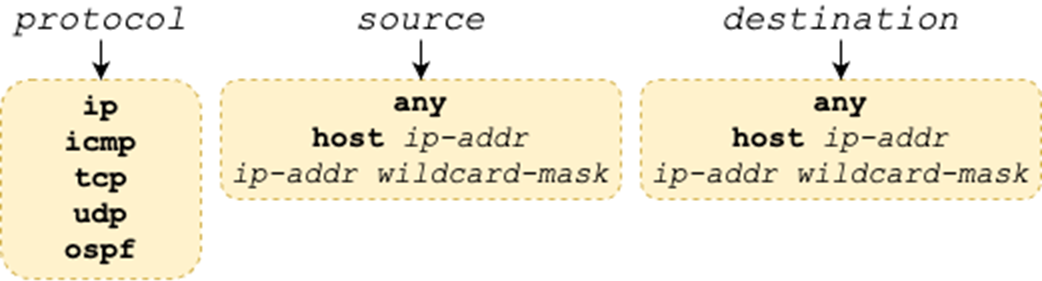
Possible matching parameters. The protocol argument specifies the protocol of the packet’s payload. The source and destination arguments specify the packet’s source and destination IP addresses, respectively.
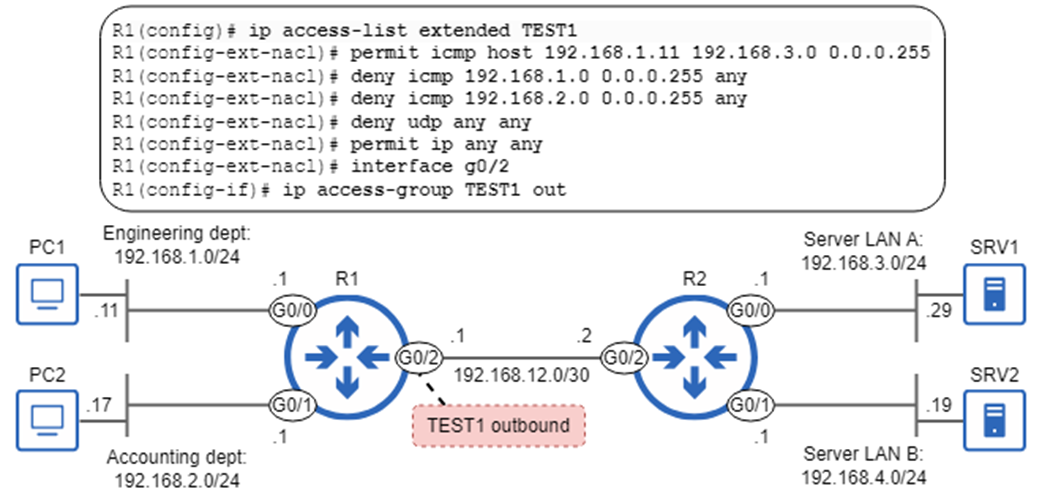
Extended ACL TEST1 is applied outbound on R1 G0/2. TEST1 permits ICMP traffic from PC1 to 192.168.3.0/24, denies ICMP traffic from 192.168.1.0/24 and 192.168.2.0/24, denies all UDP traffic, and permits all other IPv4 packets.
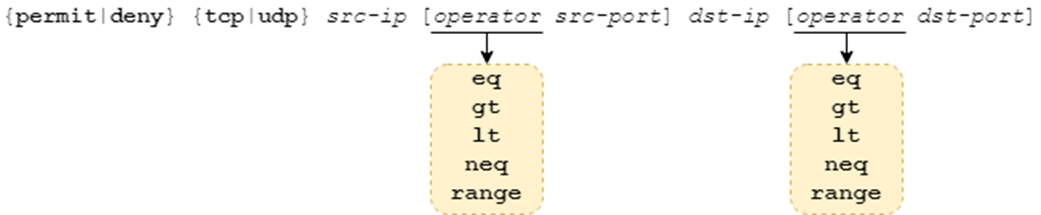
Configuring an ACE that matches packets based on protocol (TCP/UDP), source/destination IP addresses, and source/destination ports.
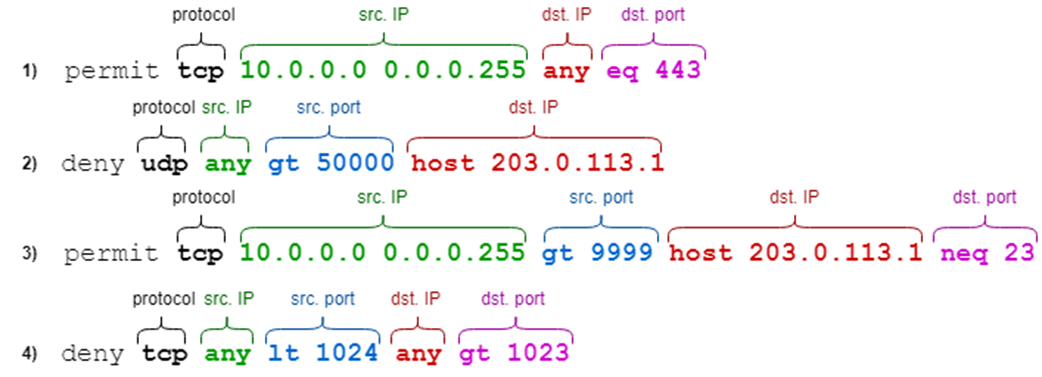
ACEs that match packets based on protocol, source IP, source port, destination IP, and destination port. Not all ACEs specify both the source and destination ports.
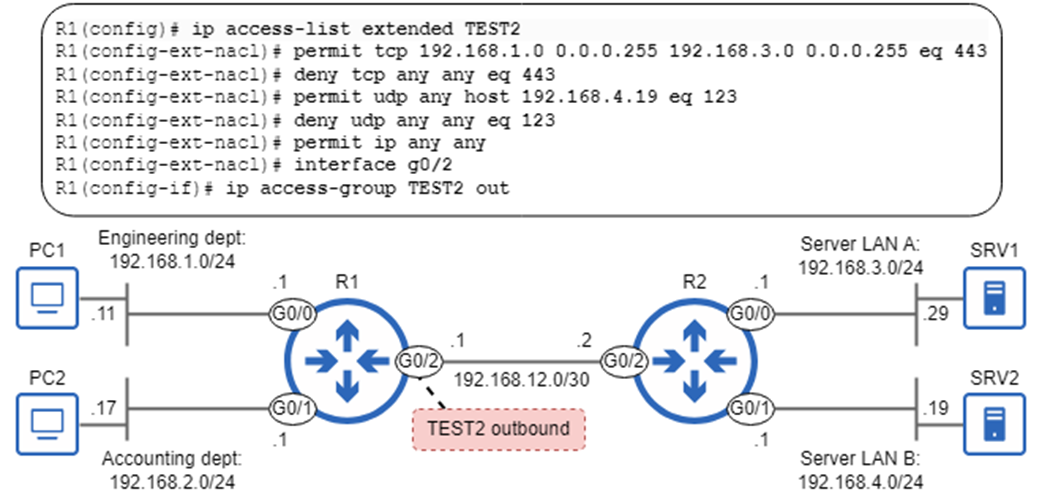
Extended ACL TEST2 is applied outbound on R1 G0/2. TEST2 permits HTTPS traffic from the Engineering department to Server LAN A, denies all other HTTPS traffic, permits all NTP traffic to SRV2, denies all other NTP traffic, and permits all other IPv4 packets.
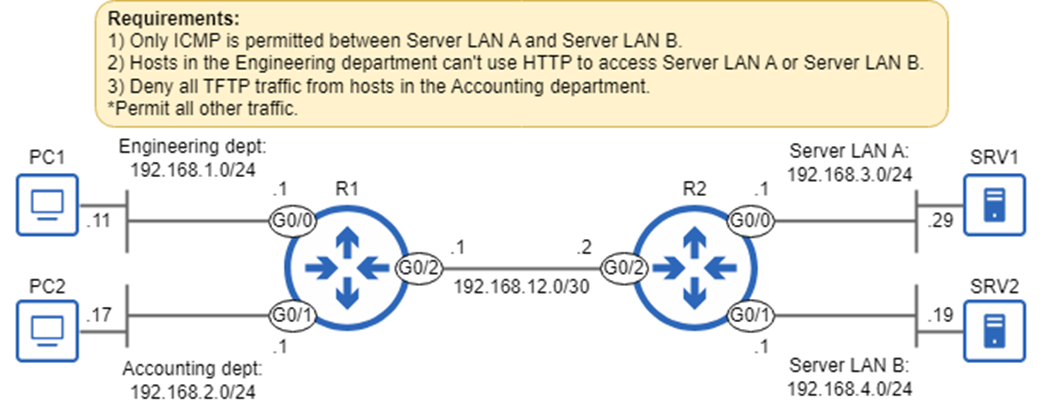
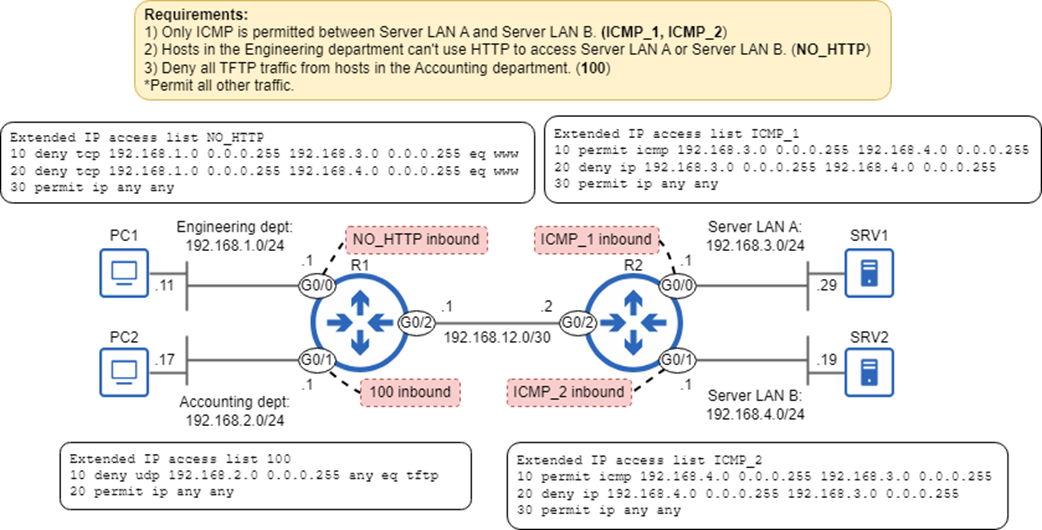
Requirements to be fulfilled by configuring extended ACLs.
Four ACLs configured on R1 and R2 fulfill the requirements. ACLs ICMP_1 and ICMP1 fulfill requirement 1, ACL NO_HTTP fulfills requirement 2, and ACL 100 fulfills requirement 3.
The ip access-list resequence command. The starting-seq-num argument specifies the new sequence number of the ACL’s first ACE, and the increment argument specifies the increment for each subsequent ACE.

Summary
- Extended ACLs can filter packets based on parameters such as the protocol of the packet’s payload (TCP, UDP, ICMP, OSPF, etc.), source/destination IP addresses, and source/destination ports.
- Extended ACL configuration is similar to standard ACL configuration. You can configure extended ACLs in global config mode with the access-list command (numbered only), or in named ACL config mode with ip access-list.
- You can configure an extended numbered ACL with access-list number {permit | deny} protocol source destination. Extended numbered ACLs must use a number from ranges 100–199 or 2000–2699.
- You can configure an extended ACL in named ACL config mode with ip access-list extended {name | number}. From there, configure each ACE with [seq-num] {permit | deny} protocol source destination.
- For the protocol argument, you can specify a keyword like icmp, tcp, udp, or ospf to match packets that carry the specified protocol in its payload. Or, you can specify ip to match all IPv4 packets, regardless of the encapsulated protocol.
- The options for the source and destination arguments are: any (to match any IP address), host ip-addr (to match only the specified IP address), and ip-addr wildcard-mask (to match the specified range of IP addresses).
- Whereas standard ACLs should be applied as close to the destination as possible, extended ACLs should be applied as close to the source as possible.
- When tcp or udp are specified for the protocol argument, you can also specify TCP/UDP port number(s) as matching conditions.
- The command syntax to configure an ACE that specifies a port number is {permit|deny} {tcp|udp} src-ip [operator src-port] dst-ip [operator dst-port].
- The options for the operator argument are eq (equal to X), gt (greater than X), lt (lower than X), neq (not equal to X), and range (from X to Y). Some examples:
- eq 80 = equal to 80
- gt 80 = greater than 80 (but not including 80)
- lt 80 = less than 80 (but not including 80)
- neq 80 = not equal to 80 (anything other than 80)
- range 80 100 = from 80 to 100 (including 80 and 100)
- An ACE can specify only the source port, only the destination port, both, or neither. If you don’t specify the source/destination ports as matching conditions, all source/destination ports will match.
- A packet must match all of an ACE’s conditions to be considered a match. If the ACE specifies the protocol, source IP, source port, destination IP, and destination port, all five parameters must match.
- When specifying port numbers in an ACE, some common protocols have keywords that can be used instead of numbers. Some examples:
- TCP 20 (FTP data) = ftp-data
- TCP 21 (FTP control) = ftp
- TCP 23 (Telnet) = telnet
- TCP/UDP 53 (DNS) = domain
- UDP 69 (TFTP) = tftp
- TCP 80 (HTTP) = www
- When a host uses a protocol to access resources on another host (a server), it uses the protocol’s port number as the destination port, not the source port. To filter that traffic, make sure to filter based on the destination port, not the source port.
- When editing a numbered ACL from global config mode, you can’t delete individual ACEs; you can only delete the entire ACL.
- Deleting an ACE in named ACL config mode is easy: use no followed by the sequence number, such as no 30 to delete the ACE with sequence number 30.
- Named ACL config mode also allows you to insert new ACEs in between existing ones by specifying a sequence number at the beginning of the command.
- You can renumber an ACL’s ACEs with the ip access-list resequence {name | number} starting-seq-num increment command. starting-seq-num specifies the sequence number of the first ACE, and increment specifies the increment for each additional ACE. For example, ip access-list 1 resequence 5 5 will set ACL 1’s first ACE to sequence number 5, the second to 10, the third to 15, etc.

 Acing the CCNA Exam, Volume 1 ebook for free
