9 Threading: web workers and pthreads
Modern web apps can offload heavy computation from the main UI thread to keep pages responsive. This chapter explains how browsers execute JavaScript and WebAssembly on a single UI thread by default, why long-running work can freeze animations and input, and how web workers introduce background threads that communicate with the main thread via message passing. It outlines when workers help (parallelizing on multicore CPUs, using synchronous APIs off the UI thread) and key constraints (high startup and memory costs, no direct DOM access, message-only communication, and mindful resource use). The guidance emphasizes favoring asynchronous APIs to avoid blocking and notes environment differences and compatibility considerations.
A practical pattern shows how to prefetch and compile a WebAssembly module inside a worker so the main thread stays smooth. The worker downloads and compiles the module, then posts the compiled artifact back to the page. On receipt, the page instantiates an Emscripten Module configured with a custom instantiateWasm callback that instantiates from the already-compiled module instead of letting Emscripten fetch and compile it. Using MODULARIZE lets you control when initialization happens, and message handlers coordinate handoff between threads. The example applies this flow to a prime-number calculator, measuring execution time while preserving UI responsiveness.
The chapter then covers WebAssembly threads via pthreads, implemented with web workers plus a SharedArrayBuffer that enables shared linear memory and atomic operations for synchronization. It walks through splitting the prime search across multiple threads with pthread_create and pthread_join, and compiling with Emscripten flags such as USE_PTHREADS and PTHREAD_POOL_SIZE to provision a worker pool; it also explains the role of the generated .mem file in data segment handling. Practical cautions include the cost of oversizing pools, browser security policies around shared memory, and the need to test across engines. In the example, distributing work across four pthreads significantly accelerates the computation compared to the single-threaded version.
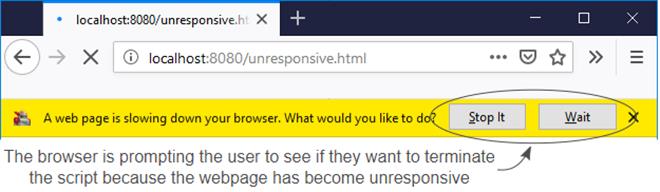
A long-running process has caused Firefox to become unresponsive. The browser is prompting the user to see if they want to terminate the script.
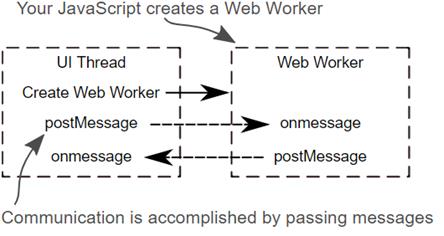
Your JavaScript creates a web worker and then communicates with the web worker by passing messages.
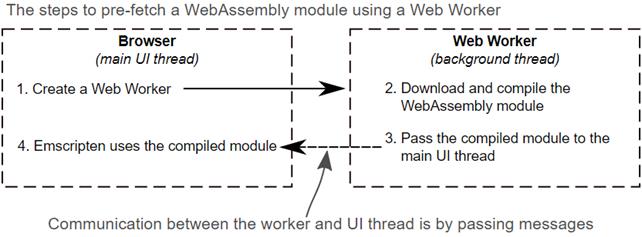
Your JavaScript creates a web worker. The worker will download and compile the WebAssembly module and then pass the compiled module to the main UI thread. Emscripten then uses the compiled module rather than downloading the module itself.
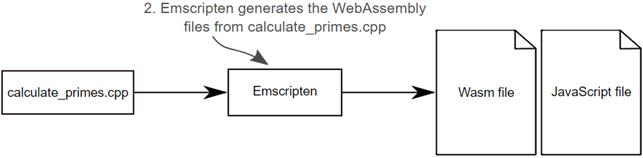
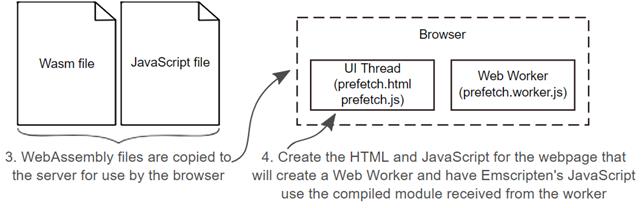
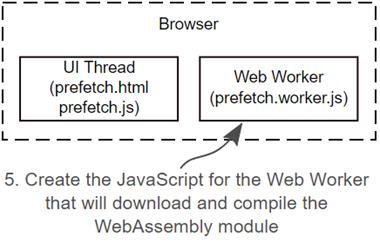
The steps to implement the pre-fetch scenario. Adjust calculate_primes.cpp to determine how long the computations take. Instruct Emscripten to generate the WebAssembly files and then create the HTML and JavaScript files. The JavaScript will create a web worker to download and compile the WebAssembly module. Finally, the compiled module will be passed back to the webpage where it will be instantiated by your code instead of Emscripten’s JavaScript.

Adjust the calculate primes logic to determine how long the calculations take
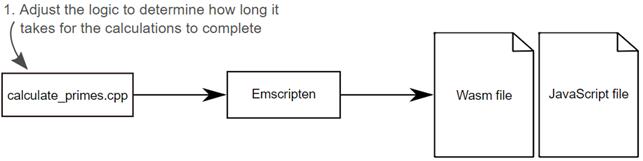
Use Emscripten to generate the WebAssembly files from calculate_primes.cpp
Copy the WebAssembly files to the server for use by the browser. Then create the HTML and JavaScript for the webpage. The JavaScript will create a web worker and then will have Emscripten’s JavaScript use the compiled module received from the worker.
The final step is to create the JavaScript file for the web worker that will download and compile the WebAssembly module. Once compiled, the WebAssembly module will be passed to the UI thread.
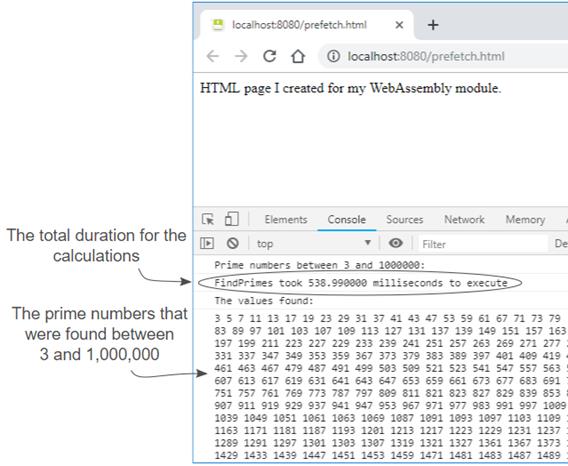
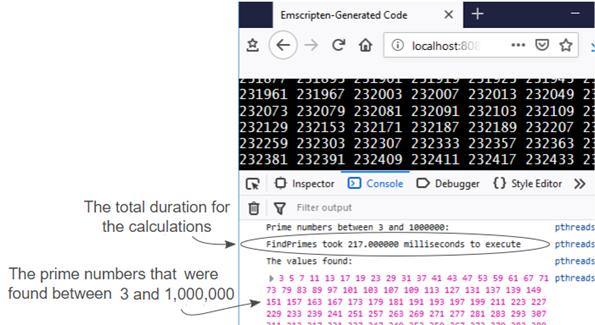
The prime numbers found by the WebAssembly module with the total duration for the calculations indicated.
The steps for this scenario are to adjust the calculate_primes.cpp logic to create four pthreads to each look for prime numbers in a given range. Then Emscripten will be used to generate the WebAssembly files along with the HTML template.
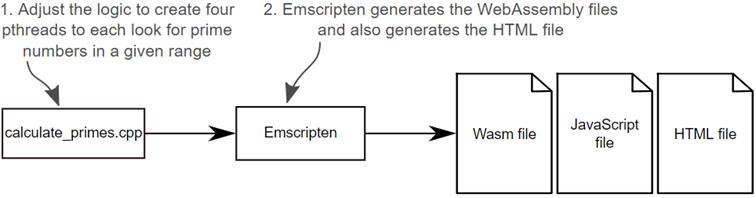
The first step is to adjust the calculate primes logic to create four pthreads to look for prime numbers in a given range.
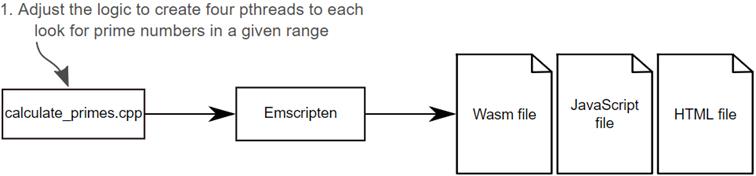
The next step is to use Emscripten to generate the WebAssembly files, and HTML file, from calculate_primes.cpp
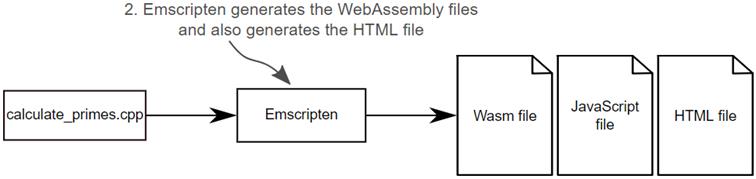
The calculate_primes.cpp source file and the Emscripten generated files. In this case, Emscripten has placed the data segments, for the module’s Data Known section, in its own file.
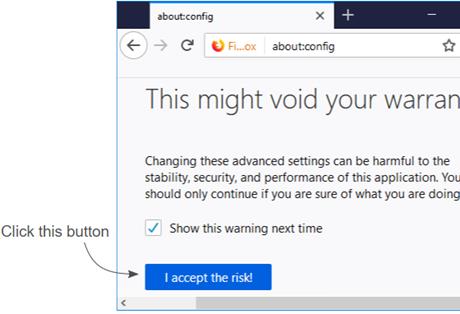
Firefox’s configuration warning screen. Click the I accept the risk button to enter the configuration view.
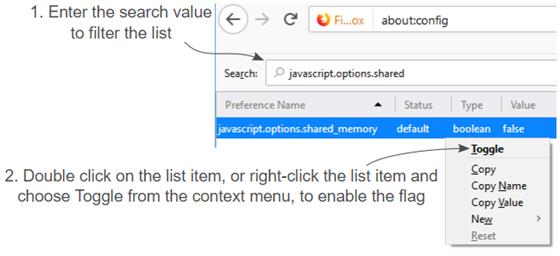
Type javascript.options.shared_memory into the search box to filter the list. Either double-click the list item, or right-click the list item and choose Toggle from the context menu, to change the flag to true.
Emscripten included a message indicating how many web workers it was creating for the pthreads. The total execution time to find the prime numbers between 3 and 1,000,000 was 217 milliseconds.
Summary
In this chapter, you learned the following:
- If too much processing happens on the main UI thread of a browser, without yielding periodically, the UI may become unresponsive. If the main UI thread of a browser is unresponsive for long enough, a browser may prompt the user to see if they want to terminate the script.
- Browsers have a means of creating background threads called web workers and communication with workers is performed by passing messages. web workers have no access to the DOM or other UI aspects of the browser.
- Web workers can be used to pre-fetch assets that a webpage may need in the future including WebAssembly modules.
- It’s possible to handle fetching and instantiating a WebAssembly module on behalf of Emscripten’s JavaScript by implementing the instantiateWasm callback function.
- There is experimental support for WebAssembly pthreads (POSIX threads) in browsers but you currently need to enable a flag in Firefox or Chrome to use it. You also need to compile the WebAssembly module using the -s USE_PTHREADS and -s PTHREAD_POOL_SIZE Emscripten command line flags.
- WebAssembly pthreads use web workers for the threads, a SharedArrayBuffer as shared memory between the threads, and atomic memory access instructions to synchronize the interactions with the memory.
- All web workers for the pthreads are created when the WebAssembly module is instantiated.
- It’s possible to tell Clang, Emscripten’s front-end compiler, to use a C++ standard other than the default C++98 standard by specifying the -std command line flag.
FAQ
What problem do web workers solve, and when should I use them with WebAssembly?
Web workers let you move heavy or long-running JavaScript/Wasm work off the main (UI) thread so the page stays responsive. Use them to: - Run CPU-intensive tasks without freezing animations or input - Pre-fetch/compile Wasm in the background - Parallelize work across cores by spawning multiple workersCan a web worker access the DOM? How do I communicate with one?
No. Workers can’t touch the DOM or UI directly. You communicate via message passing: - Main thread → worker:worker.postMessage(data)
- Worker → main thread: self.postMessage(data)
- Receive messages with the onmessage handler on both sidesAre synchronous APIs safe to use inside a worker, and what APIs are available there?
Yes—synchronous calls in workers won’t block the UI thread. Workers can use many of the same Web APIs (for example,fetch, WebSockets, IndexedDB) and can even spawn additional workers. See MDN’s list of APIs available to workers for details.What are key considerations and limitations when using web workers?
- High startup and memory cost: use a small, long-lived set of workers- No DOM access: all UI updates must be coordinated via messages
- Be mindful of battery, CPU, and data usage on devices
- Browser-only feature: Node.js worker threads are separate and not supported by Emscripten in this context
How do I pre-fetch and compile a WebAssembly module in a worker, then instantiate it in the main thread with Emscripten?
High-level steps: - In the worker, download and compile:WebAssembly.compileStreaming(fetch("module.wasm")), then postMessage(compiledModule).
- In the main thread, receive the compiled module in worker.onmessage.
- Create the Emscripten Module instance and override instantiateWasm to use your compiled module instead of letting Emscripten download it.
- Build with -s MODULARIZE=1 so you can control when the Module initializes.Why can’t I use WebAssembly.instantiateStreaming with a compiled module, and what should I call instead?
instantiateStreaming expects a streamed response with Wasm bytes, not a precompiled WebAssembly.Module. When you already have a compiled module, use the overloaded:
- WebAssembly.instantiate(compiledModule, importObject)
In an async instantiateWasm override, return {} and call Emscripten’s successCallback(instance) when ready.Besides pre-fetching, how else can Emscripten use workers with WebAssembly?
Emscripten has a Worker API that lets you build two Wasm modules—one for the main thread and one for a worker—that communicate via helper functions. Compile the worker-side file with-s BUILD_AS_WORKER=1. This approach is separate from pthreads and useful for structured offloading.How do WebAssembly pthreads work in the browser?
Wasm pthreads use: - Web workers for parallel execution - A shared linear memory viaSharedArrayBuffer
- Atomic operations for synchronization and predictable memory access
Each thread runs in its own worker but shares the same memory with the main module.What browser support and security settings affect pthreads?
Due to Spectre/Meltdown mitigations,SharedArrayBuffer usage has required specific browser support and security settings. At the time discussed in the chapter:
- Desktop Chrome supported it
- Firefox required enabling a flag (for example, javascript.options.shared_memory) in about:config
Always verify current browser requirements and revert any testing-only flags afterward.Which Emscripten flags enable pthreads, and how should I size the thread pool?
Compile with: --s USE_PTHREADS=1 to enable pthreads
- -s PTHREAD_POOL_SIZE=N to precreate N worker threads at module instantiation
Trade-offs:
- Larger pools increase startup time and memory; create only what you need
- If omitted or set to 0, workers are created on pthread_create, but execution starts after yielding to the browser; coordinate calls (for example, separate create and join steps)What is the .mem file generated in some pthread builds, and do I need to ship it?
The.mem file contains data segments for the module’s memory that can be shared across instances (threads) while keeping one copy of the data. Yes—serve it alongside the generated HTML/JS/Wasm so threads can initialize correctly.
 WebAssembly in Action ebook for free
