5 Creating a WebAssembly module that calls into JavaScript
This chapter pivots from having JavaScript call into a WebAssembly module to letting the module call back into JavaScript, replacing error-buffer handoffs with direct callbacks. It outlines three ways for module-to-JS interaction when using Emscripten: lightweight macros (EM_JS/EM_ASM and the run_script family), custom functions merged into the generated Emscripten JavaScript, and function pointers (covered in the next chapter). The discussion highlights when each approach fits best, notes maintainability concerns as interactions grow, and flags a Node.js caveat: JS added to Emscripten’s generated file must be self-contained when targeting Node.js.
With Emscripten’s plumbing enabled, the chapter walks through modifying the chapter 4 validation module so C++ functions declare an extern callback (for example, UpdateHostAboutError) and invoke it instead of copying error text into a buffer. The corresponding JavaScript implementation is injected via mergeInto so the module can pass a pointer to an error string that JS converts and forwards to page code (for example, setErrorMessage). The build includes the custom JS with a compiler flag and requests only the runtime helpers needed (such as ccall and UTF8ToString). On the webpage side, the validation calls are simplified: the temporary error buffer disappears, function signatures are reduced, and the save handler clears prior errors and proceeds only when both checks succeed.
Without Emscripten’s generated JavaScript, the same callback pattern is implemented by compiling a side module (no standard library, no plumbing) and providing the import at instantiation time via the page’s importObject (for example, env._UpdateHostAboutError). The page reads strings from the module’s memory, displays errors, and manages memory explicitly when passing data to the module. This lower-level route exposes the mechanics of module loading and memory handling, avoids the self-contained constraint for Node.js, and helps set the stage for the function-pointer technique introduced next, which decouples the module from specific host function names at the cost of a bit more host-side setup.
The way the JavaScript code is interacting currently with the module’s functions

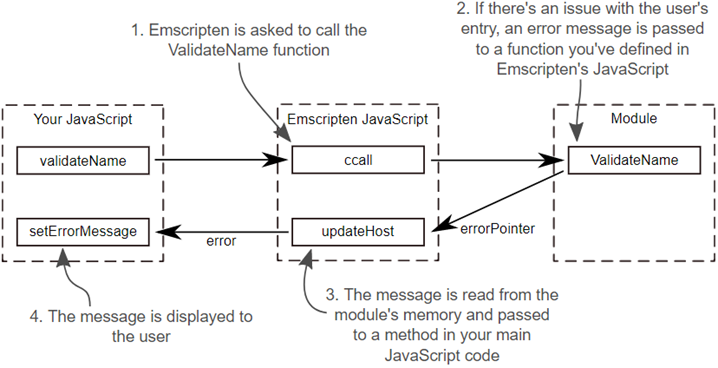
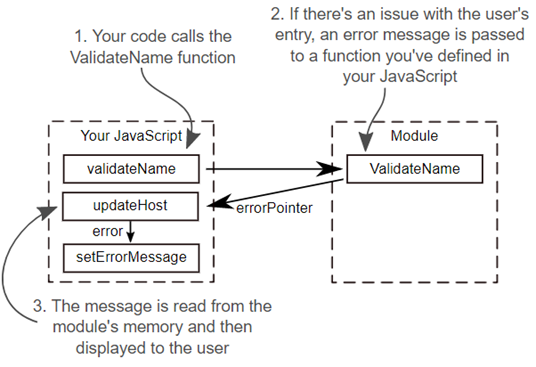
The module calling a function in the JavaScript code.

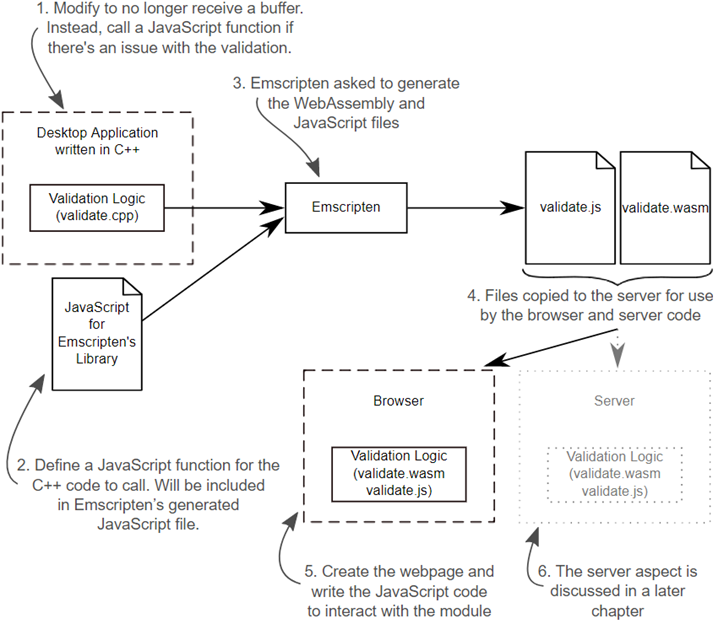
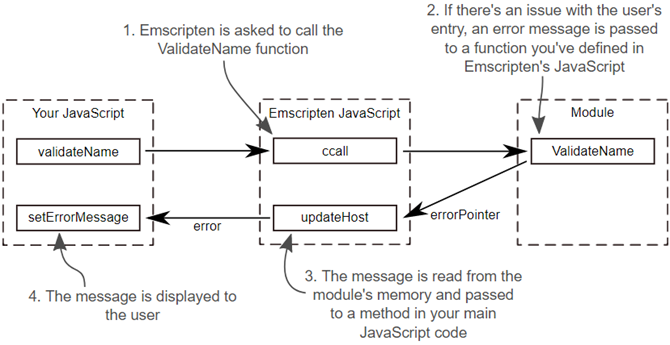
How the module and JavaScript will be reworked to allow the module to call back to the JavaScript.
The steps needed to turn C++ logic, as well as some JavaScript that needs to be included in Emscripten’s JavaScript file, into a WebAssembly module for use in a browser and by the server-side code. The Server aspect, Node.js, is discussed in a later chapter.
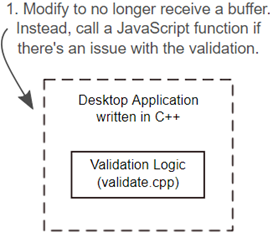
The first step of the process is to adjust the C++ code so that it passes the error message to a JavaScript function.
The second step of the process is the creation of the JavaScript code to include in Emscripten’s generated JavaScript file.
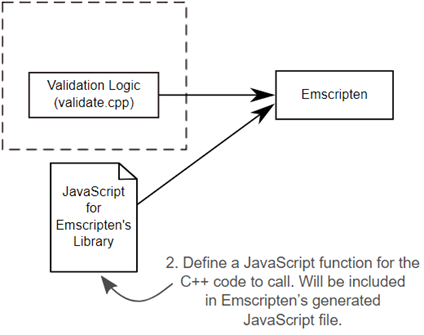
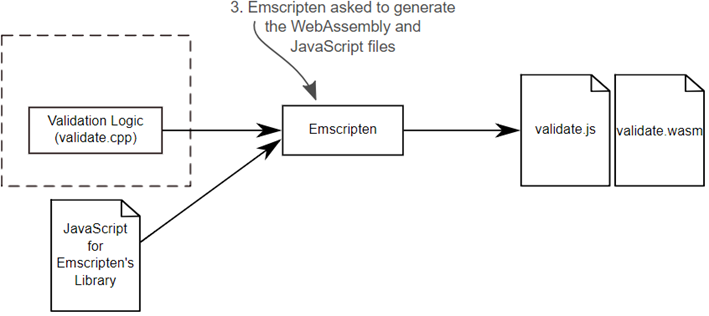
The third step of the process is to ask Emscripten to generate both the WebAssembly and JavaScript files. In this case, you’ll also ask Emscripten to include the mergeInto.js file.
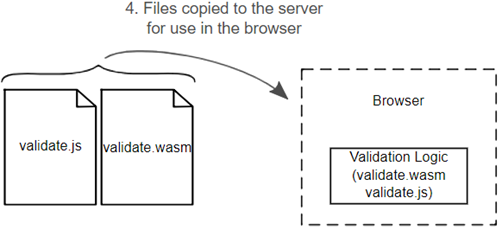
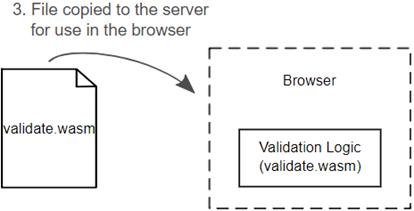
The fourth step of the process is to copy the generated files to where the HTML file is and update the JavaScript code based on the new way it needs to interact with the module.
Product Entry page’s Name validation error
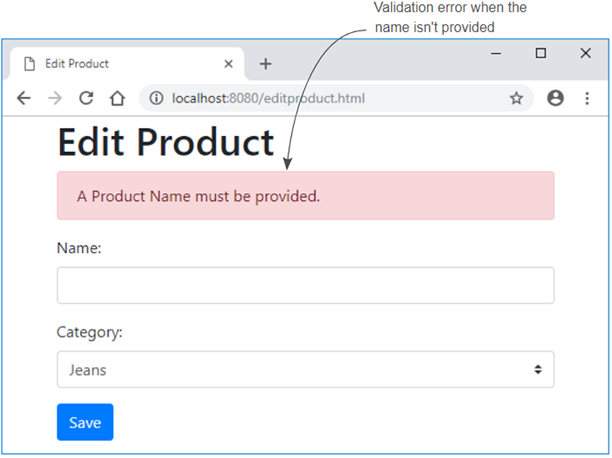
Illustration showing the module calling back to the JavaScript through a function you defined in the Emscripten generated JavaScript file.
How the callback logic works without Emscripten plumbing code
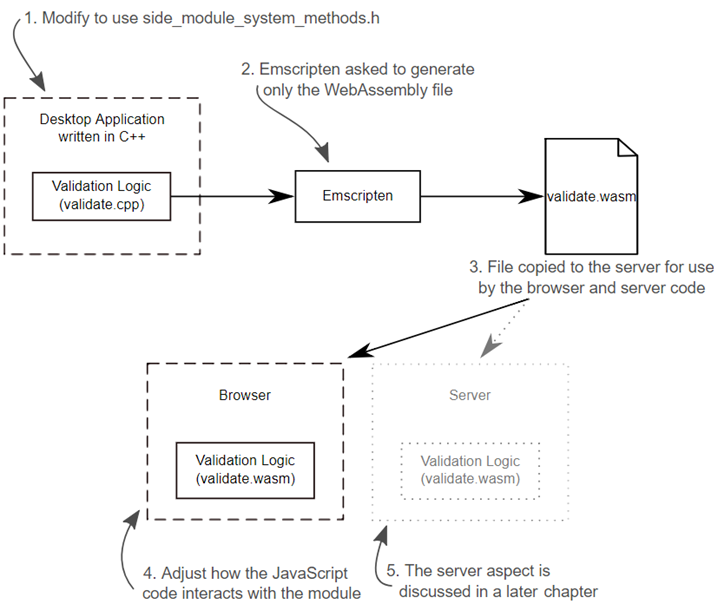
Steps where existing C++ logic is turned into WebAssembly for use by a website and the server-side code but without any generated Emscripten JavaScript code. The server aspect, Node.js, is discussed in a future chapter.
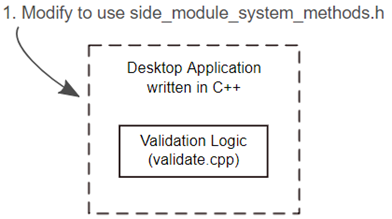
You need to modify the C++ code from section 5.1 to use the side_module_system_functions files that you created in chapter 4.
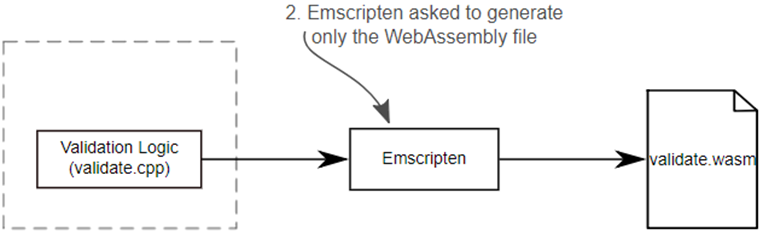
You need to ask Emscripten to generate only the WebAssembly file but not the JavaScript plumbing file in this case.
You need to copy the generated Wasm file to where the HTML file is and adjust how the JavaScript code interacts with the module.
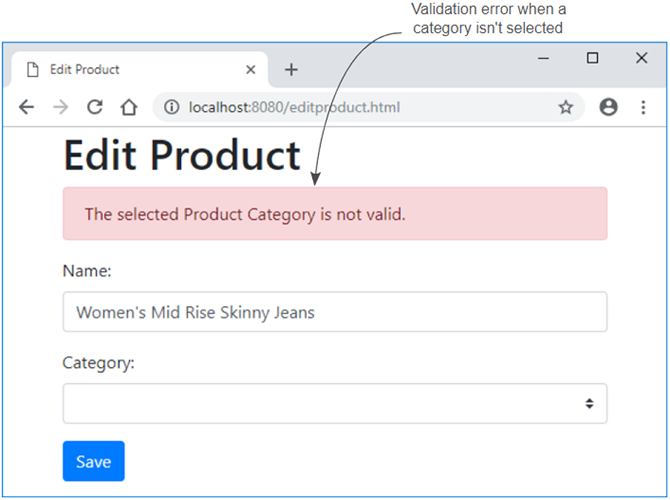
The Product Entry page’s Category validation error when there’s no category selected
Summary
In this chapter, you learned the following:
- You can modify a WebAssembly module so it can talk to the JavaScript code directly.
- External functions can be defined in your C or C++ code using the extern keyword.
- You can add your own JavaScript code to Emscripten’s generated JavaScript file by adding it to the LibraryManager.library object.
- When not using Emscripten’s plumbing code, you can include a function for the module to import by placing it in the JavaScript object that you pass to the WebAssembly.instantiate or WebAssembly.instantiateStreaming functions.
FAQ
What are the main ways a WebAssembly module can call into JavaScript with Emscripten?
Three common approaches: - Emscripten macros (emscripten_run_script, EM_JS, EM_ASM*) - Adding custom JavaScript via a JS library merged into Emscripten’s generated file - Function pointers registered from JS (covered more deeply in the next chapter)When should I choose macros vs a merged JS library vs function pointers?
- Macros: Great for quick, occasional calls or debugging. As calls grow, maintenance gets harder.- Merged JS library: Good balance for production; keeps JS separate, simplifies page code, but requires knowing host JS environment and keeping it consistent.
- Function pointers: Most flexible and decoupled, but adds setup complexity on the JS side.
How do I declare a JavaScript function in C/C++ so the Wasm can call it?
Declare it as an imported symbol using an unmangled signature, for example inside an extern "C" block:extern void UpdateHostAboutError(const char* error_message);. The compiler creates an import that must be supplied by JavaScript at runtime.How do I include my own JS function in Emscripten’s generated JS file?
- Put your functions into a JS library usingmergeInto(LibraryManager.library, { ... }) with keys matching your import names (e.g., UpdateHostAboutError).- Compile with
--js-library path/to/your.js so Emscripten merges it into the output JS.How does the custom JS read strings passed from the module?
Your function receives a pointer. Convert it to a JS string using Emscripten’s helper:Module.UTF8ToString(pointer). Then pass the string to your page logic (e.g., setErrorMessage(...)).Which build flags are needed to make this work?
- Include your library:--js-library mergeinto.js- Ensure runtime helpers are available:
-s EXTRA_EXPORTED_RUNTIME_METHODS=['ccall','UTF8ToString']- Example:
emcc validate.cpp --js-library mergeinto.js -s EXTRA_EXPORTED_RUNTIME_METHODS=['ccall','UTF8ToString'] -o validate.jsHow should the webpage code change after moving error reporting into a JS callback?
- Remove the error buffer and its pointer allocations.- Clear any previous error at the start (e.g.,
setErrorMessage('')).- Update
ccall signatures to match the new C++ function parameters.- Change validation logic to check both calls succeed (e.g.,
validateName(name) && validateCategory(categoryId)).How can I call back into JS without Emscripten’s generated JS “plumbing”?
- Build as a side module (no generated JS).- During instantiation, provide imports in
importObject.env, including _UpdateHostAboutError (note the leading underscore in the Wasm symbol).- Implement the callback in your page JS to read the message (e.g.,
getStringFromMemory(ptr)) and forward it (e.g., setErrorMessage(...)).What should I know about targeting Node.js with the merged JS approach?
When adding code to Emscripten’s generated JS, keep it self-contained for Node.js because of how the file is loaded; it cannot rely on your main app’s JS scope. If you skip the plumbing and provide imports from your own JS at instantiation time, this restriction doesn’t apply.What are common pitfalls and quick troubleshooting tips?
- Put headers for your “C standard” replacements and extern imports insideextern "C" to avoid name-mangling mismatches.- If a helper like
UTF8ToString is missing, add it to EXTRA_EXPORTED_RUNTIME_METHODS.- Ensure the JS import name matches the Wasm symbol (Emscripten often prefixes with
_ in the Wasm).- Only referenced library functions are included; call sites must exist or the function is tree-shaken out.
- When allocating arrays/strings to Wasm memory, free them after use to avoid leaks.

 WebAssembly in Action ebook for free
