2 A look inside WebAssembly modules
This chapter explains how a WebAssembly (Wasm) module is organized and why its binary layout is optimized for speed and safety. A module begins with a preamble and then a series of optional sections that the compiler assembles and orders for you. The design enables single-pass parsing, validation, and compilation, supports streaming and parallel compilation, and enforces strong isolation: modules don’t touch device memory directly, and sensitive operations (such as indirect calls) are mediated by the runtime.
Known sections are well-defined, appear at most once, and must follow a fixed order. In brief: the Type section lists unique function signatures; Import declares functions, tables, memories, and globals supplied by the host; Function indexes the module’s functions by signature, while Code holds their bodies, enabling parallel and streaming compilation. Table stores typed references (for example, function pointers) accessed indirectly by index, with configurable initial and maximum sizes and controlled growth. Memory defines linear memory in 64 KiB pages supplied by the host, with bounds-checked access, optional growth limits, shared use across instances, and isolation from the execution stack. Global holds module-wide variables; Export lists the items exposed back to the host; Start optionally names an internal initializer that runs before exports are callable; Element seeds the Table; Data initializes linear memory. For inspection and debugging, a text form mirrors these sections with abbreviated names.
Custom sections hold auxiliary data outside the validated Known schema. They can appear anywhere, be repeated, and even reuse names, and the runtime may load them lazily without causing validation failures if they’re malformed. A common example is the name section, which carries human-readable identifiers for debugging; unlike typical custom data, it should appear once and after Data. Together, Known and Custom sections let compilers and runtimes interleave strict, verifiable execution data with flexible metadata, while the host environment supplies imports and receives exports at instantiation time.
Representation of the basic structure of the WebAssembly binary bytecode highlighting the Known and Custom sections

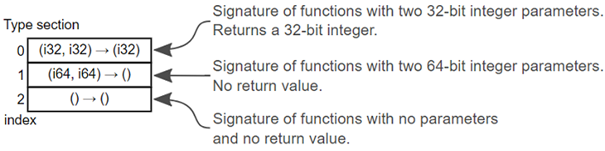
A Type section holding three function signatures. The signature at index 0 receives two 32-bit integer parameters and returns a 32-bit integer value. The signature at index 1 receives two 64-bit integer parameters but doesn’t have a return value. The signature at index 2 doesn’t receive any parameter values and doesn’t have a return value.
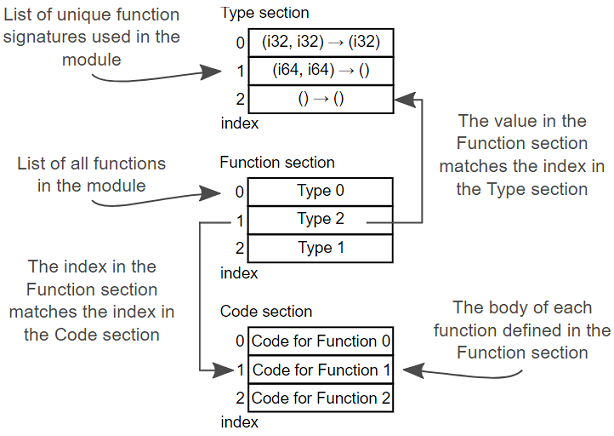
Example of how the Type, Function, and Code sections work together
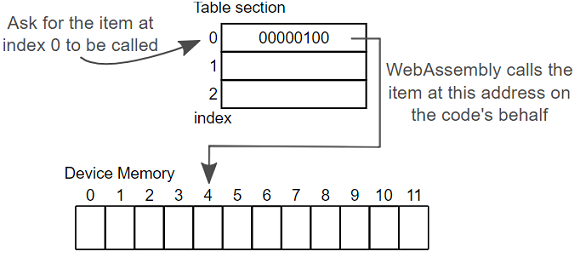
Example of an item in the Table section being called
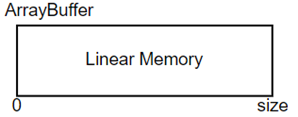
An ArrayBuffer is used as linear memory by WebAssembly modules
Summary
In this chapter you learned about the Known and Custom sections of a WebAssembly module so that you’d have a better understanding of what the sections are responsible for and how they work together. This understanding will help you as you interact with the WebAssembly modules and when you work with the WebAssembly Text Format.
- The sections of a WebAssembly module, and how they’re designed, is the reason for many of WebAssembly’s features and advantages
- A compiler handles generating the WebAssembly module’s sections and placing them in the proper order
- All sections are optional so it’s possible to have an empty module
- If specified, Known sections can only appear once and must appear in a specific order
- Custom sections can be placed before, in between, or after Known sections and are used to specify data that doesn’t apply to the Known sections
FAQ
What are the advantages of structuring a WebAssembly module into sections?
- Efficiency: the binary can be parsed, validated, and compiled in a single pass.
- Streaming: compilation can begin before the full download finishes.
- Parallelization: different parts can be parsed/validated/compiled in parallel.
- Security: modules don’t access device memory directly; indirect calls (like function pointers) are mediated by the runtime.
Are sections required, and what’s the high-level layout of a module?
All sections are optional; a module can even be empty. A module starts with a preamble identifying it as WebAssembly and indicating binary format version 1. Known sections typically follow (in a fixed order), and Custom sections can appear before, between, or after them.
What’s the difference between Known and Custom sections?
Known sections have specific, well-defined purposes and are validated during instantiation. Each can appear at most once and must follow a strict order. Custom sections hold data outside the Known sections, can appear anywhere, may be repeated (even with the same name), aren’t validated for layout, and can be loaded lazily.
What does the Type section contain and why is it important?
It lists all unique function signatures used in the module, including those of imported functions. Multiple functions can share a signature. Other sections (like Function and Code) reference these signatures by index.
How do the Function and Code sections relate to the Type section?
The Function section lists the module’s functions; each entry is an index into the Type section specifying the function’s signature. The Code section contains the corresponding function bodies in the same order as the Function section. Separating declarations from bodies enables streaming and parallel compilation.
What does the Import section declare, and who provides imports?
It declares all imports needed by the module: functions, tables, memory, and globals. The host environment supplies these at instantiation, allowing separate compilation/caching while sharing code and data.
What is the Table section used for, and how are entries invoked?
It stores a typed array of references (like functions) that can’t live in linear memory as raw bytes. Code accesses entries by index; the runtime safely dereferences and performs the operation (e.g., calls a function). Tables have an initial size and optional maximum, and can grow; without a maximum, growth isn’t capped.
How is linear memory represented and managed in WebAssembly?
- The Memory section holds the instance’s linear memory, provided by the host as an ArrayBuffer.
- Memory is segmented into 64 KiB pages; modules declare an initial page count and optional maximum.
- Memory can grow by whole pages; if no maximum is set, growth isn’t capped.
- Multiple module instances can share the same linear memory.
- The execution stack is separate from linear memory for additional security.
What are the purposes of the Global, Export, Start, Element, and Data sections?
- Global: defines module-level global variables.
- Export: lists objects (functions, tables, memory, globals) exposed to the host after instantiation.
- Start: specifies a function (by index) to run after initialization but before exports are callable; it must be defined within the module (not imported).
- Element: initializes data for the Table section during instantiation.
- Data: initializes bytes loaded into linear memory during instantiation.
What is the “name” custom section and what special rules apply?
It stores human-readable names (e.g., function and variable names) to aid debugging. Unlike typical custom sections, it should appear at most once and must come after the Data Known section if included.

 WebAssembly in Action ebook for free
