13 Testing—and then what?
As projects grow in complexity, testing shifts from ad hoc manual checks to disciplined, automated verification to keep defects from slipping in. Manual testing is slow, error‑prone, and hard to repeat across platforms, whereas automated tests are fast, consistent, schedulable, and can be run as often as needed—including across multiple browsers when targeting WebAssembly. Different layers of testing play a role—unit tests for fast, isolated logic checks; integration tests for interactions and dependencies; and higher‑level acceptance and performance tests—all complementing, not replacing, selective manual exploration.
This chapter shows how to build automated integration tests for WebAssembly modules using Mocha as the test runner and Chai for assertions, chosen because they work both at the command line (Node.js) and in the browser. After initializing a project with npm and installing dependencies, a single test suite is structured to detect its environment, load Chai and the Emscripten‑generated Module appropriately, and wait for module readiness via onRuntimeInitialized. Tests are organized with describe and it blocks, supported by Mocha hooks like before to perform async setup. The examples exercise a validation module via ccall, handle memory with malloc/free, and assert expected results with Chai, demonstrating both intentional failure (as a sanity check/TDD mindset) and subsequent fixes.
With the suite in place, tests run at the command line using npm scripts and in the browser through a simple HTML harness that initializes Mocha, loads the tests before the generated module, and triggers execution once the runtime is ready. After confirming the tests fail for the intended reasons, expected messages are corrected and the suite passes in both environments, establishing a repeatable workflow for cross‑browser verification of WebAssembly functionality. The chapter closes by noting the rapid evolution of WebAssembly—such as streaming instantiation, mutable globals, and threading support—ongoing proposals, and the emergence of WASI for non‑browser contexts, and it points readers to official documentation and community channels for continued learning and troubleshooting.
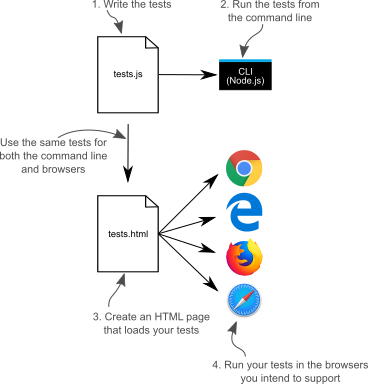
The steps to create your tests and then run them at the command line and in the browsers you intend to support.
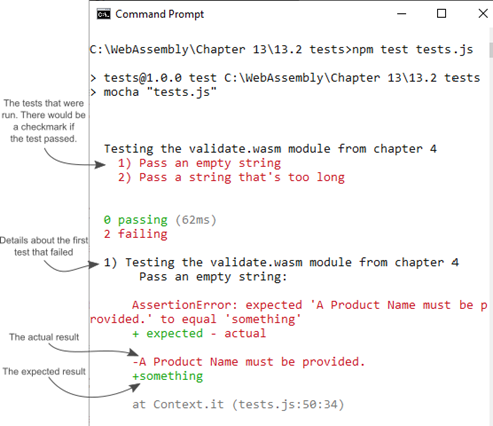
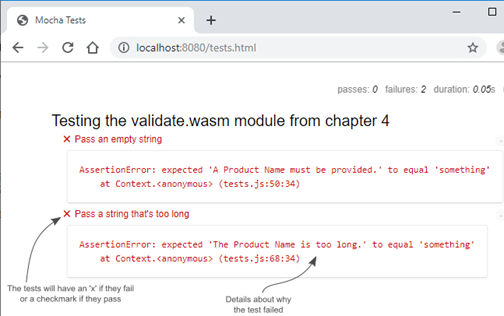
The results of the tests at the command line. Both tests failed because you intentionally provided the wrong expected string of ‘something’.
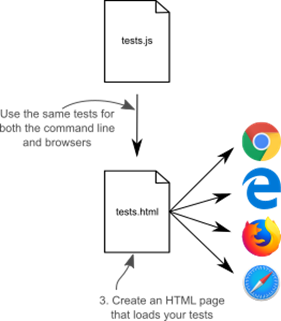
Your next step is to create an HTML page so that you can also run your tests in a browser.
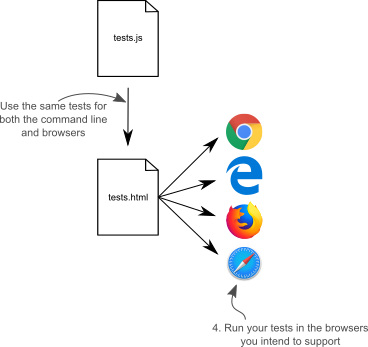
Your next step is to run your tests in a browser
The results of your tests running in a browser
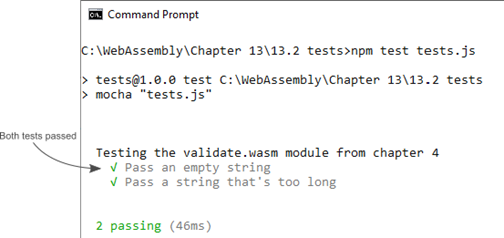
Both of your tests now pass when run at the command line.
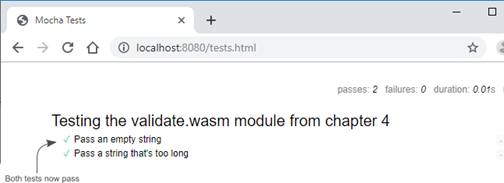
The results of your tests running in a browser show that the tests now pass.
Summary
In this chapter, you learned the following:
- Automated tests take a bit of time up front to write but, once they’re written, they run fast, can be run as often as you’d like and at any time you’d like, will run exactly the same way every time, and can be run on different platforms.
- Automated tests don’t remove the need for manual testing but can handle the monotonous items allowing you to focus on other areas.
- Mocha is one of several JavaScript testing frameworks available and supports any assertion library. It also has the ability to run tests at the command line and in the browser. When run from the command line, Mocha uses Node.js to run the tests.
- With Mocha, tests are grouped using a describe function and the tests themselves use an it function.
- Mocha has several pre- and post-hook functions available (before, beforeEach, afterEach, and after) that you can use to set preconditions before the tests are run and to clean up afterwards.
- When a Promise is returned from Mocha's functions, Mocha waits for the Promise to complete before continuing. This is helpful when you have asynchronous operations.
- If a test fails, details are given as to why it didn’t pass.
- If a test passes, there's a checkmark shown in the output.
FAQ
Why use automated testing for WebAssembly modules?
Automated tests run quickly and consistently, can be executed as often as you like (e.g., before every commit), can be scheduled (e.g., nightly), and can be reused across platforms and browsers. They don’t replace manual testing but remove repetitive checks so you can focus on higher‑value scenarios.Why does the chapter use Mocha (and not another framework)?
The chapter’s requirements are: run tests from the command line (Node.js) and in real browsers. Mocha satisfies both, is lightweight, and plays well with many assertion libraries. Alternatives exist (e.g., Jest, Puppeteer), but Mocha keeps the examples focused and portable.What is an assertion library and why choose Chai?
An assertion library verifies test expectations in a readable way. Node has a built‑in assert module, but the chapter uses Chai because it works in both Node.js and the browser and supports multiple styles (Expect/Assert). Using the same assertions everywhere keeps tests consistent.How do I set up a Node.js project to run Mocha?
- Initialize the project: npm init (set scripts.test to mocha).- Install dev dependencies: npm install --save-dev mocha chai.
- Run tests: npm test tests.js.
How do I share one test suite between Node.js and the browser?
- Detect the environment (e.g., check for process/require).- In Node.js: load Chai and the Emscripten JS via require inside Mocha’s before hook.
- In the browser: include Chai, Mocha, your tests.js, then the Emscripten JS. Define Module.onRuntimeInitialized to start Mocha when the runtime is ready.
How do Mocha’s describe/it and hooks (before/after) fit in?
- describe groups related tests; it defines individual test cases.- Hooks: before runs once before all tests, beforeEach/afterEach run around each test, after runs once after all tests.
- In this chapter, before loads Chai and waits for the Emscripten module to initialize (by returning a Promise) before tests run.
How do I call Emscripten-exported WebAssembly functions in tests?
- Use Module.ccall to invoke C/C++ exports.- Manage memory when needed: allocate buffers with Module._malloc, read strings with Module.UTF8ToString, and free with Module._free.
- Check return values to decide whether to read error messages from the buffer.
How do I run the tests from the command line?
From the project folder, run npm test tests.js. Mocha prints a summary: passing tests show checkmarks; failures list the mismatch details.How do I run the same tests in a browser?
- Create tests.html that includes Mocha/Chai from a CDN.- Call mocha.setup('bdd') and mocha.checkLeaks().
- Include tests.js before the Emscripten-generated validate.js.
- Ensure Module.onRuntimeInitialized triggers mocha.run().
- Open the page (e.g., http://localhost:8080/tests.html) to see results.

 WebAssembly in Action ebook for free
