9 Shadow CSS
This chapter deepens the exploration of the Shadow DOM by focusing on CSS encapsulation. It explains how global CSS leads to style creep—rules unintentionally leaking into or out of components—and presents the Shadow DOM as a practical fix. By giving each component its own DOM tree, styles are scoped by default, enabling simpler, component-local selectors and the safe reuse of IDs inside each shadow root while avoiding collisions with page styles.
Using a stepper example, the chapter shows how page-level button rules can override component styles through selector specificity and naming collisions, and how moving markup and styles into a shadow root prevents that. It introduces the :host selector to style the shadow host, its variant :host(.class) for mode- or state-based styling, and clarifies the nuance that inheritance can still flow from ancestors because it isn’t selector-based; when necessary, :host { all: initial } can reset inherited properties. The core rule is that outside selectors cannot target nodes inside a shadow tree, but inheritance may still apply unless explicitly reset.
To practice these ideas, the chapter builds a small Workout Creator app composed of Shadow DOM components: an application shell that uses flex layout via :host, a scrollable exercise library, a workout plan list, and an adaptable wkout-exercise tile that differentiates types with :host(.cardio) and :host(.strength). It demonstrates reflecting attributes to properties, rendering data into components, and preferring IDs inside shadow roots for straightforward selection and styling. The chapter closes by refitting a slider component to use the Shadow DOM, simplifying initialization and CSS, and reinforcing how encapsulation reduces brittleness and makes component styling predictable.
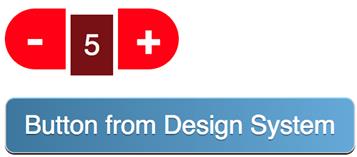
A stylized stepper component comprising two buttons and a text span

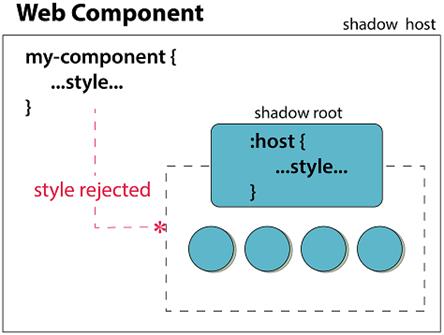
Without using the Shadow DOM, style defined in your Web Component will apply to the entire page.
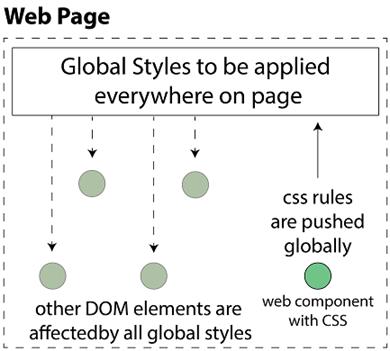
An example globally stylized button that could come from a design system

How a global button style can negatively affect our stepper component
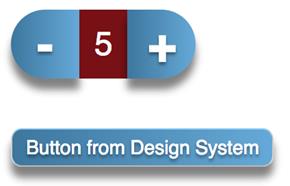
More specificity and same-named classes wreck the stepper component even more.
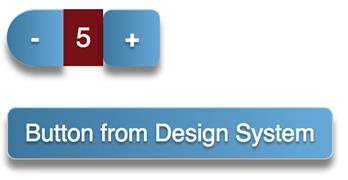
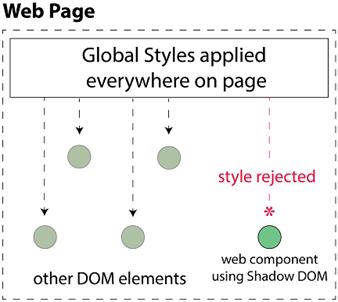
Web Components using the Shadow DOM are unaffected by page-level CSS styling
The stepper component, almost fixed, and living side by side with a globally styled button
CSS on the shadow host (or using the component’s tag as the selector) won’t penetrate into the shadow root or into the Shadow DOM.
The large, green, bold text indicates that outside style is affecting the contents of our Shadow DOM

When we place the class directly on the span tag, the Shadow DOM successfully blocks the style.
A demo app to browse exercises from a library and create a custom workout plan

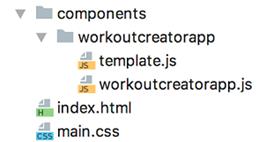
Basic file structure as we start our demo application
How our barebones application looks so far in a browser

Project file structure as our two container components are added for the exercise library and workout plan
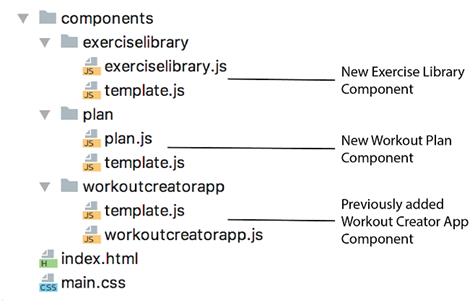
Filling in the components on the left and right sides of the application

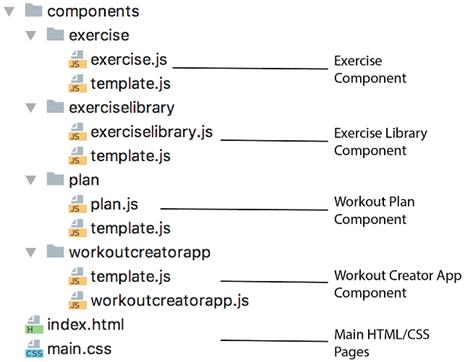
Final file structure for the application
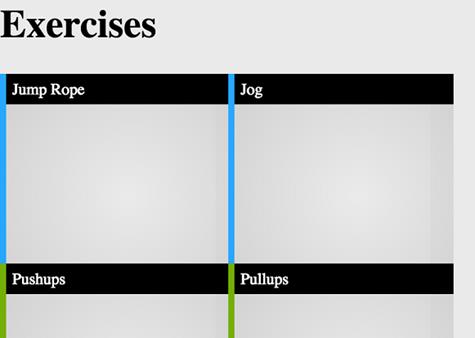
Newly styled exercise components
Summary
In this chapter, we learned
- How CSS styles can leak into and out of your Web Component just like anywhere else, if you’re not using the Shadow DOM.
- The Shadow DOM completely protects your component’s DOM from outside CSS.
- When using the Shadow DOM, we can be a lot less specific with our CSS selectors, taking full advantage of the separate DOM.
- How to use specific Shadow DOM CSS selectors to style your component, and style it differently in different contexts
FAQ
What is “style creep,” and why is it a problem when building Web Components?
Style creep is when CSS rules affect elements you didn’t intend to style because selectors match more broadly than expected. In Web Components, it can go both ways: your component’s styles can leak out to the page or child components, and page-level styles can leak in and change your component’s look. It leads to fragile UI and hard-to-debug conflicts.How does the Shadow DOM prevent style creep?
CSS defined inside a shadow root is scoped to that shadow tree. External selectors (like page-levelbutton or .big-button) cannot select into the shadow DOM, and styles declared in a component won’t affect the outside DOM. This encapsulation keeps component internals and page styles isolated.Are there cases where outside styles still affect content inside a Shadow DOM?
Yes. Inheritable properties (for example,font-size, color, font-weight) applied on ancestors (like body) can inherit into a component’s shadow tree. The Shadow DOM blocks selectors from targeting internals, but inheritance of inheritable properties can still flow in.How can I prevent even inherited page styles from affecting my Shadow DOM?
Reset them at the host. A common pattern is:host { all: initial; } inside the shadow root, then re-declare what you need (e.g., display, fonts). This clears inherited styles at the boundary so the component renders from a clean slate.What does the :host selector do, and when should I use it?
:host (used inside a shadow root) selects the host element (the custom element tag). Use it to style the host from within, e.g., :host { display: flex; }. Styling the host from outside affects only the host box, not internal shadow content.How do I style a component based on a class on its host tag?
Use the contextual host selector::host(.my-class). Example: :host(.cardio) { border-left-color: #28a7ff; } :host(.strength) { border-left-color: #75af01; }. This reacts to classes placed on the custom element itself.Do I still need very specific selectors inside a Shadow DOM?
Usually no. Inside a shadow root, selectors likebutton or #label are already scoped to that component, so they won’t leak out or collide. This lets you write simpler, clearer CSS without heavy specificity tricks.Is it safe to use IDs inside Shadow DOM components?
Yes. IDs only need to be unique within a given shadow tree. You can reuse the same ID across different components without conflicts, and use#id in CSS or shadowRoot.getElementById() in JS reliably.Why did my selector like sample-component { display: flex; } stop working after moving to Shadow DOM?
Because the host element isn’t inside the shadow tree. CSS written inside the shadow root can’t match the external host tag selector. Use :host { display: flex; } inside the shadow CSS to style the host.What’s a practical workflow for migrating an existing component (e.g., a slider) to Shadow DOM?
- Create the shadow root in the constructor and render your template into it. - Switch styling to use:host and internal IDs/classes.
- Map internals via shadowRoot.getElementById().
- Benefit from encapsulation (clean CSS, fewer timing issues) and keep event wiring as before.
 Web Components in Action ebook for free
