8 The Shadow DOM
This chapter frames the Shadow DOM as a powerful but optional part of the Web Components story, emphasizing its role in encapsulation. While features like custom elements and templates can stand on their own (and be polyfilled), slots depend on the Shadow DOM, and growing browser support has made it increasingly practical. The central promise here is to reduce brittleness by isolating a component’s internals—both its API and, more importantly, its DOM—from unintended outside influence.
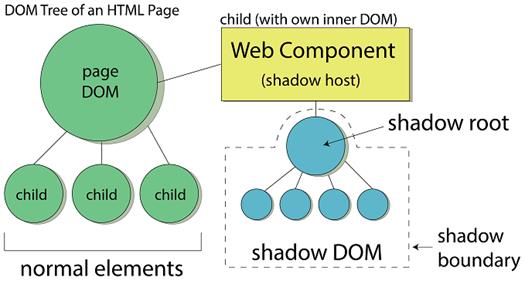
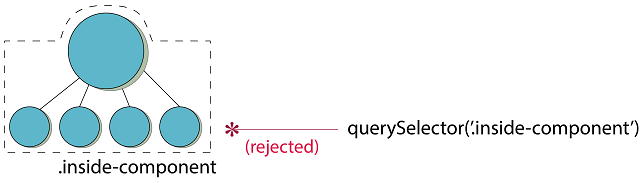
Technically, the Shadow DOM creates a separate DOM tree (the shadow tree) attached to a host element via a shadow root, giving components their own space that regular page queries can’t accidentally reach. This protects against casual DOM manipulation and helps prevent naming collisions, with key terms including shadow root, shadow host, and shadow boundary. Open and closed modes differ mainly in accessibility: open mode exposes shadowRoot (a deliberate “escape hatch” useful for development and testing), whereas closed mode hides it but is not true security and is easily bypassed, often adding friction without real protection. Because the shadow root exists independently of the page DOM, initialization can move into the constructor (after calling super()), enabling immediate setup of the component’s internal DOM.
In practice, the guidance is to prefer open mode and treat encapsulation as protection by convention, offering a clear public API while accepting that advanced users can reach in at their own risk. Polyfilling Shadow DOM behavior for JavaScript access works well via the Shady DOM, while fully emulating CSS scoping is harder and discussed further elsewhere; nonetheless, CSS isolation is one of the Shadow DOM’s biggest wins. With modern browser coverage improving and libraries integrating polyfills, developers can confidently adopt the Shadow DOM for stronger component encapsulation, safer composition, and more reliable interfaces.
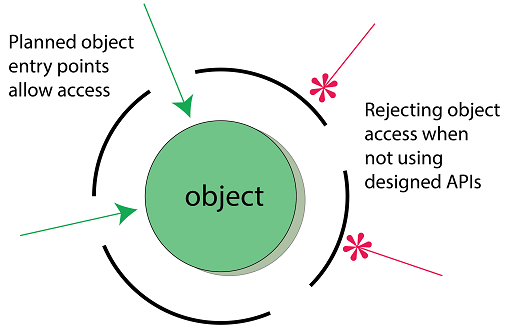
Encapsulation means hiding the inner workings of an object, but it often includes choosing how and where to provide access from the outside in.
A simple Web Component rendering a short string in the browser

Setting the innerHTML of our component’s DOM from the outside

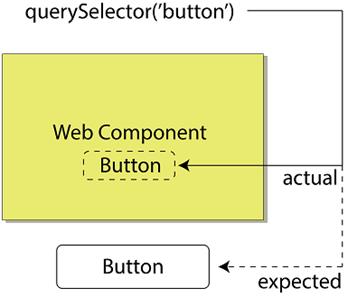
Query-selecting a button on the page, but unintentionally picking up a button in our Web Component
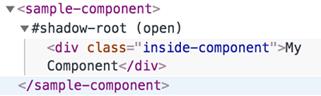
Viewing the Shadow DOM and associated shadow root in Chrome’s dev tools
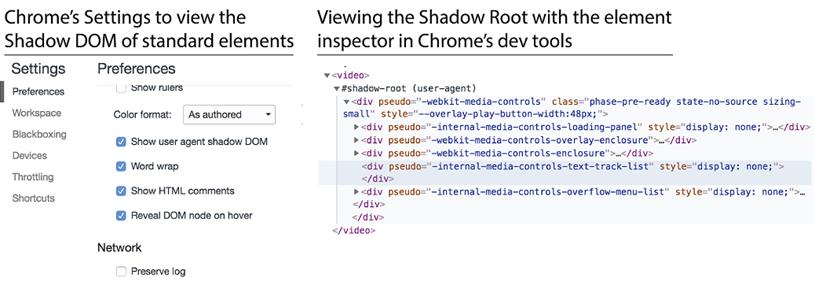
Viewing the user agent Shadow DOM/root for everyday elements
The Shadow DOM, host, root, and boundary (the dotted line)
Attempting to query-select inside the Shadow DOM
Summary
In this chapter, you learned
- What encapsulation is and how a self-contained object is only half the battle. Protecting and offering controlled access to your object is also important.
- That the Shadow DOM offers protection to your component’s inner DOM and is most useful for accidental intrusions from the outside.
- Though the Shadow DOM offers a closed mode, it’s impractical, and protecting your component by convention with an open Shadow DOM is the way forward, especially because it offers a way to bypass its protective boundary in a pinch.
- Differences between constructor and connectedCallback for working with your component’s DOM when using or not using the Shadow DOM.
- Polyfill support with the Shady DOM and that there is a separate solution for CSS encapsulation.

 Web Components in Action ebook for free
