5 Instrumenting a better web app through modules
This chapter advocates moving from manually managed script and stylesheet tags toward ES2015 modules to build cleaner, more maintainable Web Component–based applications. It shows how piling up external references leads to dependency hell—tracking load order, transitive dependencies, and unused files—while self-reliant components and module imports let each component declare what it needs. By marking scripts as type="module" and using import, the index page can stay minimal, and components become responsible for their own code, assets, and composition.
The chapter illustrates this with a Web Harp demo composed of three custom elements: an application wrapper, a strings container, and individual string components. The app includes only one module in the HTML, and each component imports its children directly, enabling nested composition without extra references in the page. Attributes configure behavior (such as the number of strings), markup and basic styles live within the components, and layout uses flexbox to distribute strings evenly. The approach promotes reuse, encapsulation, and gradual refactoring, since the entire application is itself a Web Component.
Interactivity is added by listening for mouse movement in the app component and using fat-arrow functions to preserve instance scope. The app computes motion magnitude and forwards current and previous pointer positions to the strings component, which identifies which strings were crossed and calls their strum methods. Visual feedback is provided by toggling shake-related CSS classes, while audio is enabled by wrapping a legacy library as an importable module, loading a soundfont, and mapping string index and strum power to note and velocity. A simple click-to-start overlay addresses autoplay restrictions, culminating in a modular, scalable pattern where components manage their own dependencies and behavior.
Revisiting the photo carousel component from chapter 2

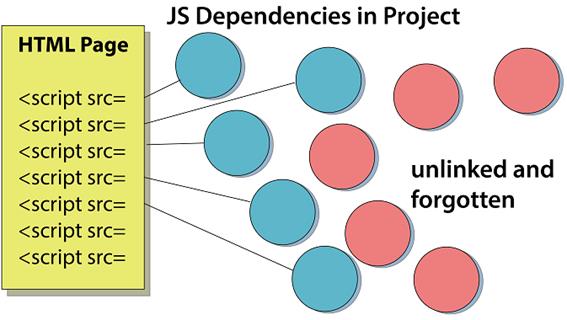
Using <script> tags on the main HTML page means having to remember to add every single JS file you use throughout.
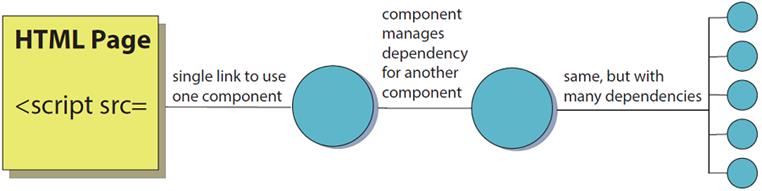
The index.html page only references a single component, simplifying our code but still allowing many dependencies.
Output of our Web Harp demo. Each white line is a strummable string that vibrates and makes some noise.

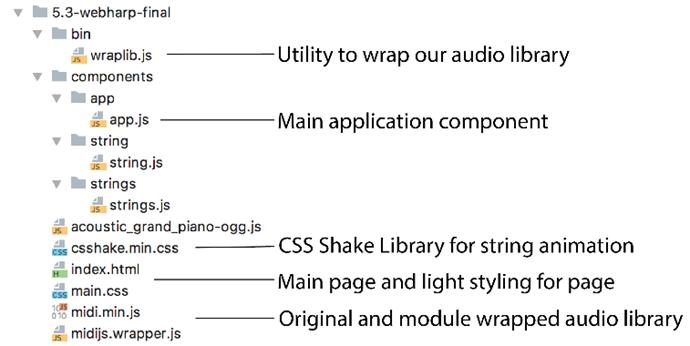
Web Harp example file structure
A single <webharp-string> component centered over a black background

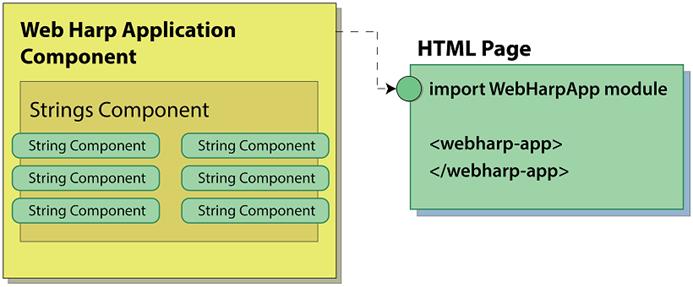
Nested Web Components inside an application Web Component, all imported as a module from our main HTML page
The current state of our Web Harp

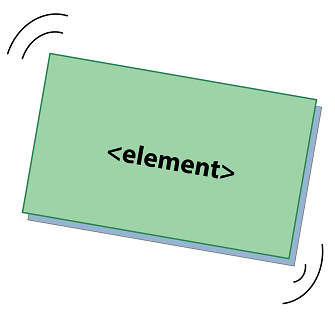
CSShake takes an element on your page and animates it with various ways of shaking.
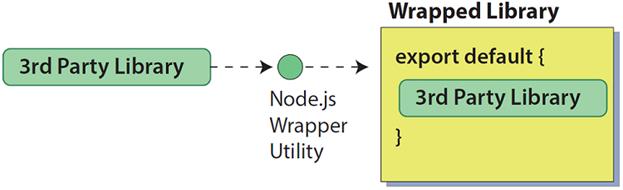
Using a Node.js utility to wrap a third-party library as an importable module
The user must click to start the Web Harp to enable audio and not be blocked by Chrome

Summary
In this chapter, you learned
- How Web Components can manage their own dependencies, including other Web Components, by using modules, as well as how having a single import to use your Web Component can avoid confusion on how to include the component on your page
- How Web Components can be a bit more self-reliant by placing CSS inside the component, avoiding the need to have to manage many CSS files or manage rules for many components in the same CSS file
- Wrapping third-party libraries as a module using Node.js, even if the original author never intended the library to be used that way, avoiding having to make an exception for an otherwise self-reliant component
- Building a musical instrument in our browser using Web Components, with even the main application being a Web Component comprising Web Component children, keeping the index.html file tiny and manageable
FAQ
Why use ES2015 modules instead of many script and link tags?
Modules let each component declare and load its own dependencies with import, eliminating long lists of script/link tags, manual load ordering, and constant edits to index.html. This avoids “dependency hell” and keeps the main page clean while improving reusability.How do I load a component as a module from index.html?
Include your entry component with<script type="module" src="./components/app/app.js"></script>. Because it’s a module, everything it imports (and their imports) will load automatically. Note: serve over a local web server—browsers often block module imports from file:// URLs.How can a Web Component be self-reliant about CSS?
Embed a<style> block inside the component’s template (e.g., assigned via innerHTML). This removes the external CSS dependency so consumers only include one JS file. Trade‑off: large inline strings can get unwieldy; later improvements (like template literals and Shadow DOM) can help.How do I import and nest one component inside another?
Useimport Child from '../child/child.js', then reference the custom element in your markup. Register the element once, optionally guarding with if (!customElements.get('tag-name')) before customElements.define. Re‑importing the same module in multiple places is cached by the browser.What’s a good way to structure the app with components?
Create a top‑level app component (e.g.,<webharp-app>) that contains the entire UI and imports its child components. Keep index.html minimal and pass data via attributes (e.g., strings="12"). As the app grows, break features into smaller components without heavy refactoring.How do I pass data from a parent to child components?
Expose properties or setters on the child and assign from the parent. Example: the app sets apoints object on <webharp-strings>, which computes the horizontal distance (strum power), determines which <webharp-string> was crossed, and calls its strum() method.Why use fat-arrow (=>) functions for event listeners?
Arrow functions preserve the enclosingthis so callbacks like this.addEventListener('mousemove', e => this.onMouseMove(e)) can access instance properties without .bind(this) or temporary variables.How can I add visual feedback (e.g., shaking strings) with CSS?
Link a CSS animation library (like CSShake) in the page and toggle classes on the component when strummed (e.g.,shake, shake-constant, shake-horizontal, optionally shake-little). Use a timer to remove classes when the strum ends. In later chapters, Shadow DOM can encapsulate styles.How do I use a third‑party library that isn’t a module (e.g., MIDI.js)?
Wrap it with a small Node.js script (e.g.,wraplib.js) that exposes the library on a known global (like window.MIDI) and re‑exports it from a generated module file. It’s a pragmatic hack (adds a global) but enables import in modern code and can be automated in your build.Why add a click‑to‑start overlay for audio, and how?
Modern browsers block autoplaying audio until a user gesture. Show a full‑page overlay<div> on load; on click, hide it and reveal the app (both absolutely positioned). After that user interaction, your audio library (e.g., MIDI.js) can play notes when strings are strummed.
 Web Components in Action ebook for free
