4 The component lifecycle
This chapter explains the lifecycle of Web Components and how the platform-level API provides just enough structure to build everything from data-centric apps to graphics-heavy experiences. It completes the tour begun earlier (attributeChangedCallback and observedAttributes) by focusing on the constructor, connectedCallback, disconnectedCallback, and the rarely used adoptedCallback. The author emphasizes that Web Components are now a stable, long-term part of the web platform and contrasts their minimal, flexible lifecycle with opinionated lifecycles from frameworks and engines to show they fit a wide range of use cases.
The core distinction is between the constructor (runs on instantiation) and connectedCallback (fires when the element is attached to the document). Experiments demonstrate that creating an element triggers the constructor, but connectedCallback fires only when the element or one of its ancestors is attached to the page; removing and re-adding will call it again. Because attributes and children aren’t reliably available in the constructor, DOM work (rendering innerHTML, reading attributes, wiring interactions) belongs in connectedCallback, while the constructor is best for initializing properties, preparing state, or prefetching data. A caveat: if you use Shadow DOM, internal DOM can be created and manipulated in the constructor, which is why many modern components centralize logic there; still, guard one-time initialization to avoid re-running expensive setup.
The remaining lifecycle hooks round out real-world needs: disconnectedCallback is essential for cleanup (clearing timers, removing event listeners, breaking references) to aid garbage collection and prevent stray work after removal; adoptedCallback fires only when moving nodes across documents (e.g., iframes) and is seldom needed. The chapter compares this model with React (constructor and componentDidMount mapping well to constructor and connectedCallback; many React update-phase methods aren’t necessary when interacting with elements and attributes directly; error boundaries are a React-specific concern) and with Unity (Awake ≈ constructor, OnEnable ≈ connectedCallback, no built-in per-frame update in Web Components, but you can use setInterval/requestAnimationFrame or create a base class to add an update loop). It closes by noting v0→v1 API changes: createdCallback → constructor, attached/detached → connected/disconnected, attributeChangedCallback now gated by observedAttributes, and document.registerElement replaced by customElements.define.
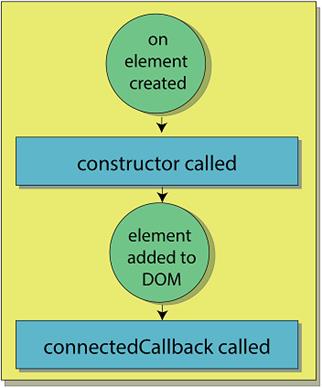
The start of a Web Component's lifecycle: constructor first, and then connectedCallback after adding to the DOM
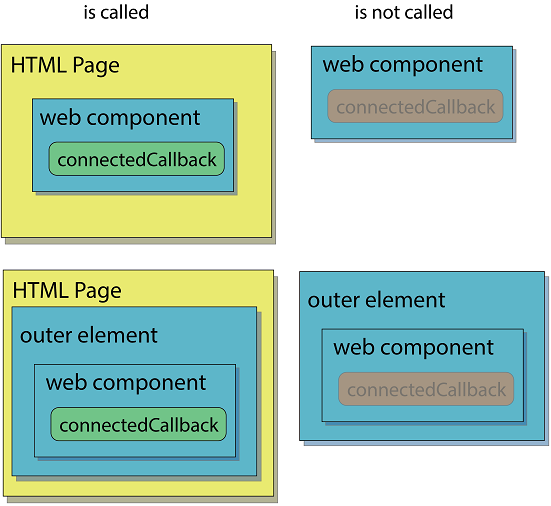
Four different scenarios for creating your Web Component
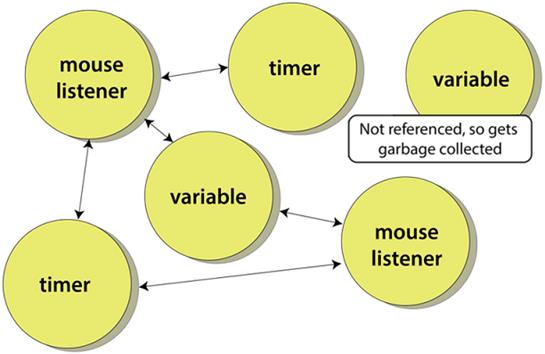
Memory references inside a Web Component
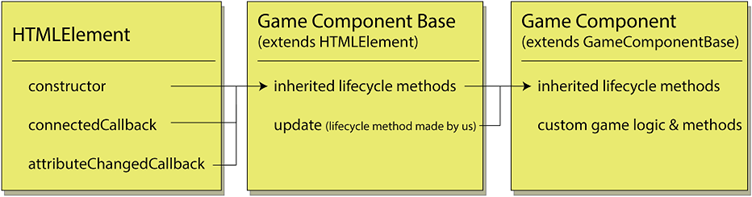
Using inheritance to create a subclass of HTMLElement to enable frame updates like a game engine
Summary
In this chapter, you learned
- How to round out the lifecycle methods you've already learned with the remaining two methods: disconnectedCallback and adoptedCallback
- The concept of garbage collection, and why you would clean up after your component
- How to subclass a Web Component and use it as a base to provide common functionality, like frame-by-frame animation, to other components
- Differences for and similarities to the React or game engine lifecycle methods, and how even though both have more methods to their APIs, Web Components don't fall short
FAQ
When is connectedCallback called for a custom element?
connectedCallback runs each time your element becomes part of a document’s DOM tree. Adding the element to a detached container (like a div not yet in the page) will not trigger it. If any ancestor (even several levels up) is appended into the main document, connectedCallback fires. Removing and re-adding the element calls connectedCallback again.What belongs in the constructor vs. in connectedCallback?
Use the constructor for early, non-DOM work: calling super(), initializing fields, setting defaults, or kicking off data fetching that doesn’t need DOM access. Use connectedCallback for DOM-dependent work: reading attributes reliably, populating innerHTML/Shadow DOM content, wiring up UI, and attaching event listeners. Remember: the element isn’t ready for light-DOM manipulation in the constructor.Why can’t I set innerHTML or read attributes in the constructor?
At construction time, a custom element must not have children, and attributes may not yet be reflected as you expect. Setting innerHTML in the constructor throws and reading attributes can return null. Move DOM/attribute-dependent logic into connectedCallback, where the element is in a usable state.What does disconnectedCallback do, and why is it important?
disconnectedCallback runs when your element is removed from the DOM, giving you a chance to clean up. Clear timers/intervals, detach event listeners, cancel network work, and null out references so garbage collection can reclaim memory. Without cleanup, code can keep running after removal, wasting resources and causing leaks.What kinds of things should I clean up in disconnectedCallback?
- Timers (setInterval/setTimeout) and requestAnimationFrame loops- Event listeners (DOM, custom, window/document)
- Observers (MutationObserver, IntersectionObserver, ResizeObserver)
- Network polling or subscriptions
- References to external objects to aid garbage collection
What is adoptedCallback and when would I use it?
adoptedCallback fires when your element moves between documents, such as from an iframe into the parent page (via document.adoptNode). This is a rare scenario for most apps, but the hook exists if you need to adjust behavior or resources when the hosting document changes.connectedCallback can run more than once — how do I avoid re-initializing?
Guard your one-time setup with a flag. For example, set this._initialized = true after your first initialization, and check it on subsequent connectedCallback calls to skip repeating expensive or stateful work.How do I implement continuous updates or animation without a built-in update lifecycle method?
Use setInterval for simple periodic updates (e.g., once per second) or requestAnimationFrame for smooth, frame-synced animations. For game-like patterns, you can create a base class that schedules requestAnimationFrame and calls an overridable update() each frame. Always stop timers/loops in disconnectedCallback.How does the Web Components lifecycle compare to React’s?
connectedCallback roughly maps to React’s componentDidMount. React’s componentWillMount is effectively unnecessary and deprecated. Web Components do not mandate a render() method; you can update DOM whenever you choose (libraries like Lit add render patterns by choice). React has error boundaries; Web Components don’t have an equivalent built-in.What changed from the v0 to v1 Custom Elements API?
- createdCallback → constructor- attachedCallback → connectedCallback
- detachedCallback → disconnectedCallback
- attributeChangedCallback now requires observedAttributes to declare which attributes to watch
- document.registerElement(...) → customElements.define(...)

 Web Components in Action ebook for free
